

Microsoft’s decision to redesign the Windows 11 Start menu was never just a visual refresh. It was a statement about what the company thinks a modern PC launcher should be: more adaptive, more personalized, and more deeply tied into the Microsoft ecosystem. The surprise is not that Microsoft tested multiple concepts before settling on one; the surprise is how far some of those prototypes went, and how much they reveal about the tension between user familiarity and product strategy.
What makes this episode especially interesting is that the current Start menu now sits at the intersection of design research, AI ambition, phone integration, and ongoing criticism from long-time Windows users. Microsoft has already said the new Start is meant to improve app discovery, recommendations, and control over pins and suggested content, while also making room for phone companion features and multiple layout styles. That context helps explain why the company kept iterating until it found a balance it thought could scale across devices from compact laptops to ultrawide desktops.
The Start menu has always carried more emotional weight than almost any other Windows interface element. For many users, it is the first thing they see after sign-in and the last thing they trust to stay stable across releases, which is why any redesign inevitably becomes a referendum on the whole operating system. Windows 10’s Start menu blended tiles, shortcuts, and live content in a way that many users came to recognize as distinctly Windows, even when they criticized it.
Windows 11 changed that formula in a way that was intentionally calmer, cleaner, and more centered. Microsoft framed the launch-era redesign as part of a broader aesthetic reset, with the Start menu, taskbar, and visuals all tuned toward a more modern desktop identity. The company also emphasized inclusive design and iterative testing in the Windows 11 era, saying it brought feedback in earlier and used prototyping to shape the final experience.
That matters because the current Start menu did not emerge from a single inspiration board. Microsoft has publicly described an extended design process involving multiple iterations, user feedback, and testing across different screen sizes and usage patterns. The company’s more recent Windows Experience Blog post says the team studied how people discovered apps, used suggestions, and interacted with phone companion features before folding those ideas into one page.
The underlying product strategy is also easy to miss if you focus only on appearance. Microsoft has been steadily pushing Windows 11 toward a more service-like experience, with recommendations, phone integration, AI-assisted actions, and cloud-adjacent workflows increasingly woven into everyday UI. Even the Start menu is now part of that larger platform narrative, not just a launcher for local apps.
At the same time, the company has had to manage the expectations of a user base that remembers Windows XP, Windows 7, and Windows 10 as era-defining interfaces. That nostalgia is not merely sentimental; it reflects a practical truth that Start is one of the few UI surfaces people use dozens of times per day. A misstep there creates friction everywhere else.
The design team also needed to account for more than just one class of PC. Microsoft says it tested the Start menu on devices ranging from 12-inch screens to 49-inch ultrawides, which is a reminder that a single launcher now has to work in everything from ultraportables to giant productivity monitors. In practice, that means the menu must remain legible at small sizes while still feeling spacious and efficient on larger displays.
The result is a Start menu that is notably more rigid than some of the prototypes, but also more predictable. It keeps pinned apps at the top, recommendations below, and several ways to view apps without overcomplicating the surface. That kind of restraint can feel boring, yet it often wins in a system UI because boring is another word for dependable.
The user reaction captured in the Windows Latest discussion is revealing, even if it is anecdotal rather than scientific. People do not just miss tiles; they miss interaction and personality in the launcher. When the home base of the operating system becomes mostly a grid of icons, the interface can start to feel functionally correct but emotionally vacant.
Prototype one leaned on a categorized grid, with a For you section and a Create button, plus app and widget surfaces that made the menu feel almost like a productivity hub. Prototype two kept the same basic structure but moved widgets into a horizontal arrangement and appeared to allow widgets like Spotify to be pinned alongside normal apps. Prototype three pushed furthest into app-like territory, with navigation tabs on the left, smart widgets at the top, and project-based horizontal sections that would probably appeal to power users more than casual ones.
The key takeaway is that several of these ideas would have made Start more dynamic. A more interactive launcher with actual widget-like functionality could have given Windows 11 a sharper personality and potentially softened complaints that the new menu is mostly just icons and recommendations. But each added layer also increases complexity, and complexity is expensive in a system component that must feel immediate.
There is also a philosophical divide here. Some concepts clearly imagined Start as a home for workstream context, not merely a list of apps. That aligns with Microsoft’s broader push toward personalization and AI-driven surfaces, but it risks alienating users who want Start to be a simple launchpad and nothing else.
The current model also gives Microsoft room to do more with recommendations and phone integration without making the interface look overloaded. The company says the new Start menu includes a “phone companion” area and a more flexible all-apps experience, which suggests the final design was optimized around a particular balance of utility and restraint. That is a classic Microsoft compromise: enough novelty to signal progress, enough familiarity to keep people from revolting.
The testing across many screen sizes was equally important. A menu with lots of content, scrolling regions, or project-specific panels can look great in a mockup and collapse under real-world pressure on small or low-resolution displays. By comparison, the current layout is easier to scale and more likely to behave consistently across devices.
That is probably why the live prototypes never translated directly into release software. They were useful as design probes, not as candidates for direct shipping. In other words, Microsoft appears to have used them to learn how far users would tolerate innovation before it started feeling like friction.
The prototypes Microsoft shared suggest the company knew this tension existed. Several of the mockups feel like they were trying to recover some of the expressive, at-a-glance functionality that Live Tiles once offered, but in a more controlled and contemporary format. The irony is that the more Microsoft tried to modernize Start, the more some users wished for the old interactive tile model back.
By contrast, the current Start menu is more static by design. The polished simplicity helps the OS feel cleaner, but it also makes Start less memorable. That tradeoff has become sharper now that Microsoft is leaning into broader personalization elsewhere in Windows 11, including widgets and AI-driven suggestions.
The challenge for Microsoft is that adding back interactivity is not trivial. Any new surface has to avoid repeating the performance and consistency problems that have long dogged Windows UI experimentation. If the menu starts stuttering, reflowing, or pulling in too much web-connected content, the remedy becomes its own complaint.
This is where the design conversation gets more strategic. The Start menu is no longer merely a software drawer; it is becoming a bridge to mobile usage, especially for Android users. Microsoft’s support pages and Windows announcements both make clear that phone companion features are part of the company’s current Windows direction, and the Start menu is one of the most visible places to surface them.
That dual purpose is powerful but risky. Some users welcome the added integration, while others see it as clutter or as a nudge toward Microsoft services they did not ask for. The more Start becomes a gateway to adjacent products, the more it risks being criticized as a promotional surface rather than a neutral launcher.
There is also a device reality to consider. Phone integration is helpful for many people, but not all workflows are phone-centric. On a workstation used for development, design, or administration, the average user may care far more about app launch speed and predictable organization than about a synced mobile experience.
Microsoft has also signaled interest in making parts of the experience more native, which would fit the long-standing demand for a faster and more responsive shell. Whether that promise fully materializes is less important than why the promise exists at all: because a polished visual layer is not enough if the surrounding implementation feels heavy. The modern Windows audience is extremely sensitive to this tension.
Still, “native” is not a magic word. Native code can still be overdesigned, and simple code can still deliver a poor UX if the interaction model is wrong. The real win would be a Start menu that feels both lightweight and helpful, which is much harder than it sounds. Fast is necessary; pleasant is the harder bar.
Microsoft’s own design philosophy seems to recognize this. The company has emphasized listening earlier, prototyping more aggressively, and using feedback cycles to prevent obviously bad choices from shipping. That is encouraging, but it also suggests the team is constantly balancing ambition against the reality of what the shell can safely support.
For enterprise customers, the concerns are different. IT administrators care about predictability, policy control, supportability, and how easily a UI can be standardized across fleets. Microsoft’s documentation notes that OEMs can customize pinned and recommended sections via layout files, which shows that the company still expects different environments to want different degrees of control.
The downside is fragmentation. The more layout flexibility Microsoft exposes, the more varied the user experience becomes across machines. That can make support harder, especially when users compare what they see on a work device, a retail laptop, and a personal PC.
Enterprise also tends to dislike surprise. If Microsoft keeps changing the shape or behavior of Start, IT teams must update training material, screenshots, and user guidance. That is not dramatic, but in large organizations even small UX shifts carry real operational cost.
There are also practical concerns around performance, discoverability, and trust. If recommendations feel promotional, if animations are inconsistent, or if the menu gets heavier as features are added, users will not credit the design for its ambition.
If Microsoft wants to win back some of the goodwill it lost with users who miss Live Tiles, it will need to prove that future Start enhancements can be both useful and fast. That likely means richer contextual cards, better first-party integration, and smarter personalization that does not overwhelm the core launcher experience.
In the end, Microsoft’s current Start menu may not be the most daring of the five concepts it explored, but it is the one that best reflects where Windows is headed: more connected, more personalized, and more carefully managed than the old platform ever had to be. Whether that makes Start better is a separate question, and one that users will keep answering every day by habit, by frustration, and by memory.
Source: Windows Latest Microsoft tested 5 different Start menus for Windows 11 before choosing the current one
What makes this episode especially interesting is that the current Start menu now sits at the intersection of design research, AI ambition, phone integration, and ongoing criticism from long-time Windows users. Microsoft has already said the new Start is meant to improve app discovery, recommendations, and control over pins and suggested content, while also making room for phone companion features and multiple layout styles. That context helps explain why the company kept iterating until it found a balance it thought could scale across devices from compact laptops to ultrawide desktops.
 Background
The Start menu has always carried more emotional weight than almost any other Windows interface element. For many users, it is the first thing they see after sign-in and the last thing they trust to stay stable across releases, which is why any redesign inevitably becomes a referendum on the whole operating system. Windows 10’s Start menu blended tiles, shortcuts, and live content in a way that many users came to recognize as distinctly Windows, even when they criticized it.Windows 11 changed that formula in a way that was intentionally calmer, cleaner, and more centered. Microsoft framed the launch-era redesign as part of a broader aesthetic reset, with the Start menu, taskbar, and visuals all tuned toward a more modern desktop identity. The company also emphasized inclusive design and iterative testing in the Windows 11 era, saying it brought feedback in earlier and used prototyping to shape the final experience.
That matters because the current Start menu did not emerge from a single inspiration board. Microsoft has publicly described an extended design process involving multiple iterations, user feedback, and testing across different screen sizes and usage patterns. The company’s more recent Windows Experience Blog post says the team studied how people discovered apps, used suggestions, and interacted with phone companion features before folding those ideas into one page.
The underlying product strategy is also easy to miss if you focus only on appearance. Microsoft has been steadily pushing Windows 11 toward a more service-like experience, with recommendations, phone integration, AI-assisted actions, and cloud-adjacent workflows increasingly woven into everyday UI. Even the Start menu is now part of that larger platform narrative, not just a launcher for local apps.
At the same time, the company has had to manage the expectations of a user base that remembers Windows XP, Windows 7, and Windows 10 as era-defining interfaces. That nostalgia is not merely sentimental; it reflects a practical truth that Start is one of the few UI surfaces people use dozens of times per day. A misstep there creates friction everywhere else.
What Microsoft Was Trying to Solve
Microsoft’s stated goals for the new Start menu are straightforward enough on paper: improve app discovery, make suggestions more useful, and give users better control over what appears on the panel. The company also wanted to unify the old two-page Windows 11 Start experience into something more coherent and easier to scan. That is a sensible goal, especially when you remember how often users complained about having to jump between pinned items and the separate All apps view.The design team also needed to account for more than just one class of PC. Microsoft says it tested the Start menu on devices ranging from 12-inch screens to 49-inch ultrawides, which is a reminder that a single launcher now has to work in everything from ultraportables to giant productivity monitors. In practice, that means the menu must remain legible at small sizes while still feeling spacious and efficient on larger displays.
The real design problem
The hard part was not deciding whether Start should be more minimal or more information-dense. The hard part was deciding how much of the old Windows mental model to preserve while still making room for newer behaviors like recommendations and Phone Link. Microsoft’s design team appears to have explored multiple structures precisely because the old answer no longer fit the new ambitions.The result is a Start menu that is notably more rigid than some of the prototypes, but also more predictable. It keeps pinned apps at the top, recommendations below, and several ways to view apps without overcomplicating the surface. That kind of restraint can feel boring, yet it often wins in a system UI because boring is another word for dependable.
The user reaction captured in the Windows Latest discussion is revealing, even if it is anecdotal rather than scientific. People do not just miss tiles; they miss interaction and personality in the launcher. When the home base of the operating system becomes mostly a grid of icons, the interface can start to feel functionally correct but emotionally vacant.
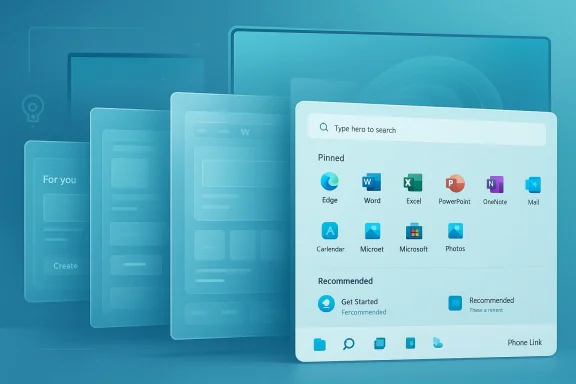
The Five Prototype Start Menus
The five Start menu concepts Microsoft showed are interesting because they do not read like random mood-board sketches. They read like serious attempts to solve specific product questions: how to expose app categories, how to surface tasks, how to integrate widgets, and how to make Start feel more personal without making it chaotic. Some of the mockups look closer to an app dashboard than a classic launcher, which suggests the team was exploring how far Start could evolve before it stopped feeling like Start at all.Prototype one leaned on a categorized grid, with a For you section and a Create button, plus app and widget surfaces that made the menu feel almost like a productivity hub. Prototype two kept the same basic structure but moved widgets into a horizontal arrangement and appeared to allow widgets like Spotify to be pinned alongside normal apps. Prototype three pushed furthest into app-like territory, with navigation tabs on the left, smart widgets at the top, and project-based horizontal sections that would probably appeal to power users more than casual ones.
Why the prototypes mattered
Prototype four was arguably the most restrained, with a clean and minimal layout that focused on pinned apps and recently opened windows while hiding categories in drop-down menus. Prototype five felt like a hybrid of the second and third concepts, still scrollable and still sectioned, but more grounded in the familiar Start vocabulary of pins and “show more” affordances. Together, the five mockups show that Microsoft was not just decorating a launcher; it was testing identities.The key takeaway is that several of these ideas would have made Start more dynamic. A more interactive launcher with actual widget-like functionality could have given Windows 11 a sharper personality and potentially softened complaints that the new menu is mostly just icons and recommendations. But each added layer also increases complexity, and complexity is expensive in a system component that must feel immediate.
There is also a philosophical divide here. Some concepts clearly imagined Start as a home for workstream context, not merely a list of apps. That aligns with Microsoft’s broader push toward personalization and AI-driven surfaces, but it risks alienating users who want Start to be a simple launchpad and nothing else.
Why Microsoft Chose the Current Layout
Microsoft’s current Start menu looks conservative compared with some of the prototypes, but that conservatism is probably the point. The company needed a design that could survive daily use, accommodate broad hardware variation, and avoid the kind of clutter that can make modern shells feel busy in a bad way. A launcher cannot win every argument; it has to minimize the number of reasons people feel lost.The current model also gives Microsoft room to do more with recommendations and phone integration without making the interface look overloaded. The company says the new Start menu includes a “phone companion” area and a more flexible all-apps experience, which suggests the final design was optimized around a particular balance of utility and restraint. That is a classic Microsoft compromise: enough novelty to signal progress, enough familiarity to keep people from revolting.
Co-creation and testing
Microsoft says it used live co-creation calls, eye tracking, heatmaps, scrolling data, and feedback to refine Start. That kind of research does not guarantee a beloved result, but it does explain why the final interface likely converged toward something relatively plain. When you watch people’s eyes move across a launcher, the temptation to add more is often replaced by the realization that users want fewer decisions, not more.The testing across many screen sizes was equally important. A menu with lots of content, scrolling regions, or project-specific panels can look great in a mockup and collapse under real-world pressure on small or low-resolution displays. By comparison, the current layout is easier to scale and more likely to behave consistently across devices.
That is probably why the live prototypes never translated directly into release software. They were useful as design probes, not as candidates for direct shipping. In other words, Microsoft appears to have used them to learn how far users would tolerate innovation before it started feeling like friction.
The Missing Live Tiles Problem
If there is one theme that keeps resurfacing in Windows discussions, it is the absence of Live Tiles. Whether users loved them or hated them, tiles gave Windows 10’s Start menu a sense of motion and information density that the current Windows 11 launcher does not try to replicate. That absence matters because it changed the emotional temperature of the entire experience.The prototypes Microsoft shared suggest the company knew this tension existed. Several of the mockups feel like they were trying to recover some of the expressive, at-a-glance functionality that Live Tiles once offered, but in a more controlled and contemporary format. The irony is that the more Microsoft tried to modernize Start, the more some users wished for the old interactive tile model back.
What users seem to miss
The criticism is not really about nostalgia alone. Users miss surfaces that can show state, context, or relevance without opening another app. That could be a calendar glance, media playback, a pinned workflow, or a compact information card that changes over time. Live Tiles were imperfect, but they represented an attempt to make Start useful before apps launched.By contrast, the current Start menu is more static by design. The polished simplicity helps the OS feel cleaner, but it also makes Start less memorable. That tradeoff has become sharper now that Microsoft is leaning into broader personalization elsewhere in Windows 11, including widgets and AI-driven suggestions.
The challenge for Microsoft is that adding back interactivity is not trivial. Any new surface has to avoid repeating the performance and consistency problems that have long dogged Windows UI experimentation. If the menu starts stuttering, reflowing, or pulling in too much web-connected content, the remedy becomes its own complaint.
Phone Integration and Ecosystem Lock-In
One of the more notable pieces of Microsoft’s current Start story is the Phone Link integration. Microsoft’s support documentation says users can access Android apps on PC, pin them to Start and the taskbar, and even open them in separate windows on the desktop. That is a meaningful capability, because it turns Start into an entry point not just for Windows apps, but for a broader cross-device workflow.This is where the design conversation gets more strategic. The Start menu is no longer merely a software drawer; it is becoming a bridge to mobile usage, especially for Android users. Microsoft’s support pages and Windows announcements both make clear that phone companion features are part of the company’s current Windows direction, and the Start menu is one of the most visible places to surface them.
Consumer value versus platform strategy
For consumers, the value is convenience. If your phone and PC are tightly connected, the Start menu becomes a central handoff point for messages, apps, and device continuity. For Microsoft, the value is stickiness. A more integrated Start experience encourages users to stay in the Microsoft ecosystem instead of treating Windows as a generic desktop that happens to run third-party software.That dual purpose is powerful but risky. Some users welcome the added integration, while others see it as clutter or as a nudge toward Microsoft services they did not ask for. The more Start becomes a gateway to adjacent products, the more it risks being criticized as a promotional surface rather than a neutral launcher.
There is also a device reality to consider. Phone integration is helpful for many people, but not all workflows are phone-centric. On a workstation used for development, design, or administration, the average user may care far more about app launch speed and predictable organization than about a synced mobile experience.
Performance, Native Rendering, and Expectations
Microsoft and Windows watchers have repeatedly discussed performance as part of the Start menu debate, especially in connection with modern Windows shell components. The user criticism around ads, glitches, and sluggish animations speaks to a broader concern: people do not just want Start to look clean, they want it to feel instant. A launcher that hesitates is already failing, regardless of its design language.Microsoft has also signaled interest in making parts of the experience more native, which would fit the long-standing demand for a faster and more responsive shell. Whether that promise fully materializes is less important than why the promise exists at all: because a polished visual layer is not enough if the surrounding implementation feels heavy. The modern Windows audience is extremely sensitive to this tension.
Why native matters
A more native Start menu should, in theory, improve responsiveness, reduce visual jank, and make the experience more consistent under load. That is especially important if Microsoft continues to add dynamic content, phone integration, or AI-driven suggestions into the surface. The more Start does, the more it needs to do those things without appearing to work hard.Still, “native” is not a magic word. Native code can still be overdesigned, and simple code can still deliver a poor UX if the interaction model is wrong. The real win would be a Start menu that feels both lightweight and helpful, which is much harder than it sounds. Fast is necessary; pleasant is the harder bar.
Microsoft’s own design philosophy seems to recognize this. The company has emphasized listening earlier, prototyping more aggressively, and using feedback cycles to prevent obviously bad choices from shipping. That is encouraging, but it also suggests the team is constantly balancing ambition against the reality of what the shell can safely support.
Enterprise, Consumer, and OEM Implications
For consumers, the new Start menu is mostly a question of taste and workflow. People who like minimalism may appreciate the cleaner structure and the ability to tune recommendations and pins, while users who prefer richer glanceable information may continue to feel that the menu is too sparse. Those reactions are emotionally charged because Start is one of the few parts of Windows that every user touches.For enterprise customers, the concerns are different. IT administrators care about predictability, policy control, supportability, and how easily a UI can be standardized across fleets. Microsoft’s documentation notes that OEMs can customize pinned and recommended sections via layout files, which shows that the company still expects different environments to want different degrees of control.
The business side of Start
That customization story matters for OEMs as well. A Start menu that can be tuned for specific hardware lines or deployment scenarios is more commercially flexible than one rigid layout. It also allows Microsoft to present a consistent default while leaving room for partner branding and curated app experiences.The downside is fragmentation. The more layout flexibility Microsoft exposes, the more varied the user experience becomes across machines. That can make support harder, especially when users compare what they see on a work device, a retail laptop, and a personal PC.
Enterprise also tends to dislike surprise. If Microsoft keeps changing the shape or behavior of Start, IT teams must update training material, screenshots, and user guidance. That is not dramatic, but in large organizations even small UX shifts carry real operational cost.
Strengths and Opportunities
Microsoft’s Start menu redesign still has meaningful strengths, especially when viewed as a foundation rather than a final answer. The company has created a base that can evolve toward richer personalization, better mobile integration, and a more intelligent app-discovery layer without forcing a complete visual reboot every cycle.- Better app discovery through a more organized and predictable structure.
- More user control over pins, recommendations, and what appears on the surface.
- Phone Link integration that can make the PC feel more connected to mobile life.
- Scalable layout logic that can work across small laptops and ultrawide desktops.
- Potential for future AI features if Microsoft decides to deepen personalization further.
- Enterprise deployability thanks to layout customization support.
- A cleaner default experience that may appeal to users who found Windows 10 Start too busy.
Risks and Concerns
The biggest risk is that Microsoft may be optimizing Start for strategic coherence while underestimating how much users value personality and glanceable utility. A clean launcher can still feel emotionally flat, and a feature-rich one can quickly turn into clutter if the balance slips.There are also practical concerns around performance, discoverability, and trust. If recommendations feel promotional, if animations are inconsistent, or if the menu gets heavier as features are added, users will not credit the design for its ambition.
- Loss of personality compared with the more expressive Windows 10 era.
- Perceived bloat if Microsoft keeps adding ecosystem hooks and recommendation surfaces.
- Performance complaints if the menu fails to feel instant and stable.
- User frustration over ads or suggestions that feel too commercial.
- Reduced glanceability if the launcher remains mostly a static icon grid.
- Fragmented expectations across consumer, enterprise, and OEM devices.
- Resistance from loyal Windows users who still associate Start with Windows 7 or Live Tiles.
Looking Ahead
The next phase of this story is less about which prototype looked prettiest and more about whether Microsoft can make Start feel genuinely useful without losing the clarity that its final design was clearly built to preserve. The company has already shown that it is willing to iterate heavily, and that suggests Start is still a living surface rather than a finished one.If Microsoft wants to win back some of the goodwill it lost with users who miss Live Tiles, it will need to prove that future Start enhancements can be both useful and fast. That likely means richer contextual cards, better first-party integration, and smarter personalization that does not overwhelm the core launcher experience.
- More native implementation work to improve speed and reduce shell friction.
- Deeper Phone Link integration as Microsoft continues to connect PC and mobile experiences.
- Potential expansion of personalized recommendations if Microsoft continues along its current design path.
- Possible future widget-like surfaces if Microsoft decides to bring more live content into Start.
- Further enterprise customization options if OEM and IT feedback push the product team in that direction.
In the end, Microsoft’s current Start menu may not be the most daring of the five concepts it explored, but it is the one that best reflects where Windows is headed: more connected, more personalized, and more carefully managed than the old platform ever had to be. Whether that makes Start better is a separate question, and one that users will keep answering every day by habit, by frustration, and by memory.
Source: Windows Latest Microsoft tested 5 different Start menus for Windows 11 before choosing the current one
