

Windows 11 is quietly preparing to add system-level haptic feedback — subtle, context-sensitive vibrations tied to actions like snapping windows, aligning objects, and crossing drag boundaries — surfaced in recent Insider preview builds as hidden Settings strings and UI fragments that promise per-class toggles and an intensity slider for tactile signals.
Microsoft’s Windows platform already exposes haptic capabilities for certain input classes (notably pen and precision touchpads), and OEMs have shipped haptic-enabled hardware for years; the recent discovery in preview builds indicates the company is moving to make tactile feedback a first-class, system-level affordance rather than leaving it solely to device or application vendors.
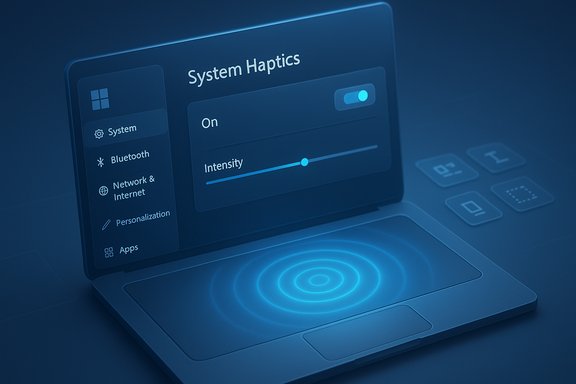
This change is visible as a Settings surface that includes:
Key unknowns that remain:
That said, the final user experience will hinge on several moving parts: OEM and peripheral driver quality, sensible battery and thermal policies, enterprise manageability hooks, and careful attention to accessibility. The feature looks promising — it can add polish and utility — but it requires coordinated engineering across Microsoft, OEMs, and accessory makers before it becomes a broadly useful, dependable part of the Windows 11 experience. Treat current findings as an early, credible signal of intent, and monitor official Microsoft and vendor channels for the definitive rollout plan and technical documentation.
Source: Neowin Windows 11 may soon provide haptic feedback to various actions
 Background
Microsoft’s Windows platform already exposes haptic capabilities for certain input classes (notably pen and precision touchpads), and OEMs have shipped haptic-enabled hardware for years; the recent discovery in preview builds indicates the company is moving to make tactile feedback a first-class, system-level affordance rather than leaving it solely to device or application vendors.This change is visible as a Settings surface that includes:
- A global toggle to enable/disable system haptics.
- A user-adjustable intensity slider for strength.
- Separate controls for haptic clicks (touchpad click simulation) and haptic signals (event-driven vibrations).
These strings and UI fragments were found in Dev/Beta preview branches, but remain gated behind feature flags and hardware checks.
What surfaced in Insider builds
The Settings strings and UI fragments
Community sleuths identified a hidden Settings entry that reads, in essence, “Feel subtle vibrations when you snap windows, align objects, and more,” and screenshots and code fragments show a touchpad/haptics panel with toggles and a slider. The control is present in the Settings UI code but is not broadly enabled on most machines; it appears to be gated by feature flags and hardware capability detection.Example triggers Microsoft appears to target
Early evidence suggests Microsoft is focusing on quick, discrete UI milestones where tactile cues add immediate confirmation without adding visual clutter or sound:- Snap Layout completion (snapping windows into tiles).
- Alignment guides engaging (object alignment in UIs).
- Drag boundary crossing (moving a file between windows or over a snap region).
Technical underpinnings: how system haptics would work
Three cooperating layers
To implement system-level haptics at scale Windows needs coordination across three layers:- Hardware/firmware (actuators like piezo modules, linear resonant actuators, or eccentric rotating mass motors).
- Device drivers that advertise haptic capabilities and expose a programmatic interface for the OS to call.
- OS components that map UI events (snap, align, drag) to predefined tactile patterns and expose user controls in Settings.
APIs and driver expectations
Windows exposes abstractions similar to the SimpleHapticsController pattern used for pen devices; extending that model to trackpads means drivers must:- Advertise supported haptic patterns and intensity ranges.
- Map OS requests to the device’s actuators while honoring power and thermal limits.
- Provide hooks for per-device or per-app overrides where necessary.
Hardware ecosystem: who already supports haptics
Built-in laptop trackpads
Several OEM laptops already ship with haptic touchpads that simulate clicks via actuators instead of mechanical switches — Surface devices being a prominent example. These precision trackpads already expose feedback control surfaces in Settings and vendor utilities, making them natural early targets for system-level tactile signals.External peripherals
Third-party peripherals like Logitech’s MX Master 4 include dedicated haptic actuators and permit customization via vendor software, demonstrating that a Windows-level haptic request could be mapped not only to built-in trackpads but to mice and other accessories — provided vendors expose the required hooks.Component vendors
Haptic modules and suppliers (piezo vendors and LRA manufacturers) already produce modules targeted at laptop OEMs and accessory makers. Microsoft’s hardware design guides and vendor documents reference haptic touchpad implementations and control fields such as feedback intensity and click sensitivity, indicating a standardized stack is possible.UX benefits: where haptics help and why it matters
- Immediate, non-visual confirmation. Short tactile cues can confirm actions faster than animations or small visual changes, which is useful in multi-monitor or high-density workflows.
- Perceived responsiveness and polish. Well-tuned haptics add a sense of “snap” that improves the feel of interactions and can make the OS feel more refined.
- Assistive value. Tactile signals can supplement visual and audio feedback for users with low vision or in situations where sound is undesirable, expanding accessibility options when integrated responsibly.
Risks and technical trade-offs
Fragmentation and inconsistent sensations
Haptic actuators vary widely in feel, latency, and dynamic range. Without vendor adherence to platform guidance, the same OS event could elicit wildly different sensations across devices, undermining the intended UX. Microsoft’s platform documentation reduces that risk, but OEM and driver variance remain the practical challenge.Power, thermal and noise concerns
Actuators consume power and can interact with thermal behavior in thin-and-light laptops. Frequent haptic pulses could measurably reduce battery life or create unwanted heat/noise if defaults aren’t conservative or profiles aren’t respected in battery mode. Expect Windows and OEM drivers to implement throttles and battery-aware intensity scaling, but the effectiveness depends on vendor implementation.Driver and firmware reliability
Community testing has exposed occasional haptic instability — stuck vibrations or intermittent failures — in early driver stacks. Broadening system-level triggers increases the driver surface area and may surface regressions until firmware/driver stacks mature. Enterprises and power users should pilot carefully.User preference and sensory overload
Haptics are subjective. Some users find constant micro-vibrations helpful; others find them distracting. Microsoft’s visible Settings strings and per-class toggles indicate an intention to make haptics opt-in and adjustable, but discoverability and sensible defaults will be decisive factors for acceptance.Enterprise, manageability and accessibility concerns
Group Policy and MDM
Enterprises will want policy controls to enforce defaults or disable system haptics across fleets. Preview fragments so far have not shown final Group Policy or MDM CSP names for haptics, so IT administrators should watch for new policy entries before deploying widely. Pilot testing across device types is essential.Pilot and validation guidance
Recommended steps for IT teams:- Identify a pilot group with haptic-capable hardware (Surface, validated OEMs, peripherals with haptic actuators).
- Validate driver and firmware versions from OEMs and vendors.
- Test haptics in AC and battery scenarios, in call contexts, and with assistive technologies enabled.
Accessibility: opportunities and cautions
Haptics present a real accessibility opportunity — tactile signals can provide non-visual confirmation for complex multi-window tasks — but only if the signals are predictable, documented, and paired with accessible controls (text labels, toggles, and alternate channels). Accessibility teams should be engaged as drivers and vendors tune patterns and intensity defaults.Developer considerations
- Respect system-level cues: apps should avoid duplicating OS haptics for the same event; duplicate signals create sensory noise.
- Offer per-app user preferences: let users suppress app-level haptics if they prefer system patterns or vice versa.
- Use platform APIs: adopt Windows’ haptic abstractions to ensure coherent mapping across device classes and to honor user intensity settings.
Timeline, rollout expectations, and what’s still uncertain
Visible Settings strings in preview builds are a strong indicator that Microsoft intends this capability, but there is no public ship date and timelines depend on OEM readiness, driver maturity, and final power/UX policy decisions. Historically Microsoft stages UI and Settings entries in Insider builds long before a broad rollout; the presence of a Settings surface is planning and in progress, not proof of imminent general availability. Treat any claims about exact functions or ship dates as provisional until Microsoft or OEMs publish official release notes.Key unknowns that remain:
- When Microsoft will flip the feature flag for broad Insider visibility.
- Which devices will be certified first (Surface is a likely early candidate, but OEM timing varies).
- Whether Group Policy/MDM controls will be available at launch.
Practical advice: what users and IT admins should do now
- If you own a haptic-capable device (Surface Laptop/Studio or peripherals like MX Master 4), expect richer tactile options in a future update — but keep haptics off by default until drivers and behaviors land in stable releases. Start with low intensity and test in meeting and recording scenarios.
- Enthusiasts and Insiders: watch Dev/Beta channels for UI changes, but avoid toggling hidden flags on production devices. Use test hardware or VMs for experimental features.
- IT/procurement: add haptic-capable devices to pilot inventories and require OEM/driver validation before mass deployment. Validate policy and manageability options before broad rollouts.
- Developers: review Windows’ haptic/tactile APIs and design your app to avoid duplicate feedback, honor system intensity settings, and provide per-app controls.
Strengths of Microsoft’s apparent approach
- Platform-level support — Microsoft’s existing haptic APIs and implementation guides show this is being built as a first-class capability, not a hacky add-on. That increases the chances of consistent developer guidance and platform-wide behavior.
- Granular user controls — early evidence of separate toggles and intensity sliders indicates Microsoft plans to make haptics optional and configurable rather than forcing a single sensory model on all users.
- OEM guidance — published hardware and touchpad implementation guides make it easier for partners to build compatible drivers and haptic modules, which is vital for any broad rollout.
- Accessibility potential — when paired with proper options and documentation, haptics can improve non-visual feedback and broaden accessibility affordances.
What to watch next
- Official Microsoft documentation or release notes that list the Settings path, Group Policy names, and supported device classes (these would confirm intent and management controls).
- OEM driver updates and release notes from major laptop makers (Surface, Dell, HP, Lenovo) confirming support and recommended defaults.
- Peripheral vendors (Logitech, etc. exposing OS-level hooks in their drivers that allow Windows to trigger device haptics beyond vendor-specific overlays.
Conclusion
The discovery of a system-level haptics control in Windows 11 preview builds points to a logical evolution: using tactile feedback as a lightweight, non-visual confirmation channel for everyday UI events like snapping, aligning, and drag boundaries. Microsoft’s platform documentation and existing haptic-enabled hardware show the building blocks are in place, and the Settings fragments demonstrate a deliberate, user-controlled approach with intensity sliders and per-class toggles.That said, the final user experience will hinge on several moving parts: OEM and peripheral driver quality, sensible battery and thermal policies, enterprise manageability hooks, and careful attention to accessibility. The feature looks promising — it can add polish and utility — but it requires coordinated engineering across Microsoft, OEMs, and accessory makers before it becomes a broadly useful, dependable part of the Windows 11 experience. Treat current findings as an early, credible signal of intent, and monitor official Microsoft and vendor channels for the definitive rollout plan and technical documentation.
Source: Neowin Windows 11 may soon provide haptic feedback to various actions
