

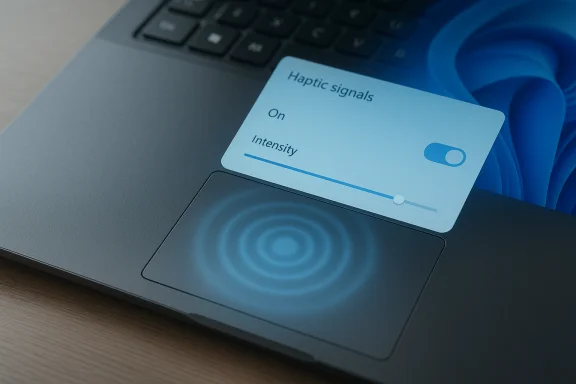
Microsoft’s long-simmering work to bring tactile feedback to Windows has taken a visible step forward: hidden strings and UI controls for a new Haptic signals option have appeared in Insider preview builds of Windows 11, suggesting the operating system will soon surface system-level haptic feedback for compatible trackpads and input devices. The discovery — a settings toggle, an intensity slider, and descriptive copy that promises “subtle vibrations when you snap windows, align objects, and more” — confirms Microsoft is building the OS-side plumbing required to deliver phone-style tactile cues on laptops and possibly on compatible mice and pens. The feature is hardware-gated and not yet broadly functional, but its presence in Settings signals a significant platform change: Windows is preparing to treat haptics as a first-class output channel alongside sound and visual UI affordances.
Haptic feedback is the tactile sibling to audio and visual UI signals. On smartphones, well-tuned haptics have long improved the feel of typing, gestures, and system events by providing immediate, low-latency confirmation without adding noise or screen clutter. On laptops, that same tactile confirmation can address two persistent usability problems: the lack of non-visual confirmation for drag-and-drop and window arrangement actions, and the uneven quality of physical click mechanisms across devices.
Bringing haptics into the Windows desktop environment is not entirely new for Microsoft: the company has published developer and hardware guidance for haptic-enabled pens and touchpads, and Surface hardware has offered “precision haptic” trackpads for several product generations. What’s new is the explicit, system-level Settings UI discovered in recent Windows 11 preview builds, which appears to expose global control over system haptic signals rather than leaving feedback entirely to OEM or application code.
OEMs such as Microsoft itself (Surface), Lenovo, and others have shipped laptops with haptic trackpads — designs that replace mechanical clicks with vibration actuators and simulate click and force sensations. Those devices make ideal partners for a system-level haptic feature because they expose intensity controls and programmable waveform support through drivers and vendor software. The newly uncovered Settings UI appears designed to sit on top of these existing hardware and driver capabilities and to provide a unified experience for Windows users.
However, the emergence of a system-wide “Haptic signals” control in Settings is a newer development and is only now visible in Insider builds. Claims that Microsoft has worked on this particular system-level signals experience since 2022 should be read with nuance: Microsoft’s haptics documentation and device-level support have existed for years, but the specific user-facing Windows Settings feature and the mapping of UI events (snap, align, drag) to haptic patterns are recent — and only now visible to Insiders via hidden previews.
That said, the real test will be in execution. Hardware gating means most users won’t notice anything immediately. Where devices do support haptics, driver quality and calibration will determine whether the experience is delightful or distracting. Reports that the feature has already rolled out widely are premature; current evidence points to hidden preview settings and hardware-dependent activation rather than a mass-release.
When the feature is finally enabled broadly, it can deliver meaningful improvements: more intuitive window management, silent confirmations for UI actions, and richer accessibility options. If mishandled, however, it risks becoming another fragmented hardware-dependent add-on that confuses users more than it helps them. The best outcome will be one where Microsoft’s platform control, clear API guidance, and vendor cooperation converge to produce a consistent, tuneable, and polished tactile layer for Windows.
Source: livemint.com Microsoft’s Haptic Signals feature may finally fix trackpads on Windows laptops | Mint
 Background: why haptics matter on laptops
Haptic feedback is the tactile sibling to audio and visual UI signals. On smartphones, well-tuned haptics have long improved the feel of typing, gestures, and system events by providing immediate, low-latency confirmation without adding noise or screen clutter. On laptops, that same tactile confirmation can address two persistent usability problems: the lack of non-visual confirmation for drag-and-drop and window arrangement actions, and the uneven quality of physical click mechanisms across devices.Bringing haptics into the Windows desktop environment is not entirely new for Microsoft: the company has published developer and hardware guidance for haptic-enabled pens and touchpads, and Surface hardware has offered “precision haptic” trackpads for several product generations. What’s new is the explicit, system-level Settings UI discovered in recent Windows 11 preview builds, which appears to expose global control over system haptic signals rather than leaving feedback entirely to OEM or application code.
Existing foundation: APIs and OEM hardware
Microsoft’s platform documentation includes detailed guidance for haptic pens and haptic touchpads. That documentation lays out HID protocol extensions, device classes, and the expectations for a haptic touchpad implementation — in short, the low-level technical routes that OEMs and peripheral makers must follow to present haptics to Windows in a standardized way. Those published guides mean the OS already has an architecture for discovering haptic capabilities, querying device-supported effects, and sending haptic events via standardized interfaces.OEMs such as Microsoft itself (Surface), Lenovo, and others have shipped laptops with haptic trackpads — designs that replace mechanical clicks with vibration actuators and simulate click and force sensations. Those devices make ideal partners for a system-level haptic feature because they expose intensity controls and programmable waveform support through drivers and vendor software. The newly uncovered Settings UI appears designed to sit on top of these existing hardware and driver capabilities and to provide a unified experience for Windows users.
What surfaced in the latest preview builds
A number of Windows-focused investigators and outlets examined an Insider preview build of Windows 11 and found a Settings entry for Haptic signals under the touchpad or mouse settings. Key findings from the discovery:- The feature appears in build 26220.7070 (Dev/Beta channel) as a hidden Settings string and UI stub rather than a fully active capability.
- The Settings entry includes a toggle to enable or disable haptic signals globally and a slider to adjust intensity.
- The settings text explicitly mentions UI actions such as snapping windows side-by-side, aligning objects, and dragging files as triggers for haptic feedback.
- The control is hardware-gated: the UI only shows up if the device reports a compatible haptic actuator, meaning most older and budget machines won’t expose it.
- The Settings surface suggests Microsoft plans to provide OS-level hooks; OEM drivers or firmware will still be required to implement the low-level waveforms and calibration.
Hidden but revealing: the Settings UX
The presence of a slider and the option to turn the feature off reveals Microsoft’s priorities: make haptics optional and tunable. A global intensity control lets users adjust how pronounced the signals are, and the kill switch keeps the feature from being intrusive for users who prefer a quieter, vibration-free experience. That mirrors good UX practice found on phones where haptics are adjustable and often grouped under Accessibility or Input preferences.Cross-checking the timeline: development and documentation
Publicly available Microsoft documentation for haptic devices goes back several years. Developer guidance and implementation guides covering haptic pens and haptic touchpads were published and updated on Microsoft’s docs site, describing how software and drivers can detect and drive tactile hardware. Those documents establish that Microsoft has been building platform-level haptics primitives and sample APIs for some time.However, the emergence of a system-wide “Haptic signals” control in Settings is a newer development and is only now visible in Insider builds. Claims that Microsoft has worked on this particular system-level signals experience since 2022 should be read with nuance: Microsoft’s haptics documentation and device-level support have existed for years, but the specific user-facing Windows Settings feature and the mapping of UI events (snap, align, drag) to haptic patterns are recent — and only now visible to Insiders via hidden previews.
- The platform-level documentation provides a credible, verifiable foundation (device classes, HID extensions, SimpleHapticsController APIs), which demonstrates Microsoft’s long-term commitment to haptics at the API and hardware specification level.
- The Settings UX in preview builds shows Microsoft is moving from API-level support to integrated, consumer-exposed controls.
Why this matters to Windows users
There are practical and user-experience reasons to welcome system-level haptic signals:- Immediate feedback: Tactile cues provide fast, non-visual confirmation that an action completed or a threshold was reached — for example, when a window snaps into place or an aligned object “locks” to a grid.
- Reduced reliance on sound: Haptics offer silent confirmation, useful in meetings or quiet environments where audio cues are disruptive.
- Accessibility benefits: For users with vision impairments or cognitive differences, tactile feedback can convey information quickly and redundantly, improving discoverability and confidence during multi-window workflows.
- Enhanced immersion: Thoughtful haptics in productivity and creative apps can improve perceived responsiveness and make interactions feel weighty and intentional.
Potential tactical uses
- Snap layouts and window grid boundaries
- Drag-and-drop confirmation between panes or apps
- Touchpad “click” simulation and multi-finger gesture confirmation
- Pen and stylus inking feedback for perceived contact and tool switching
- Gamepad-style rumble integration for select desktop apps and games (if extended beyond touchpads)
Implementation realities: hardware, drivers, and OEM roles
A crucial technical reality is that software alone cannot create haptics — the hardware must exist and drivers must expose capabilities. Microsoft’s Settings strings are only the tip of the iceberg.- Haptic actuators must be physically present in the trackpad or peripheral.
- Drivers must implement calibrated waveforms and expose capabilities through the standardized interfaces Microsoft documents.
- OEMs and peripheral manufacturers are responsible for quality tuning, calibration, and testing across noise, latency, and power consumption characteristics.
Known pitfalls from earlier haptic trackpad efforts
History offers caution. Early haptic trackpad implementations on some laptops produced inconsistent cursor behavior or imprecise small-movement tracking, leading to user complaints that haptics were degrading precision. Any system-level rollout must avoid resurrecting those problems through poor calibration or insufficient driver maturity.Strengths and opportunities
- Unified control — Exposing an OS-level toggle and intensity slider is a UX win. Users gain a single place to manage haptics across apps.
- Platform readiness — Microsoft’s hardware docs and APIs create an authoritative path for OEMs and developers, improving the odds of consistent, cross-device behavior.
- Accessibility — Haptics can be a powerful accessibility tool when implemented with care and paired with customization.
- App and game potential — With OS hooks in place, Microsoft could enable richer app-level haptic affordances, including developer APIs that make it trivial to add tactile cues to creative tools and games.
- Optional and adjustable — Building in a global intensity control and an opt-out reflects sensible product design that accommodates different user preferences.
Risks, fragmentation, and pitfalls
- Quality variance across OEMs: The user experience will differ by device. Poorly tuned haptics can be distracting or give a false sense of control.
- Driver and firmware lag: Even with OS support, vendor drivers may take months to implement full waveform support, meaning the Settings entries could exist long before users get working sensations.
- Performance and power: Motors consume energy. On thin-and-light laptops, poorly optimized haptic drivers may have measurable battery impacts during sustained use.
- Precision regression: Earlier haptic trackpad generations showed occasional tracking imprecision; careless integration could reintroduce these problems and erode trust.
- Fragmented developer adoption: Without clear API guidance and examples, third-party apps may implement inconsistent effects, leading to a patchwork of experiences.
- Unverified rollout claims: Reports that the feature is already rolled out across multiple Windows releases should be treated cautiously; evidence points to hidden settings in Insider builds rather than a broad consumer release.
What to watch next: rollout, OEM support, and developer tooling
If Microsoft follows the usual patterns, the trajectory will likely be:- Gradual exposure in Insider builds (Dev/Beta) with the Settings surface present but gated to compatible hardware.
- OEM driver updates and firmware releases adding waveform support and calibration profiles for specific devices.
- Public enablement for selected SKUs (new Surface models and OEM flagships) followed by broader availability as more vendors adopt haptic touchpads.
- Developer outreach and documentation updates that present recommended signal patterns for common UI events (snap, align, click) and sample code for Common Windows APIs.
- Potential expansion of the API to support mice and controllers that expose haptic actuators, enabling richer experiences in productivity and gaming.
How to check whether your device will support it
- Look in Settings > Bluetooth & devices > Touchpad for a haptic indicator (present only on devices that report haptic capabilities).
- Watch for OEM driver updates in Windows Update or the vendor’s support site that reference haptic, tactile, or haptic touchpad improvements.
- Expect initial support to appear first on devices that already ship with haptic trackpads (recent Surface models, select Lenovo and Dell flagship laptops).
Practical recommendations for users and IT managers
- For early adopters: Join the Windows Insider program if you want to see the feature in action when it becomes available, but be prepared for partial or non-functional behavior until OEM drivers arrive.
- For enterprise IT: Don’t assume blanket availability. Treat haptic signals as a hardware-dependent feature and test on representative hardware before rolling out policies or guidance.
- For OEMs and peripheral makers: Focus on calibration, latency, and power efficiency. Deliver clear driver release notes and user guides explaining how to tune haptics in vendor software.
- For developers: Prepare for consistent APIs and follow platform guidance on waveforms and intensity ranges to avoid jarring or misleading tactile cues.
The bigger picture: where Windows haptics could lead
Adding haptics at the OS level elevates tactile feedback from an OEM curiosity to a platform capability. That opens multiple strategic possibilities:- Consistency across apps: A standardized set of UI events and recommended waveforms could make haptics feel coherent across apps rather than a scatter of vendor-specific gimmicks.
- Cross-device modalities: If Microsoft exposes haptic signals beyond touchpads — to pens, mice, or even accessory devices — the tactile channel could be used creatively across input modalities.
- Accessibility-first design: Haptics could be integrated into accessibility workflows as a configurable, low-latency feedback channel, helping users with vision or hearing impairment.
- New interaction patterns: Developers could experiment with subtle tactile metaphors that replace or complement on-screen animations, potentially improving perceived speed and responsiveness.
Final appraisal: promising foundation, careful rollout required
The discovery of Haptic signals in Windows 11 preview builds marks a meaningful evolution in how Microsoft approaches tactile feedback on the desktop. The Settings presence, intensity control, and described triggers show that Microsoft is serious about making haptics configurable and integrated at the OS level. The pre-existing Microsoft documentation and OEM hardware efforts provide a solid technical foundation.That said, the real test will be in execution. Hardware gating means most users won’t notice anything immediately. Where devices do support haptics, driver quality and calibration will determine whether the experience is delightful or distracting. Reports that the feature has already rolled out widely are premature; current evidence points to hidden preview settings and hardware-dependent activation rather than a mass-release.
When the feature is finally enabled broadly, it can deliver meaningful improvements: more intuitive window management, silent confirmations for UI actions, and richer accessibility options. If mishandled, however, it risks becoming another fragmented hardware-dependent add-on that confuses users more than it helps them. The best outcome will be one where Microsoft’s platform control, clear API guidance, and vendor cooperation converge to produce a consistent, tuneable, and polished tactile layer for Windows.
Source: livemint.com Microsoft’s Haptic Signals feature may finally fix trackpads on Windows laptops | Mint
