

Microsoft has quietly seeded a new "Haptic signals" settings surface into Windows 11 Insider preview builds, signaling that the OS is preparing to offer system-level haptic feedback for compatible trackpads, mice, and other haptic-capable peripherals — a change that could reshape desktop interaction by adding tactile confirmation for actions like snapping windows, aligning objects, and crossing drag boundaries.
Microsoft’s platform-level work on haptics is not new: documentation and APIs for tactile feedback — including guidance for haptic pens and precision touchpads — have existed for several years. The recent discovery, however, places the controls directly in the Settings app of Windows 11 Insider builds, indicating Microsoft is moving from developer- and OEM-focused tooling to an explicit, user-facing OS feature.
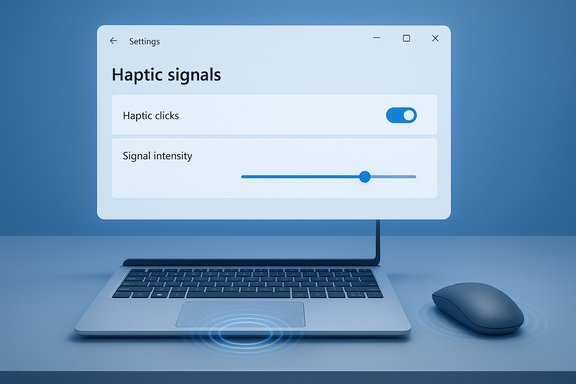
Insider sleuths found UI strings and a control stub in build 26220.x (reported as 26220.7070 delivered with KB5070300) that describe a global toggle plus a Signal intensity slider and separate controls distinguishing haptic clicks (touchpad click simulation) from haptic signals (event-driven tactile pulses). The Settings copy explicitly mentions examples such as snapping windows and aligning objects — a likely indicator of the kinds of UI milestones Microsoft plans to map to short vibrations.
For enthusiasts, designers, and developers this is an exciting expansion of Windows’ input/output repertoire; for IT teams and device makers it’s a prompt to inventory hardware, plan pilot tests, and prepare for firmware and driver work. The potential payoff — faster, less visual workflows and improved accessibility — is real, but only time (and careful implementation across the ecosystem) will determine whether system-level haptic feedback becomes a subtle delight or an avoidable nuisance.
Source: India News Network https://www.indianewsnetwork.com/en...aptic-feedback-windows-11-trackpads-20251112/
 Background
Microsoft’s platform-level work on haptics is not new: documentation and APIs for tactile feedback — including guidance for haptic pens and precision touchpads — have existed for several years. The recent discovery, however, places the controls directly in the Settings app of Windows 11 Insider builds, indicating Microsoft is moving from developer- and OEM-focused tooling to an explicit, user-facing OS feature.Insider sleuths found UI strings and a control stub in build 26220.x (reported as 26220.7070 delivered with KB5070300) that describe a global toggle plus a Signal intensity slider and separate controls distinguishing haptic clicks (touchpad click simulation) from haptic signals (event-driven tactile pulses). The Settings copy explicitly mentions examples such as snapping windows and aligning objects — a likely indicator of the kinds of UI milestones Microsoft plans to map to short vibrations.
What surfaced in the Insider preview builds
Visible controls and strings
The UI fragments seen in preview builds include:- A global Haptic signals toggle to enable or disable system-level tactile cues.
- A Signal intensity slider to adjust the strength of pulses.
- Separate distinctions between haptic clicks (the click-feel replacement for mechanical clickpads) and haptic signals (event-triggered micro-vibrations).
Build and distribution context
The strings were discovered in Dev/Beta preview channels and are present as UI plumbing rather than a broadly functional feature. Microsoft’s behavior of planting Settings surfaces early is typical: it lets the OS provide the control surface while drivers, firmware, and OEM tuning follow. That means the presence of the UI is a strong signal of intent, but it is not proof the feature will be available broadly on a fixed schedule.Technical underpinnings: how system-level haptics would work
Three cooperating layers
Delivering consistent system-level haptic feedback across Windows requires coordination across three layers:- Hardware/firmware — actuators (piezo modules, linear resonant actuators, eccentric rotating mass motors) that can produce short, repeatable pulses.
- Device drivers — software that advertises haptic capabilities, enumerates supported waveforms, and exposes a programmatic interface for OS calls.
- OS components and mapping logic — the part of Windows that maps specific UI events (Snap Layout completion, alignment guides, drag boundary crossings) to predefined tactile patterns and exposes user-facing controls.
Mapping UI events to waveforms
The Settings strings mention specific triggers such as snapping windows and aligning objects, which implies Windows will ship a catalog of short, event-driven waveforms mapped to common desktop interactions. How those waveform definitions will translate to different actuator technologies is an implementation detail handled by OEM drivers and firmware; the same waveform requested by Windows can feel very different across haptic hardware unless calibrated to a common profile.Driver and OEM responsibilities
To deliver a good experience, OEMs and peripheral makers must:- Advertise supported waveform lists and intensity ranges.
- Provide firmware that maps OS-level requests into actuator-specific commands.
- Respect power and thermal constraints (especially on battery).
- Expose vendor utilities for per-device calibration where needed.
Hardware ecosystem: who benefits first
Surface and precision haptic trackpads
Microsoft’s own Surface lineup already ships with precision haptic trackpads on several models and has developer/hardware guidance available — making Surface devices the most likely early beneficiaries of system-level haptic signals. These trackpads replace mechanical movement with solid-state actuators and can simulate clicks and other waveforms via firmware.Third‑party peripherals and mice
Some third-party peripherals already include haptic motors (for example, select Logitech devices that expose haptic controls in vendor software). If peripheral vendors provide drivers that expose haptic capabilities to Windows, system-level signals could route to external mice and controllers as well. However, peripheral-level integration depends on vendor cooperation.The reality of hardware gating
Most existing laptops — particularly older and budget models with mechanical clickpads — will not expose the Haptic signals control because they lack the necessary actuators. Expect initial availability to concentrate on flagship and mid‑to‑high-end SKUs that already ship with haptic hardware.UX case for haptics on desktop: benefits and use cases
Immediate non‑visual confirmation
Haptics can provide instantaneous, low‑attention feedback that confirms actions without sounding alerts or demanding visual focus. Examples where this is useful on desktop include:- Snap Layout completion (confirming windows have snapped into place).
- Alignment guides engaging (pixel-level alignment in design tools).
- Drag boundary crossing (moving a file between windows or across screens).
Perceived responsiveness and polish
Short, well‑tuned micro‑vibrations can make interactions feel faster and more intentional — an intangible but appreciable form of product polish that smartphones and modern laptops have benefited from for years. When done right, haptics can increase user satisfaction without adding UI clutter.Accessibility improvements
Tactile cues can supplement visual and auditory signals, offering additional context for users with low vision or those working in noisy or quiet environments. If Microsoft integrates haptics thoughtfully into Accessibility controls and per-app opt-outs, this channel could be a meaningful assistive feature.Risks, tradeoffs, and technical challenges
Hardware variability and inconsistent feel
Actuator types and firmware implementations vary widely. Piezo transducers, LRAs, and ERMs each have distinct latency, frequency, and amplitude profiles. Without cross‑vendor calibration, the same OS-level haptic event could produce wildly different sensations across devices, undermining the goal of a consistent platform experience.Power, thermal, and battery implications
Actuators draw power. On ultraportable machines, frequent haptic pulses could measurably affect battery life or contribute to thermal constraints. Windows and OEMs must implement sensible defaults (for example, conservative intensity on battery by default) and provide policies for power-sensitive profiles.Driver and firmware reliability
Early implementations could suffer from driver bugs, inconsistent behavior, or failures that disable haptics. History shows that increasing the OS-peripheral interaction surface raises the chance of regressions until drivers and firmware mature. Enterprises that manage large fleets should treat this capability as optional until vendor support is proven.Sensory overload and user preference
Haptics are subjective. Some users will find tactile feedback delightful; others may find repetitive pulses distracting. Microsoft’s apparent approach — making the feature optional and adjustable with a global intensity slider and per-class toggles — is necessary but requires per-app and per-device granularity to avoid unwanted duplication or intrusive signals.Enterprise and manageability considerations
Policy controls and MDM expectations
When system haptics reach broader availability, enterprises will expect Group Policy and MDM/Intune controls to manage the feature across fleets (for example, disabling haptics on devices used in meeting rooms or on loaner hardware). At present, those management surfaces have not been publicly documented; IT administrators should monitor official release notes for policy names and CSPs.Testing and rollout guidance
Enterprises should:- Inventory devices to identify haptic-capable hardware.
- Pilot driver and firmware updates in representative groups before mass deployment.
- Validate haptics alongside conferencing, recording, and remote‑control workflows to avoid unintended interactions or privacy concerns (some devices may produce audible artifacting during haptics under certain conditions).
For developers and OEMs: practical steps
Developers
- Design tactile cues conservatively: prefer short, distinct pulses for discrete events rather than sustained vibrations.
- Respect user preferences and system-wide toggles; avoid duplicating OS-level signals.
- Follow platform guidance for recommended waveforms and intensity ranges once Microsoft publishes official developer docs related to Haptic signals.
OEMs and peripheral makers
- Implement host-initiated haptic endpoints that advertise waveform lists and intensity ranges.
- Provide calibration utilities and firmware updates that let users tune the experience per device.
- Optimize for power and thermal limits, and document expected battery impacts.
How to see or test it today (Insider caution)
The Settings surface is currently present in Dev/Beta Insider preview builds as a hidden or gated UI element; community methods can make the strings visible, but the underlying feature remains hardware‑dependent and may be non‑functional until drivers and firmware arrive. Using community tools to surface hidden features carries risk and should be restricted to test hardware or virtual machines. Insiders who experiment should start with low intensity and test in quiet/recording environments to ensure pulses don’t create audible artifacts.Timeline and rollout expectations
Microsoft traditionally stages features discovered in preview builds: the Settings control appears first while driver and OEM readiness determines functional availability. Expect an initial rollout on select new device SKUs (notably Surface and flagship OEM laptops), followed by broader support as more vendors publish compatible drivers and firmware. There is no confirmed ship date; current evidence points to a staged, hardware-gated rollout rather than an immediate mass release. Any third‑party claims of a broad rollout should be treated cautiously until confirmed by Microsoft and OEM release notes.Critical analysis: strengths, opportunities, and risks
Strengths and opportunities
- Platform consistency: Adding a system-level haptic surface can unify tactile feedback across apps, making micro-interactions feel coherent rather than scattered across vendor utilities.
- Enhanced productivity: Tactile confirmation of multi-window workflows can reduce visual verification time, potentially making window management faster.
- Accessibility benefit: When combined with existing assistive technologies, haptics can provide an additional, configurable feedback channel.
- Developer ecosystem leverage: Existing Windows haptics APIs give developers a clear path to adopt or suppress OS-level cues, enabling richer experiences where appropriate.
Key risks and failure modes
- Inconsistent cross-device experience: Without vendor alignment on waveform profiles, users may encounter wildly different sensations for the same OS event.
- Power and thermal tradeoffs: Frequent haptic events could negatively impact battery life on thin and light devices unless appropriately constrained.
- Initial driver instability: New driver surfaces increase the likelihood of regressions and compatibility issues during the early rollout.
- User control and opt-out complexity: Granular controls are necessary but introduce UX complexity; poor defaults or insufficient per-app controls could cause user frustration.
What to watch next
- Official Microsoft release notes and a public announcement that clarifies supported events, Group Policy names, and supported device classes.
- OEM driver and firmware updates from Surface, Lenovo, Dell, Logitech and other vendors announcing host‑initiated haptic support.
- Developer documentation and sample waveform catalogs that explain the recommended tactile language for Snap, align, drag, and other common events.
- Early user feedback from Insiders on supported devices to evaluate whether the experience is an enhancement or a distraction.
Conclusion
The appearance of a hidden Haptic signals control in Windows 11 Insider builds marks a meaningful step toward making tactile feedback a first‑class OS capability on Windows. The technical scaffolding — existing haptic APIs, OEM hardware, and driver models — is already in place, and the Settings surface demonstrates Microsoft’s intent to give users control over this sensory channel. That said, the feature is still hardware-gated and preview-stage: the real user experience will depend heavily on OEM driver quality, firmware tuning, and careful OS defaults that balance polish with battery life and manageability.For enthusiasts, designers, and developers this is an exciting expansion of Windows’ input/output repertoire; for IT teams and device makers it’s a prompt to inventory hardware, plan pilot tests, and prepare for firmware and driver work. The potential payoff — faster, less visual workflows and improved accessibility — is real, but only time (and careful implementation across the ecosystem) will determine whether system-level haptic feedback becomes a subtle delight or an avoidable nuisance.
Source: India News Network https://www.indianewsnetwork.com/en...aptic-feedback-windows-11-trackpads-20251112/
