

Microsoft appears to be preparing a tactile upgrade to Windows 11: hidden “Haptic signals” controls have surfaced in the latest Insider preview build, suggesting the OS will be able to trigger subtle vibrations for UI actions — a system-level layer of feedback that promises to make snapping windows, dragging files, and aligning objects feel physically responsive.
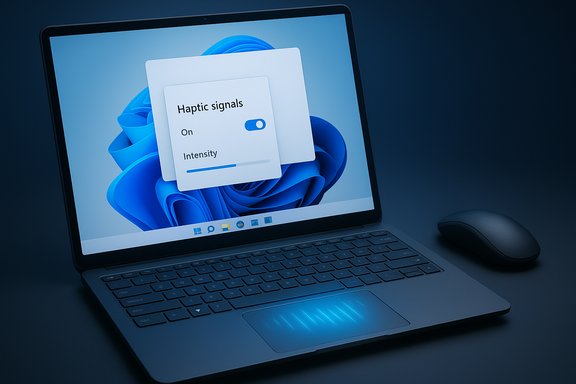
Hidden configuration strings and a new Settings panel for Haptic signals were discovered in Windows 11 Insider Preview Build 26220.7070 (KB5070300), which Microsoft released to the Dev and Beta channels. The Settings stub includes a global toggle and a Signal intensity slider, and it’s exposed only on devices that report compatible haptic hardware. The presence of the UI in the build is a clear indicator Microsoft is building OS-level support for tactile feedback — even if the full runtime and device integrations are not broadly functional yet. This is not a new area for Microsoft. The company has published hardware and developer guidance for haptic pens and haptic touchpads and has actively researched hand-object haptics for years, reflecting an ongoing platform-level investment in tactile input and output. Microsoft’s own documentation already defines host-initiated and device-initiated haptic models and prescribes how intensity, waveforms, and HID descriptors should be exposed.
Source: Digit Microsoft might soon add haptic feedback to laptops, all we know
 Background / Overview
Hidden configuration strings and a new Settings panel for Haptic signals were discovered in Windows 11 Insider Preview Build 26220.7070 (KB5070300), which Microsoft released to the Dev and Beta channels. The Settings stub includes a global toggle and a Signal intensity slider, and it’s exposed only on devices that report compatible haptic hardware. The presence of the UI in the build is a clear indicator Microsoft is building OS-level support for tactile feedback — even if the full runtime and device integrations are not broadly functional yet. This is not a new area for Microsoft. The company has published hardware and developer guidance for haptic pens and haptic touchpads and has actively researched hand-object haptics for years, reflecting an ongoing platform-level investment in tactile input and output. Microsoft’s own documentation already defines host-initiated and device-initiated haptic models and prescribes how intensity, waveforms, and HID descriptors should be exposed. What the preview build actually shows
The UI and user controls
- A new Haptic signals entry appears under the input device pages in Settings (Bluetooth & devices > Touchpad / Mouse) in the 26220.7070 preview build. The UI text explicitly lists examples — snapping windows, aligning objects, and more — as triggers for haptic pulses, and shows a toggle plus an intensity slider for user control.
- The setting is hardware-gated: the OS will only surface the controls if the device reports supported haptic actuators (precision haptic touchpad or compatible peripheral). That shows Microsoft intends the feature to be safe and optional — you won’t see noise or vibrations on machines that lack the appropriate hardware.
Functional status and rollout expectations
- The UI is present but the underlying end-to-end experience isn’t widely active for most Insiders. Microsoft often ships plumbing and settings ahead of driver/firmware and OEM support; the presence of strings and controls means the OS-level API surface is being readied while partners finalize hardware and drivers. Expect the feature to be staged and gated (CFR / feature-on-server-rollout) rather than flipping on for every Insider overnight.
- No public release date has been announced. Because support requires device firmware and driver-level implementations, Microsoft will likely debut haptic signals on hardware that already includes haptic actuators (Microsoft Surface family first), followed by a cross-vendor expansion to other laptops and external peripherals.
Why this matters: the UX case for system haptics
Tactile confirmation reduces cognitive load
Haptic feedback provides a second channel of confirmation beyond sight and sound. On phones and game controllers, subtle vibrations often tell users that an action completed without them needing to watch the screen. Translating that to desktop interactions — for example, feeling a tiny pulse when a window snaps into a layout — can make the UI feel faster and reduce the need to visually confirm micro-interactions. Microsoft’s UI text explicitly pairs haptics with alignment and snapping actions, indicating the company wants to attach tactile cues to spatial, positioning-based workflows.Accessibility and inclusion
For some users with vision or attention differences, haptic cues can be a meaningful accessibility improvement. Microsoft’s hardware guidance addresses intensity controls and calibration, and Surface-specific accessibility pages already reference precision haptic touchpads and adjustable behaviors. When implemented with sensible defaults and granular controls, system haptics can be an accessibility win rather than a gimmick.Platform and developer potential
Because Microsoft is implementing haptics at the OS level with host-initiated and device-initiated models, the platform can expose consistent APIs that apps and drivers can consume. That opens the door for:- Application-specific haptic cues (productivity apps signaling alignment or completion).
- Peripheral vendor integrations (mice, external trackpads) using a common Windows haptics contract.
- Third-party plugin ecosystems (Logitech-style plugins or Adobe integrations) to expose haptic experiences within professional tools.
What hardware support looks like (and why OEMs matter)
Haptic touchpads: precision, host-initiated vs device-initiated
Microsoft’s Haptic Touchpad Implementation Guide defines two models:- Device-initiated haptics: the touchpad firmware triggers haptics when it detects a press or release.
- Host-initiated haptics: the OS (host) triggers waveforms on demand — exactly what system-level signals would use to pulse on snapping or alignment events.
Surface devices and “solid-state” trackpads
Microsoft’s Surface lineup has already shipped several devices with haptic, solid-state trackpads that simulate clicks via actuators rather than mechanical switches. The Surface Laptop Studio (and successors like Surface Laptop 7 / Surface Laptop Studio 2) document a large precision haptic touchpad and offer settings to tune haptic behavior. Those devices are the natural first targets for Haptic signals.External mice and peripherals
Haptic-capable mice are already arriving from major vendors. Logitech’s MX Master 4 explicitly adds a thumb-based haptic element with customizable intensity and app/plugin integration; the mouse ships with software to toggle or tailor haptic events for specific actions and plugins. Gaming-focused mice such as Logitech G’s Pro X2 Superstrike also explore haptic and inductive feedback as part of a broader analog input shift. That hardware foundation means Windows’ system-level haptics could extend beyond trackpads to external mice that claim suitable actuator support.Practical checks — what Insiders and power users can (and should) do
- Confirm your build: If you’re on the Insider Dev or Beta channel and installed the KB5070300 update, your system will be on Build 26220.7070 (the build that contains the hidden Haptic signals UI).
- Look in Settings: Check Bluetooth & devices > Touchpad (or Mouse) for a Haptic signals toggle and intensity slider. The UI may only appear on hardware that reports haptic actuator support.
- Be cautious with feature flags: Community tools like ViVeTool have historically been used to reveal hidden settings; reports differ on whether a ViveTool flag exists for Haptic signals right now. Some outlets report that the UI can be exposed via ViVeTool, while others say no viable codes currently enable the runtime. Enabling hidden flags can break things and is not recommended on production machines.
Strengths and opportunities
- Natural, optional UX enhancement: System haptics can augment the UI without changing visual metaphors or adding noise. When tuned correctly, small pulses act like micro-animations — confirming actions without requiring new UI real estate.
- Platform consistency: OS-level support plus Microsoft’s documented haptic touchpad and pen implementation guidance gives vendors a single target for driver and firmware behavior, reducing fragmentation compared with vendor-only solutions.
- Peripheral and app ecosystem: Vendors like Logitech are shipping haptic mice and exposing plugin architectures for app integration. With an OS-level contract, developers can create consistent haptic affordances across devices and apps.
- Accessibility potential: Properly implemented, adjustable haptics can be a boon for users who rely on non-visual feedback. Microsoft’s docs include intensity controls and mapping guidance that align with accessibility goals.
Risks, limits, and real-world caveats
Fragmentation and calibration
Even with OS-level APIs, haptic experience depends entirely on the hardware actuator, driver quality, and firmware waveforms. Two devices can both “support haptics” yet produce very different sensations. OEMs must tune waveforms, intensity ranges, and default profiles, or the experience will feel inconsistent across the Windows ecosystem. Microsoft’s implementation guide attempts to standardize expectations, but hardware variance remains a practical risk.Battery, noise, and thermal tradeoffs
Actuators consume power; microphones and tiny motors can emit audible noise in quiet environments. Microsoft’s guidance includes conservative defaults for battery management, but design choices by OEMs and peripheral vendors will determine how aggressively haptics are used on battery power. Vendors already expose battery-saver toggles for haptics (Logitech’s MX Master 4, for instance, disables haptics under low battery by default), which shows how device makers will balance immersion and longevity.Reliability and driver bugs
Community reports show intermittent haptic failures on some Surface devices (touchpad haptics stopping or clicking inconsistently). Those anecdotal reports illustrate that the architecture is sensitive to firmware, driver interactions, and power state. Rolling out system-level signals will require OEMs to harden drivers and address edge conditions so haptics don’t vanish or misfire during normal use.Privacy and UX creep
Haptics are intimate; a misconfigured or aggressive haptic profile could annoy users. Microsoft’s inclusion of a global toggle and intensity slider is the right move, but app and peripheral authors should not weaponize haptics for attention-grabbing notifications. Platform policy and sensible defaults will be necessary to prevent misuse.Developer and OEM implications
For hardware engineers
OEMs must implement the required HID descriptors, SimpleHapticsController collections, and SET_FEATURE/GET_FEATURE semantics to support both device- and host-initiated workflows. Testing to ensure consistent waveform timing, amplitude, and latency across thermal and power states will be essential. Microsoft’s Haptic Touchpad Implementation Guide provides concrete descriptors and expectations to implement.For driver and firmware teams
Drivers must support the host’s ability to enumerate supported waveforms and execute them reliably. Low-latency pathways and careful debouncing logic are required so that a quick UI snap produces an immediate pulse rather than a delayed or missing vibration.For app developers
Once the OS exposes APIs for haptic signals, developers will be able to add contextual haptics. But responsible design is required: haptics should be optional, unobtrusive, and mapped to meaningful events (alignment snaps, operation completions), not every click or hover. Vendors with plugin marketplaces (Logitech’s Options+ / Logi Marketplace) already show what integration patterns look like; Windows-level APIs can make such experiences cross-device consistent.Timeline and likelihood of public launch
- The feature appears in Build 26220.7070 (KB5070300) released to Dev & Beta channels on November 7, 2025. That establishes the OS baseline and the Settings UI, but it does not mean immediate availability for all Insiders or general consumers; Microsoft typically uses server-side gating and incremental rollouts.
- Early availability will be tied to device support. Surface models with haptic touchpads are the most likely first recipients; peripherals from Logitech, Razer, and others may be supported shortly after if vendors ship firmware/driver updates embracing Microsoft’s haptics contract.
- There are conflicting community reports about whether ViVeTool can force-enable the feature right now — some investigators and outlets suggest the UI can be revealed with community tools, while others report there are no public feature IDs that activate a complete runtime. Given this ambiguity and the potential for instability, waiting for official Microsoft/OEM releases is the safer path for general users.
What readers should expect next
- Expect incremental testing and gated rollouts through the Insider channels as Microsoft coordinates OS APIs with OEM firmware and driver teams. The Settings UI being present is an invitation to partners to finalize hardware support and to developers to start exploring haptic affordances.
- Peripheral vendors will continue shipping haptic-enabled mice and trackpads; some already expose customizable intensity, plugin systems, and app integrations. Those devices will make early adopters the proving grounds for how useful and reliable system-level haptics become.
- Watch for follow-up insider notes from Microsoft and firmware/driver updates from OEMs. Unless Microsoft formally announces a consumer rollout date, the best indicator will be when Surface and other OEM drivers start listing explicit support for host-initiated haptics in their update changelogs.
Conclusion
The arrival of a Haptic signals settings stub in Windows 11 Build 26220.7070 is a meaningful step: it signals Microsoft’s intent to add a platform-grade layer of tactile feedback to desktop interactions. The approach is sensible — hardware gating, intensity controls, and documented GUIDANCE for device implementers — and when combined with the haptic mice and trackpads already coming to market, it could deliver a subtle but useful enhancement to everyday workflows. However, the real quality of the experience will depend on OEM driver fidelity, hardware waveform design, battery management choices, and careful developer discipline to prevent abuse. For now, the feature is in incubation: visible, hopeful, and promising — but not yet widely usable.Source: Digit Microsoft might soon add haptic feedback to laptops, all we know
