

Windows 11 is quietly preparing to add system-level haptic feedback — a feature dubbed “haptic signals” that Microsoft has tucked into recent Dev/Beta preview builds — promising subtle vibrations when you snap windows, align objects, or perform other UI actions, but the capability remains hidden and nonfunctional in public builds for now.
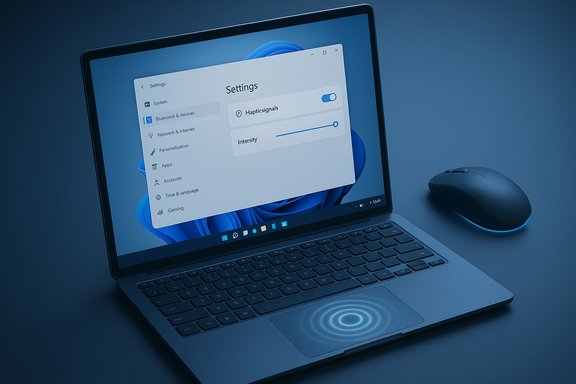
Windows insiders and build sleuths discovered the new settings entry for Haptic signals inside the Settings app of build 26220.x (25H2 Dev/Beta), with UI controls that suggest a toggle plus an intensity slider for the effect. The discovery was highlighted by a frequent Windows build investigator on social media, and multiple outlets have since reported the appearance of those hidden options. The entry is currently dormant — the menu exists but the underlying feature isn’t active — and there are no confirmed feature IDs or public ViVeTool codes available to force-enable it at the moment. That implies the setting is either a stub for forthcoming functionality or gated behind additional services or hardware checks.
Windows’ next tactile chapter is forming in plain sight: a Settings tile now hints at haptic signals across the OS, promising a richer sensory layer for desktop interactions. The path from a hidden UI stub to a polished, cross-device feature is long and technical. When implemented with sensible APIs, strong vendor cooperation, accessibility-first defaults, and battery-aware engineering, haptic signals could make Windows feel not only smarter but more tangible. For now, the build‑watchers and insiders will be the first to feel any buzz — literally — once Microsoft takes the next step.
Source: TechRadar https://www.techradar.com/computing...s-about-time-macbooks-have-had-this-for-ages/
 Background: what was found and where it sits in Windows 11
Windows insiders and build sleuths discovered the new settings entry for Haptic signals inside the Settings app of build 26220.x (25H2 Dev/Beta), with UI controls that suggest a toggle plus an intensity slider for the effect. The discovery was highlighted by a frequent Windows build investigator on social media, and multiple outlets have since reported the appearance of those hidden options. The entry is currently dormant — the menu exists but the underlying feature isn’t active — and there are no confirmed feature IDs or public ViVeTool codes available to force-enable it at the moment. That implies the setting is either a stub for forthcoming functionality or gated behind additional services or hardware checks. Overview: what "haptic signals" appears to do
At a glance the Settings controls indicate two basic capabilities:- A master Haptic signals on/off switch for mouse/trackpad interactions.
- An intensity slider to tune how strong the vibration pulses feel.
Why this matters: the UX case for haptics on desktop
Haptic feedback is an established way to add a tactile confirmation layer to actions that otherwise offer only visual or audio feedback. On phones and modern MacBooks, a tiny vibration or “haptic click” can make an interface feel faster and more satisfying because it engages a different human sense. Microsoft’s apparent goal is similar: to make common desktop interactions feel more responsive and to provide an extra, immediate cue that an action completed successfully. On laptops with solid-state trackpads — where the surface doesn’t physically depress — haptics already simulate a click, and extending that technology to additional OS interactions is a logical next step. If implemented carefully, it can reduce visual verification steps, help accessibility (confirmation without looking), and give the OS a more tactile personality.How this compares to Apple’s Force Touch and Haptic Touch
Apple introduced the classic Force Touch trackpad on Macs in 2015, which uses force sensors and a Taptic Engine to simulate clicks and secondary actions; the experience replaced mechanical movement with controlled vibration while adding pressure-sensitive interactions. Apple later moved phone interfaces from pressure-based 3D Touch to software-driven Haptic Touch, which uses the Taptic Engine to provide feedback on long-press gestures. Microsoft’s approach appears to be less about adding multiple pressure levels and more about context-aware tactile signals for UI events — closer in spirit to Haptic Touch than to Apple’s original multi‑level Force Touch/3D Touch implementations. That history matters because it shows two important lessons:- Haptics can make static surfaces feel alive and provide meaningful feedback.
- The user experience depends heavily on hardware quality, firmware control, and software API design; poor calibration or excessive vibration can quickly turn an enhancement into an annoyance.
What hardware will (probably) be required
The UI and reporting strongly indicate that haptic-capable trackpads or mice are prerequisites — machines that can produce controlled vibrotactile signals through a Taptic-like motor or actuator. Examples in the reporting point to Microsoft’s own Surface devices (Surface Laptop 7, Surface Laptop Studio 2) which have solid‑state trackpads, and to third‑party peripherals that ship with haptic motors, such as the Logitech MX Master 4. Logitech’s MX Master 4 explicitly includes a haptic motor and exposes haptic options through Logi Options+ (including intensity levels and app/plugin hooks), which demonstrates how a peripheral vendor can implement haptics in tandem with OS-level features. That mouse’s haptic controls, mapped to gestures, action rings, or Smart Actions, are a practical example of how a haptic-enabled device can integrate with software workflows.Technical implications: drivers, APIs, and standards
For haptic signals to work reliably across devices and apps, Microsoft needs two things:- A driver and firmware model that exposes consistent haptic primitives (pulse, duration, intensity) to Windows, and
- An API for apps and the OS shell to request haptic responses tied to specific events.
Developer and OEM considerations
For Microsoft
- Expose a simple API: OS events should have clear semantics (e.g., SnapComplete, AlignObject, DragEnter) and let developers opt in with a small set of parameters (intensity, duration).
- Provide sensible defaults: The OS should ship with curated haptic patterns for common interactions so third-party apps don’t have to invent basic cues.
- Respect accessibility and battery: Include global overrides and per-app toggles, and ensure haptics are disabled or scaled down on low-power modes.
For OEMs and peripheral vendors
- Calibrate for device form factor: A trackpad’s motor requires very different timing and power management than a mouse thumb motor; vendors must tune signals for comfort and clarity.
- Surface and firmware consistency: Firmware updates should be straightforward and drivers must expose uniform primitives so apps don’t need device-specific logic.
- Integrate with software toolkits: Logitech’s approach with Logi Options+ shows how vendor software can extend OS signals; but to avoid fragmentation, vendors should support any official Windows haptics API when it appears.
Accessibility and user control: what to expect
Haptic feedback can be a boon for users with low vision or attention constraints, offering a non-visual confirmation channel. But it must be optional and configurable. The Settings UI discovered by insiders already hints at a toggle and intensity slider, which is the bare minimum of user control. Best practice would include:- Per-app haptic preferences,
- Profiles for low-sensitivity users, and
- A clear “turn off all haptics” master switch.
Performance and battery trade-offs
Haptic motors consume power; on battery-powered laptops or mice, continuous or frequent pulses can shorten battery life. Logitech, for example, already disables haptic feedback under low-battery conditions and offers battery-saving toggles in its software — a practical pattern Microsoft should follow. Likewise, the OS should suspend nonessential haptics during battery saver modes and allow OEMs to expose energy-aware profiles. In driver design, aggregate haptic scheduling (coalescing small pulses) and rate-limiting are essential to prevent runaway battery drain or poor user experiences caused by overlapping signals.Security, privacy, and telemetry
Haptics themselves do not present obvious privacy issues, but how Microsoft gathers telemetry about haptic usage could. If diagnostics include per-app haptic triggers or intensity usage, Microsoft must be transparent and allow users to opt out. Additionally, OS APIs must validate and sandbox developer-initiated haptics to prevent abusive patterns (e.g., dense vibration sequences designed to annoy). Proper permission models and rate limits in the API will be important safeguards.Risks and potential downsides
- Overuse becomes noise: Poorly designed or excessive haptics will quickly become distracting. Designers must adopt restraint and ensure haptics are meaningful signals, not constant background buzz.
- Fragmentation: If Microsoft doesn’t provide a robust, documented API, vendors will implement proprietary solutions and the experience will feel inconsistent across devices.
- Compatibility confusion: Users with haptic mice (such as the MX Master 4) may expect OS-level integration, but parity is not guaranteed — peripheral vendors will still need to ship compatible drivers, and Microsoft will need to support those hooks. Reports already note uncertainty about whether Windows’ planned haptics will interoperate with devices like the MX Master 4.
- Battery and heat: On thin laptops, aggressive haptics could create heat or battery constraints that vendors must engineer around.
How this might roll out and how enthusiasts can test it now
- Microsoft will likely flip the feature internally, then pass it to Insider channels for testing (Dev/Beta) before wider rollout.
- Early testers will probably need specific hardware (Surface family or an external haptic-enabled mouse) to experience the signals.
- Enthusiasts who like to unlock hidden features sometimes use ViVeTool to enable experimental flags, but as of the latest reports there are no public ViVeTool IDs that enable haptic signals, and forcing incomplete features can cause instability. Proceed with caution; ViVeTool is powerful but unsupported by Microsoft and can change registry/feature flags in ways that may break unexpected things.
Recommendations for Microsoft, OEMs, and developers
- Microsoft should launch a documented, rate‑limited haptics API and ship standard haptic patterns for core UI events.
- OEMs must publish firmware and driver guidance, and expose device capabilities (motor strength, latency, battery constraints) so Windows can adapt profiles per device.
- Developers should adopt a “less is more” approach: use haptics sparingly for confirmations or to reduce cognitive load, and always respect OS-level user preferences and accessibility settings.
- A certification or compatibility badge for devices that meet UX and power requirements would help users identify laptops and mice where haptics will feel polished and reliable.
Verdict: hopeful, but watch the details
The addition of Haptic signals to Windows 11 is a sensible and overdue idea; it aligns desktop UX with tactile cues users already rely on in phones and some laptops. The buried Settings UI and the presence of a slider suggest Microsoft is serious about shipping something that can be controlled by users. However, much will hinge on the execution:- Will Microsoft provide a robust API and reference haptic library?
- Will OEMs and peripheral vendors adopt a consistent model?
- Will default patterns be conservative, accessible, and battery-conscious?
Practical takeaways for Windows users today
- The Settings entry is a sign of development, not a finished feature; mainstream users shouldn’t expect immediate rollout.
- If you rely on battery longevity or have sensory sensitivities, haptics should be optional and adjustable; watch for the addition of per-app controls when the functionality arrives.
- Peripheral owners curious about haptic experiences can try vendor offerings today (Logitech’s MX Master 4 is a current example that ships with haptic features), but OS-level parity is not automatic.
Windows’ next tactile chapter is forming in plain sight: a Settings tile now hints at haptic signals across the OS, promising a richer sensory layer for desktop interactions. The path from a hidden UI stub to a polished, cross-device feature is long and technical. When implemented with sensible APIs, strong vendor cooperation, accessibility-first defaults, and battery-aware engineering, haptic signals could make Windows feel not only smarter but more tangible. For now, the build‑watchers and insiders will be the first to feel any buzz — literally — once Microsoft takes the next step.
Source: TechRadar https://www.techradar.com/computing...s-about-time-macbooks-have-had-this-for-ages/
