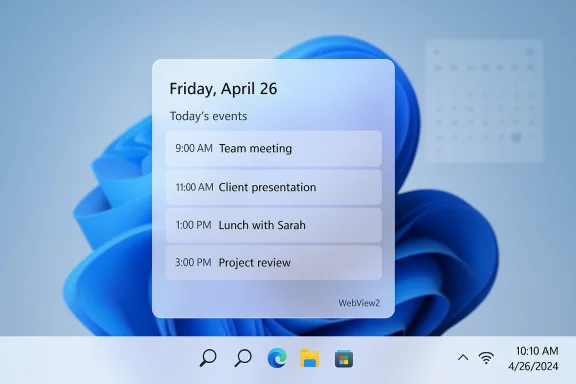
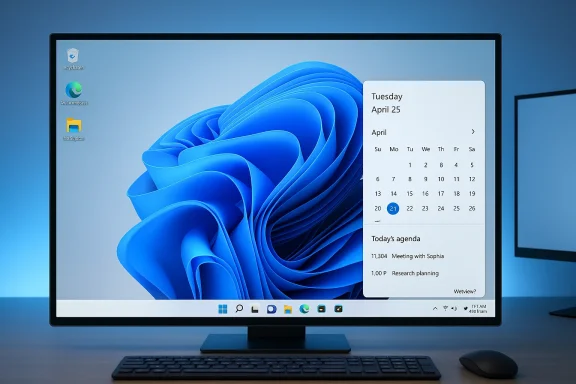
Microsoft’s recent moves to restore long-missed Taskbar capabilities mark a notable course correction for Windows 11 — the company is quietly returning features many users considered essential, from a restored Agenda view in the Taskbar calendar to prototypes that reintroduce movement, resizing, and improved drag‑and‑drop behavior across the desktop.
When Windows 11 launched in October 2021 it presented a modernized shell with a cleaner visual language and centered icons, but that redesign also removed or constrained several small, pragmatic behaviors that had been part of Windows for decades. Users immediately noticed differences: the Taskbar was fixed to the bottom, some Notification Center conveniences disappeared, drag‑and‑drop semantics changed, and multi‑monitor interactions were inconsistent. Over time, these omissions accumulated into a steady backlog of user feedback and third‑party workarounds.
Microsoft’s engineering posture has shifted in response. Rather than solely pursuing minimal, modern UI purity, the company appears to be selectively restoring usability features that demonstrably improve productivity and accessibility. The evidence comes from Insider previews, multiple Windows‑focused reports, and community tracking that show both targeted restorations (like a clock with seconds and calendar tweaks) and more ambitious prototypes to return Taskbar mobility and resizing.
Bringing back the Agenda addresses a clearly defined productivity gap without undoing the fresh look of Windows 11. The flyout’s revival is small in code but large in daily value: it reduces friction for calendar‑driven workflows and reclaims a familiar surface many users missed.
This is a pragmatic compromise: restore the intuitiveness of dragging things to the Taskbar while reworking the internals to fit Windows 11’s updated shell. For users who relied on drag‑and‑drop for quick window grouping or to pin files to applications, these fixes could remove the need for third‑party utilities.
This is more than cosmetic: it restores decades of user agency. Vertical Taskbar placement, for instance, is invaluable for portrait monitors and multi‑monitor setups. Resizable heights provide an accessibility lever for users who need bigger hit targets or visual comfort. Returning these capabilities would reconcile legacy workflows with Windows 11’s modern shell.
That said, these features are arriving cautiously. Prototypes must pass compatibility, accessibility, and performance gates before wide release, and enterprise controls will likely be provided to manage transitions. For now, Insiders can experiment, third‑party tools serve as stopgaps, and IT teams should prepare testing plans for when Microsoft begins staged rollouts. The overall takeaway is clear: Windows 11 is evolving not only forward, but also back toward the user choices that customers have long asked Microsoft to restore.
Source: Neowin Microsoft is bringing back highly-requested Windows 11 taskbar feature
 Background
When Windows 11 launched in October 2021 it presented a modernized shell with a cleaner visual language and centered icons, but that redesign also removed or constrained several small, pragmatic behaviors that had been part of Windows for decades. Users immediately noticed differences: the Taskbar was fixed to the bottom, some Notification Center conveniences disappeared, drag‑and‑drop semantics changed, and multi‑monitor interactions were inconsistent. Over time, these omissions accumulated into a steady backlog of user feedback and third‑party workarounds.Microsoft’s engineering posture has shifted in response. Rather than solely pursuing minimal, modern UI purity, the company appears to be selectively restoring usability features that demonstrably improve productivity and accessibility. The evidence comes from Insider previews, multiple Windows‑focused reports, and community tracking that show both targeted restorations (like a clock with seconds and calendar tweaks) and more ambitious prototypes to return Taskbar mobility and resizing.
What’s returning — the small but meaningful features
Agenda view returns to the calendar flyout
One of the clearest restorations is the return of an interactive Agenda view in the Taskbar calendar flyout (Notification Center). For many users the Agenda was a compact, chronological schedule surface — a one‑click glance at tomorrow’s meeting or the rest of the day without opening the full Calendar app. Reports indicate Microsoft is reintroducing this functionality in a preview targeted for Insiders, and that the new Agenda will be tightly integrated with Microsoft 365 and Copilot for quick meeting actions.Bringing back the Agenda addresses a clearly defined productivity gap without undoing the fresh look of Windows 11. The flyout’s revival is small in code but large in daily value: it reduces friction for calendar‑driven workflows and reclaims a familiar surface many users missed.
Drag‑and‑drop restoration and the “drag tray”
Microsoft has also been incrementally restoring drag‑and‑drop behaviors to the Taskbar. Earlier Insider builds teased improvements that let users drag apps and files more naturally onto pinned icons and into the Taskbar, and experimental features like a “Drag Tray” aim to modernize file sharing and window pinning workflows. These changes are being tested in Beta and Dev channels and have shown up in build notes and community analyses.This is a pragmatic compromise: restore the intuitiveness of dragging things to the Taskbar while reworking the internals to fit Windows 11’s updated shell. For users who relied on drag‑and‑drop for quick window grouping or to pin files to applications, these fixes could remove the need for third‑party utilities.
The bigger restoration — movable and resizable Taskbar prototypes
What Microsoft is prototyping
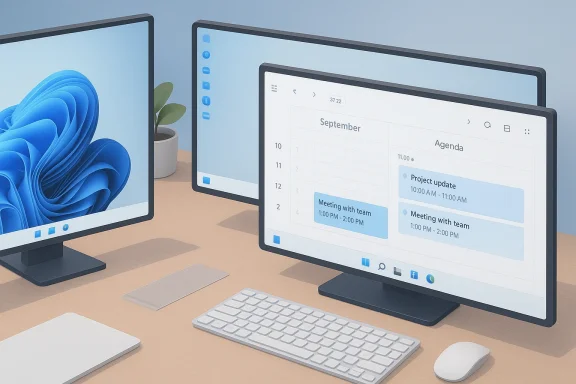
Beyond small usability fixes, multiple independent reports indicate Microsoft is prototyping a movable and resizable Taskbar for Windows 11. Prototypes reportedly allow docking the Taskbar to the top, left, right, or bottom of the screen and adding user controls to change its thickness (height), enabling denser icon packing or larger touch‑friendly layouts. Insider previews are suggested as the testbed, with potential staged rollouts depending on integration and compatibility testing.This is more than cosmetic: it restores decades of user agency. Vertical Taskbar placement, for instance, is invaluable for portrait monitors and multi‑monitor setups. Resizable heights provide an accessibility lever for users who need bigger hit targets or visual comfort. Returning these capabilities would reconcile legacy workflows with Windows 11’s modern shell.
Why this is significant
- It signals a pragmatic Microsoft that listens to evidence from telemetry, feedback, and community discourse.
- It reduces reliance on third‑party shell‑patching tools that customers have used to restore legacy behavior.
- It addresses real productivity and accessibility needs for developers, designers, traders, and users with mixed DPI or portrait displays.
How Microsoft might implement these changes
Expected rollout pattern
From the available reporting, Microsoft’s likely approach will follow a conservative engineering cadence:- Prototype internally and iterate on compatibility with flyouts, Copilot, and Start menu behavior.
- Publish to Windows Insider channels (Dev/Beta) for real‑world testing on diverse hardware.
- Collect telemetry and compatibility reports, then gate the feature behind user and enterprise controls before broad release.
Integration challenges Microsoft must solve
Restoring Taskbar movement and resizing is not a trivial UI toggle. Engineers must reconcile several interdependent systems:- Flyout anchoring: Start menu, Notification Center, and Copilot buttons must adapt their geometry depending on Taskbar position.
- Window snap and maximize behavior: Moving the bar affects how windows interact with screen edges and snapping heuristics.
- Multi‑monitor coherence: Each display may host its own Taskbar configuration and must avoid focus jumps or inconsistent flyout placement.
- Third‑party shell extensions and accessibility tools: Compatibility must be validated to prevent regressions.
Practical benefits and user scenarios
Productivity and workflow gains
- Developers and coders using portrait or ultrawide monitors can dock the Taskbar vertically to gain horizontal real estate.
- Designers and video editors with multi‑monitor setups can use denser icon packing to surface more pinned apps without opening the overflow.
- Users who rely on quick calendar access will benefit from the Agenda view and Copilot‑enabled meeting actions directly from the Taskbar.
Accessibility improvements
Resizable Taskbar heights offer immediate gains for users with low vision or motor control challenges. Increasing the height or icon size is a direct OS-level accessibility knob that should be preferred to third‑party modifications, which can bypass system accessibility hooks.Enterprise and IT implications
What administrators should prepare for
- Create test labs that mirror real‑world device mixes: laptops, docking stations, portrait monitors, and mixed DPI setups.
- Validate mission‑critical applications for snap, maximize, and shell integration behaviors.
- Monitor for Microsoft documentation and Group Policy templates that control Taskbar configuration and movement.
- If you rely on third‑party customization tools, test them early for compatibility and vendor guidance.
Deployment guidance
- Subscribe to the Windows Insider Program on non‑production machines to evaluate early builds.
- Use phased deployment rings (pilot → broad pilot → wide deployment) and keep rollback procedures ready.
- Update endpoint management baselines and configuration profiles only after features are validated in your environment.
Risks, unknowns, and engineering caveats
Compatibility and regressions
The most visible risk is compatibility: restoring movement and resizing can create regressions with apps that assume a bottom‑anchored Taskbar or specific flyout geometry. Third‑party shell extensions, legacy apps, and certain accessibility tools may behave unexpectedly until vendors adapt. Microsoft will need to either provide compatibility shims or give IT admins granular controls to lock behavior per environment.Performance considerations
Any changes to core shell layout can affect rendering, animation, and responsiveness, particularly on lower‑end hardware. Microsoft must balance feature parity with Windows 11’s existing performance constraints and avoid reintroducing the kinds of paint/white‑flash issues that have appeared in earlier builds.The timeline is uncertain
Several reports situate prototypes and previews across late‑2025 into mid‑2026, but prototypes frequently change, and Microsoft has historically adjusted schedules based on testing. Treat any reported dates as provisional until Microsoft publishes an official roadmap or Insider release notes.How to get the features now (Insider preview and alternatives)
For enthusiasts and testers
- Join the Windows Insider Program and run Beta or Dev channel builds on non‑critical machines to evaluate Agenda, drag‑and‑drop improvements, and Taskbar mobility prototypes as they appear.
- Report compatibility issues through the Feedback Hub and monitor Insider release notes for known issues and breaking changes.
For users who can’t wait
- Mature third‑party tools such as StartAllBack and ExplorerPatcher remain viable options to restore classic Taskbar behaviors immediately, but they carry maintenance and compatibility tradeoffs. Use them cautiously on managed devices.
Strategic analysis — what this shift means for Microsoft and users
A pragmatic pivot, not a reversal
Restoring Agenda, drag‑and‑drop, and prototyping movable/resizable Taskbars is best read as a pragmatic pivot rather than a wholesale reversal. Microsoft is selectively reintroducing features that demonstrably improve usability or fix clear regressions, while keeping the overall Windows 11 architecture and design language intact. The company appears to be embracing the idea that modern UI and practical customization can coexist.Reputation and community trust
These restorations send a message: Microsoft listens. For many in the Windows community, regaining trust is about responsiveness on small, day‑to‑day frictions as much as it is about headline features. Restoring these Taskbar behaviors is a low‑friction way to repair goodwill while continuing to evolve the platform.The limits of nostalgia
Not every legacy feature will or should return. Microsoft appears to be balancing nostalgia against technical debt: bringing back what improves productivity and accessibility while avoiding reintroducing archaic behaviors that conflict with modern security or architectural goals. Expect compromises and guardrails, especially in enterprise contexts.Practical checklist for users and admins (what to do next)
- If you’re curious: run Insider builds on a spare device and test Taskbar-related changes.
- If you depend on a stable environment: wait for official documentation and enterprise controls before changing Taskbar behavior broadly.
- If you need features now: evaluate third‑party tools but plan for potential reconfiguration when Microsoft ships native support.
- For admins: prepare test cases for multi‑monitor, mixed DPI, and touch scenarios; update deployment playbooks accordingly.
Conclusion
Microsoft’s decision to reintroduce and prototype long-requested Taskbar features is a welcome development for users and administrators who long ago adapted their workflows to Windows’ older affordances. The return of the Agenda view, restored drag‑and‑drop behavior, and prototypes for a movable, resizable Taskbar are practical fixes that address real productivity and accessibility needs. These changes also reflect a broader shift in Microsoft’s approach: a readiness to reconcile modern design with pragmatic usability.That said, these features are arriving cautiously. Prototypes must pass compatibility, accessibility, and performance gates before wide release, and enterprise controls will likely be provided to manage transitions. For now, Insiders can experiment, third‑party tools serve as stopgaps, and IT teams should prepare testing plans for when Microsoft begins staged rollouts. The overall takeaway is clear: Windows 11 is evolving not only forward, but also back toward the user choices that customers have long asked Microsoft to restore.
Source: Neowin Microsoft is bringing back highly-requested Windows 11 taskbar feature