

Microsoft began testing movable Windows 11 taskbar positions on May 15, 2026, in Insider Experimental Preview Build 26300.8493, letting testers place the taskbar on the bottom, top, left, or right edge of the screen through Settings. It is a small setting with a large symbolic load: Windows 11 is finally restoring one of the desktop freedoms it took away at launch. The feature is not yet a general release, and it does not perfectly recreate the old Windows 10 taskbar. But its return marks a quiet retreat from one of Windows 11’s most unpopular design bets.
When Windows 11 launched in October 2021, Microsoft sold the redesigned taskbar as part of a cleaner, calmer, more centered desktop. The Start button moved toward the middle. The taskbar was visually simplified. The shell looked more modern, more tablet-aware, and more aligned with the design language Microsoft wanted to project after years of Windows 10 sprawl.
The cost was control. Windows users who had spent years docking the taskbar to the top, left, or right side of the display suddenly found that the option was gone. Registry tweaks and third-party utilities could sometimes fake parts of the old behavior, but the official Windows 11 taskbar was pinned to the bottom.
That decision was always bigger than taskbar placement. It became an emblem of a broader Windows 11 complaint: Microsoft had rebuilt familiar parts of Windows with less functionality than the versions they replaced, then asked users to accept the loss as modernization. The movable taskbar was not some obscure enterprise checkbox. It was a decades-old behavior, used by people with ultrawide monitors, vertical displays, compact laptops, multi-monitor workstations, accessibility needs, and simple muscle memory.
Now Microsoft is reversing course. In the new Insider work, taskbar position is exposed under Settings > Personalization > Taskbar > Taskbar behaviors, with choices for bottom, top, left, and right. That is the headline. The real story is that Microsoft has decided the future of Windows 11 cannot be built only by pushing forward; it also has to repair the regressions users never stopped noticing.
Windows 11’s taskbar redesign removed or delayed several capabilities that had existed in Windows 10. Drag-and-drop support was missing at launch. Ungrouped taskbar buttons and labels took time to return. The system tray went through its own rounds of simplification and restoration. Each removed feature may have looked defensible in isolation, but together they fed the perception that Windows 11 was not simply redesigned — it was reduced.
That perception mattered because Windows is not a phone OS where users expect Apple-like design mandates or Android-style launcher churn. Windows is the general-purpose desktop platform for people who build their own workflows. A sysadmin with three monitors, a developer with a vertical display, a trader with a dense wall of windows, and a home user who just likes the taskbar at the top are not edge cases in the Windows ecosystem. They are the point of the Windows ecosystem.
Microsoft’s original justification for limiting taskbar positions was technical as much as aesthetic. Rebuilding shell components meant old assumptions had to be reconsidered, and supporting every orientation affects flyouts, animations, touch targets, notification placement, app previews, system tray behavior, and multi-monitor handling. That is real engineering work. But users were never wrong to notice that “hard” had somehow become “not available” for a feature Windows had supported for years.
Microsoft is not bringing back the old taskbar code wholesale. It is adapting the Windows 11 taskbar to support multiple positions. That means the feature must fit the newer Start menu, newer system tray, newer flyout behavior, Widgets, Copilot-related entry points, search variants, and whatever other shell work Microsoft is preparing for Windows 11’s next major wave.
The implementation also includes alignment controls that vary by orientation. When the taskbar is on the left or right side, icons can be top-aligned or centered. When it is at the top or bottom, icons can be left-aligned or centered. That is a more deliberate design than the old “drag it wherever and let the shell cope” model, and it shows Microsoft trying to preserve Windows 11’s visual rules while restoring user choice.
This is why the feature will probably satisfy some users and irritate others. People who simply wanted a vertical taskbar on the left edge may get what they wanted. People who wanted every Windows 10 behavior back — including exact sizing, spacing, drag mechanics, per-monitor quirks, and old-school taskbar density — may find the new version cleaner but less flexible. Microsoft is giving ground, but it is not surrendering the Windows 11 design system.
That caveat should temper the “finally” headlines. Yes, the movable taskbar is back in testing. No, it is not yet something most production machines should expect to see in Windows Update tomorrow. For IT departments, the distinction is not pedantic. Preview shell changes can create support churn, documentation drift, and training mismatches if users read a headline and assume the feature exists on their managed laptop.
Still, Insider placement is not meaningless. Microsoft does not write official blog posts and expose Settings UI for every abandoned experiment. The company has now acknowledged that taskbar mobility is a priority, described it as one of the most requested features, and placed it inside the broader effort to make Taskbar and Start more personal. That language suggests a roadmap, not a weekend hack.
The more interesting timing question is whether this lands as part of Windows 11’s next major feature wave or arrives through a more incremental controlled rollout. Microsoft’s modern Windows delivery model makes that line blurry. Features can be present in a build, hidden behind configuration, rolled out gradually, or shipped to some regions and device classes before others. For administrators, the practical advice is simple: treat this as incoming, but not yet guaranteed in the exact form testers see today.
Windows 11’s Start menu was designed to be simpler than Windows 10’s tile-heavy predecessor. Live Tiles disappeared. The layout became cleaner. The center of the screen became the new default stage for launching apps and searching. But the simplification came with its own frustrations, especially around the Recommended area, limited customization, and the sense that Microsoft had reserved too much Start menu real estate for things users did not explicitly ask to see.
The new Start work appears to recognize that simplicity is not the same as inflexibility. Letting users resize or tune Start, hide or control sections, and separate recommendation behavior from broader recent-file activity all point in the same direction as the movable taskbar. Microsoft is learning, slowly, that modern Windows cannot be a museum of defaults. It has to be adjustable without making users feel like they are fighting the product.
This matters because Windows 11’s most persistent criticism has not been that it looks bad. It is that it too often behaves like Microsoft knows the one correct way to use a PC. The taskbar and Start menu are where that philosophy becomes personal. By restoring choice in both places, Microsoft is not merely polishing the shell; it is trying to rebuild trust with users who saw Windows 11 as a downgrade in daily ergonomics.
The second track may be more important than it looks. AI features ask users to trust the operating system with more context, more interpretation, and more interruption. If the same operating system cannot be trusted to preserve basic desktop preferences, the pitch becomes harder. A user who feels ignored over taskbar placement is less likely to welcome an assistant embedded into the places they already use every day.
This is the tension Microsoft has to manage in 2026. The company wants Windows to become an AI-forward platform, especially on new hardware with NPUs and Copilot branding. But the Windows audience is not a blank-slate consumer base waiting for a new interaction model. It is a massive installed base with habits, scripts, pinned workflows, assistive setups, corporate images, and years of accumulated expectations.
Restoring the movable taskbar is therefore not nostalgia. It is table stakes. If Microsoft wants to make the Windows shell more intelligent, it first has to prove that intelligence does not mean taking away agency. The desktop can evolve, but users need to believe that evolution will add options rather than collapse them.
A movable taskbar can create small but real support wrinkles. Screenshots in documentation may no longer match user desktops. Training material that assumes a bottom taskbar may need caveats. Remote support staff may have to orient themselves when the Start button lives on a vertical edge. Kiosk and shared-device configurations may need testing if the setting becomes available under standard user accounts.
Those are manageable problems, and they are far less severe than the productivity hit felt by users who lost the feature in the first place. But they illustrate why Microsoft’s rollout path matters. If taskbar positioning arrives with clear policy controls, stable defaults, and consistent behavior across display configurations, administrators will shrug. If it arrives as another staggered Windows feature with partial availability and undocumented quirks, they will add it to the growing list of shell changes that make Windows harder to govern.
The best enterprise outcome is not that every user gets a vertical taskbar. It is that Microsoft treats this as a configurable desktop capability with sane defaults, documented behavior, and minimal surprise. That is the difference between customization and chaos.
These are not decorative preferences. They are workflow decisions. A left-side taskbar on a widescreen monitor can expose more running apps without eating vertical document space. A top taskbar can align with decades of personal habit or with layouts borrowed from other desktop environments. A right-side taskbar can keep controls away from left-docked tool panels in creative or development software.
Microsoft’s mistake was not merely removing a feature. It was underestimating how many Windows users treat the desktop as a workbench. You do not improve a workbench by welding every drawer shut because most people use the middle one.
The restoration validates the complaint even if Microsoft never says so bluntly. Users asked for the movable taskbar for years because the absence made Windows 11 worse for them. Microsoft listened late, but it listened.
It is also incomplete. A feature used by a minority can still be central to a platform’s identity. Windows has long won loyalty not because every user changes every setting, but because users believe they could change the setting that matters to them. The long tail of customization is part of the product’s social contract.
The bottom-taskbar majority also masks the intensity of minority use. A person who never moves the taskbar does not care if the option exists. A person who relies on a vertical taskbar may care every single day. Removing an unused option for one group can be invisible; removing a core workflow for another can be alienating.
That asymmetry is where Windows 11 repeatedly stumbled. Microsoft optimized for cleaner defaults but sometimes treated low-percentage behaviors as disposable. The movable taskbar’s return suggests a more mature view: defaults can be opinionated, but the platform should not confuse default behavior with the only legitimate behavior.
The new approach, at least in testing, emphasizes Settings rather than freeform dragging. That may disappoint purists, but it is probably the right compromise for modern Windows. A Settings-based control is clearer for documentation, easier to manage, less likely to be triggered accidentally, and more compatible with the way Windows 11 centralizes personalization.
It also reflects how Microsoft now thinks about shell configuration. The taskbar is no longer just a strip that can be dragged around like a window. It is a managed surface with widgets, search, Copilot entry points, system tray components, overflow logic, and adaptive behavior. Moving it is not a gesture; it is a mode.
That framing may irritate longtime Windows users who prefer direct manipulation. But if the Settings model makes Microsoft more willing to support all four edges reliably, it is a trade worth considering. The priority is not recreating every affordance from 2009. The priority is restoring durable control in a shell that can survive the next decade of Windows features.
A smaller taskbar gives users back space. It also signals that Microsoft understands not every PC is a touch-first convertible or a spacious desktop monitor. The Windows hardware ecosystem includes cheap education laptops, dense enterprise notebooks, handheld experiments, remote desktops, and high-DPI displays where default sizing can feel wasteful.
The size issue is especially relevant because Windows 11’s centered, padded design language has always walked a fine line between elegance and bloat. Rounded corners, larger hit targets, and breathing room can make the OS feel modern. They can also make it feel like the interface is spending pixels it did not earn.
By pairing movement with size control, Microsoft is addressing both orientation and density. That is a better answer than simply letting users move the same oversized bar to a different edge. It suggests the company is thinking about taskbar ergonomics as a whole rather than checking off a single complaint.
That makes customization more politically important. If Microsoft wants to experiment with AI search boxes, dynamic prompts, or assistant entry points, users will demand the ability to say no, move things, shrink things, and reclaim space. The more ambitious the taskbar becomes, the more important it is that users can shape it.
This is where Microsoft’s incentives can collide. The company benefits when high-value services are visible. Users benefit when the desktop is quiet, predictable, and arranged around their work rather than Microsoft’s engagement goals. Windows 11’s shell controversies often emerge when those incentives are out of balance.
A movable taskbar does not solve that conflict. But it gives Microsoft a better foundation. Users are more tolerant of new ideas when old controls are respected. A taskbar that can move, shrink, and align according to user preference is a more credible home for future features than one that feels locked down for Microsoft’s convenience.
The company has spent the years since launch slowly patching that gap. Features have returned. Menus have gained options. Taskbar behaviors have been restored or reworked. The arc is unmistakable: Windows 11 is becoming more like the operating system many users expected it to be in 2021.
That does not mean every complaint has been answered. The shell still has inconsistencies. Settings and Control Panel remain a long-running split-brain story. Microsoft’s account prompts, ads, recommendations, and AI placements continue to test user patience. But the taskbar reversal is a useful case study in how the company can recover: acknowledge the missing capability, rebuild it in the new framework, and expose it as a normal setting rather than a hidden hack.
There is a humility in that, even if it took too long. Windows does not need to pretend that every old feature was sacred. It does need to understand which old features represented user trust.
Restoring taskbar movement will not magically convert every Windows 10 loyalist. Some machines cannot officially upgrade. Some users prefer Windows 10’s Start menu and density. Others simply distrust Windows 11 after years of friction. Still, removing one of the most repeated objections matters, especially as Windows 10’s consumer support era has ended and organizations continue plotting migration timelines.
For Microsoft, this is not merely about pleasing enthusiasts. Every restored feature weakens the argument that Windows 11 is a prettier but less capable Windows 10. Every practical improvement gives IT departments and power users one fewer reason to delay. The upgrade case becomes stronger when it is based not on nagging or support deadlines, but on the product becoming less annoying.
That is why the movable taskbar matters even to people who will never move it. It is evidence that Windows 11 is still negotiable. The operating system launched with some bad calls, and Microsoft is willing to unwind at least a few of them.
Small visual bugs will matter because they will be read through years of frustration. If the left-side taskbar clips icons, if flyouts appear awkwardly, if search degrades outside the bottom position, or if Copilot entry points behave inconsistently, users will not treat those as normal preview rough edges. They will see them as proof that Microsoft still does not really value the feature.
That is the burden Microsoft created by waiting so long. A feature restored after years of requests does not get judged like a novelty. It gets judged like a debt repayment. Users expect interest.
The company can meet that bar by resisting the urge to ship too early. The right movable taskbar is not just one that appears in Settings. It is one that disappears into daily use, the way the old feature did. The highest compliment users can pay it is to stop talking about it.
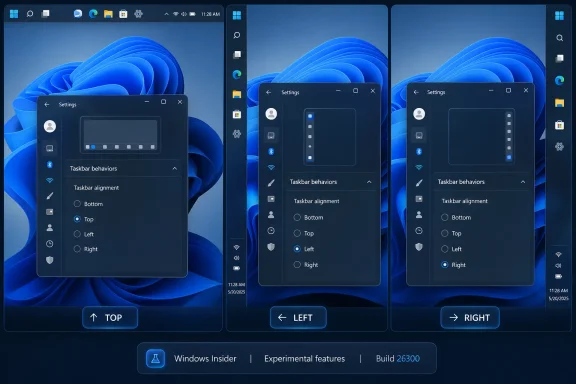 Microsoft Finally Admits the Bottom Edge Was Not Enough
When Windows 11 launched in October 2021, Microsoft sold the redesigned taskbar as part of a cleaner, calmer, more centered desktop. The Start button moved toward the middle. The taskbar was visually simplified. The shell looked more modern, more tablet-aware, and more aligned with the design language Microsoft wanted to project after years of Windows 10 sprawl.The cost was control. Windows users who had spent years docking the taskbar to the top, left, or right side of the display suddenly found that the option was gone. Registry tweaks and third-party utilities could sometimes fake parts of the old behavior, but the official Windows 11 taskbar was pinned to the bottom.
That decision was always bigger than taskbar placement. It became an emblem of a broader Windows 11 complaint: Microsoft had rebuilt familiar parts of Windows with less functionality than the versions they replaced, then asked users to accept the loss as modernization. The movable taskbar was not some obscure enterprise checkbox. It was a decades-old behavior, used by people with ultrawide monitors, vertical displays, compact laptops, multi-monitor workstations, accessibility needs, and simple muscle memory.
Now Microsoft is reversing course. In the new Insider work, taskbar position is exposed under Settings > Personalization > Taskbar > Taskbar behaviors, with choices for bottom, top, left, and right. That is the headline. The real story is that Microsoft has decided the future of Windows 11 cannot be built only by pushing forward; it also has to repair the regressions users never stopped noticing.
The Taskbar Became a Proxy War Over Windows 11 Itself
The Windows taskbar has always carried more emotional weight than its thin strip of pixels suggests. It is the thing users touch dozens or hundreds of times a day. It is where running apps, pinned apps, search, notifications, clocks, system trays, and muscle memory converge. When Microsoft changes it, users feel the change before they can articulate it.Windows 11’s taskbar redesign removed or delayed several capabilities that had existed in Windows 10. Drag-and-drop support was missing at launch. Ungrouped taskbar buttons and labels took time to return. The system tray went through its own rounds of simplification and restoration. Each removed feature may have looked defensible in isolation, but together they fed the perception that Windows 11 was not simply redesigned — it was reduced.
That perception mattered because Windows is not a phone OS where users expect Apple-like design mandates or Android-style launcher churn. Windows is the general-purpose desktop platform for people who build their own workflows. A sysadmin with three monitors, a developer with a vertical display, a trader with a dense wall of windows, and a home user who just likes the taskbar at the top are not edge cases in the Windows ecosystem. They are the point of the Windows ecosystem.
Microsoft’s original justification for limiting taskbar positions was technical as much as aesthetic. Rebuilding shell components meant old assumptions had to be reconsidered, and supporting every orientation affects flyouts, animations, touch targets, notification placement, app previews, system tray behavior, and multi-monitor handling. That is real engineering work. But users were never wrong to notice that “hard” had somehow become “not available” for a feature Windows had supported for years.
The New Taskbar Is a Restoration, Not a Time Machine
The returning movable taskbar should not be mistaken for a full rollback to Windows 10. The current implementation is being tested in Insider builds, and early reporting indicates that it behaves like a Windows 11 feature rather than a resurrected classic shell. That distinction matters.Microsoft is not bringing back the old taskbar code wholesale. It is adapting the Windows 11 taskbar to support multiple positions. That means the feature must fit the newer Start menu, newer system tray, newer flyout behavior, Widgets, Copilot-related entry points, search variants, and whatever other shell work Microsoft is preparing for Windows 11’s next major wave.
The implementation also includes alignment controls that vary by orientation. When the taskbar is on the left or right side, icons can be top-aligned or centered. When it is at the top or bottom, icons can be left-aligned or centered. That is a more deliberate design than the old “drag it wherever and let the shell cope” model, and it shows Microsoft trying to preserve Windows 11’s visual rules while restoring user choice.
This is why the feature will probably satisfy some users and irritate others. People who simply wanted a vertical taskbar on the left edge may get what they wanted. People who wanted every Windows 10 behavior back — including exact sizing, spacing, drag mechanics, per-monitor quirks, and old-school taskbar density — may find the new version cleaner but less flexible. Microsoft is giving ground, but it is not surrendering the Windows 11 design system.
Experimental Builds Are a Signal, Not a Shipping Date
The feature’s current home in the Windows Insider Experimental channel is important. It means Microsoft is publicly testing the work, not necessarily promising that every detail will ship unchanged to stable Windows 11 users next month. Experimental builds are where Microsoft can expose a direction, collect telemetry, absorb complaints, and still back away from edge cases that break too much.That caveat should temper the “finally” headlines. Yes, the movable taskbar is back in testing. No, it is not yet something most production machines should expect to see in Windows Update tomorrow. For IT departments, the distinction is not pedantic. Preview shell changes can create support churn, documentation drift, and training mismatches if users read a headline and assume the feature exists on their managed laptop.
Still, Insider placement is not meaningless. Microsoft does not write official blog posts and expose Settings UI for every abandoned experiment. The company has now acknowledged that taskbar mobility is a priority, described it as one of the most requested features, and placed it inside the broader effort to make Taskbar and Start more personal. That language suggests a roadmap, not a weekend hack.
The more interesting timing question is whether this lands as part of Windows 11’s next major feature wave or arrives through a more incremental controlled rollout. Microsoft’s modern Windows delivery model makes that line blurry. Features can be present in a build, hidden behind configuration, rolled out gradually, or shipped to some regions and device classes before others. For administrators, the practical advice is simple: treat this as incoming, but not yet guaranteed in the exact form testers see today.
Start Menu Repairs Show Microsoft Is Fixing a Pattern
The movable taskbar is arriving alongside another long-running Windows 11 sore point: the Start menu. Microsoft has also been testing Start improvements that give users more control over layout, recommendations, and app visibility. That pairing is not accidental.Windows 11’s Start menu was designed to be simpler than Windows 10’s tile-heavy predecessor. Live Tiles disappeared. The layout became cleaner. The center of the screen became the new default stage for launching apps and searching. But the simplification came with its own frustrations, especially around the Recommended area, limited customization, and the sense that Microsoft had reserved too much Start menu real estate for things users did not explicitly ask to see.
The new Start work appears to recognize that simplicity is not the same as inflexibility. Letting users resize or tune Start, hide or control sections, and separate recommendation behavior from broader recent-file activity all point in the same direction as the movable taskbar. Microsoft is learning, slowly, that modern Windows cannot be a museum of defaults. It has to be adjustable without making users feel like they are fighting the product.
This matters because Windows 11’s most persistent criticism has not been that it looks bad. It is that it too often behaves like Microsoft knows the one correct way to use a PC. The taskbar and Start menu are where that philosophy becomes personal. By restoring choice in both places, Microsoft is not merely polishing the shell; it is trying to rebuild trust with users who saw Windows 11 as a downgrade in daily ergonomics.
The AI Era Makes Old Desktop Controls More Valuable, Not Less
The return of taskbar mobility is happening while Microsoft is pushing Copilot deeper into Windows. That juxtaposition is hard to miss. On one track, Microsoft is talking about AI agents, taskbar-integrated assistants, and search experiences that blur the line between local files and cloud intelligence. On the other, it is restoring the ability to put a strip of icons on the left side of the screen.The second track may be more important than it looks. AI features ask users to trust the operating system with more context, more interpretation, and more interruption. If the same operating system cannot be trusted to preserve basic desktop preferences, the pitch becomes harder. A user who feels ignored over taskbar placement is less likely to welcome an assistant embedded into the places they already use every day.
This is the tension Microsoft has to manage in 2026. The company wants Windows to become an AI-forward platform, especially on new hardware with NPUs and Copilot branding. But the Windows audience is not a blank-slate consumer base waiting for a new interaction model. It is a massive installed base with habits, scripts, pinned workflows, assistive setups, corporate images, and years of accumulated expectations.
Restoring the movable taskbar is therefore not nostalgia. It is table stakes. If Microsoft wants to make the Windows shell more intelligent, it first has to prove that intelligence does not mean taking away agency. The desktop can evolve, but users need to believe that evolution will add options rather than collapse them.
Enterprise IT Will Care Less About Emotion and More About Predictability
For enterprise administrators, the movable taskbar is unlikely to be a crisis by itself. Most organizations standardize layouts loosely, if at all, and many users never change taskbar position. The bigger issue is predictability: when Microsoft changes shell behavior, help desks inherit the consequences.A movable taskbar can create small but real support wrinkles. Screenshots in documentation may no longer match user desktops. Training material that assumes a bottom taskbar may need caveats. Remote support staff may have to orient themselves when the Start button lives on a vertical edge. Kiosk and shared-device configurations may need testing if the setting becomes available under standard user accounts.
Those are manageable problems, and they are far less severe than the productivity hit felt by users who lost the feature in the first place. But they illustrate why Microsoft’s rollout path matters. If taskbar positioning arrives with clear policy controls, stable defaults, and consistent behavior across display configurations, administrators will shrug. If it arrives as another staggered Windows feature with partial availability and undocumented quirks, they will add it to the growing list of shell changes that make Windows harder to govern.
The best enterprise outcome is not that every user gets a vertical taskbar. It is that Microsoft treats this as a configurable desktop capability with sane defaults, documented behavior, and minimal surprise. That is the difference between customization and chaos.
Developers and Power Users Were Right to Be Annoyed
The most passionate complaints about Windows 11’s fixed taskbar often came from users who knew exactly why they wanted it elsewhere. Developers with ultrawide monitors may prefer a vertical taskbar because horizontal space is abundant while vertical space is precious. Users with top-mounted workflows may want window controls, browser tabs, and taskbar items near the same area of the display. Multi-monitor users may build habits around specific edges that reduce pointer travel.These are not decorative preferences. They are workflow decisions. A left-side taskbar on a widescreen monitor can expose more running apps without eating vertical document space. A top taskbar can align with decades of personal habit or with layouts borrowed from other desktop environments. A right-side taskbar can keep controls away from left-docked tool panels in creative or development software.
Microsoft’s mistake was not merely removing a feature. It was underestimating how many Windows users treat the desktop as a workbench. You do not improve a workbench by welding every drawer shut because most people use the middle one.
The restoration validates the complaint even if Microsoft never says so bluntly. Users asked for the movable taskbar for years because the absence made Windows 11 worse for them. Microsoft listened late, but it listened.
The 98 Percent Argument Was Always Too Small
One common defense of Microsoft’s original decision was usage share. If the overwhelming majority of Windows users kept the taskbar at the bottom, why spend engineering time supporting the small minority who moved it? In a telemetry-driven company, that argument has obvious appeal.It is also incomplete. A feature used by a minority can still be central to a platform’s identity. Windows has long won loyalty not because every user changes every setting, but because users believe they could change the setting that matters to them. The long tail of customization is part of the product’s social contract.
The bottom-taskbar majority also masks the intensity of minority use. A person who never moves the taskbar does not care if the option exists. A person who relies on a vertical taskbar may care every single day. Removing an unused option for one group can be invisible; removing a core workflow for another can be alienating.
That asymmetry is where Windows 11 repeatedly stumbled. Microsoft optimized for cleaner defaults but sometimes treated low-percentage behaviors as disposable. The movable taskbar’s return suggests a more mature view: defaults can be opinionated, but the platform should not confuse default behavior with the only legitimate behavior.
The New Settings UI Matters More Than Dragging
Some users will focus on whether Windows 11 allows the old drag-to-reposition behavior. That was part of the classic feel: unlock the taskbar, drag it to another edge, and keep working. It was direct, discoverable for some, and dangerously easy to trigger by accident for others.The new approach, at least in testing, emphasizes Settings rather than freeform dragging. That may disappoint purists, but it is probably the right compromise for modern Windows. A Settings-based control is clearer for documentation, easier to manage, less likely to be triggered accidentally, and more compatible with the way Windows 11 centralizes personalization.
It also reflects how Microsoft now thinks about shell configuration. The taskbar is no longer just a strip that can be dragged around like a window. It is a managed surface with widgets, search, Copilot entry points, system tray components, overflow logic, and adaptive behavior. Moving it is not a gesture; it is a mode.
That framing may irritate longtime Windows users who prefer direct manipulation. But if the Settings model makes Microsoft more willing to support all four edges reliably, it is a trade worth considering. The priority is not recreating every affordance from 2009. The priority is restoring durable control in a shell that can survive the next decade of Windows features.
The Smaller Taskbar Is the Other Half of the Apology
Alongside taskbar movement, Microsoft is also testing a smaller taskbar mode. That may sound secondary, but it speaks to the same underlying grievance. Windows 11’s taskbar often feels large, especially on compact laptops where every vertical pixel counts.A smaller taskbar gives users back space. It also signals that Microsoft understands not every PC is a touch-first convertible or a spacious desktop monitor. The Windows hardware ecosystem includes cheap education laptops, dense enterprise notebooks, handheld experiments, remote desktops, and high-DPI displays where default sizing can feel wasteful.
The size issue is especially relevant because Windows 11’s centered, padded design language has always walked a fine line between elegance and bloat. Rounded corners, larger hit targets, and breathing room can make the OS feel modern. They can also make it feel like the interface is spending pixels it did not earn.
By pairing movement with size control, Microsoft is addressing both orientation and density. That is a better answer than simply letting users move the same oversized bar to a different edge. It suggests the company is thinking about taskbar ergonomics as a whole rather than checking off a single complaint.
Search, Copilot, and the Taskbar Are Now One Battlefield
The taskbar’s future is not just about where it sits. It is about what Microsoft wants to put inside it. Search has already evolved from a local utility into a web-connected, recommendation-heavy surface. Copilot is being positioned as an optional but increasingly visible layer. The Start menu, search box, and taskbar are converging into a single contested zone.That makes customization more politically important. If Microsoft wants to experiment with AI search boxes, dynamic prompts, or assistant entry points, users will demand the ability to say no, move things, shrink things, and reclaim space. The more ambitious the taskbar becomes, the more important it is that users can shape it.
This is where Microsoft’s incentives can collide. The company benefits when high-value services are visible. Users benefit when the desktop is quiet, predictable, and arranged around their work rather than Microsoft’s engagement goals. Windows 11’s shell controversies often emerge when those incentives are out of balance.
A movable taskbar does not solve that conflict. But it gives Microsoft a better foundation. Users are more tolerant of new ideas when old controls are respected. A taskbar that can move, shrink, and align according to user preference is a more credible home for future features than one that feels locked down for Microsoft’s convenience.
Windows 11 Is Learning the Difference Between Modern and Rigid
The broader lesson is that Microsoft’s early Windows 11 design philosophy was too willing to equate modernity with constraint. A cleaner interface is not inherently better if it removes the affordances that made Windows useful to its most committed users. A simplified default is not a problem; a simplified ceiling is.The company has spent the years since launch slowly patching that gap. Features have returned. Menus have gained options. Taskbar behaviors have been restored or reworked. The arc is unmistakable: Windows 11 is becoming more like the operating system many users expected it to be in 2021.
That does not mean every complaint has been answered. The shell still has inconsistencies. Settings and Control Panel remain a long-running split-brain story. Microsoft’s account prompts, ads, recommendations, and AI placements continue to test user patience. But the taskbar reversal is a useful case study in how the company can recover: acknowledge the missing capability, rebuild it in the new framework, and expose it as a normal setting rather than a hidden hack.
There is a humility in that, even if it took too long. Windows does not need to pretend that every old feature was sacred. It does need to understand which old features represented user trust.
The Return of the Side Taskbar Rewrites the Upgrade Argument
For Windows 10 holdouts, the fixed Windows 11 taskbar was one item in a larger list of objections. Hardware requirements, UI changes, Start menu behavior, context menu redesigns, and Microsoft account pressure all contributed to resistance. But the taskbar was unusually visible because it affected the first minute of every session.Restoring taskbar movement will not magically convert every Windows 10 loyalist. Some machines cannot officially upgrade. Some users prefer Windows 10’s Start menu and density. Others simply distrust Windows 11 after years of friction. Still, removing one of the most repeated objections matters, especially as Windows 10’s consumer support era has ended and organizations continue plotting migration timelines.
For Microsoft, this is not merely about pleasing enthusiasts. Every restored feature weakens the argument that Windows 11 is a prettier but less capable Windows 10. Every practical improvement gives IT departments and power users one fewer reason to delay. The upgrade case becomes stronger when it is based not on nagging or support deadlines, but on the product becoming less annoying.
That is why the movable taskbar matters even to people who will never move it. It is evidence that Windows 11 is still negotiable. The operating system launched with some bad calls, and Microsoft is willing to unwind at least a few of them.
The Real Test Comes After the Headline
The next phase will be less glamorous than the announcement. Microsoft has to make the feature robust. Vertical taskbars need clean app previews, sensible tray behavior, correct notification placement, reliable auto-hide if supported, and sane behavior across multiple monitors. Touch and pen interactions need to make sense. Accessibility tools need to expose the right structure. Enterprise controls need to be clear.Small visual bugs will matter because they will be read through years of frustration. If the left-side taskbar clips icons, if flyouts appear awkwardly, if search degrades outside the bottom position, or if Copilot entry points behave inconsistently, users will not treat those as normal preview rough edges. They will see them as proof that Microsoft still does not really value the feature.
That is the burden Microsoft created by waiting so long. A feature restored after years of requests does not get judged like a novelty. It gets judged like a debt repayment. Users expect interest.
The company can meet that bar by resisting the urge to ship too early. The right movable taskbar is not just one that appears in Settings. It is one that disappears into daily use, the way the old feature did. The highest compliment users can pay it is to stop talking about it.
The Fix Users Asked For Is Also a Warning Microsoft Should Heed
The concrete story is simple, but the implications are wider.- Windows 11’s movable taskbar is now in Insider testing, not yet a guaranteed stable-channel feature for every PC.
- The new implementation supports bottom, top, left, and right taskbar positions through the Windows 11 Settings app.
- Microsoft is pairing taskbar movement with related personalization work, including alignment choices and a smaller taskbar mode.
- The feature is being rebuilt for the Windows 11 shell rather than restored as a perfect copy of the Windows 10 taskbar.
- The change matters because it reverses one of Windows 11’s clearest regressions and signals a broader shift toward repairing user trust.
- Administrators should watch rollout timing, policy controls, and multi-monitor behavior before treating it as production-ready.
References
- Primary source: thewincentral.com
Published: 2026-06-02T08:19:17.504834
Loading…
thewincentral.com - Related coverage: windowscentral.com
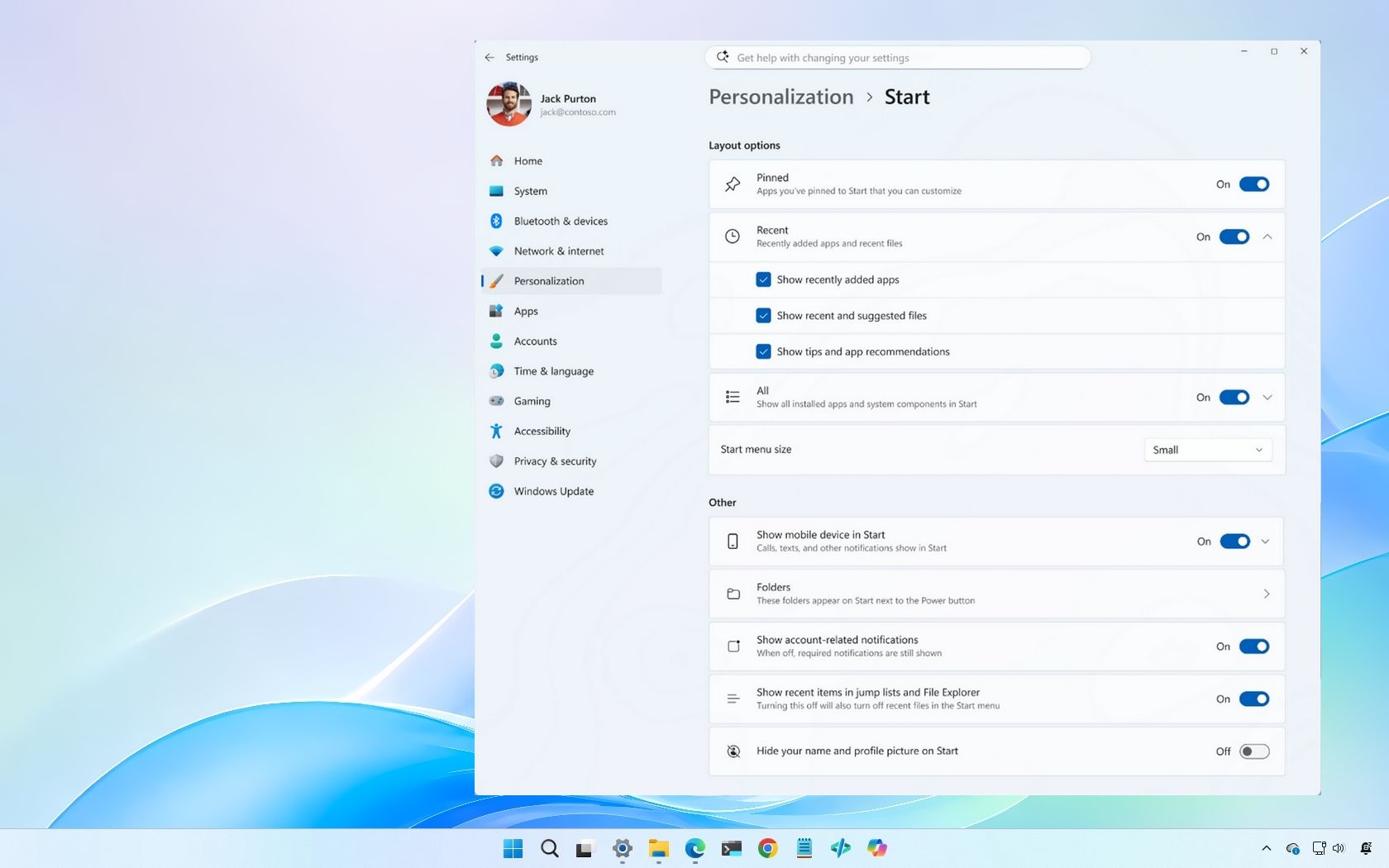
“A cleaner, more useful Start menu” — Windows 11 is getting 4 upgrades soon
Microsoft is finally fixing some of the biggest frustrations with the Windows 11 Start menu, including resizing and better customization controls. www.windowscentral.com
- Related coverage: windowslatest.com
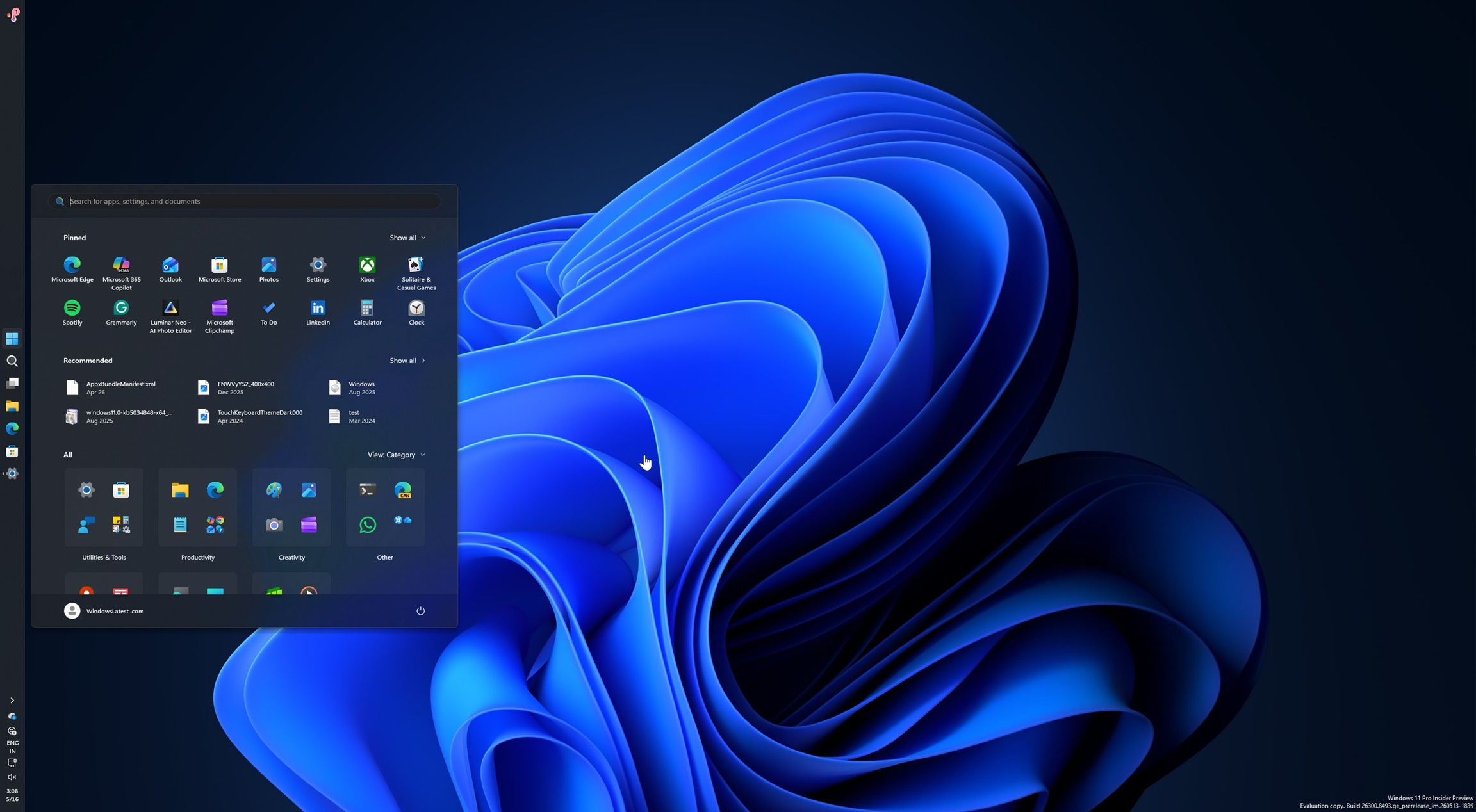
Microsoft rolls out Windows 11's movable and smaller taskbar 5 years after killing it (hands on experience)
Microsoft is finally rolling out two of the most requested features in Windows 11: the ability to move the taskbar and make it smaller. www.windowslatest.com
- Official source: blogs.windows.com

Improving Windows quality: Making Taskbar and Start more personal
In our commitment to Windows quality, we outlined our plans to deliver improvements in performance, reliability, and craft. We are also committed to blogs.windows.com
- Related coverage: notebookcheck.net

Microsoft brings back Windows 10 taskbar customizations to Windows 11
Microsoft is finally giving Windows 11 users more control over the taskbar again, including full screen-edge placement and a smaller, more compact mode. The update also improves how menus and window labels behave depending on the taskbar position. www.notebookcheck.net
- Related coverage: arstechnica.com
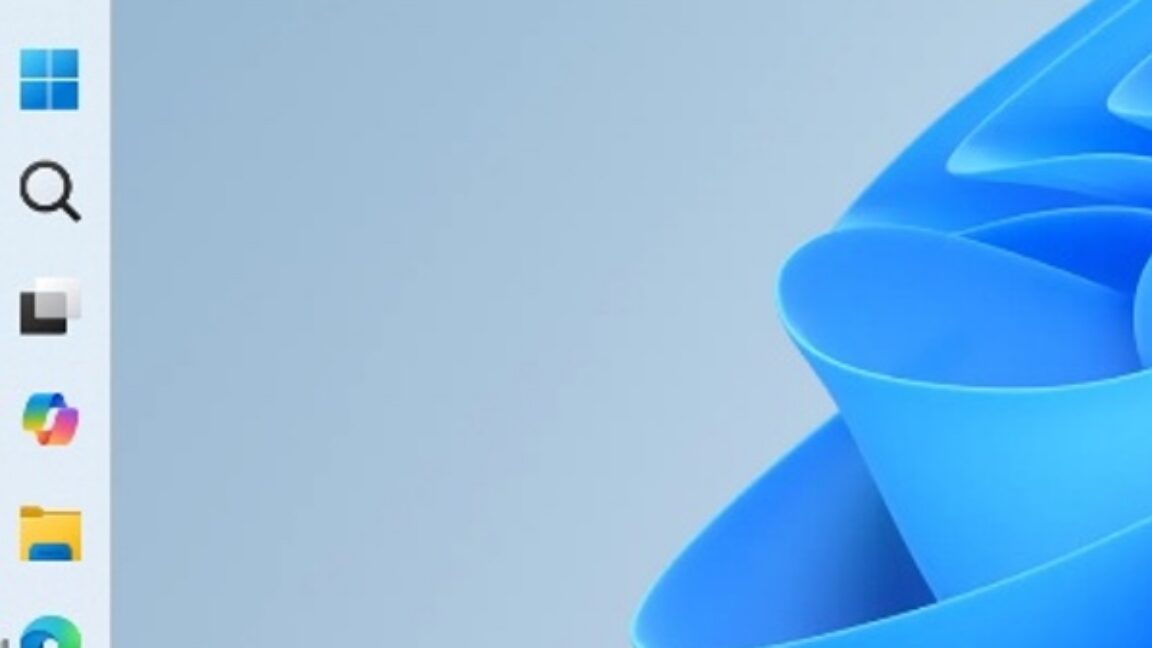
Five years later, Windows 11 brings back much-missed taskbar options (and more)
Microsoft is also testing a smaller taskbar and more customizable Start menu. arstechnica.com
- Related coverage: thefpsreview.com

Microsoft Finally Lets You Move the Windows 11 Taskbar After Nearly Five Years
It only took about five years, but Microsoft has finally relented. Windows Insiders in the Experimental channel can now move the Windows 11 taskbar to the top, bottom, left, or right of the screen, restoring a feature that Windows users had for decades before Windows 11 launched in October 2021... www.thefpsreview.com
- Related coverage: pcworld.com

Windows 11 dev accidentally leaks video of the new movable taskbar
In a video that has since been taken down, we see a movable Windows 11 taskbar in testing, with options to dock it top, bottom, left, or right. www.pcworld.com
- Related coverage: pureinfotech.com
Loading…
pureinfotech.com - Related coverage: techradar.com
Loading…
www.techradar.com - Related coverage: pcgamer.com
Microsoft announces plans to let you put the taskbar in Windows 11 pretty much anywhere you want
Top, bottom, left and right.www.pcgamer.com