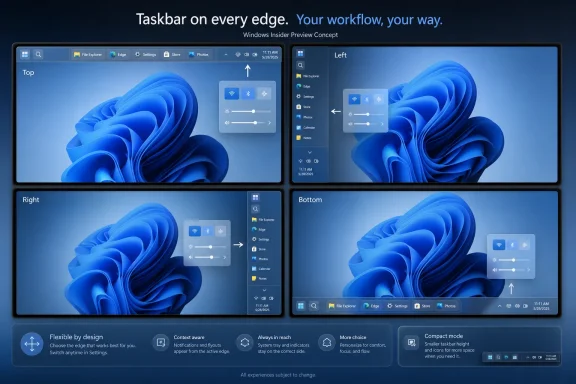
Microsoft is testing a Windows 11 taskbar setting that lets users place the taskbar at the bottom, top, left, or right of the screen, with the option appearing in Settings under Personalization, Taskbar, and Taskbar behaviors in preview builds in May and June 2026. The change looks small because it is visual, familiar, and almost comically overdue. But it is also a useful marker for where Windows 11 is in its life cycle: Microsoft is no longer merely trying to persuade users that its 2021 desktop redesign was right. It is now quietly putting back the parts of Windows it removed.

Windows 11 settings page shows Taskbar behavior options with a preview layout.Microsoft Finally Treats the Taskbar as User Territory Again​

The Windows taskbar has always been more than a launcher. It is the operating system’s handshake with the user, the strip of screen real estate where multitasking, notification triage, app switching, clock-checking, and muscle memory all meet. When Microsoft shipped Windows 11 with a rebuilt taskbar that could not move to the top or sides of the display, it was not just removing a checkbox. It was overriding decades of accumulated desktop habits.
That decision was easier to understand from Redmond’s side than from the user’s chair. Windows 11 was built around a cleaner, centered, more tablet-friendly visual language. The taskbar and Start menu were simplified, reworked, and made to look more consistent with the rest of the new shell. But the tradeoff was brutal: features Windows users had treated as basic furniture were suddenly gone.
The return of taskbar position controls is therefore less a triumph of innovation than a concession to reality. Users did not stop wanting a vertical taskbar because Windows 11 lacked one. IT pros did not stop managing fleets of ultrawide monitors, portrait displays, multi-monitor rigs, kiosks, and remote desktops because Microsoft’s design system preferred the bottom edge. Enthusiasts did not stop noticing that Windows 10 could do something Windows 11 could not.
The new setting reportedly appears where a modern Windows 11 user would expect it: Settings, not a sprawling legacy dialog. That matters. Microsoft is not simply restoring the old implementation wholesale; it is folding the old flexibility into the Windows 11 settings model. In principle, that is exactly what the company should have done from the beginning.

The Screenshot Says More Than the Checkbox​

The “taskbar-settings-pos” image attached to Paul Thurrott’s June 2026 coverage is the kind of small UI artifact that Windows watchers understand immediately. It is not a product launch, not a keynote slide, not a sweeping “Windows is back” manifesto. It is a Settings page with a new position control, and that is precisely why it matters.
For years, complaints about the Windows 11 taskbar were easy to dismiss as nostalgia. Some users wanted labels. Some wanted small icons. Some wanted drag-and-drop restored. Some wanted the old context menu. Some wanted the taskbar on the top, left, or right side of the display. Taken one by one, each demand could be framed as a niche preference.
But taken together, they described a deeper problem: Windows 11 had confused visual cleanliness with maturity. A desktop operating system earns loyalty by adapting to work habits that differ wildly across users. The person with a 13-inch laptop, the developer with three monitors, the accountant with vertical spreadsheets, the streamer with an ultrawide panel, and the administrator remoting into servers all use “the desktop” differently.
The taskbar position setting is a visible retreat from one-size-fits-all design. It tells users that the desktop edge belongs to them again. It also signals that Microsoft has accepted an uncomfortable truth: consistency is valuable only until it starts feeling like constraint.

Windows 11’s Original Sin Was Not Centered Icons​

The centered Start button became the symbol of Windows 11, but it was never the real problem. Microsoft let users move taskbar icons back to the left, and many did exactly that on day one. The deeper frustration was that the operating system allowed alignment but not placement.
That distinction sounds minor until you think about how people actually use screens. A bottom taskbar is fine on a conventional laptop. On an ultrawide monitor, a vertical taskbar can preserve more useful vertical space and reduce pointer travel. On a portrait display, side placement can be essential. On a multi-monitor setup, the “right” edge may depend on physical layout, handedness, display scaling, and years of trained behavior.
Windows 10 treated this as normal. Windows 11 treated it as out of scope.
The removal was especially jarring because the taskbar had long been one of Windows’ most forgiving surfaces. You could pin apps, rearrange shortcuts, hide it, move it, combine buttons, display labels, summon context menus, and generally bend it around your working style. Windows 11 arrived with a taskbar that looked modern but behaved like a prototype.
Microsoft has spent the years since release rebuilding that trust feature by feature. Drag-and-drop returned. Task Manager came back to the taskbar context menu. More taskbar behaviors were surfaced in Settings. Now, with alternate positions being tested, the company is addressing one of the most visible remaining gaps between Windows 10 and Windows 11.

The Return Is Real, but It Is Not a Time Machine​

The important caveat is that Microsoft is not bringing back the Windows 10 taskbar exactly as it was. The new implementation is Settings-driven, not a direct manipulation model where a user simply unlocks the taskbar and drags it to another edge. That choice will annoy purists, and not without reason.
Direct manipulation was part of the old charm. You wanted the taskbar somewhere else, so you grabbed it and moved it. It was discoverable in the old Windows way: a little messy, sometimes accidental, but immediate once learned. Windows 11’s model is more controlled. You pick from a setting, and the shell adapts.
That tradeoff reflects modern Microsoft. The company wants fewer accidental states, fewer edge cases, and a more predictable settings surface. It wants documentation, accessibility, telemetry, and policy to line up around explicit options. For enterprise administrators, that may even be preferable.
But for longtime Windows users, the difference is symbolic. Windows used to feel like something you could poke, bend, and rearrange. Windows 11 often feels like something you configure from approved panels. Restoring functionality through Settings is still restoration, but it has a different texture.
There is also the matter of completeness. A movable taskbar is only successful if the surrounding shell follows it intelligently. Start, Search, Widgets, Quick Settings, notification flyouts, previews, animations, and tooltips all need to respect the chosen edge. If a top taskbar causes awkward flyouts or a side taskbar breaks visual rhythm, users will quickly conclude that Microsoft checked the box without finishing the job.

The Engineering Debt Was Always the Hidden Story​

It has become fashionable to say Microsoft “removed” taskbar features in Windows 11, which is true from the user perspective. But technically, the company also rebuilt major parts of the shell. The missing features were not necessarily sitting behind hidden switches waiting to be re-enabled. In many cases, they had to be reimplemented.
That does not absolve Microsoft. Windows 11 was marketed as the future of Windows, not as a public shell rewrite with caveats. If a replacement taskbar cannot do what the previous taskbar did, users are entitled to call that a regression. The average person does not care whether a missing feature is the result of design preference, technical debt, schedule pressure, or architectural change.
Still, the engineering context explains why this has taken years. A taskbar placed on the left or right side is not simply the bottom taskbar rotated 90 degrees. Icons, overflow behavior, app badges, system tray elements, hover targets, touch hitboxes, clock presentation, snap affordances, and flyout positioning all become more complicated. Multi-monitor arrangements add another layer of potential weirdness.
The taskbar is also a privileged surface. It sits at the center of input, window management, notifications, and shell integration. A broken taskbar is not like a broken weather widget. It makes the whole OS feel unstable.
That is why the preview-channel rollout matters. Microsoft appears to be testing this in a controlled way rather than dropping it into stable Windows overnight. The company needs feedback not only from people who want screenshots, but from the obsessive users most likely to discover that the taskbar behaves strangely when the primary display is vertical, scaling is set to 150 percent, and a secondary monitor sits above the laptop panel.

The Settings App Becomes the New Control Panel for Old Grievances​

One of the subtler stories here is the continued migration of Windows power into the Settings app. In Windows 11, Settings is no longer merely the friendlier alternative to Control Panel. It is the arena where Microsoft is deciding which classic behaviors deserve a modern interface and which remain buried, deprecated, or gone.
Putting taskbar position under Taskbar behaviors is logical. It is also politically useful. Microsoft can present the restoration as part of Windows 11’s own evolution, not as a capitulation to Windows 10 diehards. The setting belongs to the new OS, speaks its visual language, and lives beside other taskbar controls.
That framing matters because Microsoft has a Windows 10 problem. Support for Windows 10 has now passed its mainstream end date, and the company wants the remaining holdouts to move. But a user who looks at Windows 11 and sees a less flexible desktop has little reason to view the upgrade as progress. Restoring missing taskbar features removes one more excuse.
For IT departments, the placement in Settings also suggests manageability. If Microsoft exposes the feature consistently, administrators can eventually expect documentation, policy controls, defaults, and support guidance. That is more important than it sounds. Enterprises do not merely care whether a feature exists; they care whether it can be explained, supported, and standardized.
For enthusiasts, though, the Settings-first approach will still feel constrained. The old taskbar was part of a desktop culture where right-clicking, dragging, and discovering hidden affordances rewarded curiosity. Windows 11’s shell is cleaner and less chaotic, but it can also feel less alive.

The Desktop Is Having Its Revenge on the Design System​

Windows 11 arrived during a period when Microsoft seemed unusually confident that it could simplify the desktop around a narrower set of assumptions. The centered taskbar, simplified Start menu, rounded corners, cleaner context menus, and more curated Settings pages all pushed in the same direction. The desktop would be less cluttered, less legacy-ridden, and more coherent.
There was value in that ambition. Windows 10 had become visually uneven, with modern and legacy elements coexisting in a way that made the OS feel permanently mid-renovation. Windows 11 looked more deliberate. For new users, the simplified presentation was less intimidating.
But Windows is not macOS, and attempts to make it feel more singular often collide with why people use it. Windows is the platform of weird workflows, corporate line-of-business apps, bespoke hardware, old utilities, odd monitor layouts, power-user shortcuts, and habits that have survived five hardware generations. The desktop’s messiness is not just technical baggage. It is part of the product’s value.
The taskbar position reversal is a reminder that Windows cannot win by becoming less Windows. It can modernize. It can streamline. It can retire truly obsolete plumbing. But when modernization removes everyday agency, users experience it as loss.
This is where Microsoft’s current Windows quality push becomes interesting. The company appears to be spending 2026 not only adding AI features and cloud-connected services, but also addressing longstanding complaints about the basics. That is the right order. Copilot may be strategically important, but the taskbar is emotionally important. Users forgive a lot when the fundamentals respect them.

Start and Taskbar Are Now a Trust Campaign​

The taskbar change is arriving alongside broader work on Start menu customization. Microsoft has been testing or discussing Start menu size controls, layout changes, and more personal configuration as part of its effort to improve Windows quality. The combination is not accidental.
Start and taskbar are the two most symbolic surfaces in Windows. File Explorer may be where work happens. Settings may be where configuration happens. But Start and taskbar are where users judge the personality of the OS. They are the daily front door.
When Windows 11 launched, Microsoft made that front door prettier but less accommodating. The Start menu lost some of the richness and flexibility of earlier versions. The taskbar lost long-standing placement and sizing options. Users could see the design intent, but they could also feel the missing muscle memory.
The 2026 work suggests Microsoft understands that trust has to be rebuilt at the point of irritation. If people complain for five years that they cannot move the taskbar, the eventual fix is not merely a feature. It is an admission that the complaint was legitimate.
This is also why the timing matters. Windows 11 is no longer new. By mid-2026, users have had years to decide what they like and dislike about it. The people still objecting to taskbar limitations are not confused by change. They are responding to a real reduction in capability.

Microsoft’s AI Ambitions Make the Basics More Important, Not Less​

There is an easy cynical read: Microsoft is restoring taskbar options because it needs goodwill while pushing Copilot, cloud services, ads, recommendations, account prompts, and AI features deeper into Windows. That read is not entirely unfair. Windows users have become sensitive to anything that feels like the OS serving Microsoft’s business model before the user’s workflow.
But there is a more constructive interpretation too. The more Microsoft asks Windows to become an intelligent, cloud-connected, AI-assisted platform, the more it must prove that it still cares about local control. A user who cannot move a taskbar is unlikely to trust an assistant that wants to summarize files, alter settings, or mediate tasks across apps.
Basic customization is not a distraction from Microsoft’s AI strategy. It is a prerequisite for credibility. If Windows is to become more proactive, it must first become more respectful. Otherwise, every new intelligent feature arrives under suspicion.
The taskbar is a small test of that respect. It tells users whether the OS adapts to them or whether they must adapt to the OS. Microsoft does not need to let every user redesign every pixel. But it does need to preserve the classic Windows bargain: this is your PC, and the shell should acknowledge that.
That bargain has been strained in recent years. Recommendations in Start, promotional prompts, default-app friction, account nudges, and cloud-first assumptions have all fed the feeling that Windows sometimes behaves like rented space. Restoring taskbar movement will not erase that perception, but it chips away at it in the one place everyone sees.

The Enterprise Case Is Less Nostalgic and More Practical​

In business environments, the movable taskbar is not mainly about nostalgia. It is about standardization, accessibility, screen usage, and support. Some organizations have users with specialized display layouts. Others have training materials and workflows built around older desktop assumptions. Some accessibility needs are also highly individual, and taskbar placement can affect reach, visibility, and comfort.
A left or right taskbar can make better use of modern widescreen displays, especially when vertical space is limited. A top taskbar can suit users who live in browser tabs, remote sessions, or design tools where bottom-edge space is better reserved for application UI. In shared workstations or labs, being able to match Windows 11 layouts to existing Windows 10 habits can reduce friction.
Administrators will also care about whether the setting survives reboots, profiles, upgrades, and multi-monitor changes. A feature that works for one enthusiast on a test laptop is not automatically enterprise-ready. Microsoft will need to make sure the experience is predictable across hardware, docking stations, display scaling, and remote desktop scenarios.
The policy story is equally important. If taskbar position becomes a supported setting in stable Windows, organizations may want to enforce or preconfigure it. That means Microsoft should avoid treating it as a cosmetic flourish. For enterprise Windows, anything on the taskbar can become operational.
There is also a migration angle. With Windows 10 now on borrowed time for many environments, every restored Windows 11 capability helps reduce resistance. The taskbar alone will not determine an enterprise migration, but it can show up in pilot feedback as one of those “why did they remove this?” complaints that slows acceptance.

Enthusiasts Will Notice the Missing Pieces First​

The first wave of reaction will not be satisfied merely because the taskbar moves. Enthusiasts will immediately compare Windows 11’s implementation to Windows 10’s and find differences. That is not nitpicking; it is how shell regressions get documented.
They will ask whether taskbar buttons can show labels. They will test small taskbar modes. They will check whether every flyout opens from the correct edge. They will see how Search behaves in vertical mode. They will push the feature across ultrawide monitors, mixed-DPI setups, portrait displays, virtual machines, and remote sessions. They will complain if the system tray looks wrong, if previews feel awkward, or if icon spacing wastes too much room.
This is useful pressure. Microsoft’s best Windows shell work often benefits from cranky users who know exactly what used to work. The danger is that Microsoft treats the restoration as done once the obvious checkbox exists. The real work is in the edge cases.
A vertical taskbar that cannot comfortably handle pinned apps, running apps, tray icons, overflow, notifications, and clock visibility will feel half-restored. A top taskbar that causes window controls or snap layouts to behave oddly will create new irritation. A setting that is unavailable on some configurations without explanation will invite the usual Windows folklore.
The good news is that preview testing is designed for this. The bad news is that Windows history is full of features that entered testing with rough edges and shipped with several of them still attached.

The Windows 10 Comparison Will Not Go Away​

Microsoft would probably prefer that users judge Windows 11 on its own merits. That is reasonable, but unrealistic. Windows 10 is still the comparison point for millions of users because it was the OS they used before Windows 11, and because many of its desktop behaviors felt more complete.
The taskbar is one of the clearest examples. Windows 10 may have been visually less refined, but it offered more taskbar flexibility. Windows 11 looked cleaner but removed options. For users who care about function over polish, that was a bad bargain.
Restoring taskbar movement narrows the gap, but it does not erase the memory. The lesson for Microsoft should be institutional: do not ship a “modernized” replacement for a core Windows component until it covers the ordinary use cases of the component it replaces. Users will tolerate a learning curve. They will not happily tolerate lost capability presented as progress.
This is especially true for Windows because its user base is so broad. Apple can impose more opinionated interface decisions because macOS has a different culture and a narrower hardware ecosystem. Linux desktops can fragment because choice is the point. Windows has to serve everyone from gamers to government agencies, and that means backwards compatibility is not just an API promise. It is an interface expectation.
The taskbar controversy was therefore predictable. Microsoft chose a cleaner shell and underestimated how many users considered the old flexibility essential. The 2026 reversal is welcome, but it is also a case study in avoidable friction.

A Better Windows 11 Is Emerging in Reverse​

There is a strange pattern to Windows 11’s maturation: the OS is becoming better partly by becoming more like the Windows it replaced. That sounds damning, but it is not entirely so. Good platforms evolve by absorbing criticism. Bad platforms insist that the original vision was perfect.
Windows 11 today is more capable than the initial release. The shell has gained back missing behaviors. Settings has expanded. File Explorer has evolved. The taskbar is slowly recovering its power-user credentials. Microsoft is also making changes to Start that suggest it has heard the complaint that Windows 11’s front door felt too rigid.
The question is whether this is a sustained philosophy or a temporary quality campaign. If Microsoft sees 2026 as the year to clean up Windows 11’s most obvious irritants before pushing harder into the next wave of AI and cloud integration, users may get a better OS but not necessarily a more humble one. If, instead, Microsoft internalizes that desktop agency is a competitive advantage, Windows could come out stronger.
There is reason for cautious optimism. The company’s willingness to publicly discuss requested taskbar and Start improvements suggests it knows the complaints are not merely forum noise. The placement of these features in modern Settings also indicates that Microsoft is investing in proper integration rather than relying on unsupported hacks.
Still, users should judge by shipping behavior, not announcements. Preview features can change. Rollout timing can slip. Some options may arrive in stages. The stable-channel experience is what matters.

The New Taskbar Setting Turns a Five-Year Complaint Into a Test​

The practical advice is simple: if you are not comfortable running preview builds, wait. A taskbar position setting in testing is not the same as a finished production feature. But for Windows watchers, the direction is now clear enough to matter.
The return of taskbar positioning should be read as part of a broader reset in Microsoft’s relationship with Windows 11 users. The company is trying to show that it can modernize the desktop without freezing users into a single layout. Whether it succeeds depends on how complete, reliable, and manageable the final implementation is.
For now, the concrete takeaways are these:
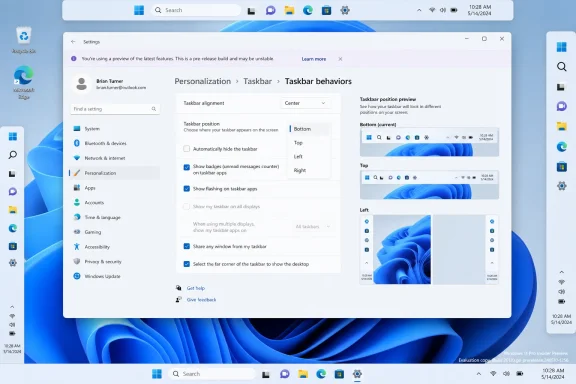
  • Microsoft is testing a Windows 11 taskbar position control that supports bottom, top, left, and right placement.
  • The new option appears in the modern Settings app under the taskbar behavior controls rather than through the old drag-to-move model.
  • The feature addresses one of the most persistent complaints from users who moved from Windows 10 to Windows 11.
  • The real test will be whether Start, Search, system tray, notifications, previews, and multi-monitor behavior adapt cleanly to every taskbar position.
  • The change matters for enthusiasts and enterprises alike because taskbar placement affects workflow, accessibility, screen space, and migration friction.
  • Microsoft’s broader Windows 11 quality push will be judged less by promises than by whether restored features feel finished when they reach stable builds.
The taskbar’s return to the top and sides of the screen will not by itself redeem every controversial choice in Windows 11, and it will not settle the larger argument over where Microsoft is taking the PC. But it does show that the company is relearning an old lesson: Windows succeeds when it gives users room to make the machine their own. If Microsoft carries that lesson into Start, File Explorer, Settings, Copilot, and whatever comes next, Windows 11’s most important upgrade may not be a new feature at all, but a renewed willingness to listen.

References​

  1. Primary source: thurrott.com
    Published: 2026-06-02T20:10:31.307169
  2. Related coverage: windowscentral.com
  3. Official source: blogs.windows.com
  4. Official source: support.microsoft.com
  5. Related coverage: windowslatest.com
  6. Related coverage: pureinfotech.com
 

Microsoft is testing a redesigned Windows 11 taskbar experience in Insider preview builds, restoring the ability to place the taskbar on the top, left, right, or bottom edge of the screen and adding a genuinely smaller mode after years of user complaints. The change is not just cosmetic housekeeping. It is Microsoft admitting, slowly and without quite saying so, that Windows 11’s clean-sheet taskbar threw away too much muscle memory in pursuit of visual discipline.

Windows “Taskbar on every edge” preview shows four edge layouts on a blue Windows 11 background.Microsoft Rebuilds a Feature It Should Not Have Removed​

When Windows 11 arrived in 2021, the centered taskbar was presented as part of a calmer, more modern desktop. The tradeoff was that decades of Windows customization suddenly vanished. Users could no longer drag the taskbar to the top or sides, and the old small-taskbar behavior was either missing or reduced to unsupported registry tinkering.
That mattered because the taskbar is not decorative trim. It is the operating system’s steering wheel. For many users, especially those with ultrawide monitors, portrait displays, remote desktops, and dense multitasking setups, taskbar placement is part of how the workstation is physically organized.
The new preview work changes that calculus. Microsoft’s current Insider builds expose taskbar position controls in Settings, letting users choose the bottom, top, left, or right edge. The company is also testing behavior that adapts flyouts, alignment, labels, and visual affordances to the taskbar’s location instead of simply bolting a vertical strip onto a horizontal design.
That last point is important. A rushed restoration would have been easy to mock. A serious one requires the Start menu, Search, tray, labels, badges, animations, and window switching to behave as though alternate taskbar positions were planned rather than begrudgingly tolerated.

The Settings App Becomes the New Taskbar Control Room​

The old Windows way was direct manipulation: unlock the taskbar, drag it, resize it, move on. The Windows 11 way is Settings-first. That is less tactile, but it is more consistent with how Microsoft now wants the shell to be administered, documented, and controlled.
In the new implementation, the taskbar’s placement lives under Settings > Personalization > Taskbar, specifically in the behaviors area. This is the same broad surface where users already manage alignment, labels, badging, hidden icons, and related shell preferences. The taskbar is no longer a thing you grab; it is a policy-like object you configure.
That will irritate longtime Windows users who remember when the desktop felt more physically malleable. But for administrators, Settings-first design has advantages. It creates a clearer path for future management hooks, reduces accidental movement, and makes the feature easier to explain in support documentation.
The cost is that Windows feels less like a desktop you can shape in the moment. Microsoft’s bet is that discoverability and predictability beat old-school immediacy. The irony is that the company is using a modern control model to bring back a legacy behavior users never stopped wanting.

The Smaller Taskbar Is the More Honest Apology​

The movable taskbar will get the headlines, but the smaller taskbar may be the more meaningful daily improvement. On smaller laptops, handheld PCs, and low-resolution remote sessions, the default Windows 11 taskbar consumes space with a confidence it does not always deserve. A compact mode gives that space back.
Earlier Windows 11 experiments with smaller icons did not fully recreate the old compact taskbar experience. Shrinking icons while leaving the bar’s footprint largely intact is the sort of compromise that satisfies a settings checklist but not an actual user. The newer work appears more serious: smaller icons, a shorter taskbar, and more usable vertical room for applications.
That matters because vertical pixels are still precious. Browser tabs, Office ribbons, IDE toolbars, and web apps already fight for height. A taskbar that can shrink is not nostalgia; it is a practical concession to how much modern software chrome has colonized the screen.
It also signals a broader shift in Microsoft’s Windows thinking. For much of the Windows 11 era, the company seemed comfortable telling users that the new design was the answer. Now it is starting to acknowledge that density is not a dirty word. Some people want a calmer desktop; others want a cockpit.

The Return of Labels Changes the Multitasking Story​

Taskbar placement is only half the argument. Labels and uncombined buttons are the other half, especially for users who live in dozens of windows rather than a handful of neatly grouped apps. A vertical taskbar with labeled windows can be far more useful than a horizontal row of indistinguishable icons.
Microsoft’s newer taskbar work appears to account for that. In alternate positions, labeled buttons and “never combine” behavior are expected to continue working, which means a left or right taskbar can become a genuine window list again. That is closer to the way many power users remember Windows behaving before the Windows 11 redesign flattened the model.
This is not just sentimentality. Grouped icons are efficient for casual use, but they impose friction when several windows belong to the same app. Anyone comparing spreadsheets, juggling multiple terminals, or moving between browser profiles knows the pain of clicking an app icon only to wait for a thumbnail chooser.
A vertical taskbar makes that workflow more legible. It turns the side of the screen into a visible inventory of work. For IT pros, developers, and administrators, that can be the difference between a desktop that feels organized and one that feels like a stack of hidden state.

The System Tray Still Has to Prove It Can Travel​

Moving the taskbar is deceptively hard because the taskbar is not one feature. It is a collection of old and new shell components pretending to be a single strip. Start, Search, Task View, Widgets, pinned apps, running apps, tray icons, clock, notifications, quick settings, battery status, network, volume, overflow icons, badges, and tooltips all have to survive relocation.
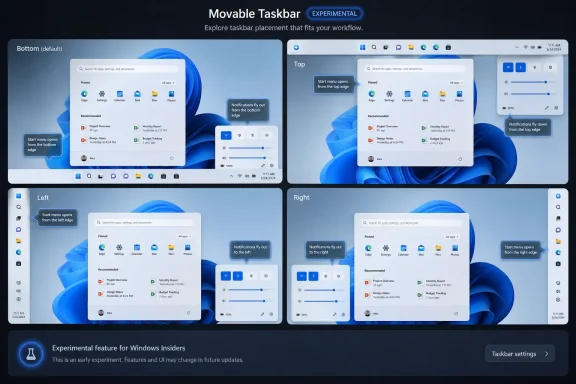
That is why the implementation matters more than the checkbox. A top taskbar must cause menus to open downward. A side taskbar must make sensible choices about clock layout, tray density, overflow behavior, and touch targets. Flyouts should appear from the correct edge, not from some ghost of the bottom taskbar.
Microsoft has said the related UI elements should originate from the taskbar in its new positions, but preview users should still expect rough edges. The company is testing visual polish, alignment, and alternate-position behavior in stages. That is exactly the kind of work that looks trivial until it breaks a notification flyout on a secondary monitor.
For enterprise users, the lesson is simple: do not confuse Insider availability with production readiness. The feature is real, but the shell is one of the most compatibility-sensitive parts of Windows. A taskbar bug is not obscure when it is visible every second of the workday.

Windows 11’s Original Sin Was Treating Familiarity as Clutter​

The broader story is that Windows 11 removed too many power-user affordances at once. Microsoft cleaned up the interface, but it also narrowed the operating system’s vocabulary. The taskbar could be centered, simplified, and visually consistent, but it stopped being the adaptable tool many users had spent years refining.
That was always a strange decision for Windows. Unlike macOS, Windows has historically won by being broad, accommodating, and a little messy. It serves gaming rigs, accounting desktops, medical carts, factory terminals, developer workstations, classroom laptops, kiosks, VDI sessions, and home PCs assembled from parts.
A one-size taskbar fits that world poorly. The bottom-centered default may be fine for a mainstream laptop, but it is not sacred. On a portrait monitor, a bottom taskbar wastes horizontal logic. On an ultrawide display, a side taskbar can reduce pointer travel and make open windows easier to scan.
Microsoft now appears to be rediscovering a basic Windows principle: defaults should be opinionated, but options should be generous. The company does not need to abandon the Windows 11 design language to admit that users deserve more than one sanctioned layout.

The Insider Channel Is Now a Trust-Rebuilding Machine​

The timing is not accidental. Microsoft has spent the past few years pushing AI features, cloud prompts, account nudges, and service integrations into Windows while asking users to accept that the underlying desktop was still being improved. Restoring taskbar flexibility is a small but symbolically potent counterweight.
It tells enthusiasts that Microsoft is listening to old complaints, not merely inventing new surfaces for Copilot. It also gives the Windows Insider Program something concrete to test. A movable, smaller taskbar is the kind of change users can evaluate in minutes and debate for weeks.
There is a reputational repair element here. The Windows community has long memories, especially when features vanish without persuasive explanation. Bringing back the movable taskbar does not erase five years of frustration, but it does suggest that Microsoft’s current Windows quality push is more than bug-fix theater.
The danger is that Microsoft overpromises by implication. Insider features can change, slip, or arrive partially. If the company lets users taste a better taskbar and then delays it into uncertainty, the goodwill could evaporate quickly.

Administrators Should Care, Even If Users Do Not​

At first glance, taskbar relocation sounds like a personal preference story. In managed environments, it is also a support and standardization story. Some organizations lock down desktop layouts; others allow power users to tune their workspace. Either way, a new taskbar model changes the support surface.
Help desk scripts that assume a bottom taskbar may need adjustment. Training material with screenshots may age faster. Remote support sessions may encounter users whose Start button is at the top-left, not the bottom-center. These are not catastrophic issues, but they are real.
There is also a deployment question. If Microsoft exposes new taskbar controls through policy or provisioning, IT departments may eventually be able to standardize layouts by role or device class. A call-center desktop, a developer workstation, and a field tablet do not need the same shell posture.
The more interesting possibility is per-monitor behavior. Reports and early testing suggest Microsoft has been thinking beyond a single global placement model. If Windows can remember taskbar preferences by position or display context, the feature becomes much more useful for docking stations, multi-monitor rigs, and hybrid work setups.

The AI Desktop Still Needs a Better Shell​

The taskbar changes arrive in a Windows era dominated by Copilot branding and on-device AI ambitions. That makes the old-school nature of this work refreshing. Users do not need a neural model to understand why a left taskbar is useful. They need the operating system to stop removing affordances that made them productive.
This is the uncomfortable lesson for Microsoft. AI features may define the marketing cycle, but trust in Windows is built in the mundane details: whether Search finds local files before web fluff, whether Settings exposes the right controls, whether File Explorer stops regressing, whether the taskbar behaves like a professional tool.
A better taskbar also helps AI features indirectly. If Microsoft wants Windows to become a context-aware productivity environment, the shell must first feel coherent. Users are less likely to embrace futuristic overlays if the basic desktop still feels less capable than it did in Windows 10.
The company’s recent focus on Start, Search, taskbar badges, Widgets noise, and shell polish suggests it understands the problem. The desktop has to earn back attention before it can ask for more of it.

The New Taskbar Is a Preview, Not a Victory Lap​

The most important caveat is that this remains preview work. Insider builds are not guarantees, and Experimental channel features are especially fluid. Microsoft can refine the UI, change defaults, limit rollout, or postpone broader availability while it works through reliability and design issues.
That said, the direction is now difficult to ignore. Microsoft has publicly framed taskbar and Start personalization as part of a Windows quality push. It has shown the feature, documented the build behavior, and begun polishing follow-up issues. This is no longer a vague rumor about hidden flags.
Users should still be cautious about installing preview builds on primary machines just to get a movable taskbar. Shell regressions can be uniquely disruptive because they affect launching apps, switching windows, using notifications, and accessing system controls. A broken taskbar is not a background bug.
For enthusiasts with test hardware or virtual machines, though, this is exactly the kind of preview worth evaluating. Microsoft needs feedback not only on whether the taskbar moves, but whether it feels native in every position. The difference between restored and restored well will be decided in those details.

The Taskbar Fight Leaves Microsoft a Short List of Obligations​

The practical meaning of the new taskbar is narrower than the emotional reaction to it. Microsoft is not reverting Windows 11 to Windows 10, and it is not giving up on a modern shell. It is conceding that modernization works best when it preserves user agency.
  • Microsoft is testing taskbar placement on all four screen edges in Windows 11 Insider preview builds.
  • The new compact taskbar mode appears designed to reduce both icon size and taskbar height, not merely shrink the glyphs.
  • Labels, uncombined app buttons, flyouts, and alignment behavior matter as much as the headline ability to move the bar.
  • The feature is still preview software, so production users should wait for stable-channel availability before treating it as a deployment assumption.
  • The change is part of a larger Windows quality push that also touches Start, Search, Widgets, visual polish, and notification behavior.
  • The real test is whether Microsoft keeps these options manageable for IT while preserving flexibility for power users.
The return of a movable, smaller taskbar will not by itself settle the argument over Windows 11, but it points in the right direction. Microsoft spent years asking users to accept that a less flexible desktop was the price of modernization; now it is learning that the better bargain is a modern desktop that remembers why Windows users valued control in the first place.

References​

  1. Primary source: thurrott.com
    Published: 2026-06-02T20:10:17.799296
  2. Related coverage: techradar.com
  3. Related coverage: windowscentral.com
  4. Official source: support.microsoft.com
  5. Related coverage: notebookcheck.net
  6. Related coverage: arstechnica.com
  1. Related coverage: windowslatest.com
  2. Official source: learn.microsoft.com
  3. Related coverage: tomsguide.com
  4. Related coverage: pcgamer.com
  5. Official source: blogs.windows.com
  6. Related coverage: pureinfotech.com
  7. Related coverage: windowsforum.com
  8. Related coverage: windowsnews.ai
 

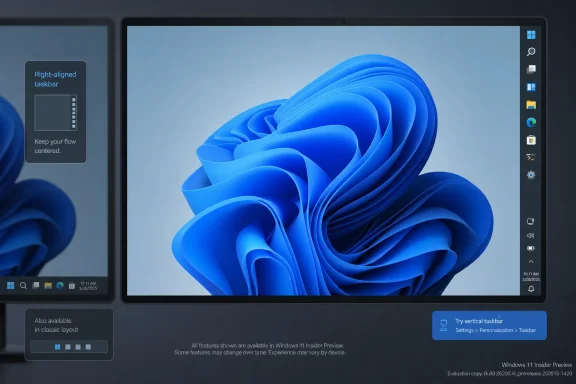
Microsoft began testing a movable, smaller Windows 11 taskbar with Windows Insiders in May 2026, bringing back top, left, and right taskbar placement nearly five years after Windows 11 launched with the taskbar locked to the bottom of the screen. The change is not just a nostalgia concession for power users who never forgave the 2021 redesign. It is an admission that Windows 11’s most visible interface bet was too rigid for the many ways people actually use PCs. Microsoft is now trying to turn a long-running complaint into evidence that Windows can still listen.

Windows 11 interface preview with a blue swirl wallpaper on a monitor displaying taskbar settings.Microsoft Finally Reopens the Edge of the Screen​

The taskbar is not glamorous infrastructure. It is the curb cut of the Windows desktop: boring when it works, maddening when someone removes it in the name of aesthetic order. Windows 11’s original sin was not that it centered the Start button or rounded the corners. It was that Microsoft took a tool with decades of accumulated user muscle memory and replaced choice with taste.
That mattered because Windows is not an appliance operating system in the Apple sense. It lives on 13-inch ultraportables, ultrawide monitors, kiosk displays, medical workstations, gaming rigs, finance desks, and remote desktops viewed through other desktops. The taskbar’s location is not decoration in those environments. It is part of how a workflow is built.
The new Insider work reverses one of the clearest regressions from the Windows 11 launch era. Users can place the taskbar on the bottom, top, left, or right edge, and Microsoft says related behaviors such as Start, Search, flyouts, icons, labels, and alignment will adapt to the selected position. A smaller taskbar mode also aims to reduce the height of the bar and return some vertical space to apps.
The timing is important. This is not happening in 2021, when the criticism first arrived. It is happening in 2026, after Microsoft spent years pushing Windows 11 as the calmer, cleaner, more modern desktop while enthusiasts kept pointing out that “modern” had somehow meant “less capable.”

The Windows 11 Taskbar Was Always a Design Referendum​

When Windows 11 debuted on October 5, 2021, the taskbar became the simplest way to explain the operating system’s philosophy. Microsoft wanted a centered, simplified, visually consistent desktop that looked more approachable and less like an inheritance from Windows 95. That was a legitimate design goal. Windows 10 had become visually incoherent, and the old shell carried plenty of historical baggage.
But Microsoft confused simplification with removal. The Windows 11 taskbar lost several behaviors that long-time users had treated as basic furniture: moving it to another edge, using a genuinely small taskbar, dragging files onto app icons in the early builds, and configuring labels and grouping with the same flexibility available in older versions. Some of those capabilities came back earlier. Others lingered as open wounds.
The backlash was predictable because the taskbar sits in the zone where personal preference and productivity overlap. A centered taskbar may look balanced in screenshots, but a left-mounted vertical taskbar can make better use of widescreen displays. A top taskbar can suit users migrating from other environments or those who prefer menus and controls near the top of application windows. A compact taskbar can matter on small laptops, remote sessions, and virtual machines where every row of pixels counts.
Microsoft’s mistake was treating those choices as edge cases. In aggregate, they were not edge cases at all. They were the quiet proof that Windows’ strength has always been its tolerance for difference.

The Right-Side Taskbar Is a Small Picture of a Bigger Retreat​

The Thurrott image circulating under the “taskbar-right” attachment is powerful precisely because it looks so ordinary. There is Windows 11, with the taskbar on the right side of the screen, doing the thing Windows users could once take for granted. No Copilot fireworks, no “AI PC” branding exercise, no new subscription hook. Just a desktop element in a place a user chose.
That ordinariness is the story. For years, the Windows 11 taskbar debate became a proxy for whether Microsoft still understood that the PC is not one workflow. A right-side taskbar is unusual enough to look strange to users who have only ever lived at the bottom edge, but for some setups it is rational. On wide monitors, horizontal space is abundant. On smaller displays, vertical space is often precious. On multi-monitor arrangements, a side taskbar can reduce pointer travel or keep system controls away from application chrome.
The feature also exposes the limits of screenshot-driven design. A centered bottom taskbar photographs well. It creates symmetry. It makes marketing images look tidy. But real desktops are messy: pinned apps, overflow icons, virtual desktops, multiple monitors, window labels, language indicators, VPN clients, cloud sync status, Teams, Slack, security agents, and the occasional vendor utility that insists it deserves permanent residence near the clock.
A taskbar that can move is not merely customizable. It is more honest about the chaos of PC life.

The Smaller Taskbar Matters Because Laptops Won the Market​

The return of taskbar placement gets the emotional headline, but the smaller taskbar may matter more day to day. Windows 11’s default taskbar has always felt like it was designed for visual breathing room rather than information density. That is defensible on a large monitor. It is less defensible on a 13- or 14-inch laptop, especially when the browser, Teams, Office, and a remote desktop client are all fighting for vertical room.
Earlier Windows 11 experiments with smaller icons did not fully satisfy users because icon size alone is not the same as reclaiming taskbar height. Microsoft’s current direction appears closer to the old “small taskbar buttons” idea: smaller icons, a shorter taskbar, and more room for applications. That sounds minor until you remember how much of modern computing happens inside vertically constrained documents, timelines, spreadsheets, terminals, code editors, and browser tabs.
The change also recognizes the awkward reality of Windows on modern hardware. Laptop screens have improved, but not always in ways that help the desktop. High-DPI scaling, 16:10 panels, OLED status bars, browser UI density, and application ribbons all shape perceived space. Windows cannot control every app’s appetite for pixels, but it can stop wasting its own.
There is a philosophical reversal here. Windows 11 originally pushed calmness as a default value. The smaller taskbar says density still has a constituency. For IT pros and power users, that is not a cosmetic preference. It is part of how they keep more state visible at once.

Microsoft Is Repairing Trust One Removed Feature at a Time​

The taskbar reversal fits a larger 2026 pattern: Microsoft is trying to make Windows 11 feel less like a forced march and more like a configurable platform again. Recent Start menu and taskbar work has emphasized personalization, control, and restored options rather than only new services. That is not accidental. Windows has a trust problem, and it is not confined to the taskbar.
For enthusiasts, the trust problem is about regression. Windows 11 arrived with requirements that cut off many otherwise capable PCs, then removed familiar shell behaviors, then spent years layering on cloud prompts, account nudges, Edge promotions, Teams integrations, Widgets, and Copilot entry points. Some of those features are useful. Many were introduced with the posture of inevitability rather than invitation.
For administrators, the trust problem is about change management. A desktop shell that removes knobs and later restores them creates policy churn, user training churn, and support churn. If the taskbar can be moved again, that is good news. But it also raises practical questions: how will these settings be exposed through policy, provisioning, configuration profiles, and enterprise management tooling? Will they roam? Will they behave consistently across multi-monitor systems and virtual desktop infrastructure? Will they remain stable across feature updates?
For developers, the trust problem is about platform consistency. The Windows shell is not just the thing users see; it is the thing applications assume exists in predictable ways. When Microsoft changes interaction zones, flyouts, notification surfaces, and drag-and-drop behavior, apps and users both have to adapt. Restoring configurability helps, but only if the implementation is robust enough that developers do not need to treat each taskbar orientation as a weird corner of the platform.
That is why this is more than fan service. The movable taskbar is a test of whether Microsoft can reintroduce choice without reintroducing fragility.

The Insider Label Is Doing Real Work Here​

It is tempting to talk about the movable taskbar as if it has already shipped to every Windows 11 PC. It has not. The feature is being tested with Windows Insiders, and Insider features can change, stall, or arrive in stages. Microsoft is clearly moving toward a more flexible taskbar, but the exact shape of general availability still matters.
That distinction should temper expectations. Taskbar placement touches Start, Search, system tray behavior, notifications, flyouts, animation direction, touch targets, accessibility, keyboard navigation, and multi-monitor behavior. Moving a strip of icons is easy. Making the whole shell feel native in all four orientations is not.
There are also historical reasons for caution. Windows 11 has had features announced, tested, adjusted, and delayed before. The operating system now develops through a rolling combination of feature updates, controlled rollouts, enablement packages, and app-delivered shell components. For normal users, that means “Windows 11 is getting this” often turns into “some Windows 11 PCs will see this later, depending on build, region, channel, device, and rollout status.”
Still, the Insider stage is where this belongs. A taskbar used only at the bottom can hide many assumptions. A taskbar that lives on the left or right exposes them quickly. If Microsoft is serious, the test audience will find the rough edges before the feature reaches millions of production desktops.

The Vertical Taskbar Is a Widescreen Feature, Not a Retro Fetish​

Critics sometimes frame the desire for a side taskbar as mere nostalgia, a refusal to move on from old Windows habits. That misses the hardware context. The modern PC display is commonly wider than it is tall, and ultrawide monitors exaggerate the imbalance. A vertical taskbar can be a better use of the available geometry.
This is especially true for users who keep many applications open. A bottom taskbar competes with browser tab strips, application ribbons, video timelines, spreadsheet rows, and code editor panels. A left or right taskbar consumes horizontal space, but many workflows have more horizontal slack than vertical slack. That is why the feature survived for so long in older Windows versions despite never being the default.
It also matters for multi-monitor setups. A taskbar on the inner or outer edge of a monitor can change pointer travel, reduce accidental clicks, and keep system controls away from content. Users with portrait displays, docking stations, or remote desktop windows may discover that a non-bottom taskbar makes more sense in one context than another.
Microsoft’s planned per-position alignment behavior is significant here. Centered icons on a vertical bar are visually balanced, but top-aligned icons may be faster for users who treat the taskbar as a launcher. Left-aligned icons on a horizontal bar satisfy traditional Windows muscle memory, while centered icons preserve the Windows 11 default. The point is not that one is correct. The point is that correctness depends on the desk.

The Start Menu Is the Other Half of the Apology​

The taskbar is not changing in isolation. Microsoft has also been previewing Start menu improvements intended to make Windows 11 feel less constrained. That matters because the Start menu and taskbar are a single behavioral surface in the minds of most users. If one is rigid, the other feels worse.
Windows 11’s original Start menu was cleaner than Windows 10’s tile-heavy sprawl, but it was also less expressive. Recommended items took up prominent space whether users valued them or not. App discovery could feel slower. Folders and layout controls improved over time, but the first impression stuck: Microsoft had traded a busy but flexible launcher for a prettier one with fewer user-controlled surfaces.
A more configurable taskbar therefore changes the interpretation of Start menu work. It suggests Microsoft may be moving away from the idea that the Windows shell should enforce one “modern” posture. That does not mean a return to Windows 10, nor should it. Windows 10 had its own clutter, inconsistencies, and half-finished design languages. But it does mean Microsoft is acknowledging that a desktop operating system cannot be reduced to a hero mockup.
The danger is that Microsoft restores just enough to quiet complaints while continuing to reserve the most prominent surfaces for its own priorities. Users will notice if configurability returns at the edges while the center of the experience remains crowded with recommendations, account prompts, and service hooks. The taskbar can rebuild goodwill, but it cannot carry the whole operating system alone.

Enterprise IT Will Ask the Boring Questions First​

Home users will ask when they can move the taskbar. IT departments will ask how to prevent chaos. Both questions are valid. Flexibility is valuable, but unmanaged flexibility can become another support variable.
In a business environment, the taskbar is often part of onboarding, training, and documentation. Help desk scripts assume certain locations. Screenshots assume certain layouts. Endpoint management policies may pin apps, hide widgets, control search behavior, or enforce parts of the user experience. If taskbar placement becomes widely available, admins will need clear controls over defaults, allowed positions, and whether users can change them.
Accessibility and compliance teams will also care. A side taskbar changes focus order, screen reader expectations, and spatial instructions. Touch users may experience different hit targets at the screen edge. Remote support technicians may need to identify user layouts quickly before guiding someone through a fix.
None of this argues against the feature. It argues for Microsoft doing the enterprise plumbing at the same time as the enthusiast-facing UI. The worst outcome would be a feature that delights Insiders and then becomes an unmanaged variable in large deployments. The best outcome is the familiar Windows bargain: users get choice, admins get policy, and both sides can live with the defaults.

The AI Era Makes Desktop Competence More Important, Not Less​

There is an irony in the timing. Microsoft has spent much of the last few years trying to make Windows feel central to the AI PC story, yet one of the most welcomed Windows changes of 2026 is the restoration of a decades-old taskbar capability. That is not a contradiction. It is a warning.
Users are not opposed to new features because they are new. They are opposed to new features that arrive while old pain points remain unresolved. A Copilot key, an AI Recall timeline, or a cloud-connected assistant may be impressive in isolation, but they land badly if the operating system still refuses to let someone place the taskbar where they have placed it for 20 years.
Desktop competence is the foundation on which everything else sits. If Microsoft wants users to trust AI-driven changes to search, file recall, settings, and workflow automation, it first has to show that it respects the visible, manual controls users already understand. The taskbar is a small stage for that drama, but it is a stage every Windows user sees.
This is why the new taskbar work may be more strategically important than its modest feature list suggests. It tells users that Microsoft can still fix annoyances that do not map neatly to a cloud service revenue line. In 2026, that message matters.

The Practical Win Is Real, but the Memory of the Regression Remains​

The fair reading is that Microsoft deserves credit for doing the work. Bringing back taskbar placement in a modernized shell is not as simple as flipping an old Windows 10 switch. Windows 11’s shell architecture, flyouts, animations, scaling behavior, and visual design all differ from the older implementation. The company could have continued to insist that bottom-only was the future.
But the equally fair reading is that users should not have had to wait this long. The movable taskbar was not an obscure registry tweak or an enterprise-only feature. It was a visible, user-facing option that Windows had supported for years. Its removal became a symbol of a broader habit: Microsoft sometimes ships a redesigned experience before it has restored the practical affordances that made the old experience work.
The return also does not erase the cost paid by third-party utilities and frustrated users. Tools like ExplorerPatcher, Start11, and other shell customizers gained attention because Microsoft left a vacuum. Some users stayed on Windows 10 longer than they otherwise would have. Others accepted Windows 11 while quietly resenting it. That resentment is not irrational; it is the memory of being told that a less capable desktop was progress.
Now Microsoft has a chance to turn the page, but only if the feature arrives polished and broadly available. A half-working vertical taskbar would be worse than a delayed one. The audience for this feature is disproportionately made up of users who notice details.

The Desktop Learns to Bend Again​

The most concrete lesson from the new taskbar work is that Windows 11 is becoming more negotiable. That is a healthier posture for an operating system that serves both consumers and professional environments.
  • Microsoft is testing taskbar placement on the bottom, top, left, and right edges of the screen in Windows 11 Insider builds.
  • The smaller taskbar mode is designed to reduce the taskbar’s footprint, not merely shrink icons while leaving the same bar height.
  • Alignment options are expected to vary by taskbar orientation, giving vertical and horizontal layouts settings that make sense for each position.
  • The feature remains in testing, so production users should wait for a stable rollout before planning workflows or support documentation around it.
  • The broader significance is that Microsoft is restoring user choice in one of the most visible areas where Windows 11 originally removed it.
The taskbar’s return to the right edge is not a revolution, and that is precisely why it matters. Windows does not need every update to reinvent the PC; sometimes it needs to remember why people trusted the PC in the first place. If Microsoft can carry that humility into Start, search, notifications, account setup, AI features, and enterprise controls, Windows 11 may yet become what it was supposed to be in 2021: not a prettier cage, but a modern desktop that bends around the user.

References​

  1. Primary source: thurrott.com
    Published: 2026-06-02T20:10:17.743620
  2. Related coverage: windowscentral.com
  3. Official source: blogs.windows.com
  4. Related coverage: windowslatest.com
  5. Related coverage: arstechnica.com
  6. Related coverage: notebookcheck.net
  1. Related coverage: thefpsreview.com
  2. Official source: techcommunity.microsoft.com
  3. Related coverage: pureinfotech.com
  4. Related coverage: windowsforum.com
  5. Related coverage: techradar.com
  6. Related coverage: pcgamer.com
 

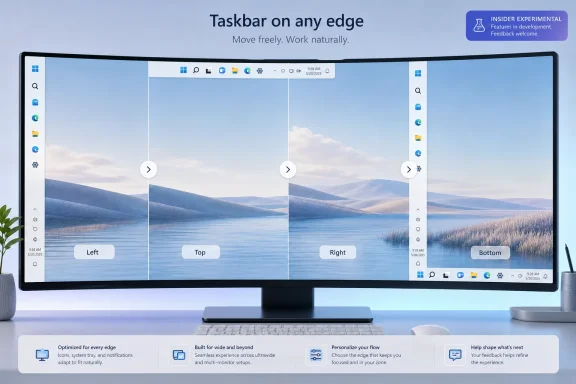
Microsoft began testing movable Windows 11 taskbars in May 2026 through its Windows Insider Experimental channel, letting testers place the taskbar on the bottom, top, left, or right edge of the screen from the Taskbar behaviors section in Settings. The change is small enough to fit inside a single dropdown, but large enough to reopen one of Windows 11’s longest-running arguments. After nearly five years of telling users, implicitly or explicitly, that the bottom taskbar was the future, Microsoft is now admitting that the desktop still belongs partly to the people who use it all day.
That is the real story here. Not that a strip of icons can move a few hundred pixels. The story is that Windows 11’s most conspicuous act of simplification has finally met the stubborn reality of Windows users: they do not all work the same way, they do not all use the same displays, and they do not regard personalization as cosmetic fluff.

A split-screen desktop on a monitor shows “Taskbar on any edge” with Left, Top, Right, and Bottom layout options.Microsoft Finally Blinks on the Windows 11 Taskbar​

When Windows 11 launched in 2021, the fixed taskbar was not merely a missing option. It was a symbol. Microsoft had rebuilt the shell around a cleaner, centered, more controlled desktop experience, and the old “put it anywhere” taskbar was one of the casualties.
For some users, that tradeoff was barely noticeable. The taskbar stayed where it had always been for them: along the bottom edge, a row of pinned apps, running windows, system tray icons, and clock. For others, especially those who had spent years with a left-side or top-mounted taskbar, Windows 11 felt less like modernization than a confiscation.
That complaint never really went away. Microsoft restored or reworked several other Windows 11 omissions over time, including taskbar drag-and-drop, taskbar labels, and “never combine” behavior. But taskbar position remained a particularly visible sore spot because it was so easy to explain: Windows 10 could do this; Windows 11 could not.
Now the option is back in testing. In the current Insider experiment, users can go to Settings, open Personalization, expand Taskbar behaviors, and select a taskbar position from a simple control. The options are familiar: bottom, top, left, and right. The taskbar moves without requiring a reboot, which makes the old limitation feel even more artificial to the people who have been waiting for it.
That reaction is understandable, but it is also incomplete. A vertical taskbar is not just a horizontal taskbar rotated ninety degrees. The Start menu, Search, jump lists, notifications, flyouts, animations, overflow behavior, touch affordances, and multi-monitor logic all have to understand the new geometry. Windows 11’s taskbar was not the Windows 10 taskbar with a coat of paint; it was a rebuilt shell component, and some of the old assumptions were deliberately left behind.
Still, engineering explanations only go so far. For users, the practical result was simple: a thing they could do for years suddenly disappeared. Microsoft has now decided that the cost of keeping that design line is higher than the cost of crossing it.

The Old Taskbar Was a Workflow, Not a Preference​

The mistake Microsoft made in 2021 was treating taskbar placement like a visual preference. It is not. For a meaningful slice of Windows users, the taskbar’s location is part of the way they think, navigate, and allocate screen space.
A side-mounted taskbar makes particular sense on modern widescreen and ultrawide monitors. Horizontal pixels are abundant; vertical pixels are precious. Developers staring at code, spreadsheet users working through rows, writers drafting long documents, and admins monitoring dashboards often get more usable space by moving persistent UI chrome to the side.
The preference also has a muscle-memory dimension. A user who has kept the taskbar on the left edge for a decade does not think of that placement as a tweak. It is where Start lives, where open windows stack, and where the eyes go when switching context. Windows is old enough now that its users have habits measured not in months but in careers.
That is why the Windows 11 taskbar backlash always had a different flavor from ordinary UI grumbling. People complain about icons, spacing, animations, and rounded corners. But the taskbar placement issue cut into the operating system’s implied contract with its most invested users.
That contract says Windows may change, but it should not unnecessarily take away the workflows that made Windows useful in the first place. Microsoft broke that expectation with Windows 11’s original taskbar. The new Insider feature is a partial repair.
It is also a reminder that power-user features often look niche only when measured by percentage. A small percentage of a massive Windows installed base is still a lot of people, and those people disproportionately include the users who administer fleets, help relatives, write guides, file Feedback Hub reports, and influence whether a new Windows release is described as polished or hostile.

The Experimental Channel Is Doing Exactly What Its Name Suggests​

The movable taskbar is not shipping broadly yet. It is rolling out to Windows Insiders in the Experimental channel, which means it should be treated as a work in progress rather than a promise of imminent general availability. Microsoft has not announced a stable-channel release date, and anyone pretending otherwise is filling in blanks.
That matters because the current implementation still has rough edges. Microsoft has said the company is still working through behavior around alternate positions, and early reporting indicates the new taskbar does not simply recreate the Windows 10 experience. Some settings and interactions remain different, and some features are still being refined.
The most important distinction is that Microsoft appears to be implementing taskbar movement through Settings rather than reviving the old direct-manipulation model where users could unlock the taskbar and drag it to another edge. That will bother purists. It also fits Windows 11’s broader design language, which prefers explicit settings over legacy right-click-and-drag behavior that many mainstream users never discovered.
In practice, that means this is both a restoration and a redesign. The option returns, but the implementation belongs to Windows 11. The taskbar can move, but it is moving inside a more managed shell.
That compromise may be the only politically viable path for Microsoft. Rebuilding every old behavior exactly as it existed in Windows 10 would undermine the architectural and design choices that defined Windows 11. Refusing to bring back any of them, however, would keep alienating the users most likely to notice the difference. The Experimental channel gives Microsoft a place to discover how much of the old flexibility users actually need.

The Settings Toggle Hides a Larger Shell Rebuild​

The visible setting is almost comically simple: bottom, top, left, right. But the work behind that control touches nearly every visible part of the Windows desktop.
Start has to open from the correct edge. Search has to avoid appearing as a misplaced remnant of the bottom taskbar era. System flyouts must anchor naturally. Notification surfaces and tray elements need to make sense when the taskbar is vertical. Tooltips, overflow menus, app labels, and window previews all need to behave predictably in layouts that many Windows 11 components were not originally built to support.
This is where the feature becomes more interesting than nostalgia. Microsoft is not only restoring taskbar movement; it is also trying to make surrounding interface elements adapt to the taskbar’s location. That includes alignment options that vary depending on whether the taskbar is horizontal or vertical, plus support for labeled app buttons in layouts where text can be more useful than a dense column of icons.
The company is also testing a smaller taskbar mode, another long-requested change. That matters because taskbar position and taskbar size are linked. A side taskbar that consumes too much horizontal space can feel clumsy, while a bottom taskbar that is too tall wastes precious vertical room. Giving users both placement and scale controls suggests Microsoft has accepted that one taskbar geometry cannot serve every display.
The larger point is that Windows 11’s desktop is becoming more adaptive after years of being stubbornly opinionated. The original Windows 11 shell was built around a strong default. The new direction, if it survives testing, looks more like a negotiated default: Microsoft still chooses the out-of-box experience, but users can bend it farther without resorting to registry hacks, unsupported shell replacements, or third-party utilities.
That is a healthy correction. Windows has always been at its best when it offers a sane default without mistaking that default for the only legitimate workflow.

Power Users Won the Argument, but Not by Themselves​

It is tempting to frame the movable taskbar as a victory for power users. That is partly true. The loudest complaints came from exactly the sort of users who know how to file feedback, join Insider channels, install shell utilities, and explain why a vertical taskbar matters on an ultrawide display.
But Microsoft is not making this change only because power users are loud. The company is making it because Windows 11 has entered a different phase of its life. The early launch-era priority was visual coherence, new hardware alignment, and a clean break from Windows 10. The current priority is refinement, retention, and convincing holdouts that Windows 11 will not make them less productive.
That shift is especially important as Windows 10 recedes from mainstream support. Many Windows 10 users skipped Windows 11 not because they could not understand the new interface, but because the upgrade felt like a downgrade in control. Every restored taskbar capability weakens that argument.
Enterprise IT also changes the stakes. A user annoyed by a missing feature is a support ticket. A department annoyed by a missing feature is upgrade resistance. A company annoyed by a missing feature is another reason to delay migration, standardize on workarounds, or treat Windows 11 as a managed imposition rather than an improvement.
The movable taskbar will not single-handedly drive enterprise adoption. But it belongs to a class of changes that reduce friction. In large Windows environments, reducing friction is often more valuable than adding spectacle.

The Return of Choice Exposes the Cost of Windows 11’s Clean Break​

Windows 11’s original taskbar was part of a broader simplification push. Some of that push made sense. The Windows shell had accumulated decades of behaviors, many of them obscure, redundant, or poorly suited to modern input. A cleaner taskbar helped Windows 11 look more coherent, especially on new laptops and hybrid devices.
The problem was that simplification often arrived as subtraction. Users lost the ability to move the taskbar. They lost familiar context-menu depth. They lost taskbar labels and ungrouped windows until Microsoft later began restoring them. Each omission could be defended individually, but together they created a pattern: Windows 11 looked cleaner because Microsoft had removed many of the handles users relied on.
That is a risky way to modernize a platform as old and broadly used as Windows. The desktop is not a phone home screen. It is a production environment, a gaming launcher, a remote administration console, a classroom tool, a trading station, a home office, and a weirdly personal space where people arrange decades of habits into something that works.
Microsoft’s challenge is that Windows must feel modern to new buyers without feeling punitive to old users. The company has often struggled with that balance. Windows 8 leaned too hard into reinvention. Windows 10 corrected by becoming more familiar and pragmatic. Windows 11, at launch, borrowed some of Windows 8’s confidence that users would adapt to a cleaner model.
The movable taskbar suggests that confidence has been tempered. Microsoft is still pursuing a more controlled design, but it is reintroducing customization where the cost of removal proved too high.

Third-Party Tools Filled the Gap Microsoft Created​

One reason the taskbar debate stayed alive is that users did not simply accept the limitation. They found workarounds. Some relied on third-party shell tools. Others used registry edits in early builds, with mixed and often broken results. Still others stayed on Windows 10 because their taskbar workflow mattered more than Windows 11’s visual refresh.
That ecosystem of workaround tools is both a compliment and an indictment. It is a compliment because Windows remains open enough that developers can often patch over Microsoft’s omissions. It is an indictment because core desktop behaviors should not require unsupported utilities to feel complete.
For enthusiasts, third-party customization is part of the fun. For businesses, it is another risk surface. Admins generally do not want to bless a shell modification tool across a fleet just to restore a taskbar behavior employees had before the upgrade. Security teams do not love adding another utility that hooks into Explorer. Help desks do not want to troubleshoot whether a taskbar bug is Microsoft’s fault or a customization tool’s fault.
If Microsoft ships movable taskbars properly, it will not eliminate the third-party customization market. There will always be users who want more control than Windows provides. But it will move a basic ergonomic choice back into the supported platform, where it belongs.
That distinction matters. Supported customization is manageable. Unsupported customization is debt.

The Limitations Are a Warning, Not a Footnote​

The current Insider implementation is not the finish line. Reports and Microsoft’s own framing point to limitations around auto-hide behavior, tablet-optimized taskbar experiences, touch gestures, Search presentation, and possibly per-monitor behavior. Those details are not minor for the users most likely to use the feature.
Auto-hide, for example, is not just a visual flourish. On smaller screens, it is how some users reclaim space while keeping the taskbar accessible. If alternate taskbar positions do not support auto-hide consistently, the feature will feel incomplete to exactly the users who care most about positioning.
Touch is another unresolved area. A left or right taskbar might make perfect sense with a mouse on an ultrawide monitor, but less sense on a tablet or convertible depending on how edge gestures and system affordances are mapped. Microsoft cannot simply assume desktop ergonomics and touch ergonomics are the same problem.
Multi-monitor behavior may be the most consequential missing piece for advanced setups. Users with several displays may want the taskbar on different edges depending on monitor orientation, desk layout, or primary-display role. A fixed global setting is better than no setting, but it will not satisfy the full range of Windows workstation configurations.
That is why the Experimental channel rollout should be read as a negotiation. Microsoft is not only asking whether the taskbar should move. It is asking which behaviors must follow it for the change to feel real.

A Better Windows 11 Is Emerging From the Features It First Removed​

There is a pattern forming in Windows 11’s evolution. Microsoft launches with a simplified version of a legacy feature. Users complain. Microsoft defends the new model, waits, measures, and eventually restores some version of the missing capability. The restored version is often cleaner than the old one, but it arrives years later and under a different name or settings path.
That pattern is frustrating, but it is not necessarily bad for the product in the long run. Some legacy behaviors deserve to be rethought. Some old options survived for years not because they were well designed, but because nobody wanted to risk removing them. Windows 11 gave Microsoft the courage to rebuild parts of the shell.
The issue is that courage without humility becomes arrogance. The fixed taskbar was the wrong kind of simplification because it treated a mature workflow choice as clutter. Bringing it back shows a more useful humility: Microsoft can still pursue a modern shell while admitting that user agency is part of the Windows brand.
There is also a competitive angle. macOS has its own conventions, ChromeOS its own managed simplicity, and Linux desktops their own customizability spectrum. Windows occupies the middle ground: mainstream enough to ship on hundreds of millions of PCs, flexible enough to support messy real-world work. If Windows becomes too rigid, it gives up one of its oldest advantages.
The taskbar is where that advantage is most visible. It is the part of Windows users touch constantly. Letting it move is not a gimmick. It is Microsoft remembering what kind of operating system Windows is supposed to be.

The Start Menu and Taskbar Are Becoming a Test of Trust​

The return of taskbar positioning also lands amid broader work on Windows personalization. Microsoft has been adjusting Start, taskbar sizing, labels, alignment, and related shell behaviors in Insider builds. Taken together, these changes suggest the company understands that Windows 11’s interface debate is not over.
Start and taskbar changes are uniquely sensitive because they sit between users and everything else. A new AI feature can be ignored. A new app can be uninstalled. A redesigned Settings page can be tolerated. But the taskbar is always there, and Start remains the symbolic front door to the operating system.
That is why Microsoft’s messaging around “most requested” features matters. It is not just marketing language. It is an implicit acknowledgment that Feedback Hub complaints, forum threads, Reddit arguments, and tech press criticism have been aligned on this issue for years. The company is not inventing demand; it is responding to demand it previously chose not to satisfy.
The trust question now is whether Microsoft follows through. Insider features can change, stall, or disappear. The Experimental channel is explicitly not the same as broad availability. Users have learned not to treat every preview feature as a shipping commitment.
If Microsoft wants credit for listening, it needs to land the feature in a stable Windows 11 release with enough polish that it feels native rather than grudging. A half-finished movable taskbar would be worse than a delayed one. It would validate the argument that Windows 11’s shell still cannot comfortably support the flexibility Windows users expect.

The Practical Win Is Bigger Than the Nostalgia​

The nostalgic appeal of the movable taskbar is obvious. Longtime users remember dragging the taskbar around like a piece of desktop furniture. Bringing that back taps into the broader feeling that older Windows versions trusted users more.
But nostalgia is not the strongest case for the feature. The stronger case is practical. Display shapes have changed. Work habits have changed. More people use multiple monitors, ultrawides, portrait displays, remote desktops, and mixed laptop-dock setups. The idea that the same bottom-edge taskbar is optimal for all of them is less defensible now than it was in the Windows 7 era.
On a portrait monitor, a bottom taskbar may make sense. On an ultrawide, a side taskbar may be a better use of space. On a top-heavy workflow built around browser tabs, toolbars, or remote sessions, a top taskbar may reduce pointer travel or match long-established habits. These are not exotic preferences; they are ergonomic decisions.
The feature also helps accessibility in the broad sense, even if it is not formally framed that way. Different users navigate screens differently. Some rely on predictable corners. Some prefer shorter mouse movements. Some organize applications spatially. Giving people control over where the primary navigation surface lives can make the desktop feel less hostile.
This is the version of personalization that matters most. Wallpapers and themes make a computer feel owned. Layout controls make it feel usable.

The Experimental Build Gives Microsoft a Chance to Avoid Another Half-Restoration​

Microsoft has a habit of restoring features in stages, and the first stage often disappoints the people who cared in the first place. The company should resist that temptation here. Taskbar positioning is easy to market but difficult to finish well, and the difference will be obvious.
A polished implementation should make the taskbar feel equally intentional on all four edges. That does not mean every position must behave identically. A vertical taskbar has different constraints than a horizontal one. But Start, Search, app labels, tray overflow, notifications, previews, and auto-hide should feel designed for the chosen edge, not merely tolerated there.
Microsoft should also be careful with defaults. The bottom taskbar will remain the default for good reason. It is familiar, predictable, and best for many users. But the presence of other positions in Settings should not be buried so deeply that only enthusiasts discover them. If the feature is worth building, it is worth making findable.
Documentation and enterprise controls will matter too. Admins will want to know whether taskbar position can be managed, preserved across upgrades, roamed, reset, or configured by policy. Users will want confidence that changing the taskbar will not break after the next cumulative update. The more Microsoft treats this as a serious shell capability, the more credible the restoration becomes.
The worst outcome would be a feature that technically checks the box but feels fragile. Windows users have waited long enough that “it moves, mostly” should not be the bar.

The Dropdown That Says Windows 11 Is Done Pretending One Size Fits All​

The movable taskbar is not available to everyone yet, and its current Insider form should be treated with appropriate caution. But the direction is clear enough to draw a few conclusions.
  • Microsoft is testing taskbar placement on the bottom, top, left, and right edges of the Windows 11 desktop through the Insider Experimental channel.
  • The option lives in Settings under Personalization, Taskbar, and Taskbar behaviors rather than returning as the old unlocked-taskbar drag behavior.
  • The feature is part of a broader personalization push that includes alignment changes, app labels, smaller taskbar options, and adaptive shell behavior.
  • The current implementation is still unfinished, with areas such as auto-hide, touch behavior, tablet optimization, Search presentation, and multi-monitor refinement requiring close attention.
  • The change matters most for users with ultrawide monitors, multi-display setups, vertical workflows, and long-established taskbar muscle memory.
  • Microsoft has not announced a stable release date, so Windows 11 users outside Insider testing should see this as a strong signal rather than a guaranteed near-term delivery.
The important part is not that every Windows user will move the taskbar. Most will not. The important part is that Windows 11 is beginning to make room again for the users who do.
Microsoft’s reversal on taskbar positioning is a useful reminder that desktop operating systems mature through argument as much as through design. Windows 11 launched with a cleaner shell that too often confused elegance with restriction; five years later, the company is slowly rebuilding the escape hatches that make Windows feel like Windows. If Microsoft carries this approach through to a polished stable release, the movable taskbar will be more than a restored feature — it will be evidence that the future of Windows 11 can still be shaped by the people who live in it every day.

References​

  1. Primary source: thewincentral.com
    Published: 2026-06-08T16:37:14.629501
  2. Official source: blogs.windows.com
  3. Related coverage: pcworld.com
  4. Related coverage: howtogeek.com
  5. Related coverage: guidingtech.com
  6. Related coverage: pureinfotech.com
  1. Related coverage: windowsnews.ai
  2. Related coverage: windowscentral.com
  3. Related coverage: techradar.com
  4. Related coverage: pcgamer.com
  5. Related coverage: ineasysteps.com
 

Microsoft began testing a movable Windows 11 taskbar on May 15, 2026, in Experimental Windows Insider builds, letting users place it at the bottom, top, left, or right of the screen while also trying smaller taskbar buttons and related Start menu layout changes. The change sounds modest until you remember that Windows 11 launched in 2021 by removing a basic desktop choice Windows users had taken for granted for decades. This is not merely a customization story. It is Microsoft quietly admitting that its clean-sheet Windows 11 shell went too far in trading user muscle memory for design control.

Mockups show Windows’ experimental movable taskbar positions with start menu and notification placement options.Microsoft Finally Rebuilds the Door It Removed​

The Windows taskbar has always been more than a strip of icons. It is the operating system’s main spatial contract with the user: where apps live, where windows return, where notifications appear, and where the Start menu begins. When Windows 11 arrived with the taskbar fixed to the bottom of the display, Microsoft broke that contract for a vocal minority that had built years of workflow around top, left, or right placement.
The new Experimental builds restore the missing geometry. Users can choose the side of the screen where the taskbar sits, and Windows adjusts related UI elements such as Start, search, pinned apps, tooltips, flyouts, and animations so they originate from the new location. Microsoft is also testing alignment controls that vary by position, so a vertical taskbar can be centered or top-aligned while a horizontal one can be centered or left-aligned.
That matters because the old workaround culture around Windows 11 was never a sign of health. Registry tweaks, third-party shell replacements, and angry Feedback Hub posts all pointed to the same underlying problem: Windows 11 had become less flexible than the operating system it replaced. A modern redesign can remove cruft, but when it removes working options without credible substitutes, users do not experience that as modernization. They experience it as loss.

The Taskbar Was the Smallest Symbol of a Bigger Windows 11 Bet​

Windows 11’s original taskbar was part of a broader design wager. Microsoft wanted a calmer, centered, touch-aware desktop that looked more deliberate than Windows 10’s inherited sprawl. The centered Start button, simplified context menus, rounded corners, and rebuilt shell components all served that visual thesis.
But Windows is not a boutique interface. It is the daily substrate for home users, accountants, help desk technicians, developers, traders, designers, call center agents, students, and sysadmins running remote sessions at 2 a.m. The same UI must serve a 13-inch laptop, a 49-inch ultrawide, a vertically mounted secondary monitor, and a fleet of locked-down enterprise desktops.
That is why the taskbar controversy persisted. On a typical laptop, the bottom taskbar is fine. On an ultrawide monitor, a vertical taskbar can keep app switching closer to the user’s visual center. On a portrait display, a bottom bar can consume scarce vertical space in precisely the wrong place. On a multi-monitor setup, taskbar placement can become part of the user’s map of work.
Microsoft’s mistake was not preferring the bottom taskbar by default. It was confusing a default with a doctrine.

Experimental Means Real, Not Guaranteed​

The current implementation is in the Windows Insider Experimental channel, which should temper expectations. Experimental builds are not production promises, and Microsoft can delay, revise, or withdraw features before they reach mainstream Windows 11 releases. That is especially true for shell work, where animation, accessibility, touch input, multi-monitor behavior, and app compatibility all collide.
Still, this is not a random leak or a hidden registry flag. Microsoft has publicly framed taskbar movement as part of a wider effort to make Taskbar and Start more personal. The company has described movable positioning, smaller taskbar buttons, alignment options, and improved behavior with labels and uncombined windows as active quality work driven by feedback.
That framing is important. Microsoft is not presenting this as nostalgia. It is presenting it as quality remediation. After years of users asking why Windows 11 could not do what Windows 10, Windows 7, and earlier versions could do, the company is conceding that customization is not cosmetic excess. It is part of usability.

The New Version Is Not Just the Windows 10 Taskbar Pasted Back In​

Users expecting the exact Windows 10 experience may still be disappointed. Early reporting and Insider notes indicate that the feature is being rebuilt inside the Windows 11 shell rather than resurrected as a simple clone of the old code. That means the new taskbar placement model is more settings-driven and less tactile than the classic unlocked taskbar many users remember dragging around the desktop.
That distinction matters. In Windows 10, moving the taskbar could feel almost physical: unlock it, drag it, resize it, and make the desktop your own. Windows 11’s approach appears more structured, with settings for position, icon size, alignment, labels, and combining behavior. It is arguably more discoverable and less accident-prone, but also less free-form.
The smaller taskbar work follows the same pattern. Microsoft is testing a compact taskbar with smaller icons and reduced height, which should recover vertical screen space on laptops and tablets. But this is not the same as arbitrary manual resizing. It is a controlled size mode, not a return to every old affordance.
That is the Windows 11 compromise in miniature. Microsoft is restoring flexibility, but only within rails it considers maintainable.

Vertical Taskbars Make More Sense in 2026 Than They Did in 2006​

The irony is that vertical taskbars may be more useful now than when power users first adopted them. Modern displays are wide, applications are ribbon-heavy, browsers eat vertical space, and video conferencing controls often squat along the top or bottom of the screen. On an ultrawide display, horizontal real estate is abundant while vertical space remains precious.
A left or right taskbar can make better use of that geometry. It gives long app labels room to breathe when “never combine” is enabled, keeps window switching in a more scannable column, and avoids competing with document toolbars, browser tabs, spreadsheets, and timelines. For users with many open windows, the difference is not aesthetic. It is cognitive.
Vertical placement also fits certain multi-monitor setups. A secondary portrait monitor used for chat, logs, documentation, or monitoring dashboards can benefit from a side-mounted taskbar that preserves vertical reading space. For IT pros living in terminals, browser admin portals, Teams, ticket queues, and remote desktop sessions, a few recovered pixels can become a small but persistent productivity gain.
The feature will not matter to everyone. But Windows succeeds when it does not force everyone to care about the same things.

The Start Menu Has to Follow the Taskbar or the Trick Fails​

Moving the taskbar is only half the problem. The rest of the shell has to understand that the taskbar moved. If Start still behaves as though the taskbar lives at the bottom, the whole experience feels like a hack.
Microsoft appears to understand that this time. The Start menu, search box, pinned icons, flyouts, and taskbar animations are being adjusted so they originate from the chosen edge. When the taskbar is at the top, the Start experience needs to drop from the top. When it is vertical, the surrounding UI needs to respect that new anchor.
This is where Windows 11’s earlier rigidity may actually help. Because the shell is newer and more componentized than the old Windows 10 taskbar, Microsoft can define more consistent behavior across placements. The cost was years of missing functionality. The payoff, if Microsoft executes well, could be a cleaner multi-position taskbar that feels designed rather than bolted on.
That is the optimistic reading. The pessimistic reading is that shell rewrites often take years to regain the practical richness of the mature systems they replace. Windows 11 users have been living inside that trade-off since launch.

Smaller Buttons Are About More Than Minimalism​

The smaller taskbar option is easy to dismiss as a cosmetic tweak, but it speaks to one of Windows 11’s recurring tensions: visual comfort versus information density. Windows 11 often favors airier layouts, larger touch targets, and simplified surfaces. That can be pleasant on modern hardware, but it can feel wasteful on small screens or dense professional workstations.
Smaller taskbar buttons push back against that drift. They make the taskbar less visually dominant and return more space to applications. That matters on compact laptops, remote desktop windows, virtual machines, and tablets where the desktop is already operating inside constrained dimensions.
It also helps users who treat the taskbar as infrastructure rather than decoration. For them, a taskbar should be visible, reliable, and economical. It should not announce itself. It should stay out of the way until needed.
Microsoft’s challenge is to make compact mode feel intentional rather than grudging. If smaller buttons create clipping, awkward notification layouts, or inconsistent widget behavior, the setting will become another half-finished concession. If it works cleanly, it will be one of those small switches that makes Windows feel more respectful.

The Insider Channel Becomes a Public Negotiation Table​

The move also shows how the Windows Insider Program has changed. Insider builds are no longer just early access for enthusiasts who enjoy living dangerously. They are a public negotiation table where Microsoft tests which reversals it can make, which defaults it can defend, and which complaints have enough staying power to become product requirements.
The taskbar is a textbook example. The missing movable taskbar was not a one-week outrage. It survived years of feedback, third-party fixes, support threads, and comparison articles. Its return suggests Microsoft’s telemetry-driven design process still has to make room for stubborn qualitative feedback.
That is a healthy correction, but it also exposes the limits of telemetry. If only a minority of users moved the taskbar in Windows 10, a usage graph could make the feature look expendable. But the users who did rely on it may have been disproportionately advanced, vocal, or workflow-sensitive. Removing a low-frequency feature can still create high-intensity dissatisfaction.
Windows is full of those features. The platform’s power lies partly in its long tail of affordances that most users ignore and some users depend on.

Microsoft Is Still Cleaning Up the 2021 Launch​

The timing is impossible to ignore. Windows 11 launched in October 2021, and years later Microsoft is still restoring capabilities that users associated with basic desktop maturity. Drag-and-drop support on the taskbar was one early example. Better grouping and label behavior was another. Now movable placement and compact sizing join the list.
This does not mean Windows 11 was a failure. It means the initial release prioritized visual reset over functional parity. Microsoft shipped a new shell before it had rebuilt every behavior that made the old shell durable. That may have been necessary from an engineering standpoint, but users judge operating systems by the work they can do today, not by the architectural cleanliness of tomorrow.
The company has spent much of the Windows 11 era trying to square that circle. It wants a modern desktop that can support Copilot-era features, new security baselines, ARM PCs, touch devices, and cloud-connected workflows. At the same time, it must appease people who simply want their taskbar back on the left side of the screen.
Those goals are not contradictory. But Microsoft often behaves as though they are until user backlash proves otherwise.

Enterprise IT Will Care Less About the Feature Than the Signal​

For most enterprise administrators, taskbar placement is not a deployment blocker. Corporate images usually standardize layouts, and many organizations discourage heavy personalization. The average IT department has bigger Windows concerns: patch reliability, driver regressions, security baselines, update cadence, application compatibility, and user training.
Yet the signal still matters. A movable taskbar indicates that Microsoft is willing to revisit Windows 11 design decisions that created friction without delivering clear administrative value. That matters in environments where Windows 10’s end-of-support pressure has forced late migrations and where users may already view Windows 11 as a forced aesthetic tax.
If Microsoft can restore familiar controls without destabilizing the shell, IT teams gain a softer landing for reluctant users. A user who can put the taskbar where it has lived for 15 years is one less user filing a ticket about “the new Windows.” That sounds trivial until multiplied across thousands of seats.
There is also an accessibility dimension. Some users arrange their desktop around motor habits, visual scanning patterns, magnification tools, or monitor ergonomics. A locked taskbar can be more than an annoyance. It can be an unnecessary barrier.

Customization Is Becoming Windows’ Defensive Moat Again​

The broader industry context makes this reversal more interesting. Apple continues to sell macOS on coherence and polish. Google sells ChromeOS on simplicity and manageability. Microsoft’s desktop advantage has always been messier: compatibility, breadth, and configurability.
Windows becomes less compelling when it behaves like a sealed appliance without the polish of one. Its strength is that it can be tuned for the weird workstation, the niche application, the eccentric user, and the enterprise policy stack. When Microsoft removes customization in pursuit of a cleaner default, it risks sanding down one of Windows’ few durable differentiators.
The movable taskbar is therefore not just a feature comeback. It is a reminder that Windows users expect agency. They may tolerate Microsoft choosing the default, but they resent Microsoft removing the override.
This is especially true as Windows becomes more cloud-connected and AI-infused. Users who already feel the operating system is becoming more promotional, more account-driven, and more telemetry-heavy will notice whether Microsoft also gives them more local control. Personalization cannot only mean widgets, recommendations, and Copilot buttons. It has to mean control over the workspace.

The Hard Part Is Making the Old Freedom Feel Native Again​

Restoring taskbar movement will create its own engineering burden. Every taskbar position multiplies the number of interface states Microsoft has to test. Flyouts, notifications, system tray behavior, language indicators, clock layouts, widgets, overflow menus, search, touch gestures, snapping, virtual desktops, and multi-monitor arrangements all need to behave predictably.
That complexity is probably one reason the feature disappeared in the first place. A bottom-only taskbar is easier to design, easier to test, and easier to support. It reduces permutations. It also reduces user choice.
The question is whether Microsoft has the appetite to finish the job. A movable taskbar that works well on a single monitor but stumbles with auto-hide, tablet mode, portrait displays, or remote sessions will feel like a partial apology. Power users are not asking for the checkbox alone. They are asking for the confidence that Windows will respect their layout without weird edge cases.
This is where the Insider phase matters. The company needs real feedback from people with nonstandard setups, not just screenshots from a pristine test machine. The whole point of a movable taskbar is to serve the configurations that standard design assumptions miss.

The Windows 11 Desktop Gets a Little Less Dogmatic​

There is a philosophical shift hiding in this build. Early Windows 11 often felt as though Microsoft wanted users to adapt to its new desktop. The latest taskbar work suggests Microsoft is, slowly and selectively, adapting the desktop back to users.
That does not mean every Windows 10 behavior should return. Some old shell features were inconsistent, obscure, or difficult to maintain. A modern operating system has to prune. But pruning is different from flattening.
The best version of Windows 11 would combine modernized internals with old-fashioned user control. It would make the default simple without making alternatives feel illicit. It would stop treating enthusiast workflows as edge cases to be tolerated and start treating them as product intelligence.
A movable taskbar is a small step toward that version of Windows. Its symbolism is larger than its footprint.

The Comeback Is Welcome, but the Lesson Is the Real Feature​

The practical advice for now is straightforward: unless you enjoy testing unfinished builds, wait. The feature is in Experimental Insider releases, and mainstream users should not move production systems into preview channels just to relocate the taskbar. Enthusiasts with spare machines or virtualized test environments can help shape the final behavior, but everyone else should treat this as a promising preview rather than a shipping guarantee.
When it does arrive more broadly, the feature will be most useful for users who already know why they want it. A bottom taskbar will remain the right default for many people. But the return of choice is the point.

The Checkbox Microsoft Should Never Have Needed​

Microsoft’s taskbar reversal leaves a few concrete lessons for Windows users and administrators watching the Insider channel.
  • Windows 11 is now testing taskbar placement on the bottom, top, left, and right edges of the screen in Experimental Insider builds.
  • The Start menu, pinned icons, flyouts, and related taskbar behavior are being adjusted so the interface follows the taskbar’s new location.
  • Smaller taskbar buttons are also being tested, primarily to recover screen space on laptops, tablets, compact displays, and dense workstations.
  • The feature is not guaranteed to ship unchanged, because Experimental channel work can be revised before general availability.
  • The larger significance is that Microsoft is restoring a long-requested Windows customization option after years of criticism over Windows 11’s more restrictive shell.
Microsoft’s decision to bring back the movable taskbar is not a revolution, but it is a useful act of humility. Windows 11 is strongest when it remembers that the desktop is not a showroom; it is a workshop, and workshops need movable benches, not just cleaner walls. If Microsoft carries that lesson into the rest of the shell, the next phase of Windows 11 could feel less like a company dictating how modern computing should look and more like an operating system once again earning its place on every strange, personal, carefully arranged desk where Windows still has to work.

References​

  1. Primary source: Geeky Gadgets
    Published: Tue, 09 Jun 2026 09:16:03 GMT
  2. Related coverage: windowscentral.com
  3. Official source: blogs.windows.com
  4. Related coverage: windowslatest.com
  5. Related coverage: alternativeto.net
  6. Related coverage: thefpsreview.com
 

Back
Top