

Microsoft began testing restored Windows 11 taskbar positioning and smaller taskbar controls in Insider Experimental Build 26300.8493 on May 15, 2026, with later build 26300.8758 adding a clearer dedicated size setting on June 26. The change matters because it reverses one of Windows 11’s most visible regressions: a desktop shell that asked professional users to accept less control than they had in Windows 10. It is not yet a guaranteed general-release feature, and some breathless reporting has overstated the certainty of a public rollout. But the direction is unmistakable: Microsoft is finally treating the taskbar less like a branding surface and more like infrastructure.
The Windows taskbar is one of those interface elements that only looks simple from a distance. To casual users, it is where pinned apps live, where the clock sits, and where the Start button waits. To administrators, developers, traders, dispatchers, designers, and anyone running more than a handful of windows, it is a workflow rail.
That is why Windows 11’s original taskbar felt so jarring in 2021. Microsoft did not merely change the default alignment or polish the iconography. It removed long-standing options: moving the taskbar to the top or sides, using smaller taskbar buttons in a way that actually saved space, and leaning on older behaviors that power users had built muscle memory around for years.
The company’s design argument was never hard to infer. Windows 11 was supposed to feel calmer, more centered, more touch-aware, and more visually coherent than the Windows 10 era of overlapping control surfaces. But coherence came at a price: the desktop became less adaptable precisely for the users most likely to notice.
Build 26300.8493 is therefore more than a checkbox restoration. It is an admission, however quiet, that a mature desktop operating system cannot be judged only by how well it photographs in a keynote. The Windows desktop has to survive real work, strange monitor layouts, remote sessions, accessibility needs, multi-window chaos, and people who have spent two decades making the shell fit their hands.
Windows 10 allowed the taskbar to sit at the bottom, top, left, or right of the screen. For years, that flexibility was unremarkable. It was the kind of plumbing Windows users expected to be there, like right-click menus, resizable windows, and multiple monitor support.
Windows 11 replaced that expectation with a locked-down taskbar that initially sat only at the bottom. The interface was rebuilt, and Microsoft made clear through omission that many older shell affordances were not coming along for the first ride. The company did restore some missing pieces over time, including taskbar labels and never-combine behavior, but taskbar placement remained one of the most conspicuous absences.
That absence created a market. Utilities such as StartAllBack and ExplorerPatcher became part of the Windows 11 power-user toolkit because they returned behaviors Microsoft had removed. Their popularity was not just nostalgia; it was a protest vote cast in executable form.
The restored positioning options in the Experimental channel show that Microsoft has heard the message. The more interesting question is why it took nearly five years of Windows 11’s life cycle for the company to concede that desktop flexibility is not the enemy of modern design.
That detail matters. A side taskbar that merely relocates icons while menus still animate from the wrong place would feel like a hack. Microsoft appears to be rebuilding the experience as a supported shell behavior, not simply exposing a registry-era relic.
The company says most customization settings, including small taskbar mode and never-combine taskbar icons, work across taskbar locations. That should be welcome news for users who treat the taskbar as a live window list instead of a row of abstract app badges. In professional workflows, seeing separate window entries can be faster than hovering over grouped icons and decoding thumbnails.
Still, this is not a complete resurrection of the Windows 10 taskbar. Microsoft’s release notes identify unfinished areas: touch gestures, the Search box, Ask Copilot in alternate locations, auto-hide, and the touch-optimized taskbar are still in progress or not yet supported in those positions. That is the difference between a restored feature and a finished one.
In Build 26300.8493, Microsoft introduced a smaller taskbar mode through the “Show smaller taskbar buttons” control. When set to Always, the taskbar uses smaller icons and a reduced height, giving apps more room. The default taskbar remains unchanged, which is the right call; the point is not to force compactness, but to restore choice.
Build 26300.8758, released June 26, refined that work with a dedicated Taskbar Size setting. That sounds minor, but it is exactly the kind of polish that separates an experimental toggle from a feature intended for normal users. If people have to decode whether “smaller buttons” means smaller icons, smaller height, or both, the setting is not ready for prime time.
The shift toward a clearer size control suggests Microsoft understands the usability trap it created. Power users want knobs, but mainstream users need those knobs to be discoverable and legible. The taskbar has to satisfy both groups because it is not an advanced feature buried in Computer Management; it is the front door of Windows.
For developers, that vertical space means more lines of code. For spreadsheet-heavy workers, it means more rows. For writers, analysts, and researchers, it means more visible context before scrolling interrupts the flow of thought.
Microsoft’s original bottom-only decision might have seemed cleaner from a design-system perspective, but it ignored the geometry of work. A 16:9 laptop panel is not an infinite canvas. A 14-inch notebook already forces compromises; taking away taskbar size and placement controls made those compromises feel imposed rather than chosen.
Vertical taskbars are not for everyone. Some users dislike them, and many will never change the default. But the best argument for restoring them is precisely that no single taskbar placement fits every device, every display, and every workflow. Windows won the desktop partly because it tolerated messiness. The taskbar should, too.
That caveat is not boilerplate. Microsoft increasingly uses controlled feature rollouts, staged enablement, and channel-specific experiments to test interface changes before they reach stable Windows releases. A feature appearing in the Experimental channel is a strong signal of intent, but it is not a promise to every Windows 11 PC.
There is also some version confusion around the reporting. The May build’s release notes describe updates based on Windows 11 version 25H2 via an enablement package. The later June build 26300.8758 references version 26H2. That does not mean ordinary users should expect a neat, calendar-bound delivery of every taskbar feature in a named annual update.
For IT departments, the right conclusion is cautious optimism. The feature is real. Microsoft is testing it publicly. But planning a migration policy around it before it reaches a stable channel would be premature.
The affected group includes sysadmins juggling Remote Desktop windows, finance teams running dense dashboards, support desks living in ticket queues, creators managing timelines and panels, and accessibility-conscious users who organize the screen around individual needs. The taskbar controversy was not a niche developer tantrum. It was a broad complaint from people who treat Windows as a working environment rather than a consumer appliance.
The global framing matters because Windows is still the default productivity substrate in many regions where hardware lifecycles are long and screen sizes vary widely. A user on a modest laptop in Nairobi, Lagos, Manila, São Paulo, or Kansas City benefits from the same reclaimed pixels as a developer with a three-monitor setup in Redmond or San Francisco.
But the story should not be inflated into a heroic capitulation. Microsoft did not wake up one morning and surrender to programmers. It appears to be responding to a combination of user feedback, competitive pressure from its own Windows 10 legacy, and the reputational cost of making Windows 11 feel less capable than the operating system it replaced.
That is a subtle but important retreat from engagement-first design. Widgets have often felt like a consumer web surface bolted onto a professional desktop. Red badges implied urgency even when the underlying content did not deserve it. Making that surface quieter is not revolutionary, but it is consistent with a broader effort to make Windows feel less needy.
Search is also being tuned so local files and apps more reliably appear ahead of web suggestions when they are the stronger match. This has been another long-running Windows 11 irritation. When a user types the name of a local application, the operating system should not behave like a search engine with desktop features attached.
Even the replacement of legacy loading animations with more consistent solid spinners fits the pattern. On its own, a spinner is cosmetic. Taken together with logon performance optimizations, File Explorer reliability work, and taskbar flexibility, it suggests Microsoft is trying to sand down the everyday friction points that shaped Windows 11’s reputation among serious users.
That tension is dangerous for Microsoft. Users are less likely to trust grand AI promises from an operating system that cannot respect their taskbar preferences. If the shell feels opinionated in small, annoying ways, Copilot risks being interpreted not as assistance but as another layer of vendor agenda.
Restoring taskbar flexibility is therefore not a retreat from modern Windows. It is a prerequisite for it. The more Microsoft asks Windows to mediate between local apps, cloud services, AI agents, and enterprise policy, the more the foundational desktop must feel reliable and user-controlled.
There is an old lesson here: productivity software earns permission. Users will tolerate new features when the basics are solid. They become hostile when novelty arrives while old affordances remain broken or missing.
Insider builds are not the place to expect final enterprise answers. Microsoft’s release notes already acknowledge unfinished support for auto-hide and touch-optimized behavior in alternate positions. Those gaps may not matter to a desktop enthusiast testing on a spare machine, but they matter in managed fleets.
The enterprise angle is also why Microsoft’s caution is understandable. The Windows shell is old, deeply integrated, and loaded with assumptions from applications, drivers, accessibility tools, and management systems. Moving the taskbar is conceptually simple; making every flyout, gesture, tray item, notification, and app behavior respect that placement is not.
Still, enterprises also benefit when Microsoft restores native functionality instead of pushing users toward third-party shell modification tools. Unsupported taskbar hacks are a governance headache. If Microsoft can provide supported customization with policy-friendly behavior, IT departments get both flexibility and control.
That distinction matters. There is a difference between enthusiast customization and compensatory customization. The former is about taste; the latter is about restoring lost productivity.
When a utility can make a new Windows release feel more usable by bringing back old taskbar behavior, the utility is not merely adding value. It is exposing a regression. Microsoft’s restoration of taskbar placement narrows that gap, but it does not erase the years in which users had to choose between accepting the new shell or modifying it from the outside.
The better path is for Microsoft to treat power-user affordances as part of Windows’ competitive moat. macOS has its own design discipline. Linux desktops have their own configurability. Windows has historically thrived in the middle: mainstream enough for everyone, flexible enough for nearly anyone. The Windows 11 taskbar forgot the second half of that bargain.
Taskbar position is structurally important. Taskbar size is structurally important. Local search ranking is structurally important. Widget badge color is less important, but it is part of the same emotional contract: the desktop should not constantly exaggerate its own urgency.
The danger is that Microsoft treats this as a one-time appeasement campaign rather than a shift in philosophy. If Windows 11 gets a movable taskbar but continues to prioritize promotional surfaces, cloud nudges, and web-first defaults over local control, the goodwill will be brief. Users are not asking for a museum piece. They are asking for an operating system that remembers who is operating it.
The best version of this work would be boring in the most complimentary sense. Settings would be clear. Defaults would be sane. Power-user options would exist without demanding registry spelunking. The shell would adapt to the user’s layout, not the other way around.
 Microsoft Relearns That the Taskbar Is Not Decoration
The Windows taskbar is one of those interface elements that only looks simple from a distance. To casual users, it is where pinned apps live, where the clock sits, and where the Start button waits. To administrators, developers, traders, dispatchers, designers, and anyone running more than a handful of windows, it is a workflow rail.That is why Windows 11’s original taskbar felt so jarring in 2021. Microsoft did not merely change the default alignment or polish the iconography. It removed long-standing options: moving the taskbar to the top or sides, using smaller taskbar buttons in a way that actually saved space, and leaning on older behaviors that power users had built muscle memory around for years.
The company’s design argument was never hard to infer. Windows 11 was supposed to feel calmer, more centered, more touch-aware, and more visually coherent than the Windows 10 era of overlapping control surfaces. But coherence came at a price: the desktop became less adaptable precisely for the users most likely to notice.
Build 26300.8493 is therefore more than a checkbox restoration. It is an admission, however quiet, that a mature desktop operating system cannot be judged only by how well it photographs in a keynote. The Windows desktop has to survive real work, strange monitor layouts, remote sessions, accessibility needs, multi-window chaos, and people who have spent two decades making the shell fit their hands.
The Missing Options Became a Symbol of Windows 11’s Arrogance
Every major Windows release breaks habits. That is part of the bargain. But the Windows 11 taskbar controversy stuck because users were not simply being asked to learn something new; they were being told that something old and useful no longer mattered.Windows 10 allowed the taskbar to sit at the bottom, top, left, or right of the screen. For years, that flexibility was unremarkable. It was the kind of plumbing Windows users expected to be there, like right-click menus, resizable windows, and multiple monitor support.
Windows 11 replaced that expectation with a locked-down taskbar that initially sat only at the bottom. The interface was rebuilt, and Microsoft made clear through omission that many older shell affordances were not coming along for the first ride. The company did restore some missing pieces over time, including taskbar labels and never-combine behavior, but taskbar placement remained one of the most conspicuous absences.
That absence created a market. Utilities such as StartAllBack and ExplorerPatcher became part of the Windows 11 power-user toolkit because they returned behaviors Microsoft had removed. Their popularity was not just nostalgia; it was a protest vote cast in executable form.
The restored positioning options in the Experimental channel show that Microsoft has heard the message. The more interesting question is why it took nearly five years of Windows 11’s life cycle for the company to concede that desktop flexibility is not the enemy of modern design.
Build 26300.8493 Restores the Edges, But Not the Entire Past
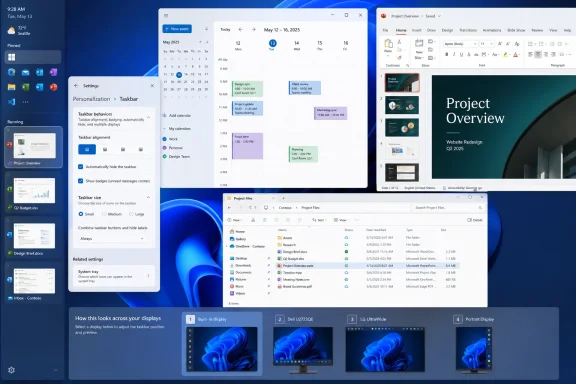
The May 15 Experimental build lets Insiders choose whether the taskbar appears on the bottom, top, left, or right side of the display. The setting lives under Settings, Personalization, Taskbar, and Taskbar behaviors. Tooltips, flyouts, and animations are designed to originate from the taskbar’s chosen edge, rather than behaving like a bottom-docked interface awkwardly pretending to move.That detail matters. A side taskbar that merely relocates icons while menus still animate from the wrong place would feel like a hack. Microsoft appears to be rebuilding the experience as a supported shell behavior, not simply exposing a registry-era relic.
The company says most customization settings, including small taskbar mode and never-combine taskbar icons, work across taskbar locations. That should be welcome news for users who treat the taskbar as a live window list instead of a row of abstract app badges. In professional workflows, seeing separate window entries can be faster than hovering over grouped icons and decoding thumbnails.
Still, this is not a complete resurrection of the Windows 10 taskbar. Microsoft’s release notes identify unfinished areas: touch gestures, the Search box, Ask Copilot in alternate locations, auto-hide, and the touch-optimized taskbar are still in progress or not yet supported in those positions. That is the difference between a restored feature and a finished one.
The Smaller Taskbar Is the Quietly Bigger Deal
Taskbar positioning got the emotional headline because it was the most obvious missing feature. But the smaller taskbar may prove more important for everyday Windows 11 users, especially on laptops. Screen real estate is not an abstraction when a browser toolbar, an IDE ribbon, a Teams call bar, and a bottom taskbar are all competing for the same vertical strip.In Build 26300.8493, Microsoft introduced a smaller taskbar mode through the “Show smaller taskbar buttons” control. When set to Always, the taskbar uses smaller icons and a reduced height, giving apps more room. The default taskbar remains unchanged, which is the right call; the point is not to force compactness, but to restore choice.
Build 26300.8758, released June 26, refined that work with a dedicated Taskbar Size setting. That sounds minor, but it is exactly the kind of polish that separates an experimental toggle from a feature intended for normal users. If people have to decode whether “smaller buttons” means smaller icons, smaller height, or both, the setting is not ready for prime time.
The shift toward a clearer size control suggests Microsoft understands the usability trap it created. Power users want knobs, but mainstream users need those knobs to be discoverable and legible. The taskbar has to satisfy both groups because it is not an advanced feature buried in Computer Management; it is the front door of Windows.
Widescreen Displays Made the Old Decision Harder to Defend
The argument for side taskbars has only grown stronger since Windows 11 launched. Modern PCs overwhelmingly use widescreen or ultrawide displays, where horizontal pixels are comparatively abundant and vertical pixels remain precious. Docking the taskbar at the bottom consumes the dimension users often need most.For developers, that vertical space means more lines of code. For spreadsheet-heavy workers, it means more rows. For writers, analysts, and researchers, it means more visible context before scrolling interrupts the flow of thought.
Microsoft’s original bottom-only decision might have seemed cleaner from a design-system perspective, but it ignored the geometry of work. A 16:9 laptop panel is not an infinite canvas. A 14-inch notebook already forces compromises; taking away taskbar size and placement controls made those compromises feel imposed rather than chosen.
Vertical taskbars are not for everyone. Some users dislike them, and many will never change the default. But the best argument for restoring them is precisely that no single taskbar placement fits every device, every display, and every workflow. Windows won the desktop partly because it tolerated messiness. The taskbar should, too.
Insider Does Not Mean Imminent, and Experimental Means Experimental
The biggest correction to make around this story is timing. Build 26300.8493 is an Insider Experimental build, not a general release. Microsoft’s own release notes are careful: features in these builds may change, disappear, or never ship outside Insider testing.That caveat is not boilerplate. Microsoft increasingly uses controlled feature rollouts, staged enablement, and channel-specific experiments to test interface changes before they reach stable Windows releases. A feature appearing in the Experimental channel is a strong signal of intent, but it is not a promise to every Windows 11 PC.
There is also some version confusion around the reporting. The May build’s release notes describe updates based on Windows 11 version 25H2 via an enablement package. The later June build 26300.8758 references version 26H2. That does not mean ordinary users should expect a neat, calendar-bound delivery of every taskbar feature in a named annual update.
For IT departments, the right conclusion is cautious optimism. The feature is real. Microsoft is testing it publicly. But planning a migration policy around it before it reaches a stable channel would be premature.
The Global Developer Angle Is Real, Even If the Victory Lap Is Premature
Some coverage frames the taskbar reversal as a response to pressure from a global developer community. That is directionally plausible, but it is easy to overdo. Developers were certainly among the loudest critics of Windows 11’s taskbar constraints, yet they were not alone.The affected group includes sysadmins juggling Remote Desktop windows, finance teams running dense dashboards, support desks living in ticket queues, creators managing timelines and panels, and accessibility-conscious users who organize the screen around individual needs. The taskbar controversy was not a niche developer tantrum. It was a broad complaint from people who treat Windows as a working environment rather than a consumer appliance.
The global framing matters because Windows is still the default productivity substrate in many regions where hardware lifecycles are long and screen sizes vary widely. A user on a modest laptop in Nairobi, Lagos, Manila, São Paulo, or Kansas City benefits from the same reclaimed pixels as a developer with a three-monitor setup in Redmond or San Francisco.
But the story should not be inflated into a heroic capitulation. Microsoft did not wake up one morning and surrender to programmers. It appears to be responding to a combination of user feedback, competitive pressure from its own Windows 10 legacy, and the reputational cost of making Windows 11 feel less capable than the operating system it replaced.
Widgets, Search, and Spinners Show the Same Course Correction
The taskbar changes arrived alongside smaller but revealing interface updates. Widgets taskbar badging is being toned down so alerts can match the Windows accent color rather than defaulting to a more urgent red. Microsoft also says it is testing ways to quiet the experience for users who barely engage with Widgets.That is a subtle but important retreat from engagement-first design. Widgets have often felt like a consumer web surface bolted onto a professional desktop. Red badges implied urgency even when the underlying content did not deserve it. Making that surface quieter is not revolutionary, but it is consistent with a broader effort to make Windows feel less needy.
Search is also being tuned so local files and apps more reliably appear ahead of web suggestions when they are the stronger match. This has been another long-running Windows 11 irritation. When a user types the name of a local application, the operating system should not behave like a search engine with desktop features attached.
Even the replacement of legacy loading animations with more consistent solid spinners fits the pattern. On its own, a spinner is cosmetic. Taken together with logon performance optimizations, File Explorer reliability work, and taskbar flexibility, it suggests Microsoft is trying to sand down the everyday friction points that shaped Windows 11’s reputation among serious users.
The Copilot Era Makes Desktop Trust More Valuable, Not Less
The taskbar reversal lands at a strange moment for Windows. Microsoft has spent the past few years aggressively positioning AI and Copilot as the next layer of personal computing. Yet many of the complaints that define Windows 11’s enthusiast reputation are not futuristic at all. They are about menus, performance, file management, ads, defaults, and missing shell behaviors.That tension is dangerous for Microsoft. Users are less likely to trust grand AI promises from an operating system that cannot respect their taskbar preferences. If the shell feels opinionated in small, annoying ways, Copilot risks being interpreted not as assistance but as another layer of vendor agenda.
Restoring taskbar flexibility is therefore not a retreat from modern Windows. It is a prerequisite for it. The more Microsoft asks Windows to mediate between local apps, cloud services, AI agents, and enterprise policy, the more the foundational desktop must feel reliable and user-controlled.
There is an old lesson here: productivity software earns permission. Users will tolerate new features when the basics are solid. They become hostile when novelty arrives while old affordances remain broken or missing.
Enterprise IT Will Wait for Policy, Predictability, and Proof
For administrators, the restored taskbar controls raise a different set of questions. Can these settings be managed consistently? Will they roam? Will they interact cleanly with existing Start and taskbar layouts? Will vertical taskbars behave properly across multi-monitor arrangements, Remote Desktop sessions, and accessibility configurations?Insider builds are not the place to expect final enterprise answers. Microsoft’s release notes already acknowledge unfinished support for auto-hide and touch-optimized behavior in alternate positions. Those gaps may not matter to a desktop enthusiast testing on a spare machine, but they matter in managed fleets.
The enterprise angle is also why Microsoft’s caution is understandable. The Windows shell is old, deeply integrated, and loaded with assumptions from applications, drivers, accessibility tools, and management systems. Moving the taskbar is conceptually simple; making every flyout, gesture, tray item, notification, and app behavior respect that placement is not.
Still, enterprises also benefit when Microsoft restores native functionality instead of pushing users toward third-party shell modification tools. Unsupported taskbar hacks are a governance headache. If Microsoft can provide supported customization with policy-friendly behavior, IT departments get both flexibility and control.
Third-Party Shell Tools Won Because Microsoft Left a Vacuum
The success of third-party utilities after Windows 11’s launch should be studied inside Microsoft as a product lesson. Users did not install those tools because they wanted to live dangerously. They installed them because Microsoft removed features that were central to their daily flow.That distinction matters. There is a difference between enthusiast customization and compensatory customization. The former is about taste; the latter is about restoring lost productivity.
When a utility can make a new Windows release feel more usable by bringing back old taskbar behavior, the utility is not merely adding value. It is exposing a regression. Microsoft’s restoration of taskbar placement narrows that gap, but it does not erase the years in which users had to choose between accepting the new shell or modifying it from the outside.
The better path is for Microsoft to treat power-user affordances as part of Windows’ competitive moat. macOS has its own design discipline. Linux desktops have their own configurability. Windows has historically thrived in the middle: mainstream enough for everyone, flexible enough for nearly anyone. The Windows 11 taskbar forgot the second half of that bargain.
The Return of Choice Is Also a Test of Restraint
Microsoft now faces a design challenge that is harder than simply restoring old settings. It has to offer more choice without turning Windows settings into a junk drawer. The company’s best move is not to recreate every legacy behavior exactly as it existed in Windows 10, but to identify which freedoms are structurally important.Taskbar position is structurally important. Taskbar size is structurally important. Local search ranking is structurally important. Widget badge color is less important, but it is part of the same emotional contract: the desktop should not constantly exaggerate its own urgency.
The danger is that Microsoft treats this as a one-time appeasement campaign rather than a shift in philosophy. If Windows 11 gets a movable taskbar but continues to prioritize promotional surfaces, cloud nudges, and web-first defaults over local control, the goodwill will be brief. Users are not asking for a museum piece. They are asking for an operating system that remembers who is operating it.
The best version of this work would be boring in the most complimentary sense. Settings would be clear. Defaults would be sane. Power-user options would exist without demanding registry spelunking. The shell would adapt to the user’s layout, not the other way around.
The Windows 11 Taskbar Fight Finally Produces Something Concrete
This is the rare Windows interface story where the practical implications are easy to see. The feature is not theoretical, the complaint was not imaginary, and the fix is now visible in public testing. The remaining uncertainty is not whether Microsoft has changed course, but how far that course correction will travel.- Windows 11 Insider Experimental Build 26300.8493, released May 15, 2026, restored the ability to place the taskbar on the bottom, top, left, or right edge of the screen for testers receiving the rollout.
- The same build introduced a smaller taskbar mode that reduces icon size and taskbar height when configured through taskbar behavior settings.
- Build 26300.8758, released June 26, 2026, added a dedicated Taskbar Size setting and refined transitions between taskbar sizes.
- Microsoft still lists important unfinished areas for alternate taskbar positions, including touch gestures, the Search box, Ask Copilot, auto-hide, and touch-optimized taskbar support.
- These features are in the Insider Experimental channel, which means they may change, roll out gradually, or fail to reach stable Windows builds in their current form.
- The broader significance is that Microsoft is restoring native shell flexibility that many users had replaced through third-party utilities since Windows 11’s 2021 launch.
References
- Primary source: streamlinefeed.co.ke
Published: 2026-07-03T06:10:12.730258
Loading…
streamlinefeed.co.ke - Related coverage: windowscentral.com
Progress! Microsoft is finally giving Windows 11 users the taskbar they actually asked for | Windows Central
A new option in Windows 11 lets you resize the taskbar, not just make its icons smaller.www.windowscentral.com - Official source: learn.microsoft.com
Loading…
learn.microsoft.com - Related coverage: pureinfotech.com
Microsoft finally restores moveable Taskbar on Windows 11 build 26300.8493
Build 26300.8493 for Windows 11 brings Taskbar repositioning, widgets tweaks, voice dictation upgrades, and UI refinements in previews. pureinfotech.com
- Official source: blogs.windows.com
Our commitment to Windows quality
Hello Windows Insiders, I want to speak to you directly, as an engineer who has spent his career building technology that people depend on every day. Windows touches more people's lives than almost any technology on Earth. Every day, we hear from th blogs.windows.com
- Related coverage: bleepingcomputer.com
Microsoft testing adjustable taskbar, Start menu in Windows 11
Microsoft has finally brought back the resizable taskbar and Start menu to Windows 11 in the latest preview version rolling out to Insiders in the Experimental channel.www.bleepingcomputer.com
- Related coverage: windowsreport.com
Taskbar Repositioning Option Now Live With New Windows 11 Experimental (Dev) Build
Microsoft’s latest Experimental build adds movable Taskbar support, smaller Taskbar buttons, improved Search, updated widgets, and more. windowsreport.com
- Related coverage: ntcompatible.com
Windows 11 Insider Experimental Preview Build 26300.8493 released
Windows 11 Build 26300 finally lets you move the taskbar to any screen edge and shrink its height for better screen real estate on compact displays. Widgets get quieter notifications while Windows Search prioritizes local files over web results, making everyday navigation noticeably faster.www.ntcompatible.com - Related coverage: windowslatest.com
Microsoft finally begins testing Windows 10-like smaller taskbar for Windows 11 after removing it in 2021
In 2021, Microsoft removed smaller taskbar from Windows 11, and forced users to stick to a standard size. Now, it's bringing it back. www.windowslatest.com
- Related coverage: thewincentral.com
Windows 11 Build 26300.8493 Adds Movable Taskbar - WinCentral
Windows 11 Build 26300.8493 secretly adds movable and smaller taskbar options via ViveTool. - Read in Latest News on WinCentral thewincentral.com
- Related coverage: windowsnews.ai
Loading…
windowsnews.ai - Official source: microsofters.com
Loading…
microsofters.com - Related coverage: overcentral.com
Loading…
overcentral.com - Related coverage: njsba.com
WP - Windows 11 Tips.docx
</rdf:Alt> </dc:description> <dc:creator> <rdf:Seq> <rdf:li>Jeffrey R. Schoenbergernjsba.com