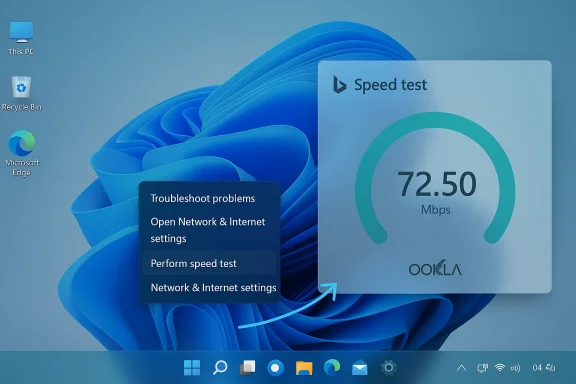
Microsoft’s latest Windows 11 rollout quietly tacked a one‑click internet check onto the Taskbar — but it isn’t the self‑contained diagnostic many users expected. Instead of shipping a native, in‑OS speed test engine, Microsoft added a “Perform speed test” launcher that opens your default browser and lands on Bing’s internet speed test — a web‑hosted widget that has historically delegated measurement work to the Speedtest (Ookla) backend. This change arrived as part of the recent preview servicing wave packaged under update KB5077241 and is now moving into general rollout with March’s Patch Tuesday servicing.
Microsoft has long experimented with where Windows should surface routine tooling. Over the last several years the company has favored discoverable touchpoints — the Taskbar, Quick Settings, and Settings pages — to surface lightweight utilities that help non‑technical users complete common tasks quickly. The new Taskbar speed‑test shortcut continues that trend: it places a one‑click pathway to an internet measurement directly where people already look when their connection seems off. The implementation, however, raises questions about what “built‑in” should mean in an operating system.
KB5077241 is an optional non‑security preview update Microsoft published in late February 2026 that bundles a cluster of quality‑of‑life changes — changes Microsoft typically ships to Release Preview channels before they are included in the following month’s mandatory Patch Tuesday package. The update lists improvements ranging from BitLocker reliability fixes and native Sysmon integration to the Taskbar speed‑test UI. Microsoft’s KB article for KB5077241 and the Windows Insider release notes document the builds and the rollout plan.
This isn’t the first time Microsoft has offered a network measurement tool. The company previously released a “Network Speed Test” application produced by Microsoft Research — a native app with a XAML interface that provided context such as connection type and historic results. The Windows ecosystem also has long supported the broader toolbox of network diagnostics — from iperf and ntttcp to third‑party web widgets like Speedtest and Fast.com — depending on the user’s needs. That historical lineage explains why some users were taken aback: they remember a proper native tool and expected Microsoft to do the same for the Taskbar shortcut.
However, several technical caveats matter:
But this is where the conversation must split: there’s a difference between a shortcut and a built‑in tool. Marketing language that suggests Windows “added an internet speed test” to the OS implies a native measurement path and an observable, managed experience inside Windows. The Taskbar launcher does not provide in‑OS results, history, or diagnostic metadata; it merely routes the user to a website. For power users and IT pros — precisely the audience that appreciates Windows’ diagnostic depth — the shortcut will feel incomplete and, frankly, a little tone deaf. Several community and tech outlets have made the same point.
Microsoft could have reasonably delivered both experiences: keep the quick web launcher for mainstream users, and provide a compact native measurement mode (or a path to a packaged native Speedtest/ntttcp/iperf integration) for advanced users and admins. The company has previously built full native speed‑test experiences, and the product trade‑offs here are primarily about investment and priority.
But it is emphatically not what many power users — and some journalists — would call a native feature in the sense of integrated diagnostics, local measurement, and enterprise control. For those audiences, Microsoft’s decision highlights a continuing tension in Windows product strategy: deliver quick, web‑backed conveniences that are easy to iterate on, or invest engineering time to build integrated, controllable features that live inside the OS.
For now, if you want a one‑click speed check, the Taskbar will do the job; if you want rigorous, repeatable measurements, choose the proper tools (iperf3, ntttcp, or a managed Speedtest deployment) and log tests consistently. And if you care about the policy and privacy implications of where your diagnostic traffic goes, plan to treat the new Taskbar launcher as a web service invocation — not a sealed, Windows‑only diagnostic — and adapt your enterprise controls accordingly.
In short: Microsoft added a useful shortcut, but it remains a shortcut — a thin bridge to a web tool — not a replacement for the deeper, native diagnostics many IT pros and power users still need.
Source: Windows Latest Windows 11 taskbar's new Internet Speed Test tool is a shortcut to Bing.com, not a native feature
 Background and context
Microsoft has long experimented with where Windows should surface routine tooling. Over the last several years the company has favored discoverable touchpoints — the Taskbar, Quick Settings, and Settings pages — to surface lightweight utilities that help non‑technical users complete common tasks quickly. The new Taskbar speed‑test shortcut continues that trend: it places a one‑click pathway to an internet measurement directly where people already look when their connection seems off. The implementation, however, raises questions about what “built‑in” should mean in an operating system.KB5077241 is an optional non‑security preview update Microsoft published in late February 2026 that bundles a cluster of quality‑of‑life changes — changes Microsoft typically ships to Release Preview channels before they are included in the following month’s mandatory Patch Tuesday package. The update lists improvements ranging from BitLocker reliability fixes and native Sysmon integration to the Taskbar speed‑test UI. Microsoft’s KB article for KB5077241 and the Windows Insider release notes document the builds and the rollout plan.
This isn’t the first time Microsoft has offered a network measurement tool. The company previously released a “Network Speed Test” application produced by Microsoft Research — a native app with a XAML interface that provided context such as connection type and historic results. The Windows ecosystem also has long supported the broader toolbox of network diagnostics — from iperf and ntttcp to third‑party web widgets like Speedtest and Fast.com — depending on the user’s needs. That historical lineage explains why some users were taken aback: they remember a proper native tool and expected Microsoft to do the same for the Taskbar shortcut.
What Microsoft shipped — the facts
How the Taskbar control behaves
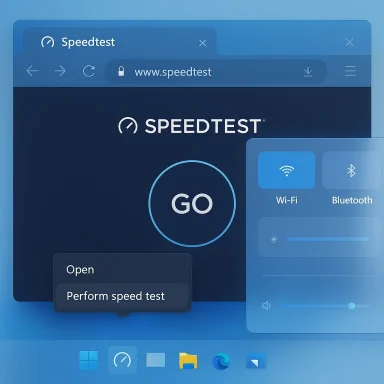
- A new “Perform speed test” entry appears in two places: the right‑click context menu for the Taskbar network icon (system tray) and the Wi‑Fi quick‑settings flyout.
- Selecting that entry opens your default web browser and navigates to Bing with a speed‑test widget presented — the same web experience you get when you search for “internet speed test” on Bing. Multiple outlets that examined the change confirm the behavior and the linking to Bing/Sppedtest.
Which update contained it
- The functionality was delivered in Release Preview Insider builds identified as 26100.7918 and 26200.7918 and distributed as the non‑security preview cumulative update KB5077241 on February 24, 2026. Microsoft’s support page for KB5077241 and the Windows Insider blog explain the preview rollout and feature set.
What the Bing widget uses
- Bing’s in‑search or toolbox speed test has, in recent years, leveraged the established Speedtest infrastructure — the measurement engine commonly associated with Ookla. That in‑browser test downloads and uploads data to measure throughput and latency, using test servers selected by location and routing. Multiple independent reporting outlets and reverse‑engineering of the Bing widget agree that Bing’s experience is powered by the Speedtest backend or equivalent Speedtest integrations.
Corporate context: Ookla sale to Accenture
- In a development that matters for anyone tracking the network‑measurement ecosystem, Ookla (the company behind Speedtest) was announced as being acquired by Accenture in early March 2026. That deal reshapes who controls some of the most widely used measurement infrastructure and has implications for enterprises that rely on Speedtest data or the Speedtest API.
Why this matters: practical and principled considerations
Convenience first — and that’s a defensible design choice
For mainstream users, the decision makes sense in a narrow UX sense. A single click from the Taskbar to a speed check is low friction and solves the typical day‑to‑day need: “Is my connection performing poorly right now?” The web widget is already maintained, benefits from global test server infrastructure, and can be updated independently of Windows itself. The shortcut also respects your default browser, so it honors user‑chosen defaults rather than forcing Edge or another browser. Those are pragmatic wins.But “web launcher” vs “native tool” is not merely cosmetic
There are several meaningful trade‑offs in delegating the measurement to a browser‑hosted third‑party widget rather than running the test locally in the OS:- Measurement accuracy and comparability. Web widgets typically perform active network tests by downloading/uploading test blobs to remote servers. That’s fine for quick checks, but those tests can vary by chosen test server, CDN paths, browser networking stacks, and other transient factors. Native tools or CLI tools (for example, iperf/iperf3 or ntttcp) can offer controlled client/server environments and richer diagnostics that better isolate ISP‑side issues versus local constraints. If you require reproducible measurements for troubleshooting or service‑level verification, the browser test is a blunt instrument.
- Dependency on remote services. A web‑hosted test depends on both Microsoft’s Bing front end and the Speedtest backend (now part of the Accenture relationship). When third‑party services evolve, change terms, or encounter outages, the Taskbar launcher’s utility changes instantly. A native tool could, at least in principle, remain operational during web service interruptions and provide more predictable behavior over time.
- Privaace area. Launching a browser to a web widget necessarily involves browser‑level networking, cookies, and potential third‑party telemetry by the test provider. Enterprises and privacy‑conscious users may prefer a local diagnostic that does not involve interacting with a web service. Microsoft’s documentation does not currently publish a granular privacy model for the Taskbar launcher; independent reporting suggests the launcher simply opens Bing, so privacy behavior will follow the chosen browser and the Bing/Speedtest privacy policies. That distinction matters for regulated environments.
- Manageability and enterprise controls. IT admins ask whether the new Taskbar entry can be removed or blocked by policy. At time of writing, community reporting indicates there’s no documented Group Policy or Settings toggle specifically to remove the “Perform speed test” entry; the launcher respects OS defaults for URL handling but otherwise appears to be a permanent addition until Microsoft exposes a control or removes it. That lack of manageability is a real pain point for administrators who lock down UI affordances in corporate images. We flag this as an item Microsoft should address.
Technical deep dive: how browser‑based speed tests work — and their limits
Browser‑hosted speed tests follow a relatively simple recipe: the client (your browser) requests a test file or session from a remote server, the server streams data back (download test), the client sends data back (upload test), and both sides measure throughput and latency. The test engine uses heuristics to pick transfer sizes, concurrency, and termination conditions to balance accuracy with data usage. For the quick checks that most users perform, this design is effective and low cost.However, several technical caveats matter:
- Browser networking stacks impose constraints. Modern browsers implement HTTP/2, HTTP/3 (QUIC), and varying TCP/IP parameters that affect throughput. The browser’s connection re‑use, congestion control defaults, and JavaScript timer granularity can introduce measurable differences compared to a dedicated native test harness.
- Short tests bias toward transient capacity. A fast test that runs for a few seconds may not fully saturate the path or account for slow‑start effects, resulting in under‑ or over‑estimates depending on the network conditions and test implementation.
- Server selection and path diversity affect outcomes. Web widgets typically choose test servers based on geolocation and latency heuristics. That is fine for consumer comparisons, but it can mask intermediariesring bottleneck vs last‑mile problem) that an IT pro would want to isolate.
Privacy, telemetry and supply‑chain considerations
The Taskbar shortcut’s reliance on Bing and the Speedtest ecosystem places several privacy and supply‑chain questions squarely in view:- Data collection and retention. When you run a web speed test, the measurement endpoint and the intermediary CDN may log IP addresses, timestamps, and performance metrics. Those logs might persist according to the provider’s policy. Enterprises that require strict data governance should treat browser speed tests as a network telemetry source and assess their retention and sharing policies accordingly. The new Taskbar launcher does not, as yet, publish a separate privacy statement clarifying what is logged when a user activates the shortcut.
- Third‑party ownership changes. Ookla’s acquisition by Accenture in March 2026 is relevant: when a widely used measurement backend changes corporate hands, enterprises and researchers should reassess API access, contractual obligations, and the implications for aggregated measurement datasets. Control of measurement infrastructure can influence benchmarking, competitive reporting, and the availability of programmatic access for fleet testing.
- Browser and extension surface. Because the feature opens a browser, any browser extensions, proxies, or security filters in the enterprise environment will influence or interfere with the test. That behavior is both a practical consequence and an operational concern: a browser extension designed to block tracking could (correctly) break or interfere with the measurement. Administrators should be mindful of this interplay.
UX and product critique — a journalist’s take
From a product standpoint Microsoft chose the lower‑cost path: deliver a highly discoverable UX that points users at an already‑available measurement tool. That choice is defensible for casual usage: users now have a faster way to satisfy a common task.But this is where the conversation must split: there’s a difference between a shortcut and a built‑in tool. Marketing language that suggests Windows “added an internet speed test” to the OS implies a native measurement path and an observable, managed experience inside Windows. The Taskbar launcher does not provide in‑OS results, history, or diagnostic metadata; it merely routes the user to a website. For power users and IT pros — precisely the audience that appreciates Windows’ diagnostic depth — the shortcut will feel incomplete and, frankly, a little tone deaf. Several community and tech outlets have made the same point.
Microsoft could have reasonably delivered both experiences: keep the quick web launcher for mainstream users, and provide a compact native measurement mode (or a path to a packaged native Speedtest/ntttcp/iperf integration) for advanced users and admins. The company has previously built full native speed‑test experiences, and the product trade‑offs here are primarily about investment and priority.
What users and administrators should do now
If you’re a casual user:- Use the Taskbar shortcut for fast, situational checks. It will get you immediate answers about now performance, and it respects your default browser choice. For quick triage — “Is my ISP slow right now?” — it’s fine.
- Prefer controlled tools: use iperf3 for client/server throughput testing or a dedicated Speedtest app where available. These tools let you choose a server and run repeatable measurements.
- Consider documenting the test method for your team (server, test duration, concurrency) so results are comparable.
- If you need to remove or suppress the Taskbar entry for policy reasons, check Microsoft’s enterprise guidance as it becomes available; today there is no publicly documented Group Policy targeting the speed‑test launcher specifically, so look for updates in the official Windows IT Pro documentation or consider UI/lockdown approaches at the image‑build level. We recommend IT teams monitor Microsoft’s release notes for KB5077241 and subsequent Patch Tuesday updates for officially supported controls.
What Microsoft should fix next
Product and policy recommendations:- Ship a clear enterprise control. Administrators need a simple Group Policy, MDM setting, or registry key to remove or disable taskbar shortcuts that spawn web pages for governance and compliance reasons.
- Offer a native diagnostic option for power users and technicians. That mode could be lightweight but should expose server selection, test parameters, and result history.
- Publish a concise privacy and telemetry statement for the Taskbar launcher that clarifies what is logged when users run the browser‑hosted test, especially now that Speedtest’s corporate ownership has changed.
- Consider showing in‑OS summary results. Even a minimal UI that displays the in‑browser results i flyout (while still relying on the web engine) would significantly improve the perception of value and reduce the friction of context switching.
Final judgment — convenience, not commitment
The Taskbar “Perform speed test” control is a pragmatic, low‑risk convenience for mainstream Windows users. It delivers a quick answer to a common question by leveraging an existing, widely used web measurement experience. That makes it easy to build and maintain, and it keeps Windows lean.But it is emphatically not what many power users — and some journalists — would call a native feature in the sense of integrated diagnostics, local measurement, and enterprise control. For those audiences, Microsoft’s decision highlights a continuing tension in Windows product strategy: deliver quick, web‑backed conveniences that are easy to iterate on, or invest engineering time to build integrated, controllable features that live inside the OS.
For now, if you want a one‑click speed check, the Taskbar will do the job; if you want rigorous, repeatable measurements, choose the proper tools (iperf3, ntttcp, or a managed Speedtest deployment) and log tests consistently. And if you care about the policy and privacy implications of where your diagnostic traffic goes, plan to treat the new Taskbar launcher as a web service invocation — not a sealed, Windows‑only diagnostic — and adapt your enterprise controls accordingly.
In short: Microsoft added a useful shortcut, but it remains a shortcut — a thin bridge to a web tool — not a replacement for the deeper, native diagnostics many IT pros and power users still need.
Source: Windows Latest Windows 11 taskbar's new Internet Speed Test tool is a shortcut to Bing.com, not a native feature