

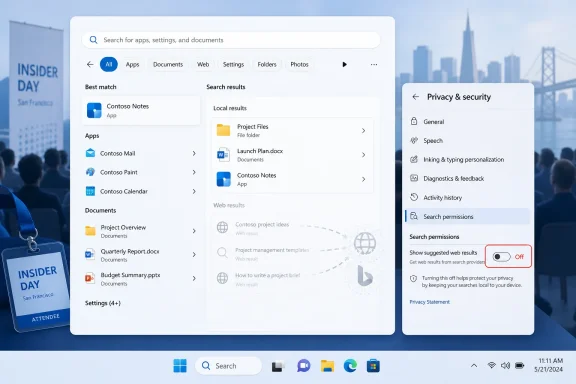
Microsoft is testing a Windows 11 setting that lets users turn off Bing-powered web results in Start and Search, with the option reportedly shown at a Windows Insider event in San Francisco in early June 2026. The change is small in interface terms but large in symbolic weight: Microsoft is admitting, at least tacitly, that desktop search should not behave like an advertising funnel by default. For Windows users who have spent years fighting web suggestions with Registry edits, Group Policy, third-party tweak tools, and sheer resignation, this is not a new feature so much as a delayed concession. The question now is whether Microsoft treats the toggle as a genuine user-control boundary or merely another experimental setting that appears, disappears, and returns under a different name.
The reported setting is straightforward: a toggle under Privacy & security that controls whether Windows Search shows suggested web results. Turn it off, and Windows should stop sending desktop queries into the Bing-powered suggestion pipeline. In plain English, searching for an app, file, folder, or system setting should stop producing web clutter when the user clearly intended to search the PC.
That sounds obvious, but Windows has not treated it as obvious. For years, users who wanted local-only search have had to use policy settings, Registry changes, or utilities that disable Windows components more aggressively than most people should be asked to tolerate. The Registry route was especially absurd for ordinary users: a productivity preference was effectively hidden behind a system-editing interface that can break things if handled carelessly.
The new toggle matters because it changes the social contract. A Registry hack says, “You are working against the product.” A Settings toggle says, “This is a supported choice.” That distinction is not cosmetic; it determines whether IT departments can document the behavior cleanly, whether help desks can talk users through it, and whether Microsoft can be held to the promise when a future build changes search behavior.
Microsoft has often argued, implicitly and explicitly, that Windows is more useful when connected to cloud services. That is true in many cases. But a Start menu search box is not a browser address bar, and users have repeatedly objected when Microsoft collapses those contexts into one monetizable surface.
That is the heart of the complaint: Windows Search has long felt less like an index of the machine and more like a contested territory. On one side are local files, installed programs, Control Panel remnants, Settings pages, and enterprise-managed resources. On the other side are Bing, Microsoft Store suggestions, search highlights, cloud content, and the broader Microsoft account ecosystem.
Microsoft’s design logic is easy enough to understand. Search is one of the most valuable interaction points in any operating system. If a user starts with the Start menu, Microsoft can route that intent toward web search, Edge, Bing, Store listings, Copilot, Microsoft 365 content, and other services. In an era where operating systems are also service platforms, every search box becomes a potential gateway.
But the user’s mental model is different. The Start menu is not “the internet.” It is the place where Windows users go when they want the machine to do something. When Microsoft injects web results into that flow, it is not adding convenience for everyone; it is changing the meaning of a core operating system affordance.
The new setting is therefore less about Bing specifically than about respecting context. If a user wants web search, a browser is one click away. If a user wants local search, Windows should not second-guess that intent in the name of engagement.
Windows 11 has never lacked privacy and search settings entirely. Users can manage search permissions, SafeSearch behavior, cloud content search, search history, and search highlights. The problem is that these controls have not consistently mapped to what many people actually wanted: “Do not show web results when I search from Start.”
That gap produced a cottage industry of guides, scripts, and tweak utilities. Some users enabled policies that were really intended for managed environments. Others created values under Explorer policy keys. Some disabled search highlights and still found that Bing-style suggestions survived in another form. The result was a familiar Windows pattern: the official Settings app gave the appearance of control, while the meaningful switch lived somewhere else.
That pattern is especially damaging because Microsoft has spent years trying to modernize Windows administration and reduce reliance on legacy surfaces. Settings is supposed to be the front door. Registry edits are supposed to be the exception. Yet on one of the most visible daily annoyances in Windows 11, the practical answer was often: open Regedit.
If Microsoft ships this toggle broadly and keeps it stable, it will be correcting more than a user-interface oversight. It will be acknowledging that certain preferences deserve first-class status precisely because they affect trust.
Even if Microsoft handles that data under published privacy rules, the user expectation is still critical. A person who opens a browser and searches the web understands that the query leaves the machine. A person who opens Start and searches for a local document may not. The privacy issue begins when the product blurs that boundary.
For enterprises, this is not theoretical. Administrators are trained to think about data leakage in mundane workflows, not just dramatic breaches. A desktop search query that becomes a web suggestion request may be low-risk in isolation, but it is also unnecessary if the user is looking for something local. The safest external query is the one that never happens.
A visible toggle also helps with compliance conversations. Instead of telling users to trust a hidden policy or a provisioning script, admins can point to a supported setting. In regulated environments, that difference can matter. It makes the behavior auditable, teachable, and less dependent on undocumented assumptions.
This is one of the reasons Microsoft’s exact implementation will matter. If turning off suggested web results only hides them visually while related query processing continues elsewhere, the setting will not satisfy the users most likely to care. If it genuinely stops internet-backed suggestions in Start and Search, it becomes a meaningful privacy control rather than a cosmetic decluttering tool.
Store results can be useful in narrow cases. If a user searches for an app that is not installed, a Store result may be a reasonable fallback. But when Store entries compete with installed applications or local documents, the operating system begins to feel promotional. It is no longer simply helping the user find something; it is nudging the user toward Microsoft’s marketplace.
That distinction matters because relevance is the one thing desktop search must get right. Users forgive a sparse interface if it finds the right file instantly. They do not forgive a polished interface that returns irrelevant results with confidence. Search is judged by whether it shortens the distance between intent and action.
Microsoft appears to understand this, at least in part. Recent Windows Insider builds have included search improvements aimed at making files and apps appear more reliably ahead of web suggestions when they are stronger matches. Microsoft has also been testing substring search improvements, so compound file names and content can be discovered more naturally. These are the kinds of improvements users actually asked for.
The irony is that local search quality was always the better path to engagement. If Windows Search becomes fast, predictable, and local-first, users will use it more. If it feels like a noisy cross-promotion surface, power users will bypass it with third-party launchers, file indexers, pinned shortcuts, or browser search directly. Microsoft cannot win long-term trust by making the default worse than the workaround.
That uncertainty is not cynicism; it is how Windows development now works. Microsoft uses controlled feature rollouts, A/B testing, staged enablement, and channel-specific experiments. Two users on similar builds may not see the same controls. A feature shown to Insiders may be tied to a server-side flag rather than the build number alone.
For ordinary users, this is confusing. For IT pros, it is a planning problem. A clean toggle for disabling web results would be valuable in standard images, onboarding guides, privacy baselines, and support scripts. But administrators cannot rely on a setting until Microsoft documents it, ships it broadly, and exposes a manageable policy equivalent where appropriate.
The wording will also deserve scrutiny. “Show suggested search results” is not the same as “Search the web from Start.” Microsoft has a habit of naming settings in ways that reflect internal feature architecture rather than user intent. If the toggle controls Bing web results, say so. If it also affects Store suggestions, search highlights, cloud content, or Start recommendations, say that too.
The best version of this feature would include both consumer simplicity and enterprise clarity. Users should get one obvious switch. Administrators should get policy, MDM documentation, and stable behavior across updates. Anything less risks turning a welcome concession into another round of “which build are you on?” troubleshooting.
That matters because Windows 11’s early years were defined by a recurring criticism: Microsoft changed the furniture before fixing the plumbing. The centered taskbar, redesigned Start menu, simplified context menus, and stricter hardware requirements gave Windows 11 a cleaner look, but many experienced users felt they had lost control. Features that had existed for years were removed, delayed, or reintroduced later.
Taskbar positioning is a perfect example. For some users, a side or top taskbar is not nostalgia; it is workflow. Widescreen monitors make vertical space valuable. Multi-monitor setups benefit from predictable taskbar placement. Accessibility and muscle memory also matter. Removing those options made Windows 11 feel less like a platform and more like a product team’s preferred layout.
File Explorer performance is similarly central. Microsoft can add AI assistants, widgets, and service integrations, but if Explorer feels slow when opening folders or deleting large batches of files, users will judge the operating system by that lag. The operating system’s reputation is built in these tiny moments.
The search toggle belongs in this same category. It is not glamorous. It will not headline a keynote in the way a Copilot feature might. But it addresses a persistent daily friction point, and those are the fixes that can shift sentiment among the people who actually maintain, repair, and recommend Windows machines.
Windows users outside those regulatory zones have watched that process with interest and occasional irritation. A setting available in one region but not another can feel like proof that Microsoft can offer choice when forced to. That perception is dangerous for Microsoft because it turns every missing toggle into a policy argument.
A global web-search-off switch would be the cleaner answer. It would avoid making user control feel like a regional privilege. It would also let Microsoft present the change as a product-quality improvement rather than a grudging compliance measure.
There is a business tension here, of course. Bing usage, Edge promotion, Microsoft Store discovery, and Microsoft account services all benefit from prominent placement in Windows. Windows is not merely an operating system license anymore; it is a distribution layer for Microsoft’s broader ecosystem. The more Microsoft turns defaults into user choices, the less guaranteed that distribution becomes.
But defaults that users resent are not free. They create support friction, brand hostility, and a thriving market for debloating tools. They also teach technically inclined users to distrust new Windows features before trying them. A toggle may reduce forced engagement, but it can increase goodwill. Microsoft has historically undervalued that trade.
The ideal enterprise implementation would include Group Policy, Intune configuration service provider support, clear documentation, and predictable interaction with existing policies around cloud content search, search highlights, diagnostic data, and consumer experiences. Without that, admins will be left mapping a new consumer toggle onto old management controls, which is exactly the kind of ambiguity that creates support tickets.
There is also the question of defaults. Microsoft could ship the toggle off by default in managed environments and on by default for consumers. It could respect existing Registry and policy settings during upgrades. It could expose the option only in certain channels at first. Each choice sends a message about whether Microsoft views local-only search as a legitimate configuration or an edge case.
Administrators will also test whether disabling web suggestions improves performance. It might, especially on slower devices or in constrained network environments, but Microsoft should not oversell that point unless the effect is measurable. The more important benefit is determinism: when a user searches the PC, the results should come from the PC unless the organization has chosen otherwise.
This is where Microsoft’s cloud-first instincts can clash with Windows’ installed base. Windows runs in factories, schools, labs, hospitals, government offices, remote workstations, field devices, and virtual desktops. Not every machine should behave as a consumer web portal. A serious operating system needs controls that reflect those environments.
That makes the Bing search toggle more important than its surface area suggests. If Microsoft cannot give users a clean way to keep Start search local, why should they trust more ambitious integrations that analyze activity, summarize context, or bridge personal and organizational data? Control over the simple thing becomes evidence for control over the complex thing.
The company’s challenge is that it wants Windows to be both personal and promotional. It wants to be the trusted local environment where users manage files, apps, credentials, and workflows. It also wants to be the launchpad for Bing, Edge, Copilot, Store apps, subscriptions, and cloud services. Those goals are not always incompatible, but they become incompatible when Microsoft hides the boundary.
A good toggle makes the boundary visible. It says: here is where local search ends and online suggestion begins. That kind of explicitness is exactly what Windows needs as its features become more networked and more AI-mediated.
The risk is that Microsoft treats the toggle as an escape hatch for complainers while continuing to crowd other surfaces with recommendations. If web search disappears from Start but Store suggestions, account prompts, Copilot nudges, and “recommended” content expand elsewhere, users will see the move as whack-a-mole. The broader issue is not Bing alone; it is whether Windows respects intent.
A search box can be powerful without being noisy. A Start menu can be modern without being promotional. A taskbar can be simplified without removing basic placement choices. File Explorer can evolve without becoming slower at the jobs it has performed for decades.
Near-term, the practical implications are clear:
 Microsoft Finally Puts a Switch Where a Workaround Used to Be
The reported setting is straightforward: a toggle under Privacy & security that controls whether Windows Search shows suggested web results. Turn it off, and Windows should stop sending desktop queries into the Bing-powered suggestion pipeline. In plain English, searching for an app, file, folder, or system setting should stop producing web clutter when the user clearly intended to search the PC.That sounds obvious, but Windows has not treated it as obvious. For years, users who wanted local-only search have had to use policy settings, Registry changes, or utilities that disable Windows components more aggressively than most people should be asked to tolerate. The Registry route was especially absurd for ordinary users: a productivity preference was effectively hidden behind a system-editing interface that can break things if handled carelessly.
The new toggle matters because it changes the social contract. A Registry hack says, “You are working against the product.” A Settings toggle says, “This is a supported choice.” That distinction is not cosmetic; it determines whether IT departments can document the behavior cleanly, whether help desks can talk users through it, and whether Microsoft can be held to the promise when a future build changes search behavior.
Microsoft has often argued, implicitly and explicitly, that Windows is more useful when connected to cloud services. That is true in many cases. But a Start menu search box is not a browser address bar, and users have repeatedly objected when Microsoft collapses those contexts into one monetizable surface.
Windows Search Became a Distribution Channel Before It Became a Good Search Tool
The irritation around Bing results is not simply that they exist. It is that they have often appeared in the wrong place, at the wrong time, and with too much confidence. A user types the name of a local app and sees a web result. A user searches for a setting and gets an internet suggestion. A user wants a file and instead receives something that looks suspiciously like a prompt to leave the desktop and enter Microsoft’s services universe.That is the heart of the complaint: Windows Search has long felt less like an index of the machine and more like a contested territory. On one side are local files, installed programs, Control Panel remnants, Settings pages, and enterprise-managed resources. On the other side are Bing, Microsoft Store suggestions, search highlights, cloud content, and the broader Microsoft account ecosystem.
Microsoft’s design logic is easy enough to understand. Search is one of the most valuable interaction points in any operating system. If a user starts with the Start menu, Microsoft can route that intent toward web search, Edge, Bing, Store listings, Copilot, Microsoft 365 content, and other services. In an era where operating systems are also service platforms, every search box becomes a potential gateway.
But the user’s mental model is different. The Start menu is not “the internet.” It is the place where Windows users go when they want the machine to do something. When Microsoft injects web results into that flow, it is not adding convenience for everyone; it is changing the meaning of a core operating system affordance.
The new setting is therefore less about Bing specifically than about respecting context. If a user wants web search, a browser is one click away. If a user wants local search, Windows should not second-guess that intent in the name of engagement.
The Registry Era Was a Quiet Admission of Product Failure
The existence of long-standing Registry and Group Policy workarounds tells its own story. Power users do not usually invent multi-step disablement rituals for features that are merely neutral. They do it when a default behavior is persistent enough to annoy them and official controls are either missing or inadequate.Windows 11 has never lacked privacy and search settings entirely. Users can manage search permissions, SafeSearch behavior, cloud content search, search history, and search highlights. The problem is that these controls have not consistently mapped to what many people actually wanted: “Do not show web results when I search from Start.”
That gap produced a cottage industry of guides, scripts, and tweak utilities. Some users enabled policies that were really intended for managed environments. Others created values under Explorer policy keys. Some disabled search highlights and still found that Bing-style suggestions survived in another form. The result was a familiar Windows pattern: the official Settings app gave the appearance of control, while the meaningful switch lived somewhere else.
That pattern is especially damaging because Microsoft has spent years trying to modernize Windows administration and reduce reliance on legacy surfaces. Settings is supposed to be the front door. Registry edits are supposed to be the exception. Yet on one of the most visible daily annoyances in Windows 11, the practical answer was often: open Regedit.
If Microsoft ships this toggle broadly and keeps it stable, it will be correcting more than a user-interface oversight. It will be acknowledging that certain preferences deserve first-class status precisely because they affect trust.
A Better Search Box Is Also a Privacy Feature
Microsoft’s reported placement of the setting under Privacy & security is telling. Web suggestions are not just visual clutter; they change where queries may go and what they may reveal. A Start menu search can include file names, project names, internal product codenames, client references, personal details, medical terms, legal topics, or anything else a user types while thinking locally.Even if Microsoft handles that data under published privacy rules, the user expectation is still critical. A person who opens a browser and searches the web understands that the query leaves the machine. A person who opens Start and searches for a local document may not. The privacy issue begins when the product blurs that boundary.
For enterprises, this is not theoretical. Administrators are trained to think about data leakage in mundane workflows, not just dramatic breaches. A desktop search query that becomes a web suggestion request may be low-risk in isolation, but it is also unnecessary if the user is looking for something local. The safest external query is the one that never happens.
A visible toggle also helps with compliance conversations. Instead of telling users to trust a hidden policy or a provisioning script, admins can point to a supported setting. In regulated environments, that difference can matter. It makes the behavior auditable, teachable, and less dependent on undocumented assumptions.
This is one of the reasons Microsoft’s exact implementation will matter. If turning off suggested web results only hides them visually while related query processing continues elsewhere, the setting will not satisfy the users most likely to care. If it genuinely stops internet-backed suggestions in Start and Search, it becomes a meaningful privacy control rather than a cosmetic decluttering tool.
Microsoft Store Filtering Shows the Real Battle Is Relevance
The same reports suggest Microsoft is also testing a way to exclude Microsoft Store results from internal searches. That may sound secondary, but it points to the same problem: Windows Search has too often mixed retrieval with recommendation. Users search for what they have; Windows suggests what Microsoft thinks they might install.Store results can be useful in narrow cases. If a user searches for an app that is not installed, a Store result may be a reasonable fallback. But when Store entries compete with installed applications or local documents, the operating system begins to feel promotional. It is no longer simply helping the user find something; it is nudging the user toward Microsoft’s marketplace.
That distinction matters because relevance is the one thing desktop search must get right. Users forgive a sparse interface if it finds the right file instantly. They do not forgive a polished interface that returns irrelevant results with confidence. Search is judged by whether it shortens the distance between intent and action.
Microsoft appears to understand this, at least in part. Recent Windows Insider builds have included search improvements aimed at making files and apps appear more reliably ahead of web suggestions when they are stronger matches. Microsoft has also been testing substring search improvements, so compound file names and content can be discovered more naturally. These are the kinds of improvements users actually asked for.
The irony is that local search quality was always the better path to engagement. If Windows Search becomes fast, predictable, and local-first, users will use it more. If it feels like a noisy cross-promotion surface, power users will bypass it with third-party launchers, file indexers, pinned shortcuts, or browser search directly. Microsoft cannot win long-term trust by making the default worse than the workaround.
The Insider Program Is Where Good Ideas Still Go to Become Uncertain
The catch, as always, is that this is currently a test. Microsoft has not committed to a precise public rollout date, and Insider-visible features do not always ship unchanged. Windows enthusiasts know the rhythm: a promising setting appears in a preview build or demo, gets covered widely, then arrives gradually, regionally, incompletely, or not at all.That uncertainty is not cynicism; it is how Windows development now works. Microsoft uses controlled feature rollouts, A/B testing, staged enablement, and channel-specific experiments. Two users on similar builds may not see the same controls. A feature shown to Insiders may be tied to a server-side flag rather than the build number alone.
For ordinary users, this is confusing. For IT pros, it is a planning problem. A clean toggle for disabling web results would be valuable in standard images, onboarding guides, privacy baselines, and support scripts. But administrators cannot rely on a setting until Microsoft documents it, ships it broadly, and exposes a manageable policy equivalent where appropriate.
The wording will also deserve scrutiny. “Show suggested search results” is not the same as “Search the web from Start.” Microsoft has a habit of naming settings in ways that reflect internal feature architecture rather than user intent. If the toggle controls Bing web results, say so. If it also affects Store suggestions, search highlights, cloud content, or Start recommendations, say that too.
The best version of this feature would include both consumer simplicity and enterprise clarity. Users should get one obvious switch. Administrators should get policy, MDM documentation, and stable behavior across updates. Anything less risks turning a welcome concession into another round of “which build are you on?” troubleshooting.
The Taskbar and File Explorer Improvements Are Part of the Same Course Correction
The Ubergizmo report also points to other Windows 11 enhancements under test: faster search execution, improved File Explorer startup, quicker bulk file deletion, and more flexible taskbar positioning. These are not unrelated quality-of-life changes. They fit a broader pattern in which Microsoft appears to be spending more energy on the parts of Windows that users touch hundreds of times a week.That matters because Windows 11’s early years were defined by a recurring criticism: Microsoft changed the furniture before fixing the plumbing. The centered taskbar, redesigned Start menu, simplified context menus, and stricter hardware requirements gave Windows 11 a cleaner look, but many experienced users felt they had lost control. Features that had existed for years were removed, delayed, or reintroduced later.
Taskbar positioning is a perfect example. For some users, a side or top taskbar is not nostalgia; it is workflow. Widescreen monitors make vertical space valuable. Multi-monitor setups benefit from predictable taskbar placement. Accessibility and muscle memory also matter. Removing those options made Windows 11 feel less like a platform and more like a product team’s preferred layout.
File Explorer performance is similarly central. Microsoft can add AI assistants, widgets, and service integrations, but if Explorer feels slow when opening folders or deleting large batches of files, users will judge the operating system by that lag. The operating system’s reputation is built in these tiny moments.
The search toggle belongs in this same category. It is not glamorous. It will not headline a keynote in the way a Copilot feature might. But it addresses a persistent daily friction point, and those are the fixes that can shift sentiment among the people who actually maintain, repair, and recommend Windows machines.
Europe May Have Taught Microsoft the Value of Local Control
It is difficult to discuss Windows search without mentioning regulation, even if the reported feature is not explicitly framed as a regulatory response. In recent years, Microsoft has had to make Windows more modular in certain markets, especially around default apps, web search providers, and bundled services. European rules have pushed large platform vendors to justify integrations that once shipped as unquestioned defaults.Windows users outside those regulatory zones have watched that process with interest and occasional irritation. A setting available in one region but not another can feel like proof that Microsoft can offer choice when forced to. That perception is dangerous for Microsoft because it turns every missing toggle into a policy argument.
A global web-search-off switch would be the cleaner answer. It would avoid making user control feel like a regional privilege. It would also let Microsoft present the change as a product-quality improvement rather than a grudging compliance measure.
There is a business tension here, of course. Bing usage, Edge promotion, Microsoft Store discovery, and Microsoft account services all benefit from prominent placement in Windows. Windows is not merely an operating system license anymore; it is a distribution layer for Microsoft’s broader ecosystem. The more Microsoft turns defaults into user choices, the less guaranteed that distribution becomes.
But defaults that users resent are not free. They create support friction, brand hostility, and a thriving market for debloating tools. They also teach technically inclined users to distrust new Windows features before trying them. A toggle may reduce forced engagement, but it can increase goodwill. Microsoft has historically undervalued that trade.
IT Departments Will Want Policy, Not Just a Pretty Toggle
For home users, a Settings switch may be enough. For enterprise environments, it is only the beginning. If web results in Windows Search are now a supported optional behavior, organizations will want to manage that behavior at scale.The ideal enterprise implementation would include Group Policy, Intune configuration service provider support, clear documentation, and predictable interaction with existing policies around cloud content search, search highlights, diagnostic data, and consumer experiences. Without that, admins will be left mapping a new consumer toggle onto old management controls, which is exactly the kind of ambiguity that creates support tickets.
There is also the question of defaults. Microsoft could ship the toggle off by default in managed environments and on by default for consumers. It could respect existing Registry and policy settings during upgrades. It could expose the option only in certain channels at first. Each choice sends a message about whether Microsoft views local-only search as a legitimate configuration or an edge case.
Administrators will also test whether disabling web suggestions improves performance. It might, especially on slower devices or in constrained network environments, but Microsoft should not oversell that point unless the effect is measurable. The more important benefit is determinism: when a user searches the PC, the results should come from the PC unless the organization has chosen otherwise.
This is where Microsoft’s cloud-first instincts can clash with Windows’ installed base. Windows runs in factories, schools, labs, hospitals, government offices, remote workstations, field devices, and virtual desktops. Not every machine should behave as a consumer web portal. A serious operating system needs controls that reflect those environments.
The Toggle Is a Trust Test for Windows 11’s Next Phase
Windows 11 is entering a phase where Microsoft wants users to accept deeper AI and cloud integration. Copilot, semantic search, cloud recall-like concepts, and Microsoft 365-aware workflows all depend on the same fragile premise: users must believe Windows is acting on their behalf, not merely harvesting intent for Microsoft’s services.That makes the Bing search toggle more important than its surface area suggests. If Microsoft cannot give users a clean way to keep Start search local, why should they trust more ambitious integrations that analyze activity, summarize context, or bridge personal and organizational data? Control over the simple thing becomes evidence for control over the complex thing.
The company’s challenge is that it wants Windows to be both personal and promotional. It wants to be the trusted local environment where users manage files, apps, credentials, and workflows. It also wants to be the launchpad for Bing, Edge, Copilot, Store apps, subscriptions, and cloud services. Those goals are not always incompatible, but they become incompatible when Microsoft hides the boundary.
A good toggle makes the boundary visible. It says: here is where local search ends and online suggestion begins. That kind of explicitness is exactly what Windows needs as its features become more networked and more AI-mediated.
The risk is that Microsoft treats the toggle as an escape hatch for complainers while continuing to crowd other surfaces with recommendations. If web search disappears from Start but Store suggestions, account prompts, Copilot nudges, and “recommended” content expand elsewhere, users will see the move as whack-a-mole. The broader issue is not Bing alone; it is whether Windows respects intent.
The Real Win Is a Desktop That Stops Arguing With Its Owner
The most concrete lesson from this episode is that Windows users are not rejecting online features wholesale. They are rejecting unwanted online features in local workflows. That distinction matters, and Microsoft’s best Windows work has always understood it.A search box can be powerful without being noisy. A Start menu can be modern without being promotional. A taskbar can be simplified without removing basic placement choices. File Explorer can evolve without becoming slower at the jobs it has performed for decades.
Near-term, the practical implications are clear:
- Windows 11 users may soon have a supported Settings toggle for disabling Bing-powered web suggestions in Start and Search.
- The option is reportedly being tested through the Windows Insider ecosystem, so availability may vary by build, channel, region, and rollout flag.
- Existing Registry and Group Policy workarounds remain relevant until Microsoft ships and documents the new control broadly.
- Microsoft Store filtering, substring search, and relevance improvements suggest Microsoft is trying to make Search less promotional and more local-first.
- Enterprises should wait for policy documentation before treating the consumer-facing toggle as a managed baseline.
- The larger issue is trust: Microsoft needs to prove that user intent, not service promotion, governs core Windows surfaces.
References
- Primary source: Ubergizmo
Published: Mon, 08 Jun 2026 17:51:09 GMT
Loading…
www.ubergizmo.com - Official source: support.microsoft.com
Windows Search and privacy - Microsoft Support
Learn how to connect Windows Search with your accounts in the cloud, manage your Windows Search and SafeSearch settings, clear search history, and more. support.microsoft.com
- Related coverage: tomshardware.com

How to Disable Windows Web Search and Speed Up Your PC
Stop Windows from showing you web results when you just want files and apps.www.tomshardware.com
- Related coverage: windowslatest.com
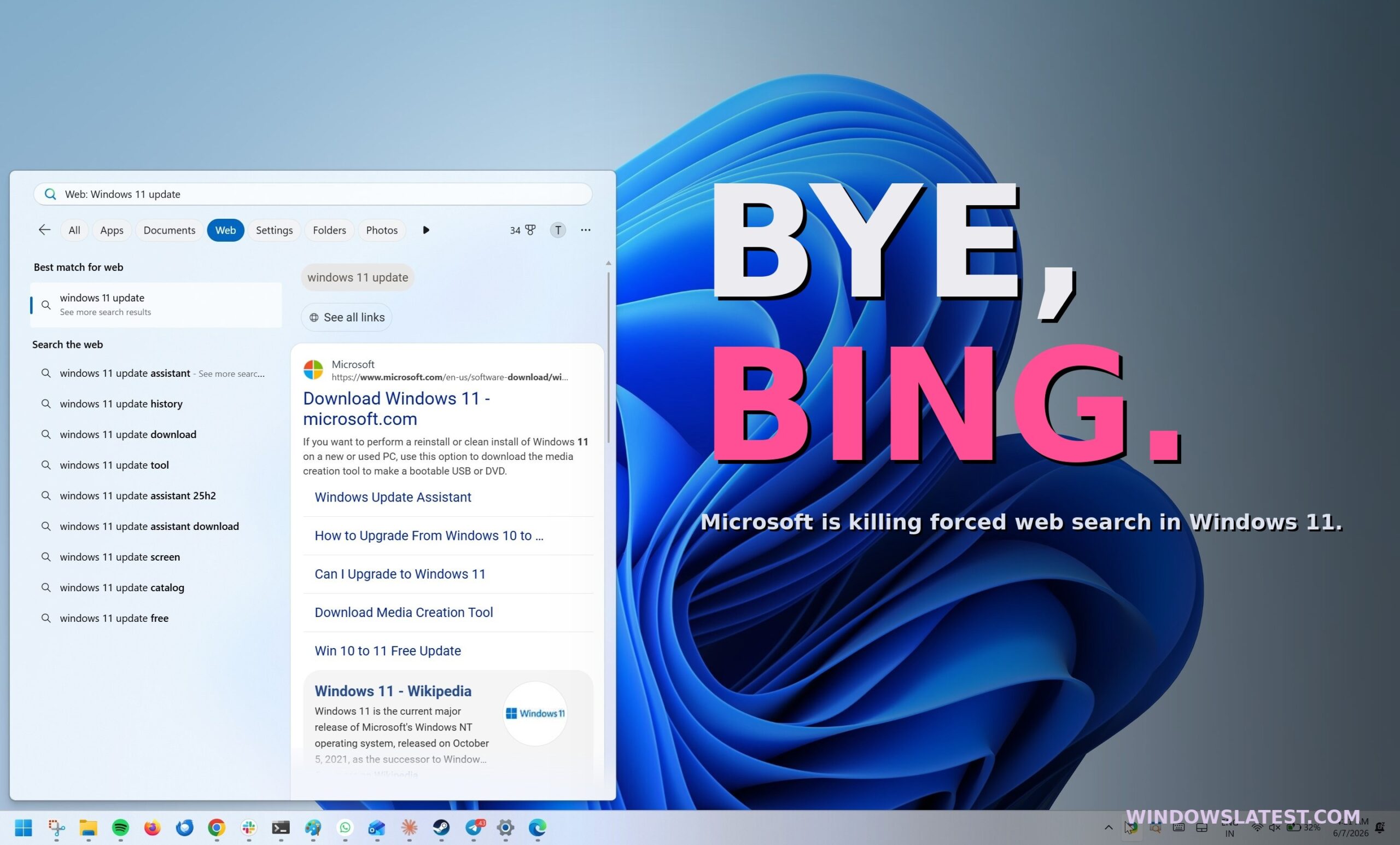
Microsoft is letting you kill Bing in Windows 11 Search, after years of forcing it on every PC
Microsoft is testing a new Windows 11 Search toggle that disables Bing, MSN, and Microsoft Store results, ending years of forced web results. www.windowslatest.com
- Related coverage: windowscentral.com
Loading…
www.windowscentral.com - Related coverage: makeuseof.com

How to Disable Bing Web Searches in Windows 11
Sick of Bing giving its opinion on your Windows 11 searches? Here's how to turn it off. www.makeuseof.com
- Related coverage: techradar.com
Loading…
www.techradar.com - Related coverage: pureinfotech.com

Windows 11 Search keeps showing web results? Here’s how to turn it off – Goodbye Bing
To disable web search in Start menu or Windows Search box, use Group Policy or Registry on Windows 11. This also removes the Copilot button. pureinfotech.com
- Related coverage: computerbild.de
Loading…
www.computerbild.de - Related coverage: digitaltrends.com

You can finally get rid of Bing on your Windows 11 PC
Microsoft is reportedly testing Windows 11 changes that would finally let users disable Bing-powered web results inside the operating system’s built-in Search experience. www.digitaltrends.com
- Related coverage: techbout.com

How to Disable Web Results in Windows Search
You can disable Web Results in Windows Search (Taskbar or Start Menu Search Box) by creating a New Registry key on your computer.www.techbout.com
- Related coverage: tech.yahoo.com
Microsoft to Let Windows 11 Users Disable Web Results in Search
At a Windows Insider meetup in San Francisco, Microsoft previewed a few upcoming enhancements to the OS, including a way to shut off web search from the main search function.tech.yahoo.com
- Related coverage: techviral.net
Loading…
techviral.net - Related coverage: askwoody.com
Loading…
www.askwoody.com