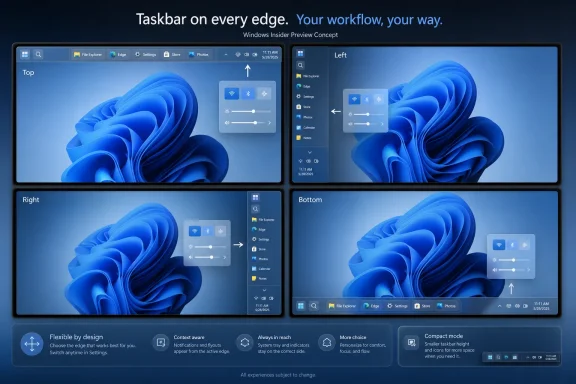
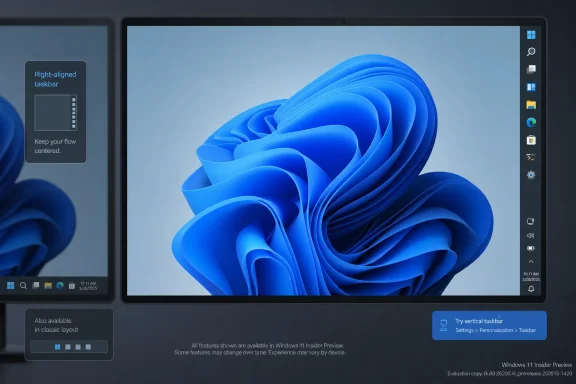
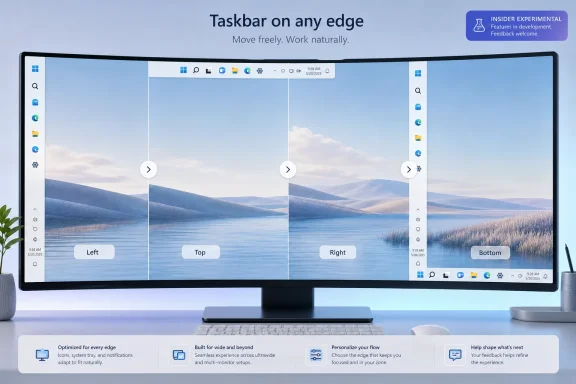
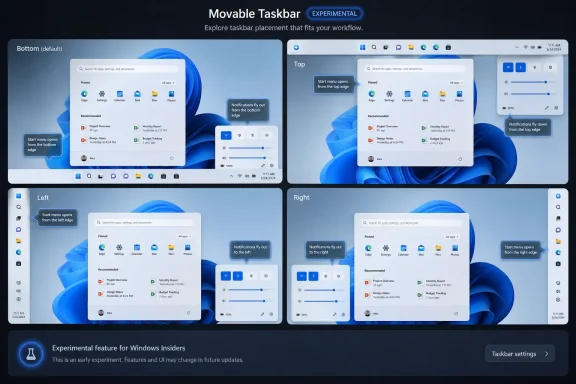
Microsoft is testing a Windows 11 taskbar setting that lets users place the taskbar at the bottom, top, left, or right of the screen, with the option appearing in Settings under Personalization, Taskbar, and Taskbar behaviors in preview builds in May and June 2026. The change looks small because it is visual, familiar, and almost comically overdue. But it is also a useful marker for where Windows 11 is in its life cycle: Microsoft is no longer merely trying to persuade users that its 2021 desktop redesign was right. It is now quietly putting back the parts of Windows it removed.
The Windows taskbar has always been more than a launcher. It is the operating system’s handshake with the user, the strip of screen real estate where multitasking, notification triage, app switching, clock-checking, and muscle memory all meet. When Microsoft shipped Windows 11 with a rebuilt taskbar that could not move to the top or sides of the display, it was not just removing a checkbox. It was overriding decades of accumulated desktop habits.
That decision was easier to understand from Redmond’s side than from the user’s chair. Windows 11 was built around a cleaner, centered, more tablet-friendly visual language. The taskbar and Start menu were simplified, reworked, and made to look more consistent with the rest of the new shell. But the tradeoff was brutal: features Windows users had treated as basic furniture were suddenly gone.
The return of taskbar position controls is therefore less a triumph of innovation than a concession to reality. Users did not stop wanting a vertical taskbar because Windows 11 lacked one. IT pros did not stop managing fleets of ultrawide monitors, portrait displays, multi-monitor rigs, kiosks, and remote desktops because Microsoft’s design system preferred the bottom edge. Enthusiasts did not stop noticing that Windows 10 could do something Windows 11 could not.
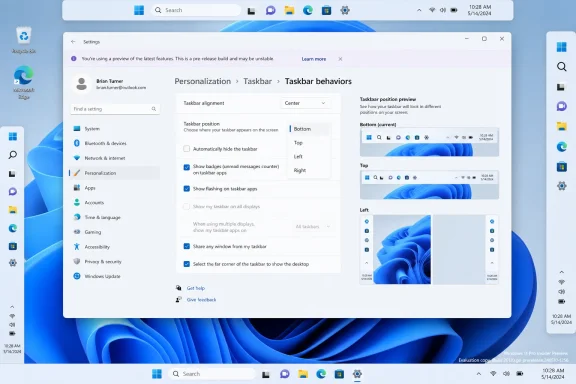
The new setting reportedly appears where a modern Windows 11 user would expect it: Settings, not a sprawling legacy dialog. That matters. Microsoft is not simply restoring the old implementation wholesale; it is folding the old flexibility into the Windows 11 settings model. In principle, that is exactly what the company should have done from the beginning.
For years, complaints about the Windows 11 taskbar were easy to dismiss as nostalgia. Some users wanted labels. Some wanted small icons. Some wanted drag-and-drop restored. Some wanted the old context menu. Some wanted the taskbar on the top, left, or right side of the display. Taken one by one, each demand could be framed as a niche preference.
But taken together, they described a deeper problem: Windows 11 had confused visual cleanliness with maturity. A desktop operating system earns loyalty by adapting to work habits that differ wildly across users. The person with a 13-inch laptop, the developer with three monitors, the accountant with vertical spreadsheets, the streamer with an ultrawide panel, and the administrator remoting into servers all use “the desktop” differently.
The taskbar position setting is a visible retreat from one-size-fits-all design. It tells users that the desktop edge belongs to them again. It also signals that Microsoft has accepted an uncomfortable truth: consistency is valuable only until it starts feeling like constraint.
That distinction sounds minor until you think about how people actually use screens. A bottom taskbar is fine on a conventional laptop. On an ultrawide monitor, a vertical taskbar can preserve more useful vertical space and reduce pointer travel. On a portrait display, side placement can be essential. On a multi-monitor setup, the “right” edge may depend on physical layout, handedness, display scaling, and years of trained behavior.
Windows 10 treated this as normal. Windows 11 treated it as out of scope.
The removal was especially jarring because the taskbar had long been one of Windows’ most forgiving surfaces. You could pin apps, rearrange shortcuts, hide it, move it, combine buttons, display labels, summon context menus, and generally bend it around your working style. Windows 11 arrived with a taskbar that looked modern but behaved like a prototype.
Microsoft has spent the years since release rebuilding that trust feature by feature. Drag-and-drop returned. Task Manager came back to the taskbar context menu. More taskbar behaviors were surfaced in Settings. Now, with alternate positions being tested, the company is addressing one of the most visible remaining gaps between Windows 10 and Windows 11.
Direct manipulation was part of the old charm. You wanted the taskbar somewhere else, so you grabbed it and moved it. It was discoverable in the old Windows way: a little messy, sometimes accidental, but immediate once learned. Windows 11’s model is more controlled. You pick from a setting, and the shell adapts.
That tradeoff reflects modern Microsoft. The company wants fewer accidental states, fewer edge cases, and a more predictable settings surface. It wants documentation, accessibility, telemetry, and policy to line up around explicit options. For enterprise administrators, that may even be preferable.
But for longtime Windows users, the difference is symbolic. Windows used to feel like something you could poke, bend, and rearrange. Windows 11 often feels like something you configure from approved panels. Restoring functionality through Settings is still restoration, but it has a different texture.
There is also the matter of completeness. A movable taskbar is only successful if the surrounding shell follows it intelligently. Start, Search, Widgets, Quick Settings, notification flyouts, previews, animations, and tooltips all need to respect the chosen edge. If a top taskbar causes awkward flyouts or a side taskbar breaks visual rhythm, users will quickly conclude that Microsoft checked the box without finishing the job.
That does not absolve Microsoft. Windows 11 was marketed as the future of Windows, not as a public shell rewrite with caveats. If a replacement taskbar cannot do what the previous taskbar did, users are entitled to call that a regression. The average person does not care whether a missing feature is the result of design preference, technical debt, schedule pressure, or architectural change.
Still, the engineering context explains why this has taken years. A taskbar placed on the left or right side is not simply the bottom taskbar rotated 90 degrees. Icons, overflow behavior, app badges, system tray elements, hover targets, touch hitboxes, clock presentation, snap affordances, and flyout positioning all become more complicated. Multi-monitor arrangements add another layer of potential weirdness.
The taskbar is also a privileged surface. It sits at the center of input, window management, notifications, and shell integration. A broken taskbar is not like a broken weather widget. It makes the whole OS feel unstable.
That is why the preview-channel rollout matters. Microsoft appears to be testing this in a controlled way rather than dropping it into stable Windows overnight. The company needs feedback not only from people who want screenshots, but from the obsessive users most likely to discover that the taskbar behaves strangely when the primary display is vertical, scaling is set to 150 percent, and a secondary monitor sits above the laptop panel.
Putting taskbar position under Taskbar behaviors is logical. It is also politically useful. Microsoft can present the restoration as part of Windows 11’s own evolution, not as a capitulation to Windows 10 diehards. The setting belongs to the new OS, speaks its visual language, and lives beside other taskbar controls.
That framing matters because Microsoft has a Windows 10 problem. Support for Windows 10 has now passed its mainstream end date, and the company wants the remaining holdouts to move. But a user who looks at Windows 11 and sees a less flexible desktop has little reason to view the upgrade as progress. Restoring missing taskbar features removes one more excuse.
For IT departments, the placement in Settings also suggests manageability. If Microsoft exposes the feature consistently, administrators can eventually expect documentation, policy controls, defaults, and support guidance. That is more important than it sounds. Enterprises do not merely care whether a feature exists; they care whether it can be explained, supported, and standardized.
For enthusiasts, though, the Settings-first approach will still feel constrained. The old taskbar was part of a desktop culture where right-clicking, dragging, and discovering hidden affordances rewarded curiosity. Windows 11’s shell is cleaner and less chaotic, but it can also feel less alive.
There was value in that ambition. Windows 10 had become visually uneven, with modern and legacy elements coexisting in a way that made the OS feel permanently mid-renovation. Windows 11 looked more deliberate. For new users, the simplified presentation was less intimidating.
But Windows is not macOS, and attempts to make it feel more singular often collide with why people use it. Windows is the platform of weird workflows, corporate line-of-business apps, bespoke hardware, old utilities, odd monitor layouts, power-user shortcuts, and habits that have survived five hardware generations. The desktop’s messiness is not just technical baggage. It is part of the product’s value.
The taskbar position reversal is a reminder that Windows cannot win by becoming less Windows. It can modernize. It can streamline. It can retire truly obsolete plumbing. But when modernization removes everyday agency, users experience it as loss.
This is where Microsoft’s current Windows quality push becomes interesting. The company appears to be spending 2026 not only adding AI features and cloud-connected services, but also addressing longstanding complaints about the basics. That is the right order. Copilot may be strategically important, but the taskbar is emotionally important. Users forgive a lot when the fundamentals respect them.
Start and taskbar are the two most symbolic surfaces in Windows. File Explorer may be where work happens. Settings may be where configuration happens. But Start and taskbar are where users judge the personality of the OS. They are the daily front door.
When Windows 11 launched, Microsoft made that front door prettier but less accommodating. The Start menu lost some of the richness and flexibility of earlier versions. The taskbar lost long-standing placement and sizing options. Users could see the design intent, but they could also feel the missing muscle memory.
The 2026 work suggests Microsoft understands that trust has to be rebuilt at the point of irritation. If people complain for five years that they cannot move the taskbar, the eventual fix is not merely a feature. It is an admission that the complaint was legitimate.
This is also why the timing matters. Windows 11 is no longer new. By mid-2026, users have had years to decide what they like and dislike about it. The people still objecting to taskbar limitations are not confused by change. They are responding to a real reduction in capability.
But there is a more constructive interpretation too. The more Microsoft asks Windows to become an intelligent, cloud-connected, AI-assisted platform, the more it must prove that it still cares about local control. A user who cannot move a taskbar is unlikely to trust an assistant that wants to summarize files, alter settings, or mediate tasks across apps.
Basic customization is not a distraction from Microsoft’s AI strategy. It is a prerequisite for credibility. If Windows is to become more proactive, it must first become more respectful. Otherwise, every new intelligent feature arrives under suspicion.
The taskbar is a small test of that respect. It tells users whether the OS adapts to them or whether they must adapt to the OS. Microsoft does not need to let every user redesign every pixel. But it does need to preserve the classic Windows bargain: this is your PC, and the shell should acknowledge that.
That bargain has been strained in recent years. Recommendations in Start, promotional prompts, default-app friction, account nudges, and cloud-first assumptions have all fed the feeling that Windows sometimes behaves like rented space. Restoring taskbar movement will not erase that perception, but it chips away at it in the one place everyone sees.
A left or right taskbar can make better use of modern widescreen displays, especially when vertical space is limited. A top taskbar can suit users who live in browser tabs, remote sessions, or design tools where bottom-edge space is better reserved for application UI. In shared workstations or labs, being able to match Windows 11 layouts to existing Windows 10 habits can reduce friction.
Administrators will also care about whether the setting survives reboots, profiles, upgrades, and multi-monitor changes. A feature that works for one enthusiast on a test laptop is not automatically enterprise-ready. Microsoft will need to make sure the experience is predictable across hardware, docking stations, display scaling, and remote desktop scenarios.
The policy story is equally important. If taskbar position becomes a supported setting in stable Windows, organizations may want to enforce or preconfigure it. That means Microsoft should avoid treating it as a cosmetic flourish. For enterprise Windows, anything on the taskbar can become operational.
There is also a migration angle. With Windows 10 now on borrowed time for many environments, every restored Windows 11 capability helps reduce resistance. The taskbar alone will not determine an enterprise migration, but it can show up in pilot feedback as one of those “why did they remove this?” complaints that slows acceptance.
They will ask whether taskbar buttons can show labels. They will test small taskbar modes. They will check whether every flyout opens from the correct edge. They will see how Search behaves in vertical mode. They will push the feature across ultrawide monitors, mixed-DPI setups, portrait displays, virtual machines, and remote sessions. They will complain if the system tray looks wrong, if previews feel awkward, or if icon spacing wastes too much room.
This is useful pressure. Microsoft’s best Windows shell work often benefits from cranky users who know exactly what used to work. The danger is that Microsoft treats the restoration as done once the obvious checkbox exists. The real work is in the edge cases.
A vertical taskbar that cannot comfortably handle pinned apps, running apps, tray icons, overflow, notifications, and clock visibility will feel half-restored. A top taskbar that causes window controls or snap layouts to behave oddly will create new irritation. A setting that is unavailable on some configurations without explanation will invite the usual Windows folklore.
The good news is that preview testing is designed for this. The bad news is that Windows history is full of features that entered testing with rough edges and shipped with several of them still attached.
The taskbar is one of the clearest examples. Windows 10 may have been visually less refined, but it offered more taskbar flexibility. Windows 11 looked cleaner but removed options. For users who care about function over polish, that was a bad bargain.
Restoring taskbar movement narrows the gap, but it does not erase the memory. The lesson for Microsoft should be institutional: do not ship a “modernized” replacement for a core Windows component until it covers the ordinary use cases of the component it replaces. Users will tolerate a learning curve. They will not happily tolerate lost capability presented as progress.
This is especially true for Windows because its user base is so broad. Apple can impose more opinionated interface decisions because macOS has a different culture and a narrower hardware ecosystem. Linux desktops can fragment because choice is the point. Windows has to serve everyone from gamers to government agencies, and that means backwards compatibility is not just an API promise. It is an interface expectation.
The taskbar controversy was therefore predictable. Microsoft chose a cleaner shell and underestimated how many users considered the old flexibility essential. The 2026 reversal is welcome, but it is also a case study in avoidable friction.
Windows 11 today is more capable than the initial release. The shell has gained back missing behaviors. Settings has expanded. File Explorer has evolved. The taskbar is slowly recovering its power-user credentials. Microsoft is also making changes to Start that suggest it has heard the complaint that Windows 11’s front door felt too rigid.
The question is whether this is a sustained philosophy or a temporary quality campaign. If Microsoft sees 2026 as the year to clean up Windows 11’s most obvious irritants before pushing harder into the next wave of AI and cloud integration, users may get a better OS but not necessarily a more humble one. If, instead, Microsoft internalizes that desktop agency is a competitive advantage, Windows could come out stronger.
There is reason for cautious optimism. The company’s willingness to publicly discuss requested taskbar and Start improvements suggests it knows the complaints are not merely forum noise. The placement of these features in modern Settings also indicates that Microsoft is investing in proper integration rather than relying on unsupported hacks.
Still, users should judge by shipping behavior, not announcements. Preview features can change. Rollout timing can slip. Some options may arrive in stages. The stable-channel experience is what matters.
The return of taskbar positioning should be read as part of a broader reset in Microsoft’s relationship with Windows 11 users. The company is trying to show that it can modernize the desktop without freezing users into a single layout. Whether it succeeds depends on how complete, reliable, and manageable the final implementation is.
For now, the concrete takeaways are these:
 Microsoft Finally Treats the Taskbar as User Territory Again
The Windows taskbar has always been more than a launcher. It is the operating system’s handshake with the user, the strip of screen real estate where multitasking, notification triage, app switching, clock-checking, and muscle memory all meet. When Microsoft shipped Windows 11 with a rebuilt taskbar that could not move to the top or sides of the display, it was not just removing a checkbox. It was overriding decades of accumulated desktop habits.That decision was easier to understand from Redmond’s side than from the user’s chair. Windows 11 was built around a cleaner, centered, more tablet-friendly visual language. The taskbar and Start menu were simplified, reworked, and made to look more consistent with the rest of the new shell. But the tradeoff was brutal: features Windows users had treated as basic furniture were suddenly gone.
The return of taskbar position controls is therefore less a triumph of innovation than a concession to reality. Users did not stop wanting a vertical taskbar because Windows 11 lacked one. IT pros did not stop managing fleets of ultrawide monitors, portrait displays, multi-monitor rigs, kiosks, and remote desktops because Microsoft’s design system preferred the bottom edge. Enthusiasts did not stop noticing that Windows 10 could do something Windows 11 could not.
The new setting reportedly appears where a modern Windows 11 user would expect it: Settings, not a sprawling legacy dialog. That matters. Microsoft is not simply restoring the old implementation wholesale; it is folding the old flexibility into the Windows 11 settings model. In principle, that is exactly what the company should have done from the beginning.
The Screenshot Says More Than the Checkbox
The “taskbar-settings-pos” image attached to Paul Thurrott’s June 2026 coverage is the kind of small UI artifact that Windows watchers understand immediately. It is not a product launch, not a keynote slide, not a sweeping “Windows is back” manifesto. It is a Settings page with a new position control, and that is precisely why it matters.For years, complaints about the Windows 11 taskbar were easy to dismiss as nostalgia. Some users wanted labels. Some wanted small icons. Some wanted drag-and-drop restored. Some wanted the old context menu. Some wanted the taskbar on the top, left, or right side of the display. Taken one by one, each demand could be framed as a niche preference.
But taken together, they described a deeper problem: Windows 11 had confused visual cleanliness with maturity. A desktop operating system earns loyalty by adapting to work habits that differ wildly across users. The person with a 13-inch laptop, the developer with three monitors, the accountant with vertical spreadsheets, the streamer with an ultrawide panel, and the administrator remoting into servers all use “the desktop” differently.
The taskbar position setting is a visible retreat from one-size-fits-all design. It tells users that the desktop edge belongs to them again. It also signals that Microsoft has accepted an uncomfortable truth: consistency is valuable only until it starts feeling like constraint.
Windows 11’s Original Sin Was Not Centered Icons
The centered Start button became the symbol of Windows 11, but it was never the real problem. Microsoft let users move taskbar icons back to the left, and many did exactly that on day one. The deeper frustration was that the operating system allowed alignment but not placement.That distinction sounds minor until you think about how people actually use screens. A bottom taskbar is fine on a conventional laptop. On an ultrawide monitor, a vertical taskbar can preserve more useful vertical space and reduce pointer travel. On a portrait display, side placement can be essential. On a multi-monitor setup, the “right” edge may depend on physical layout, handedness, display scaling, and years of trained behavior.
Windows 10 treated this as normal. Windows 11 treated it as out of scope.
The removal was especially jarring because the taskbar had long been one of Windows’ most forgiving surfaces. You could pin apps, rearrange shortcuts, hide it, move it, combine buttons, display labels, summon context menus, and generally bend it around your working style. Windows 11 arrived with a taskbar that looked modern but behaved like a prototype.
Microsoft has spent the years since release rebuilding that trust feature by feature. Drag-and-drop returned. Task Manager came back to the taskbar context menu. More taskbar behaviors were surfaced in Settings. Now, with alternate positions being tested, the company is addressing one of the most visible remaining gaps between Windows 10 and Windows 11.
The Return Is Real, but It Is Not a Time Machine
The important caveat is that Microsoft is not bringing back the Windows 10 taskbar exactly as it was. The new implementation is Settings-driven, not a direct manipulation model where a user simply unlocks the taskbar and drags it to another edge. That choice will annoy purists, and not without reason.Direct manipulation was part of the old charm. You wanted the taskbar somewhere else, so you grabbed it and moved it. It was discoverable in the old Windows way: a little messy, sometimes accidental, but immediate once learned. Windows 11’s model is more controlled. You pick from a setting, and the shell adapts.
That tradeoff reflects modern Microsoft. The company wants fewer accidental states, fewer edge cases, and a more predictable settings surface. It wants documentation, accessibility, telemetry, and policy to line up around explicit options. For enterprise administrators, that may even be preferable.
But for longtime Windows users, the difference is symbolic. Windows used to feel like something you could poke, bend, and rearrange. Windows 11 often feels like something you configure from approved panels. Restoring functionality through Settings is still restoration, but it has a different texture.
There is also the matter of completeness. A movable taskbar is only successful if the surrounding shell follows it intelligently. Start, Search, Widgets, Quick Settings, notification flyouts, previews, animations, and tooltips all need to respect the chosen edge. If a top taskbar causes awkward flyouts or a side taskbar breaks visual rhythm, users will quickly conclude that Microsoft checked the box without finishing the job.
The Engineering Debt Was Always the Hidden Story
It has become fashionable to say Microsoft “removed” taskbar features in Windows 11, which is true from the user perspective. But technically, the company also rebuilt major parts of the shell. The missing features were not necessarily sitting behind hidden switches waiting to be re-enabled. In many cases, they had to be reimplemented.That does not absolve Microsoft. Windows 11 was marketed as the future of Windows, not as a public shell rewrite with caveats. If a replacement taskbar cannot do what the previous taskbar did, users are entitled to call that a regression. The average person does not care whether a missing feature is the result of design preference, technical debt, schedule pressure, or architectural change.
Still, the engineering context explains why this has taken years. A taskbar placed on the left or right side is not simply the bottom taskbar rotated 90 degrees. Icons, overflow behavior, app badges, system tray elements, hover targets, touch hitboxes, clock presentation, snap affordances, and flyout positioning all become more complicated. Multi-monitor arrangements add another layer of potential weirdness.
The taskbar is also a privileged surface. It sits at the center of input, window management, notifications, and shell integration. A broken taskbar is not like a broken weather widget. It makes the whole OS feel unstable.
That is why the preview-channel rollout matters. Microsoft appears to be testing this in a controlled way rather than dropping it into stable Windows overnight. The company needs feedback not only from people who want screenshots, but from the obsessive users most likely to discover that the taskbar behaves strangely when the primary display is vertical, scaling is set to 150 percent, and a secondary monitor sits above the laptop panel.
The Settings App Becomes the New Control Panel for Old Grievances
One of the subtler stories here is the continued migration of Windows power into the Settings app. In Windows 11, Settings is no longer merely the friendlier alternative to Control Panel. It is the arena where Microsoft is deciding which classic behaviors deserve a modern interface and which remain buried, deprecated, or gone.Putting taskbar position under Taskbar behaviors is logical. It is also politically useful. Microsoft can present the restoration as part of Windows 11’s own evolution, not as a capitulation to Windows 10 diehards. The setting belongs to the new OS, speaks its visual language, and lives beside other taskbar controls.
That framing matters because Microsoft has a Windows 10 problem. Support for Windows 10 has now passed its mainstream end date, and the company wants the remaining holdouts to move. But a user who looks at Windows 11 and sees a less flexible desktop has little reason to view the upgrade as progress. Restoring missing taskbar features removes one more excuse.
For IT departments, the placement in Settings also suggests manageability. If Microsoft exposes the feature consistently, administrators can eventually expect documentation, policy controls, defaults, and support guidance. That is more important than it sounds. Enterprises do not merely care whether a feature exists; they care whether it can be explained, supported, and standardized.
For enthusiasts, though, the Settings-first approach will still feel constrained. The old taskbar was part of a desktop culture where right-clicking, dragging, and discovering hidden affordances rewarded curiosity. Windows 11’s shell is cleaner and less chaotic, but it can also feel less alive.
The Desktop Is Having Its Revenge on the Design System
Windows 11 arrived during a period when Microsoft seemed unusually confident that it could simplify the desktop around a narrower set of assumptions. The centered taskbar, simplified Start menu, rounded corners, cleaner context menus, and more curated Settings pages all pushed in the same direction. The desktop would be less cluttered, less legacy-ridden, and more coherent.There was value in that ambition. Windows 10 had become visually uneven, with modern and legacy elements coexisting in a way that made the OS feel permanently mid-renovation. Windows 11 looked more deliberate. For new users, the simplified presentation was less intimidating.
But Windows is not macOS, and attempts to make it feel more singular often collide with why people use it. Windows is the platform of weird workflows, corporate line-of-business apps, bespoke hardware, old utilities, odd monitor layouts, power-user shortcuts, and habits that have survived five hardware generations. The desktop’s messiness is not just technical baggage. It is part of the product’s value.
The taskbar position reversal is a reminder that Windows cannot win by becoming less Windows. It can modernize. It can streamline. It can retire truly obsolete plumbing. But when modernization removes everyday agency, users experience it as loss.
This is where Microsoft’s current Windows quality push becomes interesting. The company appears to be spending 2026 not only adding AI features and cloud-connected services, but also addressing longstanding complaints about the basics. That is the right order. Copilot may be strategically important, but the taskbar is emotionally important. Users forgive a lot when the fundamentals respect them.
Start and Taskbar Are Now a Trust Campaign
The taskbar change is arriving alongside broader work on Start menu customization. Microsoft has been testing or discussing Start menu size controls, layout changes, and more personal configuration as part of its effort to improve Windows quality. The combination is not accidental.Start and taskbar are the two most symbolic surfaces in Windows. File Explorer may be where work happens. Settings may be where configuration happens. But Start and taskbar are where users judge the personality of the OS. They are the daily front door.
When Windows 11 launched, Microsoft made that front door prettier but less accommodating. The Start menu lost some of the richness and flexibility of earlier versions. The taskbar lost long-standing placement and sizing options. Users could see the design intent, but they could also feel the missing muscle memory.
The 2026 work suggests Microsoft understands that trust has to be rebuilt at the point of irritation. If people complain for five years that they cannot move the taskbar, the eventual fix is not merely a feature. It is an admission that the complaint was legitimate.
This is also why the timing matters. Windows 11 is no longer new. By mid-2026, users have had years to decide what they like and dislike about it. The people still objecting to taskbar limitations are not confused by change. They are responding to a real reduction in capability.
Microsoft’s AI Ambitions Make the Basics More Important, Not Less
There is an easy cynical read: Microsoft is restoring taskbar options because it needs goodwill while pushing Copilot, cloud services, ads, recommendations, account prompts, and AI features deeper into Windows. That read is not entirely unfair. Windows users have become sensitive to anything that feels like the OS serving Microsoft’s business model before the user’s workflow.But there is a more constructive interpretation too. The more Microsoft asks Windows to become an intelligent, cloud-connected, AI-assisted platform, the more it must prove that it still cares about local control. A user who cannot move a taskbar is unlikely to trust an assistant that wants to summarize files, alter settings, or mediate tasks across apps.
Basic customization is not a distraction from Microsoft’s AI strategy. It is a prerequisite for credibility. If Windows is to become more proactive, it must first become more respectful. Otherwise, every new intelligent feature arrives under suspicion.
The taskbar is a small test of that respect. It tells users whether the OS adapts to them or whether they must adapt to the OS. Microsoft does not need to let every user redesign every pixel. But it does need to preserve the classic Windows bargain: this is your PC, and the shell should acknowledge that.
That bargain has been strained in recent years. Recommendations in Start, promotional prompts, default-app friction, account nudges, and cloud-first assumptions have all fed the feeling that Windows sometimes behaves like rented space. Restoring taskbar movement will not erase that perception, but it chips away at it in the one place everyone sees.
The Enterprise Case Is Less Nostalgic and More Practical
In business environments, the movable taskbar is not mainly about nostalgia. It is about standardization, accessibility, screen usage, and support. Some organizations have users with specialized display layouts. Others have training materials and workflows built around older desktop assumptions. Some accessibility needs are also highly individual, and taskbar placement can affect reach, visibility, and comfort.A left or right taskbar can make better use of modern widescreen displays, especially when vertical space is limited. A top taskbar can suit users who live in browser tabs, remote sessions, or design tools where bottom-edge space is better reserved for application UI. In shared workstations or labs, being able to match Windows 11 layouts to existing Windows 10 habits can reduce friction.
Administrators will also care about whether the setting survives reboots, profiles, upgrades, and multi-monitor changes. A feature that works for one enthusiast on a test laptop is not automatically enterprise-ready. Microsoft will need to make sure the experience is predictable across hardware, docking stations, display scaling, and remote desktop scenarios.
The policy story is equally important. If taskbar position becomes a supported setting in stable Windows, organizations may want to enforce or preconfigure it. That means Microsoft should avoid treating it as a cosmetic flourish. For enterprise Windows, anything on the taskbar can become operational.
There is also a migration angle. With Windows 10 now on borrowed time for many environments, every restored Windows 11 capability helps reduce resistance. The taskbar alone will not determine an enterprise migration, but it can show up in pilot feedback as one of those “why did they remove this?” complaints that slows acceptance.
Enthusiasts Will Notice the Missing Pieces First
The first wave of reaction will not be satisfied merely because the taskbar moves. Enthusiasts will immediately compare Windows 11’s implementation to Windows 10’s and find differences. That is not nitpicking; it is how shell regressions get documented.They will ask whether taskbar buttons can show labels. They will test small taskbar modes. They will check whether every flyout opens from the correct edge. They will see how Search behaves in vertical mode. They will push the feature across ultrawide monitors, mixed-DPI setups, portrait displays, virtual machines, and remote sessions. They will complain if the system tray looks wrong, if previews feel awkward, or if icon spacing wastes too much room.
This is useful pressure. Microsoft’s best Windows shell work often benefits from cranky users who know exactly what used to work. The danger is that Microsoft treats the restoration as done once the obvious checkbox exists. The real work is in the edge cases.
A vertical taskbar that cannot comfortably handle pinned apps, running apps, tray icons, overflow, notifications, and clock visibility will feel half-restored. A top taskbar that causes window controls or snap layouts to behave oddly will create new irritation. A setting that is unavailable on some configurations without explanation will invite the usual Windows folklore.
The good news is that preview testing is designed for this. The bad news is that Windows history is full of features that entered testing with rough edges and shipped with several of them still attached.
The Windows 10 Comparison Will Not Go Away
Microsoft would probably prefer that users judge Windows 11 on its own merits. That is reasonable, but unrealistic. Windows 10 is still the comparison point for millions of users because it was the OS they used before Windows 11, and because many of its desktop behaviors felt more complete.The taskbar is one of the clearest examples. Windows 10 may have been visually less refined, but it offered more taskbar flexibility. Windows 11 looked cleaner but removed options. For users who care about function over polish, that was a bad bargain.
Restoring taskbar movement narrows the gap, but it does not erase the memory. The lesson for Microsoft should be institutional: do not ship a “modernized” replacement for a core Windows component until it covers the ordinary use cases of the component it replaces. Users will tolerate a learning curve. They will not happily tolerate lost capability presented as progress.
This is especially true for Windows because its user base is so broad. Apple can impose more opinionated interface decisions because macOS has a different culture and a narrower hardware ecosystem. Linux desktops can fragment because choice is the point. Windows has to serve everyone from gamers to government agencies, and that means backwards compatibility is not just an API promise. It is an interface expectation.
The taskbar controversy was therefore predictable. Microsoft chose a cleaner shell and underestimated how many users considered the old flexibility essential. The 2026 reversal is welcome, but it is also a case study in avoidable friction.
A Better Windows 11 Is Emerging in Reverse
There is a strange pattern to Windows 11’s maturation: the OS is becoming better partly by becoming more like the Windows it replaced. That sounds damning, but it is not entirely so. Good platforms evolve by absorbing criticism. Bad platforms insist that the original vision was perfect.Windows 11 today is more capable than the initial release. The shell has gained back missing behaviors. Settings has expanded. File Explorer has evolved. The taskbar is slowly recovering its power-user credentials. Microsoft is also making changes to Start that suggest it has heard the complaint that Windows 11’s front door felt too rigid.
The question is whether this is a sustained philosophy or a temporary quality campaign. If Microsoft sees 2026 as the year to clean up Windows 11’s most obvious irritants before pushing harder into the next wave of AI and cloud integration, users may get a better OS but not necessarily a more humble one. If, instead, Microsoft internalizes that desktop agency is a competitive advantage, Windows could come out stronger.
There is reason for cautious optimism. The company’s willingness to publicly discuss requested taskbar and Start improvements suggests it knows the complaints are not merely forum noise. The placement of these features in modern Settings also indicates that Microsoft is investing in proper integration rather than relying on unsupported hacks.
Still, users should judge by shipping behavior, not announcements. Preview features can change. Rollout timing can slip. Some options may arrive in stages. The stable-channel experience is what matters.
The New Taskbar Setting Turns a Five-Year Complaint Into a Test
The practical advice is simple: if you are not comfortable running preview builds, wait. A taskbar position setting in testing is not the same as a finished production feature. But for Windows watchers, the direction is now clear enough to matter.The return of taskbar positioning should be read as part of a broader reset in Microsoft’s relationship with Windows 11 users. The company is trying to show that it can modernize the desktop without freezing users into a single layout. Whether it succeeds depends on how complete, reliable, and manageable the final implementation is.
For now, the concrete takeaways are these:
- Microsoft is testing a Windows 11 taskbar position control that supports bottom, top, left, and right placement.
- The new option appears in the modern Settings app under the taskbar behavior controls rather than through the old drag-to-move model.
- The feature addresses one of the most persistent complaints from users who moved from Windows 10 to Windows 11.
- The real test will be whether Start, Search, system tray, notifications, previews, and multi-monitor behavior adapt cleanly to every taskbar position.
- The change matters for enthusiasts and enterprises alike because taskbar placement affects workflow, accessibility, screen space, and migration friction.
- Microsoft’s broader Windows 11 quality push will be judged less by promises than by whether restored features feel finished when they reach stable builds.
References
- Primary source: thurrott.com
Published: 2026-06-02T20:10:31.307169
taskbar-settings-pos - Thurrott.com
 www.thurrott.com
- Related coverage: windowscentral.com
4 Start menu changes are coming to Windows 11, and they will shape how you use your PC | Windows Central
Microsoft is finally fixing some of the biggest frustrations with the Windows 11 Start menu, including resizing and better customization controls.www.windowscentral.com - Official source: blogs.windows.com
Improving Windows quality: Making Taskbar and Start more personal
In our commitment to Windows quality, we outlined our plans to deliver improvements in performance, reliability, and craft. We are also committed toblogs.windows.com - Official source: support.microsoft.com
Customize the Taskbar in Windows | Microsoft Support
Learn how to use the taskbar features in Windows. Hide the taskbar, pin an app, change the location, and more with taskbar settings.support.microsoft.com - Related coverage: windowslatest.com
Microsoft is testing different Windows 11 taskbar positions per monitor and new Start menu controls
Windows 11 plans to let you configure different taskbar positions per monitor and add multiple new features to the Start menu. www.windowslatest.com
- Related coverage: pureinfotech.com
How the new customizable Taskbar will work on Windows 11 - Pureinfotech
Windows 11 Taskbar updates bring long-requested features like repositioning and resizing. Here’s what’s changing and what’s still missing. pureinfotech.com
- Related coverage: techradar.com
Windows 11 is getting some much-wanted features for the Start menu and taskbar, and that's great to see — but it's not the change I really want | TechRadar
The thing that tops my wish-list won't ever happen...www.techradar.com - Related coverage: pcgamer.com
Microsoft announces plans to give you more control over the Windows 11 taskbar and Start menu | PC Gamer
Top, bottom, left and right.www.pcgamer.com