

Microsoft’s latest Insider preview makes explicit what had been implied for months: Windows 11 is being reshaped from an app platform with an assistant into a platform that hosts agents — AI processes that can see your screen, speak with you, and, when given permission, act inside apps and on local files.
Microsoft’s push to make Windows 11 an “agentic OS” centers on three tightly coupled moves: surface-level features (voice and vision) that make the OS multimodal, a runtime and UX model that allows AI agents to execute multi‑step tasks, and a hardware/entitlement tier (Copilot+ PCs) that guarantees low‑latency, on‑device AI experiences. These pieces are being staged through Windows Insider preview builds, Copilot Labs, and official Windows product documentation. The new Windows 11 Insider Build (26220.x series) exposes an explicit, user‑facing control — the Experimental agentic features toggle — that gates whether those agentic primitives can be provisioned on a device. This article unpacks what Microsoft shipped in preview, what it means for users and IT teams, which technical claims are verifiable today, and where the biggest operational, privacy, and security risks lie. It draws on Microsoft’s documentation and blog posts, major technology reporting, and internal summaries circulating in the Windows community.
Practical next steps are straightforward: inventory hardware against Copilot+ guidance, stage a narrow pilot with aggressive logging and policy controls, and use the Windows Insider previews to stress test revocation and rollback flows. The technology has arrived in earnest — but the trust and operational practices that will make it safe, reliable, and enterprise‑ready are still being built.
Microsoft’s roadmap for Windows 11 is no longer speculative: the company is actively preparing a platform where agents are first‑class citizens of the OS. That future promises new efficiencies and novel user experiences, but it also requires careful, measured adoption to ensure those gains aren’t accompanied by new and avoidable risks.
Source: gHacks Technology News https://www.ghacks.net/2025/11/18/microsoft-begins-preparing-windows-11-for-its-agentic-ai-future/
 Background / Overview
Microsoft’s push to make Windows 11 an “agentic OS” centers on three tightly coupled moves: surface-level features (voice and vision) that make the OS multimodal, a runtime and UX model that allows AI agents to execute multi‑step tasks, and a hardware/entitlement tier (Copilot+ PCs) that guarantees low‑latency, on‑device AI experiences. These pieces are being staged through Windows Insider preview builds, Copilot Labs, and official Windows product documentation. The new Windows 11 Insider Build (26220.x series) exposes an explicit, user‑facing control — the Experimental agentic features toggle — that gates whether those agentic primitives can be provisioned on a device. This article unpacks what Microsoft shipped in preview, what it means for users and IT teams, which technical claims are verifiable today, and where the biggest operational, privacy, and security risks lie. It draws on Microsoft’s documentation and blog posts, major technology reporting, and internal summaries circulating in the Windows community. What Microsoft has added to Windows 11
Copilot Voice — “Hey, Copilot” and voice as a first‑class input
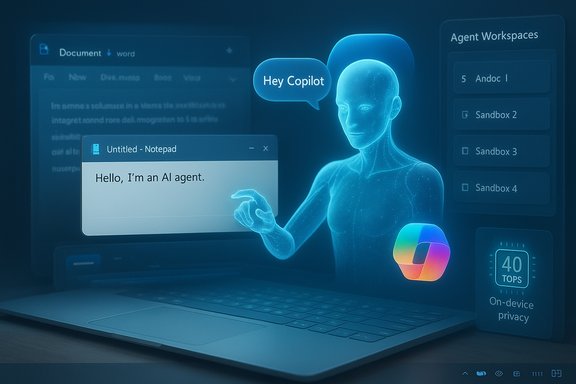
Microsoft is rolling a wake‑word experience into Copilot that mirrors smartphone and smart‑speaker assistants: say “Hey, Copilot” and the OS will optionally start a hands‑free session. The wake‑word detector is designed to run locally as a small “spotter” with a short audio buffer; heavier speech understanding and reasoning may still use cloud models unless the device meets on‑device inference requirements. The feature is opt‑in and initially limited by language/region in preview. Why it matters: voice lowers friction for long, multi‑step workflows and accessibility scenarios. The counterpoint: any always‑listening mechanism — even a local spotter — raises understandable privacy concerns, so Microsoft’s opt‑in default is a deliberate UX choice.Copilot Vision — making the screen contextually meaningful
Copilot Vision lets Copilot analyze selected windows, a shared region, or (in preview) your entire desktop when explicitly permitted. Vision can OCR images, identify UI elements, summarize content, and highlight where to click. The capability is session‑bound and requires explicit user consent before the assistant “sees” what’s on screen. Why it matters: this reduces copy/paste and translation friction and allows Copilot to provide targeted guidance for complex UI workflows. Why it’s risky: system‑level screen awareness broadens the threat model for privacy and data exfiltration if misconfigured or abused. Microsoft says Vision runs under permissioned constraints during preview, but the presence of the capability warrants attention.Copilot Actions (agentic automations) — assistants that act
Copilot Actions is the big change: agents that do, not just advise. In preview, Actions can carry out multi‑step tasks — gather files, edit documents, assemble emails with attachments, or interact with web flows — by programmatically clicking, typing, and moving through apps. Microsoft implements these agents in agent workspaces, and each agent runs under a separate agent account, isolated from the user’s main session. These controls are intended to provide auditability, revocation, and least‑privilege access. The experimental toggle in Settings enables provisioning of agent accounts and workspaces. Why it matters: agentic automations can dramatically shorten complex workflows and unlock genuine productivity gains. But the same mechanisms — agents that can access files, send email, and control UI — materially change endpoint attack surfaces and governance needs. Microsoft’s preview emphasizes visible, revocable actions and sandboxing, yet production readiness will hinge on thorough logging, rollback semantics, and enterprise policy controls.Copilot+ PCs and hardware gating
Microsoft continues to position Copilot+ as a certified hardware tier: devices with dedicated NPUs and platform guarantees for lower latency and more private local inference. The Copilot+ baseline discussed publicly and in OEM guidance highlights an NPU capability target of roughly 40 TOPS (trillions of operations per second), along with memory and storage minimums for enriched on‑device Copilot scenarios. That hardware baseline will determine which features can run fully on‑device versus relying on cloud inference. Independent reporting and hardware vendor announcements confirm the 40 TOPS target as a practical threshold for local generative workloads.The security and privacy model Microsoft is building
Microsoft has published an initial security posture for agentic features that highlights four primitives: the experimental toggle (user control), agent accounts (distinct Windows accounts for agents), agent workspaces (isolated desktop sessions), and scoped permissions for folders and connectors. The goal is to treat agent actions as first‑class, auditable operations rather than opaque background activity. Key elements:- Experimental agentic features toggle — A master opt‑in switch in Settings → System → AI components that prevents agent provisioning unless enabled by the user or admin. Microsoft ships this off by default in preview.
- Agent accounts — Agents run under distinct standard (non‑admin) accounts so their ACLs, auditing, and revocation are separable from the human user.
- Agent workspaces — Lightweight parallel sessions where agents execute while remaining visible and interruptible; designed to be less heavy than full VMs but provide runtime isolation.
- Scoped folder permissions and signing — Agents request access to known folders and should be digitally signed; administrators can block or require signing.
Verifying the claims: what’s confirmed and what needs independent validation
- Experimental toggle and agent workspaces — verifiable: The Windows Insider build notes and Microsoft Support article document the new Settings control and the agent workspace model. You can confirm the presence of the toggle in Build 26220.x preview releases.
- Copilot Voice and Vision exist in previews — verifiable: Hands‑free wake‑word testing (“Hey, Copilot”) and expanded Vision capabilities are documented in Microsoft blog posts and observed in Insider channels. Coverage from major outlets corroborates the availability in preview channels.
- Copilot Actions agentic behavior — partial verification: Microsoft’s Windows Experience and Support pages describe the concept, the agent workspace isolation model, and the permission flow. The capability is in preview and gated; production‑grade guarantees (for example, complete audit trails, enterprise‑grade rollback semantics, or the full set of connector controls) remain to be demonstrated in a broad enterprise context. Microsoft’s claims about sandboxing and revocation are engineering promises that will merit independent testing.
- Copilot+ hardware spec (40 TOPS baseline) — externally confirmed: Multiple independent reports and hardware vendor disclosures reference the 40 TOPS figure as a practical threshold for on‑device inference and Copilot+ certification. However, real‑world performance will depend on model architecture, precision (INT8 vs FP16), memory bandwidth, and system integration; TOPS alone is an imperfect single‑number proxy for user experience. Treat the 40 TOPS figure as a useful industry target, not a definitive performance guarantee.
- Telemetry and engagement numbers — unverified external claims: Microsoft’s early telemetry about higher voice engagement is vendor‑provided and has not been independently audited. Any decision that depends on these figures should treat them as directional until third‑party telemetry or academic studies corroborate them.
Strengths: why this approach has technical merit
- Clear opt‑in controls and visible UX: Shipping an explicit, discoverable toggle and visible agent workspaces is an important step toward transparency. Making the default conservative reduces accidental exposure during preview.
- Runtime isolation and distinct agent identities: Separating agent accounts from user accounts gives Windows the ability to apply ACLs, auditing, and revocation granularly — a practical foundation for enterprise governance if implemented correctly.
- Hybrid model balances latency and reach: By differentiating cloud‑backed Copilot features from Copilot+ on‑device experiences, Microsoft acknowledges market reality: most PCs today will still rely on cloud models, while certified hardware can deliver lower latency and privacy guarantees locally. That pragmatic hybrid approach makes rollout and experimentation possible without forcing a single migration path.
- Staged rollout via Insiders and Copilot Labs: Previewing agentic features within controlled channels helps discover UX and security regressions earlier and allows Microsoft to evolve guardrails before general availability.
Risks and open questions
- New attack surface: Agents that can click, type, and manipulate the UI create opportunities for novel attacks — cross‑prompt injection, escalation via connectors, or compromised third‑party agents with excessive permissions. Endpoint security vendors and defenders will need new detection signatures and policy controls to cover agent account activity.
- Fragmentation and support complexity: The split between Copilot+ and non‑Copilot devices increases support complexity for IT teams. Differing performance and offline behavior across hardware will complicate application and security baselines.
- Auditability and rollback: Agents must leave an immutable, easily queried trace of what they did and provide robust rollback flows for human‑sensitive actions (for example, reversing an automated mass email or file reorganization). Microsoft’s preview promises undo flows, but production‑grade audit and rollback semantics remain an open requirement.
- Privacy edge cases: Screen‑aware agents and desktop‑level Vision can surface sensitive information (password managers, tokens in visible windows). Even session‑bound “opt‑in” behavior can be misconfigured or misunderstood. Enterprises will need strict policies about where and how Vision and Actions are allowed to run.
- Licensing and monetization blur: Microsoft’s messaging indicates some advanced capabilities may be gated by Copilot/Copilot+ entitlements or Microsoft 365 plans. Pricing and entitlement rules are still evolving and could impact adoption — especially in enterprise procurement cycles. Treat license boundaries as fluid until Microsoft finalizes them.
- Hardware expectations vs reality: The 40 TOPS NPU figure is real as an industry target, but TOPS alone does not guarantee real‑world quality for generative or multimodal models. CPU/GPU/DRAM balance, model optimization, and driver stacks all matter. Expect variability across OEM implementations.
Practical steps for users, IT admins, and OEMs
For individual users and hobbyists
- Keep the Experimental agentic features toggle off unless you want to test agents in a controlled way; the default is off.
- Use Copilot Vision only with apps and windows you trust; revoke permissions if behavior is unexpected.
- Review Copilot and Windows AI settings after each preview update and file feedback through the Feedback Hub.
For IT administrators (recommended pilot plan)
- Inventory hardware capability (NPUs, RAM, TPM) and map which devices meet Copilot+ guidance. Confirm copilot feature dependencies for key workflows.
- Establish a policy: default OFF for Experimental agentic features; enable for a restricted pilot group with logging and endpoint monitoring.
- Update EDR/EDR rules to detect agent account processes and agent workspace sessions; whitelist signed agents only.
- Define a permission matrix for folders and connectors; require attestation and digital signing for any agent used in production.
- Validate audit trails and rollback semantics in pilot workflows; require demonstrable, queryable logs before scaling.
For OEMs and hardware partners
- Test NPU performance under representative generative and multimodal workloads, not just TOPS benchmarks. Optimize drivers, thermal envelopes, and the software stack to meet Microsoft’s Copilot+ expectations in real workloads.
Independent cross‑checks and unresolved verifications
- The presence of the Experimental agentic features toggle is directly verifiable in Windows Insider Build 26220.x and documented in Microsoft’s Windows Insider blog and support pages.
- The Copilot Vision and Copilot Voice features are visible in Insider builds and have been reported by multiple outlets. The underlying telemetry claims (for example, “substantially higher engagement for voice sessions”) are Microsoft‑provided and need independent corroboration before they can be relied on for procurement or product strategy.
- The Copilot+ 40 TOPS guidance is consistently reported across Microsoft partner materials and third‑party hardware coverage, but user‑facing performance still depends on system integration and model tuning; TOPS is a useful shorthand but not a single‑metric guarantee of user experience.
Broader context: the OS pivot, Windows 10 EOL, and market timing
Microsoft timed much of this push against a lifecycle milestone: Windows 10 reached its end of mainstream support on October 14, 2025. That deadline both concentrates upgrade planning and creates a practical nudge for organizations and consumers to evaluate Windows 11 and Copilot‑capable hardware. Microsoft’s lifecycle guidance and messaging encourage migration to Windows 11 or enrollment in limited Extended Security Updates for Windows 10. Administrators should treat the EOL date as a hard planning milestone in migration roadmaps. This timing amplifies scrutiny: users and IT teams are rightly asking whether the migration to Windows 11 will also require a hardware refresh to get full Copilot benefits, and whether the productivity gains justify the security and governance work needed to enable agentic features. Those are organizational decisions that require pilot validation and cost/benefit analysis.Conclusion — what to watch next
Microsoft’s preview releases make the next era of Windows unmistakable: the OS is being rebuilt to treat agents as platform primitives rather than optional apps. That architectural shift brings genuine productivity promise — voice and vision as first‑class inputs, and agents that can automate compound tasks. Microsoft is exercising caution in the rollout: agentic features are off by default, staged through Insiders and Copilot Labs, and supported by a described security model that includes agent accounts and isolated agent workspaces. At the same time, the change raises real governance and security demands: new attack classes, an expanded support matrix with Copilot+ hardware, and the need for rigorous logging, rollback, and auditing. Organizations and advanced users should pilot these features in controlled environments, demand independent validation of vendor performance claims (including on‑device inference performance), and insist on clear, exportable audit trails before enabling agentic automations broadly.Practical next steps are straightforward: inventory hardware against Copilot+ guidance, stage a narrow pilot with aggressive logging and policy controls, and use the Windows Insider previews to stress test revocation and rollback flows. The technology has arrived in earnest — but the trust and operational practices that will make it safe, reliable, and enterprise‑ready are still being built.
Microsoft’s roadmap for Windows 11 is no longer speculative: the company is actively preparing a platform where agents are first‑class citizens of the OS. That future promises new efficiencies and novel user experiences, but it also requires careful, measured adoption to ensure those gains aren’t accompanied by new and avoidable risks.
Source: gHacks Technology News https://www.ghacks.net/2025/11/18/microsoft-begins-preparing-windows-11-for-its-agentic-ai-future/
