

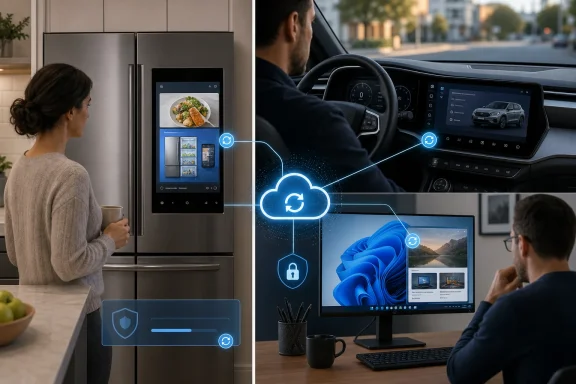
Samsung Family Hub refrigerators, Stellantis Uconnect dashboards, and Windows 11 PCs illustrate the same uncomfortable shift: a device can gain promotional content after its owner has paid for it. Software updates keep connected products secure and functional, but they also give manufacturers continuing control over screens in kitchens, vehicles, and workplaces.
Fox News highlighted the trend in a July 15 report, documenting Samsung’s refrigerator ads, earlier promotions in Jeep, Ram, and Chrysler vehicles, and Microsoft’s expanding collection of recommendations and offers in Windows 11. The individual implementations differ, but the practical consequence is consistent: buying the hardware no longer guarantees that its interface will remain as it was on purchase day.
Samsung announced its advertising experiment in October 2025 as part of a Family Hub software update. A new Cover Screen widget combined weather forecasts, calendar information, news, and what Samsung described as “curated advertisements” on selected refrigerator themes.
The company initially called the feature a pilot. According to the statement Samsung supplied to Fox News, that trial ended in March 2026 and the widget was then launched more broadly in the United States with the same experience.
Samsung says the ads are contextual or non-personalized and that Family Hub refrigerators do not collect personal information or track consumers for the feature. It also says relatively few users have disabled the widget, although that figure reflects the company’s own review rather than independent research.
Owners are not required to keep the advertising enabled. On an updated Family Hub refrigerator, the control should be available under:
The opt-out is welcome, but it does not resolve the underlying dispute. A refrigerator owner may have accepted an update expecting interface improvements, AI Vision Inside enhancements, Bixby Voice ID, and Knox security changes—not a new advertising surface in the kitchen.
That distinction matters because refusing updates is not a sensible long-term defense. Connected appliances require patches, certificate updates, service fixes, and compatibility work. Manufacturers should not force customers to weigh those benefits against the possibility that an update will also introduce monetization.
Those operational messages have a legitimate role. A recall notice, maintenance warning, or connected-service failure can require prompt attention and belongs on a display the driver is likely to see.
A sales offer is harder to justify in the same channel. The center display may control navigation, audio, climate functions, cameras, phone integration, and vehicle settings. Putting promotional material there risks blurring the line between an alert that deserves attention and a message designed to generate another purchase.
Stellantis told Fox News that it had not run the promotional messages discussed in earlier reports since mid-fall 2025 and had no future promotional messages planned. When those campaigns were active, owners could reportedly opt out through customer service or their vehicle-brand account’s message settings.
That means there is no current Stellantis promotional campaign for owners to disable, based on the company’s statement. The episode nevertheless demonstrates how an over-the-air update or connected communications service can alter a vehicle’s interface long after delivery.
The issue is not limited to one automaker. Stellantis announced a partnership with 4screen in July 2025 to place nearby commercial destinations and offers within navigation maps on compatible Uconnect 4 and Uconnect 5 vehicles. Map-based sponsored locations are less disruptive than a pop-up, but both rely on the dashboard becoming a continuing commercial platform.
Safety-critical and promotional communications should not look interchangeable. Administrators would reject that design in an enterprise alerting system, and drivers have good reason to demand the same separation inside a vehicle.
Microsoft’s own support documentation explicitly says Windows 11 Device usage settings can generate tips, recommendations, and personalized ads. Selecting Gaming, for example, may produce an Xbox Game Pass trial; School can trigger OneDrive suggestions; and Business may lead to a Microsoft 365 Business trial.
These messages are not necessarily conventional banner advertisements. Some introduce features or help complete configuration. Others encourage the user to activate OneDrive backup, adopt Microsoft 365, sign into a Microsoft account, try an application, or subscribe to another Microsoft service.
The distinction between assistance and advertising becomes particularly thin when the recommendation benefits Microsoft financially. A OneDrive prompt may help protect files, but it can also move the user toward paid cloud storage once the free allocation is exhausted.
Microsoft declined to comment for the Fox News report. Its current support pages nevertheless document several controls that reduce the promotional layer.
Under Settings > Privacy & security > General, users can disable:
Users should also open Settings > Personalization > Device usage and switch off any categories they do not need. Microsoft says those selections can influence the tips, trials, app suggestions, website recommendations, and personalized advertising presented by Windows.
For the lock screen, Settings > Personalization > Lock screen provides the relevant controls. Windows Spotlight includes rotating photography alongside tips, notifications, and other dynamic text. Selecting Picture or Slideshow gives the owner a more static surface, while an additional “fun facts, tips, tricks, and more” option may appear depending on the Windows 11 version and configuration.
Start menu controls remain under Settings > Personalization > Start. The exact wording can vary across Windows 11 releases, editions, and Microsoft’s controlled feature rollouts, but users should inspect toggles mentioning recommendations, tips, shortcuts, newly installed apps, personalized offers, and account-related notifications.
No single toggle creates a promotion-free edition of Windows 11. The controls are fragmented, and disabling one category does not necessarily affect content delivered through another subsystem, application, notification source, or Microsoft account experience.
Organizations should manage these experiences through supported Windows policy rather than asking every employee to visit Settings. Relevant controls can be deployed through Microsoft Intune settings catalogs, configuration service providers, Group Policy, and Windows experience policies, although availability can depend on Windows edition and management state.
Administrators should test policy behavior against the specific Windows 11 servicing branch deployed in their environment. Microsoft frequently adjusts Start, Spotlight, account notifications, and post-update experiences through cumulative updates or controlled rollouts, so a policy that handled one surface may not suppress a newly introduced one.
A useful validation process is to check fresh installations, feature-update migrations, new-user profiles, and Microsoft account sign-in separately. Promotional experiences often appear during setup or shortly after an update, precisely when users are most likely to assume an unexpected prompt is mandatory.
The broader problem is not that every recommendation is malicious or that connected products should stop receiving new features. It is that software has weakened the finality of a hardware sale. The manufacturer can continue redesigning, promoting, and monetizing the interface while the customer continues supplying the screen, electricity, connectivity, and attention.
Samsung currently provides a direct switch for Family Hub Cover Screen ads. Stellantis says the disputed Uconnect promotions ended in 2025. Windows 11 offers several partial controls rather than one master advertising switch.
For Windows users and administrators, the immediate response is to keep installing security updates while auditing what those updates enable. The longer-term test for manufacturers is simpler: if promotional content arrives after purchase, turning it off should be obvious, complete, and no harder than turning it on.
Fox News highlighted the trend in a July 15 report, documenting Samsung’s refrigerator ads, earlier promotions in Jeep, Ram, and Chrysler vehicles, and Microsoft’s expanding collection of recommendations and offers in Windows 11. The individual implementations differ, but the practical consequence is consistent: buying the hardware no longer guarantees that its interface will remain as it was on purchase day.
 Samsung Turned the Refrigerator Door Into Inventory
Samsung announced its advertising experiment in October 2025 as part of a Family Hub software update. A new Cover Screen widget combined weather forecasts, calendar information, news, and what Samsung described as “curated advertisements” on selected refrigerator themes.The company initially called the feature a pilot. According to the statement Samsung supplied to Fox News, that trial ended in March 2026 and the widget was then launched more broadly in the United States with the same experience.
Samsung says the ads are contextual or non-personalized and that Family Hub refrigerators do not collect personal information or track consumers for the feature. It also says relatively few users have disabled the widget, although that figure reflects the company’s own review rather than independent research.
Owners are not required to keep the advertising enabled. On an updated Family Hub refrigerator, the control should be available under:
- Open Settings on the Family Hub display.
- Select Advertisements.
- Select Cover screen Ads and switch the option off.
The opt-out is welcome, but it does not resolve the underlying dispute. A refrigerator owner may have accepted an update expecting interface improvements, AI Vision Inside enhancements, Bixby Voice ID, and Knox security changes—not a new advertising surface in the kitchen.
That distinction matters because refusing updates is not a sensible long-term defense. Connected appliances require patches, certificate updates, service fixes, and compatibility work. Manufacturers should not force customers to weigh those benefits against the possibility that an update will also introduce monetization.
A Dashboard Promotion Carries Different Risks
Stellantis previously used its Uconnect In-Vehicle Message system to display promotional messages in Jeep, Ram, and Chrysler vehicles. The company describes that system as a way to contact owners at important moments, including for recall information and vehicle-health alerts.Those operational messages have a legitimate role. A recall notice, maintenance warning, or connected-service failure can require prompt attention and belongs on a display the driver is likely to see.
A sales offer is harder to justify in the same channel. The center display may control navigation, audio, climate functions, cameras, phone integration, and vehicle settings. Putting promotional material there risks blurring the line between an alert that deserves attention and a message designed to generate another purchase.
Stellantis told Fox News that it had not run the promotional messages discussed in earlier reports since mid-fall 2025 and had no future promotional messages planned. When those campaigns were active, owners could reportedly opt out through customer service or their vehicle-brand account’s message settings.
That means there is no current Stellantis promotional campaign for owners to disable, based on the company’s statement. The episode nevertheless demonstrates how an over-the-air update or connected communications service can alter a vehicle’s interface long after delivery.
The issue is not limited to one automaker. Stellantis announced a partnership with 4screen in July 2025 to place nearby commercial destinations and offers within navigation maps on compatible Uconnect 4 and Uconnect 5 vehicles. Map-based sponsored locations are less disruptive than a pop-up, but both rely on the dashboard becoming a continuing commercial platform.
Safety-critical and promotional communications should not look interchangeable. Administrators would reject that design in an enterprise alerting system, and drivers have good reason to demand the same separation inside a vehicle.
Windows 11 Makes the Upsell Look Like Part of the PC
Windows users have dealt with recommendations, Microsoft account prompts, app suggestions, and subscription offers for years. What makes them contentious is their placement inside trusted operating-system surfaces such as Settings, Start, notifications, and the lock screen.Microsoft’s own support documentation explicitly says Windows 11 Device usage settings can generate tips, recommendations, and personalized ads. Selecting Gaming, for example, may produce an Xbox Game Pass trial; School can trigger OneDrive suggestions; and Business may lead to a Microsoft 365 Business trial.
These messages are not necessarily conventional banner advertisements. Some introduce features or help complete configuration. Others encourage the user to activate OneDrive backup, adopt Microsoft 365, sign into a Microsoft account, try an application, or subscribe to another Microsoft service.
The distinction between assistance and advertising becomes particularly thin when the recommendation benefits Microsoft financially. A OneDrive prompt may help protect files, but it can also move the user toward paid cloud storage once the free allocation is exhausted.
Microsoft declined to comment for the Fox News report. Its current support pages nevertheless document several controls that reduce the promotional layer.
Under Settings > Privacy & security > General, users can disable:
- “Let apps show me personalized ads by using my advertising ID.”
- “Let Windows improve Start and search results by tracking app launches.”
- “Show me suggested content in the Settings app.”
Users should also open Settings > Personalization > Device usage and switch off any categories they do not need. Microsoft says those selections can influence the tips, trials, app suggestions, website recommendations, and personalized advertising presented by Windows.
For the lock screen, Settings > Personalization > Lock screen provides the relevant controls. Windows Spotlight includes rotating photography alongside tips, notifications, and other dynamic text. Selecting Picture or Slideshow gives the owner a more static surface, while an additional “fun facts, tips, tricks, and more” option may appear depending on the Windows 11 version and configuration.
Start menu controls remain under Settings > Personalization > Start. The exact wording can vary across Windows 11 releases, editions, and Microsoft’s controlled feature rollouts, but users should inspect toggles mentioning recommendations, tips, shortcuts, newly installed apps, personalized offers, and account-related notifications.
No single toggle creates a promotion-free edition of Windows 11. The controls are fragmented, and disabling one category does not necessarily affect content delivered through another subsystem, application, notification source, or Microsoft account experience.
Enterprise Policy Is Stronger Than Consumer Consent
For IT departments, promotional content is more than an annoyance. Unrequested prompts can create support tickets, encourage unmanaged cloud adoption, distract users during onboarding, and undermine carefully designed endpoint configurations.Organizations should manage these experiences through supported Windows policy rather than asking every employee to visit Settings. Relevant controls can be deployed through Microsoft Intune settings catalogs, configuration service providers, Group Policy, and Windows experience policies, although availability can depend on Windows edition and management state.
Administrators should test policy behavior against the specific Windows 11 servicing branch deployed in their environment. Microsoft frequently adjusts Start, Spotlight, account notifications, and post-update experiences through cumulative updates or controlled rollouts, so a policy that handled one surface may not suppress a newly introduced one.
A useful validation process is to check fresh installations, feature-update migrations, new-user profiles, and Microsoft account sign-in separately. Promotional experiences often appear during setup or shortly after an update, precisely when users are most likely to assume an unexpected prompt is mandatory.
The broader problem is not that every recommendation is malicious or that connected products should stop receiving new features. It is that software has weakened the finality of a hardware sale. The manufacturer can continue redesigning, promoting, and monetizing the interface while the customer continues supplying the screen, electricity, connectivity, and attention.
Samsung currently provides a direct switch for Family Hub Cover Screen ads. Stellantis says the disputed Uconnect promotions ended in 2025. Windows 11 offers several partial controls rather than one master advertising switch.
For Windows users and administrators, the immediate response is to keep installing security updates while auditing what those updates enable. The longer-term test for manufacturers is simpler: if promotional content arrives after purchase, turning it off should be obvious, complete, and no harder than turning it on.
References
- Primary source: Fox News
Published: 2026-07-15T10:02:00+00:00
How to limit ads on smart devices, Windows 11 computers, tablets | Fox News
Kurt "CyberGuy" Knutsson explains why ads appear on smart device ads like refrigerators, Jeep and vehicle dashboards and Windows 11 lock screens, and how to turn them off.www.foxnews.com - Official source: support.microsoft.com
Personalize Your Windows Experience With Device Usage Settings | Microsoft Support
Discover how to personalize your Windows 11 experience with device usage settings. Learn how to optimize your device based on your usage preferences.support.microsoft.com
