

Microsoft’s latest push to make app updates “less painful” for Windows 11 users is already visible in Insider builds: a new Update Orchestration Platform (UOP) is rolling out as a preview that allows apps — including some third‑party and non‑Store apps — to register with Windows so the OS can scan, schedule, download and even initiate installs at times that minimize user disruption. Early Insider builds expose a new Settings → Apps → App updates page where registered apps report their status and users get a single place to check update progress. This is not a replacement for developer update backends; it’s an orchestration layer that coordinates timing, notifications and reporting while letting apps keep their own delivery mechanics.
For decades Windows update management has been fragmented: Windows Update handles OS patches and many drivers, the Microsoft Store updates Store‑packaged apps, and millions of Win32 applications ship their own updaters. That fragmentation creates noisy, overlapping update activity, inconsistent user prompts, duplicated bandwidth spikes, and operational overhead for IT teams. Microsoft’s stated goal with UOP is to unify orchestration — not to force every vendor to change their distribution model, but to give the OS a seat at the scheduling table so updates happen at less disruptive moments and can be audited centrally. This isn’t a brand‑new concept in operating systems: mobile platforms and Linux distributions have long used centralized update services. What’s new on Windows is the hybrid model Microsoft is promoting — apps continue to host payloads and run their installers, but Windows becomes the coordinator for when those actions happen and how they’re surfaced to users and administrators. Early reporting and Insider previews show the first visible signs of this effort: an “App updates” page in Settings, Settings-level update checks, and developer APIs for onboarding.
Microsoft’s vision for UOP is clear: a unified, intelligent update orchestrator that reduces fragmentation while preserving publisher control. The current preview shows the mechanics and the user surface; the next months will show whether developers, enterprises and the broader Windows ecosystem adopt it widely enough to deliver the promised reduction in update pain.
Source: Windows Latest Microsoft says it wants to make app updates less painful on Windows 11
 Background / Overview
For decades Windows update management has been fragmented: Windows Update handles OS patches and many drivers, the Microsoft Store updates Store‑packaged apps, and millions of Win32 applications ship their own updaters. That fragmentation creates noisy, overlapping update activity, inconsistent user prompts, duplicated bandwidth spikes, and operational overhead for IT teams. Microsoft’s stated goal with UOP is to unify orchestration — not to force every vendor to change their distribution model, but to give the OS a seat at the scheduling table so updates happen at less disruptive moments and can be audited centrally. This isn’t a brand‑new concept in operating systems: mobile platforms and Linux distributions have long used centralized update services. What’s new on Windows is the hybrid model Microsoft is promoting — apps continue to host payloads and run their installers, but Windows becomes the coordinator for when those actions happen and how they’re surfaced to users and administrators. Early reporting and Insider previews show the first visible signs of this effort: an “App updates” page in Settings, Settings-level update checks, and developer APIs for onboarding. How the Update Orchestration Platform (UOP) works
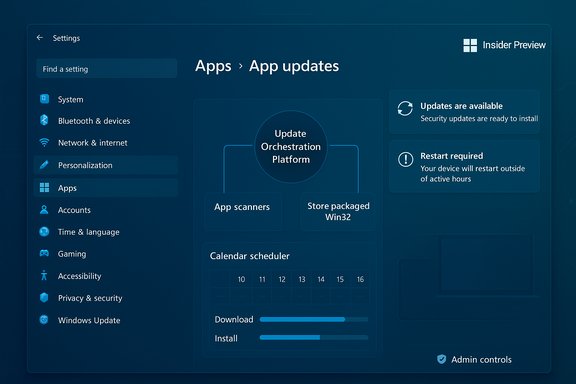
The orchestration model — at a glance
- Apps register with the orchestrator as an update provider using WinRT APIs or PowerShell commands.
- During registration, the developer supplies the path to an executable that Windows will call periodically to scan for updates.
- When the app’s scanner reports a new update, it describes the update to UOP (title, version, packaging type, restart requirements, deadlines).
- UOP schedules the download and installation based on device state (idle vs active), power (battery vs AC), network policy (metered), and admin deadlines.
- Apps keep using their own backends and installers; UOP handles timing, coordination, notifications and unified update history.
Step‑by‑step orchestration flow
- Developer registers app as an update provider and supplies an executable update scanner.
- Windows runs the scanner on a schedule; scanner reports available updates via UOP API.
- Orchestrator decides when to run heavy operations (download/install) to reduce user impact.
- Orchestrator calls back into the app’s install logic to apply the update; app reports status back to UOP for display.
What users will see: Settings → Apps → App updates
Windows Insider builds are already surfacing a new control panel under Settings > Apps > App updates. The page is compact: it shows a Last checked timestamp and a Check for updates button, and it will list apps that have opted into UOP so users can view centralized update progress and history. Early testers report that the UI may appear before backend services are fully enabled (a staged rollout), so seeing the page doesn’t necessarily mean updates are live on every device yet. Key user‑facing promises:- Unified update history for onboarded apps visible in Settings.
- Native Windows Update notifications for participating apps, reducing notification fragmentation.
- Pause / scheduling semantics aligned with Windows Update behavior (e.g., pause windows rather than a permanent Off). Early previews indicate Store auto-update behavior has already been adjusted to match this approach.
Scope, packaging support, and what is not included (yet)
UOP is intentionally hybrid and staged. Microsoft and independent reporting make the current limits clear:- Supported packaging: MSIX / APPX and Store-aware Win32 packaging are first‑class citizens. Classic Win32 apps can be supported if the publisher supplies the required scanner/installer glue, but legacy MSI/.exe installers and independent updaters (Steam, Chrome, many Adobe components) will remain outside UOP until publishers opt in or repackage.
- Drivers: Microsoft has signaled that drivers not published through Windows Update can leverage the orchestrator, allowing driver updates to be scheduled and coordinated alongside app and OS updates. The exact scope for driver onboarding is still being refined.
- Optional onboarding: participation requires the developer to register — UOP does not automatically take over third‑party updaters. This is a voluntary program in private preview for developers, with the OS providing the orchestration services.
Benefits Microsoft highlights
Microsoft lists a clear set of operational and user experience benefits for both consumers and IT teams:- Eco‑efficient scheduling: defer or schedule updates to idle times, AC power, or lower‑impact windows to avoid CPU and bandwidth spikes.
- Simplified notifications: use native Windows Update notifications so users aren’t bombarded by different updaters.
- Unified update history and telemetry: single pane for update history and centralized logs for troubleshooting and auditing.
- Admin policy support: apps can declare installation deadlines so enterprise policy enforcement meshes with application updates.
Risks, blind spots, and legitimate concerns
No major platform transition is risk‑free. UOP brings real benefits, but it also creates new attack surfaces and operational questions:- Supply‑chain and integrity concerns: UOP schedules and triggers publisher update logic — that means the OS will execute publisher-supplied scanners and installers. Ensuring the authenticity of those binaries, the integrity of distribution endpoints, and legitimacy of the update metadata becomes critical. Publishers must sign binaries and secure CDNs; IT must validate trust chains. Microsoft’s messaging acknowledges the need for strong signing and telemetry, but operationalizing that across millions of publisher endpoints will take time.
- Privacy and telemetry: centralized logging and unified telemetry are powerful for IT, but they raise questions about what data is collected, how long it’s retained, and how it’s shared with app publishers. Clear privacy controls and enterprise MDM options will be necessary. Early docs emphasize admin controls and Group Policy/Intune interoperability; specifics about telemetry retention will need review as the preview expands.
- False sense of universality: users and admins might assume UOP will update everything. It won’t — not until publishers onboard. Some legacy or intentionally siloed updaters (e.g., game launchers, custom enterprise agents) will remain outside UOP for technical or policy reasons. This mismatch could lead to confusion if communication is unclear.
- Operational coupling risk: centralizing orchestration increases coupling between OS scheduling and publisher update workflows. Poorly implemented scanners or installers could now be scheduled at scale by Windows, amplifying any bugs. Microsoft’s guidance asks publishers to preserve robust rollback and reporting semantics; testing is essential.
Enterprise impact and management
UOP is deliberately designed with enterprise use in mind. Key admin features and implications include:- Policy integration: apps can supply deadlines which Intune/Group Policy can enforce, fitting into existing compliance windows.
- Unified logging and troubleshooting: an auditable trail covering OS, drivers and UOP‑onboarded apps can simplify incident response.
- Staged adoption path: Microsoft is offering private previews to developers and product teams so enterprise customers can pilot app onboarding before defaulting to Windows‑managed orchestration. This staged route is essential for enterprises with strict change control.
- Enroll a small set of test devices in Windows Insider channels to surface the Settings UI and experience the behavior.
- Identify a subset of packaged apps (MSIX / Store‑packaged Win32) and coordinate with publishers to pilot onboarding.
- Validate rollback and detection mechanisms for app installs triggered by UOP.
- Monitor telemetry and logs closely for unexpected orchestration interactions.
Developer checklist: what publishers should do now
If a publisher wants to take advantage of UOP, the practical steps include:- Package or repackage where possible to MSIX/APPX or Store‑packaged Win32 for the smoothest onboarding.
- Provide a robust executable scanner that can safely and deterministically report update availability to UOP. Ensure the scanner is signed and hardened.
- Implement idempotent install logic and clear rollback paths so orchestrated installs don’t create unrecoverable device states.
- Validate telemetry and privacy behavior with MDM and legal teams; be explicit about what signals are reported back to Microsoft and admins.
Timeline and availability — what to expect next
- UOP is currently in private preview for developers and rolling out to Windows Insiders in Dev and Beta channels. The Windows Insider build that begins surfacing the UOP plumbing and Settings > Apps > App updates is Build 26220.7344 (delivered via KB5070316 on Insider channels).
- There is no firm public date for general availability. Microsoft is staging backend services and gating features server‑side during the Insiders phase; broad enterprise / consumer rollout depends on publisher adoption and validation. Expect gradual expansion rather than an immediate switch‑over.
- Independent outlets and community reporting have covered early previews since Microsoft’s May announcement about the vision and subsequent Insider updates; these corroborate the staged approach and the requirement that developers opt in.
Practical advice for enthusiasts, power users and admins
- If you’re curious: join Windows Insider Dev/Beta channels on a non‑critical test machine to see the App updates page and watch how the OS displays Last checked and Check for updates behavior. Treat these builds as preview code; don’t enable in production.
- For IT admins: plan pilots around packaged apps and coordinate with vendors. Add UOP onboarding to your change‑control calendar only after validating rollback, reporting and MDM interactions.
- For privacy‑minded users: review update and diagnostic settings and ask vendors what telemetry will be surfaced to the OS. Microsoft’s enterprise controls are present, but consumer defaults will matter — monitor Settings and Store UI changes carefully.
- Maintain existing update controls (winget, vendor updaters, Store settings) until you have confirmed that critical apps have safely onboarded and behave as expected under UOP.
Final analysis — what this actually means for Windows users
The Update Orchestration Platform represents a pragmatic, incremental shift toward a more centralized update model on Windows. It acknowledges the practical reality that publishers will continue to host and deliver their own update payloads, while Windows takes responsibility for when those updates occur and how they’re presented to users and administrators. The potential upsides are real: fewer disruptive CPU/bandwidth spikes, more consistent notifications, and better auditability for IT. However, success depends on publisher adoption, careful operational controls, and robust trust and signing practices. The early Insider rollout and private developer previews are the right approach: they allow Microsoft and third‑party publishers to surface edge cases before any broad enforcement. Until large, complex ecosystems (games, creative suites, bespoke enterprise software) actively opt in, UOP will improve update quality for many apps but not all. Users and admins should treat UOP as a welcome tool — but one that requires deliberate onboarding, testing and governance.Microsoft’s vision for UOP is clear: a unified, intelligent update orchestrator that reduces fragmentation while preserving publisher control. The current preview shows the mechanics and the user surface; the next months will show whether developers, enterprises and the broader Windows ecosystem adopt it widely enough to deliver the promised reduction in update pain.
Source: Windows Latest Microsoft says it wants to make app updates less painful on Windows 11
