

Microsoft is quietly experimenting with a small but practical change to Windows 11 that inserts Microsoft Store app recommendations directly into the “Open with…” dialog when the operating system encounters a file with no default handler or an unfamiliar extension. This addition, shipping as part of recent Insider preview builds, aims to collapse a two‑step workflow — identify you need an app, then open the Store to find one — into a single, more convenient action.
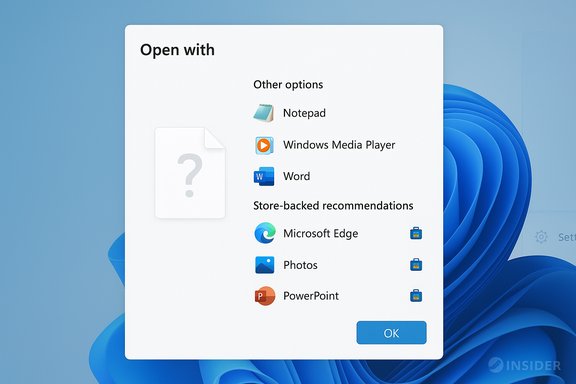
Microsoft’s Windows Insider channel has long been a laboratory for UI refinements and platform-level plumbing. In early preview releases this year, Microsoft began rolling out an experiment that adds Store‑hosted app suggestions directly to the Open With menu. The change shows a small Store icon next to suggested apps in the dialog and lists apps that are relevant to the file type you tried to open. Microsoft describes this as a way to make discovering and installing a compatible app “faster and easier” without forcing a separate visit to the Microsoft Store. At the same time, Microsoft previewed a related systems change: the Unified Update Orchestrator Platform (UOP). UOP exposes a new Settings surface (Settings → Apps → App updates) intended to centralize app update discovery and orchestration across Microsoft‑managed apps. Early Insider notes indicate apps will register with UOP via APIs, report their update status back to Windows, and let the OS coordinate update timing to reduce interruptions. The platform is still nascent and requires app publishers to opt in before it becomes tangible for most users.
Microsoft emphasizes the recommendations will be relevant to the file type, but the line between helpful suggestions and promoted apps can be thin. Community feedback in preview channels already shows mixed reactions: some appreciate the convenience, others fear the OS will increasingly nudge users toward Store apps even when high‑quality, non‑Store alternatives exist. This subjective trade‑off is worth watching as the experiment expands.
Source: Windows Central https://www.windowscentral.com/micr...wnload-recommendations-in-the-open-with-menu/
 Background
Microsoft’s Windows Insider channel has long been a laboratory for UI refinements and platform-level plumbing. In early preview releases this year, Microsoft began rolling out an experiment that adds Store‑hosted app suggestions directly to the Open With menu. The change shows a small Store icon next to suggested apps in the dialog and lists apps that are relevant to the file type you tried to open. Microsoft describes this as a way to make discovering and installing a compatible app “faster and easier” without forcing a separate visit to the Microsoft Store. At the same time, Microsoft previewed a related systems change: the Unified Update Orchestrator Platform (UOP). UOP exposes a new Settings surface (Settings → Apps → App updates) intended to centralize app update discovery and orchestration across Microsoft‑managed apps. Early Insider notes indicate apps will register with UOP via APIs, report their update status back to Windows, and let the OS coordinate update timing to reduce interruptions. The platform is still nascent and requires app publishers to opt in before it becomes tangible for most users. What’s changing in the “Open with” dialog
The user experience: one dialog to find and install an app
Previously, when Windows didn’t recognize a file type or had no default app set, the Open With dialog presented local apps and a link to “see more apps in the Microsoft Store.” That link required a context switch: the user had to open the Store, search or browse for an app, and then return to the file. The new experiment populates the Open With list with Store‑hosted recommendations inline, marked with a Store icon, so installation can begin from the same dialog. Microsoft frames this as a time‑saving convenience for users who encounter unknown file types.When the recommendations appear
The feature is designed to trigger only when the file has no associated default app or its extension is considered unknown by the system. The dialog will still surface locally installed apps first; Store recommendations are shown in the same dialog as suggested matches for the extension you tried to open. Microsoft says the rollout is gradual across the Dev and Beta Insider channels, meaning the experience is gated and will not appear for every Insider immediately.How it works (technical summary)
- Windows analyzes the file extension or file type when you attempt to open a file.
- If no installed app is associated, Windows will query the Microsoft Store catalog for apps registered to handle that file type.
- Matching Store apps are returned and displayed in the Open With dialog, flagged with a Store icon for clarity.
- Selecting a Store app can start the install process directly from the dialog, removing the need to open the full Store UI first.
Why this matters to everyday users
- Fewer friction points. The common annoyance of encountering a file you can’t open and having to hunt for the right app is reduced to a single interaction.
- Faster onboarding for occasional file types. Users who occasionally receive niche file formats from colleagues or external partners will spend less time searching for viewers or converters.
- Consistency across devices. Because Store apps declare supported file types in their manifests, the recommendations can be consistent across devices that use the same Microsoft account and Store catalog.
Concerns and trade‑offs
Advertising vs. utility
There’s an obvious tension here: inline Store recommendations can look like native help or like advertising. For power users and privacy‑conscious people, adding Store suggestions into a system dialog can feel like an extra promotional surface within the OS.Microsoft emphasizes the recommendations will be relevant to the file type, but the line between helpful suggestions and promoted apps can be thin. Community feedback in preview channels already shows mixed reactions: some appreciate the convenience, others fear the OS will increasingly nudge users toward Store apps even when high‑quality, non‑Store alternatives exist. This subjective trade‑off is worth watching as the experiment expands.
Privacy and telemetry
Any feature that queries an online catalog when a user opens a local file raises the question: what metadata is sent to Microsoft? The official preview notes do not detail the telemetry or query payloads for the Open With lookup, nor do they specify whether queries are tied to the user’s Microsoft account or anonymized. At the time of writing, Microsoft’s documentation for the experiment does not list a privacy control to disable the lookup, and no enterprise policy has been announced to block it centrally. That makes it difficult to verify privacy behavior without deeper technical analysis of network traffic from preview builds. Caution is warranted until Microsoft publishes more precise technical and privacy guidance.App quality and relevance
The effectiveness of the feature depends heavily on accurate Store metadata and the Store catalog’s ability to surface the best tool for the job. If the Store contains many low‑quality apps that claim support for common file types, the dialog could produce poor recommendations, undermining the convenience goal. Microsoft will need to rely on app manifest fidelity, ranking algorithms, editorial curation, and possibly user reviews to keep recommendation quality high.Implications for enterprises and power users
- Enterprises that centrally manage devices may want to control whether Store suggestions are surfaced in system dialogs. At present there is no documented Group Policy or MDM control specifically for this experiment in the Insider notes; that means organizations should test preview builds in controlled environments before wider deployment. Microsoft has not yet documented an explicit opt‑out for the Open With Store recommendations in the published Insider release notes. This absence should be treated as provisional — enterprise controls could be introduced later.
- For administrators managing locked‑down devices, the appearance of Store suggestions could be irrelevant or undesirable. Many such environments already block the Microsoft Store entirely. The new UOP work, however, aims to make Store‑style app updates visible in Settings and potentially usable even if the full Store app is unavailable. That could be a double‑edged sword: centralized update insights are helpful for compliance, but they must fit into existing security and update policies.
Unified Update Orchestrator Platform (UOP): a separate but related experiment
What UOP proposes
The Unified Update Orchestrator Platform is Microsoft’s effort to bring app update orchestration closer to the operating system, applying the same scheduling intelligence used for Windows Update (idle detection, AC power, metered connection rules) to app updates. The rough mechanics Microsoft outlined for Insiders are:- Apps opt into the UOP by registering through published APIs.
- UOP coordinates scanning, downloading, and installing updates on behalf of registered apps, using system signals to schedule updates with minimal user disruption.
- Apps retain their own update backends — UOP orchestrates timing and coordination rather than replacing vendor update servers.
- Update status is surfaced to users via a new Settings → Apps → App updates page.
Why UOP matters
UOP addresses a persistent Windows problem: fragmented app update flows. Today, apps update through diverse mechanisms—Store, vendor updaters, third‑party services, package managers—making it hard for users and IT to obtain a reliable, unified picture of patch status. UOP promises:- Improved user experience through intelligent scheduling and reduced interruptions.
- Better visibility and potentially better auditability for IT, if apps report status back to OS surfaces.
- A bridge between Windows Update’s scheduling logic and modern app ecosystems.
Testing and rollout — what Insider testers are seeing
Channels and builds
Microsoft is rolling the Open With Store recommendations and UOP bits out gradually to Insiders in the Dev and Beta channels. The initial documentation of the Open With experiment appeared in Insider blog posts for early preview builds (for example, build 26200.5622 and related Dev/Beta rollouts). Because the feature is behind a gradual rollout toggle, not every Insider will see it even if running the same build number.How to try it (Insider steps)
- Join the Windows Insider program and opt into the Dev or Beta channel.
- Update to the latest available preview build via Settings → Windows Update.
- Attempt to open a file with no default app or an uncommon extension.
- Observe the Open With dialog for Store‑recommended apps marked by a Store icon.
- Check Settings → Apps → App updates to see the new UOP‑related page if it’s been enabled for your device.
How to evaluate the change and test responsibly
- Use a test machine or virtual machine for Insider builds. Do not run early preview code on critical production workstations.
- Capture network traffic if you need to audit what metadata the OS sends when performing Store lookups. That will reveal whether queries include account identifiers or are performed with anonymized tokens.
- Test with typical enterprise configurations: Store blocked, Store allowed, device‑level policies, and account types (local vs. Azure AD) to see differences in behavior.
- Provide feedback through Feedback Hub if the recommendation relevance, privacy controls, or discoverability fall short. Microsoft is using Insider feedback to refine this experiment.
Dev and publisher impact
- App developers who publish to the Microsoft Store should ensure their app manifests correctly declare supported file associations and file type handlers. Accurate metadata increases the chance that a relevant app will surface in the Open With dialog.
- Publishers might see a small discovery boost for users who encounter files without local handlers. That, in turn, could influence how some developers prioritize publishing file handlers in manifest metadata.
- If UOP gains traction, developers may want to adopt UOP APIs to integrate their existing update backends with Windows’ orchestration layer. That requires additional engineering work and careful handling of update semantics.
Unanswered questions and risks
- Will Microsoft provide a user setting or enterprise policy to disable Store recommendations in the Open With dialog? Current preview notes do not document a toggle or Group Policy specifically for this experiment, and there is no clear public timeline for such a control. That lack of explicit opt‑out is the single most important unresolved issue for privacy‑minded users and administrators. Flagged as unverified: Microsoft has not published a definitive statement about opt‑out mechanisms for this experiment.
- Exactly what telemetry is emitted during Store catalog lookups? The preview documentation is silent on the query payload and retention. This is another area where technical verification is required before concluding the feature is privacy‑benign. Until Microsoft publishes details, assume the possibility that some metadata may traverse Microsoft services.
- How will ranking and trustworthiness of recommended apps be maintained? The effectiveness of the experience relies on the Store’s ability to surface high‑quality, trustworthy apps — not just the most popular or paid apps. Microsoft’s curation and ranking systems will determine whether this feature is helpful or noisy.
Practical takeaways
- For mainstream consumers, the Open With Store recommendations can be a welcome convenience that eliminates a context switch when opening unknown file types.
- For privacy‑conscious users and IT administrators, the potential for online lookups from local file actions means this feature should be evaluated in controlled tests before enabling on organizational devices.
- Developers should verify manifest metadata so their apps appear correctly in the Store catalog and benefit from any new discovery surface.
- UOP represents a larger, longer‑term shift toward consolidated update orchestration on Windows; it will matter most when major app vendors opt in.
Conclusion
The new Store‑recommendation integration into Windows 11’s Open With dialog is a pragmatic fix for a common pain point: discovering and installing the right app to open an unfamiliar file. It fits a broader Microsoft strategy to make app management and discovery more integrated with the operating system, as evidenced by the nascent Unified Update Orchestrator Platform and the new App updates page in Settings. Early Insider notes show Microsoft is taking a measured, experimental approach, rolling features to small cohorts and asking for feedback before wider release. That measured rollout is sensible, because the feature’s value hinges on three things: the quality of Store metadata and recommendations, transparent privacy practices for on‑demand Store lookups, and robust admin controls for enterprises. If Microsoft addresses those areas — better ranking, clear telemetry documentation, and explicit opt‑out or policy controls — the change could become a subtle but meaningful improvement to file handling in Windows. If not, it risks being viewed as yet another promotional surface inside the OS rather than helpful functionality. Either way, the experiment is an important data point in Microsoft’s longer arc toward tighter app‑OS integration and centralized update orchestration.Source: Windows Central https://www.windowscentral.com/micr...wnload-recommendations-in-the-open-with-menu/
