

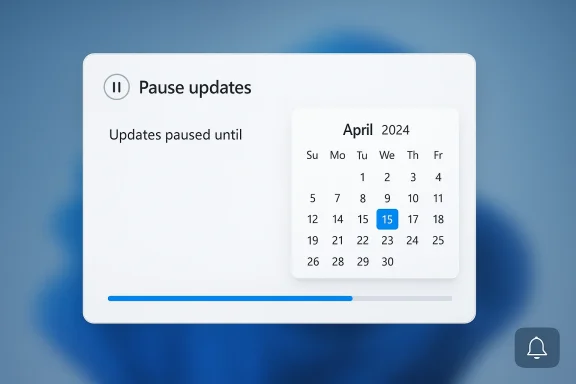
Microsoft is once again trying to soften one of Windows 11’s most unpopular habits: updates that arrive on Microsoft’s schedule, not the user’s. A new test build appears to replace the blunt “pause for 1 week” style of controls with a calendar-based pause system that lets people pick a specific resume date instead of a fixed number of weeks. If that sounds like a small tweak, it isn’t; it goes to the heart of the long-running argument over how much control Windows users should have over forced updates, reboots, and maintenance windows. The move also fits a broader shift in Windows 11 toward more user choice, even if Microsoft still insists on keeping security updates flowing.
Windows has lived for years under the logic of Windows as a service, where feature updates, monthly security patches, servicing stack fixes, and out-of-band emergency repairs are part of the package. That model has clear advantages: it reduces fragmentation, lets Microsoft respond quickly to security threats, and keeps the platform moving forward. But it also creates recurring friction for home users and IT admins alike, because update behavior can feel intrusive, unpredictable, and occasionally disruptive at the worst possible time.
The current Windows Update experience already offers pause controls, but they are comparatively crude. Microsoft’s own support documentation says Windows 11 users can pause updates from Settings > Windows Update, while Windows 10 documentation still describes a dropdown that lets users specify a date for updates to resume. In other words, the idea of date-based pausing is not foreign to Microsoft’s ecosystem; what appears to be changing now is how prominently and smoothly that control is surfaced in Windows 11 itself.
That distinction matters because the existing pause design has always been a compromise. For consumers, the normal limit has been relatively short, while business editions get far more latitude through policy and deferral tools. Microsoft’s documentation also makes clear that pause limits are not meant to be permanent escapes: once the pause window expires, updates must be installed before another pause is allowed. That makes the new calendar UI less about bypassing updates and more about making scheduling feel less arbitrary.
Over the last year, Microsoft has also started talking more openly about giving users finer-grained control over the update experience. It has emphasized faster feature delivery, more frequent non-security improvements, and stronger control over when new features appear. At the same time, Windows Latest and other outlets have reported work on reducing reboot pain, improving the update flow, and making Windows Update less of a blunt instrument. The new pause calendar fits neatly into that story.
What makes this especially notable is the timing. Windows 11 has continued to receive a steady stream of monthly updates, occasional optional updates, and emergency out-of-band patches when something goes wrong. Users have become increasingly aware that “Patch Tuesday” is no longer the whole story. Against that backdrop, a more flexible pause system looks like an admission that the old interface was too rigid for how Windows is actually maintained in 2026.
Windows Latest says it was able to choose a date such as April 15 and see updates paused until that day, with the system reflecting the change immediately. If that behavior holds in broader testing, it would suggest Microsoft is not merely changing labels but rethinking the whole interaction model. That is a real design improvement, because a pause command should resemble a scheduling task, not a guess.
At the same time, this is still development software, so the experience is not expected to be perfectly stable. Windows Latest reported that the date control can occasionally fail to load in test builds, which is exactly the sort of rough edge one expects from an in-progress feature. For now, the important point is not perfection but direction.
There is also a trust issue. When users see updates as unavoidable interruptions, they become more likely to postpone them, ignore them, or resent them. That is counterproductive for security. A better pause mechanism can actually improve compliance, because it makes Windows feel less like it is fighting the user.
This is especially relevant for households and small offices where there is no dedicated IT department. People want a predictable maintenance window, not a surprise download or an ill-timed restart. The calendar UI does not solve every complaint, but it does make the pause operation feel human.
It may also reduce accidental over-pausing. Users who misunderstand week-based controls can end up either delaying too long or not long enough. Choosing a date is more explicit, and explicitness is often the best defense against confusion. That sounds minor, but in consumer UX it is often the difference between adoption and annoyance.
For IT departments, the main benefit may be cultural rather than technical. When consumer-facing Windows becomes easier to manage, support teams spend less time explaining basic update behavior and more time on policy exceptions. That can reduce friction in mixed environments where personal and managed devices coexist.
That middle ground is increasingly important because Microsoft has also been testing other update-related refinements, including more control over feature rollouts and changes intended to make major updates less disruptive. Windows Latest has reported that Microsoft is exploring ways to shorten installation time and improve handling of third-party drivers. Seen together, these efforts suggest a concerted push to make update management feel less like maintenance and more like scheduling.
This matters strategically because Windows 11 has a long memory problem. Users remember bad updates, failed installs, surprise reboots, and compatibility regressions. Every small improvement in update control is also a trust repair measure. Microsoft is not just shipping UI changes; it is trying to rebuild confidence in the update pipeline.
There is also a competitive story around enterprise management. Many organizations choose platforms partly on the basis of lifecycle control, reliability, and patch cadence. By making consumer Windows more flexible while keeping enterprise policies intact, Microsoft reinforces the idea that Windows can serve both mainstream users and managed fleets without splitting the ecosystem apart.
The broader industry lesson is that update UX is product strategy. Companies increasingly compete on how gracefully they deliver maintenance, not just on features. If Microsoft can make update pauses, restarts, and rollouts feel less disruptive, it strengthens one of Windows’ biggest weak spots.
There are also unanswered questions about the maximum pause duration. Windows Latest says it is not yet clear whether Microsoft plans any upper limit on the chosen date, such as a year cap. If there is a ceiling, it would likely reflect Microsoft’s desire to preserve mandatory patch discipline while still giving users better scheduling flexibility.
Another limitation is that the feature depends on the rest of the update system behaving normally. If a patch is security-critical or if Microsoft needs to ship an emergency fix, the company can still change the servicing story quickly. That is the reality of a centrally managed platform. A pause control is a convenience, not a constitutional right.
If Microsoft can reduce the perceived cost of updates, the calendar pause becomes even more valuable because it sits inside a less painful overall experience. In that scenario, users are less likely to treat update management as a defensive battle and more likely to see it as ordinary system maintenance. That would be a meaningful cultural shift for Windows.
The important nuance is that improving pause controls and improving driver handling are complementary, not redundant. One is about timing, the other is about stability. Together, they address the two most common reasons people dread updates in the first place.
The next few months should also clarify whether Microsoft is pairing this with broader servicing changes, such as faster installs, better rollback behavior, or more explicit driver controls. If those pieces arrive together, Windows 11 could finally start to look like a platform that treats update management as a first-class part of the user experience rather than a background necessity. That would be a meaningful evolution for both consumers and enterprises.
Source: Mezha Microsoft is testing a 'flexible' pause for Windows 11 updates: with a specific date
 Background
Windows has lived for years under the logic of Windows as a service, where feature updates, monthly security patches, servicing stack fixes, and out-of-band emergency repairs are part of the package. That model has clear advantages: it reduces fragmentation, lets Microsoft respond quickly to security threats, and keeps the platform moving forward. But it also creates recurring friction for home users and IT admins alike, because update behavior can feel intrusive, unpredictable, and occasionally disruptive at the worst possible time.The current Windows Update experience already offers pause controls, but they are comparatively crude. Microsoft’s own support documentation says Windows 11 users can pause updates from Settings > Windows Update, while Windows 10 documentation still describes a dropdown that lets users specify a date for updates to resume. In other words, the idea of date-based pausing is not foreign to Microsoft’s ecosystem; what appears to be changing now is how prominently and smoothly that control is surfaced in Windows 11 itself.
That distinction matters because the existing pause design has always been a compromise. For consumers, the normal limit has been relatively short, while business editions get far more latitude through policy and deferral tools. Microsoft’s documentation also makes clear that pause limits are not meant to be permanent escapes: once the pause window expires, updates must be installed before another pause is allowed. That makes the new calendar UI less about bypassing updates and more about making scheduling feel less arbitrary.
Over the last year, Microsoft has also started talking more openly about giving users finer-grained control over the update experience. It has emphasized faster feature delivery, more frequent non-security improvements, and stronger control over when new features appear. At the same time, Windows Latest and other outlets have reported work on reducing reboot pain, improving the update flow, and making Windows Update less of a blunt instrument. The new pause calendar fits neatly into that story.
What makes this especially notable is the timing. Windows 11 has continued to receive a steady stream of monthly updates, occasional optional updates, and emergency out-of-band patches when something goes wrong. Users have become increasingly aware that “Patch Tuesday” is no longer the whole story. Against that backdrop, a more flexible pause system looks like an admission that the old interface was too rigid for how Windows is actually maintained in 2026.
What Microsoft Appears to Be Testing
The change reported by Windows Latest replaces the familiar pause-length dropdown with a calendar flyout. Instead of choosing “pause for 1 week” or “pause for 5 weeks,” a user can apparently click a calendar icon and pick an exact resume date. That turns update management from an abstract duration into a concrete deadline, which is easier to understand and arguably less error-prone for ordinary users.A Small UI Change With a Big UX Impact
The practical value of the calendar is obvious: users can line up pause periods with travel, project deadlines, product launches, exams, or other moments when a reboot would be annoying or risky. The old system forced people to translate “weeks” into real-world dates in their heads, which is manageable but clumsy. A date picker removes that mental step and makes the control feel more deliberate.Windows Latest says it was able to choose a date such as April 15 and see updates paused until that day, with the system reflecting the change immediately. If that behavior holds in broader testing, it would suggest Microsoft is not merely changing labels but rethinking the whole interaction model. That is a real design improvement, because a pause command should resemble a scheduling task, not a guess.
At the same time, this is still development software, so the experience is not expected to be perfectly stable. Windows Latest reported that the date control can occasionally fail to load in test builds, which is exactly the sort of rough edge one expects from an in-progress feature. For now, the important point is not perfection but direction.
- The new control appears to use a calendar picker rather than a duration menu.
- Users can apparently set a specific resume date.
- The pause still seems temporary, not a permanent block.
- Test-build behavior is reportedly inconsistent at times.
- Resume actions still reset the pause state and return the system to normal update checks.
Why the Old Pause Model Frustrated Users
Microsoft has long insisted that Windows 11 updates are automatic because safety matters. That position is defensible, but the implementation has often felt paternalistic to users who simply want to delay a reboot until they finish work, a presentation, or a gaming session. The problem is not updates themselves; it is the sense that they arrive with too little practical flexibility.Forced Timing vs User Rhythm
The old pause structure was based on fixed chunks of time, which is convenient for Microsoft’s support model but not always intuitive for users. A five-week pause may be enough for some people, yet it can also be too short or too long depending on the situation. Calendar-based control maps much better to real life because people think in dates, not in arbitrary update intervals.There is also a trust issue. When users see updates as unavoidable interruptions, they become more likely to postpone them, ignore them, or resent them. That is counterproductive for security. A better pause mechanism can actually improve compliance, because it makes Windows feel less like it is fighting the user.
This is especially relevant for households and small offices where there is no dedicated IT department. People want a predictable maintenance window, not a surprise download or an ill-timed restart. The calendar UI does not solve every complaint, but it does make the pause operation feel human.
- Fixed-week pauses are simple, but they are not always intuitive.
- Calendar dates are easier to align with actual schedules.
- Better scheduling can reduce resentment around security maintenance.
- A more respectful update UX may lead to better user behavior.
- Predictability matters as much as raw control.
Enterprise, Pro, and Consumer Differences
One reason Windows update policy has always been confusing is that not all editions are treated the same. Microsoft’s support pages still show clear differences between consumer configurations and business-oriented editions, where administrators have more powerful deferral and management options. That means the new calendar pause is mainly a usability improvement for the broad consumer base rather than a replacement for enterprise patch governance.What Home Users Gain
For home users, the value is straightforward. A calendar picker reduces uncertainty and gives them a more meaningful way to delay updates without digging through advanced controls. It is the kind of feature that makes the system feel less rigid while still keeping the safety rail in place.It may also reduce accidental over-pausing. Users who misunderstand week-based controls can end up either delaying too long or not long enough. Choosing a date is more explicit, and explicitness is often the best defense against confusion. That sounds minor, but in consumer UX it is often the difference between adoption and annoyance.
What IT Teams Already Have
Enterprise administrators already have more sophisticated levers, including policy-based update deferral and controlled rollout strategies. Microsoft’s current public documentation continues to frame update management around security, cadence, and scheduled restarts rather than a permanent opt-out. So while the new pause calendar matters, it does not rewrite enterprise servicing; it simply brings a better interface to one piece of the broader system.For IT departments, the main benefit may be cultural rather than technical. When consumer-facing Windows becomes easier to manage, support teams spend less time explaining basic update behavior and more time on policy exceptions. That can reduce friction in mixed environments where personal and managed devices coexist.
- Home users gain easier, more intuitive scheduling.
- Pro and Enterprise users still rely on deeper policy tools.
- Date selection reduces misunderstandings about pause length.
- IT support may see fewer user complaints about timing.
- The core servicing model remains unchanged.
How This Fits Microsoft’s Broader Windows 11 Strategy
This pause experiment is not happening in isolation. Microsoft has spent the past year framing Windows 11 as a platform that receives new features more continuously, while also promising more transparency and user control. The company’s own support material now emphasizes that devices can get non-security and feature updates as they become available, reflecting a more dynamic servicing model than the old annual-release mindset.Control Without Losing Momentum
The challenge for Microsoft is balancing two competing goals: giving users more say while preserving the speed and consistency of modern servicing. If users can pause updates too easily or too indefinitely, they can drift into vulnerability. If they have too little control, they feel coerced. A calendar-based pause is Microsoft’s attempt to sit in the middle.That middle ground is increasingly important because Microsoft has also been testing other update-related refinements, including more control over feature rollouts and changes intended to make major updates less disruptive. Windows Latest has reported that Microsoft is exploring ways to shorten installation time and improve handling of third-party drivers. Seen together, these efforts suggest a concerted push to make update management feel less like maintenance and more like scheduling.
This matters strategically because Windows 11 has a long memory problem. Users remember bad updates, failed installs, surprise reboots, and compatibility regressions. Every small improvement in update control is also a trust repair measure. Microsoft is not just shipping UI changes; it is trying to rebuild confidence in the update pipeline.
- Microsoft wants faster innovation without alienating users.
- Update flexibility is part of trust-building.
- Smarter pause controls support the broader servicing narrative.
- Installation-time improvements would complement pause controls.
- Better UX can reduce fear around monthly maintenance.
The Competitive and Industry Angle
Windows update policy may seem like an internal Microsoft issue, but it has broader implications for the operating system market. Every time Microsoft improves the balance between automation and user control, it is making Windows more competitive against platforms that are often perceived as more predictable or less intrusive. That is especially relevant for users who tolerate Windows for compatibility but dislike its maintenance habits.A Signal to Power Users
Power users have long complained that Windows can feel overbearing compared with more manual systems. A calendar pause is not a radical concession, but it does acknowledge a real audience that wants explicit control over system behavior. That matters because power users are influential; they shape community opinion, workplace norms, and purchasing decisions.There is also a competitive story around enterprise management. Many organizations choose platforms partly on the basis of lifecycle control, reliability, and patch cadence. By making consumer Windows more flexible while keeping enterprise policies intact, Microsoft reinforces the idea that Windows can serve both mainstream users and managed fleets without splitting the ecosystem apart.
The broader industry lesson is that update UX is product strategy. Companies increasingly compete on how gracefully they deliver maintenance, not just on features. If Microsoft can make update pauses, restarts, and rollouts feel less disruptive, it strengthens one of Windows’ biggest weak spots.
- Power users value explicit control over automatic behavior.
- Better update UX can improve brand perception.
- Enterprise buyers care about cadence as much as capability.
- Maintenance experience is now part of platform competition.
- Trust can become a differentiator in OS design.
What the Calendar Pause Does Not Solve
For all its appeal, a calendar picker is not a magic wand. It improves scheduling, but it does not eliminate the fundamental fact that Windows must update itself to stay secure. Microsoft’s support pages remain clear that pauses are temporary and that users eventually need to install pending updates before pausing again. That guardrail is not going away, and it should not.Security Still Comes First
This is the tension at the center of the whole debate. Users want freedom to delay; Microsoft wants to prevent unsafe drift. A date picker improves convenience, but the update policy underneath is still opinionated. In practical terms, the new control is a better calendar, not a new philosophy.There are also unanswered questions about the maximum pause duration. Windows Latest says it is not yet clear whether Microsoft plans any upper limit on the chosen date, such as a year cap. If there is a ceiling, it would likely reflect Microsoft’s desire to preserve mandatory patch discipline while still giving users better scheduling flexibility.
Another limitation is that the feature depends on the rest of the update system behaving normally. If a patch is security-critical or if Microsoft needs to ship an emergency fix, the company can still change the servicing story quickly. That is the reality of a centrally managed platform. A pause control is a convenience, not a constitutional right.
- It does not remove the need for eventual installation.
- It does not change Microsoft’s security-first posture.
- It may still have a hard maximum pause window.
- Emergency and out-of-band updates remain possible.
- The feature is still under active development.
Why Drivers and Reboots Matter Too
The Mezha report also notes that Microsoft is reportedly considering giving users more control over third-party drivers so they do not undermine system stability. That is a logical companion to the pause-calendar story, because updates and drivers are often linked in the user’s mind: both can trigger instability, both can require reboots, and both can make a good system feel unreliable after maintenance.The Hidden Cost of Maintenance
A lot of Windows frustration is not about the update package itself but about what happens around it. Reboots interrupt work, drivers fail to play nicely with patches, and major updates can take longer than users expect. Microsoft’s interest in shortening installation time and taming driver-related instability is therefore not just technical housekeeping; it is a direct attempt to make Windows feel less invasive.If Microsoft can reduce the perceived cost of updates, the calendar pause becomes even more valuable because it sits inside a less painful overall experience. In that scenario, users are less likely to treat update management as a defensive battle and more likely to see it as ordinary system maintenance. That would be a meaningful cultural shift for Windows.
The important nuance is that improving pause controls and improving driver handling are complementary, not redundant. One is about timing, the other is about stability. Together, they address the two most common reasons people dread updates in the first place.
- Driver quality affects how stable updates feel.
- Reboots shape the emotional cost of maintenance.
- Installation speed can reduce perceived disruption.
- Timing control and stability control solve different problems.
- Better update UX requires changes in multiple layers.
Strengths and Opportunities
The strongest thing about this change is that it addresses a genuine user pain point without undermining Microsoft’s security model. It also shows the company understands that update control is as much about experience design as it is about policy, and that makes the feature potentially more valuable than it first appears.- Makes update pauses easier to understand.
- Aligns system behavior with real-world schedules.
- Reduces mental friction compared with week-based choices.
- Improves trust by giving users more visible control.
- Fits Microsoft’s broader push for more adaptable Windows servicing.
- Could reduce support complaints about accidental timing.
- May encourage users to pause responsibly rather than avoid updates altogether.
Risks and Concerns
The obvious risk is that more flexible pausing could be misunderstood as permission to delay security maintenance indefinitely. Microsoft will need to communicate the temporary nature of the control clearly, or users may see the calendar as a loophole rather than a scheduling tool. There is also the usual challenge of feature maturity: early test builds can be inconsistent, and update UI changes sometimes land with rough edges that frustrate the very people they are meant to help.- Users may treat a pause as a long-term escape hatch.
- Test-build instability could confuse early adopters.
- Calendar behavior may vary depending on build and region.
- Security messaging must remain prominent.
- Microsoft still risks being seen as too controlling if limits remain opaque.
- Driver and reboot issues could continue even if pause UX improves.
- A poorly explained maximum pause limit could undermine trust.
Looking Ahead
If this feature reaches public release, the most interesting question will not be whether users like it, but whether it changes how they think about Windows Update. A calendar-based pause is a classic example of a small interface shift that can have an outsized effect on user behavior, because it makes the system feel less like a machine imposing deadlines and more like a service negotiating with the person in front of it. That alone would be progress.The next few months should also clarify whether Microsoft is pairing this with broader servicing changes, such as faster installs, better rollback behavior, or more explicit driver controls. If those pieces arrive together, Windows 11 could finally start to look like a platform that treats update management as a first-class part of the user experience rather than a background necessity. That would be a meaningful evolution for both consumers and enterprises.
- Watch whether the calendar pause ships beyond Insider and test builds.
- Look for any maximum date or hard cap on pauses.
- Monitor whether Microsoft improves reboot scheduling alongside pause controls.
- Track whether driver-control changes appear in the same release cycle.
- Pay attention to how Microsoft explains the feature in official documentation.
Source: Mezha Microsoft is testing a 'flexible' pause for Windows 11 updates: with a specific date
