

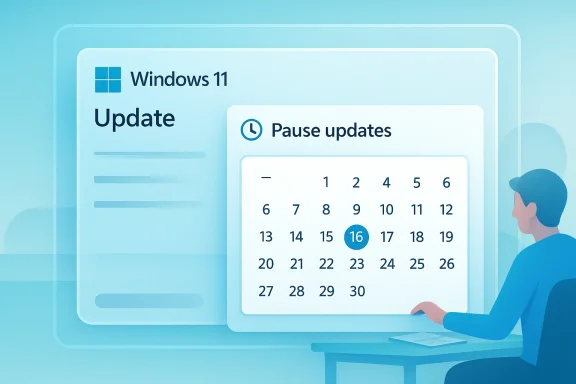
Microsoft’s next Windows 11 update changes may look small at first glance, but they speak to a much larger shift in how the company wants people to feel about Windows: less forced, more controllable, and a little less prone to surprise. Reports from preview builds suggest a redesigned pause-updates interface could let users pick an exact resume date from a calendar-style control, rather than relying on the current simpler selector. The same testing also hints that Microsoft may loosen the long-standing five-week ceiling on pausing updates, though that part remains unconfirmed.
Windows updates have always sat at the center of a familiar tension. On one side is Microsoft’s security argument: keep devices patched, keep threats down, and keep the ecosystem stable. On the other side is the user experience reality that many people do not want a reboot, a download, or a surprise install at the worst possible moment.
That tension has defined Windows servicing for years, especially on consumer machines where Microsoft has historically had less room for enterprise-style scheduling controls. The current Windows 11 design already allows users to pause updates, but the system still imposes a limit, and Microsoft documentation confirms the pause eventually expires and updates resume. In other words, the feature has always been a temporary delay tool, not a full veto.
What makes the new testing interesting is not simply the visual redesign. The deeper signal is that Microsoft may be acknowledging that update management should feel more explicit and less like a workaround. A date-based pause picker is a better match for how people actually plan around travel, project deadlines, software rollouts, and business-critical work. It is not a promise of permanent control, but it is a meaningful ergonomic improvement if it ships.
There is also a broader product story here. Microsoft has recently emphasized Windows quality, stability, and responsiveness, and the company has been surfacing more visible refinements in Settings and Quick Settings. That matters because update UX is no longer just an administrative tool; it is part of the overall trust equation for Windows 11.
That transition makes update trust more important, not less. If users feel that Windows 11 respects their workflow, they are more likely to keep automatic servicing enabled. If they feel boxed in, they are more likely to search for unsafe ways to work around the system. That is the paradox Microsoft has to manage.
This matters especially for people who do not think in weeks. Many users think in dates: “resume after this launch,” “resume when I am back,” or “resume next Monday after payroll closes.” A precise date picker matches that mental model better than a countdown. That alone makes the change feel less technical and more humane.
For now, that part should be treated cautiously. The preview screenshots and commentary do not prove indefinite deferral, and Microsoft has not confirmed a new policy. The safer reading is that Microsoft is testing the interface first and may still enforce a hidden or visible ceiling later.
Still, preview UI is useful because it reveals direction. Microsoft rarely invents a detailed control flow for no reason. Even if the exact design changes, the intent seems clear: Windows 11 is being nudged toward more visible user choice in update management. That is the part worth watching.
That distinction is important. A short pause is a convenience feature. A long pause is a policy statement. If Microsoft expands the limit, even modestly, it would signal a more permissive posture toward user scheduling control.
This also explains Microsoft’s balancing act. Too little control annoys users. Too much control can create patching gaps, support issues, and security exposure. Microsoft has to design for the broad middle: people who want convenience but are not full-time admins. That middle is huge, and it is where product trust is won or lost.
So even if Microsoft relaxes the pause UI, it will almost certainly continue nudging users back toward update compliance. The company can make the controls friendlier without giving up its core security posture. The challenge is doing both at once.
The reason this matters is simple: if the control is easier to understand, users are less likely to misconfigure it or ignore it. Better UI can improve compliance with recommended behavior without removing freedom. That is good product design and also good platform governance.
Users do not separate “settings responsiveness” from “system quality” in the abstract. If Settings feels slower or more confusing than the rest of the OS, the whole experience feels older than it should. Microsoft knows that perception matters almost as much as actual feature depth.
That is a meaningful shift because it acknowledges user agency without forcing Microsoft to surrender its servicing model. The best systems are not the ones with the fewest controls; they are the ones with the right controls in the right place.
This is why reports about “indefinite” pauses deserve skepticism. Microsoft may broaden flexibility, but it is unlikely to fully relinquish control over patch cadence on mainstream consumer systems. A total free-for-all would undermine the platform’s security and support model.
IT teams may end up explaining that managed devices follow a different update policy for security and compliance reasons. That is a familiar conversation, but it becomes easier when the operating system itself signals that update control is a policy decision, not an absolute right.
But there is a flip side. The more flexible the consumer control becomes, the more IT departments may need to reinforce policies about unsupported deferrals, especially in regulated sectors. The balance between user autonomy and fleet compliance is never static.
A precise resume date makes those scenarios easier to manage. It also reduces the likelihood of users gaming the system or repeatedly reapplying pauses in awkward increments. That is a better user journey and likely a better support story too.
The smart play is to give users enough control to avoid disruption without making it too easy to drift into neglect. That is a hard design problem, and there is no perfect answer. If Microsoft gets the balance right, the feature will feel empowering rather than reckless.
The broader market lesson is that “control” has become a feature category again. OS vendors are competing not just on performance and AI integration, but on how gracefully they let users manage routine maintenance. Microsoft’s move suggests it understands that shift.
That would be a problem not just for security, but for support consistency. Platforms that are too permissive about deferrals can end up absorbing the costs later in the form of compatibility issues, harder support calls, and fragmented user baselines.
There is also a broader pattern to watch. Microsoft is clearly investing in a Windows experience that feels more deliberate, more responsive, and more respectful of user time. That includes Settings, Quick Settings, and now update management. The company seems to be betting that better control will produce better compliance, and that may turn out to be one of its smartest moves in the post-Windows 10 era.
Source: Windows Report https://windowsreport.com/windows-11-update-overhaul-spotted-with-new-pause-options/
 Overview
Windows updates have always sat at the center of a familiar tension. On one side is Microsoft’s security argument: keep devices patched, keep threats down, and keep the ecosystem stable. On the other side is the user experience reality that many people do not want a reboot, a download, or a surprise install at the worst possible moment.That tension has defined Windows servicing for years, especially on consumer machines where Microsoft has historically had less room for enterprise-style scheduling controls. The current Windows 11 design already allows users to pause updates, but the system still imposes a limit, and Microsoft documentation confirms the pause eventually expires and updates resume. In other words, the feature has always been a temporary delay tool, not a full veto.
What makes the new testing interesting is not simply the visual redesign. The deeper signal is that Microsoft may be acknowledging that update management should feel more explicit and less like a workaround. A date-based pause picker is a better match for how people actually plan around travel, project deadlines, software rollouts, and business-critical work. It is not a promise of permanent control, but it is a meaningful ergonomic improvement if it ships.
There is also a broader product story here. Microsoft has recently emphasized Windows quality, stability, and responsiveness, and the company has been surfacing more visible refinements in Settings and Quick Settings. That matters because update UX is no longer just an administrative tool; it is part of the overall trust equation for Windows 11.
Why update controls matter now
The update conversation is more sensitive in 2026 than it was a few years ago. Windows 10 has reached end of support, which pushes more consumers and organizations toward Windows 11 and raises the stakes for how Windows 11 is managed day to day. Microsoft’s own support materials now underline that Windows 10 no longer receives free software updates, security fixes, or technical assistance after October 14, 2025.That transition makes update trust more important, not less. If users feel that Windows 11 respects their workflow, they are more likely to keep automatic servicing enabled. If they feel boxed in, they are more likely to search for unsafe ways to work around the system. That is the paradox Microsoft has to manage.
What Microsoft Is Testing
The preview build reports point to a redesigned pause flow inside Windows Update. Instead of a plain drop-down list, the new approach appears to use a calendar-like selector so the user can choose a specific day for updates to resume. That is a subtle but useful design change because it removes ambiguity and makes the pause window feel intentional rather than approximate.Calendar-style controls are more than cosmetic
A calendar interface may sound like a UI flourish, but it has real operational value. Users can align update deferrals with business trips, customer events, exam schedules, or long-running workloads in a way that a generic “pause for X weeks” menu cannot capture cleanly.This matters especially for people who do not think in weeks. Many users think in dates: “resume after this launch,” “resume when I am back,” or “resume next Monday after payroll closes.” A precise date picker matches that mental model better than a countdown. That alone makes the change feel less technical and more humane.
Possible longer pauses
The more controversial rumor is that Microsoft may let users pause updates for much longer than the current five-week limit, or even remove the visible cap altogether. That would be a major policy shift if it turns out to be accurate, because Microsoft has consistently framed pauses as temporary and in Microsoft support materials still describes them that way.For now, that part should be treated cautiously. The preview screenshots and commentary do not prove indefinite deferral, and Microsoft has not confirmed a new policy. The safer reading is that Microsoft is testing the interface first and may still enforce a hidden or visible ceiling later.
- The current Windows 11 pause system is limited.
- Microsoft support says pauses eventually expire.
- A calendar picker would improve precision.
- Longer pause windows, if real, would be a major policy change.
- Microsoft has not formally confirmed the final behavior.
Why preview builds matter, but not too much
Windows preview builds often show experiments that never fully launch. That is why any interpretation based on screenshots alone should be cautious. Microsoft can, and often does, change the wording, the limits, the placement, or the logic before public rollout.Still, preview UI is useful because it reveals direction. Microsoft rarely invents a detailed control flow for no reason. Even if the exact design changes, the intent seems clear: Windows 11 is being nudged toward more visible user choice in update management. That is the part worth watching.
The State of Windows Update Today
Right now, Windows 11 users can pause updates, but Microsoft says the pause is temporary and that updates must eventually be installed after the limit is reached. The company also recommends using active hours and scheduled restarts to reduce disruption, which shows where Microsoft prefers control to happen: around reboot timing, not around broad servicing deferral.The five-week ceiling
The five-week cap has been the defining constraint for many Windows 11 users. It offers enough breathing room for vacations or short projects, but not enough to serve as a real long-term maintenance strategy. That cap is the reason many users feel they are being “allowed” to pause rather than being trusted to manage servicing themselves.That distinction is important. A short pause is a convenience feature. A long pause is a policy statement. If Microsoft expands the limit, even modestly, it would signal a more permissive posture toward user scheduling control.
Consumer devices versus managed fleets
For enterprise IT, update control already exists in more robust forms through management tools and policy layers. The consumer story is different, because Windows Home and many unmanaged systems rely on the built-in Settings experience. That is why any change to the pause model matters most on personal machines.This also explains Microsoft’s balancing act. Too little control annoys users. Too much control can create patching gaps, support issues, and security exposure. Microsoft has to design for the broad middle: people who want convenience but are not full-time admins. That middle is huge, and it is where product trust is won or lost.
Why Microsoft still prefers updates
Microsoft’s update philosophy is ultimately rooted in security and servicing consistency. That is not surprising, because Windows is a broad attack surface and update latency remains one of the biggest risk factors in the ecosystem. Microsoft’s support materials for Windows 11 continue to emphasize that updates are important and that pauses are temporary, not an alternative to servicing.So even if Microsoft relaxes the pause UI, it will almost certainly continue nudging users back toward update compliance. The company can make the controls friendlier without giving up its core security posture. The challenge is doing both at once.
What Changed in Windows 11 Settings Design
The pause-update experiment is not happening in isolation. Microsoft has been iterating on the Settings app as part of a broader push to make Windows 11 feel quicker, clearer, and more coherent. That broader design work is important because it frames the update changes as part of a system-wide usability campaign rather than a one-off tweak.Settings as a product surface
For years, Windows Settings often felt like a place where users had to hunt for controls. Microsoft has been trying to flatten that learning curve by improving structure, rewording controls, and making frequently used features easier to reach. The update pause redesign fits that pattern well.The reason this matters is simple: if the control is easier to understand, users are less likely to misconfigure it or ignore it. Better UI can improve compliance with recommended behavior without removing freedom. That is good product design and also good platform governance.
Quick Settings and perceived speed
Microsoft has also been talking about speeding up Quick Settings, which suggests the company is paying attention not just to what settings exist, but how fast users can interact with them. That may seem unrelated, but it tells the same story: Windows should feel responsive at the surface layer, not just under the hood.Users do not separate “settings responsiveness” from “system quality” in the abstract. If Settings feels slower or more confusing than the rest of the OS, the whole experience feels older than it should. Microsoft knows that perception matters almost as much as actual feature depth.
How this affects trust
Trust in Windows updates is partly technical and partly emotional. A smoother pause flow can make users feel that Microsoft is respecting their time, even if the underlying servicing logic does not change much. That kind of trust-building is subtle, but it is real. People like systems that feel predictable.- Easier controls reduce friction.
- Clearer controls reduce accidental misuse.
- Faster Settings improves perceived quality.
- Predictability improves update acceptance.
- UI refinement can be as important as backend servicing.
Historical Context: Why This Is a Big Deal
Windows update management has evolved from a mostly background concern into a visible part of the Windows user experience. In older eras, users were often forced to accept broad, sometimes disruptive servicing models because the platform prioritized patch delivery above all else. Windows 11 has gradually softened that approach, but it has not abandoned it.From blunt servicing to guided control
The move toward a date-based pause interface reflects a broader industry trend: users want guided control, not hidden complexity. They do not want to disable services manually or rely on unsupported tweaks. They want the OS itself to provide a legitimate way to say “not now.”That is a meaningful shift because it acknowledges user agency without forcing Microsoft to surrender its servicing model. The best systems are not the ones with the fewest controls; they are the ones with the right controls in the right place.
Microsoft’s long-standing concern
Microsoft has always been wary of users staying unpatched for long periods. The company’s support guidance is explicit that update pauses are temporary, and its end-of-servicing policies show that unsupported systems are eventually pushed toward newer builds or versions. That posture is consistent across Windows servicing policy.This is why reports about “indefinite” pauses deserve skepticism. Microsoft may broaden flexibility, but it is unlikely to fully relinquish control over patch cadence on mainstream consumer systems. A total free-for-all would undermine the platform’s security and support model.
Why the timing matters
The timing is also notable because 2026 is a transition year for many Windows users moving off Windows 10. That means Microsoft has a strong incentive to make Windows 11 feel more accommodating, especially to users who may already be frustrated by years of forced service behavior. A friendlier pause control is a small but strategically smart concession.Enterprise Implications
For enterprise customers, the practical effect may be limited, but the symbolic effect is not. Most managed environments already have policy-based tools to stage, defer, and validate updates, so a consumer-facing pause redesign will not replace existing administration methods. Still, it can influence employee expectations and support workflows.Consumer behavior spills into the workplace
A lot of enterprise support friction begins with user expectations. If employees see a flexible pause control at home, they may start asking why their corporate device behaves differently. That is not a technical problem so much as a communication problem, but it still matters.IT teams may end up explaining that managed devices follow a different update policy for security and compliance reasons. That is a familiar conversation, but it becomes easier when the operating system itself signals that update control is a policy decision, not an absolute right.
Support and change management
Longer pause options could also affect mixed environments where users are permitted some self-service control. If the OS provides a cleaner date-based pause mechanism, help desks may see fewer accidental misconfigurations and fewer calls from users who cannot remember when updates are set to resume. That is a small but real operational benefit.But there is a flip side. The more flexible the consumer control becomes, the more IT departments may need to reinforce policies about unsupported deferrals, especially in regulated sectors. The balance between user autonomy and fleet compliance is never static.
Why managed environments still win on governance
Managed Windows systems will still have the upper hand on governance. They can set rings, deadlines, compliance windows, and health checks in ways that consumer tools cannot. So even if Microsoft expands pause options in the Settings app, that will not upend enterprise patch discipline.- Enterprise update strategy remains policy-driven.
- Consumer UX changes may shift user expectations.
- Help desks could see fewer basic update confusion tickets.
- Compliance-heavy sectors will still need strict controls.
- Microsoft is unlikely to weaken managed servicing rules.
Consumer Impact
For home users, however, this could be one of the more meaningful Windows 11 quality-of-life improvements in a while. People who travel, work odd hours, share a PC, or rely on it for live tasks often need the operating system to cooperate without constant intervention. A more flexible pause control directly serves that need.Better alignment with real-life schedules
The current five-week structure works best when life is neat and predictable. Real life rarely is. Users may want to avoid a feature update before a family trip, before finals, during a product launch, or while they are waiting for a driver issue to be resolved.A precise resume date makes those scenarios easier to manage. It also reduces the likelihood of users gaming the system or repeatedly reapplying pauses in awkward increments. That is a better user journey and likely a better support story too.
The security trade-off
Of course, more control always comes with a security trade-off. If Microsoft expands pause duration too far, some users will inevitably postpone updates longer than is wise. That can leave devices exposed to known vulnerabilities and operational bugs that patches are meant to fix.The smart play is to give users enough control to avoid disruption without making it too easy to drift into neglect. That is a hard design problem, and there is no perfect answer. If Microsoft gets the balance right, the feature will feel empowering rather than reckless.
Consumer expectations are changing
Consumers are also more willing than ever to compare Windows against platforms that feel less intrusive about maintenance. Even if those comparisons are imperfect, they shape perception. Microsoft knows that a more respectful update experience can help Windows 11 compete on polish as much as on features.- Home users want fewer surprises.
- Travel and project schedules need predictable pause windows.
- Better controls reduce the temptation to use unsafe workarounds.
- Excessive deferral still creates security risk.
- UX polish can improve goodwill toward Windows 11.
Competitive and Market Implications
This update overhaul is not just a Windows story; it is a signal about how Microsoft wants its desktop OS to compete. Control, clarity, and predictability are increasingly part of platform value, not just add-ons. If Windows 11 feels less bossy, that may help counter years of user frustration around updates and reboots.A softer Windows can be a stronger Windows
There is a real market advantage to making the operating system feel less adversarial. Users who trust the update process are less likely to delay, disable, or resent it. That can improve patch adoption while also improving sentiment, which is a rare win-win.The broader market lesson is that “control” has become a feature category again. OS vendors are competing not just on performance and AI integration, but on how gracefully they let users manage routine maintenance. Microsoft’s move suggests it understands that shift.
The security narrative remains central
At the same time, Microsoft cannot allow the pendulum to swing too far. Windows remains a massive target, and the company has every incentive to keep the patch cadence healthy. If the pause system becomes too permissive, Microsoft could see more users living on stale builds for longer.That would be a problem not just for security, but for support consistency. Platforms that are too permissive about deferrals can end up absorbing the costs later in the form of compatibility issues, harder support calls, and fragmented user baselines.
What rivals may notice
Even without naming direct competitors, it is safe to say that every major desktop platform watches update UX closely. If Microsoft succeeds in making Windows servicing feel less punitive, others will notice. The lesson is that update control can be a differentiator, especially in consumer-facing ecosystems where trust and convenience matter.- More user trust can improve patch compliance.
- Better update UX can reduce frustration-driven disabling.
- Security still depends on timely servicing.
- Platform design increasingly includes maintenance control.
- User autonomy is becoming a competitive feature.
Strengths and Opportunities
Microsoft’s testing points toward a smarter, more modern update experience, and that creates opportunities across usability, support, and trust. Even if the final rollout is more conservative than the rumors suggest, the direction is still encouraging. A Windows Update flow that respects time and context is easier to defend and easier to use.- Better precision for scheduling restarts and update resumes.
- Less friction for travelers, project-based workers, and shared-PC households.
- Potentially fewer support tickets tied to accidental or confusing pause settings.
- Improved trust in Windows 11 as a platform that listens to users.
- Cleaner UI that matches the rest of Microsoft’s Settings refinement work.
- Reduced temptation to use unsupported registry or service hacks.
- Stronger goodwill as Windows 10 users migrate to Windows 11.
Risks and Concerns
The biggest concern is obvious: if Microsoft gives users too much freedom to delay updates, it could weaken patch hygiene and expand the window of exposure to known security issues. That risk is especially relevant for less technical consumers who may not fully understand the trade-off. Microsoft also has to avoid creating confusion by changing the UI without clearly explaining the actual limit, if any, behind it.- Security exposure if users defer patches for too long.
- Confusion if the calendar UI implies more freedom than the policy allows.
- Mismatch between consumer expectations and enterprise rules.
- Potential support burden if users misread pause duration or expiry.
- Inconsistent rollout if preview behavior differs from final behavior.
- Unclear end-of-support handling on devices that reach servicing limits.
- Possible disappointment if the rumored indefinite pause never ships.
Looking Ahead
The next few Insider flights will tell us whether Microsoft is merely polishing the pause interface or genuinely rethinking update policy in Windows 11. That distinction matters because the UI is easy to change; the underlying servicing philosophy is harder to shift. If Microsoft pairs the new controls with clearer guidance and guardrails, the feature could land as one of the more thoughtful Windows 11 refinements of the year.There is also a broader pattern to watch. Microsoft is clearly investing in a Windows experience that feels more deliberate, more responsive, and more respectful of user time. That includes Settings, Quick Settings, and now update management. The company seems to be betting that better control will produce better compliance, and that may turn out to be one of its smartest moves in the post-Windows 10 era.
- Watch for changes to the visible pause limit.
- Watch for clearer language around when updates must resume.
- Watch for whether the new picker ships to all users or just Insiders.
- Watch for how Microsoft handles devices nearing end of support.
- Watch for related Settings and Quick Settings polish in future builds.
Source: Windows Report https://windowsreport.com/windows-11-update-overhaul-spotted-with-new-pause-options/
Last edited:
