

Microsoft is quietly decluttering one of the most complained‑about corners of the Windows 11 experience: update names. What used to be a tangle of long, technical titles — stuffed with version numbers, architecture tags and date prefixes — will now show up in Settings with a streamlined, predictable format focused on the update type, the KB (Knowledge Base) identifier and, where relevant, a single build or component version token.
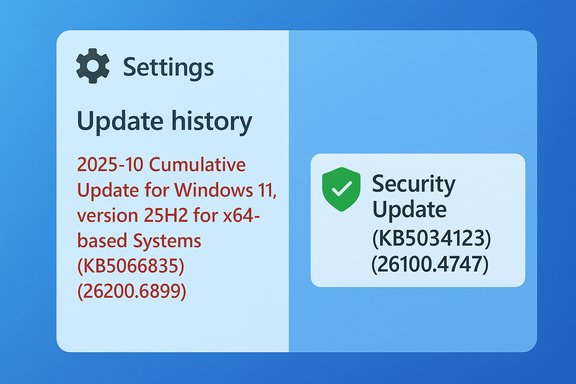
Windows Update has long been indispensable for security and stability, but the way Microsoft labeled updates in the UI created a persistent point of friction for both end users and administrators. Traditional titles such as "2025-10 Cumulative Update for Windows 11, version 25H2 for x64-based Systems (KB5066835) (26200.6899)" were informative for IT teams but cluttered the Settings > Windows Update and Update history pages for everyday users. The change announced by Microsoft reduces that friction by favoring simpler descriptors like Security Update and Preview Update followed by the KB and a compact build token. Microsoft frames the work as an accessibility and usability improvement: users should be able to scan update history, identify the purpose of an update, and find the KB number they need — without parsing a wall of technical metadata in the visible title. This simplification is rolling out where the company controls the visible title shown in Settings; management and catalog tools will continue to expose the full, machine‑oriented titles used in enterprise workflows.
Source: TweakTown Ever thought Windows 11's updates were confusingly named? Microsoft is fixing this
 Background
Windows Update has long been indispensable for security and stability, but the way Microsoft labeled updates in the UI created a persistent point of friction for both end users and administrators. Traditional titles such as "2025-10 Cumulative Update for Windows 11, version 25H2 for x64-based Systems (KB5066835) (26200.6899)" were informative for IT teams but cluttered the Settings > Windows Update and Update history pages for everyday users. The change announced by Microsoft reduces that friction by favoring simpler descriptors like Security Update and Preview Update followed by the KB and a compact build token. Microsoft frames the work as an accessibility and usability improvement: users should be able to scan update history, identify the purpose of an update, and find the KB number they need — without parsing a wall of technical metadata in the visible title. This simplification is rolling out where the company controls the visible title shown in Settings; management and catalog tools will continue to expose the full, machine‑oriented titles used in enterprise workflows. What exactly is changing
New visible title structure
The new naming convention uses a tight, three‑part structure for many updates:- A short classification (e.g., Security Update, Preview Update, Driver Update, .NET Framework Security Update).
- The KB number (the canonical Microsoft identifier).
- A compact build or version token for updates where a build number or component version is meaningful.
What Microsoft is removing from titles
The visible strings will no longer include some of the common clutter that added little value to most users:- Full Windows version tokens such as 25H2 or 24H2 in routine quality update titles.
- Architecture markers like for x64-based Systems.
- Date prefixes and long product descriptors in the UI title itself.
Scope: which updates are affected — and which are not
This titling simplification is deliberately scoped. Microsoft specified the change applies to:- Windows OS quality updates (monthly security and monthly preview non‑security updates, plus out‑of‑band fixes).
- .NET Framework updates (both security and preview).
- Driver updates delivered through Windows Update.
- AI component updates and select Visual Studio updates.
Why this matters for users and IT pros
For everyday users
The typical Windows user will benefit from shorter, clearer update entries in Settings. A concise title like Security Update (KB5034123) (26100.4747) is faster to read and reduces the cognitive load when checking what installed or when troubleshooting an unexpected reboot. The KB number — still present — preserves the link to deeper technical notes when users need more detail.For IT administrators and enterprises
IT teams can keep relying on the machine‑readable metadata and catalog titles that underpin deployment pipelines. Microsoft intentionally left the enterprise‑facing catalog names and WSUS semantics intact for compatibility with scripts, compliance auditing, and ticketing systems. Where visible client titles are simplified, the underlying identifiers (KB, build, classification) will continue to be available to management tools through update metadata. That means automation and compliance checks should not break, but organizations that perform string‑matching against old visible title formats should audit and adapt those scripts.The user experience: cleaner Update History, fewer long lines
The Update history pane in Settings often became an offender in UI design: long titles wrapped across lines, truncating important parts and making it hard to spot the KB or whether a release was security‑critical. The simplified labels address that directly by prioritizing the type and KB number. For users scanning for security fixes or verifying an installed patch, the new layout speeds comprehension and reduces misclicks.Technical implications and potential pitfalls
Parsing, logging and automation
Scripts or third‑party tools that parse the visible title string in Settings are the most likely to be affected. Any solution that relied on the older verbose naming format — for example, to determine whether an installed update targeted a 64‑bit platform or a specific Windows version — must be reviewed and updated to rely on KB numbers, the update’s classification field, or direct metadata fields exposed by Windows Update APIs. Relying on KB numbers is the safest cross‑environment approach because KBs are immutable single‑source identifiers.Catalogs, WSUS and third‑party patch tools
Microsoft explicitly notes that titles visible in the Microsoft Update Catalog and Windows Server Update Services (WSUS) will mostly remain unchanged. That preserves the stability of patch management systems that index and categorize updates by their original titles. Organizations using those systems should notice no functional regression, but they should still test UI‑based workflows and end‑user documentation where visual update names are referenced.Forensics and incident response
Security responders often trace incidents back to specific patches using KB numbers, CVE links, and build tokens. The simplified UI titles keep KBs and — where relevant — a succinct build token, which means forensic traceability remains intact. Where toolchains read the update title alone (rather than metadata), analysts should adjust playbooks to extract the KB from the new title format rather than attempting to parse architecture tokens or date strings that will no longer be shown in the UI.How this compares to other OS vendors
Short, readable update titles are not a new idea. Mobile platforms and many consumer OSes provide compact update titles that prioritize user comprehension. Microsoft’s new format brings Windows 11 more in line with those expectations for everyday users, while retaining the enterprise fidelity of catalog metadata. The change is pragmatic: keep what matters for automation and audit trails, remove what confuses people at a glance.Feature updates remain unchanged — and why that matters
Microsoft confirmed that feature updates (the versioned Windows releases such as 25H2) will continue to use their established naming convention. These releases are major milestones that often carry marketing and compatibility implications and are therefore expected to retain recognizable version numbers for months or years of servicing and documentation. Organizations that depend on version strings for lifecycle planning should not expect any change here.Rumors and the future: a note on 26H1 and device‑specific rollouts
Parallel to the naming change coverage, industry reporting and leaks have suggested Microsoft may introduce a device‑targeted Windows 11 release in early 2026 — often referred to in media as 26H1 — intended for a new generation of Copilot+ Arm laptops powered by Qualcomm’s Snapdragon X2 Elite. Multiple outlets have relayed that such a release would be limited to new hardware at launch, with a broader 26H2 roll‑out arriving later for the general installed base. These reports originate with tipsters and product‑cycle leaks and are plausible given Microsoft’s recent pattern of phased rollouts, but they remain unconfirmed by Microsoft. Treat these itemized schedule and exclusivity claims as speculative until official Microsoft communication appears.What Microsoft didn’t promise
The announcement improves clarity but does not solve deeper pain points many users associate with update management:- It does not change the underlying update cadence or the mechanics of reboots and rollout safeguards.
- It does not provide richer, user‑friendly diagnostics for installation failures beyond the KB and build shown in the title.
- It does not make feature updates smaller or faster; it only adjusts the way some updates are labeled in the UI.
Practical guidance: what users and admins should do now
- Update user documentation and internal knowledge bases to reference KB numbers and the new short titles rather than older long‑form names.
- Audit automation scripts and log parsers that search or match on visible title strings; refactor them to use KBs and metadata fields from Windows Update APIs.
- Test update identification and triage workflows in a small pilot to verify that third‑party patch managers and ticketing integrations continue to operate as expected.
- Remind helpdesk staff that while titles visible to end users will be shorter, the underlying KB and build identifiers are still authoritative for troubleshooting.
- Monitor Microsoft’s Windows release health hub and the Windows IT Pro channels for any follow‑up clarifications or tooling changes that accompany the rollout.
Critical analysis: strengths, limits and potential risks
Strengths
- Immediate UX improvement. The shorter titles reduce visual noise in Settings and Update history, directly addressing a frequent user complaint.
- Traceability preserved. By retaining KB numbers and build tokens, Microsoft preserves the single most important identifier for support and security tracking.
- Enterprise compatibility. Catalog and WSUS naming continuity minimizes disruption for administrators and avoids breaking management automation.
Limits
- Not a diagnostic improvement. Users still face the same opaque error codes when updates fail; the title change does not add human‑friendly failure explanations.
- Partial scope. Feature updates and some catalog contexts remain unchanged, which means the overall Windows update ecosystem still mixes verbose and concise naming depending on where updates are viewed. That partialness could create short‑term confusion for less technical users comparing titles across interfaces.
Potential risks
- Script breakage. Automation that parses visible titles may silently fail; organizations should proactively audit their tooling.
- False sense of simplicity. A cleaner title may cause some users to complacently assume an update is minor or harmless; clear communication about the difference between Security Update and Preview Update remains essential.
Looking ahead: what to watch
- Whether Microsoft expands the simplified titles beyond the current scope and whether deeper diagnostic metadata surfaces in the Windows Update UI.
- How quickly third‑party patch management vendors and helpdesk platforms adapt their parsing and display logic to rely on KBs and structured metadata.
- The outcome of the rumored 26H1 split rollout for Snapdragon X2 devices: if Microsoft repeats the Copilot+‑first playbook, it could cement a device‑targeted release pattern for near‑term feature shipping. That rumor remains unconfirmed and should be treated with caution.
Conclusion
The change to Windows 11 update titles is a modest but sensible move: it strips away the cosmetic clutter that made Update history hard to read while keeping the identifiers that matter for support and security tracing. For most users, the result will be an easier‑to‑scan Windows Update UI; for IT professionals, the impact should be minimal if teams update scripts and procedures to rely on KB numbers and update metadata rather than legacy visible strings. The broader lesson is pragmatic: user experience improvements can and should coexist with enterprise fidelity, but the transition requires communication and a small amount of housekeeping from administrators to avoid automation pitfalls.Source: TweakTown Ever thought Windows 11's updates were confusingly named? Microsoft is fixing this
