

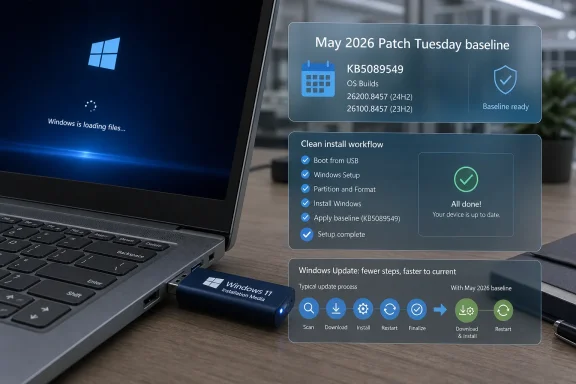
Microsoft’s Media Creation Tool is now serving Windows 11 installation media that includes the May 12, 2026 cumulative update KB5089549, letting users create USB installers for Windows 11 25H2 build 26200.8457 and 24H2 build 26100.8457 without first installing an older image and then patching it. That sounds like a small packaging change, but it matters because clean installs are where Windows servicing promises are tested most brutally. If Microsoft wants Windows 11 to feel like a living, continuously serviced platform rather than a pile of post-install chores, the USB stick has to stop being a time capsule.
For years, the canonical clean Windows install has been a strangely backward-looking ritual. You download the official tool, write a bootable USB drive, install the operating system, and then immediately ask Windows Update to drag the machine forward through whatever cumulative fixes, Defender definitions, driver packages, and servicing-stack changes were published after the image was cut.
The latest Media Creation Tool behavior narrows that gap. According to Neowin’s report, Microsoft’s download pipeline is now delivering Windows 11 25H2 and 24H2 media with KB5089549 already included, bringing new installs to the May 2026 Patch Tuesday baseline. For Windows 11 25H2, that means build 26200.8457; for Windows 11 24H2, it means build 26100.8457.
That is not the same thing as a new feature release, and it should not be treated as one. KB5089549 is a cumulative security update, not a dramatic redefinition of Windows 11. But cumulative updates are now where much of Windows’ real-world behavior changes, and placing one inside installation media changes the first-run experience in ways users and administrators will actually notice.
The immediate advantage is obvious: fewer updates after setup. The more important advantage is subtler: fewer opportunities for early setup friction, failed reboots, stale inbox components, or security exposure during the window between installation and full patch compliance.
That is why the Media Creation Tool matters more than its utilitarian name suggests. It is not just a USB writer. It is the front door for enthusiasts rebuilding machines, small shops refreshing fleets, technicians rescuing broken systems, and Windows 10 holdouts finally testing whether their hardware and workflows can survive the jump.
When that tool lags behind Patch Tuesday, every clean install begins with an IOU. The image may be official, but it is not current. The user finishes setup only to discover a stack of updates waiting, sometimes including the very reliability fixes that would have made setup smoother in the first place.
By folding KB5089549 into the media, Microsoft is reducing that contradiction. The promise of a clean install becomes closer to what the phrase implies: a fresh operating system that starts from the current supported baseline, not from last month’s assumptions.
KB5089549 applies to Windows 11 versions 25H2 and 24H2 and advances both release lines to their May 2026 OS builds. Microsoft’s support material describes it as a cumulative update containing the latest security fixes and improvements, along with changes previously tested in the prior optional preview release. That preview-to-Patch-Tuesday pipeline is now the normal rhythm of Windows servicing: optional update first, mandatory security update later, with the same payload becoming the stable baseline.
That model has a trade-off. Users who avoid optional previews get the benefit of broader testing before changes arrive. But they still receive non-security changes bundled inside the later security release. Microsoft’s monthly cumulative model makes fragmentation easier to manage, but it also means there are fewer truly “security only” moments for ordinary Windows 11 users.
For bootable media, that trade-off becomes part of the install image. A newly created USB stick is not just more secure; it is also inheriting the behavioral state of Windows 11 as of May 2026. That is good if the update fixes bugs you would otherwise hit. It is less comforting if your hardware, VPN client, storage driver, or enterprise agent happens to be among the unlucky edge cases.
The early reports around KB5089549 appear to fall into that familiar gray zone. Some users have described failed installations, including errors during reboot phases. Others have raised network-related complaints. At this stage, the public signal does not point to a universal blocker, but it is strong enough to justify caution for anyone managing production systems.
For individual users, the practical advice remains boring because boring is usually correct. If Windows Update offers KB5089549 on a normal supported PC, installing it is reasonable, especially because it includes security fixes. But if the device is mission-critical, heavily customized, or dependent on fragile networking software, waiting a few days to watch for confirmed patterns is not paranoia. It is normal Windows operations.
The Media Creation Tool angle complicates that calculus. A clean install using new media may avoid some update-installation failures because the cumulative update is already baked into the image. But it can also introduce the updated baseline before you have had a chance to test how your specific environment behaves on it.
The answer is that the tool and the payload are different things. The executable can remain the same while Microsoft changes what its servers deliver. The Media Creation Tool is a downloader and media builder; it does not have to be rebuilt every time the Windows image behind it is refreshed.
That separation is sensible engineering, but it is also opaque. Users often look at the tool version as if it were a reliable proxy for the Windows image version. In this case, it is not. The real test is what build the created media installs, not what version string appears on the downloader.
For IT professionals, that means verification remains essential. After creating installation media, check the build information of the image or install it in a virtual machine before treating it as a new standard deployment source. Microsoft’s tooling may be official, but official does not mean self-documenting.
That was especially awkward for Windows 10. Microsoft ended mainstream support for Windows 10 on October 14, 2025, while continuing security updates through the Extended Security Updates program for eligible systems. In that transition period, Microsoft has been telling users to move to Windows 11, and the Media Creation Tool is one of the most obvious routes people try when they finally decide to do it.
A migration tool that stumbles during an end-of-support push is more than an inconvenience. It damages trust at exactly the moment Microsoft needs users to believe the path forward is manageable. For home users, that can mean abandoning the upgrade attempt. For small businesses, it can mean delaying migration. For IT teams, it can mean routing around Microsoft’s preferred consumer-facing tooling entirely.
The current report says the newer Media Creation Tool app behavior includes fixes for Windows 11, and that the Windows 10-related tool issues have also been addressed even though the latest ESU Windows 10 patch is not available through it. That caveat is important. Windows 10 is now in a different servicing category, and users should not expect the same media-refresh story that Windows 11 receives.
The user most likely to care about a fresh USB installer in 2026 may not be a Windows Insider or hobbyist. It may be someone with a still-functional Windows 10 PC who has postponed the upgrade for years, finally bought compatible hardware, or decided to wipe and rebuild rather than carry old software baggage forward. For that user, the first experience of Windows 11 may be shaped by the Media Creation Tool.
That makes freshness more than a technical nicety. If the installer lands on a current build, includes recent Defender updates, and avoids known setup bugs, Windows 11 feels more coherent. If it installs an older baseline and immediately begins a long update cycle, the platform feels unfinished before the user has opened the Start menu twice.
There is also a psychological dimension. Windows 11’s hardware requirements already made the transition contentious. Users who feel pushed off Windows 10 are less forgiving of clumsy setup experiences. Microsoft does not get many chances to make the first boot feel competent.
Yet the USB installer refuses to die because it solves a different class of problem. When a system will not boot, when the internal recovery image is corrupted, when a disk has been replaced, when a lab machine needs to be wiped repeatedly, or when a user wants a truly clean start, physical boot media remains the blunt instrument that works.
That is why keeping official USB media current is still important. Unofficial ISOs, third-party download mirrors, and community-built images fill the gap when Microsoft’s official path is stale or unreliable. That is bad for security and bad for trust. The more current and dependable Microsoft’s own tool is, the less incentive users have to wander into risky alternatives.
For administrators, official media also provides a known starting point for troubleshooting. If a bug reproduces from a clean Microsoft image, that is a different conversation than a bug seen only on a modified image assembled from unknown sources. Baseline integrity matters.
Enterprise administrators still need to test driver compatibility, application behavior, endpoint security agents, VPN clients, BitLocker recovery flows, Windows Hello provisioning, Group Policy processing, and update deferral settings. A cumulative update can touch enough of the operating system that “it installed fine on my laptop” is not evidence of fleet readiness.
Small IT shops should be especially careful because they often sit between consumer tooling and enterprise expectations. They may use the Media Creation Tool for convenience, then layer business software and policies on top manually. For them, a newer base image saves time, but it also changes the base under their checklist.
The safer approach is to treat the KB5089549 media as a new candidate image. Build it, test it, document its build number, confirm post-install update behavior, and keep the previous known-good installer around until the new one proves itself. Windows deployment is not glamorous, but neither is explaining why a Friday rebuild broke Monday’s network access.
Still, performance claims deserve restraint. One user’s faster File Explorer is another user’s unchanged desktop. One machine’s smoother gaming mode or taskbar responsiveness may be invisible on hardware that was already fast. Windows performance is a messy combination of silicon, firmware, drivers, storage, background services, shell behavior, and perception.
The practical value of a current installation image is not that it magically makes Windows 11 faster. It is that it reduces the number of moving pieces between setup and a patched, supported state. Fewer immediate updates can mean fewer reboots, less background churn, and less time spent waiting for the OS to settle.
That can feel like performance even when it is really reduced friction. For most users, the distinction hardly matters. A PC that becomes useful sooner is a PC that feels better maintained.
That is a logical consequence of Windows as a service. If Windows 11 25H2 is continuously updated, then “installing 25H2” is an incomplete description. Which build? Which cumulative update? Which servicing-stack level? Which inbox app versions? Which Defender intelligence package? Those details determine the system a user actually receives.
The Media Creation Tool does not answer all of those questions transparently, but this refresh shows Microsoft is at least moving the default install closer to the current answer. That is the right direction. The downside is that users must become more aware that Windows version names are increasingly broad labels rather than precise technical states.
For enthusiasts, that is familiar territory. For ordinary users, it is invisible until something breaks. For IT professionals, it is the difference between a reproducible environment and a support headache.
KB5089549’s inclusion in Windows 11 installation media is a modest change, but it points at the right philosophy. Windows setup should not strand users on yesterday’s build and then ask them to spend the first hour repairing that fact. If Microsoft can keep the official installer fresh, predictable, and less brittle, it will remove one more source of friction from a Windows 11 transition that still needs every bit of trust it can earn.
Source: Neowin Windows 11 KB5089549 can now be downloaded for USB installs using official Microsoft tool
 Microsoft Moves the Patch Tuesday Finish Line Into the Installer
For years, the canonical clean Windows install has been a strangely backward-looking ritual. You download the official tool, write a bootable USB drive, install the operating system, and then immediately ask Windows Update to drag the machine forward through whatever cumulative fixes, Defender definitions, driver packages, and servicing-stack changes were published after the image was cut.The latest Media Creation Tool behavior narrows that gap. According to Neowin’s report, Microsoft’s download pipeline is now delivering Windows 11 25H2 and 24H2 media with KB5089549 already included, bringing new installs to the May 2026 Patch Tuesday baseline. For Windows 11 25H2, that means build 26200.8457; for Windows 11 24H2, it means build 26100.8457.
That is not the same thing as a new feature release, and it should not be treated as one. KB5089549 is a cumulative security update, not a dramatic redefinition of Windows 11. But cumulative updates are now where much of Windows’ real-world behavior changes, and placing one inside installation media changes the first-run experience in ways users and administrators will actually notice.
The immediate advantage is obvious: fewer updates after setup. The more important advantage is subtler: fewer opportunities for early setup friction, failed reboots, stale inbox components, or security exposure during the window between installation and full patch compliance.
The Clean Install Is Still Windows’ Most Honest Test
An in-place Windows update can hide a lot. Existing drivers remain in place, policies are already configured, user state is preserved, and the machine’s accumulated history often masks which component is responsible for a new problem. A clean install is less forgiving. It exposes what Microsoft believes the current default Windows experience should be.That is why the Media Creation Tool matters more than its utilitarian name suggests. It is not just a USB writer. It is the front door for enthusiasts rebuilding machines, small shops refreshing fleets, technicians rescuing broken systems, and Windows 10 holdouts finally testing whether their hardware and workflows can survive the jump.
When that tool lags behind Patch Tuesday, every clean install begins with an IOU. The image may be official, but it is not current. The user finishes setup only to discover a stack of updates waiting, sometimes including the very reliability fixes that would have made setup smoother in the first place.
By folding KB5089549 into the media, Microsoft is reducing that contradiction. The promise of a clean install becomes closer to what the phrase implies: a fresh operating system that starts from the current supported baseline, not from last month’s assumptions.
KB5089549 Is Security Plumbing With User-Visible Consequences
Patch Tuesday updates are often described in a way that makes eyes glaze over: security fixes, quality improvements, servicing-stack changes, reliability updates. That language is accurate, but it undersells the way cumulative updates now function in Windows 11. They are not just security envelopes. They are the delivery mechanism for behavioral changes that affect File Explorer, authentication, gaming features, taskbar performance, recovery, networking, and installation reliability.KB5089549 applies to Windows 11 versions 25H2 and 24H2 and advances both release lines to their May 2026 OS builds. Microsoft’s support material describes it as a cumulative update containing the latest security fixes and improvements, along with changes previously tested in the prior optional preview release. That preview-to-Patch-Tuesday pipeline is now the normal rhythm of Windows servicing: optional update first, mandatory security update later, with the same payload becoming the stable baseline.
That model has a trade-off. Users who avoid optional previews get the benefit of broader testing before changes arrive. But they still receive non-security changes bundled inside the later security release. Microsoft’s monthly cumulative model makes fragmentation easier to manage, but it also means there are fewer truly “security only” moments for ordinary Windows 11 users.
For bootable media, that trade-off becomes part of the install image. A newly created USB stick is not just more secure; it is also inheriting the behavioral state of Windows 11 as of May 2026. That is good if the update fixes bugs you would otherwise hit. It is less comforting if your hardware, VPN client, storage driver, or enterprise agent happens to be among the unlucky edge cases.
The Reported Problems Are a Warning, Not a Stop Sign
Neowin notes that KB5089549 has generated some reports of installation and network issues, though not at a scale that suggests a widespread failure. That distinction matters. Patch Tuesday always produces noise: failed installs, rollback loops, device-specific driver conflicts, VPN oddities, Wi-Fi regressions, and administrator threads trying to determine whether a problem is systemic or merely coincidental.The early reports around KB5089549 appear to fall into that familiar gray zone. Some users have described failed installations, including errors during reboot phases. Others have raised network-related complaints. At this stage, the public signal does not point to a universal blocker, but it is strong enough to justify caution for anyone managing production systems.
For individual users, the practical advice remains boring because boring is usually correct. If Windows Update offers KB5089549 on a normal supported PC, installing it is reasonable, especially because it includes security fixes. But if the device is mission-critical, heavily customized, or dependent on fragile networking software, waiting a few days to watch for confirmed patterns is not paranoia. It is normal Windows operations.
The Media Creation Tool angle complicates that calculus. A clean install using new media may avoid some update-installation failures because the cumulative update is already baked into the image. But it can also introduce the updated baseline before you have had a chance to test how your specific environment behaves on it.
Microsoft Did Not Need a New Tool Version to Change the Payload
One of the more interesting details in the Neowin report is that the Media Creation Tool version itself reportedly remains at 10.0.26100.7019. That will strike some users as odd: if the USB media is newer, why is the tool not visibly newer?The answer is that the tool and the payload are different things. The executable can remain the same while Microsoft changes what its servers deliver. The Media Creation Tool is a downloader and media builder; it does not have to be rebuilt every time the Windows image behind it is refreshed.
That separation is sensible engineering, but it is also opaque. Users often look at the tool version as if it were a reliable proxy for the Windows image version. In this case, it is not. The real test is what build the created media installs, not what version string appears on the downloader.
For IT professionals, that means verification remains essential. After creating installation media, check the build information of the image or install it in a virtual machine before treating it as a new standard deployment source. Microsoft’s tooling may be official, but official does not mean self-documenting.
The Media Creation Tool Needed a Reputation Repair
The timing of this refresh matters because the Media Creation Tool has recently had a rougher public profile than a utility of its importance should have. Neowin points to earlier buggy behavior after the Windows 11 25H2 feature update release, with both Windows 11 and Windows 10 users encountering issues.That was especially awkward for Windows 10. Microsoft ended mainstream support for Windows 10 on October 14, 2025, while continuing security updates through the Extended Security Updates program for eligible systems. In that transition period, Microsoft has been telling users to move to Windows 11, and the Media Creation Tool is one of the most obvious routes people try when they finally decide to do it.
A migration tool that stumbles during an end-of-support push is more than an inconvenience. It damages trust at exactly the moment Microsoft needs users to believe the path forward is manageable. For home users, that can mean abandoning the upgrade attempt. For small businesses, it can mean delaying migration. For IT teams, it can mean routing around Microsoft’s preferred consumer-facing tooling entirely.
The current report says the newer Media Creation Tool app behavior includes fixes for Windows 11, and that the Windows 10-related tool issues have also been addressed even though the latest ESU Windows 10 patch is not available through it. That caveat is important. Windows 10 is now in a different servicing category, and users should not expect the same media-refresh story that Windows 11 receives.
Windows 10’s Shadow Still Hangs Over Every Windows 11 Installer
Microsoft would like the Windows 10-to-11 transition to be old news. It is not. The end of Windows 10 support turned a long-running adoption debate into an operational deadline, and the aftershocks are still visible in every story about Windows installation media.The user most likely to care about a fresh USB installer in 2026 may not be a Windows Insider or hobbyist. It may be someone with a still-functional Windows 10 PC who has postponed the upgrade for years, finally bought compatible hardware, or decided to wipe and rebuild rather than carry old software baggage forward. For that user, the first experience of Windows 11 may be shaped by the Media Creation Tool.
That makes freshness more than a technical nicety. If the installer lands on a current build, includes recent Defender updates, and avoids known setup bugs, Windows 11 feels more coherent. If it installs an older baseline and immediately begins a long update cycle, the platform feels unfinished before the user has opened the Start menu twice.
There is also a psychological dimension. Windows 11’s hardware requirements already made the transition contentious. Users who feel pushed off Windows 10 are less forgiving of clumsy setup experiences. Microsoft does not get many chances to make the first boot feel competent.
USB Media Is Still the Safety Net Cloud Recovery Cannot Replace
Microsoft has spent years moving Windows recovery, reset, and deployment workflows toward the cloud. That has helped many users. Cloud download reset options can pull fresh files without requiring physical media, and enterprise deployment pipelines increasingly depend on Autopilot, Intune, provisioning packages, and managed enrollment rather than a technician with a USB stick.Yet the USB installer refuses to die because it solves a different class of problem. When a system will not boot, when the internal recovery image is corrupted, when a disk has been replaced, when a lab machine needs to be wiped repeatedly, or when a user wants a truly clean start, physical boot media remains the blunt instrument that works.
That is why keeping official USB media current is still important. Unofficial ISOs, third-party download mirrors, and community-built images fill the gap when Microsoft’s official path is stale or unreliable. That is bad for security and bad for trust. The more current and dependable Microsoft’s own tool is, the less incentive users have to wander into risky alternatives.
For administrators, official media also provides a known starting point for troubleshooting. If a bug reproduces from a clean Microsoft image, that is a different conversation than a bug seen only on a modified image assembled from unknown sources. Baseline integrity matters.
A Current Image Does Not Eliminate the Need for Deployment Discipline
It is tempting to read this update as a reason to throw away old media and immediately rebuild every deployment process around the new image. That would be premature. A refreshed Media Creation Tool image is useful, but it is not a substitute for deployment validation.Enterprise administrators still need to test driver compatibility, application behavior, endpoint security agents, VPN clients, BitLocker recovery flows, Windows Hello provisioning, Group Policy processing, and update deferral settings. A cumulative update can touch enough of the operating system that “it installed fine on my laptop” is not evidence of fleet readiness.
Small IT shops should be especially careful because they often sit between consumer tooling and enterprise expectations. They may use the Media Creation Tool for convenience, then layer business software and policies on top manually. For them, a newer base image saves time, but it also changes the base under their checklist.
The safer approach is to treat the KB5089549 media as a new candidate image. Build it, test it, document its build number, confirm post-install update behavior, and keep the previous known-good installer around until the new one proves itself. Windows deployment is not glamorous, but neither is explaining why a Friday rebuild broke Monday’s network access.
The Performance Argument Is Real but Easy to Oversell
Neowin’s report notes that users may have reasons to install KB5089549 beyond security fixes, including potential performance gains, with more improvements planned for a future release. That aligns with a broader pattern in Windows 11 servicing: Microsoft often ships performance, responsiveness, and reliability work through cumulative updates rather than waiting for marquee feature upgrades.Still, performance claims deserve restraint. One user’s faster File Explorer is another user’s unchanged desktop. One machine’s smoother gaming mode or taskbar responsiveness may be invisible on hardware that was already fast. Windows performance is a messy combination of silicon, firmware, drivers, storage, background services, shell behavior, and perception.
The practical value of a current installation image is not that it magically makes Windows 11 faster. It is that it reduces the number of moving pieces between setup and a patched, supported state. Fewer immediate updates can mean fewer reboots, less background churn, and less time spent waiting for the OS to settle.
That can feel like performance even when it is really reduced friction. For most users, the distinction hardly matters. A PC that becomes useful sooner is a PC that feels better maintained.
Security Baselines Are Becoming Installation Baselines
The most important shift here is conceptual. Microsoft’s monthly cumulative update is no longer something that happens after Windows installation. Increasingly, it is part of what installation is. The baseline is not the named feature release; it is the named feature release plus the latest servicing state.That is a logical consequence of Windows as a service. If Windows 11 25H2 is continuously updated, then “installing 25H2” is an incomplete description. Which build? Which cumulative update? Which servicing-stack level? Which inbox app versions? Which Defender intelligence package? Those details determine the system a user actually receives.
The Media Creation Tool does not answer all of those questions transparently, but this refresh shows Microsoft is at least moving the default install closer to the current answer. That is the right direction. The downside is that users must become more aware that Windows version names are increasingly broad labels rather than precise technical states.
For enthusiasts, that is familiar territory. For ordinary users, it is invisible until something breaks. For IT professionals, it is the difference between a reproducible environment and a support headache.
The May 2026 USB Image Narrows the Gap Between Setup and Servicing
The concrete lesson from KB5089549’s arrival in the Media Creation Tool is not that everyone should reinstall Windows. It is that Microsoft is tightening the loop between Patch Tuesday and clean installation media, and that has practical consequences for how users should think about fresh installs.- A newly created Windows 11 USB installer should now place 25H2 systems on build 26200.8457 and 24H2 systems on build 26100.8457.
- The Media Creation Tool executable version may not visibly change even when Microsoft refreshes the Windows image it downloads.
- A current USB installer can reduce the amount of patching required after setup, but it does not remove the need to test hardware, drivers, and business applications.
- Reports of KB5089549 installation and networking issues appear limited so far, but cautious administrators should validate the update before broad deployment.
- Windows 10 users should not assume the same media behavior applies to ESU-era Windows 10 servicing, which now follows a different support path.
Microsoft’s Best Installer Is the One Users Do Not Have to Think About
The Media Creation Tool has always been one of those Microsoft utilities that works best when it disappears into the background. Nobody wants a relationship with their USB creation software. They want a bootable drive, a clean install, and a system that is already close to secure and current when it reaches the desktop.KB5089549’s inclusion in Windows 11 installation media is a modest change, but it points at the right philosophy. Windows setup should not strand users on yesterday’s build and then ask them to spend the first hour repairing that fact. If Microsoft can keep the official installer fresh, predictable, and less brittle, it will remove one more source of friction from a Windows 11 transition that still needs every bit of trust it can earn.
Source: Neowin Windows 11 KB5089549 can now be downloaded for USB installs using official Microsoft tool
