

Windows 11’s visual polishing campaign keeps creeping into the OS’ smallest corners: Microsoft is rolling out modernized, WinUI-based dialogs for Account settings and other micro‑surfaces in Insider Preview build 26220.7653 (KB5074157), alongside practical additions like native .webp wallpaper support and snappier Copilot suggestions in Click to Do. These are not headline features, but they matter: they reduce visual jank, tighten dark‑mode coverage, and prepare legacy surfaces for future improvements—while introducing operational and accessibility considerations IT pros and power users should test before broad deployment. oion has been a slow, methodical march rather than abrupt reinvention. Over the past several updates Microsoft has steadily migrated UI components from legacy Win32/XAML fragments to WinUI and Fluent-style surfaces, with three linked goals: visual consistency, improved accessibility semantics, and easier future development on a modern framework. The most recent Beta‑channel preview continues that pattern by targeting high‑frequency micro‑surfaces—the tiny dialogs and overlays users interact with dozens of times per session.
Why focus on small dialogs? Because they’nor inconsistencies (a bright legacy dialog on a dark desktop, clipped controls, or missing accessibility roles) produce disproportionate friction. Microsoft’s staged approach—ship the code in a build, then flip feature gates for a subset of devices—lets the company gather telemetry and fix regressions without exposing every device to early rough edges. That controlled rollout model is in play for build 26220.7653.
Why this matters: Run is a muscle‑memory tool for power users and admins. Modernizing its presentation without changing core semantics (Enter to execute, arrow keys for history) preserves productivity while improving discoverability and visual parity with the rest of Windows 11. uture flags in the Insider program and, in some previews, the classic Browse… button was omitted—an implementation detail that may revert before public release. Treat build‑specific claims as provisional.
That said, the practical realities of controlled rollouts, regional gating of Copilot enhancements, and potential automation breakages mean this is a validation first release for enterprises. Recommended actions:
Conclusion: Small UI updates are quietly importanand micro‑surface refreshes in Windows 11 are the kind of refinements that improve day‑to‑day experience for millions—provided the the operational impacts are managed.
Source: Neowin https://www.neowin.net/news/windows-11-is-getting-more-modernized-dialogs/
Why focus on small dialogs? Because they’nor inconsistencies (a bright legacy dialog on a dark desktop, clipped controls, or missing accessibility roles) produce disproportionate friction. Microsoft’s staged approach—ship the code in a build, then flip feature gates for a subset of devices—lets the company gather telemetry and fix regressions without exposing every device to early rough edges. That controlled rollout model is in play for build 26220.7653.
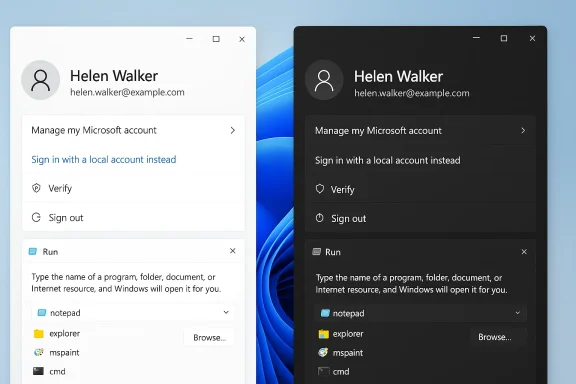 What shipped in build 26220.7653 (KB5074157)
Headlzed Account dialogs** (Settings > Accounts > Other users): Add account, Change account type, and Account info dialogs have been reimplemented using WinUI components and now respect Light/Dark mode. This presents the dialogs as sheet‑style system modals and aligns spacing, typography, and control patterns with the rest of Settings.
- Click to Do / Copilot prompt speedups: Copilot suggestion tiles in Click to Dooevices; this improvement is entitlement‑gated and is initially excluded from the EEA and China. The change reduces latency for short contextual tasks and depends on device capability and regional rollout policy.
- Desktop background: .webp support: Settings > Personalization > Desktop Background now accepts WebP raster images directly to convert wallpapers to JPG/PNG before applying them. This is a small but practical compatibility win.
- Numerous bug fixes and reliability improvements: Stability fixes for the Start menu, taskbar autohide, Settings crashes, Bluetooth battery reporer UX regressions accompany the visual updates; known issues—particularly around secondary monitors and some Xbox Full Screen Experience quirks—remain in the release notes.
Notable rollout nuance
The build is delivered to Beta‑channel Insiders as a cumulative quality update, but visibility of new UI elements is gated by server‑side fing. Installing the cumulative package does not guarantee immediate appearance of the modernized dialogs; Microsoft may enable them for specific devices, accounts, or telemetry segments. That staged enablement lowers risk but adds complexity for testers and admins trying to validate behavior predictably.A closer look: What “modernized dialogs” means in practice
Visual and accessibility upgrades
The reworked Account dialogs use WinUI 3 patterns—larger, clearer typography, consware backgrounds, and correctly themed controls in both Light and Dark modes. These changes eliminate the jarring visual mismatch that used to occur when legacy dialog fragments flashed bright chrome over a dark desktop. More than cosmetics, WinUI surfaces often carry better accessibility semantics (clearer control roles, predictable focus order, and framework‑level ARIA-like traits), which should help screen readers and assistive technologies once validation is complete.Practical user benefits
- Fewer surprises when switching themes (no more bright popups in dark mode).
- Cleaner layout and affordances for users adding accounts or changing account types—reduces cognitn‑reader behavior** and keyboard navigation when implemented correctly.
What remains to be validated
- Full screen‑reader compatibility across languages and localized strings.
- Keyboard shortcuts, focus traps, and edge cases in high‑contrast modes.
- Whether any automation hooks (window class names, UI tree structure) have changed in a way that breaks existing scripts.
The Modern Run dialog: the same philosophy applied to another micro‑surface
While the Beta build focuses on Account dialogs, Microsoft has also been experimenting with a “Modern Run” overlay in recent Insider previews—an example of the same moderied to Win+R. Early previews reshape the tiny Run box into a roomier, Fluent‑style overlay with a Most‑Recently‑Used (MRU) list, inline icons for resolved matches, and larger input affordances. The experience is being exposed as an opt‑in toggle in Settings → System → Advanced in preview builds.Why this matters: Run is a muscle‑memory tool for power users and admins. Modernizing its presentation without changing core semantics (Enter to execute, arrow keys for history) preserves productivity while improving discoverability and visual parity with the rest of Windows 11. uture flags in the Insider program and, in some previews, the classic Browse… button was omitted—an implementation detail that may revert before public release. Treat build‑specific claims as provisional.
Technical analysis: frameworks, decoding, and UI plumbing
WinUI 3 adoption
Reimplementing legacy dialogs on WinUI 3 is more than a cosmetic migration: it consolidates control rendering and theming into a single framework, reducing the number of special‑case fixes needed to support dark mode, localizationOver time, this reduces maintenance overhead and helps Microsoft ship consistent UX updates faster. From a developer perspective, moving to WinUI 3 also opens the door to shared component libraries, easier telemetry insertion, and uniform input handling..webp wallpaper support: decode vs. shim
The user‑facing change is straightforward—Settings now accepts .webp files as wallpapers—but internal implementation details are not fully documented in release notes. Community testing indicates the Settings path accepts WebP directly, but whether the shell decodes WebP natively or converts it tore rendering remains unspecified by Microsoft. That subtlety matters for scenarios like batch wallpaper deployment, caching behavior, and imaging pipelines. Treat technical decode-path claims as provisional until Microsoft publishes deeper platform notes.Enterprise considerations: deployment, automation, and support
Controlled feature rollout complicates validation
Because Microsoft often ships the code but keeps features gated by telemetry or device targeting, IT teams can find themselves in a bind: the build is installed, but the new dialog doesn’t appear on a pilot device, making reproducible testing harder. Admins should:- Maintain strict pilot rings and document which devices receive the visible features.
- Use Feedback Hub reports and targeted telemetry to escalate visual or accessibility regressions.
- Maintain clear rollback plans and test imaging with and without the enablement package.
UI automation, RPA, and accessibility automation
Many enterprise automation tools depend on predictable window classes, control IDs, and UI trees. Migrating dialogs to WinUI may break selectors and require rebaselining. Action items for IT and automation teams:- Re‑record and revalidate RPA scripts that interact with Settings > Accounts flows.
- Update UI tests to rely on more stperties rather than brittle control indices.
- Validate localized strings against test language packs; preview flights sometimes lag in localization quality.
Known issues you should test for
Microsoft’s release notes for the Beta build list issues that make this unsuitable for mass deployment without vetting—particularly secondary‑monitor black‑screen problems and some interaction quirks with Xbox Full Screen Experience. These kinds of problems are platform‑level and can affect productivity in multi‑display setups common in enterprises. Validate multi‑monitond kiosk scenarios before upgrading large fleets.Privacy, Copilot, and the data flow implications
Click to Do’s “instant” Copilot prompt suggestions are marketed as a responsiveness improvement, but they’re also entitlement‑gated and in some cases tied to on‑device inference (Copilot+). That has three consequences:- On‑device processing can reduce cloud round trips and therefore lower exposure of sensitive content to external services—improving privacy posture fo Not all devices will receive the instant prompts; EEA and China exclusions make behavior heterogeneous across regions and customer deployments.
- For devices that still rely on cloud fallback, network, DLP, and firewall policies must account for Copilot flows that may transport content to Microsoft services.
What power users will notice (and what they shouldn’t worry about)
- Expect smoother visuals: dialogs that used to flash legacy chrome in dark mode are now theme‑aware and more polished. That’s instantly noticeable to anyone who toggles Light/Dark.
- Run won’t change your muscle memory: the Modern Run overlay preserves core semantics (Win+R still runs commands), but it adds helpful affordances—MRU history and icons—that reduce typing and ai. If you are a keyboard-first user, there’s little risk of degraded productivity.
- If you rely on automation that inspects exact dialog titles or window classes, expect necessary updates. For casual users, the transition is mostly invisible beyond the visuaow to test these changes (for Insiders and IT pilots)
- Join the Windows Insider Program and enroll affected devices into the Beta Channel if you want the same Beta‑channel experience where build 26220.7653 is circulating.
- Ensure Windows Update installs the preview cumulative update labeled KB5074157 to re3**. Note: installing the update does not guarantee the feature is visible—features may be gated.
- Check Settings → System → Advanced (or Settings → Windows Update → Insider settings) related to “Modern Run” or modern dialogs; Microsoft exposes some modern surfaces as toggles in preview. If the UI doesn’t appear, verify server‑side flags and entitlements aren’t being withheld for your device.
- Validate accessibilitreadouts, keyboard focus order, high‑contrast mode, and localized strings across target languages. Report any regressions through Feedback Hub.
- Rebaseline automation: re‑record RPA jobs and UI tests that intAccounts flows; replace fragile element selectors with stable accessibility properties.
Risks, unkn cautious
- Feature gating and inconsistent visibility: Because Microsoft enables new UI elements selectively, pilot fleets may see unpredictable behavior, complicating reproducible testinccordingly.
- Automation breakage: RPA and UI automation tools that assume legacy control trees will likely need maintenance. That’s an operational cost that should be inclu
- Accessibility validation needed: WinUI brings better accessibility primitives, but real‑world screen‑reader behavior and localized string quality must be validated across languages. Don’t assume parity withouumented internal behavior**: Small conveniences—like .webp wallpaper acceptance—may hide implementation nuances (decode path, caching) that affect imaging and deployment. Treat implementation specifics as provisional until Microsoft publishes platform‑level documentatis trend tells us about Windows’ roadmap
Final verdict and practical recommendations
The modernized dialogs in build 26220.7653 are a welcomed step toward a unified Windows 11 experience: visual consistency, dark‑mode parity, and accessibility improvements are clear wins for both casual users and those who rely on polished, theme‑aware interfaces. The .webp wallpaper support is a small but appreciated convenience, and the Click to Do latency improvements point to Microsoft’s continued investment in Copilot ergonomics.That said, the practical realities of controlled rollouts, regional gating of Copilot enhancements, and potential automation breakages mean this is a validation first release for enterprises. Recommended actions:
- For IT pilots: validate the build on non‑production hardware, test mcenarios, and rebaseline RPA/UI tests.
- For accessibility leads: perform screen‑reader and localized string checks across supported languages and report regressions.
- For power users and admins: try the modern Run overlay as an opt‑in for increased discoverability, but don’t expect radical workflow changes—keyboard ergonomics remain intact.
Conclusion: Small UI updates are quietly importanand micro‑surface refreshes in Windows 11 are the kind of refinements that improve day‑to‑day experience for millions—provided the the operational impacts are managed.
Source: Neowin https://www.neowin.net/news/windows-11-is-getting-more-modernized-dialogs/
