

Microsoft's future-of-Windows fantasy videos keep doing the heavy lifting for public expectation—AR 4789's latest concept, a polished "Windows 12.1" reel that shows installation while you game or browse, a taut minimalist shell, and a tidier File Explorer, has reignited debates about what Microsoft should fix (and what it should avoid) as Windows evolves. The clip is a reminder that the conversation around Windows's next chapter isn't just about feature lists; it's about design consistency, performance trade-offs, upgrade economics, and whether deep AI integration will be an assistive boon or a liability. The timing matters: with Windows 10's support lifecycle closed out, users and organisations are actively weighing short-term migrations against longer-term bets on whatever comes next.
Microsoft formally ended mainstream support for Windows 10 on October 14, 2025; after that date the OS stopped receiving regular security and feature updates, leaving many users with a clear decision: upgrade to Windows 11, pay for Extended Security Updates (ESU) for a limited time, migrate to an alternative OS, or plan for a future Windows release. That reality frames why concept work—whether earnest or speculative—gets traction: users are shopping for a reason to upgrade, and designers are sketching what that reason could look like. What counts as "Windows 12" in the rumor mill is messy. Microsoft has shifted its development cadence since Windows 10’s long lifecycle and Windows 11’s launch, introducing platform codenames (Germanium, Bromine, etc. and release patterns that blur the line between "new OS" and "major feature update." Some public reporting describes platform releases and hardware-targeted builds (for example, Germanium underpinning 24H2/25H2 updates), while community chatter and independent concept creators fill gaps with imaginative takes on a future "Windows 12" experience. Distinguishing Microsoft-confirmed platform roadmap items from wishful design is essential when judging what concepts like "Windows 12.1" actually represent.
On the factual front, the Windows 10 support deadline is real and can drive mass migration; Microsoft’s platform work (e.g., the Germanium platform lineage and specialized builds) signals the company is focused on staged platform evolution rather than a single cinematic reset. Third-party remedies like Rectify11 demonstrate user demand for visual coherence, but they are not substitutes for a well-engineered system update that respects compatibility and security. In short: the concept shows us what the future could look like; the product organization must balance desirability against technical, legal, and economic realities. That tension will determine whether "Windows 12" becomes a rebranding, a significant platform shift, or a set of incremental, meaningful improvements to Windows 11. The safest path for users in the near term is pragmatic: check compatibility, prioritize backups, and treat concept hype as design inspiration—hopeful, informative, and not a guarantee.
Source: BetaNews Windows 12.1 is everything Windows 11 should be -- and the Microsoft operating system we need!
 Background / Overview
Microsoft formally ended mainstream support for Windows 10 on October 14, 2025; after that date the OS stopped receiving regular security and feature updates, leaving many users with a clear decision: upgrade to Windows 11, pay for Extended Security Updates (ESU) for a limited time, migrate to an alternative OS, or plan for a future Windows release. That reality frames why concept work—whether earnest or speculative—gets traction: users are shopping for a reason to upgrade, and designers are sketching what that reason could look like. What counts as "Windows 12" in the rumor mill is messy. Microsoft has shifted its development cadence since Windows 10’s long lifecycle and Windows 11’s launch, introducing platform codenames (Germanium, Bromine, etc. and release patterns that blur the line between "new OS" and "major feature update." Some public reporting describes platform releases and hardware-targeted builds (for example, Germanium underpinning 24H2/25H2 updates), while community chatter and independent concept creators fill gaps with imaginative takes on a future "Windows 12" experience. Distinguishing Microsoft-confirmed platform roadmap items from wishful design is essential when judging what concepts like "Windows 12.1" actually represent. What AR 4789's Windows 12.1 concept shows — and why people care
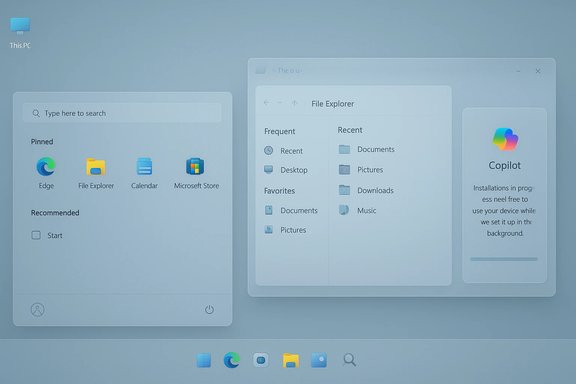
AR 4789 (a prolific concept creator whose channel and concept reels have been repeatedly highlighted by tech sites and enthusiast communities) bills his work as UI thought experiments rather than functional releases. His Windows 12.1 clip bundles several appealing ideas into a short, cinematic narrative: a modern, uniform design language across system UI; a minimalist, centered taskbar and simplified Start menu; a more useful and uncluttered File Explorer; a small presence for Copilot rather than an intrusive AI takeover; and an installation flow that allows the user to play games or browse the web during setup. The concept ends on small niceties—like swiping the lockscreen background—that sell polish and usability. These design choices are what make the video popular: it solves small annoyances many users still have with Windows 11 while never straying far from familiar interactions. Why this resonates: the core pain points many users still voice about Windows 11 are inconsistent UI styling across system apps, a Taskbar and File Explorer that feel less flexible than before, and the impression that Microsoft sometimes layers features on top of old code rather than rethinking fundamentals. AR 4789's concept directly answers that with visual consistency and usability-first tweaks—exactly the sort of changes third‑party projects like Rectify11 have aimed to deliver. For many enthusiasts, a consistent visual language across dialogs, icons, and controls would make daily use feel smoother and less fragmented.Feature highlights from the concept (summary)
- Minimalist, unified taskbar and Start menu with consistent spacing and iconography.
- Cleaner, tab-friendly File Explorer with clearer recent/favorite file surfacing.
- Installation flow that continues to allow entertainment or browsing while core files install in the background. Conceptual only; not a Microsoft feature.
- Copilot present but understated—more tool than centerpiece.
- Touch-friendly lockscreen gestures (swipe to change wallpaper).
Separating concept appeal from technical reality
Concept videos are marketing-grade thought experiments, not engineering plans. They serve three roles: design provocations, wish lists for users, and pressure points for Microsoft to notice. But their aesthetics and flow do not guarantee technical feasibility, enterprise readiness, or alignment with Microsoft’s business decisions.- Installation while playing or browsing: attractive, but technically complex. Letting users interact with a system while a fundamental install runs in the background increases the risk surface (partially configured drivers, incomplete user profiles, temporary incompatibilities). Feature designers could implement such a flow strictly for non‑critical content (a sandboxed browser or containerized game environment), but a full OS install that remains safe and predictable under that model would require careful engineering—and conservative rollback mechanisms. Treat this as a creative idea, not an imminent feature.
- UI consistency: straightforward to deliver in principle but expensive in practice. Microsoft historically balances backward compatibility and ecosystem support against aesthetic recasts; unifying iconography and dialog structure across hundreds of first- and third-party apps requires careful API and theme work. Tools like Rectify11 exist because users want that uniformity, but baked‑in consistency at the OS level is different: it must be maintainable, accessible, and enterprise-safe.
- Copilot and AI: minor in the concept but likely a major real-world agenda item. Microsoft has already embedded Copilot-like features into Windows in stages; any next-generation release is expected to extend AI functionality. That means a future OS will have to manage local inference (NPUs/NPX hardware), cloud-assisted services, data governance, and privacy controls. The balance between unobtrusive help and persistent surveillance is a policy and UX challenge more than a UI one.
How much of this is grounded in real Windows development signals?
There are two linked realities to consider:- The practical driver: Windows 10's end-of-support (October 14, 2025) forced many users to act. Microsoft’s official guidance pushed customers toward Windows 11 or ESU options; that real-world deadline amplified interest in future OS work and concept speculation. This is confirmed by Microsoft documentation and prominent coverage.
- Microsoft’s platform work: the company has been reorganizing how Windows platform updates ship, using platform codenames and staged enablement packages—Germanium and subsequent platform efforts have been invoked in reporting about the 24H2/25H2 cycle and hardware-specific builds. These behind-the-scenes platform names show Microsoft’s engineering focus on stability and silicon enablement rather than launching a monolithic "Windows 12" boxed product. In short: Microsoft is iterating on the platform, but the way it does so doesn't preclude a future version name; it does complicate the expectation that a glossy "Windows 12" will drop as a single, dramatic reinvention on a calendar date.
Strengths of the AR 4789 concept — why it matters to users
- Design coherence is the #1 usability win. A consistent system UI reduces cognitive load, prevents interaction mistakes, and improves accessibility. That Rectify11 exists and is popular proves there's demand for a cohesive visual language.
- Small, well-executed interactions (swipe background, snap-to widgets, minimal menus) often yield outsized usability gains. These micro-interactions are cheap to test in previews but powerful for end-user satisfaction.
- A toned-down Copilot is an important UX lesson. Many users say they want helpful AI—summaries, context-aware tips, productivity boosts—not a constantly present assistant that interrupts flow. The concept models restraint.
- The concept is an aspirational benchmark. When vendors see compelling third-party work widely discussed, it can nudge platforms to prioritize design parity and user-centric fixes in real updates.
Risks, trade-offs, and unanswered questions
- Performance and hardware demands. If future Windows extensively leans on on‑device AI (local NPUs), minimum hardware specifications rise. That risks repeating the Windows 11 fragmentation problem—where older devices are excluded or forced into unsupported workarounds—unless Microsoft explicitly ships lightweight tiers. Community discussions and leaks have emphasized higher hardware expectations for AI-first features. Any "Windows 12" that assumes NPUs in the baseline will accelerate hardware churn.
- Privacy and telemetry. Deep AI features require context: access to files, app usage, and possibly cloud connectivity. Without transparent defaults and granular controls, a more "helpful" OS can quickly erode trust. Concept aesthetics do not address data governance; product teams must.
- Enterprise compatibility. Businesses prize stability and application compatibility over glossy UI updates. A rework of shell elements or the explorer experience is only worthwhile if legacy application compatibility remains intact or there are cost-effective migration paths.
- UX fragmentation and user training. Radical UI shifts—even for the better—create a training overhead. Microsoft must balance novelty with muscle memory for tens of millions of users.
- Subscription and licensing speculation. Some reporting and forum threads speculate about subscription tiers or ad-supported free editions. That's plausible but unconfirmed; the business model Microsoft chooses will determine customer cost, adoption friction, and long-term platform economics. Treat such claims as speculative until Microsoft provides firm guidance.
Real-world implications and practical advice
For consumers and small-business IT teams planning next steps, the immediate guidance is pragmatic:- Verify device compatibility now. Use Microsoft’s PC Health Check and vendor guidance to see whether you can upgrade to current supported Windows 11 releases or if replacement is necessary. Microsoft’s official lifecycle pages and KB articles explain EoL and ESU options.
- If you can run Windows 11 comfortably, keep your device updated. Microsoft’s platform work (Germanium and subsequent releases) means staying on supported platform branches reduces upgrade friction later.
- If hardware replacement is imminent or costly, evaluate alternatives—lightweight Linux distros, ChromeOS Flex, or conservative Windows deployments with extended security—but weigh software compatibility costs against hardware refresh costs. Community discussion reflects a surge in interest in "Windows Lite" concepts and Linux migration options for older hardware.
- Back up everything. Major platform changes, whether from Microsoft or third‑party modifications (e.g., UI patches like Rectify11), can create recovery scenarios that benefit from current disk images and documented rollback plans.
What Microsoft should do (editorial but practical)
- Ship a "design parity" program: audit system UIs and deliver a focused, compatibility-safe set of visual fixes so that dialogues, icons and menus follow a single language. Users gain consistency without jeopardizing enterprise apps.
- Offer multiple performance profiles: a full-featured, AI-capable edition and a "Lite" edition for older hardware that omits local AI acceleration and favors low-latency performance. This preserves investment in older machines and addresses e-waste concerns.
- Make Copilot opt-in and transparent: local-only inference should be possible, cloud-accelerated features clearly labeled, and granular consent controls exposed during setup—not buried in legalese.
- Prioritize enterprise migration tooling: compatibility scanners, virtualization-based transition aids, and extended timelines for mission‑critical applications to reduce friction.
Final assessment: aspirational UI + real engineering constraints
AR 4789's Windows 12.1 concept is valuable because it crystallizes user desires into concrete visuals: less clutter, consistent styling, and helpful but non-intrusive intelligence. Concepts are an accelerant—they help shape expectations. Yet shipping a real OS that matches the gloss requires hard trade-offs: hardware baselines, privacy frameworks, enterprise compatibility, and a release cadence that aligns with OEM cycles.On the factual front, the Windows 10 support deadline is real and can drive mass migration; Microsoft’s platform work (e.g., the Germanium platform lineage and specialized builds) signals the company is focused on staged platform evolution rather than a single cinematic reset. Third-party remedies like Rectify11 demonstrate user demand for visual coherence, but they are not substitutes for a well-engineered system update that respects compatibility and security. In short: the concept shows us what the future could look like; the product organization must balance desirability against technical, legal, and economic realities. That tension will determine whether "Windows 12" becomes a rebranding, a significant platform shift, or a set of incremental, meaningful improvements to Windows 11. The safest path for users in the near term is pragmatic: check compatibility, prioritize backups, and treat concept hype as design inspiration—hopeful, informative, and not a guarantee.
Quick checklist (practical next steps)
- Run PC Health Check and document compatibility status.
- Create a full system image before applying major OS changes or third‑party theme tools like Rectify11.
- Consider ESU or a staged hardware refresh plan if migration timeline is tight.
- Track Microsoft’s platform releases (24H2/25H2 and any hardware-targeted builds) for when enterprise‑grade updates become available.
Source: BetaNews Windows 12.1 is everything Windows 11 should be -- and the Microsoft operating system we need!
