

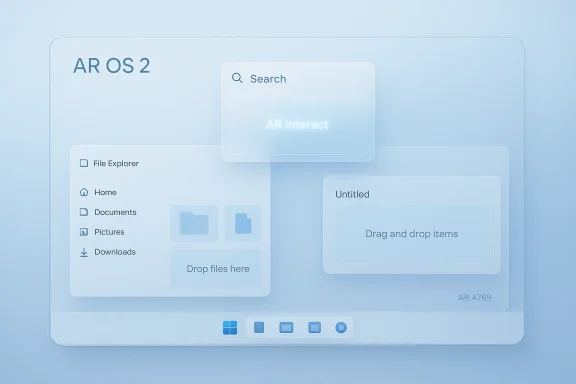
AR OS 2 is a fan-made concept that does more than fantasize about a prettier desktop — it sketches a coherent vision for how a modern Windows successor could be designed: a clean, modular UI, deeper but unobtrusive AI, superior drag‑and‑drop and customization, and a lightweight “Lite” mode for the devices that need it most. The concept — the work of designer AR 4789 — is not software you can install, but its ideas map directly onto the gaps users keep asking Microsoft to fix as Windows 10 approaches its end of life and Windows 11 evolves into an AI‑first platform.
The weaknesses are also predictable: concepts understate compatibility complexity, gloss over OEM and driver realities, and can minimize the cost of migrating legacy enterprise workloads. For AR OS 2’s ideas to arrive in shipping Windows, Microsoft must commit to a careful, staged rollout that protects application compatibility and gives IT teams clear migration paths.
If Microsoft blends AR OS 2’s user‑centric ideas with pragmatic engineering — modular components, on‑device AI with strict privacy controls, and a unified app delivery model — the next Windows could be both delightful and broadly adoptable. Until then, AR OS 2 remains a valuable blueprint: a reminder that users want smarter, cleaner, and more respectful operating systems, not just fancier animations.
AR OS 2 is aspirational, not executable — but its lessons are concrete. The future of Windows will be shaped as much by user desire for choice, privacy, and performance as by Microsoft’s capacity to deliver compatibility and manage complexity. Concepts like AR OS 2 keep that conversation alive and provide designers and engineers with a clear set of priorities to test against reality.
Source: BetaNews AR OS 2 is everything we want Windows 12 to be -- and more
 Background
Why concepts like AR OS 2 matter now
Microsoft’s desktop OS story over the past half decade has been a mix of bold design choices and mixed reception. Windows 11 brought a visual refresh and embedded AI elements such as Copilot, but adoption lagged compared with Windows 10, and many users remain vocal about performance, bloat, privacy, and customization pain points. Concept work like AR OS 2 crystallizes those grievances into specific design remedies and feature proposals, giving both users and product teams a shared vocabulary for the improvements people actually want.The timing: Windows 10 support and the pressure on Microsoft
Windows 10’s supported lifecycle is winding down, creating a crucial migration window for Microsoft and its customers. That sunsetting places pressure on Microsoft to deliver an upgrade path that addresses Windows 11’s critiques while also making a compelling case to holdouts. Concept visions and community wishlists — including the rise of “Lite” and modular ideas — are timely because they speak directly to the millions who will choose an upgrade path in the coming months.What AR OS 2 proposes: a feature-by-feature breakdown
Clean, minimal‑first UI that scales
AR OS 2’s most immediate impression is its restrained, cohesive design language: a minimal aesthetic that still exposes powerful functionality. The concept sketches a UI that scales naturally from low‑powered tablets to high‑end workstations, with consistent visual grammar and fewer legacy holdovers. This is an explicit reaction to the patchwork feel many users complain about in modern Windows versions.- Centered, adaptable taskbar that can be repositioned or stripped down.
- Floating universal search that behaves like a command palette for apps and system tasks.
- Dynamic themes and AI‑driven wallpapers that adapt to usage patterns.
Superior drag‑and‑drop and window management
One of the concrete usability areas AR OS 2 emphasizes is drag‑and‑drop and window management. The concept shows smoother, context‑aware drag flows (e.g., quick drop zones, semantic actions when dropping a file onto an app) and native multitasking primitives that rival community tools like PowerToys FancyZones. These enhancements aim to reduce friction for power users without overwhelming new users.AR Interact: an intelligent but subtle assistant
AR OS 2’s signature is AR Interact, an AI assistant that blends into the OS rather than hijacking it. Rather than persistent notification noise or forced telemetry, AR Interact is presented as a contextual helper:- Suggesting actions (open a recent file, set a meeting focus profile).
- Handling complex multi‑step UI flows via natural language.
- Surface-level automation without taking control away from the user.
Deep customization and a true “Lite” mode
AR OS 2 doubles down on customization — not just cosmetic but structural. The concept aligns with a growing community demand for a Lite flavor of Windows: a minimal base image with optional feature packs users can add as needed. This approach promises improved performance on older hardware, reduced telemetry exposure, and a lower update surface for users who need a no‑frills environment.How AR OS 2 aligns with (and diverges from) Microsoft’s rumored roadmap
Where the vision overlaps with leaked Windows 12 talk
Several of the ideas in AR OS 2 — modular core OS, enhanced AI assistants, improved file management, and more flexible UI options — mirror community‑sourced expectations for a next‑generation Windows. Engineers and leaks discussing a modular “Core PC” or “Core OS” direction would support the technical underpinnings needed to make a concept like AR OS 2 feasible. The conceptual emphasis on NPUs and hardware‑accelerated on‑device AI also matches industry moves toward local AI processing.Where it diverges: polish vs. reality
Concept visuals and demos, by design, present a polished end state without exposing the underlying engineering tradeoffs. AR OS 2, like many concept OSes, assumes frictionless app compatibility, perfect hardware support across ARM and x86, and a simple update model. In reality, Microsoft must balance:- Backward compatibility for legacy Win32 apps.
- OEM and driver ecosystems.
- Enterprise update and security expectations.
Technical feasibility: can Microsoft ship something like AR OS 2?
Modular architecture and the “Core PC” idea
A modular OS is the foundation of AR OS 2’s feasibility. The concept presumes a base kernel and user‑experience components that can be installed or removed depending on device class. Microsoft has signaled movement in that direction with componentized experience packs and experimentation with lightweight images. To fully realize AR OS 2, Microsoft would need a formalized module policy and strong API guarantees so apps behave consistently across configurations.On‑device AI and NPUs
AR Interact becomes believable when local neural processing is available. Modern CPUs and SOCs increasingly include NPUs, and Microsoft could leverage those to run conversational and predictive models without constant cloud dependency. That reduces latency and addresses privacy concerns by keeping sensitive processing on the endpoint. The engineering burden: model size, power constraints, and the need for robust model update channels.ARM support and emulation
AR OS 2’s cross‑architecture ambitions — running smoothly on both ARM and x86 — are tied to improved emulation layers. Microsoft’s work on Prism/Prism‑like emulation, plus the industry’s progress on ARM silicon performance, makes a credible path forward, but full parity with native x86 remains a heavy lift for compatibility‑dependent environments.UX, privacy, and accessibility: strengths of the concept
A privacy‑forward option
One of the most compelling aspects of AR OS 2 is explicit user control over telemetry and AI functionality. By positioning AR Interact as opt‑in and offering a minimal base install, the concept answers persistent critiques about data collection in consumer OSes. If Microsoft adopted a similar model, it would both improve user trust and reduce friction for privacy‑sensitive users.Accessibility baked in, not bolted on
Concepts that treat accessibility as a first‑class design criterion — flexible focus profiles, voice and gesture support, smarter screen readers — produce real value for users who need it. AR OS 2 shows how AI can enhance accessibility without being invasive, e.g., by providing real‑time captioning and context‑aware control aids when the user requests them.Enterprise and developer implications
For IT: update simplicity vs. fragmentation risk
A modular or Lite Windows can reduce update complexity for certain devices, but it also creates fragmentation risk. Enterprises demand predictable APIs and dependable update channels; too many SKUs or divergent feature sets increase testing overhead. Microsoft would need to guarantee compatibility and provide clear servicing lanes for each configuration to avoid a support morass.For developers: packaging and distribution
Windows needs a robust package manager and better developer tools to match the convenience of Linux ecosystems. Concepts like AR OS 2 presuppose package management and in‑OS app discovery that keep the platform cohesive. Upgrading winget into a true, integrated package ecosystem would be a prerequisite for delivering the holistic experience AR OS 2 implies.Risks, trade‑offs, and hard truths
1. Compatibility is non‑negotiable
Windows’ strength is its vast software ecosystem. Any radical UI or modular split that breaks compatibility will meet rapid resistance from ISVs and enterprises. AR OS 2’s clean slate must come with a compatibility promise — or it becomes a niche OS.2. Fragmentation can hurt users
Offering both Lite and full editions is attractive, but multiple supported variants risk confusing consumers and complicating OEM catalogs. Microsoft must keep a single, well‑documented compatibility layer to avoid this.3. The AI balance: usefulness vs. creepiness
AI that “helps” can quickly be perceived as intrusive if it collects excessive data or surfaces assistance at inappropriate times. AR OS 2’s model of opt‑in intelligence and local processing is a good guiding principle, but implementation details (data retention, model updates, telemetry toggles) will determine public reaction.4. Engineering cost and time
Ship cycles for a major OS are measured in years. Many of AR OS 2’s features — redesigned shell, modular architecture, on‑device AI — require deep investments and careful staging to keep enterprise customers secure and developers confident. Abrupt change risks a repeat of Windows 11’s uneven early reception.How Microsoft could pragmatically adopt AR OS 2 ideas
- Introduce an official “Minimal Install” option in the setup flow, fully supported for security updates and enterprise servicing. This gives users a no‑bloat baseline without fragmenting support.
- Formalize a feature pack model — installable UI or capability modules (e.g., Gaming Pack, Tablet Pack, AI Pack) that can be added or removed without reinstalling the OS.
- Ship an on‑device AI runtime that leverages NPUs and provides a clear privacy dashboard for model updates and telemetry control; make AR Interact (or similar) opt‑in by default.
- Evolve winget into a fully integrated package manager with GUI and CLI parity, simplifying application distribution and updates across flavors.
- Commit to developer guarantees: a stable core API set and emulation guarantees so apps behave predictably on minimal and full installs.
The broader message: concepts steer product conversations
AR OS 2 is more than a dream desktop; it’s a user‑driven critique and wish list rolled into a design exercise. The concept highlights three persistent user asks:- Less bloat, more choice.
- Intelligent helpers that are respectful of privacy.
- A user interface that scales across device types without inconsistency.
Final assessment: strengths, weaknesses, and the likely future
AR OS 2 succeeds as a design statement. Its strengths are straightforward: cohesive visual design, attention to useful AI, realistic customization models, and a credible Lite scenario for constrained hardware. These map closely to the community’s stated needs and to some technical directions Microsoft is already exploring.The weaknesses are also predictable: concepts understate compatibility complexity, gloss over OEM and driver realities, and can minimize the cost of migrating legacy enterprise workloads. For AR OS 2’s ideas to arrive in shipping Windows, Microsoft must commit to a careful, staged rollout that protects application compatibility and gives IT teams clear migration paths.
If Microsoft blends AR OS 2’s user‑centric ideas with pragmatic engineering — modular components, on‑device AI with strict privacy controls, and a unified app delivery model — the next Windows could be both delightful and broadly adoptable. Until then, AR OS 2 remains a valuable blueprint: a reminder that users want smarter, cleaner, and more respectful operating systems, not just fancier animations.
AR OS 2 is aspirational, not executable — but its lessons are concrete. The future of Windows will be shaped as much by user desire for choice, privacy, and performance as by Microsoft’s capacity to deliver compatibility and manage complexity. Concepts like AR OS 2 keep that conversation alive and provide designers and engineers with a clear set of priorities to test against reality.
Source: BetaNews AR OS 2 is everything we want Windows 12 to be -- and more
