

Microsoft hasn’t formally announced a product called “Windows 12,” but the industry signals are strong enough that we can move beyond rumor stage and produce a reasoned forecast of what the next major Windows milestone will emphasize: an AI‑first desktop experience tightly coupled to new hardware tiers, a modularized and more secure OS core, and a deployment model that favors faster, componentized feature delivery over monolithic version jumps. The short version: expect Copilot embedded across the shell, NPUs as the gating metric for premium experiences, real momentum for Windows on Arm through improved emulation, and a modular CorePC foundation that promises faster updates and stronger isolation—while licensing remains additive rather than mandatory subscription-only. Much of this synthesis tracks a recent “six‑prediction” briefing circulated in the community and preserved in the materials you shared. rview
The trajectory from Windows 10 to Windows 11 has been gradual but deliberate: Microsoft has invested heavily in integrating generative AI into the OS and in defining a new hardware class—Copilot+ PCs—that explicitly targets on‑device AI experiences. Those moves, combined with chipmakers shipping neural accelerators and a renewed focus on modular OS architectures, create the conditions for a Windows successor that is less a cosmetic UI bump and more a platform reorientation around on‑device intelligence.
This article synthesizes the available public information, evaluates the technical plausibility of the headline claims, highlights risks and trade‑offs, and gives practical guidance for consumers, enterprise IT, and OEMs preparing for the likely transition. Wherever assertions can be verified, I cross‑checked them against Microsoft and independent reporting; where claims remain leaked or speculative, I flag them clearly.
Microsoft’s own Copocumentation make the company’s intent explicit: Copilot+ PCs are positioned as the class of device delivering the richest on‑device Copilot experiences, with hardware requirements chosen to support low‑latency local inference for tasks such as live captions, image understanding, and real‑time assistance. That messaging is documented on Microsoft’s product pages and in OEM Copilot+ promotions.
Multiple OEM product pages and press coverage corroborate those minimums: many Copilot+ laptops ship with 16GB LPDDR5x and Qualcomm’s Snapdragon X family or Intel/AMD Ultra parts paired with NPU subsystems. Independent coverage in outlets such as Wired has summarized this hardware floor and the experiences it unlocks (real‑time translation, image editing, local models).
Prism, introduced and iterated through Insider builds, significantly narrows the compatibility gap by supporting many x64 instruction patterns and even some advanced extensions (AVX/AVX2) in newer updates, which directly benefits gaming and legacy applications that previously failed to run on Arm devices. Independent reporting documents these emulator improvements as a meaningful step toward parity.
These changes are consequential: they promise a smarter, faster, and more secure Windows—but they also raise questions about fragmentation, accessibility, and migration complexity. Plan accordingly: test early, prioritize modernization for mission‑critical apps, and remember that many AI experiences will remain available in cloud form for users who don’t (or can’t) upgrade to the newest certified hardware.
Source: findarticles.com Windows 12 Forecast Six Expert Predictions
The trajectory from Windows 10 to Windows 11 has been gradual but deliberate: Microsoft has invested heavily in integrating generative AI into the OS and in defining a new hardware class—Copilot+ PCs—that explicitly targets on‑device AI experiences. Those moves, combined with chipmakers shipping neural accelerators and a renewed focus on modular OS architectures, create the conditions for a Windows successor that is less a cosmetic UI bump and more a platform reorientation around on‑device intelligence.
This article synthesizes the available public information, evaluates the technical plausibility of the headline claims, highlights risks and trade‑offs, and gives practical guidance for consumers, enterprise IT, and OEMs preparing for the likely transition. Wherever assertions can be verified, I cross‑checked them against Microsoft and independent reporting; where claims remain leaked or speculative, I flag them clearly.
 AI‑First Windows: Copilot Everywhere
What we’re likely to see on day one
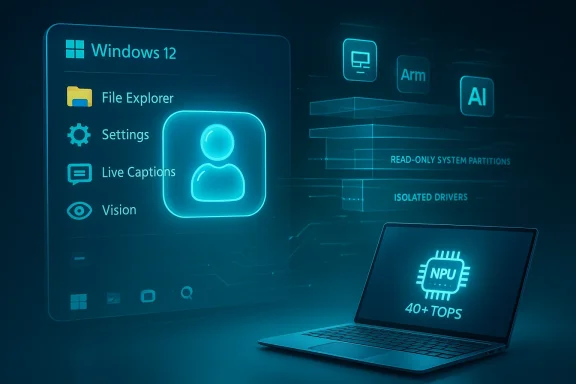
Expect Copilot to be a native experience, not an optional add‑on. That means Copilot capabilities will be woven into Search, File Explorer, Settings, and core shell surfaces; voice activation, on‑screen understanding (vision), and agent‑style automations will move from preview demos into shipped features for qualifying devices. The community write‑up you provided frames this as a core premise: “Copilot everywhere” and an OS that “feels AI‑native” rather than AI‑added.Microsoft’s own Copocumentation make the company’s intent explicit: Copilot+ PCs are positioned as the class of device delivering the richest on‑device Copilot experiences, with hardware requirements chosen to support low‑latency local inference for tasks such as live captions, image understanding, and real‑time assistance. That messaging is documented on Microsoft’s product pages and in OEM Copilot+ promotions.
Why this is credible
- Microsoft has publicly committed Windows innovation to generative AI in product blogs and marketing for Copilot+ devices.
- OEMs (HP, ASUS, Lenovo, etc.) are packaging Copilot+ devices and advertising the same class features (NPU, memory, and storage baselines).
- Independent tech press and analysis (Wired, The Verge) document that Microsoft and partners have shipped hardware and Insider builds that emphasize on‑device AI integration.
Practical implications for users
- On ordinary PCs (non‑Copilot+ machines) Copilot will remain available in cloud‑assisted form (via online services and browser integrations), but the most advanced features—low‑latency vision tools, agentic automations that act locally on behalf of the user—will be optimized for, and sometimes gated to, Copilot+ hardware.
- Privacy‑sensitive users can benefit: when models and inference run locally on an NPU, data stays on the device by default (subject to Microsoft’s settings and cloud integration choices), reducing the need for cloud round trips for many tasks. Microsoft documents this design goal and advertises on‑device reasoning as a privacy and latency advantage.
NPUs Become the New Baseline: Hardware Floors and Feature Gating
What “Copilot+” hardware means
Microsoft’s Copilot+ specification explicitly calls out an NPU capable of “40+ TOPS” (trillions of operations per second), plus a baseline of 16GB RAM and fast NVMe storage for many device SKUs. That 40+ TOPS figure appears on Microsoft product pages as the target performance metric for Copilot+ NPUs.Multiple OEM product pages and press coverage corroborate those minimums: many Copilot+ laptops ship with 16GB LPDDR5x and Qualcomm’s Snapdragon X family or Intel/AMD Ultra parts paired with NPU subsystems. Independent coverage in outlets such as Wired has summarized this hardware floor and the experiences it unlocks (real‑time translation, image editing, local models).
Why Microsoft is raising the floor
- Local LLMs and multimodal models require significant RAM and fast storage to cache model weights and support low latency; Microsoft’s Copilot+ baseline reflects the practical minimum for a smooth local‑first experience.
- NPUs allow offloading inference from CPU/GPU to specialized silicon, yielding better power efficiency for always‑available AI features—critical on thin-and-light laptops.
What will and won’t change
- Core OS functionality and the basic Windows desktop will continue to run on traditional x86 and Arm hardware; Microsoft is not abandoning legacy compatibility. But premium, AI‑accelerated experiences will be designed to assume an NPU—and experience parity will be gated accordingly.
- Expect capabilities like Copilot Vision, advanced real‑time transcription, and higher‑fidelity agent actions to be limited to devices meeting the Copilot+ criteria; software fallback paths will exist for non‑NPU machines but with lower fidelity or higher cloud reliance.
Impact on buyers and IT
- If you’re buying a new laptop and want the “full” Copilot experience, prioritize Copilot+ certification and verify the NPU and memory specs.
- Enterprises should plan for a mixed environment: a subset of “AI edge” endpoints that meet NPU requirements, plus broader fleets that still benefit from cloud Copilot services.
Windows on Arm: Prism Emulation and Real Momentum
The state of Arm on Windows
Windows on Arm has moved from a curiosity to a viable mainstream option—largely because of two technical shifts: stronger Arm silicon (Qualcomm Snapdragon X Elite / X Plus and competitive AMD/Intel offerings) and Microsoft’s improved x86/x64 emulation layer known as Prism.Prism, introduced and iterated through Insider builds, significantly narrows the compatibility gap by supporting many x64 instruction patterns and even some advanced extensions (AVX/AVX2) in newer updates, which directly benefits gaming and legacy applications that previously failed to run on Arm devices. Independent reporting documents these emulator improvements as a meaningful step toward parity.
Why this matters for Windows 12
- Better emulation reduces the friction for users and developers to adopt Arm hardware without sacrificing their existing apps.
- Arm laptops—especially fanless, long‑battery designs—are attractive in mobile markets. Microsoft treating Arm as a first‑class platform in the next OS iteration (better Store flags, optimized shells) would accelerate that adoption.
Caveats and real‑world friction
- Emulation is not identical to native execution. Some workloads (specialized drivers, kernel‑mode code, anti‑cheat systems) still behave poorly under emulation, and not all AVX‑heavy games run optimally. Microsoft documentation and community Q&A continue to caution about limitations and provide troubleshooting guidance.
Modular Core: CorePC and a State‑Separated Windows
What CorePC claims to be
Multiple outlets have reported that Microsoft is experimenting with a modular architecture—often referred to in coverage as CorePC or “Core PC”—which would partition the OS into separated state zones (read‑only system partitions, isolated driver areas, etc.) and allow for multiple, composable Windows editions (lightweight, education, full desktop) built from the same core. This is a direct evolution of ideas explored in Windows Core OS and Windows 10X. Coverage across varied outlets repeats the central claims: faster updates, safer partitioning, and smaller, targeted images for different device classes.Technical benefits
- Faster and safer updates: state separation enables updates to be applied to inactive partitions and atomically swapped, reducing reboot time and rollback complexity.
- Smaller trusted surfaces: read‑only partitions make it harder for malicious code to tamper with system binaries.
- Edition flexibility: OEMs could ship devices with only the subsystems they need, improving performance and security for constrained form factors.
What remains speculative
CorePC reporting is sourced mainly to unnamed insiders and Windows‑centric journalists; Microsoft has not released a canonical CorePC white paper or product roadmap that confirms timeline or feature set. The concept is plausible and aligns with industry trends, but the specific implementation details, migration path for legacy Win32 stacks, and release timing are not yet public. Treat CorePC as a credible architectural direction, not a guaranteed ship‑day feature.Licensing and Subscriptions: Evolution Without Forced Paywalls
The likely licensing path
Whispers of a “subscription Windows” periodically surface, but the most robust evidence points to an additive model: Microsoft will continue to sell Windows as a perpetual license for consumers while expanding cloud and subscription services (Windows 365 Cloud PC, Microsoft 365 bundles) as optional paid offerings for those who want management, backup, or cloud‑native experiences. Windows 365 and other Cloud PC initiatives already exist as subscription services, and Microsoft’s strategy increasingly emphasizes hybrid device+cloud scenarios rather than forcing up‑front subscription conversions for every consumer.Corporate vs. consumer differentiation
- Enterprise customers are already moving to subscription‑style device management and cloud PC provisioning; internal flags discovered in Insider branches often represent enterprise scenarios before consumer rollout.
- For consumers, expect optional tiers—cloud backup, enhanced security suites, and perhaps AI add‑ons—sold as subscriptions. There is no strong evidence that Microsoft will require a subscription to use the base OS at home.
Why vigilance is still warranted
Microsoft’s increasing integration of account sign‑ins, subscription nudges, and cloud services into the Settings UI has prompted debates about the direction of consumer licensing. Organizations and privacy‑conscious users should watch the licensing language in official Microsoft docs and the Services Agreement for signs of broader mandatory changes.Faster Feature Drops: Insider‑Led, Componentized Delivery
The new cadence
Microsoft has steadily decoupled surface features from major OS releases via the Microsoft Store, Windows Feature Experience Packs, and Online Service Experience Packs—mechanisms that let the company ship incremental changes to apps and UI areas without a full OS rollout. Microsoft documentation for Online Service Experience Packs describes how targeted areas (for example, the Microsoft Account page in Settings) can be provisioned and updated independently. Expect Windows 12 to double down on that approach: more continuous delivery for core shell features, Paint/Photos/Notepad, and Copilot integrations via the Store or online packs.Role of the Insider program
The Windows Insider Program will remain the R&D pipeline: Canary and Dev channels will preview shell‑level AI interactions, new Settings flows, arm performance sandboxes, and tightened security controls. That means enterprise admins and enthusiasts will see features earlier and have more time to plan rollouts, but it also raises the onus on IT teams to validate changes that begin as fast‑moving previews.Risks, Trade‑offs, and Open Questions
1. Fragmentation risk
Gating premium features to Copilot+ hardware risks a two‑tier Windows experience: the “full” AI desktop on NPU devices and a degraded or cloud‑dependent experience on legacy hardware. Microsoft must design graceful fallbacks to avoid alienating broad swaths of users.2. Compatibility complexity
Even with Prism improvements, emulation cannot p execution. Specialized drivers, anti‑cheat systems for games, and kernel‑mode components pose ongoing compatibility risks on Arm devices. Enterprises with legacy apps should plan for testing and modernization paths.3. Security vs. convenience trade‑offs
CorePC’s state separation buys security, but migration paths for installed Win32 applications, third‑party drivers, and bespoke enterprise software will be complex. Enterprises should expect a non‑trivial transition and demand clear Microsoft guidance and tooling for image migration.4. Economic and accessibility concerns
Raising the hardware baseline (16GB RAM, 40+ TOPS NPU) has implications for affordability. Microsoft and OEMs will have to balance innovation with accessible, lower‑cost variants or cloud‑assisted experiences to avoid locking advanced features behind premium pricing.5. Unverified timelines and codenames
Codenames like “Hudson Valley” and “Germanium” and version numbers circulating in community leaks are useful signals but remain unofficial. Treat such details as informative but tentative until Microsoft publishes definitive roadmaps.Practical Advice: What Consumers and IT Should Do Now
For consumers shopping for a new PC
- Decide how important local, low‑latency AI features are to you. If critical, target Copilot+ certified devices (16GB RAM, 40+ TOPS NPU, NVMe storage).
- If you prioritize gaming or legacy x86 software, review Arm compatibility notes and wait for emulator maturity or choose x86/Intel/AMD Copilot+ SKUs.
- For budget buyers, evaluate cloud‑assisted Copilot and browser‑based AI services rather than paying premium for local NPUs.
For enterprise IT and procurement
- Start building a small “AI edge” pilot group of Copilot+ devices to test on‑device models, privacy implications, and management controls. Use Windows Insider channels for early access and validation.
- Inventuse kernel‑level drivers or anti‑cheat components; test these early on Arm hardware to assess compatibility with Prism.
- Plan for image and patching changes: modular CorePC architectures (if adopted) will change update and recovery flows—demand migration documentation from vendors and create rollback plans.
For OEMs and ISVs
- Optimize for NPU architectures—moving critical inference paths to neural accelerators will yield better battery and latency characteristics.
- Provide Arm‑native builds where possible; emulation is improving, but native code reduces friction and improves performance.
Conclusion — The Most Likely Windows 12 Day‑One Experience
If Windows 12 (by whatever name Microsoft chooses) arrives in the coming release cycle, expect these anchor facts on day one: Copilot will be embedded across the desktop with meaningful on‑device smarts on qualified hardware; NPUs and a higher hardware floor will unlock the premium experiences; Windows on Arm will be treated as first‑class with improved emulation; and a modular CorePC foundation will underpin faster, safer updates. Feature delivery will increasingly come through decoupled experience packs and the Store rather than monolithic OS upgrades, and licensing will evolve to offer cloud and AI subscriptions as options rather than forcing subscription‑only access to the base OS. The community briefing you supplied captures these six predictions succinctly—and they align with Microsoft’s public Copilot+ messaging, emulation work, and modular‑update mechanisms.These changes are consequential: they promise a smarter, faster, and more secure Windows—but they also raise questions about fragmentation, accessibility, and migration complexity. Plan accordingly: test early, prioritize modernization for mission‑critical apps, and remember that many AI experiences will remain available in cloud form for users who don’t (or can’t) upgrade to the newest certified hardware.
Source: findarticles.com Windows 12 Forecast Six Expert Predictions
