

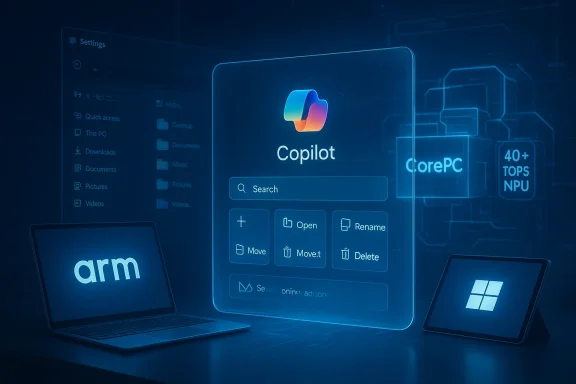
Microsoft hasn’t said “Windows 12” on stage, but the evidence — from Microsoft’s Copilot messaging and Copilot+ PC specs to emulator improvements, analyst market forecasts, and leaked Windows build strings — converges on a clear picture: the next major Windows milestone will be an AI-first, hardware-accelerated, and more modular OS that ships features continuously rather than in one monolithic jump. erview
The conversation about a successor to Windows 11 stopped being pure rumor some time ago and became a series of defensible forecasts. Microsoft’s public Copilot+ branding and device requirements explicitly establish a new hardware baseline for AI features, while independent market research firms and OEM roadmaps are already aligning to support on-device neural processing. At the same time, Microsoft’s engineering work in the Insider channels and multiple reporting threads inside Windows-focused communities show a push toward a componentized OS core (often referred to internally as CorePC or Core PC), improved Windows on Arm parity, and a delivery model that decouples many features from major version upgrades.
This feature article unpacks six spdustry watchers are making about “Windows 12” — what they mean for users and IT, what evidence supports them today, and where the risks and trade-offs lie. Throughout, I cross-reference Microsoft’s own product pages, independent reporting, and analyst forecasts to verify technical claims and market direction.
1) AI‑First Windows: Copilot Everywhere
What to expect
Windows’ next chapter will likely be defined by Copilot as operating-system fabric rather than as an optional add-on. Expect Copilot-style, context-aware assistance to surface across system surfaces: Search, File Explorer, Settings, active windows, and the shell itself. These aren’t mere chat widgets; the vision is on-screen understanding and agentic automations that can propose and, with permission, execute multi-step tasks across apps.Why this is credible
Microsoft’s Copilot+ marketing and feature copy explicitly describes a class of experiences uniquely enabled by on-device neural silicon, and Microsoft positions Copilot not as a single app but as a platform woven through system UX. The Copilot+ PC pages talk about “Copilot experiences” baked into search, live captions, and other areas — signaling integration deeper than a sidebar.Insider builds and Canary/Dev channel notes have repeatedly shown Copilot experiments appearing in File Explorer, context menus, and system search — the exact spots where Microsoft would embed contextual helpers. Forum and community threads mirror these signals, compiling preview behavior and Microsoft statements into a consistent narrative.
Strengthsns:** Context-aware helpers that can find documents, summarize timelines, draft messages, or automate repetitive workflows have clear productivity upside.
- Local-first privacy options: On-device reasoning (when paired with an NPU) can reduce reliance on cloud inference for many tasks, limiting potential data exposure.
- Differentiation: A truly integrated Copilot helps Microsoft distinguish Windows from other desktops and makes the OS sticky for users invested in Microsoft 365.
Risks and caveats
- Agency vs. control: Users and administrators will demand precise controls around what an agent can do automatically. Missteps here invite both security risks and user distrust.
- Privacy and telemetry: Deep context awareness naturally involves surface-level access to user files and screens. Microsoft will need to be transparent and granular in consent, which remains a trust challenge.
- Fragmentation: If advanced Copilot features require NPUs (see next section), the user experience will differ across devices — some users may feel downgraded.
2) NPUs Become the New Baseline for Premium Windows Features
The claim
Expect Microsoft to push a higher hardware floor for headline AI experiences: Copilot+ PCs will require NPUs delivering ~40+ TOPS, alongside ample RAM and fast NVMe storage. Systems without dedicated neural silicon will still run the base OS, but premium AI experiences will be gated.Evidence and verification
Microsoft’s Copilot+ product pages explicitly advertise NPUs capable of “40+ TOPS” as a defining element of Copilot+ devices, and the business device guidance reiterates the 40+ TOPS figure while listing 16 GB RAM and fast NVMe storage as common expectations for Copilot+ hardware.On the market side, Canalys and other analyst houses project a rapid ramp of AI‑capable PCs (devices with dedicated AI blocks) to a major share of shipments within a few refresh cycles, making it commercially feasible for Microsoft to design premium features that rely on NPU acceleration. Canalys’ reporting and extended forecasts show an aggressively rising share of AI-capable PCs through 2027.
What this means for users and IT
- Gated features: Vision features (scene understanding, on-device image generation), real-time language translation, and low-latency agentic workflows will work best — or only — on NPU-equipped Copilot+ hardware.
- Two-tier experience: The core OS should remain functionally complete on CPU/GPU-only machines, but the “wow” features will form a premium tier.
- Procurement implications: Enterprises re-evaluating refresh cycles will need to decide whether to standardize on Copilot+ hardware for knowledge workers and frontline staff.
Analysis: Benefits vs. fragmentation
Raising the premium hardware floor creates better user experiences where NPUs exist, and it helps Microsoft offload latency and privacy-sensitive inference to the device. But it also raises legitimate concerns about segmentation: users on older or budget devices will see fewer capabilities, potentially creating perception problems unless Microsoft designs graceful feature fallbacks.3) Windows on Arm Gains Real Momentum — Emulation and Native Parity
The claim
Windows on Arm is no longer an experiment: improvements in Microsoft’s Prism emulation and Qualcomm’s Snapdragon X family are narrowing the gap with x86, making Arm a first‑class option for many users and workflows.Evidence
Microsoft’s Prism emulator updates (rolled into retail and Insider builds) now support more x86 instruction extensions (AVX/AVX2, BMI, FMA, F16C), which directly expands compatibility for creative apps and games previously blocked on Arm. Microsoft documentation and community posts confirm Prism’s role and ongoing updates. Independent reporting (The Verge, Windows Central, WindowsLatest) has highlighted Prism improvements and examples such as Premiere Pro, Ableton Live, and other demanding apps becoming usable under emulation.Developers like Discord and others are also shipping native Arm64 builds — a sign of ecosystem momentum. The combination of improved emulation and rising native support means Arm devices (especially fanless, low-power models) can now be realistic choices for many Windows users.
Why this matters
- Battery and thermals: Arm devices can offer all-day battery life in thin-and-light, fanless designs — attractive for mobile workers and education.
- Ecosystem growth: Better emulation plus native ports reduce the friction that kept many apps off Arm devices four years ago.
- Competitive pressure: Intel and AMD are responding with hybrid-core and NPU-forward roadmaps; a robust Arm lineup keeps competition healthy.
Risks and caveats
- Performance variability: Emulation can cover many cases but performance and driver-level compatibility remain variable. Vendor QA is still required for enterprise adoption.
- Driver ecosystem: Hardware that relies on kernel-mode drivers may still need native Arm64 drivers; not every vendor will prioritize that port.
- Management complexity: IT will have to manage mixed-architecture fleets and test for subtle compatibility issues.
4) Modular CorePC Architecture Reshapes the Windows OS Model
The claim
Microsoft is moving to a more componentized OS architecture (commonly called CorePC in reporting), splitting system concerns, locking critical partitions, and enabling smaller, faster, and safer updates.Supporting signals
Multiple Windows-focused reporting channels and Insider signals point to architecture work that separates the OS into more isolated modules, with read-only critical partitions and smale practical aim is faster updates, simpler rollback and recovery, improved manageability for enterprises, and targeted delivery of features to specific device classes (education vs. high-end). Community threads and leak analysis have repeatedly surfaced the CorePC term and described the intended benefits.Microsoft’s own trend over the last few years — shipping features via Store-updatable packages and Feature Experience Packs rather than tying everything to full OS upgrades — matches the technical direction implied by a modular core. This makes the move plausible and consistent with their engineering priorities.
Benefits
- Smaller updates: Reduced downtime for users and faster security patching cycles.
- Improved security posture: Read-only critical partitions and better state separation reduce attack surfaces.
- Flexible SKUs: Easier composition of editions tailored to schools, kiosks, or fully featured desktops.
Enterprise considerations
IT admins stand to gain from more predictable recovery and image management, but they’ll also face a transition: new deployment tooling and updated imaging/MDM practices will be needed. Organizations should plan lab pilots and update baselines rather than attempting a mass migratCautionary notePublic documentation on the internal name and implementation details remains limited; some specifics are inferred from Insider activity and reporting. Treat the CorePC label as an accurate indicator of direction, but expect implementation details and timelines to evolve.
5) Licensing Will Evolve — But Don’t Expect a Mandatory Consumer Subscription
The claim
Talk of a “subscription Windows” frequently surfaces when internal flags or add-on services are spotted in builds. The most credible outcome: Microsoft will expand cloud-enhanced paid tiers and services, not force a mandatory subscription for the base consumer OS.Why that’s likely
Microsoft already sells Windows 365 and bundles advanced management/security capabilities into Microsoft 365 for business. Historically, subscription markers in Insider builds have targeted enterprise scenarios or optional add-ons rather than forcing consumers into monthly payments. Most credible analysts efer optional cloud-enhanced tiers — device backup, advanced security, AI assistant features — while keeping the base OS upgrade path familiar for home users. Community reporting mirrors that interpretation and cautions against reading too much into internal flags.What to watch
- Optional tiers: Expect Microsoft to push add-on subscriptions that tightly integrate with Copilot and cloud sync.
- Bundled value: For businesses, subscription bundles that include endpoint security, device management, and Copilot for enterprise could become attractive.
- Consumer reaction: If Microsoft overplays monetization on obvious OS experiences, it risks consumer backlash.
Enterprise impact
Organizations should evaluate the total cost of ownership across potential subscription bundles (security, backup, endpoint analytics) and map out when it makes sense to adopt Microsoft’s subscriptions versus third-party tooling.6) Faster Feature Drops, Insider‑Led Development, and a Continuous‑Delivery Rhythm
The claim
Windows will continue the post‑Windows‑10 trend of moving away from monolithic yearly upgrades toward a continuous delivery model where many UX and shell changes arrive in smaller, faster drops — tested first in Canary/Dev Insider channels.Evidence
Microsoft has already decoupled many experiences from major builds via the Microsoft Store, Feature Experience Packs, and online service packs. Insider channels serve as the proving ground for shell-level AI interactions, Settings reworks, and security defaults like driver isolation and Smart App Control improvements. Community reporting and Microsoft’s release notes confirm this cadence.What this means for users and IT
- Quicker access to features: Users could see iterative improvements to Paint, Photos, Notepad, File Explorer, and small shell behaviors without waiting for a version jump.
- Ongoing validation: Admins should treat Canary/Dev features as preview-only and rely on Beta/Release Preview before tenant-wide deployment.
- Policy and change management: IT must build processes for continuous validation and pilot rings in a world where changes arrive incrementally.
Practical Guidance: Preparing for the Transition
- Hardware audit and procurement planning
- Inventory existing fleet and identify roles that will benefit from Copilot+ hardware (knowledge workers, creative pros).
- Consider pilot devices with 40+ TOPS NPUs for a representative subset of users; this avoids a rushed enterprise-wide refresh.
- Test mixed-architecture compatibility
- Build test plans for Arm devices, verifying Prism-emulated workflows and native Arm64 builds for critical apps. Microsoft’s emulation settings and App Assure resources are important tools here.
- Update security and consent policies
- Define clear policies for agent automation. Who can approve actions? What telemetry is allowed? How will data be logged?
- Audit how on-device models and cloud-assisted Copilot instances handle sensitive data.
- Prepare change management for continuous delivery
- Move from one-time upgrade campaigns to a staged, ring-based approach that can absorb more frequent but smaller UX changes.
- Licensing and budgeting
- Model scenarios for optional Microsoft subscription bundles (security/backup/Copilot for business) versus third-party alternatives.
Critical Analysis: The Promise and the Pitfalls
Notable strengths
- User productivity: The promise of an assistant that understands context across the desktop could materially change workflows and reduce friction for knowledge work.
- Privacy-forward patterns: On-device NPUs allow a legitimate privacy argument for reducing cloud roundtrips on sensitive tasks.
- Security improvements: Componentized OS design and read-only critical partitions can materially shrink exploit surfaces and simplify recovery.
Potential risks and blind spots
- Feature fragmentation: Two-tier experiences tied to NPU availability can fracture the Windows user base unless Microsoft designs graceful and honest fallbacks.
- Vendor lock-in and monetization pressure: Heavy coupling of Copilot experiences with Microsoft services/subscriptions could raise antitrust and customer-sentiment questions if not presented transparently and fairly.
- E-waste and upgrade cost: A hardware-driven AI roadmap risks accelerating device churn. Enterprises and consumers with older but otherwise usable PCs may balk at forced refreshes.
- Governance of agentic actions: Agents that act across apps introduce new security models. Fine-grained admin controls and audit trails will be non‑negotiable in regulated environments.
- Reliance on emulation: While Prism’s improvements are meaningful, emulation is still a compromise; driver-level and specialized workloads may remain problematic on Arm.
What to Watch (Signals and Timelines)
- Microsoft product pages and official Copilot documentation for changes in Copilot+ hardware guidance and eligibility.
- Canalys, Gartner, and IDC quarterly shipments and AI‑PC forecasts for the pace at which NPU‑equipped devices hit the market — these figures will determine Microsoft’s comfort in gating features to NPUs. ([canalys.com/newsroom/ai-capable-pc-shipment-q4-2024)
- Prism emulation updates in Insider release notes and Microsoft’s Windows OS Platform blog; these are the clearest signals of Arm parity progress.
- Insider channel experimentation: Canary/Dev previews of shell-level Copilot interactions and CorePC architecture signs — the Windows Insider Program remains the primary testing ground.
- Licensing and SKU announcements from Microsoft: watch for new entitlements tied to Copilot features versus explicit subscriptions that control base OS access.
Bottom Line: Windows 12 Day One ee)
When Microsoft ships the next major Windows milestone — whether it’s called Windows 12 or delivered as a branded AI-forward release — expect three things to be immediately visible:- Copilot embedded across the desktop with a blend of cloud and on-device smarts; many of the show‑case experiences will run best on Copilot+ hardware with 40+ TOPS NPUs.
- A tighter, more modular core OS that allows Microsoft to push smaller updates and reduce installation time, while improving recovery and management for enterprises.
- Rearity thanks to Prism improvements and rising Arm-native apps; expect more fanless, long‑battery devices to appear on OEM roadmaps.
Final recommendations for readers
- If you manage IT: pilot Copilot+ hardware for roles that will benefit most, validate critical apps on Arm where relevant, and refresh deployment and governance playbooks for frequent feature updates.
- If you’re a consumer: don’t panic about immediate obsolescence — base Windows functionality will remain supported on If you want the latest AI features, consider evaluating Copilot+ laptops when replacing an older device.
- For developers: prioritize Arm64 builds for core workloads, test Prism emulation cases, and design apps to gracefully degrade when NPU acceleration is unavailable.
Conclusion: watch Copilot, NPUs, Prism, and CorePC signals closely. Those four pillars will tell you whether the next Windows release is an elegant evolution or a clumsy leap — and they’ll determine whether the new Windows delivers on productivity, privacy, and manageability the way users and IT need it to.
Source: findarticles.com Windows 12 Forecast Six Expert Predictions
