

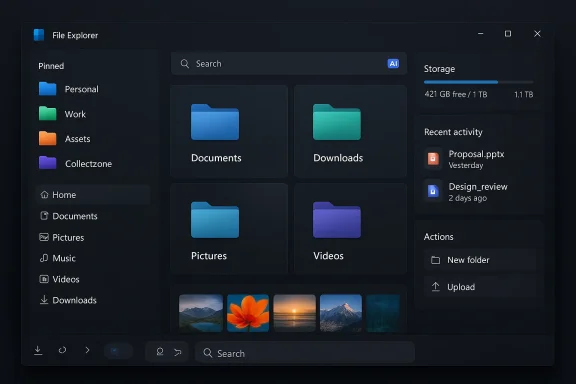
Microsoft’s File Explorer — an app that has quietly carried the weight of Windows file management for decades — is the subject of a striking fan-made redesign that imagines how a future “Windows 12” could finally give Explorer the visual polish, discoverability, and intelligence many users have long wanted.
File Explorer sits at the intersection of everyday productivity and platform identity. It is where users organize documents, manage photos, and perform quick edits — yet its interface has long been criticized for being inconsistent, slow to start, and woefully uneven when it comes to theme and modern features. Microsoft has been iterating carefully: Insider experimentation has already introduced small but practical changes like background preloading to reduce cold starts and a reorganized context menu to declutter right-click actions. These experiments appear in recent Insider builds and reveal Microsoft’s pragmatic approach to improving Explorer without radical redesigns.
At the same time, the Windows design community — led by high-profile concept creators such as Abdi (AR 4789) — has been producing cinematic concepts that show what a full reimagining might look like: a consistent dark theme, AI-assisted search, an Explorer sidebar rich with pinned “collections,” visual widgets, carousel-style photo browsing, and more flexible visual organization for folders and icons. Those ideas are aspirational, but they are also useful thought experiments for product teams and users alike.
Notably, speculative reporting that Microsoft would ship a new OS named “Windows 12” imminently has been debunked in some channels; Microsoft’s roadmap appears focused on fixing Windows 11 pain points and integrating AI thoughtfully rather than rushing a new major release. In short: concept videos shape appetite, but they are not evidence of imminent product plans. Readers should treat them as inspiration, not a roadmap.
Yet shipping such a vision demands hard engineering trade-offs around performance, privacy, enterprise manageability, and backward compatibility. Microsoft’s playbook — incremental experiments in Insider builds, local-first AI strategies, and careful enterprise policy support — is the right one for navigating those trade-offs. Evidence of this approach can already be seen in background preload experiments and early AI Actions tests.
The best outcome would be a Windows Explorer that borrows the concept’s best ideas without inheriting its risks: a polished dark theme, a lightweight collection workflow, a fast and accessible Filmstrip view, and local-first AI search that enhances rather than replaces user control. Delivered thoughtfully, that would be the glow-up the platform has deserved for years.
Microsoft’s design teams and the enthusiast community share a common incentive: make the file surface more delightful, efficient, and trustworthy. If the company can combine the community’s imagination with measured, privacy‑aware engineering, the next generation of Explorer could genuinely reshape daily productivity — not because it looks pretty in a video, but because it makes everyday tasks measurably better for millions of users.
Source: Windows Central I love this modern "Windows 12" take on Microsoft's File Explorer
 Background / Overview
File Explorer sits at the intersection of everyday productivity and platform identity. It is where users organize documents, manage photos, and perform quick edits — yet its interface has long been criticized for being inconsistent, slow to start, and woefully uneven when it comes to theme and modern features. Microsoft has been iterating carefully: Insider experimentation has already introduced small but practical changes like background preloading to reduce cold starts and a reorganized context menu to declutter right-click actions. These experiments appear in recent Insider builds and reveal Microsoft’s pragmatic approach to improving Explorer without radical redesigns.At the same time, the Windows design community — led by high-profile concept creators such as Abdi (AR 4789) — has been producing cinematic concepts that show what a full reimagining might look like: a consistent dark theme, AI-assisted search, an Explorer sidebar rich with pinned “collections,” visual widgets, carousel-style photo browsing, and more flexible visual organization for folders and icons. Those ideas are aspirational, but they are also useful thought experiments for product teams and users alike.
What the concept actually proposes
The Abdi concept places File Explorer at the center of a modern, Fluent-aligned OS experience. Key proposed features include:- Collectzone — A drag-and-drop collection system that lets users gather files of a similar type or theme into a pinned collection in the navigation pane for quick access and workflows. Think of it as a lightweight, local tagging and temporary staging area for files.
- Widgets inside Explorer — Small, contextual widgets that surface content, collections, and drive usage statistics directly within Explorer, turning the app into a more informative hub.
- Filmstrip (carousel) view for photos — A horizontally scrollable filmstrip that makes image browsing faster and visually richer than the current details or thumbnails views.
- Consistent dark theme — A complete, polished dark-mode overhaul to remove the jarring bright elements that still appear in some core UIs when dark mode is enabled. Critics have described Windows 11’s dark-mode inconsistencies as noticeable and unfinished, which the concept directly addresses with a unified visual language.
- AI-powered search and intent detection — A natural-language-aware search that understands intent and context, rather than relying solely on filename and metadata matches. This is paired with generative features and “AI Actions” that are already appearing experimentally in File Explorer for specific tasks (image edits, visual lookup, summarization).
- Visual customization — Folder and icon colorization and pinning for quicker identification and a more personal workspace.
- Redesigned Properties and File Restoration UIs — Cleaner, more contextual property panes and an improved restore experience for files.
Why Microsoft is already moving parts of Explorer forward
Microsoft has not been idle. Recent Insider builds show the company prefers incremental, telemetry-driven improvements rather than sweeping UI overhauls. Two illustrative moves:- Background preloading — An experimental feature in Windows 11 Insider Preview Build 26220.7271 (KB5070307) attempts to reduce the familiar “cold start” delay by partially preloading Explorer components at boot. The trade-off is a small memory footprint increase in exchange for snappier first launches. Community testing shows modest gains but highlights the trade-off between RAM usage and perceived speed.
- AI Actions and context-aware editing — Canary/Beta channel experiments have surfaced right‑click “AI Actions” that let users perform quick image edits (background blur/remove, object erases), visual search, and micro-tasks directly from Explorer. This points toward Microsoft’s strategy of integrating intelligence into high-frequency surfaces.
Strengths of the concept — what it gets right
The concept nails several user experience principles that have been under-addressed in Explorer for years:- Context-first design: Embedding widgets and collections into Explorer acknowledges that file management is often the hub for productivity, not an isolated utility. Presenting storage usage, collections, and content previews reduces friction and the cognitive cost of switching apps.
- Modern visual consistency: A unified dark theme and Fluent-aligned visual treatment would reduce the cognitive jolt users experience when some panes are dark and others are bright. This is a practical accessibility and aesthetic win.
- AI that complements, not replaces, workflows: The combination of AI-assisted search and inline AI Actions — demonstrated experimentally by Microsoft — points to a pragmatic model: keep core control in user hands while offering faster shortcuts for repetitive tasks. This reduces context-switching without introducing heavy new application dependencies.
- Improved media handling: A Filmstrip or carousel view for images is a high-ROI improvement for users who frequently browse photos and screenshots; it reduces clicks and puts the visual timeline of images front-and-center.
- Lightweight collection workflows: Collectzone is an elegant compromise between full tagging systems and rigid folder hierarchies. It acknowledges that temporary or project-based groupings are common and should be easy to create and pin.
Risks and trade-offs — what could go wrong
No redesign is purely positive; the concept — and any Microsoft implementation inspired by it — would need to navigate multiple practical risks.Performance and resource trade-offs
The background preloading experiments indicate a fundamental trade: reducing cold starts often means maintaining more resident state in memory. For users on low‑RAM systems, this can be a net negative. Microsoft’s controlled experiments show only modest launch-time gains while increasing memory usage, and those trade-offs risk alienating users on older hardware. Any Explorer redesign that adds live widgets, AI indexing, or background sync needs rigorous profiling to avoid regressions.Privacy and AI inference
Embedding intent-aware search and AI Actions directly into Explorer raises questions about telemetry, local vs. cloud inference, and data residency. Enterprises and privacy-conscious users will demand transparency: where are files analyzed, are thumbnails or text index contents uploaded, and what controls exist? Microsoft’s existing AI-integrated features already prompt such concerns in enterprise conversations about Copilot and related services; any extension into the personal file surface will require clear opt-in, local-only options, and robust governance.Feature bloat and cognitive overhead
Adding widgets, Filmstrip, Collectzone, and color tagging to a single app risks turning Explorer into a toolkit that overwhelms casual users. The design challenge is to expose advanced features with progressive disclosure so everyday users continue to find Explorer simple while power users can enable deeper capabilities.Compatibility and enterprise manageability
Business customers value predictability. Large-scale UI changes often trigger retraining costs and compatibility issues with scripts, third-party shell extensions, and enterprise tooling. Microsoft’s pace of iterative change — delivering smaller, sandboxed UI experiments via Insider channels — partly reflects this sensitivity. Any major Explorer redesign must be optional or phased for enterprise deployments.Security, data governance, and enterprise implications
Enterprises will scrutinize any feature that touches user files or indexes content. The concept’s AI search and collection features intersect with three important enterprise concerns:- Data exfiltration risk: AI features that rely on cloud inference are attractive but increase attack surface and compliance complexity. Enterprises will insist on clear controls to keep corporate data within approved boundaries.
- Policy-driven feature gating: IT administrators will require policy options to disable or limit AI Actions, Collectzone sharing, and telemetry. Group Policy and Intune controls must be available from day one for enterprise adoption.
- Compatibility with existing storage ecosystems: Many organizations leverage network shares, SharePoint, Teams, and OneDrive. Any new Explorer features must preserve and surface sync status, permissions metadata, and audit trails to be useful in managed environments. Microsoft’s prior OneDrive integration work shows the company understands this expectation and has taken steps to show quota and sync status inside Explorer.
How Microsoft could realistically deliver components of this vision
Microsoft is already shipping pieces of the imagined future, which suggests a pragmatic path to delivery:- Incremental UI polish: Continue tightening theme consistency and Fluent updates across panes. This low-risk approach improves perception without breaking workflows.
- Modular feature rollout via Insider channels: Test Collectzone-style collections as an optional feature toggle in the Dev/Canary channels. Telemetry during this phase can guide whether the idea should graduate to broader availability. Microsoft’s background preload experiment is an exemplar of this model.
- Local-first AI with opt-in cloud augmentation: Provide on-device intent parsing for search (local index + embeddings), with a clearly labeled opt-in for cloud-enhanced generative actions. This dual model reduces privacy concerns while enabling richer capabilities for users who want them. Microsoft’s current strategy with Copilot-like features suggests this hybrid model is already on the roadmap.
- Developer APIs and extension model: Publish official, well-documented extension points for third-party apps to integrate with Collectzone, Filmstrip, or AI Actions. This preserves ecosystem value and prevents breakage of existing shell extensions. Historical precedent shows Microsoft iterating on iconography and extension docs in response to developer feedback.
- Enterprise policy surface and telemetry transparency: From the outset, ship Group Policy/Intune settings to govern indexing, telemetry, and cloud inference. Microsoft’s enterprise-first posture for major features has become standard practice and would be expected here.
User experience: a closer look at specific features
Collectzone: the promise and the pitfalls
Collectzone is attractive because it lets users assemble related files without moving them physically from their folders. This solves a common problem: temporary, cross-folder groupings for projects or presentations. To be successful, Collectzone should:- Support pinned views persisted across sessions.
- Be non-destructive (collections reference files rather than copying them).
- Respect file permissions and storage locations (network, OneDrive, SharePoint).
- Offer an export/clear workflow so collections do not become permanent clutter.
Filmstrip and media UX
A horizontally scrolling filmstrip reduces friction for sequence-based browsing (screenshots, camera-roll photos). To maximize usefulness:- Implement fast, GPU-accelerated rendering for large photo folders.
- Support keyboard navigation and accessibility (screen-reader announcements, high-contrast cues).
- Respect RAW and multi-frame formats commonly used by photographers.
AI-powered search: practical scenarios
An intent-aware search could transform mundane tasks:- Find “slides with green background” or “photos from last beach trip” using natural language.
- Surface recently edited documents across local and cloud locations.
- Suggest quick actions like compressing large photos or extracting text from screenshots.
Accessibility and inclusivity
Reworking Explorer represents an opportunity to improve accessibility across many dimensions:- Consistent theming reduces visual confusion for low-vision users.
- Structured, semantic markup (for screen readers) in new panes and widgets avoids regression.
- Keyboard-first workflows must be preserved and enhanced — Filmstrip and Collectzone need first-class keyboard access.
- Contrast and motion controls must be respected by new animations and carousel behaviors.
Community reaction, expectations, and the reality gap
The Windows enthusiast community — which often produces polished concepts — plays a dual role: it drives expectations and surfaces user desires that product teams can learn from. Abdi’s concept video and similar renderings create momentum and a clear wishlist, but they can also inflate expectations about release timelines and feasibility.Notably, speculative reporting that Microsoft would ship a new OS named “Windows 12” imminently has been debunked in some channels; Microsoft’s roadmap appears focused on fixing Windows 11 pain points and integrating AI thoughtfully rather than rushing a new major release. In short: concept videos shape appetite, but they are not evidence of imminent product plans. Readers should treat them as inspiration, not a roadmap.
Practical recommendations for Microsoft (and users)
If Microsoft were listening — and in many respects it is already — here are pragmatic next steps that balance ambition and risk:- Ship theme consistency fixes and a unified dark mode across Explorer panes as a near-term improvement. This is a visible win with low risk.
- Pilot Collectzone-like collections behind a feature flag, instrumented with telemetry to study adoption and performance effects.
- Make AI Actions opt-in, with strong local-first defaults and enterprise controls to prevent accidental data leaks.
- Prioritize accessibility and keyboard-first navigation in any new view (Filmstrip, widgets).
- Provide extension APIs and enterprise policy gates from day one to avoid fragmentation and ensure manageability.
Final appraisal: aspirational design, realistic delivery
Abdi’s Windows 12 File Explorer concept does what strong design thinking should do: it asks bold questions about how a decades-old surface can evolve for modern needs. It points toward a File Explorer that is contextual, visually consistent, and smarter — qualities Windows users have wanted for years.Yet shipping such a vision demands hard engineering trade-offs around performance, privacy, enterprise manageability, and backward compatibility. Microsoft’s playbook — incremental experiments in Insider builds, local-first AI strategies, and careful enterprise policy support — is the right one for navigating those trade-offs. Evidence of this approach can already be seen in background preload experiments and early AI Actions tests.
The best outcome would be a Windows Explorer that borrows the concept’s best ideas without inheriting its risks: a polished dark theme, a lightweight collection workflow, a fast and accessible Filmstrip view, and local-first AI search that enhances rather than replaces user control. Delivered thoughtfully, that would be the glow-up the platform has deserved for years.
Microsoft’s design teams and the enthusiast community share a common incentive: make the file surface more delightful, efficient, and trustworthy. If the company can combine the community’s imagination with measured, privacy‑aware engineering, the next generation of Explorer could genuinely reshape daily productivity — not because it looks pretty in a video, but because it makes everyday tasks measurably better for millions of users.
Source: Windows Central I love this modern "Windows 12" take on Microsoft's File Explorer