

Windows 13 is still not a real Microsoft product, but the idea has become a useful mirror for what Windows users expect from the next era of the desktop. Fan-made mockups and concept videos are leaning hard into AI-first workflows, adaptive interfaces, and a more fluid blend of local and cloud services, while Microsoft’s actual Windows roadmap continues to evolve inside Windows 11 rather than through any announced “Windows 13” release. That tension is why the concept matters: it captures demand that Microsoft has not formally committed to, yet is already addressing in pieces through Windows 11 servicing and Insider builds. m]
The appeal of a “Windows 13 concept” is not the number itself. It is the promise of a cleaner, smarter, more personalized PC experience that feels less rigid than Windows 11 has at times appeared to power users. Microsoft’s public direction in 2025 and 2026 has emphasized continuous innovation, performance, AI experiences, and service-style delivery, which makes fan speculation feel less fantastical than it did a few years ago. In practice, though, those improvements are landing as feature waves within Windows 11, not as evidence of a next-generation named release.
That distinction matters because Windows has historically shifted through a mix of visual refreshes and behavioral changes. Windows 11 introduced a more modern design language, but also triggered backlash over reduced customization and a more opinionated interface. Recent Microsoft updates suggest the company is listening: taskbar flexibility is returning in some form, Copilot placements are being tonh es do not prove a Windows 13 timeline, but they do show the pressure points that fan concepts are trying to solve.
The result is a strange but revealing moment. On one side, the community is designing futuristic shells, translucent UI layers, and adaptive Start menus. On the other, Microsoft is quietly iterating on the exact same themes through practical updates: better AI integration, more flexible servicing, and less friction in the desktop shell. The gap between fantasy and product is smaller than it used to be, but it is still very real. That gap is where the most interesting analysis lives.
The timing also reflects the broader PC market. AI-capable hardware is becoming more common, but support and servicing remain top-of-mind after Windows 10’s end of support in October 2025 and the ongoing emphasis on staying current with Windows 11 updates. That means users are thinking about the future of Windows not just as a visual redesign, but as a platform decision tied to hardware lifecycles, security, and workflow continuity.
Historically, Windows version changuted a shift in philosophy. Windows 7 was about refinement, Windows 10 was about unification, and Windows 11 was about visual modernization plus a stronger push toward curated experiences. But the desktop audience has always been split between casual users who want simplicity and power users who want control. That split is exactly what fan-made Windows 13 ideas are trying to resolve, usually by combining sleek aesthetics with deeper configurability.
Microsoft’s recent servicing model also blurs the line between “new version” and “continuous change.” The company now frames Windows 11 as a continuously evolving platform, with features arriving through monthly update channels and Windows Store updates as much as through annual releases. That makes the idea of a single big “Windows 13” launch less certain, but it also makes it easier for Microsoft to absorb fan-requested ideas without ever using that branding.
The company’s actual Windows direction in 2025 and 2026 shows this in practice. Microsoft has emphasized Windows 11 as the home for AI on the PC, with features like improved Windows Search, Recall, Click to Do, Copilot Vision, and other AI-enhanced workflows. It has also been reducing friction in maintenance, even while keeping the security model strict. The modern Windows story is no longer “wait for“watch the current OS keep mutating.”
For consumers, that shift creates confusion and opportunity at the same time. Confusion, because rumors about Windows 12 or Windows 13 can overpromise a dramatic reset that is not confirmed. Opportunity, because many of the qualities people associate with a hypothetical next Windows are already being tested in public. If the future of Windows is modular, AI-assisted, and cloud-connected, then the fan concepts are less like science fiction and more like speculative product research.
A lot of these mockups borrow from mobile design principles without fully becoming mobile interfaces. You see widgets, live tiles reborn in subtler form, and homescreen layouts that feel more personal than traditional Windows desktops. That is a direct response to how people now use multiple devices across work and home, and it suggests that fans want the desktop to behave like a smart hub rather than a fixed work surface.
Microsoft’s own updates point in a similar direction, though with more restraint. The company has already been experimenting with more intelligent search, tighter Copilot integration, and UI adjustments that feel less disruptive. Fan concepts may exaggerate the aesthetic, but the underlying impulse is aligned with the real roadmap.
Transparency works the same way. It can make a system feel elegant and modern, but it can also reduce readability if overused. The strongest concepts use transparency to imply layers of information, not to blur the whole desktop into an artistic effect. That restraint would be essential in a real Microsoft product.
Microsoft has already established the basic logic for this approach. Windows 11 now sits at the center of the company’s AI story, especially on Copilot+ PCs where on-device acceleration powers features like Recall, Click to Do, and enhanced search. The company’s messaging is clear: AI should reduce friction, not just add novelty. Fan-made Windows 13 mockups simply push that idea further and imagine a full operating system organized around prediction and assistance. ([blogs.windows.dnce/2025/05/06/introducing-a-new-generation-of-windows-experiences/)
Enterprises will want controls around content safety, auditability, and device policy. Consumers will want the system to “just know” what they need. That is why any real next-generation Windows has to balance personality with predictability.
This is also where concepts become more than decoration. Better multitasking support has direct productivity value. If the operating system can remember a layout for editing, a layout for meetings, and a layout for research, then switching contexts becomes less painful. That idea builds on Windows Snap features, but takes them in a much more ambitious direction.
That would be especially useful for hybrid workers who move between a desktop at home, a laptop in transit, and a larger setup in the office. Fan concepts often imagine settings and layouts following the user across devices, which is one reason they feel so resonant. The operating system becomes a continuity layer rather than a single machine’s interface.
That is why Microsoft’s real-world approach is likely to stay incremental. The company can add smarter workspace tools through Windows 11 updates, then expose them to managed environments once stability is proven. In other words, the concept is sound, but the deployment path has to be disciplined. That is classic Microsoft pragmatism.
This matches the direction of modern computing more broadly. Users increasingly expect continuity, not repetition. They want the same settings, files, and preferences whether they are on a tower PC, a laptop, or a tablet-style device. The best concepts reflect that reality by making the interface feel portable.
This is where fan-made mockups can be surprisingly insightful. They often place the user’s priorities first: fewer repetitive clicks, easier file access, and a desktop that feels tailored without requiring deep configuration. Those are not flashy features, but they are exactly the kinds of ran OS feel premium.
Microsoft’s current AI and Windows roadmap suggests that balance is already being tested. The company is emphasizing trust, privacy, and responsible AI alongside productivity gains. That balance will matter even more if the OS becomes more predictive and account-driven.
Microsoft already understands this. Recent Windows 11 messaging has emphasized improved search and navigation, while Insider work has continued to polish the platform’s everyday mechanics. The company knows that no amount of AI branding will matter if the operating system still feels sluggish when people try to find something they saved yesterday.
Still, the risk is overcomplexity. If search becomes too magical, users may not understand why a result appears. If it becomes too literal, it loses the benefit of AI entirely. The best outcome is a search system that feels intuitive but still explainable.
Microsoft currently tells users that they can pause updates, but only temporarily, and that updates ultimately need to be installed. That policy exists for a reason: unsupported or out-of-date devices are a security liability. But it also creates frustration, especially when users want to control downtime more precisely. That is why a concept-driven future often imagines a more graceful update model.
That matters more now because Windows 10 support ended in October 2025, and Microsoft is actively steering users toward Windows 11 as the maintained platform. A future Windows branding exercise will only work if the servicing story is trustworthy. Otherwise, the name means little.
That is why Microsoft’s real pashy mockups. Trust is built in maintenance screens as much as in design decks.
Microsoft’s advantage is scale. It can spread new ideas across a massive installed base and then fold them into enterprise products, consumer devices, and cloud-connected services. If the company can make AI and personalization genuinely useful, it does not need to out-style every competitor. It just needs to become the most practical place to work.
The same logic applies in enterprise environments. Microsoft is most persuasive when it frames AI as productivity infrastructure, not decoration. That is also why its public messaging around Windows has increasingly emphasized performance, reliability, and more intentional Copilot placement rather than blanket AI saturation.
That said, there is a catch: if the system feels too dependent on newer hardware, older PCs may appear second-class. That would be a serious risk for a platform with Windows’ installed-base expectations. Microsoft has to modernize without making millions of devices feel left behind.
The other thing to watch is hardware. Copilot+ PCs, NPUs, and on-device AI acceleration are becoming increasingly central to Microsoft’s platform story. If those capabilities spread across more devices, then the “future Windows” will be less about a new version number and more about a new expectation: that the OS should understand you, not just run your apps.
Source: Tech Times Windows 13 Concepts: Fan-Made Mockups and Possible Features
 Overview
The appeal of a “Windows 13 concept” is not the number itself. It is the promise of a cleaner, smarter, more personalized PC experience that feels less rigid than Windows 11 has at times appeared to power users. Microsoft’s public direction in 2025 and 2026 has emphasized continuous innovation, performance, AI experiences, and service-style delivery, which makes fan speculation feel less fantastical than it did a few years ago. In practice, though, those improvements are landing as feature waves within Windows 11, not as evidence of a next-generation named release.That distinction matters because Windows has historically shifted through a mix of visual refreshes and behavioral changes. Windows 11 introduced a more modern design language, but also triggered backlash over reduced customization and a more opinionated interface. Recent Microsoft updates suggest the company is listening: taskbar flexibility is returning in some form, Copilot placements are being tonh es do not prove a Windows 13 timeline, but they do show the pressure points that fan concepts are trying to solve.
The result is a strange but revealing moment. On one side, the community is designing futuristic shells, translucent UI layers, and adaptive Start menus. On the other, Microsoft is quietly iterating on the exact same themes through practical updates: better AI integration, more flexible servicing, and less friction in the desktop shell. The gap between fantasy and product is smaller than it used to be, but it is still very real. That gap is where the most interesting analysis lives.
The timing also reflects the broader PC market. AI-capable hardware is becoming more common, but support and servicing remain top-of-mind after Windows 10’s end of support in October 2025 and the ongoing emphasis on staying current with Windows 11 updates. That means users are thinking about the future of Windows not just as a visual redesign, but as a platform decision tied to hardware lifecycles, security, and workflow continuity.
Why the fan concept keeps spreading
Windows concepts spread because they answer a real emotional need. Many users want the return of control after years of UI simplification, while others want the OS to feel less like a static shell and more like an adaptive assistant. Fan designers can explore those desires without having to balance shipping constraints, compatibility rules, or enterprise support burdens.Why Microsoft should care
Microsoft should care because these concepts often highlight user pain points before product teams publicly acknowledge them. When concepts repeatedly center on taskbar flexibility, smarter search, and contextual automation, they are not just visual exercises. They are feedback, expressed in design language rather than bug reports.Background
The “Windows 13” label emerged naturally from a familiar pattern: as soon as one Windows generation stabilizes, enthusiasts start imagining the next one. That happened after Windows 10, then again after Windows 11, and it accelerated as Microsoft’s AI strategy became more visible. Once Copilot, Copilot+ PCs, Recall, and other AI-led experiences entered the conversation, people began treating the next Windows version as something that would likely be defined by intelligence, not just interface polish.Historically, Windows version changuted a shift in philosophy. Windows 7 was about refinement, Windows 10 was about unification, and Windows 11 was about visual modernization plus a stronger push toward curated experiences. But the desktop audience has always been split between casual users who want simplicity and power users who want control. That split is exactly what fan-made Windows 13 ideas are trying to resolve, usually by combining sleek aesthetics with deeper configurability.
Microsoft’s recent servicing model also blurs the line between “new version” and “continuous change.” The company now frames Windows 11 as a continuously evolving platform, with features arriving through monthly update channels and Windows Store updates as much as through annual releases. That makes the idea of a single big “Windows 13” launch less certain, but it also makes it easier for Microsoft to absorb fan-requested ideas without ever using that branding.
The company’s actual Windows direction in 2025 and 2026 shows this in practice. Microsoft has emphasized Windows 11 as the home for AI on the PC, with features like improved Windows Search, Recall, Click to Do, Copilot Vision, and other AI-enhanced workflows. It has also been reducing friction in maintenance, even while keeping the security model strict. The modern Windows story is no longer “wait for“watch the current OS keep mutating.”
For consumers, that shift creates confusion and opportunity at the same time. Confusion, because rumors about Windows 12 or Windows 13 can overpromise a dramatic reset that is not confirmed. Opportunity, because many of the qualities people associate with a hypothetical next Windows are already being tested in public. If the future of Windows is modular, AI-assisted, and cloud-connected, then the fan concepts are less like science fiction and more like speculative product research.
What came before
Before the current wave of Windows 13 mockups, the community spent years reacting to Windows 11’s locked-down taskbar, centered Start menu, and trimmed customization options. Those choices made the OS look cleaner, but they also created frustration among users who depended onsktop efficiency. That frustration is the seed from which many concepts grow.Why AI changed the conversation
AI changed the conversation because it gave concept designers a believable engine for adaptive behavior. Once Microsoft proved that AI could live inside the operating system rather than only in separate apps, the idea of a context-aware desktop stopped sounding abstract. It became a plausible next step.The Visual Language of Fan-Made Mockups
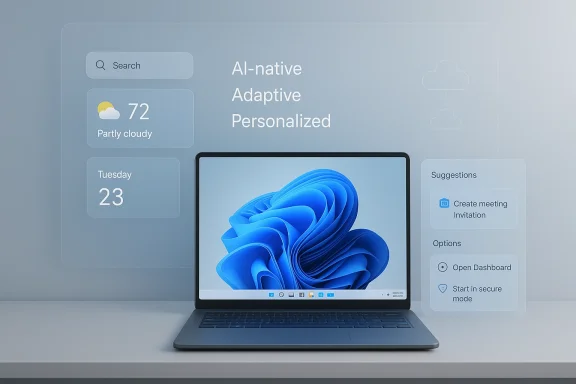
The dominant visual theme in Windows 13 concepts is lightweight futurism. Designers keep returning to translucent panels, soft shadows, modular widgets, and a centered taskbar that feels more dynamic than static. The goal is not just to look modern; it is to imply that the interface can react to user behavior in real time.A lot of these mockups borrow from mobile design principles without fully becoming mobile interfaces. You see widgets, live tiles reborn in subtler form, and homescreen layouts that feel more personal than traditional Windows desktops. That is a direct response to how people now use multiple devices across work and home, and it suggests that fans want the desktop to behave like a smart hub rather than a fixed work surface.
Common visual motifs
The same ideas appear again and again across concept art, which says something important about user expectations. The recurring motifs include:- Translucent layers that create depth without clutter.
- Adaptive taskbars that shift color to match wallpaper or context.
- Context-aware Start menus that surface relevant apps or files.
- Live wallpapers that feel like ambient system decoration.
- Modular widgets that can be placed and resized freely.
- Rounded corners and smooth motion that soften the desktop’s feel.
Microsoft’s own updates point in a similar direction, though with more restraint. The company has already been experimenting with more intelligent search, tighter Copilot integration, and UI adjustments that feel less disruptive. Fan concepts may exaggerate the aesthetic, but the underlying impulse is aligned with the real roadmap.
The role of motion and transparency
Motion is one of the clearest markers of “future” design in Windows 13 mockups. Animations are meant to suggest responsiveness, but they also carry a risk: too much movement can make an interface feel ornamental rather than efficient. The best fan concepts understand that tension and use motion sparingly, as a cue for state changes rather than a constant visual performance.Transparency works the same way. It can make a system feel elegant and modern, but it can also reduce readability if overused. The strongest concepts use transparency to imply layers of information, not to blur the whole desktop into an artistic effect. That restraint would be essential in a real Microsoft product.
AI as the Core Feature, Not the Add-On
If there is one idea that unifies nearly every Windows 13 concept, it is AI-native computing. Fans do not imagine AI as a side panel or a helper app. They imagine it woven into the operating system itself, helping with search, suggestions, context switching, and system optimization. That mirrors Microsoft’s current Windows strategy more closely than any visual element does.Microsoft has already established the basic logic for this approach. Windows 11 now sits at the center of the company’s AI story, especially on Copilot+ PCs where on-device acceleration powers features like Recall, Click to Do, and enhanced search. The company’s messaging is clear: AI should reduce friction, not just add novelty. Fan-made Windows 13 mockups simply push that idea further and imagine a full operating system organized around prediction and assistance. ([blogs.windows.dnce/2025/05/06/introducing-a-new-generation-of-windows-experiences/)
What AI could realistically do
The most plausible Windows 13-style AI features are not glamorous. They are practical. Think smarter file search, better workflow suggestions, automatic window grouping, background task management, and context-sensitive shortcuts based on app usage. Those are boring in presentation terms, but they are powerful in daily use.- Intent prediction could reduce clicks.
- Workflow memory could help users resume tasks faster.
- Background optimization could improve perceived speed.
- Contextual search could make files and settings easier to find.
- Smart suggestions could lower the learning curve for nontechnical users.
Enterprise versus consumer AI
For consumers, AI is about convenience and discovery. For enterprises, it is about governance, reliability, and consistency. The same Windows 13 idea can be sold as a personal assistant at home and as a productivity multiplier in the office, but the implementation requirements are very different.Enterprises will want controls around content safety, auditability, and device policy. Consumers will want the system to “just know” what they need. That is why any real next-generation Windows has to balance personality with predictability.
Productivity and Multitasking Reimagined
Another major theme in Windows 13 concepts is workspace orchestration. Instead of treating the desktop as a simple grid of windows, fan designs imagine saved layouts, gesture-based navigation, and smarter snapping systems that understand tasks rather than just app positions. That aligns closely with how many people alreadyot in isolated programs.This is also where concepts become more than decoration. Better multitasking support has direct productivity value. If the operating system can remember a layout for editing, a layout for meetings, and a layout for research, then switching contexts becomes less painful. That idea builds on Windows Snap features, but takes them in a much more ambitious direction.
Why workflow memory matters
Workflow memory matters because modern knowledge work is fragmented. People jump between browsers, documents, chat tools, calendars, and cloud storage all day. A Windows 13-style system that understands task types could reduce the need to manually rebuild a workspace each time.That would be especially useful for hybrid workers who move between a desktop at home, a laptop in transit, and a larger setup in the office. Fan concepts often imagine settings and layouts following the user across devices, which is one reason they feel so resonant. The operating system becomes a continuity layer rather than a single machine’s interface.
The enterprise benefit
For ITd multitasking is only useful if it remains manageable. A system that can save complex workflows also needs policy controls, profile management, and device-level consistency. Without those, what looks like productivity for the individual can become support overhead for the organization.That is why Microsoft’s real-world approach is likely to stay incremental. The company can add smarter workspace tools through Windows 11 updates, then expose them to managed environments once stability is proven. In other words, the concept is sound, but the deployment path has to be disciplined. That is classic Microsoft pragmatism.
Personalization, Cloud Sync, and the New Desktop Identity
Windows 13 concept art often treats the desktop as a living profile rather than a static installation. Wallpapers, themes, widgets, app arrangements, and even recommended actions are imagined as syncing across devices seamlessly. That is a compelling vision because it tudentity layer, not just an installed operating system.This matches the direction of modern computing more broadly. Users increasingly expect continuity, not repetition. They want the same settings, files, and preferences whether they are on a tower PC, a laptop, or a tablet-style device. The best concepts reflect that reality by making the interface feel portable.
Personalization is no longer cosmetic
Personalization used to mean themes and backgrounds. Now it means how quickly the machine adapts to your habits. That includes the suggestions you see, the tools that appear first, and how much manual setup you must repeat on a new device.This is where fan-made mockups can be surprisingly insightful. They often place the user’s priorities first: fewer repetitive clicks, easier file access, and a desktop that feels tailored without requiring deep configuration. Those are not flashy features, but they are exactly the kinds of ran OS feel premium.
Cloud sync with caveats
Cloud sync is attractive, but it introduces obvious concerns. Users want convenience, yet they do not always want every preference, activity, or file location tied to a cloud account. The ideal Windows 13-style system would offer selective continuity: enough sync to preserve workflows, but enough local control to respect privacy and offline use.Microsoft’s current AI and Windows roadmap suggests that balance is already being tested. The company is emphasizing trust, privacy, and responsible AI alongside productivity gains. That balance will matter even more if the OS becomes more predictive and account-driven.
File Explorer, Search, and Core Utility
No Windows concept would be credible without better file management. In Windows 13 mockups, File Explorer is often imagined as smarter, faster, and more context-aware, with AI-enhanced search, previewing, and filtering built directly into the core workflow. That makes sense because file handling is one of the most universal pain points in desktop computing.Microsoft already understands this. Recent Windows 11 messaging has emphasized improved search and navigation, while Insider work has continued to polish the platform’s everyday mechanics. The company knows that no amount of AI branding will matter if the operating system still feels sluggish when people try to find something they saved yesterday.
The search problem
Search is a deceptively hard problem because users describe the same thing in different ways. A good operating system has to handle filenames, app names, document content, visual recognition, and contextual clues without making the user think about where the file lives. That is why AI search is so attractive: it promises a human-style query layer on top of a machine-style storage system.Still, the risk is overcomplexity. If search becomes too magical, users may not understand why a result appears. If it becomes too literal, it loses the benefit of AI entirely. The best outcome is a search system that feels intuitive but still explainable.
File Explorer as a productivity surface
A smarter File Explorer could also become a productivity center, not just a folder browser. Preview panes, quick actions, embedded metadata, and better sort/filter controls would reduce the need to open separate apps. That is exactly the kind of workflow simplification that concept designers keep returning to.- Faster previews reduce context switching.
- Better metadata helps users sort large libraries.
- AI filtering can surface the right file faster.
- Inline actions can keep users in one window longer.
- More responsive navigation makes the OS feel reliable.
Updates, Security, and the Trust Problem
One of the most interesting overlaps between fantasy and reality is update behavior. Fan concepts often imagine less intrusive, more intelligent servicing. Meanwhile, Microsoft has already moved in the real world toward more user-friendly Windows Update behavior while keeping the security floor high. That tension between convenience and enforcement is central to the future of Windows.Microsoft currently tells users that they can pause updates, but only temporarily, and that updates ultimately need to be installed. That policy exists for a reason: unsupported or out-of-date devices are a security liability. But it also creates frustration, especially when users want to control downtime more precisely. That is why a concept-driven future often imagines a more graceful update model.
The security trade-off
Any system that makes updates feel easier also risks making them feel optional. If too many users delay too long, Microsoft’s security posture weapdates too aggressively, users feel controlled. The best future design will probably be one that gives users more timing freedom without letting them fall out of support.That matters more now because Windows 10 support ended in October 2025, and Microsoft is actively steering users toward Windows 11 as the maintained platform. A future Windows branding exercise will only work if the servicing story is trustworthy. Otherwise, the name means little.
Consumer and enterprise differ here too
For consumers, fewer forced restarts are a quality-of-life win. For enterprises, update predictability is a governance issue. Businesses want control, but they also need assurance that every device stays in compliance. If a future Windows design got update behavior right, it would need to satisfy both groups without creating a patchwork of policies that confuse everyone.That is why Microsoft’s real pashy mockups. Trust is built in maintenance screens as much as in design decks.
What the Concepts Reveal About Microsoft’s Competitive Position
Windows 13 concepts are also a competitive commentary. They implicitly compare Microsoft to Apple, Google, and even Linux desktop environments by asking what a truly adaptive operating system should feel like. The repeated answer is that Windows should be more fluid, more personal, and less prescriptive. That is a direct challenge to the polished predictability of macOS and the lightweight simplicity of ChromeOS.Microsoft’s advantage is scale. It can spread new ideas across a massive installed base and then fold them into enterprise products, consumer devices, and cloud-connected services. If the company can make AI and personalization genuinely useful, it does not need to out-style every competitor. It just needs to become the most practical place to work.
Why utility may beat spectacle
This is where the market logic gets interesting. Many concept mockups are visually striking, but Microsoft’s success will depend on whether the ideas improve everyday workflows. If an AI-enhanced desktop can save a user five or ten minutes a day, that is more valuable than an interface that only looks impressive in screenshots.The same logic applies in enterprise environments. Microsoft is most persuasive when it frames AI as productivity infrastructure, not decoration. That is also why its public messaging around Windows has increasingly emphasized performance, reliability, and more intentional Copilot placement rather than blanket AI saturation.
Strategic implications
A Windows 13-style direction would help Microsoft in three ways. First, it would reinforce the idea that Windows is the home for AI on the PC. Second, it would let the company modernize the shell without abandoning desktop depth. Third, it would create room for premium hardware to matter without making the broader platform feel obsolete.That said, there is a catch: if the system feels too dependent on newer hardware, older PCs may appear second-class. That would be a serious risk for a platform with Windows’ installed-base expectations. Microsoft has to modernize without making millions of devices feel left behind.
Strengths and Opportunities
The strongest thing about Windows 13 concepts is that they convert vague desire into concrete product language. They show where users want the platform to go, and many of those ideas map cleanly onto Microsoft’s current AI and Windows strategy. That means the concepts are not just artistic exercises; they are a roadmap of expectations.- AI-native workflows could reduce repetitive tasks.
- Smarter search could make the OS feel much faster.
- Better multitasking could improve real productivity.
- Cross-device sync could strengthen continuity for hybrid users.
- More customization could win back power users.
- Cleaner visual design could make Windows feel contemporary.
- Stronger on-device intelligence could improve privacy and latency.
Risks and Concerns
The biggest danger is that concept-driven hype outruns product reality. When users repeatedly hear about the “next Windows” without an official roadmap, they start expecting a dramatic reset that may never come. That can create disappointment, especially if the actual changes arrive gradually inside Windows 11 instead of as a single new release.- Rumor fatigue can erode trust.
- Fragmented AI features may split the installed base.
- Hardware dependence could make older PCs feel excluded.
- Privacy concerns could grow as AI becomes more contextual.
- Update complexity may increase if servicing tiers multiply.
- Feature bloat could return if Microsoft overcorrects with too many additions.
Looking Ahead
The next big clue is not a leaked name; it is how Microsoft continues shaping Windows 11 through 2026. If taskbar flexibility expands, Copilot becomes less intrusive, and update behavior becomes more user-friendly, then the company is effectively building the outline of a future Windows generation without announcing one. That would make the fan-made Windows 13 conversation feel less speculative and more predictive.The other thing to watch is hardware. Copilot+ PCs, NPUs, and on-device AI acceleration are becoming increasingly central to Microsoft’s platform story. If those capabilities spread across more devices, then the “future Windows” will be less about a new version number and more about a new expectation: that the OS should understand you, not just run your apps.
Key signals to watch
- More Windows 11 feature waves focused on performance and reliability.
- Wider availability of AI-powered search and contextual tools.
- Changes in taskbar control and desktop customization.
- Further shifts in update timing and restart handling.
- Expansion of Copilot+ experiences to more hardware classes.
Source: Tech Times Windows 13 Concepts: Fan-Made Mockups and Possible Features
