

When Microsoft’s Windows president wrote that “Windows is evolving into an agentic OS,” the short version of the fallout was immediate: a massive wave of public skepticism, sharp criticism from veteran users, and renewed demands that Microsoft fix the basics before reimagining the desktop as an AI-native platform.
Microsoft has been explicit about the long‑term direction for Windows: move beyond passive UI controls and toward an operating system that can reason about context, act on behalf of users, and orchestrate multi‑step workflows using multimodal AI. This ambition shows up across several concrete initiatives — an expanded Copilot that speaks and sees, a permissions and tooling fabric based on the Model Context Protocol (MCP), a developer runtime rebranded as Windows AI Foundry, and a hardware tier called Copilot+ PCs that promises fast, private on‑device inference. These pieces form the engineering backbone for what Microsoft calls an “agentic” OS. The phrase itself — “agentic OS” — is the proximate cause of the internet uproar. It implies initiative: software that does things, not just follows clicks and keystrokes. For many users that semantic shift triggers legitimate questions about control, auditability, privacy, and software bloat — and those questions were voiced in the hundreds of replies, forum threads, and coverage that followed the executive post.
If Microsoft can combine technical rigor with meaningful policy changes — transparent logs, independent audits, conservative defaults, and a real expert mode — the agentic OS could become a productivity multiplier rather than a trust sink. If not, the company will discover that power users and enterprise buyers will demand strict controls or vote with their wallets and attention.
Microsoft now faces a classic product choice: ship faster and convince skeptics later, or invest in transparency, conservative defaults, and the sort of user‑controllable modes that rebuild faith in the platform. The safest path to adoption is painfully simple in concept: prove your agents are safe, private, and reversible, and then let users opt in because they want help — not because the OS assumes permission.
The road from “evolving into an agentic OS” to “agents people trust” is long. The next releases and the decisions Microsoft makes at Ignite and in the months that follow will determine whether Windows’ AI pivot is an earned advancement or another chapter in a slow erosion of user trust.
Source: TweakTown Microsoft says Windows is transforming into an 'Agentic OS' and no one is happy about it
 Background / Overview
Microsoft has been explicit about the long‑term direction for Windows: move beyond passive UI controls and toward an operating system that can reason about context, act on behalf of users, and orchestrate multi‑step workflows using multimodal AI. This ambition shows up across several concrete initiatives — an expanded Copilot that speaks and sees, a permissions and tooling fabric based on the Model Context Protocol (MCP), a developer runtime rebranded as Windows AI Foundry, and a hardware tier called Copilot+ PCs that promises fast, private on‑device inference. These pieces form the engineering backbone for what Microsoft calls an “agentic” OS. The phrase itself — “agentic OS” — is the proximate cause of the internet uproar. It implies initiative: software that does things, not just follows clicks and keystrokes. For many users that semantic shift triggers legitimate questions about control, auditability, privacy, and software bloat — and those questions were voiced in the hundreds of replies, forum threads, and coverage that followed the executive post. What Microsoft actually announced (and what “agentic” means)
The key technical pillars
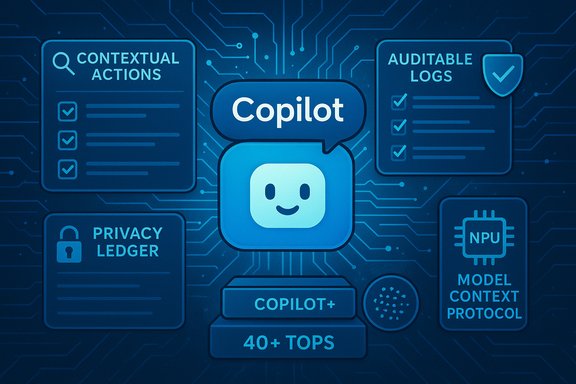
Microsoft’s public roadmap — built from blog posts, Build / Ignite previews, and executive messaging — ties the agentic concept to several specific components:- Copilot Voice: a wake‑word conversational interface so users can summon assistance hands‑free (e.g., “Hey, Copilot”). Sessions are meant to be session‑bounded and visible, but voice raises obvious sensor‑and‑privacy questions.
- Copilot Vision: optional, permissioned screen awareness — where Copilot can inspect selected windows to summarize or extract data. The feature is explicitly opt‑in in Microsoft’s descriptions, but the presence of screen‑aware agents is a frequent cause for unease.
- Copilot Actions: an agentic framework for chained, multi‑step tasks — with a promise of permission gating, auditable logs, and sandboxes for agent execution. Microsoft positions this as a developer‑first set of primitives that apps can expose.
- Model Context Protocol (MCP): an open agent‑tooling standard that lets agents discover and call local or cloud “capability providers” (files, apps, services) through a registry and permission model. MCP is the plumbing Microsoft is embedding in Windows to let agents talk to local apps securely.
- Windows AI Foundry: the runtime and toolkit for developing, deploying, and running local models across CPU/GPU/NPU — Microsoft’s attempt to make on‑device AI manageable for developers and OEMs.
Hardware gating: Copilot+ and the NPU conversation
Microsoft has been clear that the best agentic, on‑device experiences will be delivered on Copilot+ PCs, devices equipped with more powerful NPUs. Public and press messaging has referenced a guideline of 40+ TOPS (trillions of operations per second) as the NPU performance target for richer, low‑latency on‑device inference. That figure is repeatedly used to explain why some PCs will offer “full” local Copilot features while others will rely on cloud fallbacks. The 40+ TOPS number is a performance guideline — not an absolute spec that guarantees latency, power, or model quality — and it varies significantly by vendor implementation and workload. Independent benchmarking will be necessary once hardware arrives at scale.Why reaction has been so negative
The outrage and skepticism aren’t just knee‑jerk Luddism; they reflect a cumulative erosion of trust and several technical and UX pain points that many Windows users have experienced in recent years.- Perceived neglect of fundamentals: Many users argue Microsoft should prioritize stability, speed, and predictable UI behavior over large platform experiments. Complaints about taskbar regressions, slower search, and buggy Insider builds are repeatedly cited in community threads.
- Monetization optics: Buyers see Copilot and related prompts as yet another commercial funnel inside an OS they already own. When an assistant can act on your behalf, the potential to surface paid services — visible or subtle — feels like a design hazard.
- Privacy and telemetry anxiety: An agent that can “see” your screen or maintain contextual memory needs access to files, windows, and history. Even with opt‑in claims, users worry about defaults, retention policies, and what data is sent to the cloud. Prior missteps (real or perceived) have hardened skepticism.
- Hardware and fragmentation concerns: The Copilot+ two‑tier model risks making a full‑featured Windows experience contingent on new and expensive hardware — a choice that feels like vendor lock‑in to some and increases fragmentation for developers.
The technical upside: what agentic Windows could actually deliver
It’s important to separate the hype from the genuine, plausible benefits. The engineering work under discussion does have clear, measurable upsides when done carefully:- Speed and latency improvements through on‑device inference. Agents that run locally on an NPU can provide instant, context‑aware answers without round trips to the cloud — useful for transcription, local search, and offline productivity. This is especially valuable for regulated industries where data can’t leave the device.
- Unified agent runtime and developer primitives reduce friction. MCP, Windows AI Foundry, and App Actions APIs offer a consistent way for third‑party apps to expose functionality to agents. That reduces the integration cost of agentic features and could let agents perform meaningful, safe actions across apps.
- Auditable automation for complex tasks. Properly designed, agentic workflows can be transparent: explicit permission requests, a visible action log, and easy rollbacks. For repetitive, error‑prone tasks — e.g., assembling a regulatory package from multiple sources — agents could reduce human toil.
- Privacy‑enhancing hybrid models. By defaulting to local models for sensitive tasks and falling back to cloud models only when necessary, Microsoft can balance privacy, latency, and model capability — if the on‑device models are powerful enough and NPU performance is real. This is the rationale for Copilot+ hardware.
Major risks and where Microsoft still needs work
The upside is contingent on a long list of hard engineering, privacy, and policy problems being solved — and on defaults that favor user control. Key risks:- Defaults and “permission creep”: Safety depends on conservative defaults and clear consent flows. If agents are enabled by default or if permissions are too broad, an agentic OS could create surprising behaviors and new attack surfaces. The company’s own documentation emphasizes opt‑in patterns, but defaults matter more than promises.
- MCP security complexity: MCP solves interoperability but also expands a new class of tool‑calling attack vectors (prompt injection, lookalike tool substitution). Microsoft and partners are adding registry and authorization controls, but independent audits and third‑party evaluations are essential. Early security reports flagged MCP‑style risks and the community has called for clearer guidance.
- Hardware stratification and fairness: Locking the “best” experiences behind Copilot+ hardware may accelerate innovation, but it also creates a two‑tier OS experience and confuses developers: which APIs must be supported on baseline devices? How will Microsoft avoid shipping key UX changes that behave completely differently on older hardware?
- Stability tax of complexity: Adding multimodal inputs, new background services, and agent runtimes increases system surface area. Each subcomponent is an attack surface and a potential source of regressions — a concern given recent complaints about update‑induced breakage. That “stability tax” must be actively managed if trust is to be rebuilt.
- Unverified claims and PR framing: Several community narratives assert Microsoft cut budgets for Surface and Xbox to fund AI initiatives. Those claims have appeared in commentary but lack comprehensive, line‑item confirmation from Microsoft and should be treated as plausible but unverified. Microsoft’s executive communications are explicit about AI priorities; some ancillary claims in the wild are not independently verifiable. Flagging these distinctions will be necessary for clear public debate.
User sentiment: data points and the “threat” of platform migration
Public replies to the Windows president’s post were overwhelmingly negative in tone and volume across X, Reddit, and enthusiast forums; comments ranged from “Stop this nonsense” to concrete threats to migrate to Linux or macOS. The narrative that Microsoft is prioritizing AI marketing over day‑to‑day polish is widespread and consistent across multiple outlets and forum captures. That sentiment, if left unaddressed, translates to a long‑term trust deficit that costs Microsoft more than any short‑term engagement metric. But it’s worth being realistic about migration dynamics: wholesale switching to Linux or macOS is costly for many users and enterprises. Still, the directional risk — that power users, developers, and a vocal subset of customers will vote with their enthusiasm and attention — is real and influential for public perception and advocacy.What Microsoft should — and must — do next
Practical policy and engineering changes can materially reduce the trust tax and help agentic Windows land without alienating the user base. The following are concrete steps grounded in community demands and platform engineering best practices:- Ship an explicit, discoverable “Power User / Expert” mode. One system toggle at setup (and persistently visible in Settings) that disables promotional nudges, minimizes telemetry to security‑essential only, and prevents agentic features from activating without explicit user opt‑in. This proposal has been repeatedly requested by power users and Microsoft veterans.
- Default to opt‑in and make opt‑in meaningful. Any agent that can access files, vision, or microphone must remain off by default and require granular per‑capability consent that is session bound (not unlimited) and easily revocable. Permissions should auto‑expire and require reaffirmation for high‑risk capabilities.
- Publish machine‑readable audit logs and human‑readable “why” explanations for telemetry. Users and admins need transparent logs of agent actions, data flows, and the precise rationale for any data leaving the device. A privacy ledger and packet‑level reasons for outbound flows would materially improve trust.
- Fund independent security audits for MCP and agent sandboxes. Publish third‑party evaluations and red‑team results, along with mitigations for prompt injection, token leakage, and tool substitution attacks. MCP is powerful, but it’s also complex: external validation is essential.
- Avoid gating core UX on premium hardware (or be explicit about what is premium vs. core). Separate convenience and performance features from essential functionality so baseline devices are not presented as inferior by design. If Microsoft insists on Copilot+ as a premium tier, clearly enumerate what is optional vs. necessary.
- Maintain rigorous update and rollback guarantees for enterprises. Provide long‑term servicing options and predictable update channels for customers that need stability over innovation, and make choosing them straightforward.
Practical advice for users and IT teams today
- For individual users: treat agentic Copilot features as experimental. Enable only what you trust, inspect audit logs, and keep cloud fallbacks off for sensitive data. Use account‑level and privacy settings to limit telemetry.
- For IT admins: pilot agentic features on a representative, non‑production fleet; require policy gating for any agent that touches PII or sensitive business data; and require acceptance testing on standard images. Audit logs and group policy controls will be crucial.
- For prospective buyers: if Copilot+ features are a selling point, demand independent NPU benchmarks and real‑world inference metrics — TOPS is a headline number, not the whole story. Look for energy efficiency, latency under load, and model quality on device.
Editorial assessment: ambition, credibility, and the political work ahead
Microsoft’s agentic Windows is technically coherent and strategically plausible. The core building blocks — MCP, Windows AI Foundry, on‑device runtimes, permissioned agent frameworks, and NPU acceleration — are real engineering projects with demonstrable benefits when implemented correctly. Together, they could reshape productivity models on the desktop. But the company’s public posture underestimates how much political and product work is required to earn trust. An operating system that can act on behalf of a user requires a durable contract: clear defaults, auditable behavior, conservative opt‑in, and an easy way to say “no.” Without those safeguards, agentic features will feel like a series of nudges that monetize user attention and erode control. The current negative reaction is therefore not merely a reaction to AI — it’s a reaction to years of choices that have made many users feel less in control of their own machines.If Microsoft can combine technical rigor with meaningful policy changes — transparent logs, independent audits, conservative defaults, and a real expert mode — the agentic OS could become a productivity multiplier rather than a trust sink. If not, the company will discover that power users and enterprise buyers will demand strict controls or vote with their wallets and attention.
Conclusion
The “agentic OS” framing crystallized a broader trust problem for Windows. The technical vision — local inference, MCP tool access, and a platform for agentic automation — is ambitious and backed by significant engineering work. But the rollout, messaging, and defaults will determine whether that ambition becomes a productivity revolution or a reputational setback.Microsoft now faces a classic product choice: ship faster and convince skeptics later, or invest in transparency, conservative defaults, and the sort of user‑controllable modes that rebuild faith in the platform. The safest path to adoption is painfully simple in concept: prove your agents are safe, private, and reversible, and then let users opt in because they want help — not because the OS assumes permission.
The road from “evolving into an agentic OS” to “agents people trust” is long. The next releases and the decisions Microsoft makes at Ignite and in the months that follow will determine whether Windows’ AI pivot is an earned advancement or another chapter in a slow erosion of user trust.
Source: TweakTown Microsoft says Windows is transforming into an 'Agentic OS' and no one is happy about it
