

Windows 11’s new agentic features mark a decisive shift: AI is no longer just a helpful advisor on the screen but a background actor with the ability to open apps, edit files, and perform multi‑step workflows — and Microsoft is explicit that these capabilities come with real security trade‑offs.
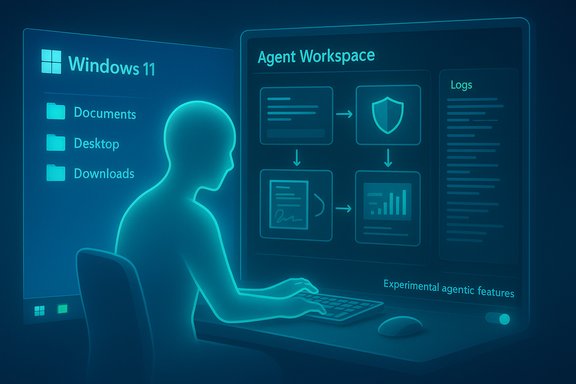
Microsoft has begun layering “agentic” primitives into Windows 11: an Experimental agentic features toggle, a contained runtime called Agent Workspace, and agent accounts that let AI tools operate as distinct principals on a PC. These agents can be granted scoped access to common user folders (Documents, Desktop, Downloads, Pictures, Music, Videos) so they can inspect and manipulate files necessary to complete tasks. Microsoft and early reporting stress that the model is opt‑in and initially gated to Insider previews, but the implications extend far beyond that early audience. Agentic AI means an assistant that can act: schedule, edit, move, batch process, and otherwise change your environment without step‑by‑step human input. That capability opens productivity possibilities — and it also reshapes the OS threat model in ways that demand fresh operational controls and governance.
For security, the hybrid model matters: non‑Copilot+ devices will often rely on cloud reasoning, shifting the privacy boundary. Organizations must map what data leaves the device and which features run locally versus remotely to maintain compliance and data residency guarantees.
Security experts and analysts agree the foundational primitives are sound — agent accounts, scoped access, signing — but also stress that these are only the start. Operational tooling, independent audits, DLP integration, and enterprise governance are required before agents should be widely trusted on production fleets.
Source: WebProNews Windows 11’s AI Agents: Unlocking Autonomy at the Cost of Security
 Background
Microsoft has begun layering “agentic” primitives into Windows 11: an Experimental agentic features toggle, a contained runtime called Agent Workspace, and agent accounts that let AI tools operate as distinct principals on a PC. These agents can be granted scoped access to common user folders (Documents, Desktop, Downloads, Pictures, Music, Videos) so they can inspect and manipulate files necessary to complete tasks. Microsoft and early reporting stress that the model is opt‑in and initially gated to Insider previews, but the implications extend far beyond that early audience. Agentic AI means an assistant that can act: schedule, edit, move, batch process, and otherwise change your environment without step‑by‑step human input. That capability opens productivity possibilities — and it also reshapes the OS threat model in ways that demand fresh operational controls and governance. What Microsoft is shipping in preview
The technical primitives
- Experimental agentic features toggle — an administrative, device‑wide opt‑in switch in Settings that must be deliberately turned on. Once enabled it allows creation of agent accounts and Agent Workspaces.
- Agent Workspace — a lightweight, separate Windows session where an agent executes UI‑level actions in parallel to the human user, designed to be more efficient than a full VM while providing runtime isolation and visible step logs.
- Agent accounts — separate standard Windows accounts created for agents so their actions are distinguishable, auditable, and can be governed via ACLs, Intune, and enterprise policy.
- Scoped folder access — default permission scopes limit agents to known folders (Documents, Desktop, Downloads, Pictures, Music, Videos) unless the user explicitly grants expanded access.
Productivity scenarios Microsoft highlights
- Batch processing tasks (photo deduplication, resizing, renaming).
- Extracting tables from many PDFs and compiling them into spreadsheets.
- Cross‑app workflows that historically required manual UI automation or scripting.
Why security researchers are uneasy
The attack surface changes, materially
A conversational bot that only returns suggestions is a bounded risk. An agent that can click, type, open apps, and change or transmit files is a different class of actor: it carries the authenticated privileges the user intends to grant and can operate continuously in the background. That expands both the opportunity for automation and the blast radius for compromise. Early coverage flagged the exact vector that worries defenders: agent workspaces operate with their own accounts but can be granted read/write access to sensitive folders like Desktop and Documents, creating novel exfiltration paths if an agent is compromised or tricked.Prompt injection and cross‑prompt attacks
Agents reason over document content and UI text. That makes them vulnerable to adversarial content designed to change the agent’s plan, a class of attack known as prompt injection (or cross‑prompt injection when content in one UI crosses contexts). If an agent follows an injected instruction, the consequences can be direct action — not just misleading answers. This transforms a long‑standing LLM risk into an OS‑level security problem.Supply‑chain and signing risks
Microsoft requires agents be digitally signed so provenance can be validated and misbehaving agents can be blocked or revoked. That’s essential, but signing is not a silver bullet: compromised certificates, malicious updates from trusted publishers, or weaknesses in the revocation chain all present systemic risk. Enterprises must treat agent signing like any other code‑signing trust — with lifecycle controls, monitoring, and rapid revocation readiness.UI automation brittleness and accidental damage
Agents that automate GUIs are brittle: app updates, localization, and layout changes can cause misclicks that lead to data loss, erroneous emails, or other irreversible actions. The initial preview offers visible step playback and an emergency “take over” button, but the rollback semantics and guarantees for recovery are not fully specified. Reliable undo, shadow copies, and backups remain essential mitigations.Microsoft’s mitigation strategy — sound design, incomplete answers
Microsoft’s public posture combines several sensible controls: opt‑in defaults, agent accounts, runtime isolation in Agent Workspaces, signed agents, and visible step logs users can review and interrupt. Those are the right building blocks for an agentic OS and they materially reduce many straightforward risks. However, important implementation and operational gaps remain:- The precise isolation boundary of Agent Workspace vs full VM/hypervisor containment is described as lightweight and efficient, but detailed assurances at kernel/hypervisor levels are not fully public. That leaves open questions about escape vectors and privilege escalation mitigations for high‑sensitivity scenarios.
- Audit and tamper‑evidence: Microsoft promises logs and non‑repudiation, but enterprise requirements demand robust, tamper‑evident logs, SIEM integration, retention policies, and replayability for forensic trails — features that are still maturing in preview.
- DLP and conditional access integration: blocking agent‑driven exfiltration requires tight coupling between agent policies and existing DLP/conditional access controls — a necessary integration that enterprises must verify before wide enablement.
Real‑world attack scenarios worth planning for
- Credential scope creep: an agent granted access to a cloud connector could misuse OAuth scopes or have tokens exfiltrated, enabling unauthorized access to mail, files, or cloud storage. Tight scope enforcement and token hygiene are essential.
- Prompt injection leading to file exfiltration: a malicious document could embed instructions that alter an agent’s plan to collect and email sensitive files to an external address. Sanitization and explicit human confirmation for high‑risk steps are necessary.
- Signed agent compromise: a trusted agent receives a malicious update; without fast revocation propagation, that agent could perform destructive actions across many devices. Robust certificate lifecycle and signing governance mitigate this.
- UI brittleness causing destructive edits: an agent misclicks during automation and overwrites files; absent atomic rollback, recovery costs can be high. Maintain versioning and backups as a non‑negotiable control.
Practical guidance — what users and IT must do now
For individual and home users
- Keep Experimental agentic features disabled unless you are explicitly testing or understand the permission model. The toggle is administrative and device‑wide for a reason.
- If you test agents, restrict them to a single test folder and avoid granting broad profile access. Use read‑only scopes when the task permits.
- Inspect the agent’s step plan before approving any multi‑step or destructive actions; revert permissions after the task if persistent access is unnecessary.
- Back up important files (OneDrive versioning, Volume Shadow Copy, or local backups) before enabling experimental automations.
For IT administrators and security teams
- Gate the experimental toggle via Intune/MDM and enable only on test cohorts.
- Treat agents as first‑class service principals: require signing, maintain allowlists, and enforce certificate revocation checks.
- Integrate agent telemetry with SIEM/EDR and create alerts for anomalous agent activity and unexpected file access patterns.
- Extend DLP to agent contexts and require explicit policies for connectors and token scopes.
- Pilot in isolated, non‑production environments and run simulated misuse scenarios (prompt injection, failed UI automation, interrupted workflows).
The Copilot+ hardware angle and hybrid compute tradeoffs
Microsoft’s two‑tier plan distinguishes baseline Copilot experiences from enhanced on‑device capabilities available on certified Copilot+ PCs with Neural Processing Units (NPUs). On‑device inference reduces cloud roundtrips and narrows outbound data flows, which has privacy advantages, but the Copilot+ hardware bar (commonly cited at ~40+ TOPS in public reporting) is provisional and depends on model formats, memory bandwidth, and thermal headroom — not TOPS alone. Buyers and admins should evaluate real workload benchmarks, not raw TOPS claims.For security, the hybrid model matters: non‑Copilot+ devices will often rely on cloud reasoning, shifting the privacy boundary. Organizations must map what data leaves the device and which features run locally versus remotely to maintain compliance and data residency guarantees.
Industry reaction and the trust problem
Public reaction has been mixed and, in places, hostile. Longtime enthusiasts and privacy advocates fear feature creep and opaque background behavior that resembles earlier controversial features (for example, the Recall experiment). Community backlash highlights a central trust problem: rolling powerful autonomous capabilities into an OS already criticized for aggressive feature pushes risks alienating users unless Microsoft couples agency with ironclad controls and transparent, auditable telemetry.Security experts and analysts agree the foundational primitives are sound — agent accounts, scoped access, signing — but also stress that these are only the start. Operational tooling, independent audits, DLP integration, and enterprise governance are required before agents should be widely trusted on production fleets.
Regulatory and compliance considerations
Agentic behaviors that access, aggregate, or transmit personal data raise regulatory concerns across jurisdictions. Organizations handling regulated data must know:- Where processing occurs (local vs cloud).
- What telemetry Microsoft retains and for how long.
- Whether agent logs satisfy audit and e‑discovery requirements.
Where the technical debate pivots next
The security community is focused on several engineering priorities that will determine whether agentic Windows can be trusted broadly:- Strong, tamper‑evident logging with SIEM APIs and replayable forensic trails.
- More granular policy controls in Intune/Entra to restrict agent abilities by data classification, not just by folder.
- Hardened anti‑prompt‑injection layers and provenance tracking for content an agent ingests.
- Fast certificate revocation and supply‑chain governance for signed agents.
- Robust rollback and transactional semantics for destructive multi‑step workflows.
Trade‑offs: productivity vs. control
Agentic automation promises to shift repetitive, brittle UI chores into background flows that save time and reduce cognitive load. For many users and use cases, that’s a net positive. But agency necessarily hands autonomous software new powers; with them comes the need for new disciplines:- Treat agents as identities in your identity and access management model.
- Apply least privilege and time‑boxed permissions for every agent task.
- Keep experimental features off on production devices until controls mature.
Conclusion
Windows 11’s agentic features represent a milestone: the operating system is moving from a passive host to an active partner capable of accomplishing complex, multi‑step tasks. That shift unlocks real productivity and accessibility improvements, especially where local models and Copilot+ hardware enable low‑latency inference. At the same time, agents that run with user‑granted privileges and access known folders expand the OS attack surface in novel ways: prompt injection, supply‑chain risks, credential scope creep, UI automation brittleness, and recovery ambiguity are all realistic threats. Microsoft’s initial controls — opt‑in toggles, agent accounts, Agent Workspaces, signing, visible step logs — are necessary and thoughtfully designed, but they are not a finished defense. Real trust will depend on rigorous engineering, independent validation, enterprise governance tooling, and transparent telemetry that proves those mitigations hold up in the wild. For most users and organizations today the practical posture is simple and prudent: test agentic features in isolated environments, insist on least‑privilege policies and backups, and require strong auditing and DLP integration before enabling broad deployments. The agentic future of Windows is promising — but only if it is matched by commensurate advances in security, governance, and transparency.Source: WebProNews Windows 11’s AI Agents: Unlocking Autonomy at the Cost of Security
