

Microsoft’s own documentation now calls agentic AI in Windows “risky,” yet the company is moving forward anyway — rolling a preview of Copilot Actions and a new Agent Workspace into Windows 11 while asking users and administrators to accept a shifted threat model and new operational responsibilities.
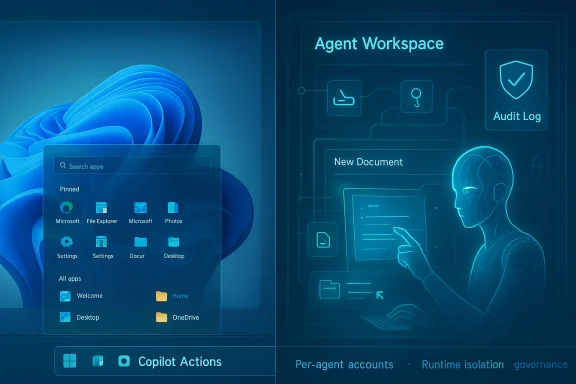
Microsoft framed the latest push at Ignite and via Insider channels as a strategic pivot: make Windows an “agentic OS” where AI doesn’t merely suggest what to do but does things for you — clicks, types, opens files, chains multi-step workflows, and interacts with cloud connectors. The visible components landing in preview are Copilot Voice, Copilot Vision, and, crucially, Copilot Actions: agentic automations surfaced from the taskbar and the new Ask Copilot interface.
That transformation depends on three platform primitives Microsoft is shipping or documenting:
But the devil is in the details. Security researchers have already demonstrated the kinds of misconfigurations and protocol weaknesses that will be probed by attackers. The MCP ecosystem — powerful but nascent — needs stricter baseline requirements and a vetted supply chain. The UI automation model is convenient but brittle and spoofable, and known-folder access, while pragmatic, sweeps in large volumes of potentially sensitive data. Independent audits, mandatory protocol hardening, clear enterprise controls, and conservatively restrictive defaults are required for trust to follow.
An agentic OS is probably inevitable across platforms, but trust is optional and must be earned. The safety of an agentic Windows will depend on measurable enforcement — not just design ideals — and on the company’s willingness to invite independent review, transparently publish telemetry policies, and give users and administrators clear, usable controls. Until those pieces are demonstrably in place, cautious pilots and tight governance should be the standard for businesses and power users who care about security and privacy.
Source: Windows Latest Microsoft says AI agents are "risky", but it's moving ahead with the plan on Windows 11
 Background
Microsoft framed the latest push at Ignite and via Insider channels as a strategic pivot: make Windows an “agentic OS” where AI doesn’t merely suggest what to do but does things for you — clicks, types, opens files, chains multi-step workflows, and interacts with cloud connectors. The visible components landing in preview are Copilot Voice, Copilot Vision, and, crucially, Copilot Actions: agentic automations surfaced from the taskbar and the new Ask Copilot interface.That transformation depends on three platform primitives Microsoft is shipping or documenting:
- Agent Workspace — a contained, parallel Windows session where agents run under their own identity and perform UI-level actions.
- Agent accounts — separate, low-privilege Windows accounts provisioned per agent to enable auditing, ACLs, and revocation.
- Model Context Protocol (MCP) — a standard-like bridge that lets agents discover tools, call functions and interact with applications and services in a structured JSON-RPC style.
What Microsoft’s documentation actually says
The admission: agents can hallucinate and be misled
Microsoft’s support and guidance material is unusually candid: the company warns that agentic systems “face functional limitations” and “may hallucinate and produce unexpected outputs.” It also names a specific, novel attack class — Cross Prompt Injection (XPIA) — where adversarial content embedded in documents, UI elements or images could override an agent’s instructions and force harmful actions. Those warnings are surfaced prominently in Microsoft’s Experimental agentic features guidance.The proposed mitigations
To contain these risks, Microsoft describes a layered architecture:- Provision one standard, non-interactive Windows account per agent so actions are attributable and limited by ACLs.
- Run agents inside an Agent Workspace — a parallel, lightweight desktop and process tree that isolates agent runtime from the user session while still allowing UI interaction.
- Limit default file access to six “known folders” (Documents, Downloads, Desktop, Pictures, Music, Videos) unless additional permissions are granted.
- Require cryptographic signing for agent binaries and connectors so compromised components can be revoked.
- Produce tamper-evident audit logs, surface multi-step plans for human review, and supply runtime controls (pause/stop/takeover).
How Agent Workspace and Copilot Actions work in practice
Agent Workspace: a parallel Windows session
Agent Workspace is not a VM or Windows Sandbox in the traditional sense. It is a parallel Windows environment with its own desktop, process tree, and a separate Windows account for each agent. That lets an agent perform UI interactions (clicking, typing, scrolling, dragging) within a contained surface while the human user continues to work. The workspace is visible and interruptible; Microsoft intends users to be able to pause, stop, or take over an agent mid-run.Identity and permissions
When Experimental agentic features are enabled, Windows provisions per-agent local accounts that behave like low-privilege service principals. The operating system enforces ACLs and uses standard Windows policy and audit tooling to try to prevent an agent from exceeding what the enabling user allowed. Agents get default read/write access only to the known folders listed above; everything else in the user profile is off-limits unless explicitly granted.The role of MCP (Model Context Protocol)
MCP is the communication model agents use to discover tools and call capabilities in applications and services. Rather than granting raw filesystem or process-level authority, an agent asks an MCP-exposed tool to perform well-scoped functions through a JSON-RPC-like interface — a central enforcement point where Windows can check authentication, capability declarations, and logging. Microsoft positions MCP as the “standard” that will let on-device and cloud-based agents interoperate with apps and enterprise services.Why Microsoft thinks the risk is worth taking
Microsoft frames this move as both competitive necessity and long-term product strategy. The company argues that agentic computing will reduce friction, replace repetitive clicks with natural language, and make Windows the natural environment for personal and enterprise automation. Failing to build these primitives risks falling behind other major platforms that are also integrating agentic features and local AI acceleration. Microsoft’s security teams have published guidance emphasizing governance, identity-bound agents (Entra Agent ID), and DLP/Telemetry integrations as necessary for enterprise trust.The explicit risks Microsoft names — and those it underemphasizes
What Microsoft openly warns about
- Hallucinations: LLMs confidently returning incorrect facts becomes materially dangerous when an agent acts on those falsehoods (e.g., moving the wrong files or sending incorrect financial instructions).
- Cross Prompt Injection (XPIA): When agents parse documents, images (OCR), or rendered UI, maliciously crafted content can be interpreted as new instructions and override the agent’s plan. Microsoft calls this out as a first-order security concern.
- Supply chain and connector risk: MCP connectors and third-party tools that agents call can themselves be compromised, creating an indirect way to escalate privileges or exfiltrate data. Microsoft demands signing and revocation as mitigation but the mechanics and timelines for such revocations remain operational details to be proven in the field.
What security research and independent analysts add
- MCP ecosystem hygiene is uneven: Public scans and independent analyses show many MCP servers deployed without strong authentication or proper token audience validation. Misconfigured MCP endpoints and optional authentication in some implementations create the potential for confused-deputy and token-passthrough attacks. These are not theoretical — researchers have already catalogued exposed or poorly configured MCP instances.
- UI automation is brittle and spoofable: Agents that navigate GUIs by clicking and typing are vulnerable to deceptive UI overlays, CSS or layout changes, and adversarial rendering that can trick automation into clicking malicious UI targets. Isolating agents into separate desktops reduces but does not eliminate these risks.
- Known-folder access is still broad: Documents, Downloads and Desktop — the canonical “known folders” — are where most personal and work data lives. Granting agents programmatic access to those locations creates avenues for large-scale exfiltration if an agent is tricked or compromised. Scoped access helps, but many practical attacks don’t need system directories to cause significant harm.
Recall, privacy baggage, and trust erosion
The Recall controversy — Microsoft’s feature that captures frequent screenshots to build a timeline of user activity — left a trust scar. Security researchers and privacy advocates raised strong objections; app developers (Signal, Brave, AdGuard) introduced mitigations to prevent Recall from capturing sensitive content. Signal added a default “screen security” flag to its desktop app expressly to block Recall’s screenshots. That history matters: users who saw Recall’s early problems are predisposed to distrust any agent that can also see their screen and touch their files. Microsoft’s public response during Recall’s backlash was to delay, make the feature opt-in, and add hardware-backed enclave protections and tighter controls. That response showed Microsoft can iterate, but it also highlighted how quickly trust can be lost and how difficult it is to design a privacy-preserving, opt-in experience that also delivers the convenience users expect.Critical assessment — strengths and gaps
Strengths
- Design discipline on paper: Per-agent accounts, runtime isolation in Agent Workspace, signed agent binaries, and audit logging are the right architectural primitives for treating agents as first-class OS workloads rather than opaque processes. These controls create the foundation for enterprise governance and attribution.
- Administrative gating and opt-in defaults: Microsoft has not pushed Agent Workspace as an always-on default. The need for administrator enablement and the initial Insider staging point to an incremental rollout that can gather telemetry and harden mitigations.
- Ecosystem-level thinking: Integrations with Entra, Defender, Purview, and Intune are being discussed as part of the governance stack, which is necessary for enterprise adoption at scale.
Gaps and open questions
- Implementation vs. promise: Tamper-evident logs, revocation timelines, and the real-world enforcement of ACLs matter far more than design diagrams. Those operational processes are not yet fully documented or independently audited in production.
- MCP security reality: The MCP ecosystem shows real-world weaknesses — optional authentication, session handling in URLs, and a proliferation of unvetted MCP servers. Without protocol-level mandatory security requirements and a registry with vetting, MCP becomes a high-value attack surface.
- Human-in-the-loop fallacy: Microsoft requires surfacing multi-step plans and confirms for sensitive operations, but attackers will test which prompts bypass review or execute when human attention is low. UX friction also increases if too many confirmations are required, undercutting the productivity promise.
- Scope creep and defaults: Known-folder access is a pragmatic starting point, but it still grants agents entry into personal and professional document stores. Many users don't understand fine-grained permissions; defaults and UI clarity will decide adoption and backlash.
Concrete recommendations (what Microsoft should do next)
- Enforce protocol-level MCP security: require mandatory mutual authentication, strict token audience validation, and deprecate insecure transports or session patterns that leak identifiers.
- Publish and submit the Agent Workspace and audit log formats for independent third‑party review and red-team testing; fund independent evaluations and make the results public.
- Make tamper-evidence and log-export part of the default admin toolkit, with cryptographic attestations that integrate into SIEM/XDR workflows.
- Tighten defaults further: start agent file access in a read-only, single-folder sandbox and require just-in-time, time-limited write scopes for escalations.
- Ship developer-first APIs that avoid fragile UI automation where possible; encourage apps to expose small, auditable MCP-enabled capabilities rather than relying on screen scraping.
- Create a signed MCP server registry and a robust revocation mechanism, and mandate package signing and provenance for MCP connectors and agent binaries.
- Allow per-user selective opt-out — not just device-wide admin toggles — so personal devices aren’t forced into agentic models by an admin decision.
Advice for IT teams and power users — how to approach the preview today
- Treat Experimental agentic features as experimental. Enable only on test hardware or in isolated pilot groups.
- Review and harden Intune/Group Policy controls before enabling agents broadly. Ensure DLP and Purview policies are in place to restrict exfiltration paths via connectors.
- Monitor agent logs centrally and test revocation processes: simulate a compromised agent binary and verify that you can revoke and quarantine quickly across endpoints.
- Prefer agent workflows that use explicit, well-scoped MCP tools rather than screen-driven automation when building enterprise agent capabilities.
- Educate users: explain what folders agents can access, how to approve actions, and how to pause or take over a running agent if behavior looks suspicious.
The unavoidable truth: agentic computing is coming — but trust is not automatic
Agentic capabilities promise a big productivity leap: automating repetitive workflows, summarizing disparate documents, and letting users reclaim time. Microsoft’s architectural approach shows serious thought: identity separation, runtime isolation, permission scoping, and a protocol layer for capability discovery. Those are the right building blocks.But the devil is in the details. Security researchers have already demonstrated the kinds of misconfigurations and protocol weaknesses that will be probed by attackers. The MCP ecosystem — powerful but nascent — needs stricter baseline requirements and a vetted supply chain. The UI automation model is convenient but brittle and spoofable, and known-folder access, while pragmatic, sweeps in large volumes of potentially sensitive data. Independent audits, mandatory protocol hardening, clear enterprise controls, and conservatively restrictive defaults are required for trust to follow.
Conclusion
Microsoft has chosen to make Windows 11 the test bed for an agentic future: a bold, platform-level bet that elevates assistants from “suggest” to “do.” The company’s frank public warnings — about hallucinations, XPIA, and the need for signed agents and auditable logs — are welcome and rare in vendor messaging. Those admissions set the right tone, but architecture and words will only matter if Microsoft executes: shipping hardened MCP rules, audited logs, robust revocation plumbing, and defaults that err on the side of privacy and least privilege.An agentic OS is probably inevitable across platforms, but trust is optional and must be earned. The safety of an agentic Windows will depend on measurable enforcement — not just design ideals — and on the company’s willingness to invite independent review, transparently publish telemetry policies, and give users and administrators clear, usable controls. Until those pieces are demonstrably in place, cautious pilots and tight governance should be the standard for businesses and power users who care about security and privacy.
Source: Windows Latest Microsoft says AI agents are "risky", but it's moving ahead with the plan on Windows 11
