

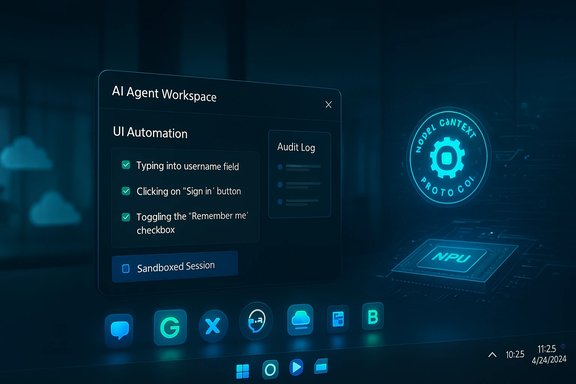
Microsoft’s preview of a Windows 11 framework for third‑party AI agents marks a decisive step toward what Microsoft calls an “agentic OS” — an operating system that doesn’t just host apps and files, but hosts persistent, auditable AI assistants that can act on users’ behalf. The company is building a multi‑layer platform that surfaces agents on the taskbar, runs them inside contained agent workspaces with separate agent accounts, exposes a Model Context Protocol (MCP) for tool integration, and routes workloads between cloud and on‑device inference on Copilot+ PCs — a combination meant to make these assistants both discoverable and powerful.
Background / Overview
Microsoft’s vision is straightforward in ambition: move AI from “assistant that answers” to “agent that does.” The company’s recent Windows Insider previews and developer posts show multiple coordinated pieces arriving together — an Ask Copilot composer in the taskbar, taskbar‑resident agents that display progress and status, an Agent Workspace sandbox where agents can perform UI automation and multi‑step workflows, and the Model Context Protocol (MCP) to standardize how agents discover and call app‑level tools. These primitives are intentionally gated behind an Experimental agentic features toggle and are being delivered as opt‑in previews to Insiders and select enterprise customers. Why this matters: Windows is the place where many knowledge‑work workflows begin and end. By making agents visible in the taskbar and auditable through per‑agent accounts and logs, Microsoft aims to lower the friction to automation while giving IT the controls it expects in enterprise environments. The underlying strategy couples platform changes, developer APIs, and a new hardware entitlement (Copilot+ PCs) to push both on‑device speed and cloud scale.What Microsoft announced — feature by feature
Ask Copilot and taskbar agents
- Ask Copilot replaces or augments the taskbar search pill with a compact, multimodal composer — text, voice (“Hey, Copilot”), and vision inputs — that blends local search with Copilot conversational results and agent invocation. Agents launched from the composer appear as taskbar icons with badges and hover previews that show progress, status, and the ability to pause, take over, or cancel. This makes automation discoverable and keeps users informed while agents run in the background.
Agent Workspace and agent accounts
- Agent Workspace is a new, contained runtime: essentially a lightweight, sandboxed Windows session where an agent can interact with UI elements, open apps, type, click, and manipulate files without blending its actions into the main user session.
- Agent accounts are separate, non‑administrator Windows accounts used to run agents so their activity is auditable, subject to ACLs, and revocable. Microsoft emphasizes least‑privilege defaults and a system setting that explicitly gates agent provisioning.
Copilot Actions (agents that act)
- Copilot Actions are the capability set that converts a natural‑language intent into a sequence of UI interactions and tool calls. In preview, actions can do things like extract tables into Excel, batch process photos, assemble an email with attachments, or summarize documents — all while surfacing progress and audit logs so users or admins can inspect what happened. These actions are interruptible and expected to require user consent before sensitive operations.
Model Context Protocol (MCP) and developer plumbing
- Microsoft is adopting the Model Context Protocol (MCP) as a standardized way for agents to discover and call tools and services exposed by apps and system components. MCP servers (apps, services, connectors) will be discoverable via a registry and Microsoft plans to mediate MCP traffic to reduce direct, unvetted access — a security posture designed to reduce prompt‑injection and tool poisoning vectors. The MCP adoption also aligns Windows with a growing industry current: Google, Anthropic, and other vendors have shown MCP support or analogous tool protocols.
Copilot+ PCs and on‑device acceleration
- Microsoft’s agent strategy is hybrid: some workloads are routed to the cloud; others are intended to run locally on Copilot+ PCs — machines with dedicated NPUs that meet a minimum performance threshold (40+ TOPS is now common on qualifying devices). Microsoft and OEMs argue that local inference reduces latency, protects privacy for some scenarios, and enables offline or high‑performance tasks. Hardware vendors are already shipping Copilot+ certified devices with NPUs in the 40–48 TOPS range.
How this changes the Windows UX and developer model
A new control plane in the taskbar
Putting agents in the taskbar is a deliberate UX decision to reduce friction: instead of opening separate apps or web dashboards, users can launch agent workflows from the place they already look for search and quick actions. Taskbar visibility — icons, hover cards, and notifications — is designed to make agent actions observable and interruptible rather than hidden background activity.Developers get an agent surface
MCP and new Windows AI APIs let third‑party developers register agent capabilities so their assistants can appear system‑wide (Ask Copilot, Start, Search). The platform approach creates a standardized contract for tool semantics and permissioning, helping agents call functions in apps without brittle, app‑specific hacks. This is significant for independent developers and ISVs who want system‑level discoverability.Enterprise governance baked in
Microsoft’s architecture treats agents as principals: separate accounts, explicit folder scopes (e.g., Documents, Desktop, Downloads at preview time), cryptographically signed agents, audit logs, and admin policy controls via Intune/MDM. Those choices aim to make agent adoption manageable for IT teams that must preserve compliance, DLP, and auditability.The strengths: where Windows has a real advantage
- Entrenched desktop context: Windows is where users keep files, apps, and settings — a natural place for an OS‑level assistant that needs to act across that environment. Integrating agents into the taskbar and File Explorer reduces friction for everyday workflows.
- Enterprise integration and Azure: Microsoft’s corporate moat — Azure, Microsoft 365, and existing M365 Copilot — gives it a credible path to enterprise adoption. Enterprises using Azure and Microsoft 365 benefit from integrated identity, compliance tooling, and managed model hosting. This is a major strength against consumer‑first agent efforts.
- Hybrid compute model: Copilot+ PCs plus cloud routing lets Microsoft offer low‑latency local inference where it’s meaningful (e.g., vision, voice, immediate actions) while falling back to Azure for heavier reasoning. Hardware partners are shipping devices that meet Microsoft’s NPU thresholds, making on‑device claims verifiable.
- Standards alignment: By supporting MCP and participating in the ecosystem of open agent protocols, Microsoft improves interoperability for third‑party agents and reduces lock‑in for developers. This is an industry trend with multiple vendors moving the same direction.
The risks and open questions
1) Novel attack surface: cross‑prompt injection and agent hijacking
Microsoft is explicit that agentic AI introduces novel security risks, particularly prompt‑injection attacks where malicious UI elements or embedded content can override agent instructions (cross‑prompt injection, XPIA). Researchers and vendors already warn that GUI‑enabled agents expand the attack surface compared with isolated, server‑side chatbots. Microsoft’s mitigations (sandboxed agent accounts, explicit consent, audit logs, and signed agents) are necessary but not sufficient to eliminate these risks. Independent security analysis and continuous hardening will be essential.2) Hallucinations and integrity of actions
Agents that act amplify the harm from hallucinations. A mistaken summary is a nuisance; an agent that assembles and sends an email, or modifies files based on erroneous reasoning, can produce real damage. Microsoft acknowledges hallucination risk and warns users; engineers must design robust validation, verification checkpoints, and conservative defaults to prevent costly errors.3) Privacy and consent complexity
Giving agents access to local files, vision streams, and calendars raises real privacy tradeoffs. Microsoft’s preview limits initial scopes to known folders and requires per‑operation consent, but real‑world workflows may demand broader access. That will create difficult UX and policy tradeoffs between usefulness and safety, especially in shared or corporate devices.4) Trust and supply‑chain concerns
Microsoft plans to sign and revoke agent binaries and to mediate MCP registries, but these mechanisms create central points of control and potential supply‑chain risk. If compromised registries or signing keys are exploited, the consequences could be large. The industry will need multiple, auditable guardrails: transparent registries, independent audits, and revocation practices.5) Does a PC‑first agent strategy make sense in a mobile‑first world?
Some analysts argue Microsoft is betting on the wrong battleground: agents embedded deep in Windows may be powerful for desktop workflows, but smartphones, browsers, and cloud services compete fiercely for attention. Microsoft historically missed the mobile era; convincing users that Windows should be the home for their agents — rather than their phones or cloud dashboards — is a strategic challenge. Enterprise adoption could carry the day for Microsoft, but consumer relevance remains uncertain. This skepticism is a legitimate counterweight to Microsoft’s platform bet.How Microsoft stacks up against rivals
The agent landscape is crowded and fast‑moving. Microsoft is competing not just with traditional OS rivals but with major AI platform providers:- Google (Gemini): Google has been rapidly integrating Gemini into developer tooling and agent frameworks (Gemini CLI, Agent Mode) and is adding MCP‑style support to its services. Google’s strength is search and browser integration, which makes agent experiences in Chrome and Workspace especially potent. Microsoft’s on‑device angle is an important differentiator versus Google’s cloud‑first model.
- Anthropic (Claude): Anthropic has released browser and SDK‑based agents and introduced standards for agent tools and “skills.” Anthropic’s safety‑focused posture and research roots make it a different kind of competitor — more focused on model behavior, tool safety, and standards like MCP.
- Amazon / AWS (Bedrock, frontier agents): AWS positions itself as the agent infrastructure provider with Bedrock AgentCore and recently announced long‑running “frontier agents” and production‑grade agent tooling. Its enterprise scale and managed services are a natural match for companies that need to run agents at scale. Microsoft will compete here via Azure and tight Microsoft 365 integration.
Practical guidance for IT leaders and power users
- Treat agents as a new class of privilege: Pilot agentic features in controlled groups and treat agent accounts like service accounts with clear policies and audit trails.
- Define scope and consent policies: Use the preview’s known‑folder scoping as a model; require per‑operation consent for high‑risk tasks (sending email, publishing, modifying shared files).
- Test for prompt‑injection and tool hardening: Include prompt‑injection cases in security testing and maintain allow‑lists for trusted MCP servers where possible.
- Measure value, not just novelty: Track time saved, error rates, and compliance incidents to validate agent deployments. The most compelling internal use cases are repetitive, multi‑step workflows that cross apps (report assembly, invoice bundling, meeting prep).
Long‑term outlook — practicality versus hype
Microsoft’s architecture has clear pragmatic strengths: it leverages Windows’ role as a productivity hub, couples device acceleration with cloud routing, and brings enterprise governance to agentic automation. If executed well, agents could materially compress routine desktop tasks and unlock new productivity patterns for knowledge workers and power users.At the same time, the technical and operational hurdles are real: preventing agent hijacking, limiting harm from hallucinations, and designing transparent consent and DLP models are nontrivial. The company’s insistence on opt‑in defaults, auditability, and signing is a sensible starting point — but history shows that attackers move fast and that complexity breeds unexpected failure modes. Independent audits, third‑party testing, and conservative rollout plans will be necessary guardrails. Finally, Microsoft’s success will hinge on two things: convincing enterprises to embed agents into managed endpoints at scale, and proving that desktop‑first agents deliver measurable value beyond what browser, mobile, and cloud agents already provide. The competition is fierce, and standards like MCP make it possible for agents to interoperate across platforms — which both lowers barriers for third‑party agent developers and increases the importance of delivering a truly differentiated Windows experience.
Conclusion
The Windows 11 framework for third‑party AI agents is a bold platform play that reframes the OS as an orchestration layer for intelligent, auditable automation. Microsoft has stitched together UX changes (Ask Copilot and taskbar agents), runtime primitives (Agent Workspace and agent accounts), developer standards (MCP), and hardware entitlements (Copilot+ PCs) into a coherent story that targets both consumer productivity and enterprise governance. These elements collectively make a compelling case for on‑device agents — but they also introduce a new class of security and privacy risks that will require sustained engineering, rigorous testing, and careful policy design.For IT leaders, the practical path is clear: pilot conservatively, validate telemetry and DLP, and treat agents as privileged software that requires the same lifecycle controls as any enterprise service. For Microsoft, the challenge is equally clear: demonstrate that embedding agents deep in Windows produces real, repeatable value that users prefer over browser, mobile, or cloud‑only alternatives — while keeping those agents safe, transparent, and controllable.
Source: Technobezz Microsoft Previews Windows 11 Framework for Third-Party AI Agents
