

Microsoft’s short, matter‑of‑fact follow‑up makes the previously fuzzy promise of an “agentic OS” much more immediate: Windows 11 will begin hosting autonomous, auditable AI agents in contained desktop sessions, and Microsoft is already shipping the plumbing for that future to Windows Insiders as an experimental preview.
Microsoft’s executive-level description of Windows “evolving into an agentic OS” crystallized a strategy that had been gestating across multiple product teams: make AI not only a source of suggestions, but a first‑class actor that can perform multi‑step tasks on behalf of users. The company has tied organizational changes and new platform primitives to that goal, and the messaging has moved from conceptual blog posts to concrete preview documentation and Insider builds.
This transition isn’t limited to Copilot as a chat panel — it spans voice activation (“Hey, Copilot”), a permissioned screen‑aware capability (Copilot Vision), and a runtime model that lets AI take actions (Copilot Actions) inside a separately provisioned environment called an Agent Workspace. Microsoft frames the effort as staged and opt‑in, but the first public signs are unmistakable: a Settings toggle that enables experimental agentic features and a private developer preview for Windows Insiders.
At the same time, the preview exposes a new class of operational and security burdens that enterprises, security teams and developers will need to absorb. The practical success of agentic Windows hinges less on headline features than on execution: timely revocation, robust signing and supply‑chain hygiene, comprehensive telemetry and policy integration, and developer patterns that avoid brittle UI automation. These are solvable problems, but they require sustained attention and third‑party validation before agentic features can be confidently enabled at scale.
For the typical cautious user or reputable enterprise, the current posture is clear: treat agentic features as experimental, test carefully in controlled environments, and demand transparency and governance before enabling agents on production machines. For power users and developers, agentic Windows is an early frontier that offers large productivity gains — provided the community builds robust, auditable, and least‑privilege tooling on top of Microsoft’s primitives.
The era of agents acting autonomously on your PC has begun in preview. The path to making them safe, trustworthy and broadly useful will be determined by the work Microsoft and the ecosystem do now — in documentation, in tooling, and in the hard operational practices of signing, revocation and auditable telemetry. Until those things are proven in the wild, prudent skepticism is the correct posture.
Conclusion: Windows 11’s agentic features are no longer a distant thought experiment — they are an experimental product reality rolling into Insider previews. The engineering foundation is coherent and promising, but the promise of safe, everyday agentic automation depends on ironclad supply‑chain controls, enterprise‑grade governance hooks, and clear, testable privacy and recovery guarantees. The feature set deserves attention from IT pros and privacy advocates alike — but it also demands rigorous pilot programs before any organization treats these agents as production‑ready coworkers.
Source: TechSpot Microsoft explains how Windows 11 will become an agentic OS whether you like it or not
 Background
Microsoft’s executive-level description of Windows “evolving into an agentic OS” crystallized a strategy that had been gestating across multiple product teams: make AI not only a source of suggestions, but a first‑class actor that can perform multi‑step tasks on behalf of users. The company has tied organizational changes and new platform primitives to that goal, and the messaging has moved from conceptual blog posts to concrete preview documentation and Insider builds.This transition isn’t limited to Copilot as a chat panel — it spans voice activation (“Hey, Copilot”), a permissioned screen‑aware capability (Copilot Vision), and a runtime model that lets AI take actions (Copilot Actions) inside a separately provisioned environment called an Agent Workspace. Microsoft frames the effort as staged and opt‑in, but the first public signs are unmistakable: a Settings toggle that enables experimental agentic features and a private developer preview for Windows Insiders.
What Microsoft has actually shipped (and how you enable it)
Short version: the bits are real, discoverable in settings, and gated behind experimental controls in Insider builds.- A new Settings control — Experimental agentic features — appears under Settings → System → AI components → Agent tools. It is off by default and requires administrative consent to turn on; enabling it provisions the agent runtime and agent accounts on the device.
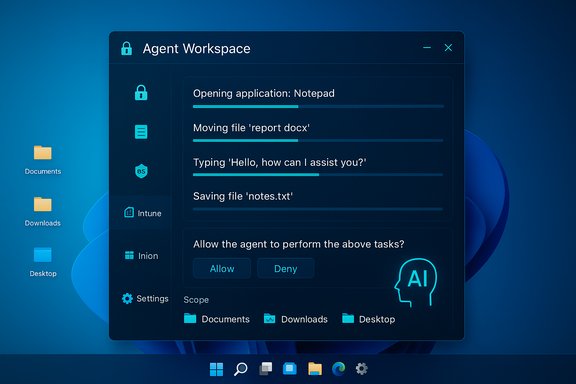
- Agent Workspace: a contained desktop session tied to a dedicated, non‑interactive Windows account that runs the agent. The workspace is visible to the human user, reports progress, and can be paused, stopped, or taken over. Microsoft positions it as more efficient than a full VM while offering comparable isolation for many scenarios.
- Agent accounts: each agent runs under a separate standard Windows user account so actions are auditable, subject to ACLs, and manageable via existing enterprise tooling like Intune/MDM.
- Scoped file access: during the preview, agents are limited to explicitly scoped “known folders” — Documents, Downloads, Desktop, Pictures, Videos, and Music — and must request further permissions. The user is expected to give per‑task confirmations for sensitive steps.
- Copilot Actions: the visible consumer case that demonstrates an agent chaining UI actions — opening apps, clicking, typing, moving files and assembling results — inside the Agent Workspace.
The technical anatomy — how agentic Windows is built
Microsoft’s approach uses well‑known platform concepts (accounts, sessions, ACLs, signing) re‑applied to AI agents.Identity and audit
Treating agents as first‑class principals is central. Each agent is provisioned a standard Windows account so it can be governed with the same administrative controls and logging as any other process. That separation makes actions auditable, supports revocation, and enables enterprise policy application.Contained runtime: Agent Workspace
An Agent Workspace is a separate desktop‑session runtime that runs in parallel with the human user. It’s designed to be lightweight relative to a full virtual machine yet strong enough to contain UI‑level automation and file operations. Microsoft says the workspace dynamically scales CPU and memory according to need.Tooling and protocols
Microsoft is not only shipping runtime isolation but also integration plumbing:- Model Context Protocol (MCP) to let agents discover and call tools and “MCP servers” (local apps, file connectors, calendars) in an auditable, mediated way.
- Windows AI Foundry / Foundry Local as a runtime and developer toolset for running or hybridizing models on device.
- A hardware gating tier (Copilot+ PCs) that lists an NPU baseline — cited guidance referenced a floor around 40+ TOPS for the richest on‑device experiences. These pieces aim to balance latency, privacy and functionality.
Signing, revocation and supply chain controls
Microsoft’s documentation repeatedly mentions agent signing and certificate revocation as critical controls. Agents are intended to be signed, and revocation is presented as a primary mechanism for removing rogue or compromised agents. The exact mechanics and operational latencies for revocation propagation are described as work‑in‑progress.Strengths of Microsoft’s design — what they got right
Microsoft’s preview shows several pragmatic decisions that reduce the risk profile relative to naive agent models.- Opt‑in by default: The experimental toggle is off on new devices and requires an administrator to enable, which reduces accidental exposure on consumer and managed fleets.
- Identity separation: Agent accounts make agent actions auditable and manageable by standard enterprise tools and logs. This is a powerful governance primitive that enterprises already understand.
- Visible, interruptible execution: Agents run in a workspace that shows step‑by‑step progress and allows human takeover or cancellation. That human‑in‑the‑loop UI is a strong UX decision to avoid silent, irreversible changes.
- Least‑privilege default: Initial preview limits agents to a small set of known folders and requires explicit approvals for more sensitive access. This aligns with modern least‑privilege practice.
- Platform primitives over point solutions: By embedding MCP, a local model runtime, and signing/revocation, Microsoft is offering ecosystem primitives rather than a single, closed assistant. That creates a path for enterprise integration and third‑party automation.
Major risks and unanswered operational questions
The preview is promising, but it surfaces a set of material risks every admin and privacy‑minded user should weigh.- Attack surface expansion: Agents that can click, type and manipulate files increase the number of ways an attacker can mount attacks — from compromised agent binaries to prompt/tool chaining abuses. Agent principals create new targets for credential theft and signing misuse.
- Supply‑chain and certificate risk: The security of agent signing and revocation is only as strong as the signing infrastructure and the timeliness of revocation. Operational gaps here could let malicious agents persist. Microsoft notes this as a focus area, but independent validation and production telemetry are still pending.
- Permission UX complexity: Per‑task confirmations and folder scoping are workable in simple cases, but real workflows often require broad or recurring access. The design must balance consent fatigue against practical automation needs — and that trade‑off is not fully solved in the preview.
- Data collection and retention: Agents may capture context, screen imagery, or intermediate artifacts. The preview materials promise audit logs and visible progress, but Microsoft has not yet published exhaustive retention, telemetry or training‑data policies tied specifically to agent operations. That gap matters for regulated environments.
- Fragility of UI automation: Many agent actions rely on UI automation that can break with app updates, regional UIs, or small layout changes. Microsoft recommends MCP‑style connectors over brittle click‑series, but ecosystem adoption will determine whether agents are robust in practice.
- Hardware and entitlement fragmentation: Copilot+ hardware gating (NPUs, top‑end local models) risks creating a two‑tier experience: devices with strong on‑device privacy/latency vs. devices that must rely on cloud fallbacks. That complicates enterprise procurement and user expectation management.
Practical guidance for users and IT professionals
The preview is an experiment, and the safest path for most users and organizations is deliberate, measured testing.- Keep Experimental agentic features turned off on production devices. Only enable it on dedicated test hardware or isolated VMs if you want to evaluate the feature.
- Build a pilot plan: test with non‑sensitive data first, exercise pause/stop/takeover flows, validate logging, and simulate incident response. Confirm that EDR and DLP solutions detect and log agent account activity.
- Require agent signing and an allowlist for third‑party agents in managed environments. Treat agent certificates and signing keys as high‑value assets.
- Enforce least privilege: only grant agents access to the folders and services they strictly need, and prefer MCP connectors over UI automation where possible.
- Backup and version control: agentic automation can accelerate changes; ensure file history, shadow copies or source control exist so recovery is straightforward.
- Update security policies and runbooks to include agent principals — auditing, incident triage, and certificate revocation must be part of endpoint management.
Developer and ecosystem implications
For software vendors and integrators, agentic Windows creates both opportunities and new responsibilities.- Opportunities:
- Build resilient MCP servers that expose enterprise systems in a safe, auditable manner.
- Create verified agent apps that leverage on‑device models for low‑latency scenarios.
- Provide managed lifecycle tools for signing, revocation and telemetry reporting.
- Pitfalls:
- Avoid fragile UI‑only automations that break with app updates; prefer well‑defined tool APIs and MCP integration.
- Plan for certificate lifecycle management and automated revocation workflows; manual processes won’t scale.
What remains unresolved and what to watch next
Microsoft’s preview gives us the architecture and initial UX, but several critical operational details remain to be proven in real deployments:- How quickly will revocation propagate in large fleets and cloud‑connected devices? Will there be gaps that allow compromised agents to persist?
- How granular and comprehensible will agent permission prompts be before the feature ships broadly? Consent fatigue is a real risk if prompts are too frequent or opaque.
- Can MCP registries and mediators be hardened against tool‑discovery and context‑spoofing attacks? The security of MCP is foundational to safe agent tooling.
- Will enterprises get robust telemetry and policy hooks (Intune/MDM, DLP, EDR) early enough to make production adoption safe?
- How will Microsoft’s Copilot+ hardware tier shape expectations and procurement cycles across OEM partners? Wide disparity in device capability could fragment user experience.
Final analysis — a pragmatic verdict
Microsoft has moved the agentic OS concept decisively from rhetoric to prototype infrastructure. The company’s design choices — opt‑in defaults, agent accounts, visible workspaces, least‑privilege folder scoping, signing and revocation primitives — show a sober recognition of the risks that agentic automation introduces. Those are meaningful, defensible engineering decisions.At the same time, the preview exposes a new class of operational and security burdens that enterprises, security teams and developers will need to absorb. The practical success of agentic Windows hinges less on headline features than on execution: timely revocation, robust signing and supply‑chain hygiene, comprehensive telemetry and policy integration, and developer patterns that avoid brittle UI automation. These are solvable problems, but they require sustained attention and third‑party validation before agentic features can be confidently enabled at scale.
For the typical cautious user or reputable enterprise, the current posture is clear: treat agentic features as experimental, test carefully in controlled environments, and demand transparency and governance before enabling agents on production machines. For power users and developers, agentic Windows is an early frontier that offers large productivity gains — provided the community builds robust, auditable, and least‑privilege tooling on top of Microsoft’s primitives.
The era of agents acting autonomously on your PC has begun in preview. The path to making them safe, trustworthy and broadly useful will be determined by the work Microsoft and the ecosystem do now — in documentation, in tooling, and in the hard operational practices of signing, revocation and auditable telemetry. Until those things are proven in the wild, prudent skepticism is the correct posture.
Conclusion: Windows 11’s agentic features are no longer a distant thought experiment — they are an experimental product reality rolling into Insider previews. The engineering foundation is coherent and promising, but the promise of safe, everyday agentic automation depends on ironclad supply‑chain controls, enterprise‑grade governance hooks, and clear, testable privacy and recovery guarantees. The feature set deserves attention from IT pros and privacy advocates alike — but it also demands rigorous pilot programs before any organization treats these agents as production‑ready coworkers.
Source: TechSpot Microsoft explains how Windows 11 will become an agentic OS whether you like it or not
