

Microsoft is preparing a guarded rollout of agentic AI in Windows 11, introducing an opt‑in "agent workspace" model and a new Settings toggle that enables experimental agentic features for a limited set of Windows Insiders — a careful first step toward agents that can act autonomously on a user’s behalf while Microsoft tests security, privacy and usability at scale.
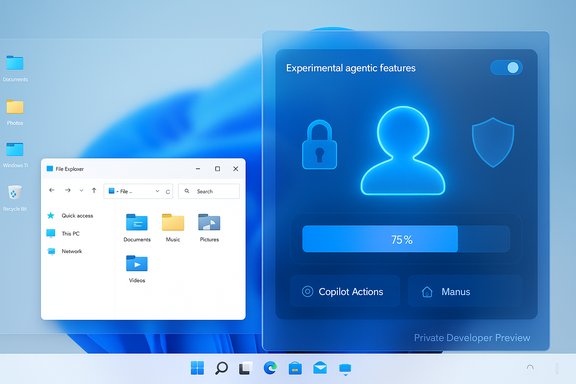
Microsoft’s recent preview build for the Dev and Beta channels introduces a conspicuous new control in Settings — under System → AI components — labeled Experimental agentic features. This toggle gates the provisioning of agent workspaces and the runtime plumbing that will allow AI agents, including Copilot Actions and third‑party agent apps, to operate on local files and interact with desktop apps. The Windows engineering team frames agent workspaces as a contained runtime that provides an agent with its own standard Windows account and a separate desktop session, enabling parallel execution alongside the signed‑in user’s session while enforcing scoped permissions and isolation.
This is being delivered initially as a private, developer‑only preview for a subset of Windows Insiders. Microsoft emphasizes that the early release will be tightly scoping access (known folders such as Documents, Downloads, Desktop and Pictures in the first phase), will run under separate, low‑privilege agent accounts, and will expose visibility and control mechanics (progress views, pause/stop/takeover controls and activity logs) so users and IT administrators can audit and manage agent activity.
However, agentic capabilities expand the attack surface in predictable and novel ways:
The Recall episode demonstrates a cautionary tale that applies directly to agentic features:
Microsoft’s emphasis on a visible progress UI and the ability to intervene mid‑task addresses many UX concerns: the user doesn’t have to trust the agent blindly, and control mechanisms are front and center. However, the UX challenge is to present enough information to make consent meaningful without overwhelming users with technical detail.
At the same time, the model surfaces difficult tradeoffs. A session‑based isolation that prioritizes parallelism and performance requires near‑perfect enforcement by the host OS and consistent updates to close privilege lift or isolation bypass vulnerabilities. The Recall episode demonstrates how rapidly user trust can erode when a feature that touches personal data appears rushed or lacks clear opt‑in defaults. The agentic vision therefore depends not just on technical controls, but on discipline in deployment, transparent telemetry practices, and rapid, public remediation when issues are found.
Enterprises should prepare to evaluate agentic features in sandboxed environments, prioritize policy controls, and insist on integration with identity, endpoint and SIEM systems. Consumers and power users should treat early previews as testbeds: the benefits are compelling, but the features are experimental and should be enabled thoughtfully.
Microsoft’s approach of gating agentic features behind an opt‑in toggle, running agents under separate accounts, and limiting default access during preview is the right start. The critical questions that remain will be resolved outside marketing slides: can Microsoft sustain a rigorous, transparent security posture as agent capabilities expand, and will the company build enterprise management and forensic tooling fast enough to keep pace with evolving threats? The answer to those questions will determine whether agentic Windows becomes a productivity milestone or a cautionary case study in balancing power, privacy and platform trust.
Source: TechRadar https://www.techradar.com/computing...g-is-about-to-start-and-ill-admit-im-nervous/
 Background
Microsoft’s recent preview build for the Dev and Beta channels introduces a conspicuous new control in Settings — under System → AI components — labeled Experimental agentic features. This toggle gates the provisioning of agent workspaces and the runtime plumbing that will allow AI agents, including Copilot Actions and third‑party agent apps, to operate on local files and interact with desktop apps. The Windows engineering team frames agent workspaces as a contained runtime that provides an agent with its own standard Windows account and a separate desktop session, enabling parallel execution alongside the signed‑in user’s session while enforcing scoped permissions and isolation.This is being delivered initially as a private, developer‑only preview for a subset of Windows Insiders. Microsoft emphasizes that the early release will be tightly scoping access (known folders such as Documents, Downloads, Desktop and Pictures in the first phase), will run under separate, low‑privilege agent accounts, and will expose visibility and control mechanics (progress views, pause/stop/takeover controls and activity logs) so users and IT administrators can audit and manage agent activity.
Overview of the new agent primitives in Windows 11
Agent workspace, agent accounts and the toggle
- Agent workspace: A contained desktop session where agents run in parallel with a human user. It is designed to be lighter than a full virtual machine and to provide runtime isolation while still enabling agents to interact with apps and the file system in a controlled way.
- Agent accounts: Each agent runs under its own standard (non‑admin) Windows account, separating agent actions from the user’s own activity and enabling conventional access control lists (ACLs), policy application and revocation.
- Experimental toggle: A single opt‑in control in Settings that must be enabled before agent tooling is allowed to provision and run. The toggle is off by default and intended to gate exposure during preview.
Cortical features being trialed: Copilot Actions, Manus and the Model Context Protocol
Microsoft plans to trial different agent types and scenarios in stages. Early examples surfaced by the company include:- Copilot Actions: A general‑purpose agent designed to carry out multi‑step tasks such as extracting data from PDFs, sorting and deduplicating photos, or automating UI interactions across apps. Copilot Actions will run in agent workspaces and request only the permissions necessary for the task.
- Manus: Presented as a general AI agent integrated into File Explorer and as a native app, Manus is positioned to handle higher‑level tasks — for instance, automating the creation of a website from documents and images stored locally without uploading content to external servers. Manus and similar agents are intended to leverage Windows agentic primitives such as the Model Context Protocol to locate the right documents, maintain context and perform actions locally.
- Model Context Protocol and connectors: Underlying protocols and connectors will enable agents to fetch context (local docs, cloud accounts) and call out to cloud or locally run models according to user permissions.
What Microsoft says about security and privacy
Microsoft’s public position is deliberately conservative at this stage: agentic features are experimental, opt‑in, and will be exposed incrementally. The core security measures outlined are:- Run agents under separate local accounts to enable scoped authorization and runtime isolation.
- Provision agent workspaces that isolate the agent desktop from the user’s session, while keeping the agent’s actions visible and auditable to the user.
- Limit default access in the preview to a narrow set of known folders and require explicit consent for broader access.
- Keep logs and telemetry of agent activity for transparency and diagnostics, and provide mechanisms for users and admins to pause, stop or take over agent tasks.
- Add additional identity and management integration (Entra, MSA support and enterprise management tooling) as the program matures.
Why this matters: new capabilities and new attack surfaces
The shift from passive assistants (answering prompts) to agentic assistants (taking autonomous actions) is a material change for a mainstream desktop OS. The upside is tangible: automating repetitive desktop workflows, extracting structured data from document collections, multi‑app orchestration, and improved accessibility scenarios are all plausible productivity wins. Agents that can safely open apps, extract data and produce artifacts (reports, web pages, batch file edits) could reduce friction for both consumer and enterprise users.However, agentic capabilities expand the attack surface in predictable and novel ways:
- Agents must be given credentials and file access. Misconfigured permissions or bugs in the isolation layer could expose sensitive data.
- Agents interact with UI elements and run workflows — that interaction model adds risks of unintended side effects, automated data deletion, or mistaken data exfiltration if an agent encounters unexpected UIs.
- The runtime and identity plumbing must be sealed against prompt injection, cross‑prompt injection, and other model‑level attacks that could coerce an agent to perform actions it shouldn’t.
- Telemetry and logs, if stored insecurely or accessible via weak credentials, could themselves become a vector for exposure.
Lessons from Recall and why the past matters now
Microsoft’s earlier Recall feature — an AI tool that captured desktop screenshots to create a searchable history — faced immediate scrutiny for privacy and security reasons. The initial plan to ship Recall broadly prompted public backlash, regulatory scrutiny and a decision to delay and scale the preview back into the Windows Insider Program. Key pain points included how frequently activity snapshots were taken, whether sensitive data could be captured, and whether local snapshot databases could be accessed by an attacker or compelled under legal process.The Recall episode demonstrates a cautionary tale that applies directly to agentic features:
- Any feature that records or touches user data regularly will be scrutinized for default settings, storage architecture and access controls.
- Trust erodes quickly when users feel features were designed first, privacy controls second.
- Security‑first designs must be visible and auditable to regain credibility.
Operational and enterprise considerations
Enterprises will evaluate agentic features through a risk‑management lens. The following operational controls and considerations are likely to be central:- Policy and provisioning: IT teams will want group policy/Intune controls that can block or allow agent provisioning, set allowed folders, manage connector permissions, and audit agent accounts.
- Least privilege and breakout prevention: Agent accounts should be strictly low‑privilege. Administrators will expect default deny models and fine‑grained controls for system‑critical resources.
- Visibility and logging: Robust, tamper‑resistant logs of agent actions — who initiated the action, what resources were accessed, what external calls were made — are essential.
- Identity integration: Integration with enterprise identity providers (Entra ID) and conditional access will be necessary to bridge agent actions with corporate compliance and data‑loss prevention policies.
- Data residency and telemetry: Enterprises will require clear controls over whether an agent can use cloud‑hosted models, what telemetry leaves the device, and how long logs are retained.
- Incident response: Playbooks will need to include agent‑specific scenarios — e.g., how to suspend an agent across the fleet, how to revoke agent accounts, and how to scrub agent workspaces and caches.
Technical depth: how the isolation model is described
Microsoft describes agent workspaces as separate Windows sessions — not full virtual machines — intended to strike a balance between security and resource efficiency. Key technical claims and caveats include:- Agent workspaces are visible but isolated: the agent’s UI interactions can be observed in the agent desktop, but they should not be able to peek into the user’s primary desktop session.
- Runtime isolation is enforced by account separation combined with Windows session boundaries and conventional ACLs.
- The workspace is intended to be lightweight, with memory and CPU scaling with activity rather than requiring a VM per agent. This design choice prioritizes performance and concurrency but increases the dependency on the host OS to enforce strict isolation.
- Microsoft also plans to add more granular runtime controls (e.g., blocking unsigned agents, enforcing runtime signing policies, and supporting Entra/MSA identity flows).
Known limitations and unverifiable claims
- Claims about Manus or third‑party agent quality, performance benchmarks or model accuracy — especially vendor‑published scores — should be treated cautiously until independently audited. Company marketing material about agent benchmarks or GAIA scores may overstate real‑world performance; such claims require third‑party verification.
- The promise that workspaces are broadly "more secure than a VM for common operations" depends on precise threat models. In scenarios where a compromised kernel or host process is a concern, VMs with hardware isolation remain stronger boundaries.
- Statements that agentic runtime telemetry will be sufficient to detect every malicious or accidental action are aspirational. Logs are valuable but only as good as monitoring, retention, and access controls. The effectiveness of auditing in practice will depend on how Microsoft and customers configure log collection, retention and analysis.
Practical implications for users and power users
- Agent features will be gated by a clear Settings toggle; users should expect the default to be off. Activation will require explicit consent, and individual agents should request access to specific folders.
- When enabled, users should verify agent account provisioning and review agent permissions before starting an agentic task.
- The agent workspace UI is expected to include visible controls to pause or take over a running task. Users must learn to rely on those controls when an agent “goes off script.”
- Users who prioritize privacy may want to keep agentic features disabled until broader auditing and third‑party assessments are available.
Threat models and security recommendations
To mitigate the main risks introduced by agentic features, the following recommendations will be important for Microsoft and for administrators:- Enforce least privilege for agent accounts: agents should run with the minimal set of permissions necessary for the task.
- Harden agent provisioning flows: agent identities, signing and certificate validation should be mandatory; unsigned agents must be blockable by policy.
- Make consent granular and explicit: agents should request narrow, time‑bounded access to specific resources rather than broad, persistent rights.
- Protect agent logs and indices with strong encryption and access control; consider hardware‑backed enclaves for sensitive indexes.
- Provide enterprise‑grade visibility: integrate agent logs with SIEM and EDR so suspicious agent behavior triggers established response playbooks.
- Test adversarial prompts and injection attacks: Microsoft and third parties must publish threat results and mitigation patterns for prompt and tool‑use attacks.
- Offer revocation and rollback: administrators need fast mechanisms to revoke agent accounts and to revert changes an agent made.
- Maintain transparency reports and clear telemetry controls: users and admins must know exactly what information leaves the device and under which conditions.
User experience and performance trade‑offs
Microsoft claims the agent workspace model is lightweight and designed not to "chomp through system resources." In practice, agent behavior will vary widely depending on the task and the compute model used. Local models that run on device will consume CPU and memory; cloud model calls will add network usage and latency. Users running concurrent agents should expect resource contention scenarios, particularly on older hardware.Microsoft’s emphasis on a visible progress UI and the ability to intervene mid‑task addresses many UX concerns: the user doesn’t have to trust the agent blindly, and control mechanisms are front and center. However, the UX challenge is to present enough information to make consent meaningful without overwhelming users with technical detail.
Where things go next: staged rollout and key milestones to watch
- Private developer preview: limited to Windows Insiders and Copilot Labs participants. This is the period for early security, privacy and UX feedback.
- Broader Insiders preview and staged rollout: Microsoft will gradually expand the set of agents, connectors and supported workloads.
- Enterprise features: identity integration (Entra), Graph/Intune controls, and SIEM/EDR integrations are expected as the agent primitives are hardened for workplace use.
- Third‑party agent ecosystem: native agent apps from third parties (and signed agents) will be an important litmus test for the platform’s viability and security posture.
Final assessment: cautious optimism, guarded expectations
Microsoft’s agent workspace model is an important technical and product step: it acknowledges that agents need runtime isolation, identity, and explicit consent. The design leans on proven OS constructs — accounts, sessions and ACLs — which makes the approach familiar to Windows admins and easier to integrate with existing policies.At the same time, the model surfaces difficult tradeoffs. A session‑based isolation that prioritizes parallelism and performance requires near‑perfect enforcement by the host OS and consistent updates to close privilege lift or isolation bypass vulnerabilities. The Recall episode demonstrates how rapidly user trust can erode when a feature that touches personal data appears rushed or lacks clear opt‑in defaults. The agentic vision therefore depends not just on technical controls, but on discipline in deployment, transparent telemetry practices, and rapid, public remediation when issues are found.
Enterprises should prepare to evaluate agentic features in sandboxed environments, prioritize policy controls, and insist on integration with identity, endpoint and SIEM systems. Consumers and power users should treat early previews as testbeds: the benefits are compelling, but the features are experimental and should be enabled thoughtfully.
Microsoft’s approach of gating agentic features behind an opt‑in toggle, running agents under separate accounts, and limiting default access during preview is the right start. The critical questions that remain will be resolved outside marketing slides: can Microsoft sustain a rigorous, transparent security posture as agent capabilities expand, and will the company build enterprise management and forensic tooling fast enough to keep pace with evolving threats? The answer to those questions will determine whether agentic Windows becomes a productivity milestone or a cautionary case study in balancing power, privacy and platform trust.
Source: TechRadar https://www.techradar.com/computing...g-is-about-to-start-and-ill-admit-im-nervous/
