

Windows is quietly shifting from an application platform into a managed runtime for autonomous AI agents — and that shift changes everything administrators must assume about identity, data boundaries, endpoint security, and operational playbooks for a Microsoft 365 tenant. Microsoft now offers a tenant-level control plane (Agent 365), Windows-level runtime and UX primitives (Ask Copilot, Agent Workspace), and identity plumbing that treats agents as directory principals — a packaged vision designed to scale agentic automation inside enterprises while attempting to make it governable.
Microsoft’s recent product narrative reframes Copilot and Windows features as the foundation for persistent, identity-bound AI agents that can read data, take actions, and interact across services without constant human prompting. These are not single-turn chat assistants; they are goal-oriented actors with memory, connectors, and lifecycle needs. The company has introduced authoring tools such as Copilot Studio and hosted runtimes like Azure AI Foundry, an Agent Store for discoverability, and Agent 365 as the tenant registry and governance surface. On the device side, Windows introduces the concept of an Agent Workspace — a sandboxed runtime that runs agents under distinct agent identities and exposes status via the taskbar “Ask Copilot” composer. This is a platform decision, not a cosmetic UI change. The architecture couples:
The organizations that will succeed will be those that treat agents as production services: inventory them, bind them to identities with strict least privilege, separate training and operational data, harden endpoints (especially browsers), and update SOC playbooks to detect non-human behavioral baselines. Start small, instrument everything, and let governance drive the pace of adoption rather than marketing timelines. The choice today is simple: prepare your tenant deliberately, or clean up preventable incidents later.
Source: Petri IT Knowledgebase Windows and AI Agents: What That Means for Microsoft 365
 Background
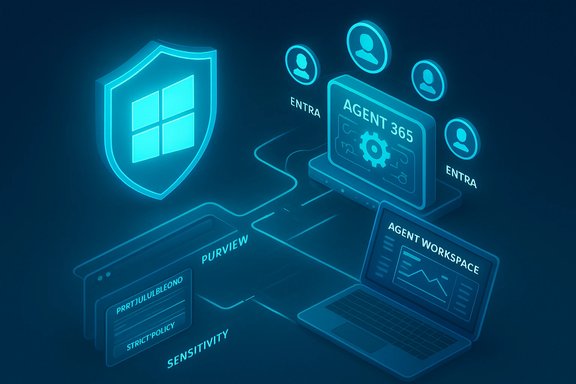
Microsoft’s recent product narrative reframes Copilot and Windows features as the foundation for persistent, identity-bound AI agents that can read data, take actions, and interact across services without constant human prompting. These are not single-turn chat assistants; they are goal-oriented actors with memory, connectors, and lifecycle needs. The company has introduced authoring tools such as Copilot Studio and hosted runtimes like Azure AI Foundry, an Agent Store for discoverability, and Agent 365 as the tenant registry and governance surface. On the device side, Windows introduces the concept of an Agent Workspace — a sandboxed runtime that runs agents under distinct agent identities and exposes status via the taskbar “Ask Copilot” composer. This is a platform decision, not a cosmetic UI change. The architecture couples:- an authoring pipeline (Copilot Studio, Agent Store),
- a control plane (Agent 365) that registers, meters, and enforces policy,
- identity plumbing (Entra Agent IDs and blueprints),
- endpoint runtime surfaces (Agent Workspace, Ask Copilot),
- and data governance integrations (Purview, sensitivity labels, DLP).
What “Windows as an OS for AI agents” actually means
Persistent agents, not disposable features
Traditional applications are inert until a user interacts with them. Agentic workflows change that assumption: agents may persist, maintain state, schedule themselves, chain API calls, and execute multi-step plans autonomously. This persistence means agents are continuously active endpoints in the enterprise attack surface rather than ephemeral UI helpers. Microsoft’s Agent 365 frames agents as registrable, auditable entities to be managed much like service accounts or applications.Agents as first-class identity principals
A major architectural shift is that agents will have identities in Microsoft Entra — “agent identities” — created from blueprints, sponsored by humans or teams, and capable of requesting tokens or acting on behalf of users under defined scopes. Agent identities are purpose-built to scale ephemeral software principals while enabling consistent policy application (conditional access, revocation, lifecycle controls). Microsoft’s Entra docs explicitly describe agent identities, blueprints, and credential types designed for non-human principals.OS-level plumbing for discovery and containment
Windows will surface agents via the taskbar Ask Copilot composer, provide an on‑device registry for agent connectors, and offer a constrained Agent Workspace runtime that isolates agent activity under lower-privilege accounts and generates auditable telemetry. The goal is to prevent uncontrolled browser extensions and shadow SaaS automations from proliferating by making agent execution an OS-level, admin-visible operation.Why identity becomes the control plane
When software can act autonomously, identity is the only practical way to enforce least privilege, rotate credentials, run access reviews, and revoke capabilities at scale. With agents in the mix, the following become mission-critical:- Agent identities are tier‑0 assets. Treat them with the same rigor as critical service principals and admin accounts. Microsoft documents agent identities as special service principals created from blueprints; they can get tokens and act autonomously in a tenant.
- Conditional Access and session controls matter more. Policies must distinguish human sessions from agent sessions and enforce session restrictions (for example, blocking downloads, requiring managed devices, or enforcing session controls on SharePoint/OneDrive). Agent 365 is designed to integrate with Entra conditional access to apply those constraints at the agent level.
- Just-in-time privilege and Privileged Identity Management (PIM) are non-negotiable. Any broad Graph or tenant-wide permission granted to an agent becomes a powerful attack vector if compromised. Use time-bound elevation, approval workflows, and granular consent to limit blast radius.
- App consent sprawl becomes a real threat. Every agent is effectively an application with scopes. Unrestricted Graph permissions or legacy OAuth grants will scale risk quickly when many agents are deployed.
Data boundaries, classification, and training hygiene
Most agent-driven failures will be accidental, not outright malicious. An agent reading too widely — or using the wrong dataset for training — can leak sensitive information at scale. That’s why data governance is the most important safety control for agents.- Sensitivity labels and Purview integration: Apply labels consistently across SharePoint, OneDrive, and Teams. Microsoft explicitly positions Agent 365 to work with Purview to surface and enforce data protection policies for agent workflows.
- Clear separation of training vs operational data: Agent training corpora should be curated, enumerated, and segregated. Operational data (active mailboxes, PII, HR records) should not be used as raw training material without strict sanitization and legal approval.
- Session-level controls on data movement: Prevent agents from exfiltrating labeled content by enforcing session controls — for instance, blocking copy/paste, downloads, or uploads when agents access protected content.
- Zero-trust for connectors: The Model Context Protocol and connector manifests let agents call tools. These connectors must be verified and restricted; treat them like any integration that can access sensitive APIs or datasets.
The browser as a privileged workspace
Browsers are rapidly becoming the primary front door for agents: extensions, SaaS integrations, and agent pipelines converge in the browser. That means the browser is effectively a privileged application and must be treated as such.- Harden browser policy: Use Defender for Endpoint browser isolation where appropriate, enforce strict extension whitelists, and separate corporate from personal browsing contexts.
- Monitor cross-tab and cross-origin data movement: Agents that operate in the browser can move data between tabs and services quickly. Data loss prevention rules should monitor and block suspicious flows.
- Assume agents will route around weak controls: If the browser is unmanaged or extension policies are lax, agents and their creators will find ways to bypass tenant-level governance. Harden the browser before agents are broadly deployed.
SOC and detection: non-human baselines and new telemetry patterns
Agents generate telemetry that looks different from human operators:- higher-frequency reads of sensitive data,
- repeated API chains across Graph and third-party services,
- rapid multi‑step actions (open, read, summarize, write),
- automated content generation at scale.
- Instrument Agent 365 and Agent Workspace telemetry into your SIEM.
- Create detection rules for anomalous agent behaviors (rapid mass reads, unexpected outbound connector calls).
- Implement reversible automated remediation (kill-switches, forced token revocation, quarantining of agent runtimes).
- Include human-in-the-loop approvals for any automated remediation that changes state (deletes data, writes to finance systems).
Technical claims you should verify before a rollout
Several concrete technical claims underpin the agent story. Verify these against vendor documentation and your procurement planning:- Agent identities and blueprints: Microsoft Learn documents agent identities, blueprints, and credential types for scale and ephemeral usage; validate whether the agent blueprint model fits your lifecycle processes before mass adoption.
- Agent 365 availability and preview constraints: Agent 365 is available initially via Microsoft’s Frontier program and staged previews; availability in your tenant will depend on program enrollment and licensing prerequisites. Confirm preview prerequisites and timelines with Microsoft before planning broad deployments.
- Copilot+ PC hardware baseline (40+ TOPS NPU): Microsoft defines Copilot+ devices as having NPUs capable of 40+ TOPS (trillions of operations per second). That hardware baseline is central to on-device model execution claims and low-latency experiences; validate device compatibility and real-world benchmarks for targeted workloads.
- Model routing and BYOM controls: Microsoft promotes multi-model routing and BYOM (bring-your-own-model) choices, but tenant controls to enforce model provenance, residency, and routing policies must be configured and validated to meet compliance requirements.
- Market projections (1.3 billion agents by 2028): Microsoft references an IDC Info Snapshot projecting 1.3 billion agents by 2028 to motivate governance urgency. That projection was sponsored research and should be used as a planning signal — not as a deterministic forecast for every organization’s tenant. Treat such figures cautiously and validate scale assumptions via internal pilots.
Practical checklist: what to do now (tenant hardening and pilots)
Below is a prioritized action list to prepare Microsoft 365, Entra ID, and Windows endpoints for agents.- Modernize Conditional Access and session controls
- Build baselines for sign-in risk, require device compliance, and enforce session restrictions on SharePoint/OneDrive.
- Apply Conditional Access App Controls to limit downloads from web sessions.
- Prune and review app consent
- Audit all apps with Graph-level permissions; any broad scopes (Directory.Read.All, Mail.ReadWrite) must be justified or removed.
- Convert legacy app grants to permission grants that support least privilege.
- Treat the browser as privileged
- Enforce extension whitelisting and isolation.
- Segment corporate browsing and restrict unmanaged profiles.
- Aggressive data classification and Purview integration
- Apply sensitivity labels across SharePoint, OneDrive, and Teams.
- Test policy enforcement when agents access labeled content.
- Pilot agents in contained sandboxes
- Use Windows 365 for Agents or dedicated non‑production tenants with heavy logging.
- Start with read-only or suggest-only agent modes and verify outputs against human review.
- Establish AgentOps processes
- Define sponsorship, cost centers, retention, and deprovisioning for every agent.
- Use access reviews and PIM for agent identity lifecycle.
- Update SOC playbooks and telemetry
- Ingest Agent 365 telemetry into Sentinel or your SIEM.
- Define rules for rapid mass reads, cross‑agent chains, and connector misuse.
- Legal, procurement, and HR alignment
- Document model routing, data residency, and training-data policies.
- Add agent lifecycle clauses to vendor contracts and procurement checklists.
- Level 1 — Baseline Hardening
- Modernize Conditional Access.
- Remove unjustified Graph permissions.
- Apply basic browser isolation.
- Level 2 — Governed Automation
- Enforce labeling and extension whitelists.
- Implement workload identity lifecycle management.
- Whitelist agent templates only through an Agent Store.
- Level 3 — Agent‑Accredited Tenant
- Dedicated agent sandboxes (Windows 365 for Agents).
- SOC automation loops with reversible policies.
- Clear separation between training and operational datasets.
Strengths and opportunities
Microsoft’s approach has important strengths that make the agent vision practical for enterprises that already live inside its ecosystem:- Integrated stack: Copilot Studio → Agent Store → Agent 365 → Entra → Purview/Defender reduces integration friction for organizations already invested in Microsoft 365 and Azure.
- Governance-first framing: Microsoft designed agents as identity-bound principals with telemetry, admin kill-switches, and quarantine workflows — a stronger starting point than completely uncontrolled browser or plugin-based agentization.
- Developer and hardware options: On-device acceleration (Copilot+ PCs with NPUs) and multi-model routing let organizations balance latency, cost, and compliance per workload — enabling hybrid execution strategies.
- Enterprise-suitable UX: Packaging agents as managed, sponsored entities that appear in admin centers and can receive lifecycle treatment makes them easier to govern than ad-hoc bots.
Risks and unresolved gaps
While the platform approach is pragmatic, the agent era introduces systemic risks:- Privilege creep at scale: A single misconfigured agent with broad Graph privileges can cause massive exposure when multiplied across hundreds or thousands of agent identities.
- Accidental data leakage: Agents can summarize or reconstitute sensitive content in unexpected outputs; classification and session controls are the primary mitigations, but they are only as good as their coverage.
- New attack modalities: Cross‑prompt injection, connector abuse, and maliciously crafted inputs that hijack agent behavior are active threat vectors. Vendors and independent researchers are already calling attention to such scenarios.
- Operational complexity and tooling debt: AgentOps — the processes, approvals, and tooling required to manage thousands of agent identities — will require investment comparable to an IAM program for human identities.
- Dependency on vendor claims and previews: Many capabilities are preview-only or gated by early-access programs; timelines and availability may shift, so procurement and rollout planning must remain flexible.
A realistic pilot plan (90-day template)
- Establish governance cells (IAM, SecOps, Legal, Data Stewards).
- Enroll in a preview program or create an isolated tenant for experiments.
- Deploy a limited set of vetted agent templates (Copilot Studio read-only templates).
- Configure Entra blueprints and conditional access for those agent identities.
- Label and classify pilot data; restrict model routing to an approved model endpoint.
- Instrument telemetry into Sentinel and run simulated threat scenarios.
- Conduct a red-team focused on connector abuse and cross-prompt injection.
- Capture the pilot lessons, update agent lifecycle processes, and prepare for a phased rollout.
Conclusion
Windows and Microsoft 365 are moving toward a future where autonomous, identity-bound AI agents are a routine operational layer rather than rare experiments. Microsoft’s product stack — Agent 365, Entra agent identities, Agent Workspace, Copilot Studio, and Copilot+ device archetypes — gives enterprises a path to adopt agents in a managed way. But the shift amplifies existing weaknesses: misconfigured identities, lax app consent, unclassified data, and permissive browser policies become exponentially more dangerous when agents are running at scale.The organizations that will succeed will be those that treat agents as production services: inventory them, bind them to identities with strict least privilege, separate training and operational data, harden endpoints (especially browsers), and update SOC playbooks to detect non-human behavioral baselines. Start small, instrument everything, and let governance drive the pace of adoption rather than marketing timelines. The choice today is simple: prepare your tenant deliberately, or clean up preventable incidents later.
Source: Petri IT Knowledgebase Windows and AI Agents: What That Means for Microsoft 365
