

Microsoft has updated the Secure Boot status report in Windows Autopatch to give Intune administrators device-level visibility into certificate status, trust configuration, rollout confidence, alerts, and restart-dependent readiness as organizations prepare for Secure Boot certificate updates tied to expiring legacy certificates in 2026. The change is not just another dashboard refresh; it is Microsoft admitting that policy deployment and actual boot-chain readiness are very different things. For IT teams staring down firmware variability, OEM dependencies, diagnostic-data gaps, and hotpatch schedules, the new report turns Secure Boot from a black-box compliance chore into an operational rollout problem. That is progress, but it also makes clear how much of modern Windows security now depends on telemetry, staged confidence, and careful fleet segmentation.
Secure Boot has always sounded simple in the abstract. A device should start only with trusted, digitally signed components, establishing a chain of trust before Windows gets a chance to defend itself. In practice, the feature lives at the intersection of firmware, certificates, Windows Boot Manager, OEM decisions, update policy, and the uncomfortable reality that enterprise fleets are rarely as standard as procurement spreadsheets imply.
That is why the updated Secure Boot status report matters. Microsoft is not merely showing whether a policy was assigned. It is showing whether a device appears ready for the certificate update path that Microsoft wants organizations to take before older Secure Boot certificates age out.
The difference is subtle but important. A policy assignment tells an administrator what Intune intended to do. A readiness report tells an administrator whether the endpoint, firmware, and trust configuration are in a state where that intention is likely to become reality.
That distinction has haunted Windows management for years. From BitLocker enforcement to Windows Update for Business rings, the gap between configuration and outcome is where help desks burn time. Secure Boot certificate rotation raises the stakes because failure is not just cosmetic; it can sit below the operating system, where remediation is harder and confidence is harder to manufacture.
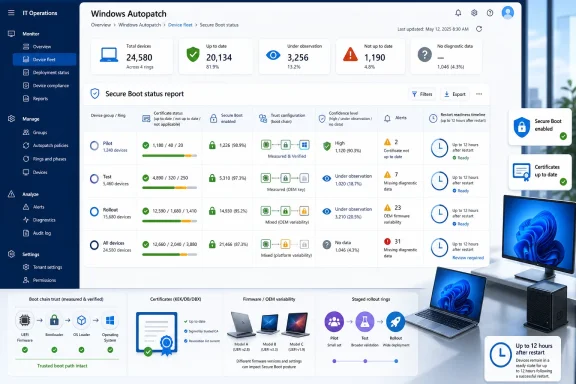
Microsoft’s recommended approach for managed Windows clients is the EnableSecurebootCertificateUpdates policy. When enabled, supported and eligible devices can receive Secure Boot certificate updates automatically through Windows Update. But the update is not fully complete until the device restarts, and the report itself warns that status can take up to 12 hours after restart to appear accurately.
That restart requirement is not a footnote. It is the difference between a policy that looks successful in a portal and a security change that has actually landed in the boot environment. For organizations trying to maintain uptime while meeting security deadlines, that turns Secure Boot into a scheduling and communications issue as much as a technical one.
The updated Autopatch report tries to provide the missing bridge. It asks administrators to stop treating Secure Boot as an on-off property and instead evaluate which devices have updated certificates, which devices are blocked by firmware or configuration, and which devices should not be touched automatically yet.
The report also surfaces whether Secure Boot is enabled and how the trust model is configured. Some devices trust Microsoft-only components. Others trust both Microsoft and non-Microsoft components. That distinction matters because the certificates a device requires depend on what the firmware is configured to trust, not simply on which files happen to exist on disk.
This is where Microsoft is usefully pushing back against a common administrative instinct. In a certificate rollout, “missing” does not always mean “broken.” A device may be compliant without a particular certificate if that certificate is not applicable to the device’s trust configuration.
That nuance is exactly what many large fleets need. A script that reports certificate presence may be fast, but it can also create noisy false positives. A report that understands applicability gives administrators a better chance of separating real risk from harmless absence.
That framing is both practical and philosophically interesting. Microsoft is not saying every supported Windows device is equally ready. It is saying some devices have enough observed evidence behind them to justify automation, while others need human caution.
The labels make the intended workflow clear. High-confidence devices can move through automatic or planned deployment depending on policy settings. Devices under observation should be tested in a controlled rollout. Devices with no observed data require careful validation. Temporarily paused devices should not be pushed because Microsoft has identified a known issue. Unsupported devices should be excluded from automation.
This is modern Windows servicing in miniature. The safest update is no longer simply the one with the right package. It is the one whose hardware cohort, firmware behavior, diagnostic history, and deployment channel line up well enough for Microsoft to say, in effect, “we have seen enough of these to proceed.”
There is a trade-off. Organizations that restrict diagnostic data may find the report less useful. The new visibility depends on devices sending the required signals back to Microsoft’s management plane. That may be acceptable in many enterprise Autopatch environments, but it is still a reminder that richer fleet intelligence increasingly comes with a telemetry dependency.
That is a big shift. Traditional patch management asks, “Which devices need this update?” Autopatch increasingly asks, “Which devices look safe enough to receive this update now, based on what Microsoft has observed elsewhere?”
For administrators, that can be useful. Nobody wants to manually validate every firmware permutation across a geographically distributed estate. If Microsoft can identify high-confidence device families and known-risk cohorts, it can save weeks of trial deployment.
But it also changes the trust relationship. The administrator is no longer just trusting Microsoft’s update binaries. They are trusting Microsoft’s classification model, Microsoft’s telemetry interpretation, and Microsoft’s decision to mark certain devices as paused, unsupported, or high confidence.
That does not make the system wrong. It makes it important. When a report becomes the basis for operational decisions, its definitions and refresh behavior matter as much as its UI.
That timestamp is a small antidote to a large problem: stale dashboards. Every IT team has seen a management console that looks authoritative while quietly reflecting yesterday’s state, last week’s check-in, or a device that has not been online since a sales trip. In Secure Boot certificate rollout, stale state can lead to the wrong conclusion.
Microsoft’s warning that status updates can take up to 12 hours after restart is therefore not a minor limitation. It is an operational constraint. If an administrator reboots a pilot group and immediately judges the rollout by the report, they may misread success as failure.
The same applies to inactive devices. A laptop in a drawer may show as unknown, not because it is inherently risky but because it has not sent the right data. The report gives better visibility, but it does not abolish the old management truth that offline endpoints remain the graveyard of clean compliance charts.
That means some hotpatch-managed devices may not get updated high-confidence data in May or June 2026. They may also fail to become eligible for automatic Secure Boot certificate deployment during that period. For administrators who adopted hotpatching to avoid restarts and reduce disruption, the Secure Boot rollout introduces a familiar Windows compromise: sooner or later, the boot chain demands a reboot.
The design makes sense technically. Updating Secure Boot certificates and the Windows Boot Manager is not the same as swapping in a user-mode component. It touches the startup path, and the machine has to restart to complete the change.
Operationally, however, it complicates the message. Hotpatching promises fewer reboots, while Secure Boot certificate rotation requires at least one. Organizations may need to install the latest monthly non-security preview update instead of a hotpatch update, restart devices, and possibly pause hotpatching temporarily while the Secure Boot rollout completes.
This is not a failure of hotpatching so much as a reminder of its boundary. Hotpatch can reduce restart frequency for certain update classes. It cannot make firmware-adjacent trust changes magically apply without crossing the reboot line.
That is why the “temporarily paused” state matters. It is Microsoft’s way of telling administrators not to force the issue where known problems exist. In those cases, the next step may be an OEM firmware update, vendor guidance, or exclusion from automated deployment until the platform is ready.
This is where large enterprises have an advantage over smaller shops. A mature endpoint management team may already have hardware models mapped to firmware baselines, BIOS settings, driver packages, and vendor support channels. A smaller organization may only discover hardware diversity when a rollout stalls.
The report narrows that gap, but it does not eliminate it. Secure Boot lives below the comfort layer of normal Windows administration, and that means the OEM remains part of the blast radius.
By putting Secure Boot status into the Windows Autopatch reporting flow, Microsoft is reducing the need for one-off validation scripts. That matters because custom scripts often become institutional folklore. Someone writes them during a crisis, someone else copies them into Intune, and three years later nobody remembers their assumptions.
Still, the report does not eliminate validation. Microsoft itself recommends careful testing for devices with limited or no observed data. A management portal can tell an administrator where to focus, but it should not be treated as a substitute for pilot rings, rollback planning, and help-desk readiness.
The best use of the report is not to press “deploy everywhere” with more confidence. It is to define smaller, safer populations: high-confidence devices that can proceed, uncertain devices that need lab or pilot testing, paused devices that should be left alone, and unsupported devices that must be handled outside the automated path.
That makes communication essential. If an organization is about to roll out Secure Boot certificate updates, it should explain why the restart is necessary, what users should expect, and how to report trouble. The worst time to teach users about boot-chain trust is after a device behaves differently.
Help desks should also understand that “Secure Boot disabled” is not the same as “certificate update failed.” Microsoft’s report includes devices with Secure Boot disabled for visibility, but certificate readiness presupposes that Secure Boot is enabled. Those devices are not necessarily part of the certificate remediation path, though they may raise separate security-policy questions.
This is where the report’s device-level detail can keep support teams from chasing the wrong issue. A disabled Secure Boot state, an inapplicable certificate, a stale diagnostic timestamp, and a known paused firmware cohort all require different responses. Treating them all as generic noncompliance would waste time and increase risk.
That is the right model. A high-confidence Surface laptop, a five-year-old OEM desktop with mixed firmware revisions, a hotpatch-managed Windows 11 Enterprise device, and an intermittently connected field laptop should not all be handled identically. The report gives administrators a way to see those differences before they become incidents.
The practical result is fewer broad deployments driven by incomplete information. Instead of pushing a policy and hoping the fleet behaves, administrators can use certificate status, trust configuration, confidence level, alerts, and timestamps to build a rollout plan with fewer blind spots.
This is especially important because Secure Boot failures are psychologically expensive. Even when a problem is recoverable, anything involving startup, boot managers, firmware, or recovery keys feels catastrophic to end users and executives. Avoiding unnecessary surprises is part of the security work.
Microsoft’s updated Secure Boot status report is ultimately a sign of where Windows management is heading: away from simple policy assignment and toward evidence-based rollout decisions shaped by device telemetry, firmware reality, and staged confidence. That future is more complex than the old checkbox model, but it is also more honest. Secure Boot certificate rotation was never going to be solved by pretending every endpoint is the same; the organizations that succeed will be the ones that use the new visibility to move deliberately, reboot intentionally, and let the data narrow the blast radius before the certificate clock forces the issue.
 Microsoft Moves Secure Boot from Checkbox Compliance to Fleet Intelligence
Secure Boot has always sounded simple in the abstract. A device should start only with trusted, digitally signed components, establishing a chain of trust before Windows gets a chance to defend itself. In practice, the feature lives at the intersection of firmware, certificates, Windows Boot Manager, OEM decisions, update policy, and the uncomfortable reality that enterprise fleets are rarely as standard as procurement spreadsheets imply.That is why the updated Secure Boot status report matters. Microsoft is not merely showing whether a policy was assigned. It is showing whether a device appears ready for the certificate update path that Microsoft wants organizations to take before older Secure Boot certificates age out.
The difference is subtle but important. A policy assignment tells an administrator what Intune intended to do. A readiness report tells an administrator whether the endpoint, firmware, and trust configuration are in a state where that intention is likely to become reality.
That distinction has haunted Windows management for years. From BitLocker enforcement to Windows Update for Business rings, the gap between configuration and outcome is where help desks burn time. Secure Boot certificate rotation raises the stakes because failure is not just cosmetic; it can sit below the operating system, where remediation is harder and confidence is harder to manufacture.
The Certificate Clock Is Now an Operations Problem
The underlying pressure is the Secure Boot certificate lifecycle. Many Windows devices still rely on certificates from the early Secure Boot era, and Microsoft has been pushing organizations toward newer certificate authorities before older ones expire. This is the sort of maintenance task that sounds routine until you remember that it touches the code path a machine uses to decide whether it can boot.Microsoft’s recommended approach for managed Windows clients is the EnableSecurebootCertificateUpdates policy. When enabled, supported and eligible devices can receive Secure Boot certificate updates automatically through Windows Update. But the update is not fully complete until the device restarts, and the report itself warns that status can take up to 12 hours after restart to appear accurately.
That restart requirement is not a footnote. It is the difference between a policy that looks successful in a portal and a security change that has actually landed in the boot environment. For organizations trying to maintain uptime while meeting security deadlines, that turns Secure Boot into a scheduling and communications issue as much as a technical one.
The updated Autopatch report tries to provide the missing bridge. It asks administrators to stop treating Secure Boot as an on-off property and instead evaluate which devices have updated certificates, which devices are blocked by firmware or configuration, and which devices should not be touched automatically yet.
The New Report Admits That “Up to Date” Is Conditional
The most visible improvement is the new Certificate status column. At a glance, devices can appear as up to date, not up to date, or not applicable. That sounds basic, but the value is in the drill-down: administrators can select a device and see certificate-level details rather than relying on custom scripts or scattered registry checks.The report also surfaces whether Secure Boot is enabled and how the trust model is configured. Some devices trust Microsoft-only components. Others trust both Microsoft and non-Microsoft components. That distinction matters because the certificates a device requires depend on what the firmware is configured to trust, not simply on which files happen to exist on disk.
This is where Microsoft is usefully pushing back against a common administrative instinct. In a certificate rollout, “missing” does not always mean “broken.” A device may be compliant without a particular certificate if that certificate is not applicable to the device’s trust configuration.
That nuance is exactly what many large fleets need. A script that reports certificate presence may be fast, but it can also create noisy false positives. A report that understands applicability gives administrators a better chance of separating real risk from harmless absence.
Confidence Levels Turn Telemetry into Policy Advice
The most consequential addition is the Confidence level column. Microsoft is using observed data from similar devices and firmware configurations to guide whether an administrator should allow automatic deployment, test manually, pause, or exclude a device from automation.That framing is both practical and philosophically interesting. Microsoft is not saying every supported Windows device is equally ready. It is saying some devices have enough observed evidence behind them to justify automation, while others need human caution.
The labels make the intended workflow clear. High-confidence devices can move through automatic or planned deployment depending on policy settings. Devices under observation should be tested in a controlled rollout. Devices with no observed data require careful validation. Temporarily paused devices should not be pushed because Microsoft has identified a known issue. Unsupported devices should be excluded from automation.
This is modern Windows servicing in miniature. The safest update is no longer simply the one with the right package. It is the one whose hardware cohort, firmware behavior, diagnostic history, and deployment channel line up well enough for Microsoft to say, in effect, “we have seen enough of these to proceed.”
There is a trade-off. Organizations that restrict diagnostic data may find the report less useful. The new visibility depends on devices sending the required signals back to Microsoft’s management plane. That may be acceptable in many enterprise Autopatch environments, but it is still a reminder that richer fleet intelligence increasingly comes with a telemetry dependency.
Autopatch Is Becoming a Risk-Ranking System, Not Just an Update Service
Windows Autopatch began as a way to reduce the operational burden of keeping Windows devices current. But reports like this show its direction: Autopatch is becoming a place where Microsoft translates its global servicing observations into enterprise-local risk decisions.That is a big shift. Traditional patch management asks, “Which devices need this update?” Autopatch increasingly asks, “Which devices look safe enough to receive this update now, based on what Microsoft has observed elsewhere?”
For administrators, that can be useful. Nobody wants to manually validate every firmware permutation across a geographically distributed estate. If Microsoft can identify high-confidence device families and known-risk cohorts, it can save weeks of trial deployment.
But it also changes the trust relationship. The administrator is no longer just trusting Microsoft’s update binaries. They are trusting Microsoft’s classification model, Microsoft’s telemetry interpretation, and Microsoft’s decision to mark certain devices as paused, unsupported, or high confidence.
That does not make the system wrong. It makes it important. When a report becomes the basis for operational decisions, its definitions and refresh behavior matter as much as its UI.
The Alerts Column Is a Quiet Warning About False Certainty
The new Alerts column may be less glamorous than confidence levels, but it is arguably just as important. It calls out devices missing diagnostic data, devices requiring action, and timestamps showing when diagnostic data was last reported.That timestamp is a small antidote to a large problem: stale dashboards. Every IT team has seen a management console that looks authoritative while quietly reflecting yesterday’s state, last week’s check-in, or a device that has not been online since a sales trip. In Secure Boot certificate rollout, stale state can lead to the wrong conclusion.
Microsoft’s warning that status updates can take up to 12 hours after restart is therefore not a minor limitation. It is an operational constraint. If an administrator reboots a pilot group and immediately judges the rollout by the report, they may misread success as failure.
The same applies to inactive devices. A laptop in a drawer may show as unknown, not because it is inherently risky but because it has not sent the right data. The report gives better visibility, but it does not abolish the old management truth that offline endpoints remain the graveyard of clean compliance charts.
Hotpatching Collides with the Certificate Rollout Calendar
The most awkward wrinkle is hotpatching. Microsoft’s note is blunt: organizations using hotpatch updates may need a one-time strategy change because high-confidence deployment data is included in monthly non-security preview updates, typically released in the fourth week of the month. Devices receiving hotpatch updates do not receive those preview updates in the same way.That means some hotpatch-managed devices may not get updated high-confidence data in May or June 2026. They may also fail to become eligible for automatic Secure Boot certificate deployment during that period. For administrators who adopted hotpatching to avoid restarts and reduce disruption, the Secure Boot rollout introduces a familiar Windows compromise: sooner or later, the boot chain demands a reboot.
The design makes sense technically. Updating Secure Boot certificates and the Windows Boot Manager is not the same as swapping in a user-mode component. It touches the startup path, and the machine has to restart to complete the change.
Operationally, however, it complicates the message. Hotpatching promises fewer reboots, while Secure Boot certificate rotation requires at least one. Organizations may need to install the latest monthly non-security preview update instead of a hotpatch update, restart devices, and possibly pause hotpatching temporarily while the Secure Boot rollout completes.
This is not a failure of hotpatching so much as a reminder of its boundary. Hotpatch can reduce restart frequency for certain update classes. It cannot make firmware-adjacent trust changes magically apply without crossing the reboot line.
The Report Helps, but It Does Not Remove OEM Risk
One of the recurring themes in Microsoft’s Secure Boot guidance is firmware variation. The updated Autopatch report can show readiness, confidence, and known pauses, but it cannot rewrite an OEM’s firmware behavior. If a device needs a firmware update before certificates can be applied safely, the report can point toward the problem but not solve it alone.That is why the “temporarily paused” state matters. It is Microsoft’s way of telling administrators not to force the issue where known problems exist. In those cases, the next step may be an OEM firmware update, vendor guidance, or exclusion from automated deployment until the platform is ready.
This is where large enterprises have an advantage over smaller shops. A mature endpoint management team may already have hardware models mapped to firmware baselines, BIOS settings, driver packages, and vendor support channels. A smaller organization may only discover hardware diversity when a rollout stalls.
The report narrows that gap, but it does not eliminate it. Secure Boot lives below the comfort layer of normal Windows administration, and that means the OEM remains part of the blast radius.
Microsoft Is Reducing Script Dependency Without Killing the Need for Validation
The new certificate-level drill-down is a welcome change because the alternative is custom inventory plumbing. Administrators have historically leaned on PowerShell, registry queries, event logs, and device scripts to answer questions that the management plane should arguably answer itself.By putting Secure Boot status into the Windows Autopatch reporting flow, Microsoft is reducing the need for one-off validation scripts. That matters because custom scripts often become institutional folklore. Someone writes them during a crisis, someone else copies them into Intune, and three years later nobody remembers their assumptions.
Still, the report does not eliminate validation. Microsoft itself recommends careful testing for devices with limited or no observed data. A management portal can tell an administrator where to focus, but it should not be treated as a substitute for pilot rings, rollback planning, and help-desk readiness.
The best use of the report is not to press “deploy everywhere” with more confidence. It is to define smaller, safer populations: high-confidence devices that can proceed, uncertain devices that need lab or pilot testing, paused devices that should be left alone, and unsupported devices that must be handled outside the automated path.
Secure Boot Readiness Is Now a Communications Challenge
There is also a people problem hiding inside the technical details. Users do not care whether a reboot is required to update the Secure Boot database or the Windows Boot Manager. They care that their device restarts, possibly outside their preferred rhythm, and that any post-update warning or recovery prompt looks alarming.That makes communication essential. If an organization is about to roll out Secure Boot certificate updates, it should explain why the restart is necessary, what users should expect, and how to report trouble. The worst time to teach users about boot-chain trust is after a device behaves differently.
Help desks should also understand that “Secure Boot disabled” is not the same as “certificate update failed.” Microsoft’s report includes devices with Secure Boot disabled for visibility, but certificate readiness presupposes that Secure Boot is enabled. Those devices are not necessarily part of the certificate remediation path, though they may raise separate security-policy questions.
This is where the report’s device-level detail can keep support teams from chasing the wrong issue. A disabled Secure Boot state, an inapplicable certificate, a stale diagnostic timestamp, and a known paused firmware cohort all require different responses. Treating them all as generic noncompliance would waste time and increase risk.
The Real Win Is Targeted Remediation
The strongest argument for the updated report is that it enables targeted remediation. Secure Boot certificate updates are not uniform across devices, and Microsoft is finally presenting the rollout as a differentiated process rather than a single switch.That is the right model. A high-confidence Surface laptop, a five-year-old OEM desktop with mixed firmware revisions, a hotpatch-managed Windows 11 Enterprise device, and an intermittently connected field laptop should not all be handled identically. The report gives administrators a way to see those differences before they become incidents.
The practical result is fewer broad deployments driven by incomplete information. Instead of pushing a policy and hoping the fleet behaves, administrators can use certificate status, trust configuration, confidence level, alerts, and timestamps to build a rollout plan with fewer blind spots.
This is especially important because Secure Boot failures are psychologically expensive. Even when a problem is recoverable, anything involving startup, boot managers, firmware, or recovery keys feels catastrophic to end users and executives. Avoiding unnecessary surprises is part of the security work.
The Autopatch Report Makes the Next Month Less Guessy
The immediate lesson for Windows administrators is not that Microsoft has solved Secure Boot certificate rotation. It is that Microsoft has given Autopatch customers a better instrument panel for the work that still has to happen.- Administrators should use the Certificate status column to separate devices that are up to date, not up to date, and not applicable before enabling or expanding certificate-update policies.
- Device drill-downs should be reviewed for Secure Boot state, trust configuration, and per-certificate applicability rather than assuming every missing certificate requires remediation.
- High-confidence devices are the best candidates for automation, while under-observation and no-data devices deserve controlled testing before broad deployment.
- Temporarily paused and unsupported devices should be excluded from automated rollout until Microsoft, the OEM, or internal validation provides a safe path forward.
- Hotpatch-managed fleets may need a one-time maintenance plan involving preview updates, restarts, or a temporary hotpatch pause to advance Secure Boot certificate readiness.
- Reporting delays, missing diagnostic data, and inactive devices should be treated as operational signals, not ignored as portal noise.
Microsoft’s updated Secure Boot status report is ultimately a sign of where Windows management is heading: away from simple policy assignment and toward evidence-based rollout decisions shaped by device telemetry, firmware reality, and staged confidence. That future is more complex than the old checkbox model, but it is also more honest. Secure Boot certificate rotation was never going to be solved by pretending every endpoint is the same; the organizations that succeed will be the ones that use the new visibility to move deliberately, reboot intentionally, and let the data narrow the blast radius before the certificate clock forces the issue.
References
- Primary source: Microsoft - Message Center
Published: 2026-05-19 10:00 PT
Updated Secure Boot status report in Windows Autopatch - Windows IT Pro Blog
Get clear visibility into Secure Boot readiness with the Secure Boot status report.    techcommunity.microsoft.com
- Official source: learn.microsoft.com
Update Secure Boot Certificates for Windows Devices - Windows Client | Microsoft Learn
Update your Windows devices to maintain Secure Boot protection with 2023 certificates before they expire in June 2026.learn.microsoft.com - Official source: support.microsoft.com
Surface Secure Boot Certificates | Microsoft Support
Secure Boot in UEFI firmware verifies pre-boot software using trusted certificates. Microsoft will update expiring Windows Secure Boot certificates starting June 2026 to maintain device protection.support.microsoft.com - Official source: microsoft.com
Prepare your servers for Secure Boot certificate updates | Microsoft Windows Server Blog
The original Secure Boot certificates introduced in 2011 are approaching the end of their planned lifecycle, with expirations beginning in late June 2026.www.microsoft.com - Related coverage: windowslatest.com
Microsoft confirms the new Secure Boot folder in Windows 11 isn't a bug, you don't need to delete it
New “SecureBoot” folder created by Windows 11 KB5089549 is expected behavior for Secure Boot certificates update and not a known issue. www.windowslatest.com
- Related coverage: tomshardware.com
Microsoft is refreshing Secure Boot certificates to plug security holes before they happen — if you bought a PC last year, you should be set | Tom's Hardware
Be sure to keep Windows 11 systems updated to get refreshed security certificates.www.tomshardware.com
- Related coverage: windowscentral.com
Your Windows PC's security foundation could expire in 8 weeks — Here's how to check if you're eligible for a new Secure Boot certificate | Windows Central
The slow decline of outdated Windows versions continues as Microsoft confronts expiring Secure Boot certificates for the first time ever.www.windowscentral.com - Related coverage: techradar.com
Still using Windows 10? Microsoft is automatically replacing Secure Boot certificates on older PCs ahead of expiration, so you might want to update ASAP | TechRadar
Secure Boot certificate upgrades is bad news for Windows 10www.techradar.com - Related coverage: pcgamer.com
Secure Boot certificates used by anti-cheat software are set to expire in June but new ones are already in the mail | PC Gamer
You shouldn't have to worry about expired certificates if you keep your PC up-to-date.www.pcgamer.com - Related coverage: cisco.com
