

Microsoft’s Copilot — long billed as the keystone of a voice‑driven, agentic Windows — is colliding with a messy reality: under-delivery, flaky behavior, and rising mistrust from both everyday users and enterprise buyers. The last few months have exposed a pattern: polished marketing and big promises onstage, followed by real‑world demos and user reports that show the assistant misreading context, offering incorrect or stale guidance, and behaving more like a distracting novelty than a dependable productivity tool.
Microsoft pitched Copilot as the moment when the PC finally becomes an “AI PC” — a machine that listens, understands, and acts. The company folded Copilot across Windows 11 and Microsoft 365, teased agentic workflows that can automate multi‑step tasks, and certified a class of Copilot+ PCs with on‑device neural processors designed to run heavy models locally. Those steps are part of a broader strategy to make Windows the “canvas for AI,” with platform primitives, agent connectors, and on‑device APIs to speed up low‑latency AI experiences. At the same time, Microsoft has shipped iterative feature updates — an expressive Copilot avatar named Mico, memory and search improvements, group chats, and a handful of premium tier changes for Microsoft 365 users — all intended to make Copilot feel more helpful and personal. The company has also altered commercial packaging (including a Microsoft 365 Premium bundle that increases Copilot usage for consumers), signaling a push to monetize wider adoption. Yet the marketing narrative and the technical reality are diverging fast. Independent reviewers, reporters on social platforms, and enterprise analysts are reporting a mixture of minor feature gaps and deeper structural problems: inconsistent guidance, hallucinated answers, state blindness (failing to read or verify the current UI state), and security concerns when Copilot consumes private data. Those criticisms are not isolated — they’ve surfaced in high‑visibility reviews and broad enterprise surveys alike.
Independent hands‑on reviews echo this pattern. A prominent technology reviewer described voice interactions with Copilot as “an exercise in pure frustration,” noting that Copilot Vision and agentic features often misidentify objects, respond slowly, or fail to take the simple, obvious actions shown in marketing materials. The reviewer observed that many of the “do for me” behaviors are still experimental or gated, so the assistant defaults to providing instructions rather than actually performing the action.
For the next phase to succeed, vendors must recenter on reliability: clarify what the agent can do, demonstrate it honestly in real, unscripted scenarios, and give admins and users robust controls to govern behavior. Incremental polish — verifying state, defaulting accessibility‑safe paths, and enabling auditable agents — will produce dramatically better outcomes than fresh avatars or brighter marketing.
Microsoft is shipping meaningful updates and has clear technical direction (NPU‑enabled Copilot+ PCs, developer tooling, staged previews). Those steps can work — but only if they’re matched with pragmatic engineering priorities that close the gap between demonstration and dependable behavior. Until then, Copilot will be remembered not for its vision but for the friction it created on the road to that vision.
Source: WebProNews Windows Copilot’s AI Fumble: Hype Crashes into Frustrating Reality
 Background / Overview
Microsoft pitched Copilot as the moment when the PC finally becomes an “AI PC” — a machine that listens, understands, and acts. The company folded Copilot across Windows 11 and Microsoft 365, teased agentic workflows that can automate multi‑step tasks, and certified a class of Copilot+ PCs with on‑device neural processors designed to run heavy models locally. Those steps are part of a broader strategy to make Windows the “canvas for AI,” with platform primitives, agent connectors, and on‑device APIs to speed up low‑latency AI experiences. At the same time, Microsoft has shipped iterative feature updates — an expressive Copilot avatar named Mico, memory and search improvements, group chats, and a handful of premium tier changes for Microsoft 365 users — all intended to make Copilot feel more helpful and personal. The company has also altered commercial packaging (including a Microsoft 365 Premium bundle that increases Copilot usage for consumers), signaling a push to monetize wider adoption. Yet the marketing narrative and the technical reality are diverging fast. Independent reviewers, reporters on social platforms, and enterprise analysts are reporting a mixture of minor feature gaps and deeper structural problems: inconsistent guidance, hallucinated answers, state blindness (failing to read or verify the current UI state), and security concerns when Copilot consumes private data. Those criticisms are not isolated — they’ve surfaced in high‑visibility reviews and broad enterprise surveys alike. What users are seeing: promise vs. behavior
A demo that became a case study in failure
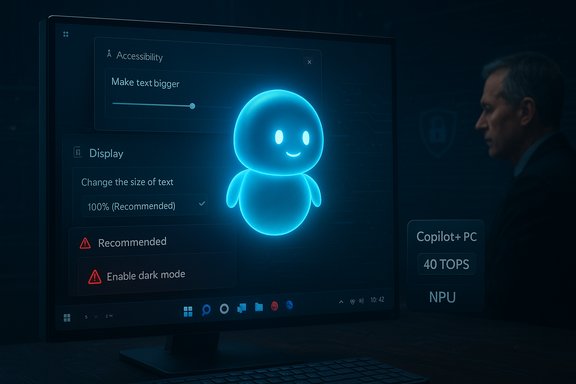
One widely discussed example is a promotional clip showing a creator asking Copilot to “make the text bigger.” Rather than using the Accessibility → Text size path (the correct, accessible approach for enlarging fonts), Copilot guided the user to Display scaling and recommended a value the machine already used — failing to detect the current setting and not completing the action itself. That short clip became a vivid illustration of what frustrates people: an assistant that recommends steps without checking context, doesn’t act when it should, and produces advice that’s at best redundant and at worst misleading.Independent hands‑on reviews echo this pattern. A prominent technology reviewer described voice interactions with Copilot as “an exercise in pure frustration,” noting that Copilot Vision and agentic features often misidentify objects, respond slowly, or fail to take the simple, obvious actions shown in marketing materials. The reviewer observed that many of the “do for me” behaviors are still experimental or gated, so the assistant defaults to providing instructions rather than actually performing the action.
Everyday failures that matter
Those demo problems aren’t just embarrassing — they have real productivity and accessibility impacts:- Accessibility regression: When Copilot points users to the wrong settings (Display vs. Accessibility), visually impaired or low‑vision users can be misdirected. A competent assistant should route accessibility requests to Accessibility controls by default.
- Context blindness: Failing to read the current system state leads to unnecessary or incorrect recommendations. A savvy assistant should verify current settings and confirm changes before presenting them.
- Teaching over doing: Many Copilot features are still conservative by design — they guide instead of acting — which makes the experience feel more like an interactive help article than an autonomous assistant.
Security, privacy, and the enterprise reaction
Gartner and enterprise caution
Enterprise skepticism is material and measurable. Gartner’s analysis and survey work — summarized publicly and cited in press coverage — found significant friction around deploying M365 Copilot at scale: many organizations run pilot programs rather than full rollouts, and concerns about oversharing and misconfiguration are delaying deployments. The report warned that Copilot will honor permissions and labels when they’re set properly, but if permissions are overly broad or labels are missing, Copilot can surface content that shouldn’t be exposed. That risk profile has led to implementation delays and extra diligence from IT teams. Salesforce CEO Marc Benioff’s public rebukes captured a similar theme: he called Copilot “disappointing,” compared it to the old Clippy era, and referenced analyst findings about data oversharing and customer remediation efforts. His comments amplified existing enterprise anxieties and placed Copilot under renewed scrutiny in boardrooms and security committees.Practical security consequences
- Oversharing risk: Models that ingest corporate context can summarize and synthesize information across docs, chats, and mailboxes. If data governance isn’t airtight, those syntheses may pull in sensitive material. Gartner’s take is explicit here: correct configuration matters.
- Deployment friction: Organizations are adding weeks or months to Copilot rollouts to validate sensitivity labeling, tighten permissions, and test data flows. The practical cost of that effort reduces the immediate ROI enterprises hoped for.
- Perception problem: A feature that looks like a productivity gain in demos but introduces a governance burden in production becomes a net negative in many CIOs’ calculus.
On‑device AI, Copilot+ PCs, and the hardware divide
Microsoft’s strategy to move AI on‑device is technically sensible: local NPUs reduce latency, enable offline processing, and can mitigate some privacy concerns. To deliver on that promise Microsoft created the Copilot+ PC category — machines that include NPUs capable of at least ~40 TOPS (trillion operations per second), along with a minimum hardware baseline (commonly 16 GB RAM and 256 GB SSD in published guidance). That spec bar is meant to ensure Copilot features run responsively without offloading everything to the cloud. But the hardware approach introduces a fresh set of problems:- Upgrade pressure and fragmentation: Requiring specialized NPUs creates an artificial divide: users with recent Intel/AMD laptops may be excluded from “Copilot+” experiences unless Microsoft or the silicon vendors certify support. That can push organizations and consumers to upgrade when the underlying software layer is still unsettled.
- Early exclusivity perception: Initial Copilot+ marketing highlighted Snapdragon X silicon as an early enabler, and that created a perception of platform favoritism even though Intel and AMD roadmaps are catching up. The optics of “buy new hardware to get promised AI” are politically and commercially sensitive.
- Value mismatch: If the on‑device AI only enables features that don’t reliably work (or that are later disabled for safety), customers will rightly ask why they paid a premium for certified hardware. Community threads and early reviews called out a dissonance between the Copilot+ pitch and what people actually received in day‑to‑day use.
Product roadmap and Microsoft’s defense: updates, Mico, and staged rollout
Microsoft is actively iterating. Recent fall updates added conversational improvements, a playful avatar called Mico, group chat and “Real Talk” modes (which attempt to challenge incorrect user assumptions), and expanded agentic primitives for developers. Microsoft frames these as incremental fixes to make Copilot feel more human, actionable, and safe. It is also moving more functionality into paid tiers (Microsoft 365 Premium) and preview channels to control exposure. The company’s staged rollout approach — gated experiments in Windows Insider channels, visible agent workspaces, and explicit permissions for sensitive actions — is meant to balance safety and innovation. However, the tradeoff is that many of the most promising “do for me” behaviors remain behind opt‑in experiments, so what mainstream users experience is a limited and conservative assistant. That mismatch is a core reason user impressions remain lukewarm.Developer and enterprise feedback loops: tinker, tune, and the cost of reliability
Copilot’s utility in business scenarios depends heavily on customization: tenant configuration, sensitivity labels, and often bespoke tuning of training data or prompt engineering. Microsoft has invested in Copilot Studio and agent tooling, but building reliable agents remains nontrivial. Developers and IT teams report that:- Agents require careful constraint to avoid hallucinations.
- Integrations with enterprise identity (Azure / Entra) and DLP tooling take time to validate.
- Achieving predictable, auditable behavior is resource‑intensive.
Market implications: trust, competition, and the reputational cost
Microsoft’s Copilot plays in a competitive field where the expectation of reliability is high. Apple’s approach to device‑level AI features has been praised for its coherence and user‑facing polish; Google and others are also moving aggressively. When a flagship feature is noisy and inconsistent, the reputational damage is real.- Trust erosion: Repeated missteps — from the Recall controversy (data handling questions) to inconsistent demos — create a credibility deficit. Once users learn not to trust an assistant for even simple tasks, they’re less likely to use it for higher‑value scenarios.
- Vendor positioning: Enterprise buyers will weigh the extra governance burden against the potential gain. For vendors like Salesforce, those concerns provided fodder for competitive messaging. Public critiques from rival CEOs amplify the narrative that Copilot is overhyped.
- Hardware economics: Requiring Copilot+ NPUs risks segmenting the PC market. If the on‑device experience is a differentiator only where it works flawlessly, early buyers who paid a premium and found underwhelm will be especially vocal.
What Microsoft must fix — practical recommendations
The road to making Copilot genuinely useful is straightforward in concept, difficult in execution. Key priorities:- Improve state awareness: The assistant should always verify UI and settings state before recommending changes. This is a low‑cost, high‑impact fix that would eliminate many of the most visible errors.
- Make accessibility the default for text requests: Queries about “making the text bigger” should preferentially route to Accessibility controls and require a clarifying question when intent is ambiguous.
- Push more agentic behaviors into secure, auditable sandboxes: If Copilot can do a task safely under policy, that capability should be available behind an admin‑approved, auditable toggle — not merely described in a demo.
- Triage the marketing message: Don’t present “do for me” magic as generally available when it’s gated or experimental. Clearer labeling and more honest demos would lower expectations and reduce backlash.
- Simplify enterprise governance tooling: Make it faster for IT to validate common configurations (sensitivity labels, DLP rules) and provide automated checks and best‑practice templates to accelerate safe rollout.
What’s verifiable — and where we still need more data
Many of the broad claims about Copilot’s behavior and enterprise survey results are corroborated by independent reporting and analyst summaries. Major facts supported by multiple sources include:- The Verge’s hands‑on findings about Copilot’s inconsistent behavior and limitations.
- Gartner’s reported survey results showing deployment caution and security concerns (full Gartner content is paywalled; public summaries and press coverage report the key metrics). Readers should treat the full Gartner numbers as authoritative only if they can access the original report.
- Microsoft’s Copilot+ PC guidance and hardware baseline (40+ TOPS NPU requirement, minimum RAM and storage guidance) as published on Microsoft developer and device guidance pages.
- Exact user‑survey percentages sometimes vary across press summaries. Where possible, rely on the primary survey source (for firms like Gartner) rather than secondary paraphrases. If a number is quoted from a paywalled analyst report, note the paywall and prefer to paraphrase rather than repeat the exact figure unless you can view the primary text.
- Some claims made in social posts or viral clips (e.g., edited ad footage implying a staged failure) are plausible but may reflect partial context (demo edits, missing frames). These require careful verification before asserting intent or deception.
The bigger lesson: reliability over hype
Copilot’s troubles are not just Microsoft’s problems — they’re a cautionary tale for the entire industry. When AI is stitched into an operating system, user trust is the fragile resource. If the assistant is wrong, slow, or inconsistent, it undermines the whole value proposition of conversational AI.For the next phase to succeed, vendors must recenter on reliability: clarify what the agent can do, demonstrate it honestly in real, unscripted scenarios, and give admins and users robust controls to govern behavior. Incremental polish — verifying state, defaulting accessibility‑safe paths, and enabling auditable agents — will produce dramatically better outcomes than fresh avatars or brighter marketing.
Conclusion
Windows Copilot remains a bold bet: agentic Windows and on‑device AI are logical evolutions for personal computing. But the present mismatch between promise and delivery is real and consequential. Users and enterprises want an assistant that reduces friction and saves time, not one that generates more steps, ambiguity, or security work.Microsoft is shipping meaningful updates and has clear technical direction (NPU‑enabled Copilot+ PCs, developer tooling, staged previews). Those steps can work — but only if they’re matched with pragmatic engineering priorities that close the gap between demonstration and dependable behavior. Until then, Copilot will be remembered not for its vision but for the friction it created on the road to that vision.
Source: WebProNews Windows Copilot’s AI Fumble: Hype Crashes into Frustrating Reality
