

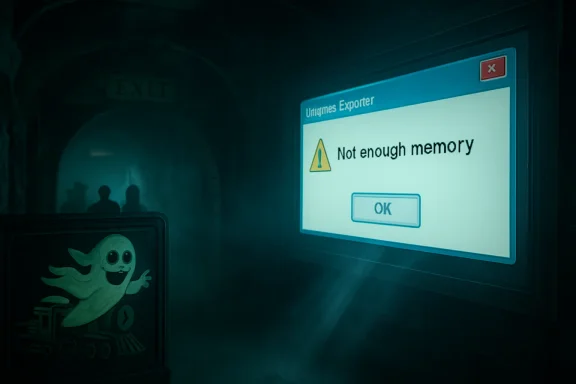
The Register’s May 1, 2026 “Bork” sighting puts a Windows Explorer memory error on a screen inside the gift shop exit of The Curse at Alton Manor, Alton Towers’ haunted dark ride in Staffordshire, England. The joke is obvious: the ghost train’s scripted horrors were upstaged by the unscripted horror every IT worker recognizes instantly. But the more interesting story is not that Windows crashed in public. It is that, in 2026, Windows is still the invisible stagehand behind so much supposedly magical public space—and it still has a habit of walking onstage in costume.
Theme parks sell immersion for a living. A haunted house ride is a contract: the operator promises to hide the machinery, the guest agrees to be frightened by the fiction, and everyone pretends the projectors, sensors, audio loops, lighting controllers, and media servers are not doing the actual haunting.
That is why a Windows dialog box in a themed gift shop lands so well. It punctures the illusion with a very specific kind of modern banality. The apparition is no longer a Victorian child, a giant spider, or a thunderclap; it is
The Register’s reader-submitted image belongs to a long and noble genre of public-display failure: airport boards showing boot screens, fast-food menus stranded at update prompts, museum interactives exposing their cursor, train-station kiosks asking for credentials, and retail signage revealing a desktop that was never meant to be seen. The publication’s “Bork” column works because these incidents are both trivial and deeply familiar. They are not breaches, disasters, or outages in the grand enterprise sense. They are little moments when the operating system reminds us that the future is mostly drywall, HDMI extenders, under-desk mini PCs, and someone’s forgotten maintenance schedule.
What makes this one especially delicious is the setting. A ghost train is designed to produce controlled fear. Windows produces uncontrolled anxiety. One is a theatrical system with reliable beats; the other is an operational system whose failures arrive with just enough specificity to make a professional start triaging in their head before they remember they are meant to be buying a keyring.
The reason is simple: public screens are not perceived as computers. Visitors read them as surfaces, props, signs, fixtures, and interfaces. When Windows leaks through, the screen stops being part of the environment and becomes a visible endpoint. Suddenly the themed portrait is not haunted; it is deployed.
This is the old curse of general-purpose computing in disguise. Windows is attractive for these jobs because it is widely understood, easy to source, compatible with almost anything, and supported by a huge ecosystem of software, drivers, integrators, AV vendors, remote-management agents, and peripheral hardware. It can run a gift-shop display, a point-of-sale adjacent dashboard, a media loop, a browser-based kiosk, a custom show-control app, or some strange Visual Basic relic written for a contract signed three refurbishments ago.
But those strengths are also the route by which entropy enters. A general-purpose OS wants to update, enumerate devices, remember user sessions, pop notifications, report errors, index files, restart services, and keep itself useful for a human sitting in front of it. A public display wants exactly the opposite: no surprises, no chrome, no personality, no desktop, no modal dialog, no cursor, no memory of being a PC.
The best kiosk deployments treat Windows as a substrate to be suppressed. They lock it down, shell it, watchdog it, monitor it, auto-recover it, and prevent casual software behavior from surfacing. The worst treat it as “just a PC behind the screen,” then act surprised when the PC behaves like a PC.
That is how a machine can sit for years behind a display, quietly doing its job until one day it does not. It may have started as a temporary install. It may have been installed by a vendor no longer under contract. It may not be domain-joined. It may be on a local admin account whose password lives in a PDF. It may run a player app that requires a specific GPU driver, a specific browser runtime, or a specific abandoned codec pack. It may have been excluded from normal patch rings because rebooting it during opening hours would break the show.
The public sees a borked screen. IT sees the fossil record.
This is not unique to theme parks. Hospitality, transport, retail, museums, universities, local government, and healthcare all accumulate these little endpoint colonies. They are not glamorous enough to receive the budget discipline of core enterprise infrastructure, but they are visible enough to embarrass the organization when they fail. The machine that drives a single portrait display may not rank high on a risk register. The screenshot of its crash, once published, becomes brand material.
Windows’ ubiquity means it takes the blame even when the actual fault is elsewhere. The Register fairly notes that a memory error in Explorer could be caused by failing hardware, a bad driver, shoddy code, or some other environmental problem. That ambiguity is exactly what makes such errors feel so cursed. They are not always self-contained clues; they are invitations to investigate a stack that may include a cheap media player, a flaky SSD, marginal RAM, a USB device, a vendor app, thermal stress, and months of uptime.
Windows 10 reached the end of free support on October 14, 2025. For consumers and many unmanaged machines, that date turned Windows 10 from “the stable one” into “the one that now needs an exception, a paid extension, or a migration plan.” In businesses, the story is messier. Extended Security Updates, long-tail hardware, application compatibility, procurement cycles, and operational conservatism mean Windows 10 did not vanish on Halloween 2025 like a ghost at dawn.
Instead, it became what Windows versions often become after their official prime: an operating system with a second life in corners where “do not touch” has become an architecture.
That is why the image resonates with sysadmins. They have seen this movie. Windows XP lived on in ATMs, medical devices, industrial controllers, ticketing systems, and specialist equipment long after its desktop era. Windows 7 lingered because it was beloved, compatible, and attached to hardware and workflows that nobody wanted to disturb. Windows 10 is now entering its own afterlife, and public signage is exactly the kind of place where such afterlives thrive.
To be clear, not every Windows 10 machine in a kiosk role is reckless. Some are isolated, managed, licensed for extended updates, or running in controlled environments where replacement is more complicated than a desktop refresh. But from the outside, the distinction is invisible. A public crash becomes evidence in the court of vibes, and the verdict is usually that somebody, somewhere, deferred maintenance.
A kiosk can be poorly designed on any modern OS. Linux can drop to a shell. Android signage boxes can freeze, desynchronize, or expose launchers. Smart TVs can show firmware nag screens. Browser-based signage can fail open into a tab error. The sin is not “using Windows.” The sin is using any general-purpose platform without accepting the operational burden that follows.
Windows 11 also brings its own enterprise tradeoffs. Hardware requirements, TPM expectations, driver compatibility, app validation, peripheral support, management tooling, and user experience changes all matter in fleets that include oddball endpoints. The more specialized the device, the less migration looks like an in-place upgrade and the more it resembles a miniature project.
This is where Microsoft’s desktop strategy collides with the physical world. Redmond can define support timelines, push modern security baselines, promote Copilot-era hardware, and nudge users toward newer builds. But in a gift shop, a lobby, or a factory, the endpoint is often inseparable from a fixture. It is not “a PC”; it is “the thing that makes that wall work.”
That does not absolve operators from maintaining it. It does explain why old Windows remains so visible. Physical installations depreciate on a different clock from software. A haunted-house refurb may budget for scenic design, lighting, audio, effects, and guest flow, while the small computer driving a display becomes part of the plumbing. Software ages even when scenery looks fresh.
The real failure is that the system had no graceful layer between fault and audience.
A properly engineered public display assumes that the application will crash, the OS will reboot, the network will disappear, and the content player will occasionally misbehave. It plans for those events. It uses a watchdog. It restarts the shell. It hides the desktop. It falls back to a branded holding screen. It reboots out of hours. It reports telemetry. It makes failure boring.
A raw Windows error on a themed screen suggests the opposite: the audience-facing layer was too close to the operating system. The crash did not merely happen; it escaped containment. For IT professionals, that is the nightmare. Not the exception, but the absence of a safety rail around the exception.
This is the same principle that separates resilient enterprise services from fragile ones. Users rarely judge you by whether failures occur. They judge you by whether failures are isolated, recoverable, intelligible, and brief. A blue screen, a desktop, or an Explorer dialog in a public environment is failure without theater. It is the backstage door left open.
The irony, of course, is that theme parks understand this better than almost anyone. Ride systems are designed around interlocks, fail-safes, operational procedures, evacuation plans, maintenance windows, and strict safety cases. The show-control and guest-facing media layer may not carry the same bodily risk, but it carries reputational risk. A broken scare is not dangerous. It is worse, in show-business terms: it is funny.
The true horror of IT is rarely the cinematic catastrophe. It is the slow dawning realization that a small problem is connected to a larger neglected system. A user says “the screen in the shop looks weird,” and suddenly someone is asking whether the vendor still exists, whether the machine has remote access, whether the admin password is known, whether the display is thirty feet up a wall, whether the PC is reachable over VPN, whether the spare image works, whether the content package is backed up, and whether the reboot can wait until guests leave.
Every sysadmin has a private taxonomy of these moments. The printer that is actually a workflow dependency. The “temporary” server under someone’s desk. The access database that became a business process. The unsupported OS attached to a machine that makes money. The Java runtime nobody can update because the vendor app breaks. The certificate expiring on a system whose owner left in 2019. The signage PC that nobody patched because nobody was quite sure what it was.
Public borks compress all of that into a single frame. They are funny because they are small. They are unsettling because they imply a much larger maintenance story just out of shot.
And, yes, there is a specifically Windows flavor to the comedy. Microsoft’s desktop UI is among the most recognizable visual languages in the world. Even people who cannot diagnose a memory access violation know what a Windows taskbar feels like. The blue, gray, white, and rectangular grammar of Windows has become a kind of universal symbol for “the computer is showing.”
That makes the theme park a useful caricature of the broader Windows estate. Everything is visible, distributed, operationally sensitive, and hard to patch during business hours. Many systems must run for long stretches. Many are installed by specialists. Many sit at the intersection of IT and operational technology. Many have owners who care deeply about uptime but do not necessarily think in terms of endpoint lifecycle.
The haunted-house gift shop screen is therefore not an oddity; it is the consumer-facing tip of a much larger pattern. Organizations keep adding digital surfaces to physical spaces, and each one becomes another endpoint with a lifecycle. Screens are cheap. Managing them forever is not.
This has been one of the under-discussed consequences of digital transformation. The first wave put computers on desks. The second put them in pockets. The current wave puts them into walls, shelves, check-in stands, menu boards, meeting rooms, classrooms, vehicles, kiosks, vending machines, and interactive exhibits. The endpoint count grows, but the cultural category does not always keep up. A screen in a wall does not look like a PC, so it is easy for leadership to forget that it needs PC-like governance.
For Windows administrators, that means the edge keeps getting stranger. The fleet is no longer just laptops and desktops. It is also the machines nobody logs into, the machines nobody sees until they fail, and the machines whose primary user is a passing member of the public.
Its staying power is not mysterious. Integrators know it. Support teams know it. Peripheral makers target it. Remote management tools support it. Legacy applications depend on it. Procurement departments can buy compatible hardware in endless variations. A Windows box can be made to do almost anything quickly, which is why it so often ends up doing things it was never aesthetically meant to do.
That is both Microsoft’s triumph and its burden. Windows became the standard way to get arbitrary computing into arbitrary places. But arbitrary places are hostile. They are dusty, hot, public, under-maintained, physically awkward, and full of edge cases. They turn desktop assumptions into operational liabilities.
Microsoft has spent years trying to professionalize and secure this world with assigned access, kiosk modes, mobile device management, Windows IoT editions, Autopilot, Intune, Defender, update rings, and enterprise servicing controls. Those tools are real, and in the hands of disciplined teams they make Windows a credible managed platform for public and embedded-ish scenarios. But tools do not enforce ownership. They do not automatically rewrite contracts, fund refresh cycles, or make a forgotten gift-shop PC appear in an asset inventory.
The Register image is therefore not an indictment of Windows alone. It is an indictment of the gap between platform capability and operational practice. Windows can be locked down. The question is whether anyone was paid, empowered, and scheduled to do it properly.
If a system is allowed to show raw OS errors to guests, what else has been allowed? Maybe nothing. Maybe the machine is patched and managed, and this was a one-off application fault that happened to surface badly. Or maybe it is running an old build, auto-login as admin, local content from an unmonitored folder, and remote access software installed by a vendor whose contract has changed twice.
The point is not to panic over a screenshot. The point is to treat screenshots like this as reminders that visibility is not the same as accountability. In many organizations, the most publicly visible endpoints are not the most rigorously managed ones. They fall between categories: not quite corporate desktop, not quite server, not quite OT, not quite AV, not quite retail system.
That liminal status is dangerous. Attackers like forgotten systems. Auditors dislike undocumented systems. Customers mock broken systems. Staff learn to work around unreliable systems. None of those outcomes require a spectacular breach; they begin with the ordinary act of leaving a small computer alone for too long.
For Windows estates in 2026, the end of Windows 10 support sharpens that concern. Any organization still running Windows 10 in public-facing or semi-public roles needs to know exactly why, under what compensating controls, and until what retirement date. “It still works” is not a plan. It is how haunted infrastructure is born.
That sounds pedestrian because it is. Most IT horror is caused not by mysterious forces but by missing routines. Nobody wants to hold a meeting about the support model for a portrait display until the portrait display becomes the subject of a mocking article.
The better organizations make this unglamorous work part of deployment. They decide whether a public screen really needs Windows, whether a lighter signage appliance would do, whether a managed browser kiosk is sufficient, whether the device belongs in Intune or another MDM, whether it needs EDR, whether it should be segmented, and whether the support desk has a runbook. They also decide what failure looks like to the public.
That last part is underrated. A branded “temporarily unavailable” screen is not ideal, but it is infinitely better than a raw system error. A black screen may be less damaging than a desktop. An automatic reboot may be better than a modal dialog waiting forever for an invisible mouse click. In public computing, aesthetics are part of reliability.
The difference between comedy and professionalism is often one watchdog process.
Source: theregister.com Who needs ghost train scares when Windows is such a fright?
 The Scariest Prop in the Gift Shop Was the Desktop
Theme parks sell immersion for a living. A haunted house ride is a contract: the operator promises to hide the machinery, the guest agrees to be frightened by the fiction, and everyone pretends the projectors, sensors, audio loops, lighting controllers, and media servers are not doing the actual haunting.That is why a Windows dialog box in a themed gift shop lands so well. It punctures the illusion with a very specific kind of modern banality. The apparition is no longer a Victorian child, a giant spider, or a thunderclap; it is
explorer.exe complaining that memory could not be read.The Register’s reader-submitted image belongs to a long and noble genre of public-display failure: airport boards showing boot screens, fast-food menus stranded at update prompts, museum interactives exposing their cursor, train-station kiosks asking for credentials, and retail signage revealing a desktop that was never meant to be seen. The publication’s “Bork” column works because these incidents are both trivial and deeply familiar. They are not breaches, disasters, or outages in the grand enterprise sense. They are little moments when the operating system reminds us that the future is mostly drywall, HDMI extenders, under-desk mini PCs, and someone’s forgotten maintenance schedule.
What makes this one especially delicious is the setting. A ghost train is designed to produce controlled fear. Windows produces uncontrolled anxiety. One is a theatrical system with reliable beats; the other is an operational system whose failures arrive with just enough specificity to make a professional start triaging in their head before they remember they are meant to be buying a keyring.
Public Windows Is the Operating System at Its Least Forgiven
A desktop crash on a personal laptop is annoying. A desktop crash on a public screen is reputational. The same error carries a different social meaning when it appears above a checkout, behind a reception desk, in a hospital corridor, or at the exit of a dark ride.The reason is simple: public screens are not perceived as computers. Visitors read them as surfaces, props, signs, fixtures, and interfaces. When Windows leaks through, the screen stops being part of the environment and becomes a visible endpoint. Suddenly the themed portrait is not haunted; it is deployed.
This is the old curse of general-purpose computing in disguise. Windows is attractive for these jobs because it is widely understood, easy to source, compatible with almost anything, and supported by a huge ecosystem of software, drivers, integrators, AV vendors, remote-management agents, and peripheral hardware. It can run a gift-shop display, a point-of-sale adjacent dashboard, a media loop, a browser-based kiosk, a custom show-control app, or some strange Visual Basic relic written for a contract signed three refurbishments ago.
But those strengths are also the route by which entropy enters. A general-purpose OS wants to update, enumerate devices, remember user sessions, pop notifications, report errors, index files, restart services, and keep itself useful for a human sitting in front of it. A public display wants exactly the opposite: no surprises, no chrome, no personality, no desktop, no modal dialog, no cursor, no memory of being a PC.
The best kiosk deployments treat Windows as a substrate to be suppressed. They lock it down, shell it, watchdog it, monitor it, auto-recover it, and prevent casual software behavior from surfacing. The worst treat it as “just a PC behind the screen,” then act surprised when the PC behaves like a PC.
The Ghost in the Machine Is Usually Procurement
When people see a public Windows error, the first impulse is to blame technical incompetence. Sometimes that is fair. More often, the real culprit is organizational layering: facilities owns the screen, marketing owns the content, retail owns the shop, an external integrator owns the installation, central IT owns the network, and nobody owns the whole lifecycle.That is how a machine can sit for years behind a display, quietly doing its job until one day it does not. It may have started as a temporary install. It may have been installed by a vendor no longer under contract. It may not be domain-joined. It may be on a local admin account whose password lives in a PDF. It may run a player app that requires a specific GPU driver, a specific browser runtime, or a specific abandoned codec pack. It may have been excluded from normal patch rings because rebooting it during opening hours would break the show.
The public sees a borked screen. IT sees the fossil record.
This is not unique to theme parks. Hospitality, transport, retail, museums, universities, local government, and healthcare all accumulate these little endpoint colonies. They are not glamorous enough to receive the budget discipline of core enterprise infrastructure, but they are visible enough to embarrass the organization when they fail. The machine that drives a single portrait display may not rank high on a risk register. The screenshot of its crash, once published, becomes brand material.
Windows’ ubiquity means it takes the blame even when the actual fault is elsewhere. The Register fairly notes that a memory error in Explorer could be caused by failing hardware, a bad driver, shoddy code, or some other environmental problem. That ambiguity is exactly what makes such errors feel so cursed. They are not always self-contained clues; they are invitations to investigate a stack that may include a cheap media player, a flaky SSD, marginal RAM, a USB device, a vendor app, thermal stress, and months of uptime.
Windows 10 Has Become the Undead Desktop
The taskbar in the Alton Towers image looked, according to The Register, like Windows 10 or perhaps Windows 8. That ambiguity matters less than the cultural recognition: it looked like old Windows. In 2026, that carries a different charge than it did a few years ago.Windows 10 reached the end of free support on October 14, 2025. For consumers and many unmanaged machines, that date turned Windows 10 from “the stable one” into “the one that now needs an exception, a paid extension, or a migration plan.” In businesses, the story is messier. Extended Security Updates, long-tail hardware, application compatibility, procurement cycles, and operational conservatism mean Windows 10 did not vanish on Halloween 2025 like a ghost at dawn.
Instead, it became what Windows versions often become after their official prime: an operating system with a second life in corners where “do not touch” has become an architecture.
That is why the image resonates with sysadmins. They have seen this movie. Windows XP lived on in ATMs, medical devices, industrial controllers, ticketing systems, and specialist equipment long after its desktop era. Windows 7 lingered because it was beloved, compatible, and attached to hardware and workflows that nobody wanted to disturb. Windows 10 is now entering its own afterlife, and public signage is exactly the kind of place where such afterlives thrive.
To be clear, not every Windows 10 machine in a kiosk role is reckless. Some are isolated, managed, licensed for extended updates, or running in controlled environments where replacement is more complicated than a desktop refresh. But from the outside, the distinction is invisible. A public crash becomes evidence in the court of vibes, and the verdict is usually that somebody, somewhere, deferred maintenance.
Windows 11 Did Not Magically Solve the Kiosk Problem
It would be tempting to turn every public Windows 10 sighting into a simple upgrade sermon: move to Windows 11, modernize the fleet, and the ghosts will depart. That is too easy. Windows 11 improves many things, but it does not repeal the laws of unattended computing.A kiosk can be poorly designed on any modern OS. Linux can drop to a shell. Android signage boxes can freeze, desynchronize, or expose launchers. Smart TVs can show firmware nag screens. Browser-based signage can fail open into a tab error. The sin is not “using Windows.” The sin is using any general-purpose platform without accepting the operational burden that follows.
Windows 11 also brings its own enterprise tradeoffs. Hardware requirements, TPM expectations, driver compatibility, app validation, peripheral support, management tooling, and user experience changes all matter in fleets that include oddball endpoints. The more specialized the device, the less migration looks like an in-place upgrade and the more it resembles a miniature project.
This is where Microsoft’s desktop strategy collides with the physical world. Redmond can define support timelines, push modern security baselines, promote Copilot-era hardware, and nudge users toward newer builds. But in a gift shop, a lobby, or a factory, the endpoint is often inseparable from a fixture. It is not “a PC”; it is “the thing that makes that wall work.”
That does not absolve operators from maintaining it. It does explain why old Windows remains so visible. Physical installations depreciate on a different clock from software. A haunted-house refurb may budget for scenic design, lighting, audio, effects, and guest flow, while the small computer driving a display becomes part of the plumbing. Software ages even when scenery looks fresh.
The Error Dialog Is a Design Failure, Not Just a Crash
The most revealing part of a public bork is not that something failed. Things fail. RAM fails, drivers fail, updates fail, processes leak, disks fill, cables loosen, fans clog, and Windows Explorer can have a bad day like anything else.The real failure is that the system had no graceful layer between fault and audience.
A properly engineered public display assumes that the application will crash, the OS will reboot, the network will disappear, and the content player will occasionally misbehave. It plans for those events. It uses a watchdog. It restarts the shell. It hides the desktop. It falls back to a branded holding screen. It reboots out of hours. It reports telemetry. It makes failure boring.
A raw Windows error on a themed screen suggests the opposite: the audience-facing layer was too close to the operating system. The crash did not merely happen; it escaped containment. For IT professionals, that is the nightmare. Not the exception, but the absence of a safety rail around the exception.
This is the same principle that separates resilient enterprise services from fragile ones. Users rarely judge you by whether failures occur. They judge you by whether failures are isolated, recoverable, intelligible, and brief. A blue screen, a desktop, or an Explorer dialog in a public environment is failure without theater. It is the backstage door left open.
The irony, of course, is that theme parks understand this better than almost anyone. Ride systems are designed around interlocks, fail-safes, operational procedures, evacuation plans, maintenance windows, and strict safety cases. The show-control and guest-facing media layer may not carry the same bodily risk, but it carries reputational risk. A broken scare is not dangerous. It is worse, in show-business terms: it is funny.
The Register’s Joke Works Because IT Horror Is Mostly Recognition
The Register riffed on the premise with Clippy emerging from the shadows, Oracle licensing vampires, and Windows Update derailing a carriage into a reboot loop. The jokes are broad, but they hit because they map to lived professional dread.The true horror of IT is rarely the cinematic catastrophe. It is the slow dawning realization that a small problem is connected to a larger neglected system. A user says “the screen in the shop looks weird,” and suddenly someone is asking whether the vendor still exists, whether the machine has remote access, whether the admin password is known, whether the display is thirty feet up a wall, whether the PC is reachable over VPN, whether the spare image works, whether the content package is backed up, and whether the reboot can wait until guests leave.
Every sysadmin has a private taxonomy of these moments. The printer that is actually a workflow dependency. The “temporary” server under someone’s desk. The access database that became a business process. The unsupported OS attached to a machine that makes money. The Java runtime nobody can update because the vendor app breaks. The certificate expiring on a system whose owner left in 2019. The signage PC that nobody patched because nobody was quite sure what it was.
Public borks compress all of that into a single frame. They are funny because they are small. They are unsettling because they imply a much larger maintenance story just out of shot.
And, yes, there is a specifically Windows flavor to the comedy. Microsoft’s desktop UI is among the most recognizable visual languages in the world. Even people who cannot diagnose a memory access violation know what a Windows taskbar feels like. The blue, gray, white, and rectangular grammar of Windows has become a kind of universal symbol for “the computer is showing.”
The Theme Park Is a Preview of Every Hybrid Environment
There is another reason this story belongs on WindowsForum rather than merely in a blooper reel. Public entertainment spaces are becoming miniature enterprise environments. A modern attraction is not just steel, scenery, and queue ropes. It is networks, endpoints, digital signage, mobile apps, payment systems, cameras, sensors, access controls, lighting controllers, projection systems, analytics, content management platforms, and vendor-managed appliances.That makes the theme park a useful caricature of the broader Windows estate. Everything is visible, distributed, operationally sensitive, and hard to patch during business hours. Many systems must run for long stretches. Many are installed by specialists. Many sit at the intersection of IT and operational technology. Many have owners who care deeply about uptime but do not necessarily think in terms of endpoint lifecycle.
The haunted-house gift shop screen is therefore not an oddity; it is the consumer-facing tip of a much larger pattern. Organizations keep adding digital surfaces to physical spaces, and each one becomes another endpoint with a lifecycle. Screens are cheap. Managing them forever is not.
This has been one of the under-discussed consequences of digital transformation. The first wave put computers on desks. The second put them in pockets. The current wave puts them into walls, shelves, check-in stands, menu boards, meeting rooms, classrooms, vehicles, kiosks, vending machines, and interactive exhibits. The endpoint count grows, but the cultural category does not always keep up. A screen in a wall does not look like a PC, so it is easy for leadership to forget that it needs PC-like governance.
For Windows administrators, that means the edge keeps getting stranger. The fleet is no longer just laptops and desktops. It is also the machines nobody logs into, the machines nobody sees until they fail, and the machines whose primary user is a passing member of the public.
Microsoft’s Desktop Is Still the Default Backstage Pass
It is fashionable to talk as if Windows is losing cultural centrality because phones own attention and cloud apps own workflows. That is true in one sense and misleading in another. Windows remains deeply embedded in the operational backstage of everyday life.Its staying power is not mysterious. Integrators know it. Support teams know it. Peripheral makers target it. Remote management tools support it. Legacy applications depend on it. Procurement departments can buy compatible hardware in endless variations. A Windows box can be made to do almost anything quickly, which is why it so often ends up doing things it was never aesthetically meant to do.
That is both Microsoft’s triumph and its burden. Windows became the standard way to get arbitrary computing into arbitrary places. But arbitrary places are hostile. They are dusty, hot, public, under-maintained, physically awkward, and full of edge cases. They turn desktop assumptions into operational liabilities.
Microsoft has spent years trying to professionalize and secure this world with assigned access, kiosk modes, mobile device management, Windows IoT editions, Autopilot, Intune, Defender, update rings, and enterprise servicing controls. Those tools are real, and in the hands of disciplined teams they make Windows a credible managed platform for public and embedded-ish scenarios. But tools do not enforce ownership. They do not automatically rewrite contracts, fund refresh cycles, or make a forgotten gift-shop PC appear in an asset inventory.
The Register image is therefore not an indictment of Windows alone. It is an indictment of the gap between platform capability and operational practice. Windows can be locked down. The question is whether anyone was paid, empowered, and scheduled to do it properly.
The Memory Error Is a Tiny Warning About Bigger Risk
A public Explorer memory error is not, by itself, a security incident. It does not prove the machine is exposed, unsupported, infected, misconfigured, or unmanaged. But it is a useful warning sign because public failure often correlates with private neglect.If a system is allowed to show raw OS errors to guests, what else has been allowed? Maybe nothing. Maybe the machine is patched and managed, and this was a one-off application fault that happened to surface badly. Or maybe it is running an old build, auto-login as admin, local content from an unmonitored folder, and remote access software installed by a vendor whose contract has changed twice.
The point is not to panic over a screenshot. The point is to treat screenshots like this as reminders that visibility is not the same as accountability. In many organizations, the most publicly visible endpoints are not the most rigorously managed ones. They fall between categories: not quite corporate desktop, not quite server, not quite OT, not quite AV, not quite retail system.
That liminal status is dangerous. Attackers like forgotten systems. Auditors dislike undocumented systems. Customers mock broken systems. Staff learn to work around unreliable systems. None of those outcomes require a spectacular breach; they begin with the ordinary act of leaving a small computer alone for too long.
For Windows estates in 2026, the end of Windows 10 support sharpens that concern. Any organization still running Windows 10 in public-facing or semi-public roles needs to know exactly why, under what compensating controls, and until what retirement date. “It still works” is not a plan. It is how haunted infrastructure is born.
The Fix Is Less Romantic Than the Failure
There is no exotic cure here. The boring answer is asset management, lifecycle discipline, standard builds, kiosk hardening, monitoring, remote recovery, and clear ownership. The screen should have an owner. The PC should have an inventory record. The OS should have a support status. The application should have a restart path. The content should have a fallback. The hardware should have a replacement date.That sounds pedestrian because it is. Most IT horror is caused not by mysterious forces but by missing routines. Nobody wants to hold a meeting about the support model for a portrait display until the portrait display becomes the subject of a mocking article.
The better organizations make this unglamorous work part of deployment. They decide whether a public screen really needs Windows, whether a lighter signage appliance would do, whether a managed browser kiosk is sufficient, whether the device belongs in Intune or another MDM, whether it needs EDR, whether it should be segmented, and whether the support desk has a runbook. They also decide what failure looks like to the public.
That last part is underrated. A branded “temporarily unavailable” screen is not ideal, but it is infinitely better than a raw system error. A black screen may be less damaging than a desktop. An automatic reboot may be better than a modal dialog waiting forever for an invisible mouse click. In public computing, aesthetics are part of reliability.
The difference between comedy and professionalism is often one watchdog process.
The Alton Towers Bork Leaves a Map for Every Windows Estate
The lesson of this haunted-house cameo is not that theme parks should ban Windows or that every public display crash is a scandal. It is that visible endpoints deserve the same lifecycle seriousness as the machines that sit on desks, because the public will not distinguish between a minor media-player fault and institutional carelessness.- Windows remains a common backstage platform for public displays because it is flexible, familiar, and compatible with a huge ecosystem of software and hardware.
- A public Windows error usually reflects not just a crash but a failure to contain the crash behind kiosk controls, watchdogs, or branded fallback behavior.
- Windows 10’s October 14, 2025 end of support makes every lingering deployment harder to justify without an explicit extension, isolation strategy, or migration date.
- Organizations should treat digital signage, attraction media, kiosks, and lobby screens as managed endpoints rather than decorative fixtures.
- The most embarrassing failures often happen in systems that fall between IT, facilities, vendors, marketing, and operations.
- A public bork is funny for readers but useful for administrators because it exposes where ownership, monitoring, and lifecycle planning may be missing.
Source: theregister.com Who needs ghost train scares when Windows is such a fright?
