

Microsoft’s January 2026 cumulative updates have finally lifted one of the most persistent troubleshooting headaches for Windows administrators: cryptic Group Policy Preferences failures that showed only a generic Event ID 4098. The updates (delivered as part of the January rollup packages for Windows 11 and Windows Server) add a new, actionable diagnostic event — Event ID 4117 — that records concrete root-cause details (exact source/destination paths, UNC addresses, and native error codes) so administrators can triage and resolve GPP failures directly from Event Viewer instead of immediately resorting to debug-mode tracing.
Group Policy Preferences (GPP) are the flexible client-side extensions used by enterprises to distribute device and user configuration — drive mappings, files and folder management, scheduled tasks, printers, local user accounts, and more. Because GPP often manipulates filesystem objects and network resources, flaky results can stem from a wide range of operational causes: missing sources, permissions mismatches, locked files, DNS or UNC path errors, and targeting logic that excludes the intended object.
Historically, when a GPP action failed the client frequently logged only Event ID 4098 with terse, ambiguous text such as “The system cannot find the file specified” or “The network name cannot be found.” That sparse output forced a manual, time-consuming cycle of replication checks, target-account verification, Process Monitor traces, and enabling verbose GPP tracing across domain infrastructure — a slow feedback loop in large fleets. The January 2026 updates aim to collapse that loop by emitting much richer context when a preference action fails.
Key operational points for the preview feature:
If you rely on static mappings of event IDs to remediation actions in automation, now is the time to move to payload-based parsing and to stage tests across your update rings.
This change does not eliminate the need for disciplined change control, careful tracing on complex incidents, or the occasional deeper dive with Procmon or gpsvc logs. But it does shorten the common path from “mystery failure” to “corrective action,” and that day-to-day reduction in wasted time is where most organizations will see the biggest return.
Operational actions to take today: update monitoring rules to include Event ID 4117, pilot the January KBs in a controlled ring, add the new Event Viewer checks to your frontline runbooks, and use the local gpedit-based tracing preview to accelerate troubleshooting on stubborn endpoints — while taking care to manage trace volume and to reconcile local fixes back into domain GPOs for long-term consistency.
In short: Event Viewer just got decisively more useful for Group Policy Preferences. If your organization manages GPP at scale, prioritizing ingestion of Event ID 4117 and short, targeted use of local GPP tracing will pay operational dividends almost immediately.
Source: WinBuzzer Microsoft Modernizes Group Policy Diagnostics in Windows 11
 Background / Overview
Group Policy Preferences (GPP) are the flexible client-side extensions used by enterprises to distribute device and user configuration — drive mappings, files and folder management, scheduled tasks, printers, local user accounts, and more. Because GPP often manipulates filesystem objects and network resources, flaky results can stem from a wide range of operational causes: missing sources, permissions mismatches, locked files, DNS or UNC path errors, and targeting logic that excludes the intended object.Historically, when a GPP action failed the client frequently logged only Event ID 4098 with terse, ambiguous text such as “The system cannot find the file specified” or “The network name cannot be found.” That sparse output forced a manual, time-consuming cycle of replication checks, target-account verification, Process Monitor traces, and enabling verbose GPP tracing across domain infrastructure — a slow feedback loop in large fleets. The January 2026 updates aim to collapse that loop by emitting much richer context when a preference action fails.
What Microsoft changed: Event ID 4117 explained
The practical improvement
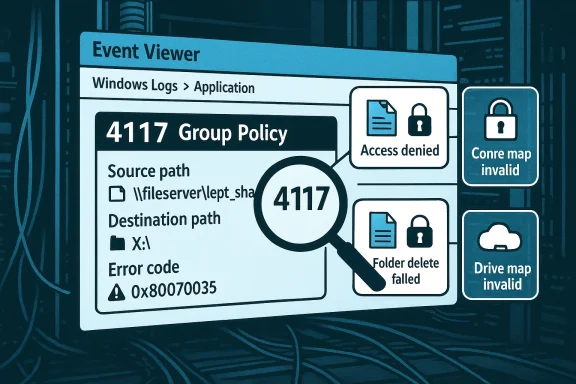
Event ID 4117 replaces the single-purpose, uninformative 4098 symptom entry with a structured failure report that identifies the failure category and the items involved:- It logs the specific failure category (for example, source file missing, access denied, folder-delete failed, or drive-mapping path invalid).
- It includes the exact source and destination file paths, UNC addresses, and Windows error codes associated with the failure.
- It is enabled automatically after the January 2026 cumulative updates — no registry toggles, no debug-policy deployment, and no GPSvc restart required to surface the new event.
What Event ID 4117 covers (the four high-value cases)
Microsoft’s public summaries and multiple reporting outlets list the four most operationally important failure categories that 4117 surfaces:- Source file missing: The event records the exact source and (when relevant) destination paths so you can confirm whether the GPP-specified file exists and whether the GPP entry points to the intended resource.
- Access denied (file): The event includes the source and destination paths and the low-level error code, allowing admins to determine whether the failure is due to NTFS or share permission issues in the context that the preference was running.
- Folder delete failed: The event logs the precise folder path and error code so you can check ownership, ACLs, or whether another process has a handle on the folder.
- Drive-map path invalid: The event reports the invalid UNC or DNS name plus the drive letter that was being mapped, making it straightforward to correct an outdated UNC, DNS problem, targeting filter error, or to retire an obsolete map.
How the change behaves in the real world
Coexistence and monitoring implications
Microsoft intentionally preserved Event ID 4098 for backwards compatibility; both event IDs now appear in Event Viewer for GPP failures. That design minimizes disruption to legacy parsing and alerting systems but also means that any detection or automation that looks only for 4098 will miss the additional detail that 4117 provides. Put another way:- Existing 4098-based alerts will continue to fire but remain terse.
- To get the new details into your incident pipelines, update event filters and SIEM parsers so they ingest and alert on Event ID 4117 as well.
Where to look in Event Viewer
After installing the January 2026 updates, Group Policy Preference events (including 4117 outputs) appear in the standard Group Policy logs under Event Viewer — typically Applications and Services Logs → Microsoft → Windows → GroupPolicy → Operational and the specific Preferences logs. The new event entries are designed to be actionable (path + error code), so they can be incorporated into SIEM ingestion and automatic remediation logic more reliably than the older free-text 4098 entries. (cloud.google.com)February 2026 preview: Local GPP debug logging via gpedit.msc
The January change improves event-level observability; Microsoft extended that work in a February 2026 preview by making GPP debug logging configurable via the Local Group Policy Editor (gpedit.msc). Traditionally, the GPP preferences debug settings lived in domain Administrative Templates (ADMX) and required domain-side changes and AD replication to enable across clients. The preview exposes the same per-CSE logging and tracing controls locally, so frontline technicians can enable trace capture on a single device immediately, without domain changes or ADMX copying.Key operational points for the preview feature:
- The setting surfonfiguration → Policies → Administrative Templates → System → Group Policy → Logging and Tracing.
- Admins can enable per‑CSE logging (Drive Maps, Files, Printers, Shortcuts, Registry, Scheduled Tasks, etc.), set event verbosity (Errors, Warnings, Informational, All), and enable trace files (default path: %COMMONAPPDATA%\GroupPolicy\Preference\Trace).
- If you configure a custom trace folder, ensure SYSTEM has Full Control — GPP CSEs write traces under the Local System context and will silently fail to produce files if ACLs are incorrect.
- This capability is currently in preview and may change before general availability; treat it as a supported troubleshooting aid in pilot environments while validating the exact policy names and default values against your Windows build.
Operational playbook: how to use 4117 and local GPP tracing to debug common failures
Use the following practical workflow to triage GPP failures faster.- Confirm the device has the January 2026 cumulative update applied (KB5074109 for applicable Windows 11 servicing branches or the matching January KB for your SKU) and, if you plan to use local gpedit-based tracing, that the February preview (or later general-release build) is present where required. Microsoft’s January KBs and release notes list the packages by build number.
- Inspect Event Viewer for a recent 4117 entry under the Group Policy preference logs. Read the event payload: it should show the failure category, the source/destination path or UNC, and a Windows error code.
- Act on the most likely remediation determined by the event:
- If the source file is missing, verify that the file exists at the path and that SYSVOL/DFS replication has propagated the content to the domain controller the client used.
- If access denied is reported, check the ACLs on the file or share and confirm the prender the intended security context (System vs. user). Also validate share-level permissions and Kerberos/NTLM access paths.
- If folder delete fails, inspect ownership and locks (use handle.exe or Process Explorer if necessary), and confirm no process has the folder open.
- If a drive map path is invalid, verify DNS resolution for the target server, that the share exists and is reachable, and that targeting filters on the preference didn’t exclude the endpoint.
- If the event alone isn’t sufficient, enable targeted preference CSE tracing locally:
- Open gpedit.msc on the affected device and enable tracing for the relevant CSE.
- Reproduce the failure and collect the trace files from %COMMONAPPDATA%\GroupPolicy\Preference\Trace (or your configured folder).
- Correlate timestamps between the Event Viewer 4117 entry and the trace content to isolate whether the failure occurred at the CSE level, during targeting evaluation, or while accessing the file system or network.
- Reconcile any local fixes into authoritative domain GPOs to avoid configuration drift. For example, if you fix an ACL on a file server, document the change and deploy it via standard change control so the fix is durable across the estate.
Benefits: why this matters for large Windows environments
- Faster triage: Many routine GPP failures will now require minutes instead of hours to resolve because Event Viewer delivers precise context instead of a cryptic symptom.
- Lower escalation load: Helpdesk and desktop support teams can resolve more incidents without involving domain or Group Policy specialists.
- Reduced need for invasive tracing: Because 4117 is actionable in many cases, you’ll enable verbose tracing less often, preserving disk and operational overhead.
- Better automation: SIEM and runbook automation can ingest specific fields from 4117 (path + error code) and implement more targeted remediation or enrichment (for example, attaching a server’s ACL snapshot to a ticket).
Risks, caveats, and notes of caution
- Event semantics can vary across builds and locales. Microsoft and community reporting s and the exact message text sometimes shift between OS builds or localization packs. Do not hardcode remediation logic to an ID alone; validate the message text and fields against the exact Windows build you manage. In short, parse the event payload rather than assuming stable free-text semantics.
- 4117 is not a behavioral change to policy processing. Microsoft’s update improves diagnostics only — the underlying policy application semantics are unchanged. That means a fix surfaced by 4117 (e.g., “source file missing”) still requires the administrator to perform the corrective action; the event doesn’t change how preferences are evaluated or applied.
- Compatibility and monitoring maintenance required. Because Microsoft retained 4098 for compatibility, teams must update alerts and parsers to take advantage of the new details. If you manage dozens of alert rules or a central SIEM that looks for 4098, plan a migration path to add 4117 and then pivot to the richer fields.
- Preview features may change. The gpedit-exposed GPP debug logging introduced in the February preview is explicitly a preview capability and canral availability. Treat it as a supportable troubleshooting aid, but validate the exact policy names and defaults on the builds you run before rolling out institutionalized playbooks.
- Operational discipline needed when enabling traces. Enabling “All” verbosity across many endpoints can produce large trace files quickly. Use targeted, short-duration captures and ensure trace destinations have appropriate ACLs and retention policies. Also confirm whether your compliance posture allows uploading raw trace artifacts to cloud support systems, and sanitize any sensitive data before sharing.
Implementation checklist for IT teams
- Inventory current GPP alerting and detectID 4117 to your monitoring scope and update parsers to extract path, UNC, and error-code fields instead of relying on generic text.
- Pilot the January update (KB5074109 / KB5073455 depending on branch) on a representative ring of devices to confirm 4117 behavior and to surface any update-related regressions that Microsoft has patched in subsequent OOB updates. Validate KB applicability for each servicing branch before broad deployment.
- Create a focused runbook for GPP troubleshooting that starts with checking Event Viewer for 4117, then progresses to targeted local gpedit tracing if the event is insufficient.
- Train frontline support on the new runbook and on the default trace path (%COMMONAPPDATA%\GroupPolicy\Preference\Trace) — remind teams to check and correct ACLs for any custom trace locations.
- Reconcile permanent fixes through domain-based GPOs and preserve change control to avoid configuration drift after local troubleshooting actions.
Cross-checks and verification
I verified the presence and intent of Event ID 4117 in multiple independent outlets reporting on Microsoft’s January 2026 updates and cross-checked the rollout packaging and KB details on Microsoft Support pages for the January cumulative updates (the Windows 11 cumulative KBs released in January 2026 were documented under the KB articles included in that month’s release notes). I also confirmed the gpedit.msc Local GPP debug-logging change as a preview capability documented in community reporting and forum threads that track the February 2026 preview behavior. Readers should validate exact policy names and expected event payloads on their own test images because event text and available fields can vary across localized builds and subsequent cumulative updates.If you rely on static mappings of event IDs to remediation actions in automation, now is the time to move to payload-based parsing and to stage tests across your update rings.
Example incident flow (realistic scenario)
A support tech receives a ticket: “My drive maps vanished at logon.” Instead of immediately running Process Monitor or asking the user for screenshots, the tech:- Opens Event Viewer on the affected machine and looks under Microsoft → Windows → GroupPolicy → Operational.
- Finds an Event ID 4117 entry that reads “Drive map failed — invalid UNC \fileserver.corp.local\dept_share ; error 0x80070035.”
- The tech pings the UNC host name and discovers DNS resolution intermittently fails for that name from the client’s subnet.
- The tech escalates to networking, which corrects a stale DNS entry; the user logs off and back on and the drive mapping returns.
What’s next: Microsoft promises continued improvements
Microsoft’s messaging around the change (including the line that “this is not the end of the story”) indicates the January event ID improvement is the start of broader Group Policy observability work. The February preview that added local gpedit-based GPP tracing is a complementary step, and community reporting suggests Microsoft’s Group Policy team is focused on making the entire preference diagnostics pathway less brittle and more locally actionable. Expect additional refinements to event schemas, richer structured fields, and possibly new CSE-specific events or extended telemetry that make automatic remediation and forensics simpler over the next several updates — but also expect some iteration between preview and general availability.Final assessment: modern diagnostics for a legacy pain point
The addition of Event ID 4117 is a pragmatic, high-impact win for enterprise IT. It keeps the Group Policy processing model unchanged — so compatibility and stability are preserved — while delivering substantially more diagnostic signal when preferences fail. Combined with the ability to enable GPP debug logging locally through gpedit.msc (in preview at the time of writing), the updates materially lower the operational friction of troubleshooting GPP failures.This change does not eliminate the need for disciplined change control, careful tracing on complex incidents, or the occasional deeper dive with Procmon or gpsvc logs. But it does shorten the common path from “mystery failure” to “corrective action,” and that day-to-day reduction in wasted time is where most organizations will see the biggest return.
Operational actions to take today: update monitoring rules to include Event ID 4117, pilot the January KBs in a controlled ring, add the new Event Viewer checks to your frontline runbooks, and use the local gpedit-based tracing preview to accelerate troubleshooting on stubborn endpoints — while taking care to manage trace volume and to reconcile local fixes back into domain GPOs for long-term consistency.
In short: Event Viewer just got decisively more useful for Group Policy Preferences. If your organization manages GPP at scale, prioritizing ingestion of Event ID 4117 and short, targeted use of local GPP tracing will pay operational dividends almost immediately.
Source: WinBuzzer Microsoft Modernizes Group Policy Diagnostics in Windows 11
