Windows Insider Adds Native WebP Desktop Backgrounds; Video Wallpapers Still Experimental

  • Thread Author
Microsoft has quietly added native support for .webp images as desktop backgrounds in the Insider channels, a small but practical tweak that removes a long-standing friction point for users who collect web-sourced wallpapers — while the more eye-catching idea of native video wallpapers remains a work-in-progress, visible only in earlier preview traces and community-enabled builds.

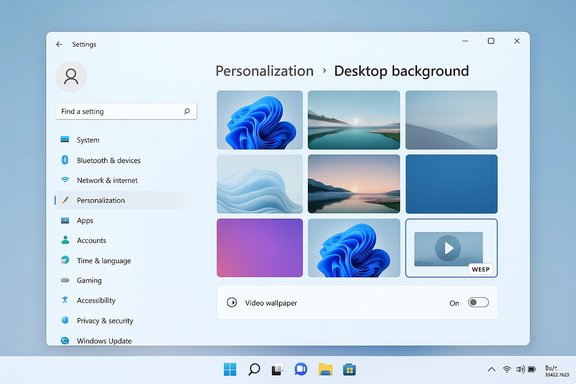
Windows settings window showing Personalization: Desktop background with a grid of wallpapers.Background / Overview​

The Windows Insider release notes for Build 26220.7653 (Beta Channel) explicitly state that you can now set .webp images from Settings > Personalization > Desktop Background. This is a deliberate, user-facing change that aligns the wallpaper picker with the modern web ecosystem where WebP is a common choice for efficient image delivery. The build itself sits in the 26xxx series that Microsoft is using while iterating features across the 24H2/25H2 shared servicing branch, which means this improvement is appearing inside the ongoing annual-update cadence rather than as a separate product.
Separately, Microsoft’s experiments with video wallpapers — a DreamScene-style return that would let you pick containers such as .mp4, .mkv, .mov, .webm and others as looping desktop backgrounds — surfaced in earlier preview builds and community hands‑ons. That experimental capability was discovered in older Dev/Beta builds and exposed by enthusiasts through an internal feature flag, but it is not present (or at least not visible) in the recent Beta build that adds WebP support. In short: WebP as wallpaper is now an official, rolling change for Insiders; native video wallpapers remain experimental and gated.

Why this matters: WebP, wallpaper workflows, and practical benefits​

WebP is designed to deliver smaller file sizes at comparable or better visual fidelity than JPEG and PNG. For wallpaper use, that translates to several practical benefits:
  • Smaller storage footprint for large wallpaper collections and synced themes.
  • Lower bandwidth if wallpapers are downloaded or synchronized across devices or when using cloud-based theme services.
  • Higher quality at modest file sizes, especially for photographic or gradient-rich images.
  • Better parity with the web: Many modern image sources deliver images as WebP by default.
Before this change, Windows applications and browsers could display WebP images, but the shell’s wallpaper path did not reliably expose WebP as a native choice in Settings. Users often converted WebP to JPEG/PNG or used third-party tools to set them as backgrounds. The new setting removes that step and simplifies the pipeline for users who source imagery from the web.

Real-world benefits at a glance​

  • Faster sync and reduced data transfer for wallpaper galleries.
  • Easier workflows for designers and users who save wallpapers directly from the web.
  • Less friction for curated theme packs distributed internally in enterprises or via third‑party marketplaces.

What Microsoft changed in Build 26220.7653​

The official Insider release notes for Build 26220.7653 state, in plain language: you can now set .webp images for your desktop background from Settings > Personalization > Desktop Background. That change indicates a supported path in the Settings app and shell for WebP. The key implications are:
  • The Settings-based image picker will offer WebP images alongside PNG and JPEG when browsing local files.
  • Users no longer need to convert WebP files before applying them through the standard personalization UX.
  • This change is being rolled out to Insiders and may be gated or gradual as Microsoft flips server-side toggles; your device may receive the change at a different time depending on toggles and channels.
Important implementation notes and caveats:
  • Microsoft documentation lists this as an OS-level settings improvement; the notes do not explicitly detail whether the shell performs native decoding of WebP internally, or if it still converts to another intermediate format for caching. Observations from hands-on testers suggest the wallpaper path now accepts WebP directly, but whether that equates to purely native decoding versus internal conversion is an implementation detail Microsoft has not published. Treat any claims about the internal conversion pipeline as informed inference unless Microsoft publishes explicit technical details.
  • The feature is arriving through Insider channels and may be delivered to stable channels via the shared servicing branch and enablement packages used for 24H2/25H2 lifecycle updates. Microsoft’s flighting model means the exact public release branch and timing can change.

Technical context: WebP support in Windows historically​

WebP has been supported by many Windows applications for years — browsers, image editors, and some apps have used the WebP codec and libraries. What changed now is the inclusion of WebP in the Settings > Personalization wallpaper path, a path that underpins the OS shell behavior for desktop backgrounds and interacts with features like slideshow, transcoded wallpaper cache, and enterprise wallpaper deployments.
Historically, users who wanted WebP wallpapers sometimes resorted to:
  • Converting .webp to .jpg/.png before applying.
  • Using registry tweaks or third‑party utilities to add a “Set as desktop background” context action for .webp files.
  • Employing third‑party wallpaper managers.
The native Settings integration eliminates those workarounds for the majority of scenarios.

Video wallpaper: the DreamScene echo and current status​

The idea of setting a video as a desktop background is not new — Windows Vista’s DreamScene allowed animated backgrounds long ago — and it has been a popular third-party feature via apps like Wallpaper Engine and Lively Wallpaper. Over the last year, traces of a first-party video wallpaper implementation appeared in Insider preview builds: the personalization UI had been observed to accept video containers, and community testers exposed the capability via an internal feature flag.
Key points from community findings and early hands‑on reports:
  • The capability was discovered in Dev/Beta preview builds earlier in the cycle and appears to accept a wide range of containers: .mp4, .mkv, .mov, .wmv, .avi, .m4v, .webm, etc.
  • When enabled by the internal flag, the Settings > Personalization > Background picker showed video files and allowed them to be applied as looping wallpapers.
  • Early testers reported playback was silent by default (no audio), which matches sensible UX expectations for desktop backgrounds.
  • The implementation is gated behind a feature flag (community-tested flag: 57645315) and requires experimental tooling to expose on consumer builds; Microsoft has not formally announced a general rollout.
Why the feature is still uncertain
  • The video wallpaper feature was visible in earlier preview traces but is absent or hidden in some subsequent Insider builds that focus on other changes. That suggests Microsoft is still iterating, assessing trade-offs (performance, battery, accessibility), and possibly reworking the media pipeline before finalizing a public release.
  • Microsoft has not published formal guidance about codec support, battery impact, or enterprise controls for video wallpapers. Container support doesn’t guarantee every codec inside that container will decode the same way across hardware and drivers.
  • Insider traces suggest the capability exists but may eventually be controlled by policy, reduced-motion heuristics, or power state checks.

Hands-on notes and how testers exposed video wallpapers (community insights)​

Community sleuths found the video wallpaper bits by examining Settings and by flipping an internal feature flag using a third‑party utility. The commonly reported approach in the testing community is:
  • Obtain the utility that toggles internal features (community tool such as ViVeTool).
  • Enable the feature ID 57645315.
  • Restart Explorer.exe or reboot to refresh shell state.
  • Open Settings > Personalization > Background and browse to a video file; the option to set it as wallpaper appears.
Caveats and warnings
  • This is a community method, not an official Microsoft-supported workflow. Enabling internal flags can change system behavior and is recommended only on non-critical test machines.
  • The feature is experimental and could change or be removed without notice; enabling it may expose unresolved bugs or stability issues.
  • There is no official Microsoft support path for problems caused by flipping internal flags.

Risks, unknowns, and implementation considerations​

While WebP wallpaper support is a benign and welcome usability improvement, the broader ambitions to support video backgrounds raise several technical and security questions. These deserve attention from both power users and IT professionals.
Performance and battery life
  • Continuous video decoding and rendering carries an energy cost. Early hands-on reports indicate testers saw little immediate resource impact for short, low-resolution loops, but that is not a guarantee for all hardware or all codecs.
  • Laptops on battery, small form-factor devices, or devices with older GPUs may see measurable battery drain and thermal impact if long or high-resolution clips are used.
  • Microsoft has historically included power heuristics for animation (for example, pause or reduce motion under Battery Saver). Expect similar heuristics for video wallpapers — but those have not been fully documented yet.
Codec, container, and hardware acceleration
  • Supporting containers (MP4, MKV, WEBM, etc. is only part of the story; the actual decoding depends on the codecs inside the container (H.264, H.265, AV1, VP9, etc.. Hardware acceleration, driver support, and performance vary by GPU and platform.
  • Unsupported codecs will fallback to software decoders, which may consume CPU and produce worse battery and performance outcomes on some devices.
Security and attack surface
  • Media codecs are historically a source of security vulnerabilities. Whitelisting untrusted video files or playing malformed files in the shell could raise attack-surface concerns if the media stack or decoders have undiscovered flaws.
  • Enterprises should expect Microsoft to implement safe-guards (scanning by antimalware engines, process isolation for media decoding, or policy controls) before a general release.
Accessibility and user experience
  • Dynamic or animated backgrounds must respect accessibility preferences such as Reduce motion and should not create motion or flicker issues for users with vestibular disorders.
  • Defaulting to silent playback is a sensible UX decision; any deviation would be disruptive.
Enterprise controls and manageability
  • Organizations will want Group Policy or MDM controls to:
  • Disable video wallpapers on managed devices.
  • Restrict allowed file types or directories.
  • Ensure compliance with performance baselines or imaging policies.
Compatibility with third‑party wallpaper apps
  • Native video wallpaper support could subsume much of the functionality that third‑party apps provide, but third‑party apps commonly offer richer per-monitor control, streaming, interactive content, and pause-on-fullscreen gaming behavior.
  • Third-party apps may need to adapt to coexist with native functionality; conversely, Microsoft could provide OS-level APIs so third-party developers can integrate responsibly.

Practical guidance for typical users​

  • If you only care about smaller, higher-quality wallpapers: update to the latest Insider builds that include the WebP wallpaper feature and use Settings > Personalization > Desktop Background to apply WebP images. Expect the feature to arrive gradually if you don’t see it immediately.
  • If you want to experiment with video wallpapers now: understand that the capability is experimental and lives behind a feature flag. Use a test machine and proceed cautiously; shorter, lower-resolution clips encoded with widely supported codecs (H.264 in an MP4 container) will generally be the most compatible and efficient.
  • Keep an eye on power settings: if you apply a looping video wallpaper on a laptop, verify battery life and thermal behavior — especially for long or 4K clips.
  • For multi-monitor setups: current community reports do not confirm per-monitor capabilities for native video wallpapers. Third-party apps still provide more advanced per-monitor personalization.

Practical guidance for IT admins and developers​

  • Audit existing scripts and automation that set wallpapers: if your tools assume only JPG/PNG/BMP, update them to handle WebP if your environment will adopt WebP assets.
  • Consider Group Policy/MDM readiness: plan for potential administrative controls to disable animated or video backgrounds on managed fleets.
  • Test line-of-business images and themes: if you deploy corporate wallpapers, validate that WebP assets display correctly across target devices and that any transcoded wallpaper caches behave as expected.
  • Monitor driver and codec compatibility: for environments with constrained or legacy hardware, confirm that media decoders are available and that fallback behavior is acceptable.

Strategic perspective: why Microsoft might be moving cautiously​

Small, incremental shell features often hide complex trade-offs. Adding WebP wallpaper support is low risk and high value: it’s a simple UX win that improves parity with the web. Enabling video wallpapers touches on a wider set of concerns: battery impact, codec diversity, media security, accessibility, and enterprise manageability.
Microsoft’s approach — surfacing WebP first, experimenting with video wallpaper behind hidden flags, and rolling changes through Insider channels — fits a conservative, iterative model. It lets Microsoft collect telemetry, observe real-world impacts, and design administrative controls before committing to a broad public rollout.

What to watch next​

  • Official documentation or a formal announcement that clarifies the internal implementation details for WebP (native decode vs. conversion / caching strategy).
  • Microsoft guidance on video wallpaper behavior: battery impact, codec list, audio policy, and enterprise controls.
  • Group Policy or MDM CSP entries that allow admins to restrict or disable animated/video wallpapers.
  • Accessibility and reduced‑motion integration into the feature (expected, but not yet documented).
  • How third‑party wallpaper ecosystem vendors adapt: will they preserve niche features or pivot to complementary capabilities?

Conclusion​

The addition of .webp as a first-class desktop background type in Build 26220.7653 is a modest but meaningful modernization that simplifies workflows for users and administrators who rely on web-native imagery. It’s a tidy, practical win: reduced file sizes, fewer conversions, and more consistent behavior when sourcing wallpapers from the web.
The broader idea of video wallpapers — the modern DreamScene — remains tantalizing but unfinished. Community discoveries showed the capability in preview builds and revealed a generous list of supported video containers, but the feature remains experimental and gated. Microsoft appears to be iterating cautiously, balancing the appeal of animated backgrounds against battery, security, accessibility, and enterprise policy concerns.
For now, WebP support is the immediate, supported improvement to enjoy. Video wallpaper, if it returns to the Insider channel as a polished, documented, and manageable feature, would broaden personalization in a visible way — but its final shape and availability are still to be determined. Users and IT pros should test, prepare scripts and policies for WebP, and keep a watchful eye on subsequent Insider notes for the next step in Windows personalization.

Source: Windows Latest Microsoft lets you use .webp images as Windows 11 desktop background, no signs of Video wallpaper yet
 

Microsoft has quietly added native support for .webp images as desktop backgrounds in Windows 11’s latest Beta preview (Build 26220.7653 / KB5074157), while the long-rumored native video-wallpaper capability remains experimental and absent from this particular build — a cautious, incremental change that matters more than its size suggests for both consumers and IT administrators.

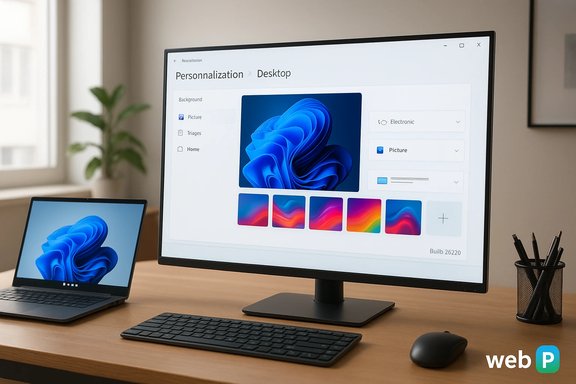
A sleek workspace with a large monitor showing Windows personalization, a laptop, keyboard, and plant.Background​

What changed in Build 26220.7653​

Microsoft shipped Windows 11 Insider Preview Build 26220.7653 (KB5074157) to the Beta channel as a preview quality update. The package mainly modernizes small Settings dialogs, speeds up Copilot prompt suggestions in Click to Do on eligible Copilot+ devices, and — crucially for personalization — adds support for using .webp raster images as desktop backgrounds through Settings > Personalization > Desktop Backgrothe change is rolling out via Microsoft’s controlled feature rollout model, so visibility may vary by device and region.

Why WebP matters for wallpapers​

WebP is a modern raster format developed to deliver better compression than JPEG and PNG at comparable visual quality. That makes it attractive for large wallpaper ecosystems, cloud sync, and low-storage devices. Until now, Windows could display WebP inside apps and browsers, but the Desktop Background path sometimes o JPG/PNG before being accepted by Settings; with this change, the Settings wallpaper pipeline decodes WebP natively, removing an annoying manual conversion step for users and admins.

WebP as wallpaper: practical details and implications​

How to use .webp images as your desktop background​

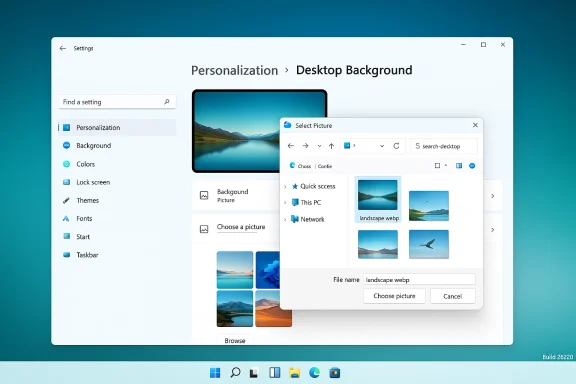
  • Open Settings > Personalization > Desktop Background.
  • Choose Picture and clic Select any .webp file from disk and apply it as your wallpaper.
    Because the change is surfaced in the same Settings flow as other image types, the user experience is identical to setting JPG or PNG wallpapers — the only difference is you no longer need to convert WebP assets before use.

Benefits for consumers and creators​

  • Smaller file sizes for high-quality desktop art reduce storage and sync bandwidth.
  • Web designers and wallpaper authors who publish WebP no longer need to bundle legacy formats.
  • Users copying images from the web can set them as wallpapelining personalization workflows.

Enterprise and admin considerations​

  • Automation, MDM and Group Policy scripts that set wallpapers may assume JPG/PNG/BMP only; those workflows should be validated to handle WebP assets
  • During controlled feature rollouts, identical machines can behave differently based on entitlement flags. IT pilots should confirm behavior across device rings and account scopes before automating wallpaper deployments.

Known caveats in this preview build​

Build 26220.7653 contains other fixes and active known issues — most notably secondary-monitor black-screen re-tray visibility problems — making it a good candidate for testing but not immediate productionwide deployment. These unrelated reliability items underscore the normal trade-offs of Beta-channel previews.

Video wallpaper: the DreamScene return that’s not here — yet​

The test-phase sightings (what community sleuths found)​

Throughout late 2025, multiple insiders and outlets reported that Microsoft had hidden a native video-wallpaper capability in Dev/Beta preview builds (reportedly in the 26x20.6690 series). Testers found a hidden feature flag (reported as ID 57645315) that, when enabled with community tools like ViVeTool, exposed a workflow allowing users to set video files as desktop backgrounds through Settings or a contextual Explorer action (“Set as wallpaper”). Reported supported containers included MP4, MKV, MOV, AVI, WMV, M4V and WebM. These discoveries were widely covered by mainstream outlets and enthusiast communities.

Why video wallpaper returned to the conversation​

Native video wallpapers recreate a DreamScene‑style capability from Windows Vista, delivering a polished, first-party experience that would reduce reliance on third-party apps like Wallpaper Engine, Lively Wallpaper, or DeskScapes. Unlike third-party offerings that require separate processes or heavy permissions, a built-in solution could integrate with Windows power-management and compositing layers more cleanly — if Microsoft ships admin controls and sensible pause rules.

But Build 26220.7653 shows no visible video-wallpaper rollout​

Despite those earlier traces, the new Beta build that added .webp wallpaper does not include (or at least does not surface) the video-wallpaper controls for testers by default. Community reporting and release notes for KB5074157 do not mention enabling the feature flag in this flight; that absence suggests Microsoft has not yet committed to a public rollout, or it is continuing to gate the capability behind server-side flags and more selective testing. That means, for now, consumers should not expect a widely distributed native video‑as‑wallpaper feature in this update.

Important technical caveats about the experimental video feature​

  • Container support ≠ codec support: recognizing MP4 or MKV containers doesn’t guarantee every codec inside (H.264, HEVC, AV1, etc. will decode natively under all hardware/software configurations. bility, installed codec packs, and licensing can change behavior.
  • Power and thermal impacts: playing a looping video as wallpaper requires continuous decoding and GPU/compositor involvement; Microsoft must tune pause rules and battery‑aware behavior to make this acceptable on laptops. Third-party tools already implement automatic pause rules for fullscreen apps and battery mode — any native implementation should match or improve on that behavior to avoid disrupting battery life.
  • Enterprise controls: organizations will expect Group Policy/Intune controls to disable or constrain animated/video wallpapers in managed fleets, and VDI/remote desktop environments will need special handling. Early Insider traces do not disclose Microsoft’s management story, so that remains an open question.

Third‑party alternatives remain relevant now​

Until Microsoft ships a fully supportet-party video wallpaper capability, the market still offers robust alternatives:
  • Lively Wallpaper: an open-source, Store-distributed app that supports video, web pages, shaders and includes auto-pause logic for games and battery saving. It integrates well with Windows 11 and is lightweight to run.
  • Wallpaper Engine / DeskScapes / PUSH Video Wallpaper: feature-rich, often paid tools with workshop ecosystems, per-wallpaper performance controls, and wide codec support. They remain the best way for users to have animated or interactive desktops today.
These third‑party tools already solve many of the practical problems Microsoft would need to address: intelligent pause/power rules, per‑monitor assignments, and robust codec/container fallback. A native solution must match those expectations to be considered an improvement rather than a simplification.

Technical verification and what’s proven vs. what remains speculative​

Proven, verifiable claims​

  • Windows 11 Beta Build 262as been released to Beta-channel Insiders and includes native support for setting .webp images as desktop backgrounds. This is explicitly described in multiple release-notes and community summaries for the build.
  • Separate Insider builds earlier in 2025 contained hidden traces of a native video-wallpaper feature; community testers exposed it via a feature flaools like ViVeTool. Evidence for these traces is corroborated by multiple independent outlets and community posts. ])

Claims that should be treated cautiously​

  • Any single hands-on claim that video wallpapers “don’t increase resources or power use” is anecdotal unless confirmed by systematic telemetry across hardware profiles. Early tester notes are inconsistent and device-dependent; therefore, statements about battery or performance impact should be considered provisional until Microsoft publishes guidance or rigorous benchmarks.
  • Precise codec and hardware‑acceleration support for a potential native video wallpaper feature remains unverifiable withoudocumentation or a hands-on test across representative devices. Container lists observed in community tests do not prove full codec parity.

Risks, strengths and editorial analysis​

Strengths of the WebP addition​

  • Low friction, high utility: supporting WebP in the native wallpaper path removes a cosmetic but persistent friction for users who collect web-originated wallpapers. It’s a pragmatic, no-risk change that modernizes the platform.
  • Favours modern web workflows: WebP is widely used on the web; this closes a small but visible gap between browser/app rendering and core shell flows.

Weaknesses, risks and unanswered questions​

  • Controlled Feature Rollout (CFR) fragmentation: Microsoft’s gate-and-flip model means some Insiders, OEM devices or regions may see different behavior. This increases support s and complicates automated deployment testing.
  • Automation and management blind spots: admin scripts and MDM policies that set wallpapers at scale must be reviewed; legacy tooling may assume only JPG/PNG/BMP. Without clear documensk silent failures in provisioning.
  • For video wallpapers, the main risks are performance/battery, codec/DRM/licensing complexity, and a lack of pre-announced admin controls. Until Microsoft publishes enterprise guidance and throttling/pausing behavior, caution is warranted.

Strategic read on Microsoft’s approach​

The WebP change is an example of product teams prioritizing low-risk polish that improves daily usability without increasing the attack surface or altering administrative controls. Video wallpaper experiments show Microsoft is exploring bolder personalization moves, but the absence of the feature from the latest Beta preview indicates a conservative posture — likely driven by performance, power, and manageability concerns. The most prudent path for Microsoft would be to ship WebP broadly now while continuing careful testing and administrator-facing controls for any animated or video wallpaper rollout.

Practical recommendations​

For enthusiasts and power users​

  • Try the Beta build on a non-production PC if you want immediate WebP wallpaper support; create a system image before testing to simplify rollback.
  • If you want native-like video wallpapers today, use established third-party tools (Lively, Wallpaper Engine, DeskScapes) that offer pause-on-battery and pause-on-fullscreen features. They remain the most flexible route until Microsoft provides an official, well-documented rollout.

For IT administrators and deployment teams​

  • Validate any wallpaper automation scripts, MDM profiles, or SCCM/Intune policies in a test ring to ensure they handle .webp assets correctly. Don’t assume parity with prior behavior.
  • Keep Beta-channel builds off production devices. Use the controlled rollout to your advantage: stagger tests across pilot rings, and monitor multi-monitor and GPU-heavy workflows closely because this preview family still lists active display-related known issues.

For Microsoft (what to ask of product teams)​

  • Publish explicit Group Policy / Intune controls and power-management policies for animated or video wallpaper features. Enterprise adoption depends on clear administrative controls.
  • Document codec and hardware-decode expectations for any video wallpaper feature, and expose a power-friendly default (pause-on-battery, pause-on-fullscreen, per‑monitor limits).

Conclusion​

The addition of native .webp wallpaper support in Windows 11 Build 26220.7653 is a small but meaningful improvement that removes a real-world friction point for users and creators; it modernizes Windows’ wallpaper pipeline in step with web standards and simplifies day-to-day personalization. At the same time, the absence of a visible native video-wallpaper control in this same build underscores Microsoft’s cautious approach to larger, more complex personalization features that implicate performance, codecs, and enterprise manageability. Enthusiasts can still experiment with third‑party tools, while IT teams should validate wallpaper automation and monitor ongoing Insider flights for changes. The story here is illustrative of Microsoft’s broader pattern: ship the low-risk wins quickly, but carefully test and gate larger, system-level features until the admin, performance and security details are thoroughly resolved.
Source: Windows Latest https://www.windowslatest.com/2026/...-background-no-signs-of-video-wallpaper-yet/]
 

Microsoft's quiet but practical update to the Windows 11 personalization pipeline now lets you use .webp images as desktopsktop backgrounds — a small change on the surface that removes needless steps and closes a long-standing gap between how images behave in browsers and how they behave on the desktop. This capability arrives in the Beta Channel build marked Build 26220.7653 (KB5074157) and is being rolled out via Microsoft’s controlled feature gates, meaning it will appear for Insiders first and expand over time.

Windows 11: Personalization > Desktop Background with image picker open.Background / Overview​

WebP is a modern image format developed with the web in mind: it supports lossy and lossless compression, alpha transparency, and animation, typically producing much smaller files than comparable JPEG or PNG images at the same perceived quality. That makes WebP an attractive default for websites, and for anyone who saves images from the web, WebP is now far more common than it was a few years ago. The new wallpaper support simply aligns the Windows desktop with that reality, so images you save from the web will behave more consistently across systems.
Microsoft’s Insider release notes for Build 26220.7653 explicitly list the change under Settings > Personalization > Desktop Background: you can now set .webp files as desktop backgrounds. The update is delivered to the Beta Channel as part of Microsoft’s enablement and controlled rollout model. This is not a sweeping redesign — it’s a targeted, user-facing quality improvement intended to reduce friction for everyday workflows.

What changed and why it matters​

The concrete change​

  • The Settings > Personalization > Desktop Background picker now accepts .webp files as a first-class wallpaper option.
  • The user experience for applying a WebP wallpaper is identical to applying a JPG or PNG: browse, choose Picture, pick the file, and set it as your background.

Why it's useful​

For most users, the practical benefits are straightforward:
  • Fewer manual conversions. No need to “save as JPG” or use a converter to make a downloaded WebP image acceptable for desktop use.
  • Smaller storage and sync payloads. WebP images typically consume less disk space and bandwidth when synced across devices or distributed in large wallpaper packs.
  • Cleaner workflows for creators and admins. Wallpaper authors and IT teams can publish and deploy a single WebP asset without bundling legacy formats.
These improvements are especially relevant for users who regularly source wallpapers from the web, for theme or wallpaper services that sync images between devices, and for IT departments that distribute brand imagery at scale.

How to use it (quick steps)​

  • Open Settings.
  • Go to Personalization > Desktop Background.
  • Choose Picture if not already selected.
  • Click Browse and navigate to the .webp file you want to use.
  • Select the image and apply it — Windows will set it the same way as other supported picture types.
If your device does not show .webp as a selectable option yet, the feature might be gated by Microsoft’s rollout toggles; Insiders on the Beta Channel will see it earlier than the general public.

Technical verification and what Microsoft published​

The change is described in Microsoft’s Beta Channel release notes for Build 26220.7653. The announcement lists several improvements — WinUI dialog modernizations, Click to Do latency reductions for Copilot prompts, and a number of fixes — and explicitly names .webp support for desktop backgrounds in the Desktop Background section. Multiple independent outlets and community reports corroborate the build number and the KB entry for this preview.
A critical piece to note: Microsoft’s release notes state the user-facing behavior (you can set WebP as a background) but do not describe internal implementation details. It remains undocumented whether the wallpaper pipeline now performs pure native WebP decode at render time or whether it decodes/transcodes WebP into an internal cached bitmap format for the shell. Community hands-on tests suggest the Settings path accepts WebP directly, but the precise decode/caching pipeline has not been published by Microsoft and should be treated as unverified technical detail until Microsoft clarifies.

Cross-checks and independent confirmation​

This addition has been reported across multiple independent Windows-focused outlets and community forums, and the build notes were reproduced in editorial coverage of the new Beta release. Those independent confirmations align on three key facts:
  • The Beta build number is 26220.7653 and delivered as KB5074157.
  • The Settings personalization path now accepts .webp as a wallpaper format.
  • The rollout is controlled and may not be visible on every Insider device immediately.
These corroborating reports were drawn from the official Insider notes and community testing coverage. Treat rollout timing as variable across devices and rings because Microsoft typically uses server-side toggles to ramp features.

Strengths: the pragmatic wins​

  • Low friction, high impact. This is exactly the kind of small UX polish that removes an everyday annoyance: saving a wallpaper from the web no longer forces a conversion step.
  • Better parity with web ecosystems. As WebP becomes a de facto default for web images, Windows catching up reduces surprises for end users and content creators.
  • Operational benefits for IT. Imaging, MDM, and Group Policy wallpaper deployments can now support native WebP assets — when devices have the feature enabled — reducing storage and distribution overhead.

Risks, unknowns, and what to watch​

1) Controlled Feature Rollout fragmentation​

Microsoft’s rollout model means identical machines can experience different behavior during preview. IT pilots should expect that not every device in a ring sees the change simultaneously and should avoid assuming uniform visibility when testing automated deployments.

2) Automation and scripting gaps​

Many existing scripts and MDM policies that set wallpapers assume common formats like JPG, PNG, or BMP. Administrators should audit deployment scripts and imaging routines to ensure they either accept or explicitly handle .webp files. Automation that verifies file extensions or MIME types may need adjustments.

3) Caching and decoding behavior (unverified)​

Because Microsoft has not documented whether the shell decodes WebP natively or converts it to an internal raster format for caching, there are open questions:
  • Will WebP wallpapers be stored in the same wallpaper cache as other images, and how will that affect disk usage and restore behavior?
  • Could there be differences in memory footprint or rendering performance on low-end or older GPUs/drivers?
    These remain unverified implementation details until Microsoft publishes deeper technical notes. Treat any claims about internal decode pipelines as informed inference rather than fact.

4) Video wallpaper hopes and reality​

Community sleuths and previous Dev/Beta traces uncovered experimental video wallpaper capability in other preview builds, exposing flows that could accept a wide array of containers. Build 26220.7653, however, does not deliver a packaged, documented video-wallpaper feature; video wallpaper remains experimental and gated behind flags or absent in this Beta release. Any claims that native video wallpapers are broadly supported or that they “don’t affect battery life” are anecdotal and hardware-dependent; treat such claims skeptically until Microsoft ships an official feature with documentation that addresses codecs, power, and manageability.

Enterprise and administrative guidance​

Test in a small pilot​

  • Validate the feature on a non-production device enrolled in the Beta Channel with the “get the latest updates as soon as they are available” toggle enabled.
  • Confirm that your existing wallpaper deployment tools (Group Policy, MDM, imaging scripts) can:
  • Recognize .webp file extensions.
  • Set the wallpaper using the Settings pipeline or the registry keys your provisioning relies on.
  • Check multi-monitor and slideshow scenarios to ensure consistent behavior across monitors and switching events.

Update automation and packaging​

  • Ensure wallpaper packaging scripts do not accidentally filter out .webp and that versioned distribution packages include fallback JPG/PNG variants if backward compatibility across older Windows versions is required.
  • If you use SCCM, Intune, or imaging pipelines that expect certain formats, add explicit tests and logging for WebP payloads during rollout.

Policy and manageability planning​

  • Plan for Group Policy or MDM controls to disable animated or video backgrounds if/when Microsoft ships such features, as these can be disruptive on managed fleets.
  • Include accessibility and reduced-motion considerations in policy planning if animated wallpapers arrive in future builds.

Developer and wallpaper-creator considerations​

  • Designers who publish wallpaper packs can simplify asset lists by shipping WebP as a primary format, taking advantage of better compression for large-resolution images.
  • If you distribute theme packs or marketplace content, include fallback assets for older OS versions that may not respect WebP as a first-class wallpaper format.
  • Consider the behavior of third-party wallpaper managers (e.g., Wallpaper Engine or Lively Wallpaper): they may continue to provide richer animation and interaction until, if ever, Microsoft ships a fully supported video-wallpaper product.

Real-world examples and practical tips​

  • If you download a high-resolution WebP photo of a landscape from a site that serves images in modern formats, you can now apply it directly without conversion.
  • If you maintain a synchronized wallpaper library in the cloud (OneDrive, Dropbox, or an MDM-hosted asset store), switching to WebP can reduce storage costs and sync bandwidth.
  • For users who rely on third-party wallpaper tools because of missing format support, native WebP support reduces the need for such workarounds in simple still-image cases; animated wallpaper enthusiasts may still prefer specialized apps for granular controls.

Accessibility and performance considerations​

  • Accessibility teams should validate Narrator and other assistive technologies in any pilot, particularly if the Settings UI has been modernized with WinUI controls (which the build also updates under Accounts > Other Users). Modern controls can improve accessibility, but changes sometimes reveal localized or focus issues that require remediation.
  • Performance impact is likely insignificant for still WebP images compared to equivalent JPG/PNG assets; however, because the internal decode and cache behavior is undocumented, admins should monitor memory and GPU usage during pilot deployments. If video wallpaper is introduced later, battery and CPU/GPU impact becomes a critical test dimension.

What remains unanswered​

  • Will Microsoft publish a technical note that clarifies whether WebP wallpapers are decoded natively by the shell, or whether an intermediate cached format is used?
  • Will Group Policy/MDM CSPs be updated with specific settings to control animated or video backgrounds when/if Microsoft ships native video wallpaper?
  • If video wallpapers are eventually offered, what container/codec list will Microsoft officially support, and how will audio be handled? Currently, community discoveries list many containers in experimental traces, but official guidance is absent for now.
These are the items to watch for in subsequent Insider notes and Microsoft documentation.

Conclusion​

Adding native .webp support to Windows 11’s desktop background pipeline is a pragmatic, user-first improvement that resolves a real productivity annoyance: images downloaded from the web will now behave the way you expect when you try to set them as wallpapers. Delivered in Build 26220.7653 (KB5074157) to the Beta Channel, the update is modest in scope but meaningful in practice, especially for creators, sysadmins, and anyone who manages wallpaper deployments.
That said, this is an incremental step rather than a complete personalization overhaul. The more ambitious idea of native video wallpapers remains an experiment in other preview streams and is not part of this Beta build’s supported feature set. Administrators should pilot WebP support carefully, update automation where needed, and keep an eye on future Insider notes for official documentation clarifying internal behavior and any enterprise controls Microsoft might introduce.
Overall, for everyday Windows users and wallpaper fans, the change simply reduces friction. For IT and power users, it invites a quick round of testing and small updates to automation — a tidy win that modernizes Windows 11 personalization without changing how the desktop looks.

Source: Windows Central Windows 11 backgrounds are finally joining the modern era.
 

Back
Top