

Microsoft is making the Windows Insider Program easier to understand, easier to join, and, crucially, easier to leave. That sounds like a modest administrative tweak, but for power users it could change the practical calculus of testing preview builds on a primary PC. If the rollout lands as described, Insiders will get fewer channel choices, more predictable feature delivery, and a long-awaited ability to switch tracks without a clean install in most cases. For a program that has often felt like a maze of build numbers, rolling toggles, and irreversible jumps, that is no small improvement.
The Windows Insider Program has always served two masters: it is a testing ground for Microsoft’s engineers, and a public showcase for what the company hopes Windows will become next. In practice, that has meant a program that is simultaneously exciting and confusing. The most committed participants wanted first access to new features, while everyone else wanted a preview system that did not feel like a gamble every time a build landed.
Microsoft’s current Insider structure grew out of an attempt to balance those needs through multiple rings and channels. Over time, the familiar channel lineup became a mixture of platform experiments, feature previews, and near-retail validation. That model worked well enough for enthusiasts who lived and breathed build numbers, but it was less friendly to casual testers and enterprise admins who simply wanted to help shape Windows without constantly decoding the flighting taxonomy.
The complication became more obvious as Microsoft’s preview strategy matured. The company increasingly used gradual rollouts and toggle-gated features inside Insider builds, which made every flight feel like a layered experiment. You might install the same build as another user and see entirely different behavior, depending on whether your device had been selected for a staged rollout or whether you had enabled the latest features toggle. That is useful for validation, but it is not especially intuitive.
Microsoft has already been moving toward a more deliberate preview rhythm over the past year, especially in the Beta and Dev branches. Recent Insider blog posts show the company repeatedly offering the same build to both Dev and Beta for a period, then warning users that the window to switch channels will eventually close as Dev moves ahead. That pattern indicates Microsoft has been trying to reduce the pain of channel transitions while still preserving a frontier channel for unstable work.
The latest changes, according to the Tom’s Hardware report and Microsoft’s own recent Insider behavior, appear to formalize that direction rather than invent it from scratch. In other words, this is not a sudden philosophical reversal. It is Microsoft taking a messy system and making the boundaries more legible, while preserving enough experimentation to keep Windows moving forward.
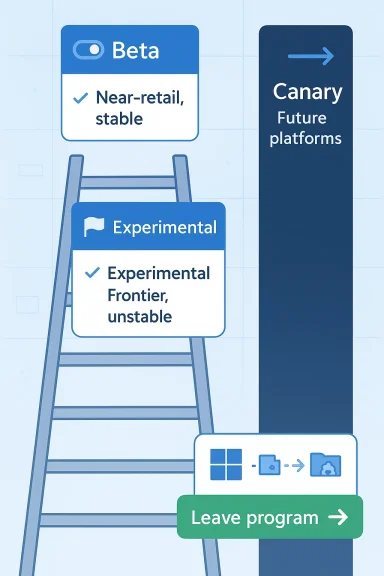
That matters because channel names shape expectations. A channel called Beta suggests something relatively close to shipping, while a channel called Experimental tells you to expect instability, missing pieces, and even features that may never reach retail Windows. The distinction is valuable because it reduces the number of false assumptions users bring into the program on day one.
That also helps Microsoft itself. A simplified ladder makes documentation, support, and community guidance easier to maintain. It is much easier to tell users, “Choose Beta if you want previews near retail; choose Experimental if you want the newest, roughest work,” than to explain the subtle differences between branches that change every few months.
The likely result is a more honest Insider funnel. Enthusiasts who want bleeding-edge features can still go there, but less technical testers can land in a preview environment that better matches their tolerance for risk. That could widen participation, especially among users who were previously intrigued by the program but intimidated by its moving parts.
That decision is also a quiet admission that the old system could frustrate the very people it was supposed to motivate. Microsoft has previously described controlled feature rollouts as a way to assess quality and gather feedback, but the company also acknowledged that it could make the Insider experience feel unpredictable. In other words, the program sometimes hid the thing people signed up to test.
That gives Beta a clearer identity. It becomes the channel for people who want to preview what Windows is likely to become, not what might appear someday if the stars align. For enthusiasts, that is a better bargain. For Microsoft, it may create a cleaner feedback loop because users will know whether a feature is supposed to be there or whether it is genuinely missing.
The broader implication is that Beta may become the safest place for serious testing on a daily-driver PC. You still accept some instability, but you are less likely to be confused by missing features or partial deployments. That can make the channel more useful for writers, IT admins, and power users who need to evaluate behavior quickly.
The most interesting part is that Microsoft is reportedly giving Experimental more direct control mechanisms, including flags for enabling or disabling new features. That is a nod to the reality that the most advanced users want to experiment with specific capabilities rather than accept an entire unstable package. It also mirrors how modern software teams increasingly use feature flags internally before broader exposure.
There is, however, a subtle risk in giving too many knobs to users who may not fully understand the consequences. Feature flags can create combinations that are hard to reproduce, and that may complicate support if the system becomes too configurable. Still, for a channel labeled Experimental, that complexity is appropriate.
The more consequential point is strategic. Microsoft is signaling that the earliest preview tier is no longer just “random rough builds,” but a structured lab for future Windows concepts. That could include platform changes, shell experiments, and UI ideas that need more incubation before they are even meaningful to wider Insider audiences.
This matters because not every preview should be treated as a partial version of the next retail Windows release. Some builds are effectively laboratories for ideas that may take multiple cycles to mature. Microsoft has long warned Canary users that those builds are not meant to map neatly to any specific product version, and that features may never ship.
From an engineering perspective, the clean-install requirement is a feature, not a bug. It isolates experimental platform work from the stability expectations of the rest of the Insider ecosystem. From a user perspective, though, it is a reminder that the absolute newest Windows work remains expensive to chase.
That trade-off is likely deliberate. Microsoft seems willing to make Beta and Release Preview easier to move between, while preserving a hard line for the earliest frontier builds. In effect, the company is creating a safer middle lane and an explicitly dangerous outer lane.
Microsoft says the new process will rely on in-place upgrades that migrate apps, settings, and data when moving between compatible Insider channels on the same core version. That is a huge quality-of-life improvement, especially for users who have spent years building a primary workstation around a stable application stack.
That is more important than it may sound. The biggest inhibitor to feedback programs is not technical fear alone; it is the fear of time loss. Users are willing to tolerate a broken feature, but they are much less willing to spend an afternoon rebuilding their PC just to exit the experiment.
If Microsoft executes this correctly, it should broaden the pool of testers. People can join Beta or Release Preview, evaluate a feature, and leave without treating the process like a data migration project. That alone could improve the quality of Windows feedback because it invites broader participation from users who maintain real workstations rather than spare test machines.
Release Preview has always occupied a slightly odd but important niche. It is not where you go to discover the future; it is where you go to verify that the future will not break your fleet on day one. That makes it valuable for businesses, schools, and managed device environments that need to see what is coming without dealing with the instability of Dev or Experimental.
That separation could prove important as Windows becomes more feature-flag-driven. If Beta is less randomized and Experimental is more volatile, Release Preview must remain the place where administrators can examine almost-final code with a minimum of surprises. Otherwise, the middle of the program would become blurry again.
By keeping Release Preview intact, Microsoft is acknowledging that the Insider ecosystem is not just about enthusiasts. It is also a release management tool for the people who must deploy Windows at scale and who need enough certainty to make decisions months in advance.
The fact that server remains unchanged suggests Microsoft is avoiding unnecessary turbulence where administrators rely on long validation cycles and predictable preview streams. Server preview is not the place to improvise with flashy channel redesigns. It is the place for controlled evaluation of infrastructure changes, management behavior, and compatibility with server-side workloads.
This division also preserves Microsoft’s ability to tune the Insider narrative separately for each audience. Client Windows can become more transparent and user-friendly, while Server can remain an engineering-focused validation pipeline. That is the right balance if Microsoft wants to reduce confusion without diluting the purpose of either program.
For businesses, the practical win is that the new client-side structure may better align with the real-world need to test updates without rebuilding devices. For server admins, the existing model remains familiar, which reduces the chance of accidental disruption in a domain where stability matters more than novelty.
There is also a competitive reality here. Apple’s developer and public beta systems are comparatively easy to understand, and Android preview programs have also become more legible for mainstream testers. Microsoft has often struggled with fragmentation in its preview story, which can make Windows feel more complicated than it should for users who simply want to test upcoming features.
It also helps the Windows community. Forum guidance, IT walkthroughs, and troubleshooting discussions become easier when the channel structure is easier to describe. The community no longer has to translate a complicated matrix of build series into plain English every time Microsoft adjusts the flighting path.
In that sense, the change is both tactical and symbolic. Microsoft is not merely rearranging preview labels; it is trying to make Windows feel more approachable at the point where the next version of Windows is being shaped. That is a smart move, even if it comes years later than some users would have liked.
These changes could unlock more useful feedback, especially if users know whether they are testing near-retail behavior or frontier platform work. Better still, the in-place upgrade path lowers the cost of participation, which may be the single biggest practical barrier to broader enrollment.
There is another concern around feature parity. If Beta no longer uses gradual rollouts, Microsoft loses one mechanism for soft-launching features to a subset of users inside that channel. That may be fine if Experimental absorbs the early validation role, but the company must avoid creating gaps where certain problems are discovered too late.
If Microsoft gets this right, the Insider Program may become significantly more approachable without losing its technical value. That would be a win for consumers, enthusiasts, and enterprises alike, because it would make the feedback loop around Windows less intimidating and more productive.
Source: Tom's Hardware Microsoft simplifies Windows Insider program — fewer channels, and switching without wiping your device
 Background
The Windows Insider Program has always served two masters: it is a testing ground for Microsoft’s engineers, and a public showcase for what the company hopes Windows will become next. In practice, that has meant a program that is simultaneously exciting and confusing. The most committed participants wanted first access to new features, while everyone else wanted a preview system that did not feel like a gamble every time a build landed.Microsoft’s current Insider structure grew out of an attempt to balance those needs through multiple rings and channels. Over time, the familiar channel lineup became a mixture of platform experiments, feature previews, and near-retail validation. That model worked well enough for enthusiasts who lived and breathed build numbers, but it was less friendly to casual testers and enterprise admins who simply wanted to help shape Windows without constantly decoding the flighting taxonomy.
The complication became more obvious as Microsoft’s preview strategy matured. The company increasingly used gradual rollouts and toggle-gated features inside Insider builds, which made every flight feel like a layered experiment. You might install the same build as another user and see entirely different behavior, depending on whether your device had been selected for a staged rollout or whether you had enabled the latest features toggle. That is useful for validation, but it is not especially intuitive.
Microsoft has already been moving toward a more deliberate preview rhythm over the past year, especially in the Beta and Dev branches. Recent Insider blog posts show the company repeatedly offering the same build to both Dev and Beta for a period, then warning users that the window to switch channels will eventually close as Dev moves ahead. That pattern indicates Microsoft has been trying to reduce the pain of channel transitions while still preserving a frontier channel for unstable work.
The latest changes, according to the Tom’s Hardware report and Microsoft’s own recent Insider behavior, appear to formalize that direction rather than invent it from scratch. In other words, this is not a sudden philosophical reversal. It is Microsoft taking a messy system and making the boundaries more legible, while preserving enough experimentation to keep Windows moving forward.
A Simpler Channel Model
The biggest headline is the channel cleanup itself. Microsoft is reportedly collapsing the old multi-branch Insider structure into a more straightforward pairing centered on Beta and Experimental, with Canary-like work moving into a more clearly labeled front line for the earliest builds. That is not just a cosmetic rename. It is an attempt to make the preview ladder understandable to people who do not track every internal build series.That matters because channel names shape expectations. A channel called Beta suggests something relatively close to shipping, while a channel called Experimental tells you to expect instability, missing pieces, and even features that may never reach retail Windows. The distinction is valuable because it reduces the number of false assumptions users bring into the program on day one.
Why naming matters
Channel branding is product design. When labels are opaque, users make the wrong risk assessment, and they either avoid the program or join the wrong one. Microsoft appears to be acknowledging that the old structure had become too dependent on insider knowledge and too little on plain language.That also helps Microsoft itself. A simplified ladder makes documentation, support, and community guidance easier to maintain. It is much easier to tell users, “Choose Beta if you want previews near retail; choose Experimental if you want the newest, roughest work,” than to explain the subtle differences between branches that change every few months.
The likely result is a more honest Insider funnel. Enthusiasts who want bleeding-edge features can still go there, but less technical testers can land in a preview environment that better matches their tolerance for risk. That could widen participation, especially among users who were previously intrigued by the program but intimidated by its moving parts.
- Fewer labels should reduce confusion.
- Clearer risk tiers should improve user expectations.
- Simpler onboarding may attract more testers.
- Better docs become easier to write and maintain.
- Support burden could decline if fewer users enroll in the wrong ring.
What the Beta Channel Change Really Means
The Beta channel appears to be getting the most consumer-friendly upgrade of the bunch: Microsoft is stopping gradual feature rollouts there. In practice, that means if a Beta build includes a feature, you should get it rather than waiting for Microsoft to stage it out slowly to a subset of Insiders. That is a meaningful shift because it restores the sense that Beta is a preview channel with visible rewards rather than a lottery.That decision is also a quiet admission that the old system could frustrate the very people it was supposed to motivate. Microsoft has previously described controlled feature rollouts as a way to assess quality and gather feedback, but the company also acknowledged that it could make the Insider experience feel unpredictable. In other words, the program sometimes hid the thing people signed up to test.
Predictability versus validation
There is an important trade-off here. Gradual rollouts are useful for telemetry, because they let Microsoft watch feature behavior under load before distributing it more broadly. But Beta users are not the same as retail users; they are already volunteering to live with instability. If Microsoft has enough telemetry from Dev or Experimental users, it can afford to make Beta more deterministic.That gives Beta a clearer identity. It becomes the channel for people who want to preview what Windows is likely to become, not what might appear someday if the stars align. For enthusiasts, that is a better bargain. For Microsoft, it may create a cleaner feedback loop because users will know whether a feature is supposed to be there or whether it is genuinely missing.
The broader implication is that Beta may become the safest place for serious testing on a daily-driver PC. You still accept some instability, but you are less likely to be confused by missing features or partial deployments. That can make the channel more useful for writers, IT admins, and power users who need to evaluate behavior quickly.
- No staged surprises in Beta should improve consistency.
- Feedback quality may improve because everyone sees the same feature set.
- Adoption could rise among cautious testers.
- Comparison testing becomes easier across devices.
- Documentation from the community should become more reliable.
Experimental Becomes the New Frontier
If Beta is becoming clearer, Experimental is becoming more explicit about its purpose: it is where Microsoft can test features that may change, slip, or never ship. That is a healthy move because it tells users exactly what they are signing up for. Too often, preview programs fail when users mistake raw exploration for near-term product planning.The most interesting part is that Microsoft is reportedly giving Experimental more direct control mechanisms, including flags for enabling or disabling new features. That is a nod to the reality that the most advanced users want to experiment with specific capabilities rather than accept an entire unstable package. It also mirrors how modern software teams increasingly use feature flags internally before broader exposure.
Feature flags as a user tool
Feature flags are not new, but exposing them more visibly to Insiders changes the relationship between the user and the preview system. Instead of being passive recipients of a build, testers get a degree of agency. That can improve debugging, because users can isolate issues more effectively and can tell Microsoft which feature caused a regression.There is, however, a subtle risk in giving too many knobs to users who may not fully understand the consequences. Feature flags can create combinations that are hard to reproduce, and that may complicate support if the system becomes too configurable. Still, for a channel labeled Experimental, that complexity is appropriate.
The more consequential point is strategic. Microsoft is signaling that the earliest preview tier is no longer just “random rough builds,” but a structured lab for future Windows concepts. That could include platform changes, shell experiments, and UI ideas that need more incubation before they are even meaningful to wider Insider audiences.
- More user control should improve targeted testing.
- Better bug isolation may help Microsoft triage issues.
- Higher complexity is acceptable in the earliest tier.
- Feature gates make experimentation more intentional.
- Unfinished ideas can live there without confusing Beta users.
Canary, Future Platforms, and the Clean-Install Problem
The Canary side of the Insider world has always been the most volatile, and that is not changing. Microsoft’s current naming and build behavior already suggests a sharp divide between builds aligned to a current Windows release and those that are not. The reported move to split Canary-like work into subtracks such as Future Platforms and version-specific experimental branches is another effort to separate “near-term preview” from “platform research.”This matters because not every preview should be treated as a partial version of the next retail Windows release. Some builds are effectively laboratories for ideas that may take multiple cycles to mature. Microsoft has long warned Canary users that those builds are not meant to map neatly to any specific product version, and that features may never ship.
Why clean installs still matter
The part that will frustrate many enthusiasts is that the most forward-looking Experimental or Future Platforms path still appears to require a clean install. That is understandable, because when a build is not aligned to a retail Windows core, in-place transitions can break assumptions about drivers, apps, and system state.From an engineering perspective, the clean-install requirement is a feature, not a bug. It isolates experimental platform work from the stability expectations of the rest of the Insider ecosystem. From a user perspective, though, it is a reminder that the absolute newest Windows work remains expensive to chase.
That trade-off is likely deliberate. Microsoft seems willing to make Beta and Release Preview easier to move between, while preserving a hard line for the earliest frontier builds. In effect, the company is creating a safer middle lane and an explicitly dangerous outer lane.
- Canary/Future Platforms remains the roughest territory.
- Build alignment determines whether migration is feasible.
- Clean installs protect platform experiments from corruption.
- Retail mapping is less important in the earliest stage.
- Power users must still choose risk carefully.
In-Place Upgrades Finally Reduce Friction
One of the most practical changes is Microsoft’s plan to let Insiders switch channels or leave the program without wiping the device in most cases. That may be the real headline for power users, because the clean-install barrier has historically been one of the biggest reasons people hesitated to try preview channels on a production machine. A preview program that can strand apps, settings, and data is a tougher sell than one that lets you exit gracefully.Microsoft says the new process will rely on in-place upgrades that migrate apps, settings, and data when moving between compatible Insider channels on the same core version. That is a huge quality-of-life improvement, especially for users who have spent years building a primary workstation around a stable application stack.
A better off-ramp
Historically, the “Stop getting preview builds” path was not always enough to preserve a user’s preferred environment. In many preview scenarios, leaving the Insider program meant a reset or a fresh installation, which made the program feel like a one-way door. By promising a better off-ramp, Microsoft is reducing the psychological cost of trying the program in the first place.That is more important than it may sound. The biggest inhibitor to feedback programs is not technical fear alone; it is the fear of time loss. Users are willing to tolerate a broken feature, but they are much less willing to spend an afternoon rebuilding their PC just to exit the experiment.
If Microsoft executes this correctly, it should broaden the pool of testers. People can join Beta or Release Preview, evaluate a feature, and leave without treating the process like a data migration project. That alone could improve the quality of Windows feedback because it invites broader participation from users who maintain real workstations rather than spare test machines.
- Lower exit cost should encourage more enrollment.
- Less downtime makes previews more practical.
- Preserved apps and settings reduce fear of testing.
- Migration support is especially valuable for daily drivers.
- Channel hopping becomes far less punitive.
Release Preview Becomes the Conservative Option
Microsoft is also preserving Release Preview as the more cautious place for users who want production builds shortly before general availability. That is wise, because not every Insider wants to be at the bleeding edge. Many IT pros use Release Preview as a validation environment, and they care more about compatibility and deployment readiness than about experimenting with new shell behaviors.Release Preview has always occupied a slightly odd but important niche. It is not where you go to discover the future; it is where you go to verify that the future will not break your fleet on day one. That makes it valuable for businesses, schools, and managed device environments that need to see what is coming without dealing with the instability of Dev or Experimental.
Enterprise and consumer differences
For consumers, Release Preview is often a safety valve. It lets enthusiasts sample an upcoming release while staying close to retail. For enterprises, it is a practical proving ground for application compatibility, policy behavior, and rollout planning. The distinction matters because Microsoft’s changes appear to maintain that role rather than collapse it into the broader Beta experience.That separation could prove important as Windows becomes more feature-flag-driven. If Beta is less randomized and Experimental is more volatile, Release Preview must remain the place where administrators can examine almost-final code with a minimum of surprises. Otherwise, the middle of the program would become blurry again.
By keeping Release Preview intact, Microsoft is acknowledging that the Insider ecosystem is not just about enthusiasts. It is also a release management tool for the people who must deploy Windows at scale and who need enough certainty to make decisions months in advance.
- Release Preview remains the near-production channel.
- Enterprises benefit from compatibility checks.
- Consumers get a safer preview path.
- Deployment planning is easier with a stable reference point.
- Feature chaos is less likely to spill into validation workflows.
Windows Insider for Business and Server
Microsoft says Windows Insider for Business will follow the same structural changes as the consumer program, while Windows Server Insider remains unchanged. That split makes sense. Business device testing needs the same simplified logic as consumer testing, but server preview workflows are more specialized and historically more conservative.The fact that server remains unchanged suggests Microsoft is avoiding unnecessary turbulence where administrators rely on long validation cycles and predictable preview streams. Server preview is not the place to improvise with flashy channel redesigns. It is the place for controlled evaluation of infrastructure changes, management behavior, and compatibility with server-side workloads.
Why the split is sensible
A single preview philosophy rarely works across client and server. Client users care about UI changes, app behavior, and feature cadence. Server users care about uptime, compatibility, and whether a build supports the tools and dependencies already in their environment.This division also preserves Microsoft’s ability to tune the Insider narrative separately for each audience. Client Windows can become more transparent and user-friendly, while Server can remain an engineering-focused validation pipeline. That is the right balance if Microsoft wants to reduce confusion without diluting the purpose of either program.
For businesses, the practical win is that the new client-side structure may better align with the real-world need to test updates without rebuilding devices. For server admins, the existing model remains familiar, which reduces the chance of accidental disruption in a domain where stability matters more than novelty.
- Client and business channels are being simplified.
- Server preview keeps its existing rhythm.
- Enterprise admins get better continuity.
- Specialized workloads avoid unnecessary redesign.
- Different audiences continue to get different tooling.
Why Microsoft Is Doing This Now
The timing makes sense. Microsoft has spent the last year pitching a more polished, more responsive Windows 11 roadmap, including promises of a more flexible taskbar, less aggressive update behavior, fixes for memory-related issues, and a better File Explorer experience. Any company making those promises needs a healthy Insider loop to validate them, and the old channel structure likely made that loop harder to explain than it needed to be.There is also a competitive reality here. Apple’s developer and public beta systems are comparatively easy to understand, and Android preview programs have also become more legible for mainstream testers. Microsoft has often struggled with fragmentation in its preview story, which can make Windows feel more complicated than it should for users who simply want to test upcoming features.
Market and ecosystem implications
A simpler Insider program helps Microsoft in the broader ecosystem because it lowers the activation energy for feedback. More testers means more telemetry, more reports, and more chances to catch regressions before retail release. That can improve release quality, which matters as Windows increasingly competes on reliability as much as on features.It also helps the Windows community. Forum guidance, IT walkthroughs, and troubleshooting discussions become easier when the channel structure is easier to describe. The community no longer has to translate a complicated matrix of build series into plain English every time Microsoft adjusts the flighting path.
In that sense, the change is both tactical and symbolic. Microsoft is not merely rearranging preview labels; it is trying to make Windows feel more approachable at the point where the next version of Windows is being shaped. That is a smart move, even if it comes years later than some users would have liked.
- Better roadmap validation should support Windows 11 fixes.
- Simpler onboarding can increase Insider participation.
- Easier community support improves troubleshooting quality.
- Reduced confusion helps Microsoft’s public messaging.
- Competitive clarity matters in a crowded platform market.
Strengths and Opportunities
The new Insider direction has several obvious strengths. It should make Windows preview testing feel less like a hobby for specialists and more like a structured program that ordinary enthusiasts can actually use. It also gives Microsoft a cleaner way to separate experimentation from validation, which is something the program has needed for years.These changes could unlock more useful feedback, especially if users know whether they are testing near-retail behavior or frontier platform work. Better still, the in-place upgrade path lowers the cost of participation, which may be the single biggest practical barrier to broader enrollment.
- Clearer channel identities reduce confusion.
- More predictable Beta behavior improves testing reliability.
- In-place upgrades make joining and leaving far less painful.
- Feature flags give advanced users better control.
- Release Preview continuity supports enterprise planning.
- Simpler docs and support should improve community guidance.
- Broader participation could generate better telemetry for Microsoft.
Risks and Concerns
There are also real risks. Simplifying the structure may reduce confusion, but it could also blur the distinction between channels if Microsoft is not careful about communicating what each branch is for. A more user-friendly design only works if the labels are consistent and the rules are enforced clearly.There is another concern around feature parity. If Beta no longer uses gradual rollouts, Microsoft loses one mechanism for soft-launching features to a subset of users inside that channel. That may be fine if Experimental absorbs the early validation role, but the company must avoid creating gaps where certain problems are discovered too late.
- Miscommunication could still send users to the wrong channel.
- Loss of staged Beta rollouts may reduce some safety checks.
- Feature flag complexity could complicate troubleshooting.
- Clean-install paths will still frustrate the most adventurous testers.
- Transition bugs are likely during the rollout period.
- Enterprise confusion may persist if documentation lags.
- User expectations may outpace Microsoft’s implementation speed.
Looking Ahead
The most important thing to watch is execution. Microsoft says the changes are coming in the next few weeks, but preview program reforms always look cleaner on paper than they do in the field. The real test will be whether the new channels behave consistently, whether in-place upgrades work reliably, and whether users can actually understand which branch they should choose.If Microsoft gets this right, the Insider Program may become significantly more approachable without losing its technical value. That would be a win for consumers, enthusiasts, and enterprises alike, because it would make the feedback loop around Windows less intimidating and more productive.
- Watch channel renames and how Microsoft documents them.
- Watch in-place upgrade behavior across supported branches.
- Watch Beta rollout consistency after gradual delivery ends there.
- Watch whether Experimental gains useful feature controls without becoming unusable.
- Watch how quickly Microsoft updates Insider guidance for business and server users.
Source: Tom's Hardware Microsoft simplifies Windows Insider program — fewer channels, and switching without wiping your device
