

Microsoft’s latest Windows Insider overhaul is more than a cosmetic rename. By collapsing the program into Experimental and Beta as the two primary channels, ending gradual feature rollouts in Beta, and adding a Feature flags page for Experimental users, Microsoft is trying to solve the two complaints it hears most often: that the channel ladder is confusing, and that announced features often fail to show up after an update. The changes were announced on April 10, 2026, and Microsoft says they were shaped by direct community feedback, including the company’s first in-person Insider meetup. (blogs.windows.com)
The Windows Insider Program has always served a dual purpose: it is a testbed for Microsoft’s engineering teams, and a public feedback loop for enthusiasts, IT pros, and commercial evaluators. But over time, the program’s channel structure became increasingly difficult to explain, especially as Microsoft added more nuanced distinctions between early platform work, retail-aligned previews, and feature rollouts that appeared at different times for different people. Microsoft acknowledged that problem directly in its April 10, 2026 blog post, saying the channel structure had become confusing and that feature rollout behavior was the single biggest frustration among participants. (blogs.windows.com)
That frustration was not theoretical. For years, Windows Insider builds have routinely included features that were technically present in the update but enabled only for subsets of devices through Controlled Feature Rollout. Microsoft used that mechanism to test quality, gather telemetry, and reduce risk, but it also meant the experience felt inconsistent. Two Insiders on the same channel could install the same build and walk away with different feature sets, which undercut the very idea of previewing what Windows would look like next. Microsoft’s own April 10 explanation makes clear that this tension was central to the redesign. (blogs.windows.com)
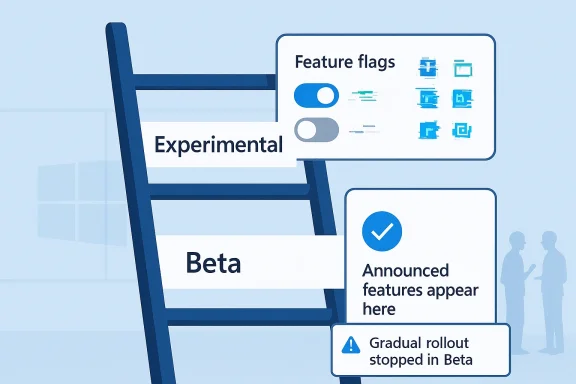
The new model is also a sign that Microsoft wants the Insider Program to feel less like a maze and more like a ladder with clearer rungs. In the company’s telling, Experimental becomes the home for the earliest, least predictable work, while Beta becomes a closer-to-shipping preview track where features announced in a build are expected to be there when you install it. That is a meaningful philosophical shift, because it changes the promise Microsoft is making to testers. Instead of asking users to tolerate uncertainty in both early and near-final tracks, Microsoft is separating invention from validation more cleanly. (blogs.windows.com)
The move also comes after a long period of channel drift. Microsoft has repeatedly experimented with ways to reduce confusion, including version-specific build tracks and the old “Skip Ahead” concept from earlier Insider eras. The April 2026 changes feel like the latest attempt to reconcile those ambitions with a more coherent user experience. In practical terms, the company is trying to keep early adopters engaged without making the program feel like a part-time software archaeology project. (blogs.windows.com)
Beta, by contrast, becomes much more deterministic. Microsoft says that if a feature is announced in a Beta update and you install that update, you will have that feature on your device. The company notes that some small variations inside a feature may still exist while testing continues, but the feature itself will no longer be hidden from part of the channel through gradual rollout. That is the most user-facing change in the entire announcement. (blogs.windows.com)
The change does not remove uncertainty from the Windows test pipeline entirely, and that is by design. Microsoft is preserving a place for early experimentation while trying to make the near-term preview track feel trustworthy. In other words, the company is not eliminating complexity so much as relocating it to the right audience. That is a smarter move than pretending all preview users want the same thing. (blogs.windows.com)
Ending gradual rollouts in Beta also makes the channel easier to document and support. If everyone in Beta is supposed to get the announced feature, Microsoft and the community can discuss one shared baseline instead of constantly qualifying whether a feature is “in the build” but “not enabled yet.” That will help with troubleshooting, feedback quality, and forum discussion alike. The result should be fewer speculative posts and more useful bug reports. (blogs.windows.com)
There is a strategic upside too. Beta can now function as a cleaner feedback loop for features nearing release, because Microsoft no longer needs to interpret rollout bias as part of the user response. That makes Beta more valuable not only to testers, but to Microsoft’s product teams as they refine what is likely to ship. Cleaner signal is often more valuable than more data. (blogs.windows.com)
Microsoft is careful, however, to limit expectations. The company says the Feature flags page will initially focus on visible new features announced in Windows Insider blog posts, not necessarily bug fixes or system-level changes. That distinction is important because it shows Microsoft is treating feature flags as a user-facing control surface, not a universal developer console for every change in the OS. It is selective empowerment, not complete control. (blogs.windows.com)
That design should appeal to the exact kind of Insider who wants agency without having to sift through registry hacks or unofficial tweak tools. It also suggests Microsoft is trying to keep the program accessible to enthusiasts who know enough to care, but not necessarily enough to want to live in experimental infrastructure. If this works, it could make the program more attractive to people who have previously stayed away because the previews felt too opaque. (blogs.windows.com)
The deeper significance is that Microsoft is drawing a firmer line between consumer enthusiasm and business predictability. The new two-channel model may simplify the front door, but Release Preview still preserves a professional on-ramp for organizations that need stability and process discipline. In that sense, Microsoft is not flattening the Insider ecosystem entirely; it is clarifying which path is meant for which kind of user. (blogs.windows.com)
This should also help Microsoft avoid a common enterprise complaint: that preview programs sometimes blur into production testing in a way that is hard to explain to management. When channel names are clearer and release expectations are better defined, it becomes easier for IT teams to justify why they are running preview builds at all. That matters because trustworthy previewing is often a governance issue, not just a technical one. (blogs.windows.com)
It also reflects a more mature understanding of how people actually use preview software. Many enthusiasts are not permanently committed to a single build train. They want to test a feature, report a bug, and then go back to a less volatile channel. Making that process less punitive should broaden the audience for the program. Fewer barriers is not the same as fewer problems, but it is still a major improvement. (blogs.windows.com)
Microsoft does draw one important boundary: Experimental Future Platforms builds are not aligned to a retail version of Windows, so switching away from that path may still require a clean install. That makes sense because Microsoft is reserving the earliest platform work for users who explicitly opt into the messiest stage of development. Some experiments are too foundational to unwind neatly. (blogs.windows.com)
Microsoft also had to balance two competing imperatives. On one hand, it needed Controlled Feature Rollout to manage risk in a massive, globally distributed test pool. On the other hand, it needed the Insider Program to feel rewarding enough that people would keep participating. The old structure arguably optimized for engineering caution at the cost of user enthusiasm. The new structure appears to be a compromise that keeps caution where it is most needed and removes it where it causes the most frustration. (blogs.windows.com)
The timing of this overhaul is also notable. Microsoft has recently been emphasizing quality, reliability, and craft across Windows, suggesting a broader effort to make the platform’s development process feel more disciplined. Seen that way, the Insider changes are not isolated housekeeping. They are part of a larger reset around how Microsoft wants people to perceive Windows engineering in 2026. (blogs.windows.com)
There is also a subtle branding benefit. “Experimental” is a more candid label than “Dev” or “Canary” for many consumers, and “Beta” is instantly legible. The simpler language may reduce friction for newcomers who do not follow Windows release engineering closely. In a market where usability extends beyond the UI into update policy, naming is strategy. Words shape expectations. (blogs.windows.com)
For Microsoft’s own ecosystem partners, the effect should be even more tangible. Hardware vendors, app developers, and managed service providers need to know whether a feature is ready for validation or still a moving target. A Beta channel that guarantees announced features are present is much better suited to that work than one where those features might still be hidden by rollout gates. (blogs.windows.com)
The key question is whether this redesign solves the feeling of unpredictability without sacrificing the excitement that keeps enthusiasts participating. That balance will determine whether Experimental becomes a respected sandbox or just another label on a confusing ladder. Microsoft appears to believe that trust, once restored, is more valuable than novelty for its own sake. That is likely correct. (blogs.windows.com)
What to watch next:
Source: gHacks Microsoft Simplifies Windows Insider Program to Two Channels and Ends Gradual Feature Rollouts in Beta - gHacks Tech News
 Background
The Windows Insider Program has always served a dual purpose: it is a testbed for Microsoft’s engineering teams, and a public feedback loop for enthusiasts, IT pros, and commercial evaluators. But over time, the program’s channel structure became increasingly difficult to explain, especially as Microsoft added more nuanced distinctions between early platform work, retail-aligned previews, and feature rollouts that appeared at different times for different people. Microsoft acknowledged that problem directly in its April 10, 2026 blog post, saying the channel structure had become confusing and that feature rollout behavior was the single biggest frustration among participants. (blogs.windows.com)That frustration was not theoretical. For years, Windows Insider builds have routinely included features that were technically present in the update but enabled only for subsets of devices through Controlled Feature Rollout. Microsoft used that mechanism to test quality, gather telemetry, and reduce risk, but it also meant the experience felt inconsistent. Two Insiders on the same channel could install the same build and walk away with different feature sets, which undercut the very idea of previewing what Windows would look like next. Microsoft’s own April 10 explanation makes clear that this tension was central to the redesign. (blogs.windows.com)
The new model is also a sign that Microsoft wants the Insider Program to feel less like a maze and more like a ladder with clearer rungs. In the company’s telling, Experimental becomes the home for the earliest, least predictable work, while Beta becomes a closer-to-shipping preview track where features announced in a build are expected to be there when you install it. That is a meaningful philosophical shift, because it changes the promise Microsoft is making to testers. Instead of asking users to tolerate uncertainty in both early and near-final tracks, Microsoft is separating invention from validation more cleanly. (blogs.windows.com)
The move also comes after a long period of channel drift. Microsoft has repeatedly experimented with ways to reduce confusion, including version-specific build tracks and the old “Skip Ahead” concept from earlier Insider eras. The April 2026 changes feel like the latest attempt to reconcile those ambitions with a more coherent user experience. In practical terms, the company is trying to keep early adopters engaged without making the program feel like a part-time software archaeology project. (blogs.windows.com)
What Microsoft Changed
At the center of the announcement is a simple idea: fewer primary choices, clearer expectations, and less ambiguity about what you are actually testing. Microsoft says the new primary channels are Experimental and Beta, replacing the older Dev/Canary split on one side and the older Beta model on the other. The names are important because they signal intent. Experimental is for features still in active development, while Beta is for features Microsoft expects to ship in the coming weeks. (blogs.windows.com)The new channel logic
Experimental is essentially the new home for the most adventurous Insiders. Microsoft says this is where features may change, be delayed, or not ship at all. That is brutally honest, but it is also useful: it tells testers that they are participating in a process, not simply consuming a product. For power users who enjoy seeing the very first traces of a future Windows experience, that clarity matters more than channel count. (blogs.windows.com)Beta, by contrast, becomes much more deterministic. Microsoft says that if a feature is announced in a Beta update and you install that update, you will have that feature on your device. The company notes that some small variations inside a feature may still exist while testing continues, but the feature itself will no longer be hidden from part of the channel through gradual rollout. That is the most user-facing change in the entire announcement. (blogs.windows.com)
The change does not remove uncertainty from the Windows test pipeline entirely, and that is by design. Microsoft is preserving a place for early experimentation while trying to make the near-term preview track feel trustworthy. In other words, the company is not eliminating complexity so much as relocating it to the right audience. That is a smarter move than pretending all preview users want the same thing. (blogs.windows.com)
- Experimental replaces Dev and Canary as the early-development destination.
- Beta becomes the more stable, retail-adjacent preview channel.
- Beta updates should now deliver announced features to all enrolled testers.
- Feature differences may still exist, but the feature itself should be present.
- Channel names are now meant to be more intuitive for new participants. (blogs.windows.com)
Why Gradual Rollouts in Beta Are Ending
Microsoft’s decision to stop gradual feature rollouts in Beta is arguably more important than the channel rename. Controlled rollouts are common in modern software, and Microsoft is careful to note that they help measure quality before broad release. But inside an Insider program, the logic cuts both ways. If the feature is being tested by enthusiasts specifically because it was announced, then withholding it from many of them weakens the whole value proposition. (blogs.windows.com)The problem with “announced, but not for you”
This is the core grievance Microsoft heard from users: they read a blog post, install the build, and then cannot find the feature they came to test. Microsoft explicitly calls that the biggest frustration it hears. That admission matters because it acknowledges that the rollout system, while operationally sound, had become politically expensive inside the Insider community. Trust is a scarce resource in preview programs, and inconsistent visibility erodes it quickly. (blogs.windows.com)Ending gradual rollouts in Beta also makes the channel easier to document and support. If everyone in Beta is supposed to get the announced feature, Microsoft and the community can discuss one shared baseline instead of constantly qualifying whether a feature is “in the build” but “not enabled yet.” That will help with troubleshooting, feedback quality, and forum discussion alike. The result should be fewer speculative posts and more useful bug reports. (blogs.windows.com)
There is a strategic upside too. Beta can now function as a cleaner feedback loop for features nearing release, because Microsoft no longer needs to interpret rollout bias as part of the user response. That makes Beta more valuable not only to testers, but to Microsoft’s product teams as they refine what is likely to ship. Cleaner signal is often more valuable than more data. (blogs.windows.com)
- Users get a more predictable preview experience in Beta.
- Feedback becomes easier to compare across devices.
- Documentation becomes simpler and less conditional.
- Forum support should become less fragmented.
- Microsoft can still test feature variants without hiding the feature entirely. (blogs.windows.com)
Experimental Channel and Feature Flags
Microsoft is not making the Experimental channel merely “earlier Beta.” It is giving that track a new tool: a Feature flags page in Windows Insider settings that lets users manually turn specific announced features on or off. That is a major usability shift because it moves some control back to the tester instead of leaving activation entirely to Microsoft’s rollout machinery. (blogs.windows.com)A more active role for testers
The practical effect is important. Under the old model, testers often had to wait for a feature to show up, even if they were on the right build and wanted to evaluate it immediately. Under the new Experimental workflow, they may be able to opt into or out of visible announced features directly. That creates a more deliberate test environment, where the user can help validate edge cases instead of passively waiting for a server-side switch. (blogs.windows.com)Microsoft is careful, however, to limit expectations. The company says the Feature flags page will initially focus on visible new features announced in Windows Insider blog posts, not necessarily bug fixes or system-level changes. That distinction is important because it shows Microsoft is treating feature flags as a user-facing control surface, not a universal developer console for every change in the OS. It is selective empowerment, not complete control. (blogs.windows.com)
That design should appeal to the exact kind of Insider who wants agency without having to sift through registry hacks or unofficial tweak tools. It also suggests Microsoft is trying to keep the program accessible to enthusiasts who know enough to care, but not necessarily enough to want to live in experimental infrastructure. If this works, it could make the program more attractive to people who have previously stayed away because the previews felt too opaque. (blogs.windows.com)
What feature flags could change
If Microsoft executes this well, feature flags could become a pressure valve for the most common Insider complaint. Instead of asking, “Why don’t I have the thing you just announced?” users may be able to answer that question themselves. That is not just convenience; it is a fundamental change in how the preview relationship works. It makes the Insider feel like a participant rather than a subscriber. (blogs.windows.com)- Experimental users can manually test announced features sooner.
- Microsoft can gather more direct feedback on feature-level behavior.
- The program becomes less dependent on invisible rollout logic.
- The page may not cover fixes or lower-level system changes.
- Feature flags should reduce the “I updated, but nothing happened” problem. (blogs.windows.com)
The New Role of Release Preview
Microsoft is also preserving Release Preview as an advanced option, mainly for commercial customers and Insiders who want production builds before broad release. The company says its content has not changed, which is significant because Microsoft clearly wants to keep one channel anchored to near-final confidence rather than experimentation. That should reassure IT admins who use Insider access for deployment planning. (blogs.windows.com)Commercial and enterprise implications
For enterprises, Release Preview has always been the safest way to validate compatibility with a forthcoming Windows release without stepping into the churn of experimental development. Microsoft’s statement that the channel remains unchanged means organizations can continue using it as a staging ground for app testing, policy verification, and rollout preparation. That is especially relevant for commercial customers managing broad device fleets. (blogs.windows.com)The deeper significance is that Microsoft is drawing a firmer line between consumer enthusiasm and business predictability. The new two-channel model may simplify the front door, but Release Preview still preserves a professional on-ramp for organizations that need stability and process discipline. In that sense, Microsoft is not flattening the Insider ecosystem entirely; it is clarifying which path is meant for which kind of user. (blogs.windows.com)
This should also help Microsoft avoid a common enterprise complaint: that preview programs sometimes blur into production testing in a way that is hard to explain to management. When channel names are clearer and release expectations are better defined, it becomes easier for IT teams to justify why they are running preview builds at all. That matters because trustworthy previewing is often a governance issue, not just a technical one. (blogs.windows.com)
Release Preview in practice
The fact that Release Preview is now an advanced option rather than one of the headline channels reinforces Microsoft’s intent. It is there for users who know why they need it, not for casual explorers. That makes sense, because a stable pre-release channel is most useful when it is boring, predictable, and easy to explain. (blogs.windows.com)- Release Preview remains the closest thing to production without being GA.
- Commercial customers can still use it for validation and readiness checks.
- Microsoft is keeping the content stable rather than rebranding it for drama.
- The channel should remain useful for IT departments and pilot groups.
- It provides a safer alternative to Experimental for cautious testers. (blogs.windows.com)
In-Place Upgrades and Channel Mobility
One of the most practical but least flashy parts of Microsoft’s announcement is its work on in-place upgrades for moving between channels. Today, leaving Insider or switching tracks can sometimes require a clean install, which is a real barrier for both testers and administrators. Microsoft says it is re-engineering the program so that, in most cases, users can move between Experimental, Beta, and Release Preview on the same Windows core version without wiping the device. (blogs.windows.com)Why this matters
This is a big quality-of-life improvement because it lowers the cost of participation. If an Insider knows they can exit the program or step down a channel without reinstalling Windows and rebuilding their environment, they are far more likely to take the risk in the first place. Reducing exit friction is often one of the best ways to increase entry. (blogs.windows.com)It also reflects a more mature understanding of how people actually use preview software. Many enthusiasts are not permanently committed to a single build train. They want to test a feature, report a bug, and then go back to a less volatile channel. Making that process less punitive should broaden the audience for the program. Fewer barriers is not the same as fewer problems, but it is still a major improvement. (blogs.windows.com)
Microsoft does draw one important boundary: Experimental Future Platforms builds are not aligned to a retail version of Windows, so switching away from that path may still require a clean install. That makes sense because Microsoft is reserving the earliest platform work for users who explicitly opt into the messiest stage of development. Some experiments are too foundational to unwind neatly. (blogs.windows.com)
A better on-ramp and off-ramp
The broader takeaway is that Microsoft is treating the Insider Program more like a managed lifecycle and less like a one-way leap into chaos. That should help the company keep testers longer and reduce the number of people who join, panic, and leave. It is a subtle change, but in community programs, subtle usability improvements often have outsized effects. (blogs.windows.com)- In-place upgrades reduce the pain of channel switching.
- Leaving Insider should become less disruptive for most users.
- Experimental Future Platforms remains the exception.
- Users can more easily try a track, then step back.
- This lowers the psychological cost of participation. (blogs.windows.com)
Historical Context: How the Insider Program Got Here
Microsoft did not invent the modern preview-channel culture, but it has spent years refining it in public, often in response to user complaints. The Dev, Beta, and Canary structure emerged as a way to distinguish between early platform work and more polished previews, yet the reality for users was messier because feature availability still depended on rollout logic layered on top of channel selection. That created a mismatch between the channel label and the actual user experience. (blogs.windows.com)Why the old model struggled
The problem was not that the channel taxonomy lacked sophistication. The problem was that it became too sophisticated for ordinary testers to decode quickly. If a feature appeared in one build but not another, the channel label alone was no longer enough to explain what was happening. The result was a familiar support pattern: confusion, forum threads, screenshots, and speculation. Microsoft’s April 2026 post reads like an attempt to clean up that narrative at the source. (blogs.windows.com)Microsoft also had to balance two competing imperatives. On one hand, it needed Controlled Feature Rollout to manage risk in a massive, globally distributed test pool. On the other hand, it needed the Insider Program to feel rewarding enough that people would keep participating. The old structure arguably optimized for engineering caution at the cost of user enthusiasm. The new structure appears to be a compromise that keeps caution where it is most needed and removes it where it causes the most frustration. (blogs.windows.com)
The timing of this overhaul is also notable. Microsoft has recently been emphasizing quality, reliability, and craft across Windows, suggesting a broader effort to make the platform’s development process feel more disciplined. Seen that way, the Insider changes are not isolated housekeeping. They are part of a larger reset around how Microsoft wants people to perceive Windows engineering in 2026. (blogs.windows.com)
The broader Windows strategy
The move also hints at a more modular Windows future, where Microsoft can separate platform evolution from retail release cadence more cleanly. The presence of a Future Platforms option inside Experimental is especially telling, because it formalizes a route for users who want to track the earliest core work instead of merely previewing near-term retail features. That is a sign Microsoft expects Windows development to remain multi-threaded for the foreseeable future. (blogs.windows.com)- The old channel model mixed too many expectations.
- Rollout technology created user-visible inconsistency.
- Microsoft is now separating early platform work from near-term previews.
- The Insider program is becoming more explicit about its audience segments.
- The company is aligning channel structure with real user behavior. (blogs.windows.com)
Competitive and Market Implications
Microsoft’s Insider changes may sound internal, but they matter beyond the Windows enthusiast base. Operating systems are ecosystem platforms, and preview policies influence how app developers, OEMs, IT departments, and hardware partners plan their own testing cycles. A cleaner Insider model gives those groups a more reliable signal about where Windows is headed and when features are likely to arrive. (blogs.windows.com)For rivals and the wider industry
The clearest competitive implication is that Microsoft is trying to reduce the perception that Windows preview testing is chaotic compared with the more controlled release channels used by some other platforms. That matters because platform confidence is part of platform power. When developers and admins trust the cadence, they are more willing to invest in compatibility work early. That in turn makes Windows stickier. (blogs.windows.com)There is also a subtle branding benefit. “Experimental” is a more candid label than “Dev” or “Canary” for many consumers, and “Beta” is instantly legible. The simpler language may reduce friction for newcomers who do not follow Windows release engineering closely. In a market where usability extends beyond the UI into update policy, naming is strategy. Words shape expectations. (blogs.windows.com)
For Microsoft’s own ecosystem partners, the effect should be even more tangible. Hardware vendors, app developers, and managed service providers need to know whether a feature is ready for validation or still a moving target. A Beta channel that guarantees announced features are present is much better suited to that work than one where those features might still be hidden by rollout gates. (blogs.windows.com)
Enterprise versus consumer impact
Consumers will mostly notice the convenience factor: fewer confusing choices, fewer missing features, and less guesswork. Enterprises will care more about channel determinism and the reduced need for clean installs when moving between tracks. Both groups benefit, but in different ways, and Microsoft seems to have recognized that the same program cannot serve both constituencies well unless it becomes more legible. (blogs.windows.com)- Developers get clearer expectations for feature availability.
- IT teams get better validation paths for upcoming releases.
- OEMs can align testing with more predictable build behavior.
- Consumers get a less frustrating preview experience.
- Microsoft strengthens the credibility of its feedback loop. (blogs.windows.com)
Strengths and Opportunities
Microsoft’s redesign has several clear strengths. It reduces ambiguity, gives advanced users more control, and acknowledges that the Insider Program works best when participants understand exactly what kind of software they are testing. The company also gets an opportunity to rebuild trust with testers who have grown tired of “announced but unavailable” features. (blogs.windows.com)- Clearer channel definitions should make the program easier to join.
- Feature flags give power users more direct control.
- Beta determinism should improve the value of feedback and testing.
- Release Preview continuity protects enterprise workflows.
- In-place upgrades lower the cost of switching or leaving.
- Future Platforms keeps a place for the most advanced experimentation.
- Simpler settings may reduce support overhead and user confusion.
A better feedback engine
The strongest opportunity is cultural, not technical. If users feel that the features they read about are actually the features they can test, they are more likely to provide precise feedback, and more likely to stay engaged. That could make the Insider community more productive, more vocal, and ultimately more useful to Microsoft’s Windows team. (blogs.windows.com)Risks and Concerns
The overhaul is promising, but it is not risk-free. Any time Microsoft simplifies a preview program, it must preserve enough flexibility for internal testing, staged deployment, and region-specific validation. The challenge is making the system understandable without making it too rigid for engineering reality. (blogs.windows.com)- Feature flags may confuse casual Insiders if the interface becomes too technical.
- Beta predictability could reduce Microsoft’s ability to test staged variations there.
- Experimental users may still be overwhelmed by early-build instability.
- Future Platforms could create migration friction for testers who want to step back.
- Channel renaming may temporarily cause confusion during the transition period.
- Mixed expectations between consumer and enterprise testers could persist.
- Incomplete flag coverage means some frustrations may remain unresolved.
The risk of oversimplification
There is also a social risk: by making Beta more deterministic, Microsoft raises expectations that all preview experiences should be equally straightforward. That is not how complex software development works. If the company does not communicate the limits of the new model clearly, some users may assume Feature flags are meant to expose everything, which would quickly lead to disappointment. Clarity helps only when the boundaries are explicit. (blogs.windows.com)Looking Ahead
Microsoft says these changes will begin rolling out in the coming weeks, and that matters because the transition itself will be part of the test. Moving people from Dev and Canary into Experimental, while preserving version alignment for specific build families, is not trivial. If Microsoft manages the migration cleanly, the new structure could become one of the more successful usability fixes the Insider Program has seen in years. (blogs.windows.com)The key question is whether this redesign solves the feeling of unpredictability without sacrificing the excitement that keeps enthusiasts participating. That balance will determine whether Experimental becomes a respected sandbox or just another label on a confusing ladder. Microsoft appears to believe that trust, once restored, is more valuable than novelty for its own sake. That is likely correct. (blogs.windows.com)
What to watch next:
- Whether Feature flags expands beyond announced visible features.
- How smoothly existing Dev, Beta, and Canary users are migrated.
- Whether Beta feedback quality improves once rollout variance disappears.
- Whether enterprise customers adopt the simplified structure more broadly.
- How Microsoft communicates the limits of Future Platforms.
Source: gHacks Microsoft Simplifies Windows Insider Program to Two Channels and Ends Gradual Feature Rollouts in Beta - gHacks Tech News
