

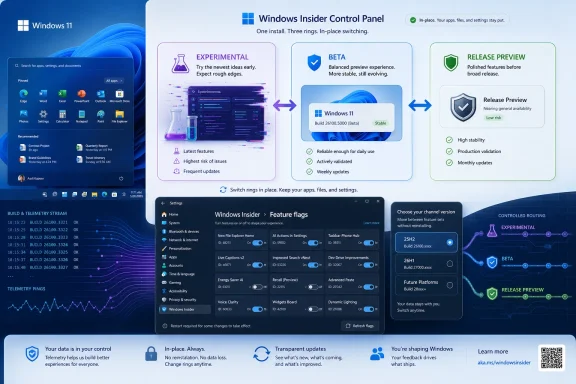
Microsoft is replacing the old Windows 11 Insider channel maze with a new model built around Experimental, Beta, and a still-available Release Preview track, while adding in-box feature flags and easier in-place moves between testing rings during its 2026 transition. The change is more than a naming exercise. It is Microsoft admitting that the Insider Program, once a clean ladder from risky to stable, had become a confused mix of platform branches, hidden rollouts, and enthusiast workarounds. For Windows users and admins, the practical question is no longer simply “which channel am I in?” but “which Windows platform am I testing, and who controls the switch?”
The Windows Insider Program was designed to make pre-release Windows feel legible. Canary meant the edge of the map, Dev meant active development, Beta meant closer-to-release validation, and Release Preview meant a final shakedown before general availability. That hierarchy was easy enough to explain, even if the builds themselves did not always behave as neatly as the labels promised.
Over time, though, the labels stopped doing enough work. Features could appear in Beta before Canary, Dev could look safer than its name suggested, and Canary could carry platform work that was not obviously relevant to mainstream PCs. Controlled Feature Rollouts meant two machines on the same build could behave differently, and the community increasingly leaned on ViveTool to expose features Microsoft had compiled into Windows but not enabled for everyone.
The new structure is Microsoft trying to separate three ideas that had become tangled: the risk level of the experience, the Windows platform version under test, and the feature switches that decide what a particular machine actually sees. That distinction matters because Windows 11 is no longer just one client operating system inching toward one annual feature update. It is a rolling product with hardware-specific platform branches, AI-adjacent shell work, staged rollout machinery, and an audience that ranges from hobbyists to enterprise deployment teams.
The result is a cleaner front door with a more technical back room. Experimental and Beta are easier words than Canary and Dev, but the introduction of options such as 25H2, 26H1, and Future Platforms means Microsoft is not making the Insider Program simpler in every dimension. It is making the visible contract more honest.
Experimental replaces the role previously split across Canary and Dev. It is where Microsoft can ship early changes, platform work, and features that may never reach production in their current form. The name does useful work because it no longer pretends that every build is on a smooth road toward the next public Windows release.
Beta keeps the more familiar promise: preview upcoming Windows changes with less instability than the earliest track. The important twist is that Microsoft is moving away from the old feeling that Beta users had to chase hidden toggles just to see the features being advertised in official build notes. If Microsoft says a feature is in Beta, the expectation is now that Beta testers should actually get it.
Release Preview remains the conservative lane for near-final updates, but the fact that it is surfaced through an advanced option says a lot about the new hierarchy. Microsoft appears to want most Insider conversation split between “I want the early stuff” and “I want the safer preview stuff,” while Release Preview remains available for users and organizations that treat Insider builds as final validation rather than exploration.
That is a better mental model than the old four-channel spread, but it also narrows the middle. Dev once occupied an ambiguous but useful cultural space: adventurous, but not quite Canary reckless. Folding that territory into Experimental may simplify the program page, yet it also means Microsoft must be unusually clear in release notes about which Experimental builds are merely rough and which are genuinely dangerous.
That reality was awkward for everyone. Microsoft wanted telemetry from controlled rollouts, but it also cultivated an enthusiast audience that naturally wanted to test the features being discussed in public. Users installed a preview build, read that a new shell behavior or Settings page was being tested, and then discovered their machine was not in the rollout cohort.
The new Feature flags page is an attempt to professionalize that gray market. Instead of forcing testers to use ViveTool for officially acknowledged experiments, Microsoft is giving them a supported switchboard. That does not mean every hidden component in a build becomes fair game, and it does not eliminate internal gating altogether. It means Microsoft is drawing a line between experiments it is ready to expose and dormant code that still belongs behind the curtain.
That line is important. ViveTool became popular because it solved a real problem: Windows builds often contained more than Microsoft’s public rollout state allowed users to see. But it also blurred the difference between testing an announced experiment and force-enabling unfinished plumbing. Bringing feature flags into Settings gives Microsoft a way to satisfy enthusiasts while reducing the support confusion caused by unsupported toggling.
For IT pros, this is both welcome and slightly ominous. A first-party feature flag UI makes Insider testing more reproducible, but it also confirms that Windows is increasingly governed by remote-configurable capability switches. The build number still matters, but the switch state matters just as much.
The problem was that the Insider Program sold participation as access, while CFR often delivered participation as lottery. A user could join the right channel, install the right build, and still miss the thing Microsoft was promoting. That made the program feel arbitrary and encouraged the community to route around the official process.
Microsoft’s Beta change is therefore a major philosophical shift. In the new model, Beta is supposed to be less about hidden cohorts and more about advertised features being enabled for the people who opted into that level of risk. If that holds, Beta becomes a much better place for practical evaluation: admins can test a workflow, journalists can describe a feature without caveats multiplying by the paragraph, and power users can decide whether a change is worth caring about.
Experimental is different. There, the Feature flags page gives users some agency, but the track still exists for unstable and unfinished work. Microsoft is not promising that every switch will produce a polished experience, only that some officially announced experiments can now be managed without third-party tooling.
This division is healthier than the old arrangement. Beta should be a preview of things Microsoft is seriously preparing to ship. Experimental should be a laboratory. When the laboratory and the preview showroom share the same rules, everyone loses track of what a broken feature actually means.
Windows 11 version 25H2 is the mainstream path for current PCs. It is the track most users should understand as the next broadly relevant Windows 11 release line. If you are testing what is likely to affect your existing machine, your organization’s fleet, or the next wave of broadly deployed Windows features, 25H2 is the anchor.
Windows 11 version 26H1 is stranger. Microsoft has framed 26H1 as a targeted platform release tied to new device innovations rather than a general feature update for every existing Windows 11 PC. In other words, it is not simply “the next thing after 25H2” in the way many Windows users instinctively read version numbers. It is platform work aligned with specific hardware needs.
Future Platforms goes further still. It replaces part of what the old Dev/Canary split awkwardly carried: work not tied to a specific public Windows release. That may be necessary for Microsoft engineering, but it is also the least useful choice for anyone who wants to predict what their current PC will receive in the next normal update cycle.
This is why the new Insider page may be visually simpler while intellectually more demanding. The old question was “Canary, Dev, Beta, or Release Preview?” The new question is “Experimental or Beta, on which platform, with which flags enabled?” That is a better architecture, but it asks testers to understand Windows as a set of branches rather than a single road.
That friction distorted user behavior. Some users avoided Insider builds altogether because the escape hatch was too costly. Others stayed on riskier builds longer than they should have because rebuilding a machine was more hassle than tolerating bugs. For testers with only one spare device, the channel decision carried a kind of administrative gravity.
The new model reduces that penalty, at least when the move stays within compatible platform boundaries. Switching between Experimental and Beta on the same underlying Windows version should be less dramatic than it used to be. Leaving the Insider Program can also be handled through an in-place upgrade path that preserves the user environment.
The caveat is the platform boundary. Moving into or out of Future Platforms, or crossing between branches that do not align cleanly, can still require a clean installation. That is not Microsoft being cruel; it is a reflection of how deep platform changes can run. But it means the new freedom is conditional, and users should not confuse “easier channel switching” with “no consequences.”
For enterprise administrators, the improved reversibility matters. It makes pilot rings less risky and reduces the operational tax of correcting a bad enrollment decision. But no admin should read it as permission to put daily-driver production machines on Experimental and assume Windows Update will always provide a painless retreat.
That split is revealing. Canary was never a single thing in the way its public branding suggested. It carried early platform work, hardware-enabling work, and feature experiments that did not always map to the next consumer release. The new labels make that fragmentation more visible.
Users on 28000-series builds are not in the same situation as users on 29500-series builds, even if both previously thought of themselves as Canary testers. One group may be closer to the 26H1 platform story. Another may be on a Future Platforms path where the connection to any near-term Windows release is deliberately looser.
This is the kind of distinction that matters to enthusiasts who track build numbers, but it also matters to anyone who writes guidance for Windows users. A feature appearing in Experimental no longer means one thing. It may be Experimental on 25H2, Experimental on 26H1, or Experimental on Future Platforms, and those are meaningfully different contexts.
The migration also explains why some users may see the old structure and new release-note language at the same time during the transition. Microsoft is relabeling the program in public while the client-side experience rolls out gradually. That temporary mismatch is not ideal, but it is typical of a Windows transition where documentation, Settings UI, update metadata, and enrolled devices do not all flip on the same day.
What changes is the moral center of gravity. Until now, ViveTool often felt like the only practical way for a serious Insider to experience the build Microsoft had described. Going forward, if Microsoft follows through, the supported route should cover the features it is ready to have people test.
That leaves ViveTool in a narrower role: a tool for spelunking, not ordinary participation. Enthusiasts will still use it to discover what is hidden in a build. Reporters and leakers will still use it to surface where Windows might be going. But the average Insider should not need it just to keep up with official preview notes.
This is a win for Microsoft’s telemetry, too. When users enable official flags through Settings, Microsoft can present clearer descriptions, require restarts when appropriate, and understand which experiments testers intentionally opted into. Third-party toggling makes for great screenshots, but it complicates feedback because Microsoft cannot always distinguish a supported test state from a hand-crafted Frankenstein build.
The danger is that Microsoft underpopulates the new page. If the Feature flags UI becomes a sparse token gesture while the most interesting changes remain hidden, the community will go right back to unsupported tools. The credibility of the overhaul depends on Microsoft using the page aggressively enough to make it feel real.
That makes Beta the better choice for admins validating app compatibility, enthusiasts testing daily workflows, and support-minded users who want early access without turning their PC into a research device. It is still pre-release Windows, and pre-release Windows can break things in ways that waste an afternoon. But the risk-reward ratio is clearer.
Experimental, by contrast, is appropriately named. It is for users who want to see where Windows is going before the path is paved. That includes shell experiments, platform shifts, and features whose eventual shipping form may look different or never arrive at all.
The name matters because it should reduce false expectations. A broken Experimental feature is not necessarily a scandal. A broken Beta feature is more meaningful because Beta is supposed to be nearer to customer reality. Microsoft benefits when those expectations are distinct, and so do testers.
Release Preview remains useful for a narrower audience. It is the place for near-final validation, especially for users who want to see cumulative updates and release-bound fixes before they hit the broader public. But in the cultural life of the Insider Program, Beta and Experimental are now the main stage.
On that measure, the new structure has promise. Fewer channels reduce communication overhead. A more predictable Beta experience makes feature validation less dependent on rollout luck. In-place exits lower the operational cost of participating. The version picker clarifies whether a device is testing mainstream 25H2 work or something more specialized.
But the same structure also gives admins new ways to make mistakes. Enrolling a test machine in Experimental Future Platforms is not equivalent to testing the next broadly deployed Windows update. Evaluating a feature behind an Experimental flag is not the same as validating a default-on behavior in Beta. Treating 26H1 as a normal upgrade target for current PCs may lead to bad assumptions.
Microsoft’s challenge is documentation discipline. Release notes must state not just what changed, but where it changed: which experience, which version, which build series, and which flag state. If Microsoft gets that right, the new Insider Program becomes a better planning tool. If it gets sloppy, the simpler branding will merely hide a more complex branching model.
For IT departments, the safest policy is to treat the new program as a set of rings with explicit purpose. Beta on the mainstream version line is for practical readiness. Release Preview is for near-final update confidence. Experimental is for horizon scanning, not production planning.
There is the visible shell layer, where users notice taskbar behavior, File Explorer changes, Settings pages, and AI integrations. There is the servicing layer, where enablement packages and cumulative updates decide how features arrive. There is the platform layer, where hardware support and under-the-hood changes may not map cleanly to an annual feature update. And there is the configuration layer, where feature flags determine what the user actually sees.
The Insider Program had to change because the old channels were trying to describe all of those layers with one set of names. Canary could mean “very early feature,” “new platform,” or “hardware-enabling branch.” Dev could mean “active development” or “not actually the earliest place a feature appears.” Beta could mean “close to shipping” or “close to shipping, unless the feature is still rolling out to someone else.”
The new model is not perfect, but it is more aligned with the way Windows now works. Channel, platform, and flag are separate concepts. That is more complicated than the old marketing ladder, but it is also less misleading.
The cost is that Windows enthusiasts must become more precise. Saying “this is in Experimental” will not be enough. The useful sentence is “this is in Experimental on 25H2 with the relevant feature flag enabled,” or “this is in Beta and enabled by default.” That may sound pedantic, but it is the difference between a useful report and another round of confused forum threads.
The improvement is that users are being given clearer tools to decide what kind of instability they want. Someone curious about officially announced experiments can use feature flags instead of unsupported utilities. Someone who wants broadly relevant preview features can choose Beta. Someone who wants near-final builds can surface Release Preview. Someone exploring future platform work can do so with a better label attached.
That is a healthier contract, but it cuts both ways. When Microsoft gives users clearer toggles, users have fewer excuses for not understanding what they enabled. When Microsoft labels something Experimental, it is telling testers not to treat it as a promise. And when Microsoft separates platform versions, it is warning that build numbers alone do not tell the whole story.
The Insider Program has always depended on a bargain between Microsoft and its most engaged users. Microsoft gets telemetry, bug reports, and early sentiment. Users get early access, influence, and the pleasure of seeing Windows before everyone else. The new structure makes that bargain more explicit.
Source: Windows Central https://www.windowscentral.com/micr...ows-11-insider-program-what-you-need-to-know/
 Microsoft Finally Names the Chaos It Created
The Windows Insider Program was designed to make pre-release Windows feel legible. Canary meant the edge of the map, Dev meant active development, Beta meant closer-to-release validation, and Release Preview meant a final shakedown before general availability. That hierarchy was easy enough to explain, even if the builds themselves did not always behave as neatly as the labels promised.Over time, though, the labels stopped doing enough work. Features could appear in Beta before Canary, Dev could look safer than its name suggested, and Canary could carry platform work that was not obviously relevant to mainstream PCs. Controlled Feature Rollouts meant two machines on the same build could behave differently, and the community increasingly leaned on ViveTool to expose features Microsoft had compiled into Windows but not enabled for everyone.
The new structure is Microsoft trying to separate three ideas that had become tangled: the risk level of the experience, the Windows platform version under test, and the feature switches that decide what a particular machine actually sees. That distinction matters because Windows 11 is no longer just one client operating system inching toward one annual feature update. It is a rolling product with hardware-specific platform branches, AI-adjacent shell work, staged rollout machinery, and an audience that ranges from hobbyists to enterprise deployment teams.
The result is a cleaner front door with a more technical back room. Experimental and Beta are easier words than Canary and Dev, but the introduction of options such as 25H2, 26H1, and Future Platforms means Microsoft is not making the Insider Program simpler in every dimension. It is making the visible contract more honest.
The Channel Cut Is Really a Trust Reset
The headline change is that Microsoft is reducing the visible Insider experience to Experimental and Beta, with Release Preview still present but no longer front-and-center. That sounds like a simple consolidation. In practice, it is a reset of expectations after years in which channel names carried too much implied certainty.Experimental replaces the role previously split across Canary and Dev. It is where Microsoft can ship early changes, platform work, and features that may never reach production in their current form. The name does useful work because it no longer pretends that every build is on a smooth road toward the next public Windows release.
Beta keeps the more familiar promise: preview upcoming Windows changes with less instability than the earliest track. The important twist is that Microsoft is moving away from the old feeling that Beta users had to chase hidden toggles just to see the features being advertised in official build notes. If Microsoft says a feature is in Beta, the expectation is now that Beta testers should actually get it.
Release Preview remains the conservative lane for near-final updates, but the fact that it is surfaced through an advanced option says a lot about the new hierarchy. Microsoft appears to want most Insider conversation split between “I want the early stuff” and “I want the safer preview stuff,” while Release Preview remains available for users and organizations that treat Insider builds as final validation rather than exploration.
That is a better mental model than the old four-channel spread, but it also narrows the middle. Dev once occupied an ambiguous but useful cultural space: adventurous, but not quite Canary reckless. Folding that territory into Experimental may simplify the program page, yet it also means Microsoft must be unusually clear in release notes about which Experimental builds are merely rough and which are genuinely dangerous.
Feature Flags Move From Enthusiast Hack to Microsoft Control Plane
The most consequential change is not the channel renaming. It is the arrival of a Feature flags page inside Settings, under the Windows Insider Program area. For years, Windows enthusiasts understood the real Insider experience as a combination of official build notes, staged rollout luck, and third-party tools that could flip internal feature IDs before Microsoft made them broadly available.That reality was awkward for everyone. Microsoft wanted telemetry from controlled rollouts, but it also cultivated an enthusiast audience that naturally wanted to test the features being discussed in public. Users installed a preview build, read that a new shell behavior or Settings page was being tested, and then discovered their machine was not in the rollout cohort.
The new Feature flags page is an attempt to professionalize that gray market. Instead of forcing testers to use ViveTool for officially acknowledged experiments, Microsoft is giving them a supported switchboard. That does not mean every hidden component in a build becomes fair game, and it does not eliminate internal gating altogether. It means Microsoft is drawing a line between experiments it is ready to expose and dormant code that still belongs behind the curtain.
That line is important. ViveTool became popular because it solved a real problem: Windows builds often contained more than Microsoft’s public rollout state allowed users to see. But it also blurred the difference between testing an announced experiment and force-enabling unfinished plumbing. Bringing feature flags into Settings gives Microsoft a way to satisfy enthusiasts while reducing the support confusion caused by unsupported toggling.
For IT pros, this is both welcome and slightly ominous. A first-party feature flag UI makes Insider testing more reproducible, but it also confirms that Windows is increasingly governed by remote-configurable capability switches. The build number still matters, but the switch state matters just as much.
Controlled Rollouts Were the Hidden Source of Insider Friction
Controlled Feature Rollout technology was never inherently bad. Microsoft needs phased deployment, especially for an operating system installed across wildly different hardware, regional settings, drivers, app stacks, and enterprise policies. A staged rollout can catch a bad interaction before it reaches every tester, let alone every consumer or business PC.The problem was that the Insider Program sold participation as access, while CFR often delivered participation as lottery. A user could join the right channel, install the right build, and still miss the thing Microsoft was promoting. That made the program feel arbitrary and encouraged the community to route around the official process.
Microsoft’s Beta change is therefore a major philosophical shift. In the new model, Beta is supposed to be less about hidden cohorts and more about advertised features being enabled for the people who opted into that level of risk. If that holds, Beta becomes a much better place for practical evaluation: admins can test a workflow, journalists can describe a feature without caveats multiplying by the paragraph, and power users can decide whether a change is worth caring about.
Experimental is different. There, the Feature flags page gives users some agency, but the track still exists for unstable and unfinished work. Microsoft is not promising that every switch will produce a polished experience, only that some officially announced experiments can now be managed without third-party tooling.
This division is healthier than the old arrangement. Beta should be a preview of things Microsoft is seriously preparing to ship. Experimental should be a laboratory. When the laboratory and the preview showroom share the same rules, everyone loses track of what a broken feature actually means.
The Version Picker Is the New Fine Print
The new Insider Program is not just asking users to pick a channel. It also asks them to pick a Windows version or platform target through advanced options. That is where the simplicity story becomes more complicated, because 25H2, 26H1, and Future Platforms are not just labels on a timeline. They represent different relationships to Windows’ underlying platform.Windows 11 version 25H2 is the mainstream path for current PCs. It is the track most users should understand as the next broadly relevant Windows 11 release line. If you are testing what is likely to affect your existing machine, your organization’s fleet, or the next wave of broadly deployed Windows features, 25H2 is the anchor.
Windows 11 version 26H1 is stranger. Microsoft has framed 26H1 as a targeted platform release tied to new device innovations rather than a general feature update for every existing Windows 11 PC. In other words, it is not simply “the next thing after 25H2” in the way many Windows users instinctively read version numbers. It is platform work aligned with specific hardware needs.
Future Platforms goes further still. It replaces part of what the old Dev/Canary split awkwardly carried: work not tied to a specific public Windows release. That may be necessary for Microsoft engineering, but it is also the least useful choice for anyone who wants to predict what their current PC will receive in the next normal update cycle.
This is why the new Insider page may be visually simpler while intellectually more demanding. The old question was “Canary, Dev, Beta, or Release Preview?” The new question is “Experimental or Beta, on which platform, with which flags enabled?” That is a better architecture, but it asks testers to understand Windows as a set of branches rather than a single road.
In-Place Movement Fixes One of the Program’s Oldest Punishments
One of the most welcome pieces of the overhaul is Microsoft’s promise of easier movement between experiences through in-place upgrades, preserving files, apps, and settings in many scenarios. Historically, joining the wrong Insider channel could feel like stepping onto a conveyor belt that only moved forward. If you wanted to retreat from a riskier build to a safer one, a clean install was often the price.That friction distorted user behavior. Some users avoided Insider builds altogether because the escape hatch was too costly. Others stayed on riskier builds longer than they should have because rebuilding a machine was more hassle than tolerating bugs. For testers with only one spare device, the channel decision carried a kind of administrative gravity.
The new model reduces that penalty, at least when the move stays within compatible platform boundaries. Switching between Experimental and Beta on the same underlying Windows version should be less dramatic than it used to be. Leaving the Insider Program can also be handled through an in-place upgrade path that preserves the user environment.
The caveat is the platform boundary. Moving into or out of Future Platforms, or crossing between branches that do not align cleanly, can still require a clean installation. That is not Microsoft being cruel; it is a reflection of how deep platform changes can run. But it means the new freedom is conditional, and users should not confuse “easier channel switching” with “no consequences.”
For enterprise administrators, the improved reversibility matters. It makes pilot rings less risky and reduces the operational tax of correcting a bad enrollment decision. But no admin should read it as permission to put daily-driver production machines on Experimental and assume Windows Update will always provide a painless retreat.
The Canary-to-Experimental Migration Reveals the Real Map
Microsoft’s transition plan tells us how the company now sees its own old channels. Dev Channel devices are being mapped into Experimental, generally aligned with the 25H2 path. Canary devices are more complicated, with different build series moving into Experimental variants such as 26H1 or Future Platforms.That split is revealing. Canary was never a single thing in the way its public branding suggested. It carried early platform work, hardware-enabling work, and feature experiments that did not always map to the next consumer release. The new labels make that fragmentation more visible.
Users on 28000-series builds are not in the same situation as users on 29500-series builds, even if both previously thought of themselves as Canary testers. One group may be closer to the 26H1 platform story. Another may be on a Future Platforms path where the connection to any near-term Windows release is deliberately looser.
This is the kind of distinction that matters to enthusiasts who track build numbers, but it also matters to anyone who writes guidance for Windows users. A feature appearing in Experimental no longer means one thing. It may be Experimental on 25H2, Experimental on 26H1, or Experimental on Future Platforms, and those are meaningfully different contexts.
The migration also explains why some users may see the old structure and new release-note language at the same time during the transition. Microsoft is relabeling the program in public while the client-side experience rolls out gradually. That temporary mismatch is not ideal, but it is typical of a Windows transition where documentation, Settings UI, update metadata, and enrolled devices do not all flip on the same day.
ViveTool Is Not Dead, but Its Job Description Changes
The Windows enthusiast community should not hold a funeral for ViveTool. Microsoft’s new Feature flags page is limited to officially exposed experiments. Builds will almost certainly continue to include dormant features, internal tests, and partially wired components that do not appear in Settings.What changes is the moral center of gravity. Until now, ViveTool often felt like the only practical way for a serious Insider to experience the build Microsoft had described. Going forward, if Microsoft follows through, the supported route should cover the features it is ready to have people test.
That leaves ViveTool in a narrower role: a tool for spelunking, not ordinary participation. Enthusiasts will still use it to discover what is hidden in a build. Reporters and leakers will still use it to surface where Windows might be going. But the average Insider should not need it just to keep up with official preview notes.
This is a win for Microsoft’s telemetry, too. When users enable official flags through Settings, Microsoft can present clearer descriptions, require restarts when appropriate, and understand which experiments testers intentionally opted into. Third-party toggling makes for great screenshots, but it complicates feedback because Microsoft cannot always distinguish a supported test state from a hand-crafted Frankenstein build.
The danger is that Microsoft underpopulates the new page. If the Feature flags UI becomes a sparse token gesture while the most interesting changes remain hidden, the community will go right back to unsupported tools. The credibility of the overhaul depends on Microsoft using the page aggressively enough to make it feel real.
Beta Becomes the Sensible Default for Serious Testers
For most WindowsForum readers, Beta is now the track to watch. Not because it is exciting, but because it is where Microsoft’s new promise is most practical. A Beta build should be close enough to the shipping product to evaluate seriously and open enough that announced features are actually present.That makes Beta the better choice for admins validating app compatibility, enthusiasts testing daily workflows, and support-minded users who want early access without turning their PC into a research device. It is still pre-release Windows, and pre-release Windows can break things in ways that waste an afternoon. But the risk-reward ratio is clearer.
Experimental, by contrast, is appropriately named. It is for users who want to see where Windows is going before the path is paved. That includes shell experiments, platform shifts, and features whose eventual shipping form may look different or never arrive at all.
The name matters because it should reduce false expectations. A broken Experimental feature is not necessarily a scandal. A broken Beta feature is more meaningful because Beta is supposed to be nearer to customer reality. Microsoft benefits when those expectations are distinct, and so do testers.
Release Preview remains useful for a narrower audience. It is the place for near-final validation, especially for users who want to see cumulative updates and release-bound fixes before they hit the broader public. But in the cultural life of the Insider Program, Beta and Experimental are now the main stage.
The Enterprise Angle Is Less About Early Features Than Predictability
Businesses do not usually join Insider builds because they want to admire a redesigned dialog box. They join, when they join at all, because they need warning. The value of the Insider Program for enterprise IT is not novelty; it is lead time.On that measure, the new structure has promise. Fewer channels reduce communication overhead. A more predictable Beta experience makes feature validation less dependent on rollout luck. In-place exits lower the operational cost of participating. The version picker clarifies whether a device is testing mainstream 25H2 work or something more specialized.
But the same structure also gives admins new ways to make mistakes. Enrolling a test machine in Experimental Future Platforms is not equivalent to testing the next broadly deployed Windows update. Evaluating a feature behind an Experimental flag is not the same as validating a default-on behavior in Beta. Treating 26H1 as a normal upgrade target for current PCs may lead to bad assumptions.
Microsoft’s challenge is documentation discipline. Release notes must state not just what changed, but where it changed: which experience, which version, which build series, and which flag state. If Microsoft gets that right, the new Insider Program becomes a better planning tool. If it gets sloppy, the simpler branding will merely hide a more complex branching model.
For IT departments, the safest policy is to treat the new program as a set of rings with explicit purpose. Beta on the mainstream version line is for practical readiness. Release Preview is for near-final update confidence. Experimental is for horizon scanning, not production planning.
Microsoft Is Cleaning Up Windows Testing Because Windows Itself Is Changing
The Insider overhaul reflects a deeper reality: Windows development is becoming more modular, more staged, and more hardware-sensitive. The old model assumed that Windows insiders were previewing a relatively linear operating system. The new model admits that Microsoft is developing multiple layers at once.There is the visible shell layer, where users notice taskbar behavior, File Explorer changes, Settings pages, and AI integrations. There is the servicing layer, where enablement packages and cumulative updates decide how features arrive. There is the platform layer, where hardware support and under-the-hood changes may not map cleanly to an annual feature update. And there is the configuration layer, where feature flags determine what the user actually sees.
The Insider Program had to change because the old channels were trying to describe all of those layers with one set of names. Canary could mean “very early feature,” “new platform,” or “hardware-enabling branch.” Dev could mean “active development” or “not actually the earliest place a feature appears.” Beta could mean “close to shipping” or “close to shipping, unless the feature is still rolling out to someone else.”
The new model is not perfect, but it is more aligned with the way Windows now works. Channel, platform, and flag are separate concepts. That is more complicated than the old marketing ladder, but it is also less misleading.
The cost is that Windows enthusiasts must become more precise. Saying “this is in Experimental” will not be enough. The useful sentence is “this is in Experimental on 25H2 with the relevant feature flag enabled,” or “this is in Beta and enabled by default.” That may sound pedantic, but it is the difference between a useful report and another round of confused forum threads.
The New Insider Contract Gives Users More Agency, Not Less Risk
Microsoft’s move should not be mistaken for making Insider builds safe. It is making them more navigable. Experimental builds can still break workflows, drivers can still misbehave, shell features can still arrive half-finished, and platform moves can still strand users on a path that requires a clean install to escape.The improvement is that users are being given clearer tools to decide what kind of instability they want. Someone curious about officially announced experiments can use feature flags instead of unsupported utilities. Someone who wants broadly relevant preview features can choose Beta. Someone who wants near-final builds can surface Release Preview. Someone exploring future platform work can do so with a better label attached.
That is a healthier contract, but it cuts both ways. When Microsoft gives users clearer toggles, users have fewer excuses for not understanding what they enabled. When Microsoft labels something Experimental, it is telling testers not to treat it as a promise. And when Microsoft separates platform versions, it is warning that build numbers alone do not tell the whole story.
The Insider Program has always depended on a bargain between Microsoft and its most engaged users. Microsoft gets telemetry, bug reports, and early sentiment. Users get early access, influence, and the pleasure of seeing Windows before everyone else. The new structure makes that bargain more explicit.
The Practical Map for WindowsForum Readers
The new Insider Program is best understood as Microsoft replacing a channel ladder with a control panel. The old labels told you roughly how close you were to danger. The new model asks you to pick a risk level, a platform path, and sometimes a feature state.- Choose Beta if you want the most sensible balance between early access and practical reliability on a current Windows 11 PC.
- Treat Experimental as a lab environment, especially when it is tied to 26H1 or Future Platforms rather than the mainstream 25H2 path.
- Use the Feature flags page for officially exposed experiments before reaching for third-party tools.
- Remember that Release Preview still exists, but it is now more of an advanced validation lane than the public face of the program.
- Do not assume that switching tracks is always painless, because crossing platform boundaries can still require a clean installation.
- Read build notes with attention to the experience, version, build series, and flag state, because all four now shape what a tester actually sees.
Source: Windows Central https://www.windowscentral.com/micr...ows-11-insider-program-what-you-need-to-know/
