

Microsoft is finally trying to make the Windows Insider Program behave like a preview program again instead of a scavenger hunt. In a set of changes announced through the Windows Insider Blog, the company is collapsing the old maze of channels into a cleaner structure, making Beta a more trustworthy preview of the next retail Windows release, and giving power users better control over which experimental features they want to see. The move matters because it directly addresses the most common complaint about the program: it was often impossible to know what was coming next, when it would arrive, or whether you were looking at a real preview at all.
The Windows Insider Program began as a simple bargain with enthusiasts: test unfinished Windows builds, provide feedback, and get a look at features before everyone else. For years, that model worked because the program had a relatively clear ladder of risk. Canary was for the absolute edge, Dev was for active development, Beta tracked the next release, and Release Preview sat closest to production. In practice, however, Microsoft blurred those distinctions so often that channel labels stopped meaning much to ordinary testers.
That confusion grew worse as Microsoft increasingly used Controlled Feature Rollout mechanisms to hide features from some Insiders even after they installed the same build. Official blog posts from the Dev and Beta channels repeatedly described updates in two buckets: features rolled out gradually and features eventually delivered to everyone in the channel. The result was predictable: users joined Beta expecting a preview of the next release, only to find that the marquee features they wanted were absent for days or weeks.
Microsoft’s channel drift also encouraged a strange kind of anxiety. Insiders who wanted stability were told to use Beta, but the channel increasingly inherited the messiness of development builds. Those who wanted the newest features often had to gamble on Dev or Canary and accept the possibility that a feature might disappear, mutate, or never ship. The program no longer felt like a ladder; it felt like a set of overlapping probabilities.
The timing of this reset is telling. In early 2026, Microsoft publicly acknowledged customer frustration with Windows 11 and promised changes to the platform experience. The Insider shift is the first concrete sign that Redmond recognizes the preview ecosystem itself needs fixing, not just the operating system’s surface-level design. In other words, Microsoft is trying to repair the pipeline that feeds Windows, not merely the release that comes out of it.
What makes this especially important for Windows watchers is that Insider channels are not just for hobbyists. They shape enterprise planning, help OEMs evaluate platform readiness, and give IT departments a heads-up on what will eventually land on managed fleets. If the preview process is confusing, the uncertainty spreads beyond enthusiasts and into the organizations that rely on Windows stability the most.
That matters because channel names are part of user behavior. When a channel says “Beta,” people expect a preview of something close to release, not an unpredictable sample of whatever happened to be in the build that week. Microsoft is trying to restore that intuition, and that alone should reduce a lot of the recurring forum frustration around Insider flights.
The irony is that Microsoft’s own documentation helped create the confusion. Insider posts regularly warned that many features were only being rolled out to a subset of users, even inside Beta. That may have been good for telemetry, but it was bad for trust. The new structure is a tacit admission that predictability has real product value.
It also gives Microsoft a cleaner signal. When a Beta feature is broadly available, feedback is less skewed by rollout timing and more reflective of the actual UI, behavior, and bugs. That should improve the quality of the data Microsoft gets back before retail release. In theory, that is exactly what Beta ought to do.
There is also a marketing angle. When the company talks about the next feature wave, it needs a preview channel that feels believable. If Beta becomes a dependable mirror of what is close to shipping, Microsoft can point to it without having to add a dozen caveats about hidden toggles and partial availability. Trust is a product feature, and this change is a trust repair exercise as much as an engineering one.
The company’s wording matters here. Microsoft says that users looking for the earliest access to features should stay on a version aligned to a retail build, while the future-platform track is for those who want to be at the “forefront” of platform development. That is effectively a warning label: the more adventurous the path, the less stable the promise.
At the same time, Microsoft is being careful not to overpromise. The company says not every feature will be exposed through these flags, only selected “visible new features” announced in Insider builds. That restraint is smart. Too many switches would create a second layer of confusion on top of the one Microsoft is trying to eliminate.
There is also a psychological benefit. People who join the program want a sense of agency, not just access. Microsoft is effectively saying that Insiders should not only receive features but also help shape their maturation. That is the original spirit of the program, finally resurfacing in a modern form.
This is especially relevant for users who start in one channel and then realize the pace is wrong for them. If Beta becomes too tame, they may want Experimental. If Experimental becomes too wild, they may want Beta or Release Preview. The ability to move without a clean install makes the Insider Program feel more like a spectrum and less like a trap.
Still, the broader message is clear. Microsoft wants fewer people stuck in channels they selected months ago under different expectations. That should lower the barrier to participation, especially among users who are curious but not eager to reimage a machine just to test a new taskbar behavior or system UI tweak.
There is also a broader benefit for Windows perception. Windows 11 has taken repeated criticism for being fragmented, over-managed, and occasionally opaque about what is new versus what is merely staged. A more reliable preview pipeline makes the product feel less chaotic even before the operating system itself changes.
That distinction matters. Consumer testers usually want novelty, while enterprise IT wants consistency and rollback clarity. Microsoft’s revised structure tries to satisfy both audiences without forcing them into the same workflow, which is exactly the kind of maturity the Insider Program has lacked in recent years.
That does not mean Microsoft is copying Apple. The Windows ecosystem is far more diverse, with OEM variation, enterprise policies, Arm and x86 realities, and much heavier backward-compatibility expectations. But it does mean Microsoft is recognizing that a preview program is also a communication product, and communication products need simplicity.
The broader competitive implication is that Microsoft is trying to make Windows feel less like a moving target and more like a managed platform. That is exactly the sort of message enterprises want to hear when they are evaluating whether to accelerate or delay rollout plans. If the preview story is credible, the release story becomes credible too.
We should also watch how Microsoft handles the transition from the current build cadence into the next retail feature cycle. The company says Beta should preview what it plans to ship in the coming weeks, which means the next month or two should reveal a lot about Windows 11’s next major update direction. That will tell us whether this is a cosmetic restructuring or a real operational reset.
Source: ZDNET Microsoft's Windows Insider Program is no longer a confusing mess
 Background
The Windows Insider Program began as a simple bargain with enthusiasts: test unfinished Windows builds, provide feedback, and get a look at features before everyone else. For years, that model worked because the program had a relatively clear ladder of risk. Canary was for the absolute edge, Dev was for active development, Beta tracked the next release, and Release Preview sat closest to production. In practice, however, Microsoft blurred those distinctions so often that channel labels stopped meaning much to ordinary testers.That confusion grew worse as Microsoft increasingly used Controlled Feature Rollout mechanisms to hide features from some Insiders even after they installed the same build. Official blog posts from the Dev and Beta channels repeatedly described updates in two buckets: features rolled out gradually and features eventually delivered to everyone in the channel. The result was predictable: users joined Beta expecting a preview of the next release, only to find that the marquee features they wanted were absent for days or weeks.
Microsoft’s channel drift also encouraged a strange kind of anxiety. Insiders who wanted stability were told to use Beta, but the channel increasingly inherited the messiness of development builds. Those who wanted the newest features often had to gamble on Dev or Canary and accept the possibility that a feature might disappear, mutate, or never ship. The program no longer felt like a ladder; it felt like a set of overlapping probabilities.
The timing of this reset is telling. In early 2026, Microsoft publicly acknowledged customer frustration with Windows 11 and promised changes to the platform experience. The Insider shift is the first concrete sign that Redmond recognizes the preview ecosystem itself needs fixing, not just the operating system’s surface-level design. In other words, Microsoft is trying to repair the pipeline that feeds Windows, not merely the release that comes out of it.
What makes this especially important for Windows watchers is that Insider channels are not just for hobbyists. They shape enterprise planning, help OEMs evaluate platform readiness, and give IT departments a heads-up on what will eventually land on managed fleets. If the preview process is confusing, the uncertainty spreads beyond enthusiasts and into the organizations that rely on Windows stability the most.
What Microsoft Changed
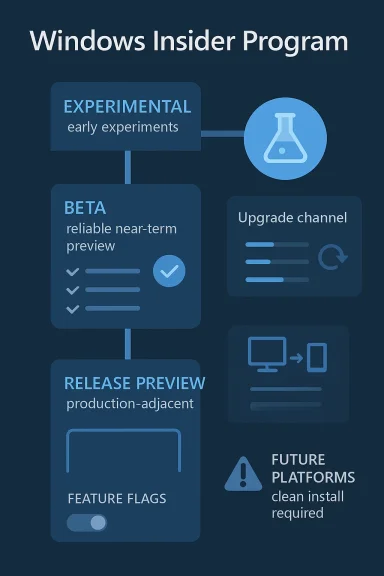
The headline change is a new channel structure centered on Experimental and Beta, with Release Preview retained for organizations that want a near-final look at production code. Microsoft’s own language makes the point clearly: Experimental is the place for features still in active development, while Beta is meant to preview what the company plans to ship in the coming weeks. That is a much cleaner promise than the old system, where Dev and Canary had too much overlap and too little explanatory power.A clearer ladder of risk
The practical value here is not just renaming. It is the creation of a more legible contract between Microsoft and testers. Beta now looks like the place to find what is actually likely to ship soon, while Experimental becomes the home for features that are still evolving and may never graduate.That matters because channel names are part of user behavior. When a channel says “Beta,” people expect a preview of something close to release, not an unpredictable sample of whatever happened to be in the build that week. Microsoft is trying to restore that intuition, and that alone should reduce a lot of the recurring forum frustration around Insider flights.
- Experimental is for early, unstable platform work.
- Beta is for near-term retail previews.
- Release Preview remains for production-adjacent validation.
- The goal is less ambiguity and more predictable expectations.
Why the old structure failed
The old channel model was technically sophisticated but narratively weak. Microsoft had one channel for very early work, one for active feature development, one for near-term previews, and one for release validation, yet the company often moved features between them or held them back with rollout controls. To a user, that looked less like engineering discipline and more like randomization.The irony is that Microsoft’s own documentation helped create the confusion. Insider posts regularly warned that many features were only being rolled out to a subset of users, even inside Beta. That may have been good for telemetry, but it was bad for trust. The new structure is a tacit admission that predictability has real product value.
Beta Becomes the Reliable Preview
The biggest behavioral change is that Microsoft says it is ending gradual feature rollouts inside Beta. If a feature is announced in a Beta update and you install that update, you should get the feature. That sounds obvious, but it is a major philosophical correction after years of controlled rollout frustration.Ending the “why don’t I have it?” problem
For Insiders, this is the most user-friendly part of the announcement. The same Beta build should now mean the same feature set for everyone in the channel, instead of a lottery where two people on identical machines compare notes and discover different experiences. That makes testing easier, feedback better, and community discussion far less chaotic.It also gives Microsoft a cleaner signal. When a Beta feature is broadly available, feedback is less skewed by rollout timing and more reflective of the actual UI, behavior, and bugs. That should improve the quality of the data Microsoft gets back before retail release. In theory, that is exactly what Beta ought to do.
- Same build, same announced feature set.
- Less confusion in community testing.
- Better alignment with imminent retail code.
- Fewer false negatives caused by rollout delays.
The strategic value for Microsoft
Microsoft is also protecting its release cadence. A coherent Beta channel is a better staging ground for the next Windows feature update because it can reveal what survives exposure to a larger, more diverse test base. That matters now that Windows 11 updates are increasingly treated as iterative platform changes rather than one big annual event.There is also a marketing angle. When the company talks about the next feature wave, it needs a preview channel that feels believable. If Beta becomes a dependable mirror of what is close to shipping, Microsoft can point to it without having to add a dozen caveats about hidden toggles and partial availability. Trust is a product feature, and this change is a trust repair exercise as much as an engineering one.
Experimental Channel: More Freedom, More Responsibility
If Beta is becoming more orderly, Experimental is where Microsoft is pushing the chaos to the edge where it belongs. The company says this channel replaces the old Dev and Canary concept for people who want to work with features under active development, and it also introduces platform selection options tied to specific Windows bases or future platform work.Choosing the right platform
Microsoft’s new platform choices are a subtle but important correction. Instead of asking testers to live in one constantly moving target, the company is distinguishing between a branch aligned to a supported retail build and a Future Platforms path that is explicitly not aligned to any retail release. That should help people understand whether they are testing a likely Windows trajectory or a more speculative one.The company’s wording matters here. Microsoft says that users looking for the earliest access to features should stay on a version aligned to a retail build, while the future-platform track is for those who want to be at the “forefront” of platform development. That is effectively a warning label: the more adventurous the path, the less stable the promise.
A more honest Canary replacement
This is also a sensible way to recast the old Canary idea. Canary has always been the channel where Microsoft can toss in deeply experimental platform changes without worrying about retail alignment. By turning that concept into an explicitly named future-platform branch, Microsoft is making the risk more visible. That is not just better branding; it is better expectation-setting.- Retail-aligned experimental builds should be easier to understand.
- Future Platforms is the true cutting edge.
- The naming better reflects real engineering risk.
- Testers can match their appetite for instability to the branch they choose.
Feature Flags and User Control
Microsoft is also promising a new Feature Flags page in Insider settings, allowing testers in Experimental to toggle specific visible features on or off. That is an interesting compromise between the old brute-force rollout model and a more user-driven test environment.Why this is a big deal
Feature control has always been one of the biggest complaints about Windows Insider testing. Users want to explore new capabilities, not merely wait for them to appear. Giving them a way to enable or disable certain features turns experimentation into a more active process and may encourage better feedback because testers can compare behavior with and without a feature enabled.At the same time, Microsoft is being careful not to overpromise. The company says not every feature will be exposed through these flags, only selected “visible new features” announced in Insider builds. That restraint is smart. Too many switches would create a second layer of confusion on top of the one Microsoft is trying to eliminate.
Why it matters for feedback quality
From a product-development standpoint, flags can improve signal quality. If a tester can intentionally toggle a new behavior, they can isolate whether a bug is caused by the feature itself or by some interaction with the broader build. That makes bug reports more useful and reduces the gray area that has often plagued Insider discussions.There is also a psychological benefit. People who join the program want a sense of agency, not just access. Microsoft is effectively saying that Insiders should not only receive features but also help shape their maturation. That is the original spirit of the program, finally resurfacing in a modern form.
- Better feature comparisons.
- More deliberate testing.
- Fewer “where is it?” complaints.
- Stronger feedback loops for Microsoft.
Easier Channel Switching and Leaving the Program
The third major change may be the most practical for ordinary users: Microsoft says it is moving to in-place upgrades that will let many Insiders hop between channels or leave the program without a clean reinstall. That is a serious quality-of-life upgrade, because the old model punished curiosity with a full wipe and a long recovery process.Removing the reinstall penalty
Historically, switching from one Insider branch to another often meant starting over from scratch. For a casual tester, that is enough friction to avoid changing channels at all. For an enthusiast, it is merely annoying; for an enterprise pilot, it is operational overhead. Microsoft’s new IPU model acknowledges that test programs should not require a scorched-earth exit.This is especially relevant for users who start in one channel and then realize the pace is wrong for them. If Beta becomes too tame, they may want Experimental. If Experimental becomes too wild, they may want Beta or Release Preview. The ability to move without a clean install makes the Insider Program feel more like a spectrum and less like a trap.
The exception that proves the rule
There is one important limitation. If users are on a Future Platforms branch, Microsoft says moving back to a supported retail platform will still require a clean install. That makes sense because those builds are explicitly not aligned with the normal release track, and moving across such a gap can be structurally messy.Still, the broader message is clear. Microsoft wants fewer people stuck in channels they selected months ago under different expectations. That should lower the barrier to participation, especially among users who are curious but not eager to reimage a machine just to test a new taskbar behavior or system UI tweak.
- Install the new channel build.
- Use in-place upgrade when moving within compatible branches.
- Keep apps, data, and settings intact.
- Reserve clean installs for truly incompatible future-platform work.
Why This Matters for Windows 11
Microsoft’s current Windows 11 strategy depends on making the operating system feel both more stable and more adaptable. That is a difficult balance, and Insider previews are where the company proves whether it can manage it. A more coherent Insider Program should translate into a clearer story for Windows 11’s next wave of updates.A better preview of upcoming releases
The new Beta channel positioning is especially important because it should better reflect the next retail feature update. If Microsoft continues this model, Beta should become the place where users can see what is likely to land in the upcoming release cycle rather than a channel where features appear on unpredictable schedules. That will matter for the next Windows 11 feature wave, which is already being discussed in terms of the 26H2 timeline.There is also a broader benefit for Windows perception. Windows 11 has taken repeated criticism for being fragmented, over-managed, and occasionally opaque about what is new versus what is merely staged. A more reliable preview pipeline makes the product feel less chaotic even before the operating system itself changes.
Enterprise and consumer impact diverge
For consumers, the biggest win is simplicity. They no longer need to decode channel names or wonder why a build announcement does not match what appears on their PC. For enterprises, the payoff is predictability and the ability to trial near-final code with less risk of being dragged into unplanned feature churn.That distinction matters. Consumer testers usually want novelty, while enterprise IT wants consistency and rollback clarity. Microsoft’s revised structure tries to satisfy both audiences without forcing them into the same workflow, which is exactly the kind of maturity the Insider Program has lacked in recent years.
- Consumers get clearer channel meaning.
- Enterprises get more dependable pre-release validation.
- Microsoft gets cleaner telemetry from better-defined cohorts.
- Windows 11 gets a less chaotic public narrative.
Competitive Implications
Microsoft’s changes also have competitive significance, even if the company is not advertising them that way. A cleaner preview program improves the company’s ability to stage platform changes against rivals that update their operating systems or ecosystems on different rhythms. In a market where trust and cadence matter, the quality of the preview story is part of the competitive story.The Apple comparison
Apple has long benefited from a relatively legible beta model for macOS and iOS: public betas, developer betas, and a sense that release candidates are close to final. Microsoft’s Insider Program has often felt less orderly by comparison, even when its engineering was just as serious. This redesign narrows that perception gap by making channel purpose much easier to explain.That does not mean Microsoft is copying Apple. The Windows ecosystem is far more diverse, with OEM variation, enterprise policies, Arm and x86 realities, and much heavier backward-compatibility expectations. But it does mean Microsoft is recognizing that a preview program is also a communication product, and communication products need simplicity.
The enterprise tooling angle
For IT teams, the shift may also make Microsoft’s own business messaging more credible. If Beta becomes a stable, near-term preview and Release Preview continues to serve production validation, IT departments can align testing cycles more cleanly with deployment windows. That matters in a world where patch management, update deferrals, and app compatibility testing already consume a lot of attention.The broader competitive implication is that Microsoft is trying to make Windows feel less like a moving target and more like a managed platform. That is exactly the sort of message enterprises want to hear when they are evaluating whether to accelerate or delay rollout plans. If the preview story is credible, the release story becomes credible too.
Strengths and Opportunities
Microsoft’s overhaul has several obvious strengths, and the biggest opportunity is simply restoring confidence. A preview program only works when people believe the labels on the channels mean something, and this change is built to restore that relationship. It also gives Microsoft a cleaner foundation for future Windows 11 releases and a more rational path for users who want to participate without committing to a full-time hobby.- Clearer channel names reduce confusion for new and returning Insiders.
- Beta channel reliability should improve trust in near-term previews.
- Feature Flags can give testers more agency over visible features.
- In-place upgrades lower the cost of moving between compatible channels.
- Release Preview remains valuable for enterprise validation.
- The new structure makes Microsoft’s public messaging much easier to understand.
- A cleaner Insider pipeline should produce better feedback for Windows engineering.
Risks and Concerns
The biggest risk is that Microsoft may still overcomplicate the experience in practice, even if the names are better. If too many features remain hidden behind backend switches, or if the Experimental channel becomes a dumping ground for loosely connected ideas, the program could still feel fragmented. There is also the possibility that Microsoft’s definitions will drift again over time, especially if release pressure starts to blur channel boundaries.- Residual hidden rollout logic could still frustrate users.
- Experimental may become a new umbrella for too much instability.
- Future Platforms could confuse testers who do not understand the implications.
- Feature Flags may create another layer of discoverability problems.
- In-place upgrade behavior may not be consistent across all device types.
- Clean-install requirements for future-platform users still create friction.
- Microsoft must keep the channel definitions disciplined or the reset will fade fast.
Looking Ahead
The key question now is whether Microsoft follows through with the same discipline in the next several Insider flights. If Beta truly stops using gradual feature rollout, that will be the clearest proof that the company is serious about restoring the channel’s identity. If not, the new labels will simply become better packaging around the same old confusion.We should also watch how Microsoft handles the transition from the current build cadence into the next retail feature cycle. The company says Beta should preview what it plans to ship in the coming weeks, which means the next month or two should reveal a lot about Windows 11’s next major update direction. That will tell us whether this is a cosmetic restructuring or a real operational reset.
- Watch whether announced Beta features arrive uniformly.
- Watch how often Experimental features remain hidden or mutable.
- Watch whether Release Preview stays tightly aligned to production builds.
- Watch the ease of channel hopping in real-world use.
- Watch for signs that Microsoft is using the new model as a template for broader Windows release management.
Source: ZDNET Microsoft's Windows Insider Program is no longer a confusing mess
Last edited:
