

Microsoft’s latest Windows Insider overhaul is the most convincing reason in years for power users to take preview builds seriously again. On April 10, 2026, the company laid out a broad reset for the program that attacks four of its longest-running frustrations: confusing channels, feature rollouts that hide what you came for, the pain of clean installs when you want out, and the sense that feedback disappears into a void. The result is a preview ecosystem that looks far more legible, more reversible, and more genuinely participatory than the old one. It is still a preview channel, which means bugs remain part of the deal, but Microsoft has clearly decided that friction, not just instability, was driving people away.
For years, the Windows Insider Program has lived with an awkward contradiction. It was designed to attract enthusiasts, IT pros, testers, and curious users who wanted to shape Windows before release, yet the program often made participation feel like a tax. If you picked the wrong channel, you could end up on a path that was hard to reverse. If Microsoft announced a feature you wanted to test, there was a good chance you would not actually get it. If you wanted to leave, the escape route could involve a full wipe. That is not a great pitch for a program built around excitement and experimentation.
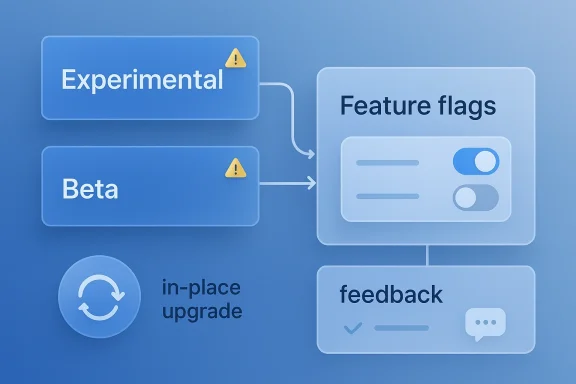
Microsoft’s new approach is notable because it addresses the operational pain, not just the branding. The company is changing channel definitions, moving toward in-place upgrades for most channel transitions, and introducing a Feature flags page that should make experimental capabilities easier to surface. It is also promising that Beta will no longer use gradual feature rollouts, which means a Beta build should be much closer to the straight-up promise of “download this and you get what we announced.” That alone is a meaningful philosophical shift.
This is also a sign of how Microsoft now wants Windows to evolve. The company has spent the past several years emphasizing quality, stability, and controlled delivery across Windows 11. But controlled delivery can become too controlled. The result is a program that sometimes feels like a maze of toggles and hidden states instead of a true preview environment. Microsoft’s April 2026 update is, in effect, an admission that the old Insider experience was too opaque for the audience it was supposed to serve.
There is a bigger industry lesson here as well. Preview programs are only useful when they are both exciting and trustworthy. Enthusiasts will tolerate crashes and rough edges if they feel they are getting early access to meaningful features. They will not tolerate a system that makes it hard to understand what they are running, what they can expect, or how to get back. That is why this reset matters so much.
That sounds simple, but it is a major quality-of-life improvement. The old system blurred the line between build access and feature access. Users often assumed a build number meant they had the feature Microsoft had just talked about, when in reality they were only getting the framework for it. That gap between expectation and reality was one of the most annoying parts of Insiders participation.
Microsoft’s logic is sensible: if the goal is feedback, users need to see what they are reacting to. Hiding a feature behind a rollout system in a preview channel undermines the whole point. It makes the program feel less like a testbed and more like a randomized lottery.
That distinction matters because not all preview tracks are created equal. Some are just early windows into an eventual shipping build. Others are effectively platform experiments. Microsoft’s revised structure gives enthusiasts a better way to decide how far forward they want to live, instead of forcing them to learn the hard way after enrolling.
The practical upside is clarity. The downside is that Microsoft is still asking users to understand what is, in effect, a layered development pipeline. The new names help a lot, but this is still a niche program with enough complexity to intimidate casual testers.
This is a big deal because the old behavior often pushed power users toward tools like ViVeTool, which became popular precisely because Microsoft’s own preview pipeline was too restrictive. The irony was obvious: Insiders were using unsupported tools to access supported preview features. That is not a healthy sign for a test program.
The new approach is also more intellectually coherent. If a feature is experimental enough to be in Experimental, then allowing insiders to toggle it on or off is closer to the spirit of the channel. Users can test variants, report issues, and understand exactly what they are evaluating.
That complaint was not trivial. It eroded trust. When users cannot reliably predict whether a build contains the advertised capability, they stop taking announcements seriously. That, in turn, weakens feedback quality because testers cannot focus on the feature Microsoft actually wants evaluated.
There is still a nuance here, though. Microsoft says some small variations may still be tested within a feature. That is fine. Testing variants is different from hiding the whole thing. The latter was the real problem.
Microsoft’s new move is significant because it lowers the cost of curiosity. If joining the program no longer feels like a one-way ticket to a reinstall, more users will be willing to try it on a secondary PC. That alone could broaden the tester base.
The company is being careful to carve out exceptions. Future Platforms remains special because it does not align with a retail Windows release. If you move into or out of that lane, a clean install may still be required. That is sensible, because platform-level divergence creates a technical boundary that an in-place migration may not be able to bridge cleanly.
This also helps business users. IT departments may be more willing to assign a test machine to Insider work if they know they can recover it without a major cleanup exercise. For consumer enthusiasts, the value is simpler: you can try a build, decide you hate it, and get back out with less drama.
That is the real challenge here. It is not merely collecting feedback. It is proving that feedback shapes product direction in recognizable ways. Otherwise, the program becomes a public relations tool rather than a development tool.
Microsoft has started doing more face-to-face engagement again, including meetups and direct conversations with users. That is a promising sign because it reduces the distance between the people building Windows and the people testing it.
Microsoft’s revival of meetup-style engagement is therefore not just community theater. It is a way to get richer data. The company should use that channel to identify recurring pain points more quickly and to communicate tradeoffs in a human way.
The bigger test is whether Microsoft acts on the recurring themes it hears. If the company continues to ship visible fixes for popular requests, users will begin to believe the loop is real.
That matters because the most valuable testers are often the ones who actually want to use the features, not just benchmark them. Enthusiasts tend to notice UI friction, workflow regressions, and consistency issues faster than broad consumer populations. If Microsoft truly wants better feedback, these are the people it should keep close.
The more the program feels optional and reversible, the more honest the risk calculation becomes. That is a healthier dynamic than the previous “install at your own peril and hope you can recover” model.
Using Experimental will require a bit more self-control than before. You can now surface more capabilities more directly, but that does not mean every toggle should be flipped at once. Selective testing will matter if you want to provide useful feedback or recover from instability.
The Beta channel becoming less random is especially useful for organizations that want to compare what they see in previews with what they expect in production. If a feature is announced in Beta, it should be there. That makes internal validation less frustrating and more repeatable.
For commercial testers, the new model may reduce the need to maintain separate documentation just to explain Insider channel behavior. Fewer surprises usually mean fewer support tickets.
Microsoft’s decision to keep Release Preview as an advanced option for commercial customers is smart. It preserves a lane for near-final validation without forcing businesses into the more experimental parts of the program. That separation should make it easier to align testing with risk tolerance.
The overall result is a more mature preview stack. It looks more like an operational program and less like a consumer curiosity funnel.
Microsoft is now trying to make the program self-explanatory. Channel names should tell you what you are getting. Feature presence should align with announcement expectations. Leaving should not be a punishment. That is a pretty good definition of a healthy preview product.
This also aligns with the broader Windows 11 theme of making the platform feel more intentional and less historically layered. Microsoft appears to know that power users want less ceremony and more clarity.
The timing is interesting, because preview programs increasingly compete with a user base that expects choice everywhere. When users can opt into all kinds of early-access software from other vendors, a clunky Windows Insider structure starts to look dated. Microsoft is modernizing not just the program, but the expectation set around it.
That is probably the real story. Microsoft is learning that preview access must be both technically interesting and emotionally low-friction.
That matters to developers too. Developers who care about what Windows is doing next need stable ways to observe and test changes. If the Insider process becomes less frustrating, it may regain some of the energy it lost to apathy and confusion.
Microsoft is also reinforcing the message that Windows 11 development is not just about shipping shiny UI changes. It is about making the path to those changes legible. That is a more modern software posture.
If this shift sticks, it may encourage more people to see Windows previews as an opportunity rather than a burden. That could increase engagement with features before they reach the mainstream, which in turn helps Microsoft refine releases earlier.
The most important test will be consistency. If Beta builds reliably contain the features Microsoft says they contain, users will notice immediately. If the Feature flags page makes experimental capabilities easy to access, enthusiasts will talk about it. If leaving the program becomes as painless as Microsoft claims, the whole Insider narrative could change for the better.
Source: PCMag UK 4 Big Changes That Make Windows Insider Builds Worth Trying Again
 Overview
For years, the Windows Insider Program has lived with an awkward contradiction. It was designed to attract enthusiasts, IT pros, testers, and curious users who wanted to shape Windows before release, yet the program often made participation feel like a tax. If you picked the wrong channel, you could end up on a path that was hard to reverse. If Microsoft announced a feature you wanted to test, there was a good chance you would not actually get it. If you wanted to leave, the escape route could involve a full wipe. That is not a great pitch for a program built around excitement and experimentation.Microsoft’s new approach is notable because it addresses the operational pain, not just the branding. The company is changing channel definitions, moving toward in-place upgrades for most channel transitions, and introducing a Feature flags page that should make experimental capabilities easier to surface. It is also promising that Beta will no longer use gradual feature rollouts, which means a Beta build should be much closer to the straight-up promise of “download this and you get what we announced.” That alone is a meaningful philosophical shift.
This is also a sign of how Microsoft now wants Windows to evolve. The company has spent the past several years emphasizing quality, stability, and controlled delivery across Windows 11. But controlled delivery can become too controlled. The result is a program that sometimes feels like a maze of toggles and hidden states instead of a true preview environment. Microsoft’s April 2026 update is, in effect, an admission that the old Insider experience was too opaque for the audience it was supposed to serve.
There is a bigger industry lesson here as well. Preview programs are only useful when they are both exciting and trustworthy. Enthusiasts will tolerate crashes and rough edges if they feel they are getting early access to meaningful features. They will not tolerate a system that makes it hard to understand what they are running, what they can expect, or how to get back. That is why this reset matters so much.
What Microsoft Changed
The headline change is the simplification of the Insider structure into two primary channels: Experimental and Beta. Microsoft says Experimental replaces the old Dev and Canary channels, while Beta becomes the place for previewing features that are intended to ship soon. The naming alone is important, because the old channel tree had become a semantic mess. Too many users had to decode labels like Dev, Canary, and Beta without a clear mental model for what each meant.Clearer channel intent
Microsoft is being unusually direct about channel purpose. Experimental is for early access to features still under active development, and Microsoft explicitly says those features may change, slip, or never ship at all. Beta, by contrast, is where Microsoft plans to put features that are much closer to release, and it is ending gradual feature rollouts in that channel. In practical terms, if Microsoft announces a feature in Beta and you install that update, the feature should be there.That sounds simple, but it is a major quality-of-life improvement. The old system blurred the line between build access and feature access. Users often assumed a build number meant they had the feature Microsoft had just talked about, when in reality they were only getting the framework for it. That gap between expectation and reality was one of the most annoying parts of Insiders participation.
Microsoft’s logic is sensible: if the goal is feedback, users need to see what they are reacting to. Hiding a feature behind a rollout system in a preview channel undermines the whole point. It makes the program feel less like a testbed and more like a randomized lottery.
A better mental model
The company is also adding an advanced option that lets users choose a Windows core version that matches their hardware. For most people, that means roughly choosing between 25H2 and 26H1 builds. For more advanced users, there is a Future Platforms option that represents Microsoft’s earliest preview track and is not aligned to any retail Windows release.That distinction matters because not all preview tracks are created equal. Some are just early windows into an eventual shipping build. Others are effectively platform experiments. Microsoft’s revised structure gives enthusiasts a better way to decide how far forward they want to live, instead of forcing them to learn the hard way after enrolling.
The practical upside is clarity. The downside is that Microsoft is still asking users to understand what is, in effect, a layered development pipeline. The new names help a lot, but this is still a niche program with enough complexity to intimidate casual testers.
Why the rename matters
Branding changes in software previews often sound cosmetic, but this one is not. By making Experimental the home for the earliest work and Beta the home for near-release features, Microsoft is trying to reduce the perception that Insider participation is a gamble. That perception has long pushed people toward either staying away entirely or relying on outside guides to decode the program.- Experimental now signals active development and uncertainty.
- Beta now signals closer-to-shipping features with less ambiguity.
- Release Preview remains the late-stage option for commercial and cautious users.
- Future Platforms is still the sharp edge of the sharp edge.
Ending the Feature Lottery
The second big change is Microsoft’s decision to reduce the randomness surrounding feature availability, especially in Beta. For years, Insider builds frequently inherited the same Controlled Feature Rollout logic that Microsoft uses on stable releases. That made sense from a risk-management standpoint, but it was deeply frustrating for people in a channel explicitly meant for testing new things.Feature flags instead of feature roulette
Microsoft says Insiders in Experimental will get a new Feature flags page inside the Windows Insider Program settings area. That page will let users enable or disable specific features, starting with visible features announced in Windows Insider Blog posts. In other words, if a feature is there and you want to try it, you should not need a third-party utility to uncover it.This is a big deal because the old behavior often pushed power users toward tools like ViVeTool, which became popular precisely because Microsoft’s own preview pipeline was too restrictive. The irony was obvious: Insiders were using unsupported tools to access supported preview features. That is not a healthy sign for a test program.
The new approach is also more intellectually coherent. If a feature is experimental enough to be in Experimental, then allowing insiders to toggle it on or off is closer to the spirit of the channel. Users can test variants, report issues, and understand exactly what they are evaluating.
The end of hidden frustration
Microsoft is also ending gradual feature rollouts in Beta. That means Beta should no longer feel like a build where the feature is technically present but functionally invisible. This should reduce one of the most common Insider complaints: the feeling that you updated for a feature Microsoft promised and got nothing visible in return.That complaint was not trivial. It eroded trust. When users cannot reliably predict whether a build contains the advertised capability, they stop taking announcements seriously. That, in turn, weakens feedback quality because testers cannot focus on the feature Microsoft actually wants evaluated.
There is still a nuance here, though. Microsoft says some small variations may still be tested within a feature. That is fine. Testing variants is different from hiding the whole thing. The latter was the real problem.
Why third-party tools mattered
The popularity of unsupported enablement tools revealed a lot about Insider behavior. Advanced testers do not mind rough edges, but they hate artificial opacity. When they know a feature exists but cannot access it, they interpret that as a program design failure, not as a necessary safeguard.- The new system should reduce dependence on unsupported utilities.
- It should make feature discovery more predictable.
- It should improve the quality of feedback Microsoft receives.
- It may also make Insider builds more attractive to experienced testers.
The Return of Reversible Testing
One of the most important changes is Microsoft’s commitment to using in-place upgrade technology for many Insider transitions and exits. That means users will often be able to move between Experimental, Beta, and Release Preview, or leave the program, without having to perform a clean install. That is the sort of change that sounds boring until you have had to reinstall Windows and rebuild your machine from scratch.Reinstall pain was a real barrier
For a long time, leaving the Insider Program could be a hassle that discouraged experimentation. If you wanted to back out, the route back to stability could require wiping the device, reinstalling Windows, and restoring apps and settings. Even seasoned testers found that annoying. For everyone else, it was enough to stay away.Microsoft’s new move is significant because it lowers the cost of curiosity. If joining the program no longer feels like a one-way ticket to a reinstall, more users will be willing to try it on a secondary PC. That alone could broaden the tester base.
The company is being careful to carve out exceptions. Future Platforms remains special because it does not align with a retail Windows release. If you move into or out of that lane, a clean install may still be required. That is sensible, because platform-level divergence creates a technical boundary that an in-place migration may not be able to bridge cleanly.
In-place upgrade as a trust signal
The technical detail is important, but the messaging is even more important. Microsoft is effectively telling users, “We know the exit ramp mattered.” That is a trust signal. It says the company understands that preview participation is easier to sell when there is a clear path back to normalcy.This also helps business users. IT departments may be more willing to assign a test machine to Insider work if they know they can recover it without a major cleanup exercise. For consumer enthusiasts, the value is simpler: you can try a build, decide you hate it, and get back out with less drama.
A better lifecycle for test PCs
A healthier preview program should have a lifecycle, not a trapdoor. You should be able to move in, test, compare, and leave without feeling like you are sacrificing the machine. Microsoft’s use of IPU gets much closer to that ideal.- Fewer clean installs.
- Less app reconfiguration.
- Less lost time.
- Lower risk for secondary PCs.
- Better continuity for test environments.
Feedback That Feels More Visible
The Windows Insider Program has always been described as a feedback loop, but many users have treated it like a one-way street. Microsoft’s new changes do not magically solve that perception, but they do suggest the company wants feedback to matter more visibly.The problem with invisible listening
One of the most persistent criticisms of Windows Insider has been that the community can shout into Feedback Hub for years and still see little movement. The classic example is the desire to move the Windows taskbar, a request that has remained a long-running symbol of user frustration. When the company ignores a prominent request for a long time, it teaches users to stop believing feedback changes outcomes.That is the real challenge here. It is not merely collecting feedback. It is proving that feedback shapes product direction in recognizable ways. Otherwise, the program becomes a public relations tool rather than a development tool.
Microsoft has started doing more face-to-face engagement again, including meetups and direct conversations with users. That is a promising sign because it reduces the distance between the people building Windows and the people testing it.
Why meetups matter
In-person or direct community engagement can produce a different quality of feedback than app-based submissions. It is easier to clarify a bug report, explain a workflow issue, or identify a design flaw when people can ask follow-up questions. That can be especially useful for a product as sprawling as Windows, where a small change in one subsystem can have ripple effects elsewhere.Microsoft’s revival of meetup-style engagement is therefore not just community theater. It is a way to get richer data. The company should use that channel to identify recurring pain points more quickly and to communicate tradeoffs in a human way.
The bigger test is whether Microsoft acts on the recurring themes it hears. If the company continues to ship visible fixes for popular requests, users will begin to believe the loop is real.
Feedback needs visible consequences
For the program to feel credible, people need to see that the same issues do not linger forever without comment. If a feature is rejected, users should at least understand why. If a popular request is being worked on, the community should see evidence of progress. That is how you turn a feedback repository into a meaningful participation platform.- Direct community meetings can improve signal quality.
- Feedback Hub still matters, but only if users see outcomes.
- Transparent follow-through builds loyalty.
- Big, symbolic requests can shape public perception.
- The Insider Program must reward patience with visible change.
What This Means for Enthusiasts
For longtime Windows nerds, these changes make the Insider Program feel useful again instead of merely risky. The combination of easier exits, clearer channel definitions, and feature toggles is exactly the sort of polish that makes a preview track worth exploring on a spare machine. It turns the program into something closer to a lab and less like a dare.The secondary-PC sweet spot
The best use case remains a secondary or noncritical PC. That has always been true, and it remains true now. But the new structure lowers the commitment threshold enough that more enthusiasts may finally decide the experiment is worth it.That matters because the most valuable testers are often the ones who actually want to use the features, not just benchmark them. Enthusiasts tend to notice UI friction, workflow regressions, and consistency issues faster than broad consumer populations. If Microsoft truly wants better feedback, these are the people it should keep close.
The more the program feels optional and reversible, the more honest the risk calculation becomes. That is a healthier dynamic than the previous “install at your own peril and hope you can recover” model.
More power, more responsibility
The new Feature flags page is likely to be popular, but it also increases the temptation to turn on everything just because you can. That is understandable, but it can also make debugging harder when you do not know which feature caused a problem. Experienced testers will need to be disciplined.Using Experimental will require a bit more self-control than before. You can now surface more capabilities more directly, but that does not mean every toggle should be flipped at once. Selective testing will matter if you want to provide useful feedback or recover from instability.
The appeal to Windows fans
Windows enthusiasts have always wanted two things at once: early access and control. Microsoft’s new structure offers both more cleanly than before. That is why the changes are likely to resonate.- Easier channel hopping.
- Clearer feature access.
- Less dependence on hacks.
- Better odds of getting what was announced.
- A more credible feedback story.
Enterprise and Business Impact
The commercial angle is easy to miss, but it is important. Microsoft explicitly says Windows Insider Program for Business customers will see the same changes and improvements, while Windows Server remains unchanged. That suggests the company sees preview modernization as a platform-wide issue, not just a hobbyist concern.Better for IT testing pipelines
Enterprise IT wants predictability above all else. A preview program that is easier to exit is more attractive because it reduces cleanup overhead. A clearer channel structure is also helpful because it reduces ambiguity when teams are trying to validate features for staged deployment.The Beta channel becoming less random is especially useful for organizations that want to compare what they see in previews with what they expect in production. If a feature is announced in Beta, it should be there. That makes internal validation less frustrating and more repeatable.
For commercial testers, the new model may reduce the need to maintain separate documentation just to explain Insider channel behavior. Fewer surprises usually mean fewer support tickets.
A calmer way to test Windows roadmaps
The advanced channel and core-version choices also let organizations map test machines more deliberately to the part of Windows roadmap they want to watch. That can matter if a company is trying to understand how future releases may affect internal apps, device management, or helpdesk workflows.Microsoft’s decision to keep Release Preview as an advanced option for commercial customers is smart. It preserves a lane for near-final validation without forcing businesses into the more experimental parts of the program. That separation should make it easier to align testing with risk tolerance.
The overall result is a more mature preview stack. It looks more like an operational program and less like a consumer curiosity funnel.
Why This Is Different From Past Tweaks
Microsoft has changed Windows Insider mechanics many times over the years, but this one feels more structural. It is not just a new build number or a fresh feature set. It is a rethinking of the relationship between the tester, the build, and the promise of preview access.From opacity to explicitness
Earlier Insider changes often focused on expanding what Windows could do. This one focuses on how the program itself behaves. That distinction matters. If your preview system is confusing, every feature you add inherits that confusion.Microsoft is now trying to make the program self-explanatory. Channel names should tell you what you are getting. Feature presence should align with announcement expectations. Leaving should not be a punishment. That is a pretty good definition of a healthy preview product.
This also aligns with the broader Windows 11 theme of making the platform feel more intentional and less historically layered. Microsoft appears to know that power users want less ceremony and more clarity.
A response to community fatigue
This reset also feels like a response to burnout. A lot of experienced Insiders have gotten tired of build churn without meaningful visibility. Others left because the program was hard to understand or harder to unwind. Microsoft is now trying to win back that trust.The timing is interesting, because preview programs increasingly compete with a user base that expects choice everywhere. When users can opt into all kinds of early-access software from other vendors, a clunky Windows Insider structure starts to look dated. Microsoft is modernizing not just the program, but the expectation set around it.
That is probably the real story. Microsoft is learning that preview access must be both technically interesting and emotionally low-friction.
Key differences from the old model
- Channels are more intuitive.
- Beta is less of a feature lottery.
- Feature flags reduce reliance on third-party tools.
- IPU reduces the pain of exit and migration.
- The program now feels more transactional and less punitive.
The Competitive and Ecosystem Angle
Microsoft is not making these changes in a vacuum. Preview programs shape public perception, developer mindshare, and the broader conversation around platform innovation. A smoother Insider Program can make Windows feel more agile relative to competing desktop ecosystems.Windows versus the rest of the market
Apple’s developer betas, Linux distribution previews, and even mobile platform betas often have clearer expectations around what users are getting. Microsoft has historically struggled with that clarity in Windows Insider. If the company closes that gap, it strengthens the case that Windows can still be an active, responsive platform rather than a slow-moving legacy OS.That matters to developers too. Developers who care about what Windows is doing next need stable ways to observe and test changes. If the Insider process becomes less frustrating, it may regain some of the energy it lost to apathy and confusion.
Microsoft is also reinforcing the message that Windows 11 development is not just about shipping shiny UI changes. It is about making the path to those changes legible. That is a more modern software posture.
A stronger platform narrative
A better Insider program is a better marketing story. It tells the market that Microsoft is listening, iterating, and reducing friction in response to user complaints. That is especially valuable when broader platform sentiment can swing quickly based on a handful of visible decisions.If this shift sticks, it may encourage more people to see Windows previews as an opportunity rather than a burden. That could increase engagement with features before they reach the mainstream, which in turn helps Microsoft refine releases earlier.
Strengths and Opportunities
Microsoft’s redesign has several obvious upsides, and they are not just cosmetic. The company is lowering the friction that kept curious users away, while also making the preview process easier to understand and easier to reverse. That combination is unusually strong for a product change aimed at enthusiasts and IT testers alike.- Clearer channel choices should reduce enrollment mistakes and confusion.
- Beta without gradual rollout makes announced features feel real.
- Feature flags reduce dependence on unsupported tools.
- In-place upgrade transitions lower the cost of experimentation.
- Commercial Insiders get a more predictable validation path.
- Meetups and direct outreach can improve the quality of feedback.
- A faster settings page makes the program feel more polished and modern.
Risks and Concerns
The changes are promising, but they are not risk-free. Microsoft is still shipping unstable software, and the more accessible the program becomes, the more users may underestimate that reality. There is also the possibility that the new clarity creates expectations the engineering pipeline cannot always meet.- Users may overestimate stability because the channels sound simpler.
- Feature flags could create support complexity if too many combinations emerge.
- Future Platforms still require clean installs, which preserves some of the old pain.
- Beta losing CFR could expose more users to half-finished features sooner.
- Feedback may still feel ignored if visible follow-through does not improve.
- More accessibility does not eliminate bugs, crashes, or compatibility issues.
- Commercial users may expect stronger guarantees than preview software can provide.
Looking Ahead
The next few weeks will tell us whether this is a real reset or just a well-worded repositioning. Microsoft has said the changes will begin rolling out soon, and the transition will move existing Beta, Dev, and Canary participants into the new structure. The details matter, because the promise of simplicity only works if the rollout itself is not confusing.The most important test will be consistency. If Beta builds reliably contain the features Microsoft says they contain, users will notice immediately. If the Feature flags page makes experimental capabilities easy to access, enthusiasts will talk about it. If leaving the program becomes as painless as Microsoft claims, the whole Insider narrative could change for the better.
- Watch whether Beta features arrive without hidden gating.
- Watch whether Experimental really feels more controllable.
- Watch whether in-place upgrade behaves smoothly in practice.
- Watch whether feedback response becomes more visible.
- Watch whether Microsoft sustains the new meetup and outreach push.
Source: PCMag UK 4 Big Changes That Make Windows Insider Builds Worth Trying Again
Last edited:
