

Today’s Windows Insider reshuffle marks one of the most consequential program changes Microsoft has made in years, not because it introduces flashy end-user features, but because it changes how the company stages Windows development itself. With the move to Experimental and Beta now beginning, Microsoft is redrawing the lines between preview velocity, feature stability, and the path from Insider builds to retail Windows. The result is a cleaner channel model on paper, but also a more nuanced set of choices for Insiders, especially those who have spent years treating Dev, Beta, and Canary as familiar lanes.
Microsoft has been telegraphing this transition for weeks, and the April 24 announcement is best understood as the execution phase of a broader Insider program reset. On April 10, Microsoft explained that Experimental would replace the old Dev-and-Canary-style early flighting model, while Beta would become a more retail-adjacent preview track with clearer expectations and fewer feature ambiguities. That earlier post framed the redesign as a response to long-running Insider feedback: people wanted simpler channel definitions, stronger predictability, and a better sense of what would actually ship.
The practical significance is that Microsoft is not merely renaming channels. It is reorganizing the entire cadence of how Windows features mature, how testers get access to them, and how release notes are presented to the community. In the old model, the distinctions between Dev and Beta could feel blurry, especially when features appeared gradually or shifted between channels in ways that were hard to explain. The new model attempts to correct that by making Beta the “coming soon” lane and Experimental the “actively changing” lane.
The April 24 blog also confirms that Microsoft will move build documentation into the Windows Insider Program Documentation Hub, rather than keeping all release-note detail embedded in the blog posts themselves. That may sound procedural, but it is actually a meaningful product decision. It suggests Microsoft wants a more durable, structured documentation layer for a program that now spans multiple channel families, multiple platform tracks, and multiple versions of Windows 11.
The timing matters too. Microsoft has been shipping fairly frequent Insider updates throughout early 2026, including Canary and Beta builds in April, and it has already established separate platform branches like 26H1 and “Future Platforms” for the more advanced flighting paths. The new move simply formalizes what those build families have already implied: the Insider program is no longer one ladder, but a set of intersecting ladders with different rungs and different end goals.
For Dev users, Microsoft says the new Experimental UI may appear automatically, but if it does not, Insiders can enable it manually through Settings > Windows Update > Windows Insider Program > Feature flags. That detail matters because it confirms the company is treating the redesign itself as a controllable feature rather than a hard network-side switch. In other words, Microsoft is dogfooding the channel redesign as if it were just another staged Windows feature rollout.
The result is a more explicit taxonomy. It is not just about what features you see; it is about what kind of platform you are testing and how far upstream it sits from retail Windows. That distinction should help Microsoft interpret feedback more accurately, because testers will be clustered around more comparable platform states. In theory, that should improve signal quality across the program.
This will likely please administrators, enthusiasts, and enterprise pilots who use Beta as a dress rehearsal for broader deployment. If the channel behaves more predictably, organizations can treat it as a stronger indicator of what is coming next in the servicing pipeline. That said, Microsoft also warns that some Beta users may still see feature changes after the move, even if those changes are described as minor.
For enthusiasts, this may feel counterintuitive. Beta has traditionally been the safer place to live, but under the new regime, staying put may mean accepting some feature drift while channel semantics are redefined. The practical takeaway is that channel labels now matter more than habit, and users who ignore that may be surprised when a familiar feature disappears or behaves differently. That is the cost of a cleaner taxonomy.
For Microsoft, the upside is easier communication. A Beta build should mean something tighter than it did before, and a Dev-equivalent Experimental build should imply active experimentation rather than incremental previewing. If the company holds that line consistently, the Insider program becomes easier to explain to new participants and easier to manage at scale.
This is important because Canary has often been the least predictable part of the Insider ecosystem. Microsoft has repeatedly described Canary as the earliest place to see platform changes, but the April 24 post shows it is now splitting that earliest tier into meaningful sub-branches. The implication is that Microsoft wants to preserve the extreme early-access function of Canary while making the downstream transition more intelligible.
That matters for advanced testers because build lineage influences everything from bug reporting to compatibility testing. A feature issue in a 26H1 branch may be interpreted differently than the same issue in Future Platforms, because the former is closer to a likely ship target. In practice, this should help Microsoft triage feedback by separating plausible near-term problems from truly speculative platform behavior.
For Windows power users, the change also reinforces a broader trend: Microsoft is increasingly separating where a build lives from what version of Windows it belongs to. The build number and watermark remain important, but the channel identity is now part of the real diagnostic picture. That is a subtle but significant shift for anyone who tracks Insider progression closely.
There is also a deeper communications angle here. A blog post is good for announcements, but a documentation hub is better for long-term reference and internal consistency. By separating the narrative layer from the release-note layer, Microsoft can make the blog more readable while making the release details easier to maintain and search. That is a classic enterprise-content move, and it makes sense for a program this large.
This separation may also reduce confusion around channel transitions. If a user has not yet moved to the new system, they can still find release notes based on the new channel structure, which avoids the awkward in-between period where old labels and new labels coexist. That is a sensible move during a migration that could otherwise produce avoidable support noise.
The likely long-term effect is a more professionalized Insider program. Microsoft has been steadily turning Windows previewing into a documentation-rich ecosystem, and this move aligns release notes more closely with modern software lifecycle practices. That may not excite casual readers, but it will matter to the people who actually test Windows at scale.
Microsoft’s advice is also unusually pointed. If you are in Beta and care about feature continuity, moving to Dev before the transition may preserve more of what you currently have. If you are already on Dev, you may see the new Experimental UI appear automatically, or you may need to switch it on through feature flags. Either way, Microsoft is signaling that the transition is intended to be manageable, but not invisible.
There is a consumer-angle upside too. Enthusiasts who like testing new Windows features early may find the new framework easier to understand once the rollout stabilizes. The downside is that during the transition window, the experience may be a little messy, especially for users who move between channels often or keep multiple devices on different branches.
The move is also consistent with Microsoft’s broader pattern of tightening Insider semantics around version families, especially in the 26H1 and Future Platforms branches. For IT planners, that should make it easier to decide which devices are suitable for validation, which are suitable for experimentation, and which are best left alone. Clearer channel definitions are not just a community nicety; they are a management tool.
There is also a tactical benefit in how Microsoft now exposes build identity. Because users can identify the build number via the desktop watermark, IT staff can verify branch membership quickly during troubleshooting. That is a small detail, but in enterprise support workflows, small details save time.
Still, enterprises should treat the transition period carefully. Any channel reorganization can create confusion in policy documentation, device ring assignments, and helpdesk scripts. Teams that have built their internal processes around the old Dev/Beta mental map will need to update those materials fast, or risk debugging the wrong assumptions.
The competitive angle is subtle but real. A more coherent preview system can make Windows look more disciplined to developers, OEMs, and IT departments evaluating where to invest testing resources. If Microsoft can reduce confusion while improving feature visibility, it strengthens the perceived professionalism of the Windows ecosystem relative to other desktop platforms. That perception matters far more than the marketing language does.
This also helps Microsoft defend the value of the Insider program itself. The company has spent years building a community around pre-release testing, but that community only works if participants understand where they are in the pipeline. A clearer ladder of channels is a way of preserving that trust while increasing the program’s technical usefulness.
For competitors watching from the outside, this is a reminder that Microsoft continues to treat Windows as an evolving service with layered participation levels. The company is not merely shipping features; it is designing a participation architecture around them. That architecture may become a competitive asset in its own right.
The build numbering also implies that Microsoft is already deep into parallel platform workstreams. That is not unusual for Windows, but the new channel structure makes the parallelism more visible. The result is a program that feels less like one monolithic preview stream and more like a set of managed experiments moving at different speeds.
That is especially true during transition periods like this one, when old channel habits can obscure what the number is actually telling you. A familiar build cadence in one channel may mean something very different once the channel itself has changed meaning. Microsoft is effectively asking Insiders to look at builds through a new lens.
The presence of two Experimental branches also hints at a future where build families become increasingly specialized. If Microsoft keeps segmenting Windows development this way, users may eventually think of Insider participation less in terms of “where am I?” and more in terms of “what kind of platform am I helping shape?”
It also gives Microsoft room to tailor channels to different user types without pretending all preview users want the same thing. Enthusiasts who want bleeding-edge builds can stay close to Experimental, while users who prefer near-term retail visibility can rely on Beta. That separation is healthier than the old ambiguity between Dev and Beta, and it should make the Insider program easier to recommend.
There is also a risk that the new Beta experience will not feel stable enough for users who expect strict continuity. Microsoft says the changes should be minor, but minor is a subjective term when features, toggles, or rollouts are involved. A small change to one user can be a significant workflow disruption to another.
What happens next is less about the labels themselves and more about consistency. Microsoft needs the new naming to line up with actual build behavior, feature cadence, and release-note clarity. If those three things stay aligned, the Insider program will feel more intentional and less improvisational.
In the end, the move to Experimental and Beta is not just a channel reshuffle; it is an admission that Windows previewing has outgrown the old mental map. Microsoft is trying to make the Insider program more legible, more scalable, and more honest about where each build sits in the journey from experiment to product. If the company can keep that promise, this may be remembered as the point when the Insider program finally got the structure its complexity demanded.
Source: Microsoft - Windows Insiders Blog We’re moving to Experimental and Beta! Announcing new builds for 24 April 2026
 Background
Microsoft has been telegraphing this transition for weeks, and the April 24 announcement is best understood as the execution phase of a broader Insider program reset. On April 10, Microsoft explained that Experimental would replace the old Dev-and-Canary-style early flighting model, while Beta would become a more retail-adjacent preview track with clearer expectations and fewer feature ambiguities. That earlier post framed the redesign as a response to long-running Insider feedback: people wanted simpler channel definitions, stronger predictability, and a better sense of what would actually ship.The practical significance is that Microsoft is not merely renaming channels. It is reorganizing the entire cadence of how Windows features mature, how testers get access to them, and how release notes are presented to the community. In the old model, the distinctions between Dev and Beta could feel blurry, especially when features appeared gradually or shifted between channels in ways that were hard to explain. The new model attempts to correct that by making Beta the “coming soon” lane and Experimental the “actively changing” lane.
The April 24 blog also confirms that Microsoft will move build documentation into the Windows Insider Program Documentation Hub, rather than keeping all release-note detail embedded in the blog posts themselves. That may sound procedural, but it is actually a meaningful product decision. It suggests Microsoft wants a more durable, structured documentation layer for a program that now spans multiple channel families, multiple platform tracks, and multiple versions of Windows 11.
The timing matters too. Microsoft has been shipping fairly frequent Insider updates throughout early 2026, including Canary and Beta builds in April, and it has already established separate platform branches like 26H1 and “Future Platforms” for the more advanced flighting paths. The new move simply formalizes what those build families have already implied: the Insider program is no longer one ladder, but a set of intersecting ladders with different rungs and different end goals.
What Microsoft Changed
The headline change is straightforward: Dev becomes Experimental, and Beta remains Beta, but with a clearer promise about what each channel is for. Microsoft says it will begin moving Dev users to Experimental first, then roll the change outward to Canary 28000-series users, Canary 29500-series users, and Beta users over the coming weeks. That phased approach is intended to preserve quality while Microsoft verifies the mechanics of the transition.For Dev users, Microsoft says the new Experimental UI may appear automatically, but if it does not, Insiders can enable it manually through Settings > Windows Update > Windows Insider Program > Feature flags. That detail matters because it confirms the company is treating the redesign itself as a controllable feature rather than a hard network-side switch. In other words, Microsoft is dogfooding the channel redesign as if it were just another staged Windows feature rollout.
The new channel map
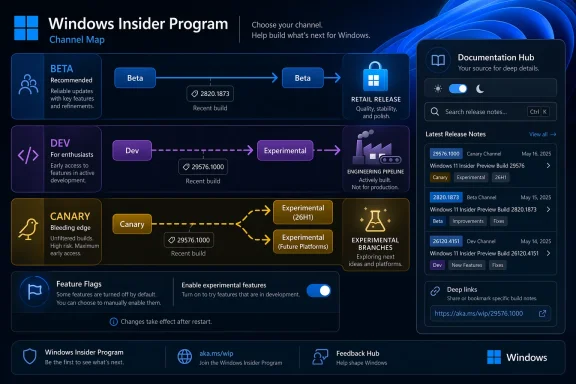
Microsoft’s mapping is explicit, and it is the clearest way to understand the change. The company says:- Beta Channel → Beta
- Dev Channel → Experimental
- Canary 28000 series → Experimental (26H1)
- Canary 29500 series → Experimental (Future Platforms)
The result is a more explicit taxonomy. It is not just about what features you see; it is about what kind of platform you are testing and how far upstream it sits from retail Windows. That distinction should help Microsoft interpret feedback more accurately, because testers will be clustered around more comparable platform states. In theory, that should improve signal quality across the program.
Why the Beta Rework Matters
Microsoft says Beta is being realigned to better reflect what will arrive in retail in the following weeks. That is a notable policy shift because it narrows the gap between preview and production. Beta is no longer positioned as a semi-floating middle ground with ambiguous rollout behavior; it is becoming a more trustworthy preview of near-term Windows changes.This will likely please administrators, enthusiasts, and enterprise pilots who use Beta as a dress rehearsal for broader deployment. If the channel behaves more predictably, organizations can treat it as a stronger indicator of what is coming next in the servicing pipeline. That said, Microsoft also warns that some Beta users may still see feature changes after the move, even if those changes are described as minor.
Continuity versus clarity
The company is being unusually candid that the new model may trade continuity for definition. Microsoft says users who want the best continuity of all existing features should consider moving from the existing Beta Channel to Dev before the transition completes. That is effectively a migration warning disguised as advice.For enthusiasts, this may feel counterintuitive. Beta has traditionally been the safer place to live, but under the new regime, staying put may mean accepting some feature drift while channel semantics are redefined. The practical takeaway is that channel labels now matter more than habit, and users who ignore that may be surprised when a familiar feature disappears or behaves differently. That is the cost of a cleaner taxonomy.
For Microsoft, the upside is easier communication. A Beta build should mean something tighter than it did before, and a Dev-equivalent Experimental build should imply active experimentation rather than incremental previewing. If the company holds that line consistently, the Insider program becomes easier to explain to new participants and easier to manage at scale.
Experimental and Canary: A More Technical Split
The biggest structural implication is that Microsoft is giving Canary a more formal destination and, by extension, a more explicit identity. Canary 28000-series devices are tied to Experimental 26H1, while Canary 29500-series devices are tied to Experimental Future Platforms. That suggests Microsoft sees these as materially different platform streams, not just different build numbers.This is important because Canary has often been the least predictable part of the Insider ecosystem. Microsoft has repeatedly described Canary as the earliest place to see platform changes, but the April 24 post shows it is now splitting that earliest tier into meaningful sub-branches. The implication is that Microsoft wants to preserve the extreme early-access function of Canary while making the downstream transition more intelligible.
26H1 and Future Platforms
The distinction between 26H1 and Future Platforms is especially revealing. 26H1 suggests a platform family with some forward linkage to an upcoming half-year release cycle, while Future Platforms reads like a more experimental branch for work that may be farther from shipping form. Microsoft does not fully define the technical delta here, but the naming itself indicates two different expectations of maturity.That matters for advanced testers because build lineage influences everything from bug reporting to compatibility testing. A feature issue in a 26H1 branch may be interpreted differently than the same issue in Future Platforms, because the former is closer to a likely ship target. In practice, this should help Microsoft triage feedback by separating plausible near-term problems from truly speculative platform behavior.
For Windows power users, the change also reinforces a broader trend: Microsoft is increasingly separating where a build lives from what version of Windows it belongs to. The build number and watermark remain important, but the channel identity is now part of the real diagnostic picture. That is a subtle but significant shift for anyone who tracks Insider progression closely.
Release Notes Move to a Documentation Hub
Microsoft’s decision to publish build-specific release notes in the Windows Insider Program Documentation Hub is more than a cosmetic editorial tweak. It is a documentation strategy that reflects the program’s new complexity. The company says the new hub will improve navigation, dark and light mode support, localization, and deep linking. Those are all practical quality-of-life upgrades for a content system that was getting harder to scale in blog-only form.There is also a deeper communications angle here. A blog post is good for announcements, but a documentation hub is better for long-term reference and internal consistency. By separating the narrative layer from the release-note layer, Microsoft can make the blog more readable while making the release details easier to maintain and search. That is a classic enterprise-content move, and it makes sense for a program this large.
Better for readers, better for Microsoft
For readers, the obvious benefit is easier discovery. Insiders who want the build tied to their specific channel no longer need to dig through a stream of posts to find the right document. For Microsoft, the advantage is editorial flexibility: the blog can focus on major changes, while the documentation hub becomes the canonical record for granular build content.This separation may also reduce confusion around channel transitions. If a user has not yet moved to the new system, they can still find release notes based on the new channel structure, which avoids the awkward in-between period where old labels and new labels coexist. That is a sensible move during a migration that could otherwise produce avoidable support noise.
The likely long-term effect is a more professionalized Insider program. Microsoft has been steadily turning Windows previewing into a documentation-rich ecosystem, and this move aligns release notes more closely with modern software lifecycle practices. That may not excite casual readers, but it will matter to the people who actually test Windows at scale.
What This Means for Insiders
For everyday Insiders, the first thing to understand is that the new channel names are not just branding. They signal a change in how much volatility to expect, how features are staged, and how close a given build is to retail behavior. The channel you choose now has a sharper impact on your experience than it did under the older Dev/Beta split.Microsoft’s advice is also unusually pointed. If you are in Beta and care about feature continuity, moving to Dev before the transition may preserve more of what you currently have. If you are already on Dev, you may see the new Experimental UI appear automatically, or you may need to switch it on through feature flags. Either way, Microsoft is signaling that the transition is intended to be manageable, but not invisible.
Practical user guidance
The practical implications can be reduced to a few operational steps:- Check your current channel in Windows Insider settings.
- If you rely on stable feature continuity, review the transition timing carefully.
- Watch for the new Experimental UI in Dev and enable it if needed.
- Use the build watermark to confirm which branch you are running.
- Follow the new documentation hub for release-specific notes.
There is a consumer-angle upside too. Enthusiasts who like testing new Windows features early may find the new framework easier to understand once the rollout stabilizes. The downside is that during the transition window, the experience may be a little messy, especially for users who move between channels often or keep multiple devices on different branches.
Enterprise and IT Implications
For enterprise IT teams, the new model offers clearer guidance for risk management. Beta becoming more aligned with near-term retail means it can serve as a better staging ground for validation, while Experimental becomes a more obvious place to observe unstable platform work. That reduces the chance that administrators mistake an early exploratory build for something close to production-ready software.The move is also consistent with Microsoft’s broader pattern of tightening Insider semantics around version families, especially in the 26H1 and Future Platforms branches. For IT planners, that should make it easier to decide which devices are suitable for validation, which are suitable for experimentation, and which are best left alone. Clearer channel definitions are not just a community nicety; they are a management tool.
Administrative benefits
The documentation hub change may be especially valuable in enterprise environments where technicians need clean references, durable URLs, and localized build notes. Microsoft’s stated improvements to deep linking and localization are exactly the sorts of features that reduce support friction across global teams. The release-note archive becomes easier to cite internally, easier to audit, and easier to train against.There is also a tactical benefit in how Microsoft now exposes build identity. Because users can identify the build number via the desktop watermark, IT staff can verify branch membership quickly during troubleshooting. That is a small detail, but in enterprise support workflows, small details save time.
Still, enterprises should treat the transition period carefully. Any channel reorganization can create confusion in policy documentation, device ring assignments, and helpdesk scripts. Teams that have built their internal processes around the old Dev/Beta mental map will need to update those materials fast, or risk debugging the wrong assumptions.
Competitive and Market Context
From a broader market standpoint, Microsoft’s Insider redesign is part of the continuing maturation of Windows as a serviced platform rather than a static operating system. By clarifying preview channels, Microsoft is aligning Windows development with modern release engineering practices that many enterprise software vendors already use. That is not a headline-grabbing move, but it is a strategic one.The competitive angle is subtle but real. A more coherent preview system can make Windows look more disciplined to developers, OEMs, and IT departments evaluating where to invest testing resources. If Microsoft can reduce confusion while improving feature visibility, it strengthens the perceived professionalism of the Windows ecosystem relative to other desktop platforms. That perception matters far more than the marketing language does.
Why clarity is a product feature
Channel clarity is effectively a product feature because it shapes how people discover, test, and trust Windows. When a preview program is poorly explained, testers spend more time interpreting the system than testing it. When it is well explained, Microsoft gets higher-quality feedback and users get a more predictable path through the same rough development terrain.This also helps Microsoft defend the value of the Insider program itself. The company has spent years building a community around pre-release testing, but that community only works if participants understand where they are in the pipeline. A clearer ladder of channels is a way of preserving that trust while increasing the program’s technical usefulness.
For competitors watching from the outside, this is a reminder that Microsoft continues to treat Windows as an evolving service with layered participation levels. The company is not merely shipping features; it is designing a participation architecture around them. That architecture may become a competitive asset in its own right.
Build Numbers and What They Suggest
Microsoft says today’s notable new builds include Experimental (26H1) build 2820.1873 for the Canary 28000 series and Experimental (Future Platforms) build 29576.1000 for the Canary 29500 series. In the new channel organization, those numbers are more than identifiers; they are markers of which experimental path a device now occupies.The build numbering also implies that Microsoft is already deep into parallel platform workstreams. That is not unusual for Windows, but the new channel structure makes the parallelism more visible. The result is a program that feels less like one monolithic preview stream and more like a set of managed experiments moving at different speeds.
Reading the numbers
A build number is never just a build number in the Insider ecosystem. It is a clue about the development branch, the degree of platform stability, and the likely proximity to any future retail integration. Insiders who care about feature lifecycles should pay attention to the branch identity as much as the raw number itself.That is especially true during transition periods like this one, when old channel habits can obscure what the number is actually telling you. A familiar build cadence in one channel may mean something very different once the channel itself has changed meaning. Microsoft is effectively asking Insiders to look at builds through a new lens.
The presence of two Experimental branches also hints at a future where build families become increasingly specialized. If Microsoft keeps segmenting Windows development this way, users may eventually think of Insider participation less in terms of “where am I?” and more in terms of “what kind of platform am I helping shape?”
Strengths and Opportunities
The biggest strength of Microsoft’s new Insider model is that it finally gives the program a cleaner story. That may sound like a communication win rather than a technical one, but in practice the two are inseparable. A preview ecosystem with clearer expectations produces better feedback, fewer support misunderstandings, and a more deliberate path from rough code to retail release.It also gives Microsoft room to tailor channels to different user types without pretending all preview users want the same thing. Enthusiasts who want bleeding-edge builds can stay close to Experimental, while users who prefer near-term retail visibility can rely on Beta. That separation is healthier than the old ambiguity between Dev and Beta, and it should make the Insider program easier to recommend.
- Clearer channel definitions reduce confusion for both consumers and IT admins.
- Phased rollouts lower the odds of a disruptive mass migration issue.
- Documentation Hub release notes should improve discoverability and maintenance.
- Feature flags give advanced users more control over preview behavior.
- Canary branching now has a more rational mapping to platform families.
- Beta’s retail proximity makes it a better validation environment.
- Better localization should help global teams and multilingual audiences.
Risks and Concerns
The most obvious risk is confusion during the transition window. Even with Microsoft’s explanations, channel renaming and branch remapping can create practical uncertainty for users who do not follow Insider news closely. If people remain on an old assumption about what Dev or Beta means, they may be surprised by what arrives on their device.There is also a risk that the new Beta experience will not feel stable enough for users who expect strict continuity. Microsoft says the changes should be minor, but minor is a subjective term when features, toggles, or rollouts are involved. A small change to one user can be a significant workflow disruption to another.
- User confusion could spike during the phased rollout.
- Feature drift may unsettle longtime Beta participants.
- Documentation migration can temporarily scatter important information.
- Channel misinterpretation could lead to poor troubleshooting assumptions.
- Excessive fragmentation may make the Insider program harder to explain.
- Enterprise documentation updates will take time and coordination.
- Mixed build families might complicate support scripts and feedback analysis.
Looking Ahead
The next few weeks will determine whether this channel redesign becomes a useful foundation or just another Insider-era rebrand. If Microsoft executes well, the new Experimental and Beta split could become a model for how to present preview complexity without overwhelming users. If it executes poorly, people may simply remember it as the moment Windows previewing got harder to follow.What happens next is less about the labels themselves and more about consistency. Microsoft needs the new naming to line up with actual build behavior, feature cadence, and release-note clarity. If those three things stay aligned, the Insider program will feel more intentional and less improvisational.
Key things to watch
- Whether Dev users see the Experimental UI broadly and quickly.
- Whether Beta behaves more consistently with near-term retail builds.
- How smoothly the Documentation Hub takes over release-note duties.
- Whether Canary 28000 and 29500 branches remain meaningfully distinct.
- Whether Microsoft keeps the channel definitions stable after the transition.
In the end, the move to Experimental and Beta is not just a channel reshuffle; it is an admission that Windows previewing has outgrown the old mental map. Microsoft is trying to make the Insider program more legible, more scalable, and more honest about where each build sits in the journey from experiment to product. If the company can keep that promise, this may be remembered as the point when the Insider program finally got the structure its complexity demanded.
Source: Microsoft - Windows Insiders Blog We’re moving to Experimental and Beta! Announcing new builds for 24 April 2026
