

Microsoft is giving the Windows Insider Program a long-overdue simplification, and the timing matters. After years of channel churn, build-number anxiety, and the occasional need for a clean install just to leave a preview track, the company is now moving toward a more forgiving system that better matches how people actually test software. The change also arrives as Microsoft publicly frames Windows quality, feedback, and preview participation as core priorities for 2026, not side projects. (blogs.windows.com)
The Windows Insider Program has always been a balancing act. On one side are enthusiasts and IT pros who want to see upcoming features early; on the other is Microsoft’s need to protect stability, preserve upgrade paths, and avoid promising too much before code is ready. That tension is why the program evolved into multiple channels with different levels of risk, visibility, and build cadence.
For a long time, that structure was harder to explain than it needed to be. The old vocabulary of Dev, Canary, Beta, and Release Preview was useful to power users, but it also created a common problem: people joined a channel without fully understanding what it meant for their device lifecycle. If you got too far ahead, there was often no graceful way back. In practical terms, the word Insider could easily translate into you’re stuck unless you reinstall.
Microsoft has already been moving away from that model in stages. In late 2025 and early 2026, the company repeatedly used its Insider blogs to remind people that Dev and Beta sometimes shared builds, that channel-switching windows could open and close, and that Canary remained the most volatile option. The messaging was clear enough for experienced testers, but still too procedural for mainstream enthusiasts who just wanted early access without risking a full reset. (blogs.windows.com)
That is the context for the latest simplification. Microsoft’s March 20, 2026 “commitment to Windows quality” post explicitly promised “a simpler, more transparent Windows Insider Program,” and said the company was working toward clearer channel definitions, easier access to new features, and better feedback visibility. In other words, this is not an isolated tweak. It is part of a broader reset of how Microsoft wants users to experience Windows preview builds. (blogs.windows.com)
The practical significance is bigger than a branding cleanup. If Microsoft can make Insider participation less punishing, it may be able to widen the funnel of testers while reducing the number of people who bail out because the process feels risky or opaque. That could improve signal quality for Microsoft and reduce friction for users who want to help shape Windows without treating their PCs like disposable lab gear.
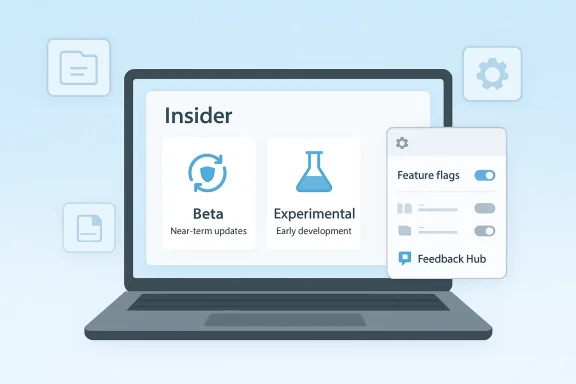
A second change is the collapse of the Insider program into two main paths: Beta and Experimental. Beta is positioned as the near-term track for imminent updates, while Experimental replaces the old Dev and Canary split as the future-facing track where Microsoft can test more aggressive ideas. This kind of simplification is less about fewer buttons in Settings and more about making the risk model legible to normal humans.
The new structure should reduce that cognitive load. If Beta means “soon,” and Experimental means “very early,” then most users can self-sort more quickly. That is especially important for non-technical enthusiasts who are curious, not reckless.
Microsoft says the new process will be slower during the update itself because it must carry over user state, but that extra time is likely a good bargain. A longer migration window is a lot easier to tolerate than a scorched-earth reset, especially for users who test on their primary machine.
A migration-first approach changes the psychology of testing. If Insider participation becomes reversible, more users may feel safe trying a preview build for a few weeks, then stepping out if the tradeoffs become annoying. That fluidity could improve feedback quality because people will spend more time in the program instead of hesitating at the door.
At present, Microsoft still uses controlled feature rollout mechanisms across Beta and Dev builds, often turning features on for a subset of users first and then broadening the distribution later. Microsoft’s January 9, 2026 Insider build notes are explicit about those two buckets of changes and the presence of the “latest updates” toggle in Settings > Windows Update. The new Beta direction appears to reduce that uncertainty, at least for features Microsoft wants to surface more quickly. (blogs.windows.com)
It also changes the relationship between Microsoft and feedback. If more users see features earlier, then bug reports can arrive sooner, which may help Microsoft spot regressions before a wider release. The danger, of course, is that visibility can be mistaken for stability. A feature appearing in Beta is not the same thing as a feature being done.
That makes documentation and communication more important than ever. Admins need to know whether a feature is merely announced, partially enabled, or broadly deployed. Without that clarity, even a simplified channel structure can still create operational confusion.
The most aggressive option inside Experimental is Future Platforms. Microsoft describes this as aimed at users who want to be at the forefront of platform development, and it also says people looking for the earliest access to features should remain on a version aligned to a retail build. That phrasing matters because it suggests Microsoft is drawing a line between platform experimentation and feature previewing.
That should help reduce the mismatch between expectations and reality. If you choose Future Platforms, you know you are opting into the least predictable branch of development. If you choose Beta, you know you want proximity to shipping code, not the frontier.
Microsoft’s April 3, 2026 Canary build notes reinforce the point that Canary-style flights can represent “the latest platform changes early in the development cycle” and may never be tied to any specific release. That is a powerful reminder that Experimental is not a product roadmap; it is a laboratory. (blogs.windows.com)
This is a sensible compromise. A preview OS needs a way to show the “interesting” things without implying that every relevant improvement will be exposed by a single switch or label. Still, there is a tension here: once Microsoft highlights visible features more prominently, users may infer that anything not shown is less important, even when the opposite is true.
But visibility can also distort expectations. The most meaningful Windows changes are often the least photogenic: speed improvements, reliability fixes, reduced crashes, and cleaner system behavior. Those are harder to market than a shiny new UI element, yet they are usually what users feel most over time.
A good Insider model has to support both truths. Microsoft seems to understand that the program can’t just be a feature parade; it has to be a quality telemetry system too.
There is also a competitive angle. Windows has to compete not just with rival desktop platforms, but with the expectations users now have from mobile operating systems and cloud services. People are accustomed to reversible choices, smooth migrations, and low-friction opt-in experimentation. A preview program that required clean installs to escape was increasingly out of step with that expectation.
It may also reduce the support burden around Insider confusion. If fewer users get stranded in the wrong channel, there are fewer forum posts, fewer escalation cases, and fewer people blaming Windows for a choice they didn’t fully understand at enrollment time. That is a real operational win.
It also makes the program friendlier to people who just want to sample new features. The average enthusiast may not care about the distinction between Canary and Dev builds, but they absolutely care about whether leaving the program means redoing their entire machine. A less destructive exit path is the kind of quality-of-life change that can turn a “maybe later” into a “why not now.”
Still, consumers should keep their expectations grounded. Preview remains preview. Bugs will happen, some features will disappear, and some changes will never ship. Microsoft’s own build notes are explicit that experiences may be removed or replaced, and that some features could appear in future releases only when they are ready. (blogs.windows.com)
But enterprises also need predictability. The more Microsoft accelerates feature visibility in Beta and separates aggressive platform work into Experimental, the more careful organizations will need to be about who is allowed into each ring. A simpler program can still produce complicated governance questions if change rates differ meaningfully between tracks.
The potential upside is that migration without a clean install may make device recovery less painful for test labs. If a build turns out to be too unstable, administrators may have a less disruptive way to move devices back to a safer state. That could save time and reduce the number of sacrificial machines needed for basic qualification.
The Insider Program simplification fits that philosophy neatly. Microsoft appears to be trimming redundant labels, reducing user confusion, and emphasizing the most visible new experiences. In practice, that means the company is trying to make Windows feel more intentional, even when the underlying development process remains messy and experimental.
That could help Copilot-era features land more cleanly too. If Microsoft wants users to understand which features are real, which are preview-only, and which are simply not for them yet, it needs a clearer framework than a maze of partially overlapping channels. The new Insider structure is a step in that direction.
The opportunity is bigger than the channels themselves. If Microsoft executes this well, it could improve adoption of preview programs, sharpen telemetry, and reduce the friction that has long made Windows testing feel more brittle than it needed to be.
There is also a danger that faster feature visibility in Beta could outpace user understanding. If features appear before users realize they are still subject to change, support confusion may increase rather than decrease. And while migration without reinstall is a welcome improvement, it could also introduce new edge cases during transfers, especially on heavily customized machines.
The deeper question is whether this becomes the beginning of a broader Windows simplification effort. Microsoft is clearly trying to reduce update disruption, sharpen feedback loops, and make the preview story more understandable. If that continues, the Insider Program may become less of a technical obstacle course and more of a genuinely useful on-ramp for product development.
Microsoft is not just simplifying the labels on a preview program. It is trying to make early access feel less like a gamble and more like a controlled choice, and that shift could end up mattering just as much as any individual feature the program surfaces next.
Source: PCMag UK Attention, Early Adopters. Microsoft Just Simplified the Windows Insider Program
 Background
The Windows Insider Program has always been a balancing act. On one side are enthusiasts and IT pros who want to see upcoming features early; on the other is Microsoft’s need to protect stability, preserve upgrade paths, and avoid promising too much before code is ready. That tension is why the program evolved into multiple channels with different levels of risk, visibility, and build cadence.For a long time, that structure was harder to explain than it needed to be. The old vocabulary of Dev, Canary, Beta, and Release Preview was useful to power users, but it also created a common problem: people joined a channel without fully understanding what it meant for their device lifecycle. If you got too far ahead, there was often no graceful way back. In practical terms, the word Insider could easily translate into you’re stuck unless you reinstall.
Microsoft has already been moving away from that model in stages. In late 2025 and early 2026, the company repeatedly used its Insider blogs to remind people that Dev and Beta sometimes shared builds, that channel-switching windows could open and close, and that Canary remained the most volatile option. The messaging was clear enough for experienced testers, but still too procedural for mainstream enthusiasts who just wanted early access without risking a full reset. (blogs.windows.com)
That is the context for the latest simplification. Microsoft’s March 20, 2026 “commitment to Windows quality” post explicitly promised “a simpler, more transparent Windows Insider Program,” and said the company was working toward clearer channel definitions, easier access to new features, and better feedback visibility. In other words, this is not an isolated tweak. It is part of a broader reset of how Microsoft wants users to experience Windows preview builds. (blogs.windows.com)
The practical significance is bigger than a branding cleanup. If Microsoft can make Insider participation less punishing, it may be able to widen the funnel of testers while reducing the number of people who bail out because the process feels risky or opaque. That could improve signal quality for Microsoft and reduce friction for users who want to help shape Windows without treating their PCs like disposable lab gear.
What Microsoft Changed
The biggest change is the promise that users will be able to switch in and out of the Windows Insider Program without reinstalling the operating system. That is a major usability shift, because the old escape hatch often involved wiping the device and starting over. Microsoft now says the transition will take longer because it has to migrate data, settings, and tools, but the tradeoff should be less painful overall.A second change is the collapse of the Insider program into two main paths: Beta and Experimental. Beta is positioned as the near-term track for imminent updates, while Experimental replaces the old Dev and Canary split as the future-facing track where Microsoft can test more aggressive ideas. This kind of simplification is less about fewer buttons in Settings and more about making the risk model legible to normal humans.
Why the channel reset matters
The old channel labels were technically informative, but the lived experience was often confusing. Dev could be fairly stable for long stretches, Canary could jump ahead unexpectedly, and build-number rules could block movement between channels even when users wanted to downshift. Microsoft itself has repeatedly warned that once a channel moves to a higher build number, switching options close until another window opens. (blogs.windows.com)The new structure should reduce that cognitive load. If Beta means “soon,” and Experimental means “very early,” then most users can self-sort more quickly. That is especially important for non-technical enthusiasts who are curious, not reckless.
- Beta is intended for imminent Windows updates.
- Experimental is for active platform development.
- Future Platforms is the earliest sub-track inside Experimental.
- Users should no longer need a clean install just to leave the program.
- Microsoft says migration will preserve data, settings, and other tools.
The End of the Clean-Install Barrier
The most consumer-friendly part of this update is the removal of the clean-install requirement when leaving or changing certain Insider tracks. That sounds small until you remember how disruptive a full reinstall can be. For many users, a clean install is not just time-consuming; it also means reconfiguring apps, reauthenticating services, and occasionally discovering that a favorite driver or utility didn’t survive the trip.Microsoft says the new process will be slower during the update itself because it must carry over user state, but that extra time is likely a good bargain. A longer migration window is a lot easier to tolerate than a scorched-earth reset, especially for users who test on their primary machine.
The real user pain point
The real issue was never that a clean install existed. In preview software, there are always situations where a reinstall is the safest path. The problem was that the reinstall was often the default exit ramp, which made experimentation feel expensive. That discourages participation, and it may have quietly filtered out the very users Microsoft would want most: curious, competent, but not eager to wipe a working PC.A migration-first approach changes the psychology of testing. If Insider participation becomes reversible, more users may feel safe trying a preview build for a few weeks, then stepping out if the tradeoffs become annoying. That fluidity could improve feedback quality because people will spend more time in the program instead of hesitating at the door.
- Fewer users will fear being trapped on a risky build.
- More testers may join from their main PCs.
- IT admins may be more willing to pilot the program on spare hardware.
- Recovery from a bad channel choice becomes less punitive.
- The update process itself may take longer, but with less downstream disruption.
Beta: Faster Access, Less Drama
Under the new model, Beta becomes the place where imminent updates land, and Microsoft is reportedly ditching gradual feature rollouts there so users can see new tools as soon as they are announced. That is a subtle but important change. It implies a more direct relationship between Microsoft’s announcement cadence and Insider visibility.At present, Microsoft still uses controlled feature rollout mechanisms across Beta and Dev builds, often turning features on for a subset of users first and then broadening the distribution later. Microsoft’s January 9, 2026 Insider build notes are explicit about those two buckets of changes and the presence of the “latest updates” toggle in Settings > Windows Update. The new Beta direction appears to reduce that uncertainty, at least for features Microsoft wants to surface more quickly. (blogs.windows.com)
What this means for testers
For testers, Beta may start to look less like a waiting room and more like a preview showroom. If Microsoft truly removes some of the gradual gating, users will get a better sense of what the company considers ready for broad inspection. That also makes Beta easier to explain to readers, friends, and colleagues who are not already deep into build-number culture.It also changes the relationship between Microsoft and feedback. If more users see features earlier, then bug reports can arrive sooner, which may help Microsoft spot regressions before a wider release. The danger, of course, is that visibility can be mistaken for stability. A feature appearing in Beta is not the same thing as a feature being done.
Enterprise implications
For enterprise testers, this could be useful and risky in equal measure. On the one hand, Beta becomes a more predictable staging ground for validating workflow changes, policy interactions, and app compatibility. On the other hand, if Microsoft reduces feature ramping, businesses may encounter a broader set of changes sooner than their internal validation schedules are ready for.That makes documentation and communication more important than ever. Admins need to know whether a feature is merely announced, partially enabled, or broadly deployed. Without that clarity, even a simplified channel structure can still create operational confusion.
- Better for rapid validation of upcoming changes.
- Better for usability testing on business applications.
- Less helpful if your organization depends on slow, staged exposure.
- Potentially more transparent for support teams.
- Still not a substitute for release engineering discipline.
Experimental and Future Platforms
The new Experimental channel replaces the old Dev and Canary combination, and that choice reflects Microsoft’s desire to separate “early” from “ready soon.” Experimental is where the company can move fast, break things, and ask Insiders to tolerate the uncertainty that comes with active development. Microsoft’s own language says features here may “change, get delayed, or not ship at all,” which is exactly the sort of caution people should expect from an early-flight track.The most aggressive option inside Experimental is Future Platforms. Microsoft describes this as aimed at users who want to be at the forefront of platform development, and it also says people looking for the earliest access to features should remain on a version aligned to a retail build. That phrasing matters because it suggests Microsoft is drawing a line between platform experimentation and feature previewing.
Why Microsoft is splitting the earliest ring
That distinction is important. Canary has often served two audiences at once: the people who wanted to test weird, deep platform shifts, and the people who simply wanted features before anyone else. Those are not always the same user. By carving out Future Platforms, Microsoft is acknowledging that some Insiders care more about the plumbing than the wallpaper.That should help reduce the mismatch between expectations and reality. If you choose Future Platforms, you know you are opting into the least predictable branch of development. If you choose Beta, you know you want proximity to shipping code, not the frontier.
Microsoft’s April 3, 2026 Canary build notes reinforce the point that Canary-style flights can represent “the latest platform changes early in the development cycle” and may never be tied to any specific release. That is a powerful reminder that Experimental is not a product roadmap; it is a laboratory. (blogs.windows.com)
What this means for power users
Power users often like Canary because it feels like the edge of the edge. But the naming has never fully captured the idea that not all early builds are equal. A separate Future Platforms path should make it easier for the most hardcore testers to get what they actually want, rather than forcing everyone into one ultra-risky lane.- Experimental is for the earliest broad development testing.
- Future Platforms is for the deepest platform-level work.
- Features may be delayed, redesigned, or abandoned.
- Stability is likely to vary more sharply than in Beta.
- The channel is meant for feedback, not convenience.
Feature Flags, Rollouts, and Transparency
Microsoft is also changing how it surfaces new features in Settings, with a stronger emphasis on visible feature flags for announced items in Windows Insider Program builds. That means users should have a clearer view of the marquee features they joined to test. But Microsoft also notes that less visible changes, such as bug fixes and system improvements, may not appear in those flags.This is a sensible compromise. A preview OS needs a way to show the “interesting” things without implying that every relevant improvement will be exposed by a single switch or label. Still, there is a tension here: once Microsoft highlights visible features more prominently, users may infer that anything not shown is less important, even when the opposite is true.
Why visibility helps and hurts
Better visibility reduces the mystery that often surrounds Insider builds. If a user can tell what feature is actually on their machine, they are more likely to give useful feedback instead of guessing whether a problem is due to a rollout, a toggle, or an unfinished code path. That helps Microsoft, and it helps the community.But visibility can also distort expectations. The most meaningful Windows changes are often the least photogenic: speed improvements, reliability fixes, reduced crashes, and cleaner system behavior. Those are harder to market than a shiny new UI element, yet they are usually what users feel most over time.
A good Insider model has to support both truths. Microsoft seems to understand that the program can’t just be a feature parade; it has to be a quality telemetry system too.
The bigger feedback loop
The March 20 quality post and the March 20 Insider-related language both point to the same strategic shift: Microsoft wants Insiders to feel more engaged, more informed, and more useful. The company says it is increasing opportunities to engage directly with the team and improving Feedback Hub to make reporting easier. That’s not just goodwill; it is an attempt to create a tighter loop between preview code and release quality. (blogs.windows.com)- Visible flags should help users track marquee features.
- Hidden fixes will still matter even if they are less obvious.
- Better feedback tooling can improve bug triage.
- Transparency may reduce support noise.
- Misleading expectations remain a risk if rollout status is not clearly explained.
Why Microsoft Is Doing This Now
The timing of this change looks deliberate. Microsoft has spent the last year and a half emphasizing Windows quality, with repeated reminders that the company wants to reduce update disruption, improve reliability, and make the Insider Program easier to understand. In that sense, simplifying Insider channels is a natural extension of a broader operating philosophy, not a random UI clean-up. (blogs.windows.com)There is also a competitive angle. Windows has to compete not just with rival desktop platforms, but with the expectations users now have from mobile operating systems and cloud services. People are accustomed to reversible choices, smooth migrations, and low-friction opt-in experimentation. A preview program that required clean installs to escape was increasingly out of step with that expectation.
The business logic
From Microsoft’s perspective, a simpler Insider funnel should improve participation and feedback density. More testers mean more telemetry, more reproducible bugs, and more early signals about regressions. That is especially valuable as Microsoft keeps threading AI features, system UX changes, and reliability improvements through the same product pipeline.It may also reduce the support burden around Insider confusion. If fewer users get stranded in the wrong channel, there are fewer forum posts, fewer escalation cases, and fewer people blaming Windows for a choice they didn’t fully understand at enrollment time. That is a real operational win.
The historical pattern
Microsoft tends to improve the Windows experience in waves: first by adding capability, then by reducing friction, and finally by trying to simplify the story. The Insider Program is now in the simplification phase. That does not mean the underlying complexity has vanished, but it does mean Microsoft is trying to hide more of it from casual participants.- Better onboarding for new testers.
- Less punishment for making the wrong channel choice.
- More coherent messaging across preview tracks.
- Stronger alignment between quality goals and preview mechanics.
- A smaller gap between marketing language and actual usability.
How This Affects Consumers
For consumers, the new system lowers the psychological barrier to trying preview builds. Many Windows fans are curious enough to join Insider but cautious enough to worry about downtime, app issues, or losing their place in the family laptop hierarchy. If switching out becomes reversible without a full reinstall, that is a meaningful win.It also makes the program friendlier to people who just want to sample new features. The average enthusiast may not care about the distinction between Canary and Dev builds, but they absolutely care about whether leaving the program means redoing their entire machine. A less destructive exit path is the kind of quality-of-life change that can turn a “maybe later” into a “why not now.”
Consumer behavior changes
This may also change how people use Insider builds. Instead of joining once and staying indefinitely, more users may treat preview access as temporary. They may hop in for a feature they want to test, then hop out again after the novelty fades. That is not necessarily a bad thing; in fact, it could create a healthier pool of testers who are engaged because they want to be, not because they feel trapped.Still, consumers should keep their expectations grounded. Preview remains preview. Bugs will happen, some features will disappear, and some changes will never ship. Microsoft’s own build notes are explicit that experiences may be removed or replaced, and that some features could appear in future releases only when they are ready. (blogs.windows.com)
- Easier trial-and-exit behavior.
- Lower risk of abandoning a trial because of reinstall anxiety.
- Better access for curious but cautious enthusiasts.
- Less fear of permanent disruption.
- More useful choice between “soon” and “very early.”
How This Affects Enterprises
For enterprises, this is more nuanced. The new structure may make it easier for IT teams to understand which machines are on which track, which is valuable for lab environments, pilot rings, and app compatibility testing. In principle, fewer channel names and a clearer risk ladder should reduce accidental enrollment mistakes.But enterprises also need predictability. The more Microsoft accelerates feature visibility in Beta and separates aggressive platform work into Experimental, the more careful organizations will need to be about who is allowed into each ring. A simpler program can still produce complicated governance questions if change rates differ meaningfully between tracks.
Deployment and testing implications
Organizations that use Insiders to validate line-of-business software may welcome the cleaner channel model, but they will still need explicit policies. A machine in Beta may be useful for UI and app compatibility checks, while a machine in Experimental may be better suited to platform engineering or driver testing. Those are different jobs, and they should not be managed as interchangeable rings.The potential upside is that migration without a clean install may make device recovery less painful for test labs. If a build turns out to be too unstable, administrators may have a less disruptive way to move devices back to a safer state. That could save time and reduce the number of sacrificial machines needed for basic qualification.
Governance still matters
At the same time, organizations should not mistake “simplified” for “low risk.” Microsoft still describes Experimental builds as active development and says features may change, delay, or never ship. That makes them inappropriate for any device that has to be dependable day in and day out. Enterprises will need to keep their traditional discipline: rings, backups, documentation, and clear owner assignment.- Beta may be suitable for controlled pilot groups.
- Experimental should remain limited to specialized testers.
- Recovery paths may improve, but policy still matters.
- Update documentation will need to reflect the new channel names.
- Training materials may need a full rewrite.
The Copilot Context
There is another layer to this story: Microsoft’s wider effort to reduce clutter while sharpening the product narrative around Windows and Copilot. Pavan Davuluri recently signaled that the company wants fewer unnecessary Copilot entry points, and that has already started showing up in apps such as Notepad and Snipping Tool. That matters because it shows Microsoft is willing to remove surface-level noise while still pushing AI-adjacent capabilities across the platform.The Insider Program simplification fits that philosophy neatly. Microsoft appears to be trimming redundant labels, reducing user confusion, and emphasizing the most visible new experiences. In practice, that means the company is trying to make Windows feel more intentional, even when the underlying development process remains messy and experimental.
Why this matters to product strategy
The best product strategies are often invisible. Users should not have to understand channel topology, rollout staging, and feature flag logic just to figure out whether a new tool is available. By simplifying the Insider story, Microsoft may be trying to lower the cognitive overhead that surrounds all of its recent Windows changes.That could help Copilot-era features land more cleanly too. If Microsoft wants users to understand which features are real, which are preview-only, and which are simply not for them yet, it needs a clearer framework than a maze of partially overlapping channels. The new Insider structure is a step in that direction.
Why the messaging matters
Microsoft’s own language around Windows quality suggests it knows this. The company says the program should be easier to understand, with clearer channel definitions and better visibility into feedback. That is not just an internal engineering preference; it is a response to how users interpret product trust. If the path to testing feels arbitrary, the feature itself can feel less reliable. (blogs.windows.com)- Fewer unlabeled entry points.
- Better alignment between preview exposure and product maturity.
- Less UX clutter around new capabilities.
- Stronger trust if the channel model is consistent.
- More room for Microsoft to explain AI features without burying them.
Strengths and Opportunities
The redesign has several obvious strengths. It makes the Insider story easier to explain, reduces the penalty for experimenting, and should lower the threshold for casual enthusiasts who want to test Windows without committing to a reinstall-heavy escape route. It also gives Microsoft a cleaner framework for separating near-term releases from deep platform work, which should improve both messaging and feedback quality.The opportunity is bigger than the channels themselves. If Microsoft executes this well, it could improve adoption of preview programs, sharpen telemetry, and reduce the friction that has long made Windows testing feel more brittle than it needed to be.
- Simpler channel names should reduce confusion.
- Reversible participation lowers the fear of testing.
- Preserved data and settings make exits less painful.
- Faster visibility in Beta may improve feedback speed.
- Experimental separation better matches risk to audience.
- Future Platforms creates a clearer lane for platform purists.
- Improved Settings visibility can make feature discovery easier.
Risks and Concerns
The main risk is that simplification could create a false sense of safety. If users hear “Beta” and assume stability, or “Experimental” and assume the worst defects are easy to avoid, they may make poor decisions about which device to enroll. Microsoft will need to keep warning language strong and consistent, because the new branding alone will not prevent misuse.There is also a danger that faster feature visibility in Beta could outpace user understanding. If features appear before users realize they are still subject to change, support confusion may increase rather than decrease. And while migration without reinstall is a welcome improvement, it could also introduce new edge cases during transfers, especially on heavily customized machines.
- Misleading expectations about stability could grow.
- Migration bugs may replace reinstall pain with new issues.
- Enterprise admins may need to retrain staff quickly.
- Feature flag confusion could obscure what is actually enabled.
- Beta acceleration might reduce the value of staging.
- Experimental builds will still be unsuitable for many users.
- Naming changes can break old documentation and community advice.
Looking Ahead
The next few weeks will tell us a lot about whether Microsoft can actually pull this off cleanly. The company says the changes are rolling out in the coming weeks, and current Insiders will be shifted to the most similar version to what they are on now. That migration detail matters, because the quality of the transition will shape whether users see the change as graceful or merely less painful than before.The deeper question is whether this becomes the beginning of a broader Windows simplification effort. Microsoft is clearly trying to reduce update disruption, sharpen feedback loops, and make the preview story more understandable. If that continues, the Insider Program may become less of a technical obstacle course and more of a genuinely useful on-ramp for product development.
What to watch
- Whether Beta truly loses gradual feature rollouts.
- Whether Experimental remains stable enough for meaningful testing.
- Whether migration out of Insider really preserves the promised user state.
- Whether Settings makes new features easier to identify without hiding important fixes.
- Whether Microsoft publishes clearer guidance for enterprise testers.
- Whether future channel names remain intuitive after the transition.
- Whether users report fewer channel-switch failures than before.
Microsoft is not just simplifying the labels on a preview program. It is trying to make early access feel less like a gamble and more like a controlled choice, and that shift could end up mattering just as much as any individual feature the program surfaces next.
Source: PCMag UK Attention, Early Adopters. Microsoft Just Simplified the Windows Insider Program
