

Microsoft’s Windows Insider Program is finally getting the kind of simplification power users have been asking for, and the timing is revealing. After years of channel sprawl, inconsistent feature availability, and awkward upgrade paths, Microsoft is restructuring Insider testing around a cleaner two-track model centered on Experimental and Beta. If the rollout works as described, it could make Windows 11 previewing feel less random, more transparent, and far more useful for both enthusiasts and IT teams. The larger story is not just about channels; it is about Microsoft trying to restore confidence in Windows 11 itself.
The Windows Insider Program has always been both a feedback machine and a public laboratory. It helped Microsoft gather telemetry, surface bugs, and validate features long before general release, but over time the program became harder to understand and harder to trust. What began as a simple ladder of release quality gradually turned into a maze of labels, build branches, and feature gates that even seasoned Windows watchers sometimes struggled to explain.
That confusion mattered because the Insider Program is not a niche side project. It is one of Microsoft’s most visible product-development pipelines, and it shapes how features land in Windows 11, how quickly bugs are discovered, and how the company frames upcoming releases to the market. When the program becomes opaque, the whole ecosystem feels the effects: users lose patience, admins lose predictability, and Microsoft loses some of the goodwill that preview programs are supposed to generate.
The biggest frustration in recent years has been the gap between installing a build and actually seeing a feature. Controlled Feature Rollouts were introduced for sensible engineering reasons, but they also created a maddening experience for Insiders who expected the preview ring to preview something. You could be on the right build, on the right channel, and still not receive the feature Microsoft had just blogged about. For an audience that is volunteering to test software, that inconsistency felt less like protection and more like a lottery.
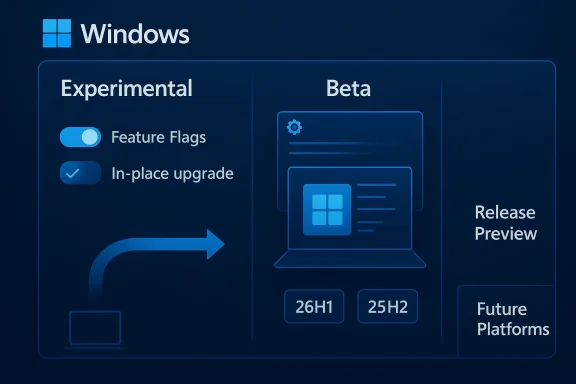
Microsoft’s reported redesign is meant to fix that. By narrowing the core channel structure, adding Feature Flags for visible experiments, and opening up in-place upgrades for channel switching, the company is trying to restore a clearer contract with Insiders. The promise is simple: know what you signed up for, see what was promised, and move between tracks without blowing away your device every time you change your mind.
Microsoft’s own documentation has repeatedly described channels as a way to balance stability, feature timing, and support expectations. Yet the practical result, especially in Windows 11’s later cycles, was a growing mismatch between label and behavior. Users could not always tell whether a build represented the next retail release or just another stop on an open-ended development branch.
The result is predictable:
At a time when Microsoft is trying to re-energize Windows 11 adoption, clarity is not a cosmetic improvement. It is a product strategy.
The trade-off is obvious. Experimental builds are for people who can tolerate breakage, regression, and the occasional disappearance of a feature without warning. That has always been true of the most aggressive Insider rings, but the new naming makes the warning stronger and the purpose clearer.
That is a much cleaner bargain. It makes Beta easier to explain to enthusiasts, and it makes it significantly more useful to commercial testers who want to validate behavior before wider deployment. It also brings the channel closer to what many people assumed it was already doing.
Microsoft’s automatic reassignment also signals confidence. A company does not usually migrate a large preview community unless it believes the new taxonomy is better than the old one. That is a meaningful admission, even if the transition itself will inevitably produce some confusion.
The problem is that the Insider audience is not the same as the retail audience. Insiders are not passive consumers; they are volunteers. When a blog post says a feature is in a build, many people expect to see it. When they do not, the program feels arbitrary, and that undermines trust.
There are still limits. Microsoft is only planning to expose user-visible features discussed in blog posts, not every background fix, platform tweak, or reliability change. That is sensible, because hidden plumbing does not lend itself to a toggle UI. But even with that limitation, the change should reduce the feeling that features are being teased and withheld at random.
It also restores a kind of honesty to the process. Beta can be the predictable preview lane, and Experimental can become the place where you intentionally say yes to the thing you want to explore. That is much easier to explain than a build that may or may not contain the feature you are seeking.
That friction discouraged people from trying different preview tracks, which in turn reduced the usefulness of the program. If the only safe way to change channels is to rebuild your PC, many users simply will not bother.
This also gives Microsoft a stronger runway for channel realignment. If a user lands in the wrong place, or the wrong channel stops making sense, they can move more freely. That should reduce churn and frustration.
That preserves the boundary Microsoft needs between ordinary previewing and the most advanced platform testing. It is a reasonable line to draw, even if it means the most adventurous users still need to accept more risk.
That matters for enterprise testers in particular. Companies do not just want “the newest thing”; they want to know whether a build is relevant to the Windows version they plan to deploy, validate, or support. Core-version targeting is therefore a practical governance tool, not just a technical flourish.
The upside is obvious: it gives Microsoft a protected environment for the earliest code. The downside is equally obvious: it pushes those users further away from the safety net that normal Insiders enjoy.
That means the new model could improve:
The lesson is not that old structures were better in every way. It is that clarity beats cleverness when you are asking users to help you test a product. A preview track should feel like a choice, not a puzzle.
That is especially important because Windows 11 has already carried plenty of public baggage around interface changes, performance perception, and update trust. A cleaner Insider story gives Microsoft a better way to demonstrate that it understands those concerns.
A better feedback loop can help Microsoft in three ways:
This is where the beta experience matters most. If Beta becomes a reliable preview of coming Windows behavior, it can function as a genuinely useful proving ground rather than a source of confusion.
The new structure should reduce that perception. It says, in effect, that Microsoft is willing to align the channel promise with the user experience. That is not just administrative housekeeping; it is reputation repair.
That matters because Windows still lives under constant scrutiny. Every confusing build policy becomes part of the larger story about whether the platform is stable enough, modern enough, and predictable enough for real-world use.
If the company gets this right, the Insider Program could become a model for how large software platforms balance experimentation with clarity. If it gets it wrong, the new names will simply replace the old confusion with a different flavor of confusion. Either way, users will quickly discover whether Experimental, Beta, and Future Platforms are genuine improvements or just new labels on an old problem.
Source: Windows Latest Microsoft is overhauling Windows Insider Program as it tries to get Windows 11 back on track
 Overview
The Windows Insider Program has always been both a feedback machine and a public laboratory. It helped Microsoft gather telemetry, surface bugs, and validate features long before general release, but over time the program became harder to understand and harder to trust. What began as a simple ladder of release quality gradually turned into a maze of labels, build branches, and feature gates that even seasoned Windows watchers sometimes struggled to explain.That confusion mattered because the Insider Program is not a niche side project. It is one of Microsoft’s most visible product-development pipelines, and it shapes how features land in Windows 11, how quickly bugs are discovered, and how the company frames upcoming releases to the market. When the program becomes opaque, the whole ecosystem feels the effects: users lose patience, admins lose predictability, and Microsoft loses some of the goodwill that preview programs are supposed to generate.
The biggest frustration in recent years has been the gap between installing a build and actually seeing a feature. Controlled Feature Rollouts were introduced for sensible engineering reasons, but they also created a maddening experience for Insiders who expected the preview ring to preview something. You could be on the right build, on the right channel, and still not receive the feature Microsoft had just blogged about. For an audience that is volunteering to test software, that inconsistency felt less like protection and more like a lottery.
Microsoft’s reported redesign is meant to fix that. By narrowing the core channel structure, adding Feature Flags for visible experiments, and opening up in-place upgrades for channel switching, the company is trying to restore a clearer contract with Insiders. The promise is simple: know what you signed up for, see what was promised, and move between tracks without blowing away your device every time you change your mind.
Why the Insider Program Had Become Hard to Explain
The old channel ladder was no longer matching the way Microsoft actually shipped Windows. In theory, Dev, Canary, Beta, and Release Preview each had distinct purposes. In practice, the overlap between them often blurred, and Microsoft kept shifting what each channel meant as Windows 11 evolved. That left Insiders guessing whether a given build was a platform test, a feature preview, or a near-final release candidate.A program that outgrew its own labels
The Windows Insider Program originally had a very readable rhythm. Fast and Slow rings gave users a basic choice between speed and stability, and Release Preview served as the obvious near-production lane. That model was not perfect, but it was easy to explain. The newer system became much more technical, but not necessarily much more useful to the average participant.Microsoft’s own documentation has repeatedly described channels as a way to balance stability, feature timing, and support expectations. Yet the practical result, especially in Windows 11’s later cycles, was a growing mismatch between label and behavior. Users could not always tell whether a build represented the next retail release or just another stop on an open-ended development branch.
Why confusion hurts participation
A preview program depends on confidence. People are more willing to install experimental software when they understand the trade-offs, but they get wary when the rules seem to change midstream. That is especially true for Windows Insiders, who may be testing on a primary PC, a work device, or a Copilot+ machine they rely on daily.The result is predictable:
- Users hesitate to join or stay in the program.
- Enthusiasts stop caring about the fine distinctions between channels.
- IT admins lose a dependable way to validate upcoming releases.
- Microsoft gets noisier feedback, but not necessarily better feedback.
The broader Windows 11 context
This overhaul also reflects Windows 11’s uneven public narrative. Microsoft has spent years trying to make the platform feel modern without alienating existing users, and the Insider Program has often been the first place that tension showed up. Features arrive half-formed, disappear from builds, or appear on some systems but not others, and that makes the platform feel less like a roadmap and more like a moving target.At a time when Microsoft is trying to re-energize Windows 11 adoption, clarity is not a cosmetic improvement. It is a product strategy.
Two Primary Channels: Experimental and Beta
The most visible change is the move toward two core channels, Experimental and Beta. That is a major simplification, and it makes intuitive sense: one track for bleeding-edge code, one for a more stable preview cadence. Microsoft has effectively acknowledged that the old channel stack was not doing enough to communicate the difference between “first look” and “nearly ready.”Experimental: the new frontier
The Experimental channel is meant to absorb the role that Dev and Canary once played. This is where Microsoft can surface unfinished work, platform shifts, and early feature experiments before they are tied to a clear retail release. For power users, it is the closest thing to watching Windows being assembled in real time.The trade-off is obvious. Experimental builds are for people who can tolerate breakage, regression, and the occasional disappearance of a feature without warning. That has always been true of the most aggressive Insider rings, but the new naming makes the warning stronger and the purpose clearer.
Beta: a more honest promise
Beta is the channel that benefits most from the overhaul. Microsoft’s new direction appears to make Beta more predictable by removing the idea that a feature can be announced yet still withheld through rollout gating from the channel itself. In plain English, if a feature is said to be in Beta and you install that Beta build, you should actually get it.That is a much cleaner bargain. It makes Beta easier to explain to enthusiasts, and it makes it significantly more useful to commercial testers who want to validate behavior before wider deployment. It also brings the channel closer to what many people assumed it was already doing.
What this means for current Insiders
The change is not merely a new coat of paint. Existing users are being reassigned automatically, with Dev moving to Experimental and Beta staying Beta, while Release Preview remains its own advanced lane. That kind of transition is important because it avoids forcing users to manually reconstruct their testing setup.Microsoft’s automatic reassignment also signals confidence. A company does not usually migrate a large preview community unless it believes the new taxonomy is better than the old one. That is a meaningful admission, even if the transition itself will inevitably produce some confusion.
- Experimental becomes the frontier for unfinished work.
- Beta becomes the steadier preview lane.
- Release Preview stays focused on near-final validation.
- Dev and Canary lose their old central identity.
- The channel contract becomes easier to describe.
Feature Flags: A Better Answer to Controlled Feature Rollouts
The most interesting engineering change may be the introduction of Feature Flags in the Experimental channel. This is Microsoft’s attempt to solve one of the Insider Program’s most irritating contradictions: you were inside the preview pipeline, but you still could not reliably see the thing you were supposed to test.Why CFR became a problem
Controlled Feature Rollouts are not a bad idea on their own. They let Microsoft test new experiences with smaller populations, watch for regressions, and expand access gradually when confidence rises. That is how modern software companies avoid shipping a rough feature to every machine at once.The problem is that the Insider audience is not the same as the retail audience. Insiders are not passive consumers; they are volunteers. When a blog post says a feature is in a build, many people expect to see it. When they do not, the program feels arbitrary, and that undermines trust.
How Feature Flags change the experience
Feature Flags are a more direct model. Instead of waiting for Microsoft to decide who gets what, testers in the Experimental channel can manually enable or disable certain visible features from a dedicated settings page. That is a meaningful shift in power, and it makes the preview process feel more interactive.There are still limits. Microsoft is only planning to expose user-visible features discussed in blog posts, not every background fix, platform tweak, or reliability change. That is sensible, because hidden plumbing does not lend itself to a toggle UI. But even with that limitation, the change should reduce the feeling that features are being teased and withheld at random.
Why the change matters strategically
Feature Flags do more than improve usability. They improve feedback quality. If testers can choose to opt into a visible feature, Microsoft can get more targeted signal about how that feature behaves in real-world conditions. That creates a more deliberate testing loop, which is exactly what an Insider Program should do.It also restores a kind of honesty to the process. Beta can be the predictable preview lane, and Experimental can become the place where you intentionally say yes to the thing you want to explore. That is much easier to explain than a build that may or may not contain the feature you are seeking.
- Visible features become more discoverable.
- Testers spend less time guessing what is enabled.
- Feedback becomes more specific and useful.
- Microsoft reduces complaints about missing features.
- The program becomes more self-service and less opaque.
A note on scope
This is not full user control over Windows feature delivery. It is still Microsoft deciding which feature candidates are present and which are exposed. But the change is important because it narrows the gap between “I installed the build” and “I can actually test the feature.”In-Place Upgrades Make Channel Switching Less Punishing
One of the most practical changes is support for in-place upgrades when switching Insider channels or leaving the program. That may sound mundane compared with channel renaming or Feature Flags, but it is probably the change most users will feel immediately. For years, clean installs were a major barrier to experimentation, especially for people who wanted to move between Insider tracks without starting from scratch.The old pain point
Switching channels in Windows Insider has often been a commitment, not a reversible choice. If you wanted to move from one branch to another, or leave the program entirely, you could end up needing a wipe and reinstall. That is a huge ask for anyone with apps, settings, and local data to preserve.That friction discouraged people from trying different preview tracks, which in turn reduced the usefulness of the program. If the only safe way to change channels is to rebuild your PC, many users simply will not bother.
What the new IPU path solves
With IPU, Microsoft is trying to preserve the device state while moving across compatible builds. If you stay within the same Windows core version, you can switch among Experimental, Beta, and Release Preview without losing your files, settings, or installed apps. That is the kind of improvement that makes the program feel much less like a hobbyist trap.This also gives Microsoft a stronger runway for channel realignment. If a user lands in the wrong place, or the wrong channel stops making sense, they can move more freely. That should reduce churn and frustration.
The exception that still matters
The caveat is important: Future Platforms builds remain special. If you choose that earliest Experimental track, you are effectively stepping outside the normal compatibility path. Moving away from those builds still requires a clean install, because they are not meant to map cleanly to retail versions.That preserves the boundary Microsoft needs between ordinary previewing and the most advanced platform testing. It is a reasonable line to draw, even if it means the most adventurous users still need to accept more risk.
Why this helps Windows credibility
This change is not just about convenience. It is about lowering the emotional cost of participation. When experimentation is reversible, people are more likely to try it. That matters if Microsoft wants a healthier Insider community with less inertia and more informed switching.- Less time spent rebuilding devices.
- More willingness to test different branches.
- Lower friction for leaving the program.
- Better retention among power users.
- Easier recovery from a wrong channel choice.
The New Core Version Model
Another major shift is the ability to choose specific Windows core versions through Advanced options. That gives the Insider Program a more structured technical identity, especially for people who care about matching builds to hardware generations or platform branches. In practical terms, it makes the program more explicit about what kind of code you are actually running.Why core versions matter
A Windows build number is not just a label. It indicates where that build sits in the lifecycle of the operating system, what branch it belongs to, and how it relates to eventual retail releases. When Microsoft ties Insider options to core versions such as 25H2 or 26H1, it gives users a better sense of release alignment.That matters for enterprise testers in particular. Companies do not just want “the newest thing”; they want to know whether a build is relevant to the Windows version they plan to deploy, validate, or support. Core-version targeting is therefore a practical governance tool, not just a technical flourish.
Future Platforms as a separate lane
The new Future Platforms option is the most speculative part of the design. It represents the earliest stage of Windows testing, before a build is meaningfully tied to a retail release. That makes it ideal for platform-level changes, silicon support work, and experiments that are not yet ready to be framed as a consumer release.The upside is obvious: it gives Microsoft a protected environment for the earliest code. The downside is equally obvious: it pushes those users further away from the safety net that normal Insiders enjoy.
Consumer versus enterprise implications
For consumers, core versions may mostly be a background detail. Most people want features and stability, not branch taxonomy. But for enterprises, the value is more concrete. A company validating new security settings, device policies, or app compatibility can do that more intelligently when builds are aligned to a known release path.That means the new model could improve:
- release planning,
- driver validation,
- application testing,
- rollout timing,
- and support forecasting.
Why Microsoft Is Moving Back Toward Simplicity
There is a bigger philosophical story here. Microsoft appears to be moving Windows Insider back toward a model that is more legible to humans and less optimized for internal branch logic. That is a good sign, because a program that serves outsiders has to make sense from the outside.The Windows 10 lesson
The Windows 10-era Insider structure, while imperfect, was easier to explain. Fast, Slow, and Release Preview each had a straightforward meaning, and most users could understand the trade-off without reading a white paper. Microsoft seems to be rediscovering the value of that simplicity.The lesson is not that old structures were better in every way. It is that clarity beats cleverness when you are asking users to help you test a product. A preview track should feel like a choice, not a puzzle.
Reducing surprise is good product design
Surprise can be delightful in consumer software, but it is corrosive in a testing program. If users do not know what to expect, they become less useful as testers and less forgiving as adopters. Microsoft’s changes suggest an effort to make the Insider experience more deterministic.That is especially important because Windows 11 has already carried plenty of public baggage around interface changes, performance perception, and update trust. A cleaner Insider story gives Microsoft a better way to demonstrate that it understands those concerns.
The feedback loop gets stronger
Microsoft is also leaning harder into direct engagement: meetups, social feedback, and one-on-one conversations are being emphasized alongside the settings changes. That matters because preview software is only as good as the feedback around it. If the company wants higher-quality signal, it needs a community that feels heard.A better feedback loop can help Microsoft in three ways:
- It catches regressions earlier.
- It helps validate feature demand.
- It builds goodwill among power users.
What This Means for Windows 11’s Reputation
The Insider overhaul is about more than software plumbing. It is also about message control, and Microsoft badly needs that. Windows 11 has made progress, but it still suffers from perceptions that it is fragmented, inconsistent, or overly dependent on staged feature gates that make updates feel incomplete.Better predictability can improve trust
Trust in operating system updates is built slowly and lost quickly. When users know a build will actually contain the announced feature, or that a channel has a consistent purpose, they are more likely to stay engaged. That benefits Microsoft not just during preview testing but in the transition to retail adoption.This is where the beta experience matters most. If Beta becomes a reliable preview of coming Windows behavior, it can function as a genuinely useful proving ground rather than a source of confusion.
Why feature inconsistency was a branding problem
Microsoft has spent years talking about Windows as a platform that evolves continuously. That narrative works only if the evolution feels coherent. When features appear for one Insider and not another, the company risks making Windows look arbitrary rather than intentional.The new structure should reduce that perception. It says, in effect, that Microsoft is willing to align the channel promise with the user experience. That is not just administrative housekeeping; it is reputation repair.
The market angle
There is also a competitive dimension. Apple’s macOS beta program and Linux distro testing communities each have their own trade-offs, but Windows is unusual in how many everyday users and enterprises it has to serve at once. A better Insider Program helps Microsoft protect its position by making experimentation less disruptive.That matters because Windows still lives under constant scrutiny. Every confusing build policy becomes part of the larger story about whether the platform is stable enough, modern enough, and predictable enough for real-world use.
Strengths and Opportunities
Microsoft’s redesign has genuine upside because it tackles problems that users have been complaining about for years. If the company executes well, the Insider Program could become more transparent, more actionable, and far less frustrating. The opportunity is not just to reduce complaints, but to create a healthier preview ecosystem that feeds better decisions back into Windows 11.- Clearer channel definitions should make it easier for users to choose the right track.
- Feature Flags can reduce the “installed it but don’t see it” problem.
- In-place upgrades lower the cost of changing channels or leaving the program.
- Core version targeting helps enterprise testers align previews with deployment plans.
- Future Platforms gives Microsoft a place for the earliest platform work.
- Better settings UX should reduce setup friction and reboot pain.
- Stronger community engagement can improve the quality of feedback.
- Beta predictability may restore trust among power users and admins.
Risks and Concerns
Even promising redesigns can stumble if the implementation is inconsistent or if the migration confuses users more than it helps them. Microsoft is changing not just labels but expectations, and that is always risky in a community that watches every build number closely. The biggest concern is whether the company can keep the new structure coherent once real-world edge cases start piling up.- Channel reassignment confusion may frustrate users who do not follow Insider blogs closely.
- Future Platforms isolation could create a permanent high-risk corner of the program.
- Feature Flags scope limits may still leave some users feeling left out.
- Mixed messaging could happen if blog posts, settings, and actual behavior diverge.
- Enterprise admin complexity may increase if channels and core versions become too granular.
- Rollback and recovery edge cases could expose bugs in the new IPU paths.
- Overpromising Beta stability might backfire if feature availability is still uneven.
Looking Ahead
The most important question is whether Microsoft will stay disciplined after the initial rollout. A cleaner structure is only useful if it remains understandable six months from now, and if the company resists the temptation to layer on fresh exceptions every time a new branch appears. The redesign suggests that Microsoft has learned something from the Insider Program’s recent drift, but the real test will be how it behaves under pressure.If the company gets this right, the Insider Program could become a model for how large software platforms balance experimentation with clarity. If it gets it wrong, the new names will simply replace the old confusion with a different flavor of confusion. Either way, users will quickly discover whether Experimental, Beta, and Future Platforms are genuine improvements or just new labels on an old problem.
- Watch how quickly existing Insiders are migrated.
- Watch whether Beta truly stops hiding announced features.
- Watch whether Feature Flags expand beyond visible UI changes.
- Watch whether IPU switching works reliably across real devices.
- Watch how Microsoft documents the new channel definitions over time.
Source: Windows Latest Microsoft is overhauling Windows Insider Program as it tries to get Windows 11 back on track
