

Microsoft’s Windows 11 quality reset has already reached the spreadsheet phase, which is usually where corporate promises go either to become policy or to die quietly. Windows Central’s new “Windows K2” tracker is useful not because it reveals a secret plan, but because it turns Microsoft’s recent burst of contrition into a public checklist. After years of complaints about forced-feeling updates, an inflexible taskbar, noisy AI placements, flaky Explorer performance, and a general sense that Windows 11 was designed around Microsoft’s priorities before the user’s, the company is now saying the right things. The question is whether Windows K2 becomes a genuine course correction — or just another charm offensive with better typography.
For most of Windows 11’s life, Microsoft treated criticism of the operating system as a collection of separate bugs. A missing taskbar option here. A slow File Explorer window there. A confusing update prompt, a Copilot button nobody asked for, a widget feed that felt less like a utility and more like a syndicated content pipeline. Each complaint could be answered in isolation, but together they formed a much more damaging story: Windows had started to feel less owned by the person sitting in front of the PC.
That is why the Windows K2 effort matters. According to Windows Central, K2 is Microsoft’s internal umbrella project aimed at fixing Windows 11’s biggest problems across three pillars: performance, reliability, and craft. Those are revealing words. Microsoft is not merely promising more features; it is implicitly conceding that the platform’s fundamentals and finish have fallen short.
The company’s own “commitment to Windows quality” messaging follows the same structure. Pavan Davuluri and the Windows Insider team framed the work as a direct response to community feedback, with early changes previewing through the Insider program in March and April 2026. The list is broad: taskbar repositioning, fewer unnecessary Copilot entry points, less disruptive updates, faster File Explorer, quieter widgets, a clearer Insider program, and a redesigned Feedback Hub.
That breadth is both encouraging and damning. Encouraging, because Microsoft appears to understand that Windows 11’s trust problem is systemic. Damning, because many of these items are not moonshots. They are, in a blunt sense, the sort of operating-system manners users expected years ago.
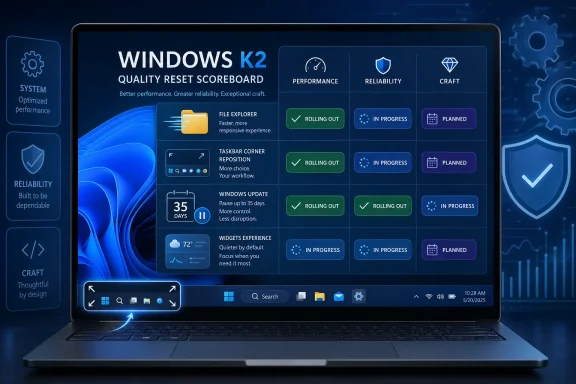
The current picture is mixed. Some commitments are already rolling out, particularly around Windows Update control, the Insider program, and Feedback Hub. Others remain in progress or have only partial evidence, such as File Explorer performance work, taskbar customization, quieter widgets, and the broader migration of core Windows experiences toward WinUI 3.
That distinction matters because Microsoft’s recent language is expansive. “Performance, reliability, and craft” can cover almost anything. A public table forces those abstractions into concrete questions: Can users move the taskbar to the top, left, or right? Can they choose a smaller taskbar? Can they restart without installing updates? Has File Explorer actually become faster, or is that still a promise in a blog post?
The uncomfortable truth is that Windows users have heard quality pledges before. Windows 10 was supposed to be the last Windows, until it was not. Windows 11 was supposed to modernize the platform, but it also removed long-standing affordances that power users had built muscle memory around. The tracker’s significance lies in its refusal to grade Microsoft on vibes alone.
That last detail is bigger than it sounds. The Windows power menu has long been a small theater of coercion. A user who wants to shut down a laptop before catching a train should not have to negotiate with the servicing stack. A machine that says “Shut down” should shut down; if it says “Update and shut down,” that should be a separate and explicit choice.
Microsoft’s newer model separates those actions more clearly. Update-specific commands remain available, but normal power commands no longer disappear behind pending patches. In theory, that restores an important principle: the operating system can recommend maintenance, but it should not surprise the user at the moment of exit.
The pause model is similarly symbolic. Microsoft is not simply adding more days to an existing timer; it is allowing users to re-pause repeatedly, up to 35 days at a time. That does not mean updates cease to matter. It does mean Windows is acknowledging that the user may have a legitimate reason to defer them: travel, exams, field work, production deadlines, fragile peripherals, or a machine that cannot risk a reboot before a presentation.
There are caveats. The setup-skip option does not apply to commercial devices where the out-of-box experience is managed, and Microsoft still has to balance flexibility with security. But the posture has changed. For years, Windows Update felt like a compliance mechanism with a friendly coat of paint. K2’s first visible win is that it begins treating update timing as a user experience problem, not merely an engineering logistics problem.
If Microsoft can make the typical Windows 11 PC require one predictable restart per month, it will have done more for user goodwill than a dozen minor UI refreshes. Reboots are where abstract reliability becomes concrete. They interrupt meetings, break remote sessions, kill unsaved work, spook nontechnical users, and turn routine maintenance into a productivity tax.
The challenge is that Windows is not a vertically integrated appliance. It runs across countless combinations of silicon, firmware, drivers, accessories, enterprise agents, VPN clients, printers, docks, capture devices, and security products. Coordinating updates across that ecosystem is much harder than coordinating updates on a phone or a Mac.
That is why the K2 promise must be judged over time, not by one Insider build. The question is not whether Microsoft can stage a cleaner Windows Update page. The question is whether ordinary users and managed fleets experience fewer surprise restarts, fewer failed installations, fewer rollback loops, and fewer “please wait while we get things ready” moments at exactly the wrong time.
If Microsoft pulls that off, it will deserve credit. If it cannot, the nicer controls will be remembered as cosmetic reforms layered over the same old servicing anxiety.
K2 now promises to reverse that. Microsoft says taskbar repositioning is coming, including top, left, and right placements. Windows Central’s tracker marks this as expected in preview imminently, while smaller taskbar and broader personalization options are expected later.
This is the kind of feature that will sound trivial to anyone who never used it and essential to anyone who did. Vertical taskbars are useful on widescreen monitors. Top-aligned taskbars fit certain muscle memories and multi-monitor setups. Smaller taskbars matter on compact laptops and handheld PCs. Power users do not merely customize for aesthetics; they customize because their layout is part of how they work.
The deeper lesson is that subtraction is not automatically modernization. Microsoft’s desire to simplify Windows 11 was understandable. Windows carries decades of legacy affordances, some of them inconsistent, some of them ugly, some of them barely maintained. But removing options without credible replacements made Windows feel less capable.
Restoring taskbar flexibility will not, by itself, fix Windows 11. But it will send a signal that Microsoft has remembered something important: Windows became dominant partly because it was adaptable. The more Windows behaves like a locked-down product funnel, the less it feels like Windows.
Microsoft’s commitments here are broad but still mostly unfinished. The company has promised faster launch, reduced flicker, smoother navigation, lower latency for search and context menus, and more reliable file operations. Windows Central’s tracker notes that faster launch times are already being tested, but the larger File Explorer fundamentals work remains in progress.
This is where K2’s language about “performance” and “craft” must become tactile. Users do not experience performance as a benchmark chart. They experience it as whether a right-click menu appears instantly, whether a folder with many files opens without a pause, whether search produces results before frustration sets in, and whether copying a large directory feels trustworthy.
File Explorer is also a test of Microsoft’s framework strategy. Windows 11 has often felt caught between old Win32 components, newer XAML surfaces, web-powered experiences, and half-modernized system apps. The result can be a UI that looks cohesive in screenshots but behaves unevenly in hand.
K2’s promised WinUI 3 migration is therefore not just an architectural footnote. If moving core experiences to newer UI infrastructure reduces latency and overhead, users will feel it. If it merely changes the plumbing while leaving the same pauses and inconsistencies, the migration will look like engineering theater.
This is an important correction. The backlash to AI in Windows has rarely been a simple rejection of machine learning features. It has been a rejection of ambient insistence — the sense that every surface must become an upsell, every text box a prompt, every app a Copilot distribution channel.
The distinction matters. AI can be useful in Windows when it solves a real local problem: summarizing copied text, improving dictation, helping find a setting, extracting text from images, organizing files, or automating repetitive actions with clear consent. But when AI appears as an unexplained button in a utility app, it reads less like assistance and more like corporate graffiti.
K2’s AI promise is modest but meaningful: fewer entry points, better placement, more craft. That is the right direction. The risk is that Microsoft’s business incentives still point the other way. Copilot is central to the company’s product strategy, and Windows remains one of the most valuable surfaces for putting it in front of hundreds of millions of users.
So the test is not whether Microsoft removes one button from one app. The test is whether Windows can integrate AI without turning the shell into a billboard. If K2 is serious about craft, restraint must count as a feature.
The old Feedback Hub often felt like a place where complaints went to be indexed rather than resolved. Users could upvote issues, attach diagnostics, and hope a pattern emerged. But the experience rarely gave a satisfying sense of momentum or accountability.
A better Feedback Hub does not guarantee better Windows, but it can improve the signal chain. If Microsoft wants Insider builds to become higher quality, it needs clearer bug reports, better duplicate detection, more transparent issue tracking, and stronger loops between user pain and engineering priority.
This is also where community rebuilding becomes more than marketing. Windows enthusiasts can be some of Microsoft’s harshest critics precisely because they care about the platform. If those users believe Feedback Hub is performative, they will route their frustration through Reddit, YouTube, X, forums, and competitors’ comment sections instead. If they believe feedback changes builds, the Insider program becomes a real collaboration again.
The K2 tracker marks the Feedback Hub redesign as rolling out now. That is a start. But the real measure will be whether Microsoft becomes more explicit about which complaints are accepted, which are rejected, and which are fixed. A nicer submission form is welcome. A visible accountability loop would be better.
The Insider Program is where Windows’ future gets normalized. If the program is confusing, noisy, or inconsistent, Microsoft receives worse feedback and users develop worse expectations. If channel boundaries blur, people install builds that are too risky for their tolerance. If features appear through opaque controlled rollouts, even experienced testers can struggle to know what they are supposed to be evaluating.
K2’s quality agenda depends on this machinery working. Microsoft wants to preview changes throughout the year, gather feedback, and refine Windows before broad release. That only works if Insiders understand what channel they are in, what quality level they should expect, and why a feature is or is not available to them.
There is a trust issue here too. Controlled feature rollouts can be useful for telemetry, but they also make the operating system feel capricious. Two users on the same build may see different features, leading to forum confusion and registry spelunking. If Microsoft wants Insiders to act as a serious test community, it has to reduce the sense that participation is a lottery.
The tracker marks Insider Program improvements as rolling out now. That should be treated as foundational. A better Windows requires better pre-release Windows, and better pre-release Windows requires a program that rewards careful testing rather than build-chasing.
K2 promises quieter defaults, more control, and better personalization. The tracker says no preview has arrived yet. That delay is telling because widgets are not merely a UI problem; they are a business-model problem.
A truly calm widget experience would prioritize user-selected information and minimize engagement bait. It would make opt-out simple, reduce notifications, and avoid treating the desktop as a portal page. But Microsoft has incentives to drive feed usage, content discovery, and account-linked personalization. Those incentives can conflict with the “quiet, controlled, crafted” Windows K2 message.
This is why widgets are a good test of corporate discipline. It is relatively easy to promise fewer crashes and faster menus because everyone inside Microsoft can agree those are good. It is harder to make a surface less noisy if that surface is also a distribution channel.
The best version of Windows widgets would feel like an extension of the user’s chosen workflow. The worst version feels like MSN escaped into the operating system. K2 says Microsoft understands the difference. Users will know quickly which side wins.
Windows 11 has suffered from a sense of split personality. Some areas are modern and animated. Others are legacy and dense. Some menus are instant. Others arrive with a tiny but perceptible delay. Some settings have migrated into the modern Settings app. Others still throw users into older control panels or dialogs.
No one expects Microsoft to rewrite Windows overnight. The platform’s compatibility burden is enormous, and much of its value lies in the fact that old software still runs. But the shell and inbox experiences need a consistent performance contract. A modern surface that looks beautiful but responds slowly is worse than an old surface that responds instantly.
WinUI 3 can help if it becomes a means to that end. It must reduce overhead, improve responsiveness, and make core experiences like Start, taskbar-related surfaces, Settings, and Explorer-adjacent interfaces feel coherent. It cannot become another layer of abstraction that serves Microsoft’s developer story more than the user’s lived experience.
The phrase “craft” is doing a lot of work in K2. This is where Microsoft proves it understands craft as behavior, not decoration. The animation matters. The icon matters. But the first rule of craft is that the thing should respond when touched.
Many complaints about Windows 11 are really comparisons with Windows 10, Windows 7, or even earlier eras when the system felt more predictable to certain users. That nostalgia can be selective. Older Windows versions had plenty of rough edges, driver nightmares, security flaws, and update pain. But users remember agency. They remember the ability to move things, disable things, avoid things, and make the PC feel like theirs.
Modern Windows is pulled between two identities. It is still the world’s great general-purpose desktop OS, expected to run ancient line-of-business apps, boutique peripherals, Steam libraries, CAD packages, DAWs, IDEs, virtual machines, and enterprise security stacks. But it is also a Microsoft services endpoint, tied to accounts, subscriptions, cloud storage, AI assistants, app recommendations, and content feeds.
K2 is, at its heart, an attempt to rebalance those identities. The company does not have to abandon cloud services or AI to make Windows better. It does have to stop letting those ambitions override the basic dignity of the PC.
The tracker makes that tension visible. Some promises are about giving back control: taskbar positions, update pauses, shutdown choices, widget settings. Others are about making Windows feel less heavy: faster Explorer, lower memory footprint, reduced latency. Still others are about rebuilding feedback loops. Together, they point toward a Windows that behaves less like a campaign and more like a tool.
That ambiguity may be understandable inside a complex engineering organization, but it is risky in public. Without dates, Microsoft gets flexibility; users get uncertainty. A promise without a window is harder to break, but also harder to trust.
The taskbar work is a good example. Repositioning is reportedly expected in preview soon. Smaller taskbar support is expected this year. But users have already waited through the entire Windows 11 era for functionality that existed before. At some point, patience stops being goodwill and becomes evidence of lowered expectations.
The same applies to File Explorer fundamentals, widgets, WinUI 3 migration, and performance improvements. These are not binary switches. Microsoft can ship partial improvements forever while still leaving users with the same broad frustration. That is why the tracker format is so important: it can distinguish “announced” from “previewing,” “partially delivered” from “done,” and “done in a lab” from “felt by users.”
If Microsoft is serious, it should embrace that discipline. Publish clearer milestones. Explain what shipped. Admit what slipped. Separate consumer and commercial timelines. Give admins policy details early. Treat Windows users like stakeholders, not a telemetry population.
That would be a mistake. K2 should not become a brand for routine maintenance. It should be a change in operating-system philosophy.
The difference is subtle but important. Maintenance asks, “What bugs can we fix?” Philosophy asks, “Why did we ship an experience that made users feel ignored?” Maintenance improves the update page. Philosophy asks why shutdown ever became ambiguous. Maintenance removes an AI button. Philosophy asks who benefits when every app becomes an AI surface. Maintenance speeds up Explorer. Philosophy asks why the shell became slow enough to require a campaign.
Windows does not need to become minimalist. It does not need to mimic macOS. It certainly does not need to chase Linux as an ideology. It needs to remember that its greatest strength has always been the negotiated complexity of the PC: messy, flexible, compatible, personal, and powerful.
K2’s best promises point in that direction. More control. Less disruption. Better fundamentals. Fewer noisy surfaces. Clearer feedback. More customization. The danger is that Microsoft treats these as a set of deliverables rather than a product ethic.
A pause button for consumers is not the same thing as predictable fleet governance. IT departments need rings, deadlines, deferral policies, rollback paths, reporting, compliance visibility, driver controls, and confidence that user-facing changes will not undermine organizational baselines. If K2 improves the consumer experience while leaving admins to discover edge cases through tickets, it will fall short.
The update coordination promise could be genuinely valuable in enterprise environments. Fewer reboots and clearer timing reduce help desk noise. Better driver titles help admins and users understand what is pending. Improved recovery from update failures could reduce manual remediation. But enterprises will need documentation and controls, not just nicer defaults.
The same applies to widgets and Copilot. A quieter consumer default is welcome, but managed environments need enforceable policies. If Microsoft reduces some AI entry points while adding others elsewhere, admins will want a coherent map of what can be disabled, configured, audited, or hidden.
Windows succeeds in business because it is governable. K2 should strengthen that reputation. The company’s consumer trust problem and enterprise trust problem overlap, but they are not identical. One is about agency; the other is about predictability at scale.
But hope is not trust. Trust is accumulated through delivery. Every time Microsoft ships a promised change without a catch, trust increases. Every time a feature arrives half-finished, region-locked, A/B-tested into confusion, or offset by a new annoyance elsewhere, trust erodes.
Windows enthusiasts are especially sensitive to this because they have watched the platform’s center of gravity shift. They remember when Windows announcements were about power features, developer capabilities, gaming improvements, hardware support, and customization. Too often lately, the story has been ads, defaults, account nudges, AI placement, and settings that revert or relocate.
That does not mean the community is impossible to please. Quite the opposite. The K2 tracker shows how concrete many of the asks are. Let the taskbar move. Make Explorer faster. Stop surprising users at shutdown. Reduce widget noise. Put AI where it helps and nowhere else. Make Feedback Hub matter. Improve reliability. These are not unreasonable demands.
Microsoft has the engineering talent to deliver them. The open question is whether it has the institutional patience to prioritize them after the headlines fade.
That is healthy. Windows is too important to be evaluated only through launch events and keynote demos. It is the daily work surface for an enormous share of the world’s PCs, and its failures are often mundane rather than spectacular. A slow context menu, an unwanted reboot, a noisy panel, a missing taskbar option — each one seems small until it becomes part of the background radiation of using the machine.
K2 is Microsoft’s opportunity to lower that radiation. The company has already made a meaningful start with update control, Feedback Hub, and Insider Program changes. It has acknowledged the right categories of pain. It has publicly committed to restoring some agency and improving fundamentals.
Now comes the harder phase: shipping the unglamorous fixes, resisting the temptation to re-clutter Windows with strategic initiatives, and accepting that user trust is rebuilt one predictable interaction at a time. If Microsoft follows through, K2 could become the moment Windows 11 stopped arguing with its users and started working for them again; if it does not, the tracker will become something just as useful — a public record of promises Windows users were right to remember.
Source: Windows Central Windows K2 tracker: Keeping tabs on Microsoft's promises to fix Windows 11
 Microsoft Has Finally Admitted the Vibe Is the Product
For most of Windows 11’s life, Microsoft treated criticism of the operating system as a collection of separate bugs. A missing taskbar option here. A slow File Explorer window there. A confusing update prompt, a Copilot button nobody asked for, a widget feed that felt less like a utility and more like a syndicated content pipeline. Each complaint could be answered in isolation, but together they formed a much more damaging story: Windows had started to feel less owned by the person sitting in front of the PC.That is why the Windows K2 effort matters. According to Windows Central, K2 is Microsoft’s internal umbrella project aimed at fixing Windows 11’s biggest problems across three pillars: performance, reliability, and craft. Those are revealing words. Microsoft is not merely promising more features; it is implicitly conceding that the platform’s fundamentals and finish have fallen short.
The company’s own “commitment to Windows quality” messaging follows the same structure. Pavan Davuluri and the Windows Insider team framed the work as a direct response to community feedback, with early changes previewing through the Insider program in March and April 2026. The list is broad: taskbar repositioning, fewer unnecessary Copilot entry points, less disruptive updates, faster File Explorer, quieter widgets, a clearer Insider program, and a redesigned Feedback Hub.
That breadth is both encouraging and damning. Encouraging, because Microsoft appears to understand that Windows 11’s trust problem is systemic. Damning, because many of these items are not moonshots. They are, in a blunt sense, the sort of operating-system manners users expected years ago.
The Tracker Turns Good Intentions Into an Accountability Machine
Windows Central’s tracker is valuable because it resists the fog that usually surrounds platform promises. Microsoft announces a quality initiative, Insiders see scattered changes across builds, journalists write a few hopeful stories, and then six months later everyone vaguely remembers that something was supposed to improve. A tracker changes the dynamic by making each commitment visible.The current picture is mixed. Some commitments are already rolling out, particularly around Windows Update control, the Insider program, and Feedback Hub. Others remain in progress or have only partial evidence, such as File Explorer performance work, taskbar customization, quieter widgets, and the broader migration of core Windows experiences toward WinUI 3.
That distinction matters because Microsoft’s recent language is expansive. “Performance, reliability, and craft” can cover almost anything. A public table forces those abstractions into concrete questions: Can users move the taskbar to the top, left, or right? Can they choose a smaller taskbar? Can they restart without installing updates? Has File Explorer actually become faster, or is that still a promise in a blog post?
The uncomfortable truth is that Windows users have heard quality pledges before. Windows 10 was supposed to be the last Windows, until it was not. Windows 11 was supposed to modernize the platform, but it also removed long-standing affordances that power users had built muscle memory around. The tracker’s significance lies in its refusal to grade Microsoft on vibes alone.
The Update Changes Are the First Real Test of Trust
The strongest early evidence that K2 is more than internal branding comes from Windows Update. Microsoft has begun rolling out changes that give users more control over when updates happen, especially during setup and shutdown. Users can skip updates during the out-of-box experience, pause updates in repeatable 35-day blocks, and choose standard Restart or Shut down actions even when updates are pending.That last detail is bigger than it sounds. The Windows power menu has long been a small theater of coercion. A user who wants to shut down a laptop before catching a train should not have to negotiate with the servicing stack. A machine that says “Shut down” should shut down; if it says “Update and shut down,” that should be a separate and explicit choice.
Microsoft’s newer model separates those actions more clearly. Update-specific commands remain available, but normal power commands no longer disappear behind pending patches. In theory, that restores an important principle: the operating system can recommend maintenance, but it should not surprise the user at the moment of exit.
The pause model is similarly symbolic. Microsoft is not simply adding more days to an existing timer; it is allowing users to re-pause repeatedly, up to 35 days at a time. That does not mean updates cease to matter. It does mean Windows is acknowledging that the user may have a legitimate reason to defer them: travel, exams, field work, production deadlines, fragile peripherals, or a machine that cannot risk a reboot before a presentation.
There are caveats. The setup-skip option does not apply to commercial devices where the out-of-box experience is managed, and Microsoft still has to balance flexibility with security. But the posture has changed. For years, Windows Update felt like a compliance mechanism with a friendly coat of paint. K2’s first visible win is that it begins treating update timing as a user experience problem, not merely an engineering logistics problem.
A Single Monthly Reboot Is the Promise IT Will Actually Measure
For enthusiasts, the headline is indefinite pausing. For IT pros, the more interesting claim is Microsoft’s push to reduce disruption by coordinating driver, .NET, firmware, and quality updates around a single monthly restart. That is the kind of promise administrators can measure with a calendar and a help desk ticket queue.If Microsoft can make the typical Windows 11 PC require one predictable restart per month, it will have done more for user goodwill than a dozen minor UI refreshes. Reboots are where abstract reliability becomes concrete. They interrupt meetings, break remote sessions, kill unsaved work, spook nontechnical users, and turn routine maintenance into a productivity tax.
The challenge is that Windows is not a vertically integrated appliance. It runs across countless combinations of silicon, firmware, drivers, accessories, enterprise agents, VPN clients, printers, docks, capture devices, and security products. Coordinating updates across that ecosystem is much harder than coordinating updates on a phone or a Mac.
That is why the K2 promise must be judged over time, not by one Insider build. The question is not whether Microsoft can stage a cleaner Windows Update page. The question is whether ordinary users and managed fleets experience fewer surprise restarts, fewer failed installations, fewer rollback loops, and fewer “please wait while we get things ready” moments at exactly the wrong time.
If Microsoft pulls that off, it will deserve credit. If it cannot, the nicer controls will be remembered as cosmetic reforms layered over the same old servicing anxiety.
The Taskbar Is Where Windows 11 Picked a Fight It Did Not Need
The taskbar has become the emblem of Windows 11’s self-inflicted wounds. When Windows 11 launched, Microsoft shipped a cleaner-looking shell that also removed flexibility Windows users had taken for granted. The inability to move the taskbar to the top or sides was not just a missing preference; it was a signal that Microsoft had narrowed the definition of a valid workflow.K2 now promises to reverse that. Microsoft says taskbar repositioning is coming, including top, left, and right placements. Windows Central’s tracker marks this as expected in preview imminently, while smaller taskbar and broader personalization options are expected later.
This is the kind of feature that will sound trivial to anyone who never used it and essential to anyone who did. Vertical taskbars are useful on widescreen monitors. Top-aligned taskbars fit certain muscle memories and multi-monitor setups. Smaller taskbars matter on compact laptops and handheld PCs. Power users do not merely customize for aesthetics; they customize because their layout is part of how they work.
The deeper lesson is that subtraction is not automatically modernization. Microsoft’s desire to simplify Windows 11 was understandable. Windows carries decades of legacy affordances, some of them inconsistent, some of them ugly, some of them barely maintained. But removing options without credible replacements made Windows feel less capable.
Restoring taskbar flexibility will not, by itself, fix Windows 11. But it will send a signal that Microsoft has remembered something important: Windows became dominant partly because it was adaptable. The more Windows behaves like a locked-down product funnel, the less it feels like Windows.
File Explorer Remains the Daily Referendum on Windows Quality
No Windows quality campaign can succeed if File Explorer still feels sluggish. Explorer is not a side app. It is the front door to local files, network shares, removable drives, cloud sync folders, archives, context menus, thumbnails, search, copy operations, and the countless little rituals of PC work. When it flickers, stalls, or hesitates, the entire operating system feels cheap.Microsoft’s commitments here are broad but still mostly unfinished. The company has promised faster launch, reduced flicker, smoother navigation, lower latency for search and context menus, and more reliable file operations. Windows Central’s tracker notes that faster launch times are already being tested, but the larger File Explorer fundamentals work remains in progress.
This is where K2’s language about “performance” and “craft” must become tactile. Users do not experience performance as a benchmark chart. They experience it as whether a right-click menu appears instantly, whether a folder with many files opens without a pause, whether search produces results before frustration sets in, and whether copying a large directory feels trustworthy.
File Explorer is also a test of Microsoft’s framework strategy. Windows 11 has often felt caught between old Win32 components, newer XAML surfaces, web-powered experiences, and half-modernized system apps. The result can be a UI that looks cohesive in screenshots but behaves unevenly in hand.
K2’s promised WinUI 3 migration is therefore not just an architectural footnote. If moving core experiences to newer UI infrastructure reduces latency and overhead, users will feel it. If it merely changes the plumbing while leaving the same pauses and inconsistencies, the migration will look like engineering theater.
Copilot Retrenchment Is a Quiet Admission That AI Was Becoming Clutter
One of the more interesting K2 commitments is not about adding AI, but removing some of its unnecessary entry points. Microsoft says it will be more intentional about Copilot across Windows, reducing placements in apps such as Snipping Tool, Photos, Widgets, and Notepad. Windows Central’s tracker notes partial movement already: Copilot in Snipping Tool has been removed, while Notepad’s Copilot button has reportedly been replaced with more specific AI writing tools.This is an important correction. The backlash to AI in Windows has rarely been a simple rejection of machine learning features. It has been a rejection of ambient insistence — the sense that every surface must become an upsell, every text box a prompt, every app a Copilot distribution channel.
The distinction matters. AI can be useful in Windows when it solves a real local problem: summarizing copied text, improving dictation, helping find a setting, extracting text from images, organizing files, or automating repetitive actions with clear consent. But when AI appears as an unexplained button in a utility app, it reads less like assistance and more like corporate graffiti.
K2’s AI promise is modest but meaningful: fewer entry points, better placement, more craft. That is the right direction. The risk is that Microsoft’s business incentives still point the other way. Copilot is central to the company’s product strategy, and Windows remains one of the most valuable surfaces for putting it in front of hundreds of millions of users.
So the test is not whether Microsoft removes one button from one app. The test is whether Windows can integrate AI without turning the shell into a billboard. If K2 is serious about craft, restraint must count as a feature.
Feedback Hub Finally Gets Treated Like Infrastructure
The redesigned Feedback Hub is one of the items already rolling out, and it deserves more attention than it will probably get. Feedback systems are usually discussed as community niceties, but for Windows they are product infrastructure. Microsoft cannot credibly promise a feedback-driven Windows while giving users a slow, confusing, or opaque mechanism for reporting problems.The old Feedback Hub often felt like a place where complaints went to be indexed rather than resolved. Users could upvote issues, attach diagnostics, and hope a pattern emerged. But the experience rarely gave a satisfying sense of momentum or accountability.
A better Feedback Hub does not guarantee better Windows, but it can improve the signal chain. If Microsoft wants Insider builds to become higher quality, it needs clearer bug reports, better duplicate detection, more transparent issue tracking, and stronger loops between user pain and engineering priority.
This is also where community rebuilding becomes more than marketing. Windows enthusiasts can be some of Microsoft’s harshest critics precisely because they care about the platform. If those users believe Feedback Hub is performative, they will route their frustration through Reddit, YouTube, X, forums, and competitors’ comment sections instead. If they believe feedback changes builds, the Insider program becomes a real collaboration again.
The K2 tracker marks the Feedback Hub redesign as rolling out now. That is a start. But the real measure will be whether Microsoft becomes more explicit about which complaints are accepted, which are rejected, and which are fixed. A nicer submission form is welcome. A visible accountability loop would be better.
The Insider Program Needed a Quality Reset of Its Own
Microsoft is also promising a simpler, more transparent Windows Insider Program, with clearer channel definitions, easier access to new features, higher-quality builds, and better visibility into how feedback shapes Windows. This is less glamorous than taskbar repositioning, but arguably more important.The Insider Program is where Windows’ future gets normalized. If the program is confusing, noisy, or inconsistent, Microsoft receives worse feedback and users develop worse expectations. If channel boundaries blur, people install builds that are too risky for their tolerance. If features appear through opaque controlled rollouts, even experienced testers can struggle to know what they are supposed to be evaluating.
K2’s quality agenda depends on this machinery working. Microsoft wants to preview changes throughout the year, gather feedback, and refine Windows before broad release. That only works if Insiders understand what channel they are in, what quality level they should expect, and why a feature is or is not available to them.
There is a trust issue here too. Controlled feature rollouts can be useful for telemetry, but they also make the operating system feel capricious. Two users on the same build may see different features, leading to forum confusion and registry spelunking. If Microsoft wants Insiders to act as a serious test community, it has to reduce the sense that participation is a lottery.
The tracker marks Insider Program improvements as rolling out now. That should be treated as foundational. A better Windows requires better pre-release Windows, and better pre-release Windows requires a program that rewards careful testing rather than build-chasing.
Widgets Are the Canary for Microsoft’s Restraint
Widgets occupy a strange place in Windows 11. In concept, they are useful: glanceable weather, calendar, traffic, sports, stocks, reminders, and personalized information. In practice, the panel has often felt like a content feed wearing a productivity costume.K2 promises quieter defaults, more control, and better personalization. The tracker says no preview has arrived yet. That delay is telling because widgets are not merely a UI problem; they are a business-model problem.
A truly calm widget experience would prioritize user-selected information and minimize engagement bait. It would make opt-out simple, reduce notifications, and avoid treating the desktop as a portal page. But Microsoft has incentives to drive feed usage, content discovery, and account-linked personalization. Those incentives can conflict with the “quiet, controlled, crafted” Windows K2 message.
This is why widgets are a good test of corporate discipline. It is relatively easy to promise fewer crashes and faster menus because everyone inside Microsoft can agree those are good. It is harder to make a surface less noisy if that surface is also a distribution channel.
The best version of Windows widgets would feel like an extension of the user’s chosen workflow. The worst version feels like MSN escaped into the operating system. K2 says Microsoft understands the difference. Users will know quickly which side wins.
WinUI 3 Is the Plumbing Behind the Promise
The WinUI 3 migration is one of the nerdier items in the tracker, but it may be central to whether K2 succeeds. Microsoft has said it wants to reduce interaction latency by moving core Windows experiences to WinUI 3, with Start menu migration confirmed but not yet broadly shipping. That sounds like internal framework churn, but the user-facing stakes are real.Windows 11 has suffered from a sense of split personality. Some areas are modern and animated. Others are legacy and dense. Some menus are instant. Others arrive with a tiny but perceptible delay. Some settings have migrated into the modern Settings app. Others still throw users into older control panels or dialogs.
No one expects Microsoft to rewrite Windows overnight. The platform’s compatibility burden is enormous, and much of its value lies in the fact that old software still runs. But the shell and inbox experiences need a consistent performance contract. A modern surface that looks beautiful but responds slowly is worse than an old surface that responds instantly.
WinUI 3 can help if it becomes a means to that end. It must reduce overhead, improve responsiveness, and make core experiences like Start, taskbar-related surfaces, Settings, and Explorer-adjacent interfaces feel coherent. It cannot become another layer of abstraction that serves Microsoft’s developer story more than the user’s lived experience.
The phrase “craft” is doing a lot of work in K2. This is where Microsoft proves it understands craft as behavior, not decoration. The animation matters. The icon matters. But the first rule of craft is that the thing should respond when touched.
Windows 11 Is Competing With Memory, Not Just macOS and Linux
Windows Central frames K2 partly as an effort to position Windows as a stronger competitor against macOS and Linux. That is true, but incomplete. Windows is also competing with users’ memories of Windows itself.Many complaints about Windows 11 are really comparisons with Windows 10, Windows 7, or even earlier eras when the system felt more predictable to certain users. That nostalgia can be selective. Older Windows versions had plenty of rough edges, driver nightmares, security flaws, and update pain. But users remember agency. They remember the ability to move things, disable things, avoid things, and make the PC feel like theirs.
Modern Windows is pulled between two identities. It is still the world’s great general-purpose desktop OS, expected to run ancient line-of-business apps, boutique peripherals, Steam libraries, CAD packages, DAWs, IDEs, virtual machines, and enterprise security stacks. But it is also a Microsoft services endpoint, tied to accounts, subscriptions, cloud storage, AI assistants, app recommendations, and content feeds.
K2 is, at its heart, an attempt to rebalance those identities. The company does not have to abandon cloud services or AI to make Windows better. It does have to stop letting those ambitions override the basic dignity of the PC.
The tracker makes that tension visible. Some promises are about giving back control: taskbar positions, update pauses, shutdown choices, widget settings. Others are about making Windows feel less heavy: faster Explorer, lower memory footprint, reduced latency. Still others are about rebuilding feedback loops. Together, they point toward a Windows that behaves less like a campaign and more like a tool.
The Missing Timeline Is the Weakest Part of the Pitch
The biggest problem with Microsoft’s K2 commitments is not their content. It is the lack of firm timing. Windows Central notes that Microsoft has not given timeframes for many of its promises. Some changes are rolling out now. Others are expected this year. Others are simply “in progress” or “committed.”That ambiguity may be understandable inside a complex engineering organization, but it is risky in public. Without dates, Microsoft gets flexibility; users get uncertainty. A promise without a window is harder to break, but also harder to trust.
The taskbar work is a good example. Repositioning is reportedly expected in preview soon. Smaller taskbar support is expected this year. But users have already waited through the entire Windows 11 era for functionality that existed before. At some point, patience stops being goodwill and becomes evidence of lowered expectations.
The same applies to File Explorer fundamentals, widgets, WinUI 3 migration, and performance improvements. These are not binary switches. Microsoft can ship partial improvements forever while still leaving users with the same broad frustration. That is why the tracker format is so important: it can distinguish “announced” from “previewing,” “partially delivered” from “done,” and “done in a lab” from “felt by users.”
If Microsoft is serious, it should embrace that discipline. Publish clearer milestones. Explain what shipped. Admit what slipped. Separate consumer and commercial timelines. Give admins policy details early. Treat Windows users like stakeholders, not a telemetry population.
The Risk Is That K2 Becomes a Brand for Maintenance
There is a version of K2 that succeeds only superficially. Microsoft restores taskbar positions, polishes Feedback Hub, tweaks update controls, removes a few Copilot buttons, improves Explorer launch time by a measurable but modest amount, and declares a quality renaissance. The press cycle moves on. Users still feel the old drag.That would be a mistake. K2 should not become a brand for routine maintenance. It should be a change in operating-system philosophy.
The difference is subtle but important. Maintenance asks, “What bugs can we fix?” Philosophy asks, “Why did we ship an experience that made users feel ignored?” Maintenance improves the update page. Philosophy asks why shutdown ever became ambiguous. Maintenance removes an AI button. Philosophy asks who benefits when every app becomes an AI surface. Maintenance speeds up Explorer. Philosophy asks why the shell became slow enough to require a campaign.
Windows does not need to become minimalist. It does not need to mimic macOS. It certainly does not need to chase Linux as an ideology. It needs to remember that its greatest strength has always been the negotiated complexity of the PC: messy, flexible, compatible, personal, and powerful.
K2’s best promises point in that direction. More control. Less disruption. Better fundamentals. Fewer noisy surfaces. Clearer feedback. More customization. The danger is that Microsoft treats these as a set of deliverables rather than a product ethic.
Enterprise IT Will Read the Fine Print
Consumers may focus on the taskbar and Copilot. Enterprises will focus on manageability, servicing behavior, driver reliability, and policy control. Microsoft has said more information is coming on how the new update features light up for commercial customers and what controls admins will have. That follow-through will matter.A pause button for consumers is not the same thing as predictable fleet governance. IT departments need rings, deadlines, deferral policies, rollback paths, reporting, compliance visibility, driver controls, and confidence that user-facing changes will not undermine organizational baselines. If K2 improves the consumer experience while leaving admins to discover edge cases through tickets, it will fall short.
The update coordination promise could be genuinely valuable in enterprise environments. Fewer reboots and clearer timing reduce help desk noise. Better driver titles help admins and users understand what is pending. Improved recovery from update failures could reduce manual remediation. But enterprises will need documentation and controls, not just nicer defaults.
The same applies to widgets and Copilot. A quieter consumer default is welcome, but managed environments need enforceable policies. If Microsoft reduces some AI entry points while adding others elsewhere, admins will want a coherent map of what can be disabled, configured, audited, or hidden.
Windows succeeds in business because it is governable. K2 should strengthen that reputation. The company’s consumer trust problem and enterprise trust problem overlap, but they are not identical. One is about agency; the other is about predictability at scale.
The Community Is Ready to Believe, But Not for Free
The reaction to K2 has been cautiously hopeful because Microsoft is addressing complaints users can recognize. That matters. People do not need to be persuaded that forced-feeling updates are annoying or that File Explorer should be faster. They have lived those problems.But hope is not trust. Trust is accumulated through delivery. Every time Microsoft ships a promised change without a catch, trust increases. Every time a feature arrives half-finished, region-locked, A/B-tested into confusion, or offset by a new annoyance elsewhere, trust erodes.
Windows enthusiasts are especially sensitive to this because they have watched the platform’s center of gravity shift. They remember when Windows announcements were about power features, developer capabilities, gaming improvements, hardware support, and customization. Too often lately, the story has been ads, defaults, account nudges, AI placement, and settings that revert or relocate.
That does not mean the community is impossible to please. Quite the opposite. The K2 tracker shows how concrete many of the asks are. Let the taskbar move. Make Explorer faster. Stop surprising users at shutdown. Reduce widget noise. Put AI where it helps and nowhere else. Make Feedback Hub matter. Improve reliability. These are not unreasonable demands.
Microsoft has the engineering talent to deliver them. The open question is whether it has the institutional patience to prioritize them after the headlines fade.
The Scoreboard Is Now Public
The importance of Windows Central’s tracker is that it turns K2 into a scoreboard. Microsoft can no longer rely on a general impression that Windows quality is improving. Each promise now has a status, and each status invites scrutiny.That is healthy. Windows is too important to be evaluated only through launch events and keynote demos. It is the daily work surface for an enormous share of the world’s PCs, and its failures are often mundane rather than spectacular. A slow context menu, an unwanted reboot, a noisy panel, a missing taskbar option — each one seems small until it becomes part of the background radiation of using the machine.
K2 is Microsoft’s opportunity to lower that radiation. The company has already made a meaningful start with update control, Feedback Hub, and Insider Program changes. It has acknowledged the right categories of pain. It has publicly committed to restoring some agency and improving fundamentals.
Now comes the harder phase: shipping the unglamorous fixes, resisting the temptation to re-clutter Windows with strategic initiatives, and accepting that user trust is rebuilt one predictable interaction at a time. If Microsoft follows through, K2 could become the moment Windows 11 stopped arguing with its users and started working for them again; if it does not, the tracker will become something just as useful — a public record of promises Windows users were right to remember.
Source: Windows Central Windows K2 tracker: Keeping tabs on Microsoft's promises to fix Windows 11
