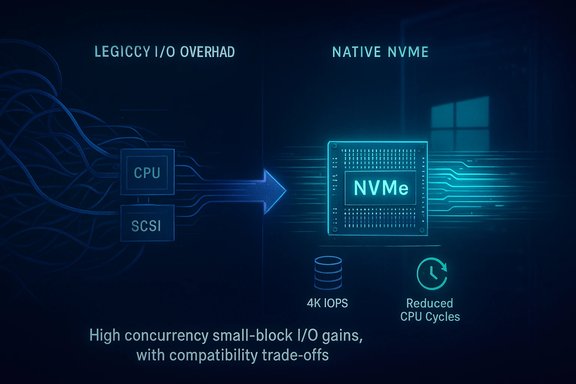
Microsoft’s storage team quietly rewired a decades‑old bottleneck: a native NVMe I/O path that bypasses Windows’ SCSI‑style translation and — when enabled — can raise small‑block random SSD performance and cut CPU cost per I/O, but the client‑side route that enthusiasts are using today is unsupported, fragile, and should be treated as an advanced experiment rather than a drop‑in speed hack.
For years Windows treated NVMe SSDs as if they were still part of the older block‑device world by funneling their commands through a SCSI‑style layer. That made driver compatibility easier across HDDs, SATA SSDs and various storage subsystems, but it created translation overhead, global locking and submission serialization that increasingly limited modern NVMe controllers’ potential. Microsoft’s Server engineering team rebuilt the I/O plumbing in Windows Server 2025 to speak NVMe natively, exposing multi‑queue semantics and per‑core submission without the translation layer. The server tests Microsoft published show very large microbenchmark uplifts under the specific, engineered workloads they used.
Because large parts of the kernel and driver packages are shared between Server and Client SKUs, the native NVMe binaries were also found inside recent Windows 11 servicing builds. Enthusiast researchers discovered a set of FeatureManagement override flags that can flip client systems to use the native NVMe path — and dozens of community and editorial tests now show measurable gains in the right scenarios. Those community methods are unofficial, vary by platform and SSD, and carry real risks.
The native NVMe path removes that translation and exposes NVMe semantics directly to the kernel through a Microsoft in‑box class driver (observed in the wild as nvmedisk.sys / StorNVMe.sys). That change reduces kernel locking, lowers per‑I/O CPU cost, and improves tail latency under concurrent small‑I/O workloads. Microsoft intentionally shipped the change as an opt‑in feature for Windows Server 2025 and published the reproduceable microbenchmark parameters used in their lab tests.
Two important clarifications:
A commonly circulated client‑side registry sequence (community‑sourced and undocumented by Microsoft) sets three DWORD entries under:
HKEY_LOCAL_MACHINE\System\CurrentControlSet\Policies\Microsoft\FeatureManagement\Overrides
Community posts list these numeric DWORD names (values set to 1 in shared examples):
Example outcomes reported by community testers:
At the same time, the client experience of Windows 11 — in particular how quality and stability are perceived by gamers, platform operators and enterprises — has been subject to sharp criticism in recent public commentary. Those criticisms often cite stability, fragmentation and the presence of experimental or preview behaviors in consumer channels; the native NVMe discovery on client builds feeds into that broader conversation by highlighting both the upside of modernized internals and the risk of exposing enterprise‑grade toggles in consumer servicing branches before ecosystem validation. Treat community‑discovered client hacks as experiments, not product features.
However, the client‑side story is messy. Community‑sourced registry flips are brittle: they rely on unpublished internal flags, they can conflict with vendor drivers and tools, and they shift assumptions that other software in the stack may rely upon. Exposing such changes to users without a supported client toggle risks breakages and user frustration. The safest path for most users is to wait for Microsoft to support the native NVMe path on client SKUs or for OEMs and vendor drivers to ship validated client updates that expose the benefits safely.
Source: Intelligent Living https://www.intelligentliving.co/wi...-how-to-get-it-today/ar-AA1RMI5A?ocid=asudhp]
 Background / Overview
For years Windows treated NVMe SSDs as if they were still part of the older block‑device world by funneling their commands through a SCSI‑style layer. That made driver compatibility easier across HDDs, SATA SSDs and various storage subsystems, but it created translation overhead, global locking and submission serialization that increasingly limited modern NVMe controllers’ potential. Microsoft’s Server engineering team rebuilt the I/O plumbing in Windows Server 2025 to speak NVMe natively, exposing multi‑queue semantics and per‑core submission without the translation layer. The server tests Microsoft published show very large microbenchmark uplifts under the specific, engineered workloads they used.Because large parts of the kernel and driver packages are shared between Server and Client SKUs, the native NVMe binaries were also found inside recent Windows 11 servicing builds. Enthusiast researchers discovered a set of FeatureManagement override flags that can flip client systems to use the native NVMe path — and dozens of community and editorial tests now show measurable gains in the right scenarios. Those community methods are unofficial, vary by platform and SSD, and carry real risks.
What Microsoft changed — the technical story
From SCSI emulation to native NVMe
NVMe was designed for PCIe‑attached flash: many submission/completion queues, low per‑command overhead, and per‑core queue affinity. Translating NVMe semantics into a SCSI‑style abstraction forces extra context switches, translation costs and lock contention — software work that can become the bottleneck when drives and platform I/O scale up.The native NVMe path removes that translation and exposes NVMe semantics directly to the kernel through a Microsoft in‑box class driver (observed in the wild as nvmedisk.sys / StorNVMe.sys). That change reduces kernel locking, lowers per‑I/O CPU cost, and improves tail latency under concurrent small‑I/O workloads. Microsoft intentionally shipped the change as an opt‑in feature for Windows Server 2025 and published the reproduceable microbenchmark parameters used in their lab tests.
Why this matters (short)
- Lower CPU overhead: The native path reduces cycles spent in the storage stack per I/O, freeing CPU for applications.
- Higher small‑block IOPS: Microbenchmarks focused on 4K random workloads showed the biggest uplift, because those tests stress per‑I/O cost and queueing.
- Improved tail latency: Reduced serialization and better queue mapping improves p99/p999 latency for high‑concurrency workloads.
- Not a universal speedup: Sequential transfers and bandwidth‑limited workloads often show little change; the win is concentrated on many small, parallel I/Os.
Microsoft’s lab numbers and how to reproduce them
Microsoft published engineered DiskSpd microbenchmarks that stress small‑block random I/O and reported headline numbers as high as roughly +80% IOPS and ~45% fewer CPU cycles per I/O on the enterprise testbeds used in their Server lab runs. Those figures come from a deliberately high‑parallelism harness and are best interpreted as an engineering upper bound rather than a consumer promise. Microsoft published the DiskSpd parameters they used so labs can reproduce the test: diskspd.exe -b4k -r -Su -t8 -L -o32 -W10 -d30.Two important clarifications:
- Those Server numbers were produced on multi‑socket enterprise hosts with enterprise NVMe media; they show potential headroom unlocked when the OS stack is the limiter.
- Independent consumer tests typically report much smaller, but still useful, improvements (single‑digit to mid‑teens percent) on many desktops and laptops. The delta depends heavily on drive controller, firmware, platform topology, and whether a vendor driver is already present.
How the capability surfaced in Windows 11 (and what people are doing)
The community discovery
Because Windows Server and Windows 11 share kernel code and driver binaries, testers discovered the native NVMe components in Windows 11 servicing packages. Community members then used FeatureManagement override entries in the registry to flip client builds to the native NVMe path. After a reboot, affected NVMe devices can be presented differently in Device Manager and the in‑box Microsoft NVMe driver (nvmedisk.sys or StorNVMe.sys) may be loaded instead of the legacy SCSI‑presented stack.A commonly circulated client‑side registry sequence (community‑sourced and undocumented by Microsoft) sets three DWORD entries under:
HKEY_LOCAL_MACHINE\System\CurrentControlSet\Policies\Microsoft\FeatureManagement\Overrides
Community posts list these numeric DWORD names (values set to 1 in shared examples):
- 735209102 = 1
- 1853569164 = 1
- 156965516 = 1
Why the client toggle is risky
- The override values circulating are undocumented internal flags; their behavior can change between builds and across hardware.
- Third‑party backup software, virtualization hosts, disk management utilities, and OEM vendor drivers may expect the legacy presentation and can break or lose visibility under the new path.
- Some systems use OEM or platform-specific NVMe stacks (VMD, vendor drivers) that bypass the in‑box stack; on those systems the registry flip may do nothing or cause conflicting driver behavior.
Benchmarks and real‑world results: what testers actually see
Independent labs and community benchmarks show a consistent pattern: large synthetic gains in high‑parallelism 4K workloads; modest to meaningful gains in consumer scenarios; and wide variability depending on SSD model and firmware.Example outcomes reported by community testers:
- An SK hynix Platinum P41 (2 TB) on Windows 11 25H2 jumped in one AS SSD run from ~10,032 to ~11,344 — roughly a 13% uplift with the largest gains in random write patterns (4K +16%, 4K‑64Thrd +22%).
- On a handheld gaming device with a Crucial T705 (4 TB), testers reported modest sequential gains but very large improvements in some random write tests — in one run random write increased by ~85%. Those outlier numbers underline how much driver path can matter for particular firmware+controller combinations.
- Small random workloads (4K) show the largest gains.
- Sequential throughput often remains similar because it’s bounded by raw PCIe bandwidth.
- CPU cycles per I/O drop, which can meaningfully improve multi‑VM hosts and metadata‑heavy services.
- Results vary — on some consumer systems the change is small or neutral; in others it’s transformative for specific workloads.
Compatibility, safety and hard lessons from early testers
Known issues documented by community testing
- Boot and disk visibility problems: Some testers reported drives disappearing from some system utilities or mis‑presented in Device Manager until the override was removed or system restored.
- Third‑party tool incompatibility: Backup, imaging and virtualization tools may rely on the legacy presentation; those tools can malfunction with the new stack.
- Vendor drivers and VMD complexity: OEM or vendor NVMe drivers, or Intel/AMD VMD stacks, may already provide optimized NVMe handling. In those cases the Microsoft native path may not be beneficial and could conflict.
- Ephemeral registry IDs: The numeric override values circulating are community‑sourced; Microsoft’s official server toggle uses different documented keys. The client workaround may stop working or behave differently across future Windows updates.
What the official guidance implies
Microsoft published the native NVMe capability as an opt‑in server feature and explicitly recommends staged validation, firmware/driver checks, monitoring and rollback planning for production environments. That counseling is important: when the storage stack stops being the limiter, you unlock headroom but you also change key system assumptions that some tools and drivers rely on.Practical, step‑by‑step safe testing checklist (for experienced users)
This is a power‑user procedure only. Do not try this on production machines without full backups and a tested recovery plan.- Create a full disk image and ensure you have bootable recovery media (Windows recovery USB + image stored externally).
- Update SSD firmware and motherboard BIOS to the latest stable versions provided by vendors.
- Record current driver presentation: take screenshots of Device Manager and record driver file names (example: is the device using a vendor driver or Microsoft in‑box StorNVMe.sys?. Use elevated Device Manager or PowerShell to list driver details.
- Export the registry branch HKEY_LOCAL_MACHINE\System\CurrentControlSet\Policies\Microsoft\FeatureManagement\Overrides as a .reg file (so you can revert).
- Apply the community registry overrides (if you choose to experiment) using an elevated prompt or .reg merge — remember these are unsupported and community‑sourced. Example sequence reported by testers (set value = 1):
- 735209102
- 1853569164
- 156965516
After applying, reboot. - Verify driver change: check Device Manager driver file and presentation (look for nvmedisk.sys / StorNVMe.sys being loaded).
- Run repeatable workloads: first run synthetic baseline (DiskSpd or CrystalDiskMark / AS SSD), then enable the override, reboot, and re‑run identical benchmarks. Microsoft’s published DiskSpd harness for Server reproduction is: diskspd.exe -b4k -r -Su -t8 -L -o32 -W10 -d30. Use identical settings and report baseline vs after numbers.
- Validate real application impact: test cold/boot responsiveness, file copy of many small files, and any backup or virtualization tools you rely on.
- If unexpected behavior appears (drives missing, backup failures, tool errors), remove the registry overrides, reboot, and restore from the exported registry or your disk image. If restoration fails, use bootable recovery media and your image.
Who benefits most — and who should wait
Good candidates for testing now
- Enthusiast desktop users who keep good backups and enjoy tinkering.
- Labs and IT teams running performance validation in isolated staging environments.
- Users whose workloads are IOPS‑bound on small random I/O: VM hosts, databases, metadata servers, and some game streaming/asset access scenarios.
Not candidates right now
- Production systems without tested rollback plans.
- Systems using vendor‑specific NVMe drivers or OEM VMD stacks where the Microsoft in‑box driver is not in use.
- Users who rely on third‑party backup/imaging tools that have not been validated with the native path.
Broader implications: Windows 11 25H2 rollout and the user experience debate
Microsoft is rolling Windows 11 feature updates and servicing changes in a phased way — the native NVMe path was introduced server‑first and is controlled by feature flags precisely because it changes foundational behaviors. That careful rollout model matters because core changes to storage presentation ripple through management, security and tooling ecosystems.At the same time, the client experience of Windows 11 — in particular how quality and stability are perceived by gamers, platform operators and enterprises — has been subject to sharp criticism in recent public commentary. Those criticisms often cite stability, fragmentation and the presence of experimental or preview behaviors in consumer channels; the native NVMe discovery on client builds feeds into that broader conversation by highlighting both the upside of modernized internals and the risk of exposing enterprise‑grade toggles in consumer servicing branches before ecosystem validation. Treat community‑discovered client hacks as experiments, not product features.
Assessment — strengths, risks, and editorial judgment
The strength of Microsoft’s native NVMe work is technical and real: aligning Windows’ software path with NVMe hardware design resolves a growing architectural mismatch and produces measurable benefits in the right workloads. The engineering rationale is sound and the server lab numbers are credible when interpreted as upper bounds. For enterprise admins and lab engineers, this represents a meaningful modernization with operational upside once vendor drivers, firmware and tooling are validated.However, the client‑side story is messy. Community‑sourced registry flips are brittle: they rely on unpublished internal flags, they can conflict with vendor drivers and tools, and they shift assumptions that other software in the stack may rely upon. Exposing such changes to users without a supported client toggle risks breakages and user frustration. The safest path for most users is to wait for Microsoft to support the native NVMe path on client SKUs or for OEMs and vendor drivers to ship validated client updates that expose the benefits safely.
Final takeaways and recommendations
- The native NVMe path in Windows is a genuine modernization that restores NVMe’s parallelism to the OS and can materially improve random I/O performance and CPU efficiency for high‑concurrency workloads.
- Microsoft’s server microbenchmarks show up to ~80% higher IOPS and ~45% lower CPU cycles per I/O under engineered conditions, but those are lab upper bounds — consumer gains are typically smaller and highly variable.
- A community‑discovered registry route can flip Windows 11 onto the native path today, but it is unsupported and risky: back up first, test in a sandbox, and expect variability across SSD models and platform stacks.
- For most users the recommended path is caution: update firmware and BIOS, keep good backups, and wait for vendor‑validated client updates or an official supported toggle from Microsoft before changing storage presentation on production machines.
Source: Intelligent Living https://www.intelligentliving.co/wi...-how-to-get-it-today/ar-AA1RMI5A?ocid=asudhp]